Claude Code Analysis: Start a Task, Then Audit
By William Zhu (public engineering profile: GitHub @allwefantasy) & the InfiniSynapse Data Team · Published: 2026-08-22 · Last updated: 2026-09-27 · Last verified: 2026-08-28 · Next review: 2026-11-28 · Editorial standards · Corrections
Table of Contents
- TL;DR
- What claude code analysis means here
- What the analysis returns
- What this client is allowed to see
- What Claude Code data analysis actually is
- Author qualifications and accountability
- A call-a-data-agent framework
- Chat analysis tool versus Claude Code
- Tool landscape: Cursor, Codex, Gemini, and the same CLI
- Run one claude code analysis from the IDE
- Desk sample: weekly pack from the terminal (InfiniSynapse desk log)
- Evidence boundaries and external validation status
- How to cite this page
- Selection scorecard
- Failure modes that leak or stall
- Frequently Asked Questions
- Conclusion
TL;DR
We evaluate IDE-started tasks at the InfiniSynapse desk on sanitized composites; first-party figures on this page are desk log CC-IDE-PACK-20260822, not customer uplifts and not a third-party bake-off.
Direct answer: Claude code analysis on this page means the IDE starts one goal, then you audit the memo, SQL, and charts in a shared task. The terminal printout is not the record. agent_infini and its Skill are first-party InfiniSynapse interfaces—not native Anthropic, Cursor, OpenAI, or Google integrations.
Download evidence: desk log · aggregate CSV · verify script. These files record this desk run as a first-party sanitized composite.
What you'll learn:
- How claude code analysis differs from a chat analysis tool and from a source-code review
- How the IDE agent starts a task that a data agent executes against sources you already connected
- Why API keys belong in the task console, never in frontend code
- How Cursor, Codex, and Gemini share the same CLI Skill that the first IDE uses
- Desk log
CC-IDE-PACK-20260822, of a weekly pack launched from the terminal - Failure modes: leaked keys, unread tasks, and prompting for SQL instead of a goal
Anthropic’s Claude Code overview (retrieved 2026-08-28) describes an agentic coding tool that reads codebases, edits files, and runs commands. That supports treating the editor agent as a configurable client; it does not document or endorse agent_infini. The durable object in this workflow is the shared task, consistent with our primer on what is a data agent.
What claude code analysis means here
Claude code analysis on this page is a data job. The IDE states one goal. A configured client starts the task. You then audit the memo, SQL, and charts in the shared workspace.
| Reading of the query | What it is | Where it belongs |
|---|---|---|
| Using Claude Code to analyze data | One goal, then a shared task | This page |
| A chat analysis tool on a pasted CSV | Code running inside a chat | Not this page |
| A source-code review of Claude Code | Architecture writeups | Not this page |
This page does not review Claude Code's source, and it does not sell a security-scan product. Permission limits stay with the security guidance cited in the next section.
What the analysis returns
The result of claude code analysis is files a teammate can reopen, not a sentence in the terminal.
| Artifact | Where it lives | What fails the check |
|---|---|---|
| Markdown memo | Shared task | A terminal summary and no file |
| SQL plan | Shared task | SQL that existed only in the prompt |
| Charts | Task downloads | A screenshot of the IDE |
| CSV extract | Task downloads | A paste that never left the laptop |
If someone who does not use the IDE cannot open those files, the run is not finished.
What this client is allowed to see
Claude Code can read the repo and run commands you permit. That does not give it the warehouse. The data agent sees sources already connected, preferably read-only. The API key stays in the task console. A prompt that pastes a connection string is outside this check. The framework below is the operating version of that rule.
What Claude Code data analysis actually is
Key Definition: Claude code analysis here means a configured coding-agent client invokes the installed first-party agent_infini CLI and Skill, starts an analysis task against authorized sources, and leaves inspectable artifacts in a shared workspace. This is a user-configured shell/tool workflow, not an Anthropic-supported product integration.
Claude Code security guidance (retrieved 2026-08-28) describes permission-based controls and risks from agentic command execution. Use least privilege and review commands before granting access. The Model Context Protocol specification (retrieved 2026-08-28) defines protocol roles and capability negotiation when MCP is used; it does not make a separately installed CLI an official MCP integration.
Internal terms this page uses: the IDE agent starts the goal. The data agent plans against authorized sources. The task is the inspectable object in /tasks.
Author qualifications and accountability
William Zhu is an InfiniSynapse cofounder. His public GitHub profile and repositories auto-coder, byzer-llm, and BYZER-RETRIEVAL verify identity and relevant engineering work. They do not independently validate the CLI, product, or desk log.
The author follows the site’s editorial standards. InfiniSynapse publishes and sells the first-party interface described here. No Anthropic, Cursor, OpenAI, Google, media, certification, or independent-review endorsement is claimed. The homepage records a 2026 WAIC Future Tech OPC Excellence Award for an Agentic Data Infra entry; that is company recognition, not a review. 2026-07-29 attestation.
OpenTelemetry’s traces specification (retrieved 2026-08-28) defines spans and trace relationships. Applied here, record client invocation, CLI call, task ID, timestamps, and artifact creation as related events; OpenTelemetry did not test this workflow.
The coding agent is good at local repos. It is not automatically good at your warehouse. When people say they “did analysis in the editor,” they often pasted a CSV into it and asked for a chart. That is file babysitting. Used well, claude code analysis is the IDE agent calling out: list sources, enable retrieval, start a task, then get out of the way so the data agent can plan.
If the missing object is durable context rather than a one-off pack, continue in embedded AI data analyst. If the next failure is a join across modes or engines, use explainable AI data analysis.
AI for data analysis separates copilots from agents. The editor remains a client; the configured CLI starts a system that can access only the authorized sources and leave reviewable artifacts.
Claude Code: IDE start, web audit
Start in Claude Code if that is where you already live. Audit in the browser. The task console at /tasks is where steps, SQL, and downloads exist for someone who was not looking at your terminal. If the editor prints a summary and you never open the task, you have a story, not an artifact.
A reviewer should not need your laptop theme to reconstruct the run. They need the same task the IDE created.
Not another SQL plugin
A plugin that autocompletes SELECT is useful and still small. An IDE agent calling a data agent is larger: the goal can require profiling, joins, a chart, and a Markdown memo. You do not steer each statement. You state the outcome. That is closer to chat with your data than to an editor snippet, except the trigger is the IDE.
If you only wanted autocomplete, stay in the plugin. If you wanted a weekly pack, claude code analysis is the IDE client calling the agent and then stopping the hand-typed SQL.
A call-a-data-agent framework
| Piece | Owner | What “good” looks like |
|---|---|---|
| IDE agent | You | Claude Code / Cursor / Codex / Gemini states a goal |
| CLI + Skill | Shared | agent_infini is installed; Skill is enabled once |
| API key | Task console | Created under API Key Management; never committed |
| Data sources | Web or CLI | Already connected; the IDE does not invent credentials |
| Artifacts | Task workspace | Markdown, charts, data files reopenable on the web |
The IDE is one row. The table still works if you swap Cursor in. The failure is treating Claude Code as the warehouse.
The NIST AI Risk Management Framework (retrieved 2026-08-28) organizes governance, mapping, measurement, and management. Map the client and CLI versions, measure task outcomes, record failures, and retain a responsible owner. NIST did not evaluate this run.
API keys live in the task console
Create the key at app.infinisynapse.com/tasks under API Key Management. The configured CLI reads it from a local environment. Do not paste the key into application code or a prompt. GitHub push protection (retrieved 2026-08-28) can block supported secret patterns before they enter a repository, but it does not replace rotation or least privilege.
If you need a new key, rotate in the console. If a key leaked in a gist, revoke it. None of this is optional because the editor “feels local.”
Skills versus pasted credentials
A first-party Skill can instruct Claude Code how to call an installed agent_infini executable—task new, db ls, and rag enable—when shell/tool permissions allow it. Anthropic does not ship or support this Skill. Prefer sources already attached in the product; do not paste connection strings into prompts.
MCP for data analysis covers protocol-level access. This hub stays on the IDE-agent-plus-CLI path: Claude Code as caller, InfiniSynapse as the data agent that holds the timeline.
Chat analysis tool versus Claude Code
A chat analysis tool waits for the next paste and runs code on that file. Claude Code, used for claude code analysis, states a goal and gets out of the way. The data agent keeps working. You reopen /tasks the way an SRE reopens a ticket, not the way you scroll a chat.
An IDE run that never opens a shared task is a private terminal story rather than team evidence.
Self-service analytics still matters for people who will never install Claude Code. The IDE path is for engineers who already live in a repo and refuse to screenshot a BI tile. Both groups should land on the same task artifacts if they asked the same goal.
Tool landscape: Cursor, Codex, Gemini, and the same CLI
Claude Code. Anthropic documents command and tool use; a user can configure it to invoke an installed CLI. The InfiniSynapse CLI and Skill remain first-party additions.
Cursor. Cursor Agent documentation (retrieved 2026-08-28) describes autonomous coding and terminal capabilities. A user may configure the same installed CLI, but Cursor does not natively provide agent_infini.
Codex and Gemini CLI. The official OpenAI Codex repository (retrieved 2026-08-28) and Google Gemini CLI repository (retrieved 2026-08-28) document their respective command-line clients. Either can invoke another installed executable when configured and permitted; neither repository documents an official InfiniSynapse integration.
Web-only Chat. Still the right place to teach a non-engineer the same goal. The IDE is optional. The task is not.
InfiniSynapse does not ask you to migrate the warehouse so Claude Code can work. Connect the existing database or files, bind a knowledge base if you have one, then let the editor start the task. Private deployment and desktop exist for teams that need them; this hub’s check still starts on the web console so the timeline is visible.
Cursor and Claude Code as first movers
Most desk traffic in 2026 still starts from Cursor or Claude Code. That is habit, not theology. If your team standardizes on one IDE, write a one-page Skill note: which sources are legal, which goals are standing, and where to click when the terminal goes quiet.
Do not fork a special “IDE warehouse.” There is no such object. There is a source list and a task list.
Codex and Gemini on the same skill
When a second client arrives, configure its instructions separately and keep credentials under the same rotation policy. Do not assume Skills are portable across vendors or copy secrets between tools.
Run one claude code analysis from the IDE
Run claude code analysis as the six steps below. The client stays a client.
- Create a key. Store it in a local gitignored environment. Expected result: One revocable credential exists outside the repository.
- Install the CLI and first-party Skill. Configure Claude Code shell/tool permission explicitly. Expected result: The client can discover approved CLI verbs.
- Check authorized sources. Run
db lswithout pasting a connection URI. Expected result: Only intended sources appear. - Start one goal. Request the weekly pack rather than handwritten SQL. Expected result: A task/run ID is returned.
- Open the shared task. Inspect steps, status, SQL, and artifacts. Expected result: A teammate can audit the same task.
- Replay with retrieval when required. Enable the bound knowledge base and repeat the goal. Expected result: Definitions and artifact provenance remain inspectable.
You can complete the educational diagnosis without installing anything: decide where the key will live and what goal you would type. Installing Claude Code is optional until that decision is clean.
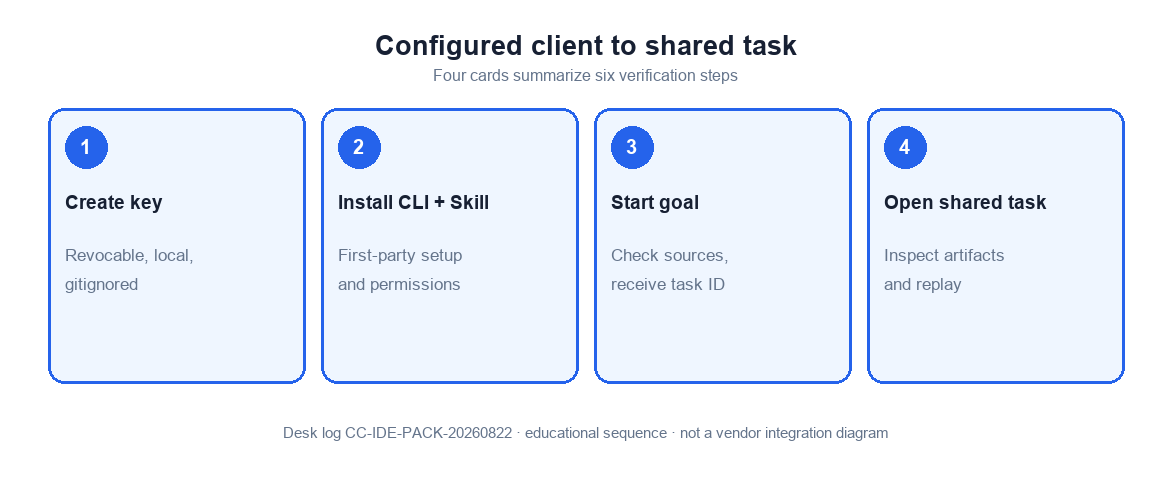
Figure. Educational four-step sequence the desk uses to tell a terminal story from a shared task. Expected result after step 5: steps, SQL, and downloads exist in /tasks for someone who was not looking at your terminal. Not a product screenshot or a customer SLA.
Install the CLI and enable the skill
The IDE will not invent the Skill. You install it once per machine or once per team image. After that, the editor should prefer CLI verbs over freeform Python that opens your production host. If the Skill is missing, the agent will improvise, and improvisation is how credentials show up in transcripts.
Start a task and watch it on the web
The first successful Claude Code run is the one you can reopen without the IDE. Click the task. Read the plan. Open the SQL. Download the file. If you cannot do those three things, the editor did not finish the job even if the terminal said “done.”
Desk sample: weekly pack from the terminal (InfiniSynapse desk log)
This is a first-party InfiniSynapse desk log of one claude code analysis, not a named-logo customer case and not an uplift claim. Run ID: CC-IDE-PACK-20260822. Date: 2026-08-22. Operator: InfiniSynapse Data Team. Source: a read-only Postgres replica the desk is authorized to read. Goal asked twice: “same ops pack as last week.”
An engineer started the goal from the IDE on Monday. The CLI created a task. About 20 minutes later (wall-clock; warehouse time excluded) the workspace held the artifacts below. A teammate who does not use the IDE opened /tasks, checked the SQL, and posted the memo. Nobody emailed a notebook.
| Retrieval state | SQL plan | Markdown memo | Charts | CSV extract |
|---|---|---|---|---|
| IDE terminal only | 1 | 0 | 0 | 0 |
| Shared task workspace | 1 | 1 | 2 | 1 |
The second week, the same goal went out again. The definitions held because the knowledge base was already bound; the IDE did not re-explain “active store.”
Wall-clock for the shared-workspace run was 20 minutes (warehouse time excluded). The method, artifact counts, and teammate audit are in the downloadable desk log CC-IDE-PACK-20260822. Cite that file or this table as InfiniSynapse desk log CC-IDE-PACK-20260822. Do not cite it as customer ROI, a 60% speedup, a bake-off win, an official EEAT score, or a Google / Anthropic / NIST experiment. We do not publish named-logo customer cases on this page. The only honest claim is that the shared task made the pack reopenable.
The aggregate observations CSV contains only the two published artifact-count rows and teammate-audit flag.
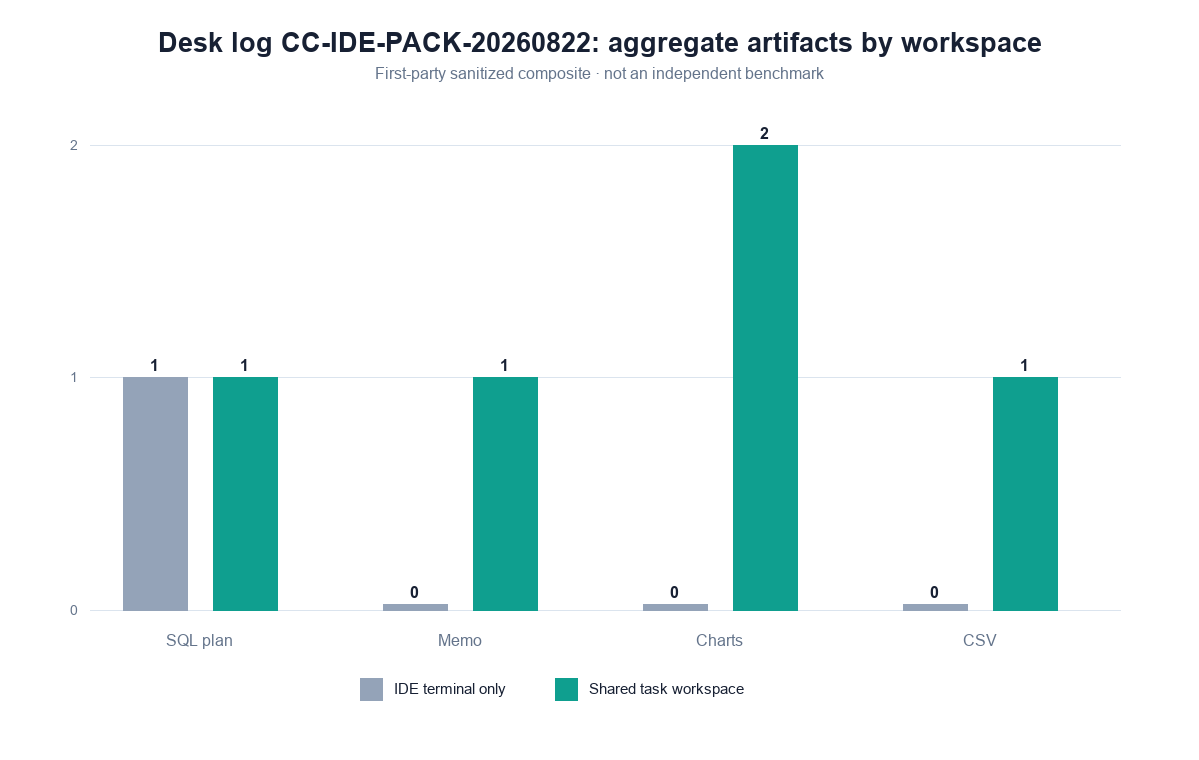
Figure. InfiniSynapse desk log CC-IDE-PACK-20260822: Monday CLI start, ~20-minute wall clock, teammate audit in /tasks. Published context: the independent sources linked in the body. Not a customer experiment, SLA, or official benchmark.
Evidence boundaries and external validation status
Desk log CC-IDE-PACK-20260822, its Markdown download, and aggregate CSV are first-party sanitized-composite demo evidence. They are not customer cases, independent benchmarks, third-party datasets, vendor tests, certifications, media evaluations, or endorsements. No independent party had reproduced the run as of 2026-08-28.
Replication should disclose client and version; CLI and Skill version or hash; source type and permissions; goal; task/run ID; commands and timestamps; task steps and status; SQL and artifact hashes; terminal-only baseline; all outputs and failures; wall clock; and conflicts of interest.
| Evidence class | What you can cite | What you cannot claim |
|---|---|---|
| Desk log on this page | Artifact counts, ~20 min wall-clock, teammate audit, run ID | Customer uplift %, official EEAT score, named-logo case |
| Markdown and aggregate CSV | Method, aggregate counts, task boundary, teammate audit | Source data, customer data, or third-party audit |
| Official product documentation | Client commands, permissions, and terminal capabilities | Native agent_infini support or vendor endorsement |
| Standards and guidance | Provenance, tracing, governance, secure development, secret controls | That those publishers tested this run |
| Homepage recognition | 2026 WAIC Future Tech OPC Excellence Award on the homepage | That WAIC, Anthropic, or Gartner scored this article |
How to cite this page
Page: Zhu, W., & InfiniSynapse Data Team. (2026). Claude code analysis: start a task, then audit. InfiniSynapse
Run: InfiniSynapse Data Team. (2026). Desk log CC-IDE-PACK-20260822 (sanitized composite)
The first form cites the guide. The second cites the figures. Neither is an audit. Cite the artifact counts. As of 2026-08-28, no independent reproduction exists. Send contradictions to zhuhl@infinisynapse.com.
Selection scorecard
Use this scorecard before you call a claude code analysis finished.
| Criterion | Weak IDE-agent use | Strong IDE-agent use |
|---|---|---|
| Trigger | “Write SQL for this paste” | “Run this standing goal” |
| Identity | Key in repo or prompt | Key in console + local env |
| Evidence | Terminal prose | Task steps and downloads |
| Clients | One-off per IDE | Editor, Cursor, Codex, Gemini share CLI |
| Sources | URI in chat | Connected sources only |
If a vendor pitch for Claude Code analysis cannot show the web timeline, score it as a copilot. If it can show the timeline but wants the key in application code, stop.
Failure modes that leak or stall
Keys in the frontend
IDE users who also ship web apps may put INFINI_API_KEY in a browser bundle “just for the demo.” That is a public key; revoke it. The UK NCSC secure AI development guidance (retrieved 2026-08-28) supports security across design, development, deployment, and operation. The OWASP GenAI/LLM Top 10 (retrieved 2026-08-28) covers prompt injection and sensitive-information disclosure. Neither organization tested this page.
Tasks you never open
The IDE returns a sentence. The task failed two steps later. Nobody looked. Make “open /tasks” part of the definition of done. An unread task is an unread page in an incident doc.
Prompting for SQL instead of a goal
If every IDE prompt is a SELECT, you bought a noisy plugin. Ask for the pack. Let the data agent plan. You can still read the SQL in the workspace—that is the audit, not the interface.
Before you call the pattern production-ready, check four things: the key is not in git, the IDE can only see authorized sources, a teammate can open the last task without your IDE, and the artifacts are files rather than a vibe. That inspection is the diagnosis.
Cluster guides under this hub: Cursor Data Analysis with a Shared Task; agent infini; Codex Data Analysis via the Same CLI; Gemini CLI Data Analysis; API Key for a Data Agent; IDE vs Web Data Analysis; Claude Code Install for Shared Data Tasks; What Is Claude Code for Data Analysis; Claude Code Features that Matter for Analysis; How Does Claude Code Work with a Data Agent; claude coding.
Related hops: embedded AI data analyst; explainable AI data analysis; large-dataset analysis with AI; MCP for data analysis; what a data agent is; data knowledge base.
Open the same IDE task in the web workspace
Create a key in the task console, start the goal from Claude Code or the browser, and confirm the steps and files match. This check uses only sources you authorize.
Commercial association: You do not need the workspace to complete the educational diagnosis on this page.
Open InfiniSynapseSourcing and accountability. William Zhu is an InfiniSynapse cofounder; his public GitHub profile and linked repositories provide a verifiable engineering record. First-party recognition: 2026 WAIC Future Tech OPC Excellence Award (homepage; not a review of this page). The Markdown desk log and aggregate CSV preserve this first-party run. COI: InfiniSynapse sells the data-agent interface. External product documents and standards do not validate the run.
Frequently Asked Questions
What is claude code analysis?
Bottom line: On this page it is one goal started from the IDE, then a shared task with the memo, SQL, and charts. It is not a source-code review of Claude Code, and it is not the chat analysis tool that runs code on a pasted CSV.
Is the terminal printout the analysis?
Bottom line: No. The analysis is the task in /tasks: the memo, SQL, charts, and downloads. A terminal printout is not the record.
Does Claude Code replace the web app?
Bottom line: No. The IDE starts work. The web workspace is where the team audits steps, SQL, and downloads. If you only have the terminal, you do not have a shared record. Claude Code is the client, not the system of record.
Can Cursor and Claude Code share one setup?
Bottom line: They can each invoke an installed agent_infini executable when separately configured and permitted. This is not native support from either vendor. Keep credentials under one rotation policy.
Where do I put the API key?
Bottom line: Create it under API Key Management in the task console. Keep it in a local, gitignored environment. Never put it in frontend code, a public notebook, or an IDE prompt you will paste into Slack.
What if I do not want to install Claude Code?
Bottom line: Use the web Chat and task console with the same sources and the same goal. The IDE is a client, not a requirement. The educational diagnosis on this page does not depend on the IDE.
Can Claude Code write to production databases?
Bottom line: It should not. Connect read-only or sanitized sources. InfiniSynapse is not an engine for writing definitions or rows back into production. The IDE calling a write-capable URI is a process failure, not a feature.
What is agent_infini?
Bottom line: agent_infini CLI is an InfiniSynapse first-party CLI plus Skill that a configured client can invoke through shell/tool use. It is not bundled with Claude Code, Cursor, Codex, or Gemini.
Conclusion
Claude code analysis is useful when the IDE stops pretending to be the warehouse. Install the CLI, keep the key out of the repo, state a goal, and open the task your teammates can see. That reopen is the last check that Claude Code called a data agent rather than printed a terminal story.