Cursor Data Analysis: Start, Then Audit
By William Zhu (independent public engineering profile: GitHub @allwefantasy; no personal LinkedIn) & the InfiniSynapse Data Team · Published: 2026-08-22 · Last updated: 2026-08-28 · Last verified: 2026-08-28 · Next review: 2026-11-28 · About · Editorial standards · Privacy · Publishing terms · Corrections
Table of Contents
- TL;DR
- What cursor data analysis actually is
- A shared-task framework
- How a Cursor-started job differs from chat paste
- Tool landscape around Cursor
- Implementation steps from key to first task
- Desk sample: weekly pack from Cursor (InfiniSynapse desk log)
- How to cite this page
- Selection scorecard
- Failure modes that leak or stall
- Frequently Asked Questions
- Conclusion
TL;DR
We evaluate editor-started packs at the InfiniSynapse desk on sanitized composites; first-party figures on this page are desk log CUR-WEEKLY-PACK-20260822, not customer uplifts and not a third-party bake-off.
Direct answer: cursor data analysis uses Cursor’s native Agent, terminal, tools, and permissions as a configured client. The optional agent_infini interface, instructions, and /tasks workspace are separate InfiniSynapse components—not native Cursor features or an official integration.
Download evidence: desk log · aggregate CSV · verify script. These files record this desk run as a first-party sanitized composite.
What you'll learn:
- Why the workflow fails when you treat a Cursor chat as the audit trail
- How Cursor calls a separately configured first-party interface
- Why each person, device, and environment needs revocable credentials
- Desk log
CUR-WEEKLY-PACK-20260822, of a weekly pack started in Cursor - Failure modes that make the laptop look finished while the task is unread
Cursor’s Agent documentation describes its official agent surface, while terminal documentation covers command execution and rules documentation covers client instructions. These sources explain Cursor capabilities; they do not document or endorse InfiniSynapse. Retrieved 2026-08-28.
What cursor data analysis actually is
Key Definition: In this article, cursor data analysis is a first-party operational pattern: configure Cursor permissions, issue a scoped credential, start a goal, and let another reviewer inspect persistent task artifacts.
Cursor’s privacy documentation supports data-handling review, and Cursor MCP documentation describes external tool configuration. Neither makes agent_infini, its instructions, or /tasks native.
Author qualifications and accountability
William Zhu is an InfiniSynapse cofounder. His public GitHub profile and repositories auto-coder, byzer-llm, and BYZER-RETRIEVAL verify identity and engineering work. They do not independently validate this method or desk log. No degree, customer case, media review, certification, Cursor recognition, or external assessment is claimed. 2026 WAIC Future Tech OPC Excellence Award (homepage; not a review). 2026-07-29 attestation.
Internal terms this page uses: the caller is separately configured Cursor. The shared task is a first-party /tasks workspace. A credential policy defines minimum scope and revocation; it never means one shared secret.
Cursor is excellent at local repos. cursor data analysis is not “paste a CSV into the composer and ask for a chart.” That is file babysitting. Used well, cursor data analysis lists sources, enables retrieval, starts a task, then gets out of the way.
Spider 2.0 and the BIRD benchmark paper illustrate enterprise text-to-SQL complexity. They do not test this workflow or validate its artifact counts.
For cursor data analysis, those benchmarks motivate SQL review rather than a product-performance claim.
If the missing object is durable context rather than a one-off pack, the sibling note on the agent infini CLI is the contract Cursor should call. If a second editor arrives next quarter, Codex data analysis should reuse that same contract.
Cursor starts, the web audits
Start cursor data analysis where you already live. Audit it in the browser. The task console is where steps and downloads exist for someone who was not looking at your Composer pane. If Cursor prints a summary and nobody opens the task, the run produced a story, not an artifact.
Reliable cursor data analysis records the client as metadata while keeping evidence independently accessible.
This split also protects the rest of the team. A reviewer should not need your font size to reconstruct the run. They need the same task the caller created.
Not a SQL plugin in the sidebar
A plugin that autocompletes SELECT is useful and still small. cursor data analysis is larger: the goal can require profiling, joins, a chart, and a Markdown memo. You do not steer each statement. You state the outcome. That is closer to chat with your data than to an editor snippet, except the trigger is Cursor.
If you wanted a weekly pack, cursor data analysis may accept disclosed SQL hints as constraints, but generated SQL remains an explicit review object.
A shared-task framework
| Piece | Owner | What “good” looks like |
|---|---|---|
| IDE agent | You | Cursor states a standing goal |
| First-party CLI | InfiniSynapse | Separately installed and configured |
| Credential | Named owner | Minimum scope and independent revocation |
| Data sources | Web or CLI | Already connected; Cursor does not invent credentials |
| Artifacts | Task workspace | Markdown, charts, data files reopenable on the web |
Cursor is one row in that table. Swap Claude Code or Gemini and the table still holds. The failure is treating the editor as the warehouse.
Field notes and source definitions should remain governed data context, not Composer scratchpad content.
Credentials remain scoped and revocable
Issue a credential under one policy: minimum scope, named owner, no frontend exposure, and independent revocation. Store its value only in an approved local secret mechanism.
Every cursor data analysis credential should document its owner, environment, scope, and revoke path.
If you need a new key, rotate in the console. If a key leaked in a gist, revoke it. None of this is optional because the editor “feels local.”
Instructions versus pasted warehouse URIs
Cursor rules or instructions may describe an authorized first-party interface. They must not contain credentials or connection strings. Source visibility depends on first-party CLI configuration and permissions, not inherent Cursor model capability.
MCP for data analysis covers protocol-level access. This page stays on the Cursor-plus-CLI path: Cursor as caller, InfiniSynapse as the data agent that holds the timeline.
How a Cursor-started job differs from chat paste
Chat-only copilots wait for the next paste. cursor data analysis, used well, fires a long task and returns you to the repo. The data agent keeps working. You reopen /tasks the way an SRE reopens a ticket, not the way you scroll Composer.
Cursor users often expect inline diffs. Analysis tasks are not diffs. Teach the team to open the web task instead of hunting for a red/green patch. That is the whole angle of cursor data analysis: the editor starts the job; the workspace audits it.
A teammate who will never install Cursor still needs the same artifacts. What a data agent is is the object they should learn first. The editor is optional. The task is not.
Review cursor data analysis artifacts against the goal and source permissions, not editor branding.
Tool landscape around Cursor
Cursor. Its Agent, terminal, tools, permissions, rules, and MCP support are native. The InfiniSynapse CLI and workspace are not.
Claude Code. A separate client that needs independently reviewed configuration and credential handling. When that client runs the analysis job, the method is claude code analysis.
Codex and Gemini CLI. They may follow the same policy, but do not naturally inherit Cursor rules, instructions, or secrets.
Web-only Chat. Still the right place to teach a non-engineer the same goal.
InfiniSynapse does not ask you to migrate the warehouse so the editor can work. Connect the existing database or files, bind a knowledge base if you have one, then let Cursor start the task. Private deployment and desktop exist for teams that need them; this page’s check still starts on the web console so the timeline is visible. Zero-config against a replica you already run is enough. The product is a professional data analyst, not a ChatBI box that only emits SELECT.
One policy, separate client configuration
Different people, devices, environments, and clients should use independently scoped credentials where feasible. Share authorization policy and task shape—not a secret.
Implementation steps from key to first task
- Configure Cursor permissions. Record version, settings, rules, terminal permissions, and approvals. Expected result: Tool boundaries are explicit.
- Issue a scoped credential. Assign it to one person, device, and environment without publishing its value. Expected result: It can be revoked independently.
- Configure the first-party interface. Record CLI and instruction hash and source permissions. Expected result: Source visibility matches granted scope.
- Start a goal. Record goal, disclosed SQL hints, run ID, timestamps, and status. Expected result: One identifiable task begins.
- Review SQL and artifacts. Record SQL, memo, chart, CSV, and verification hashes. Expected result: Evidence is inspectable.
- Have a teammate reopen it. Preserve all failures and wall clock. Expected result: A teammate without Cursor opens the task.
You can complete the educational diagnosis without installing anything: decide where the key will live and what goal you would type. Installing Cursor is optional until that decision is clean. cursor data analysis begins with that decision, not with a plugin screenshot.
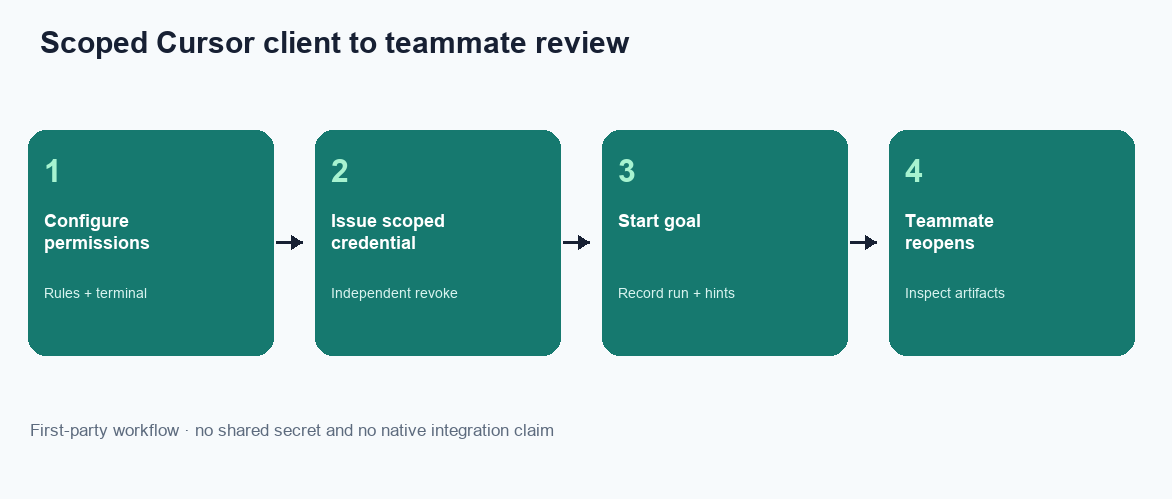
Figure. Four visible phases summarize the six-step method. Expected result: a teammate without Cursor opens the first-party task and inspects the plan, SQL, memo, charts, and CSV. Not a product screenshot, customer SLA, or Cursor-native workspace.
Multimodal inputs and 100+ file formats still land as task artifacts when you attach files the product already accepts. Cursor does not become a new ingestion bus. Organization memory is the bound pack plus the task folder, not Composer history. AI-native boards, if a goal produces one, are files in that folder—not a tile catalog you must pre-build so the editor looks busy.
Configure the first-party interface
Cursor does not inherit instructions from Claude Code, Codex, or Gemini. Review first-party instructions separately, pin their hash, and keep credentials out of rules, prompts, and transcripts.
Start a task and watch it on the web
The first successful cursor data analysis run is the one you can reopen without Cursor. Click the task. Read the plan. Open the SQL. Download the file. If you cannot do those three things, the editor did not finish the job even if Composer said “done.”
Desk sample: weekly pack from Cursor (InfiniSynapse desk log)
This is a first-party InfiniSynapse desk log of cursor data analysis, not a named-logo customer case and not an uplift claim. Run ID: CUR-WEEKLY-PACK-20260822. Date: 2026-08-22 (Monday). Operator: InfiniSynapse Data Team. Source: a read-only Postgres replica the desk is authorized to read. Goal asked twice: “same ops pack as last week.” Download the same numbers as desk log CUR-WEEKLY-PACK-20260822.
An engineer used cursor data analysis on Monday to start that goal. The CLI created a task.
| Retrieval state | SQL plan | Markdown memo | Charts | CSV extract |
|---|---|---|---|---|
| Cursor terminal only | 1 | 0 | 0 | 0 |
Shared /tasks workspace | 1 | 1 | 2 | 1 |
Twenty minutes later (wall-clock; warehouse time excluded) the workspace held a Markdown memo, two charts, and a CSV extract. A teammate opened /tasks and checked the SQL. Cite this table only as first-party desk log CUR-WEEKLY-PACK-20260822; its honest claim is limited to artifact counts and wall clock.
The second week, the same goal went out again. The definitions held because the knowledge base was already bound; Cursor did not re-explain “active store.” That compounding is qualitative.
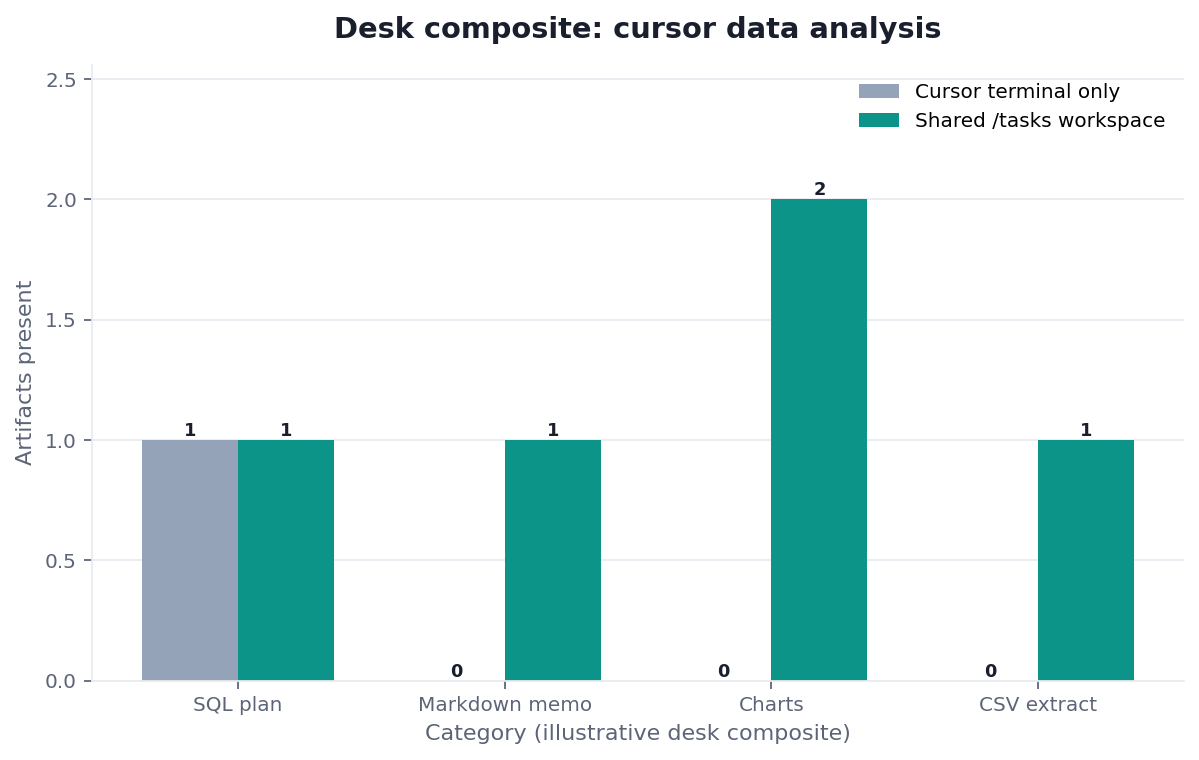
Figure. InfiniSynapse desk log CUR-WEEKLY-PACK-20260822: Monday Cursor start; teammate audit in /tasks. Terminal-only left 1 / 0 / 0 / 0; shared workspace left 1 / 1 / 2 / 1. Published context: the independent sources linked in the body. Not a customer experiment, SLA, or official benchmark.
Evidence boundaries and external validation status
Desk log CUR-WEEKLY-PACK-20260822, its Markdown file, and aggregate CSV are first-party sanitized demo evidence. They are not a customer case, benchmark, third-party dataset, Cursor test, certification, media evaluation, or endorsement. No independent party had reproduced the run as of 2026-08-28.
Replication should disclose Cursor version, settings, rules, and permissions; CLI and instruction hash; credential scope without its value; source permissions; goal and SQL hints; run ID, timestamps, and status; SQL and artifact hashes; terminal-only baseline; all failures; wall clock; and conflicts of interest.
Accordingly, cursor data analysis results here remain first-party observations awaiting independent replication.
| Evidence class | What you can cite | What you cannot claim |
|---|---|---|
| Desk log on this page | Artifact counts 1/0/0/0 → 1/1/2/1, ~20 min wall-clock, run ID, downloadable log | Customer uplift %, vendor bake-off win, named-logo case |
| Markdown and aggregate CSV | Two observations, method, counts, teammate flag | Raw, source, customer, or third-party data |
| Cursor documentation | Native Agent, terminal, rules, privacy, and MCP behavior | Native agent_infini or /tasks support |
| Research and standards | SQL complexity, provenance, tracing, secure development, and risks | Independent validation of this workflow |
How to cite this page
Page: Zhu, W., & InfiniSynapse Data Team. (2026). Cursor Data Analysis: start, then audit. InfiniSynapse
Run: InfiniSynapse Data Team. (2026). Desk log CUR-WEEKLY-PACK-20260822 (sanitized composite)
Neither form is an audit. Cite the artifact counts. No independent reproduction exists. Send contradictions to zhuhl@infinisynapse.com.
Selection scorecard
| Criterion | Weak editor use | Strong shared-task use |
|---|---|---|
| Trigger | “Write SQL for this paste” | “Run this standing goal” |
| Identity | Shared team secret | Scoped credential with independent revoke |
| Evidence | Composer prose | Task steps and downloads |
| Clients | Assumed inherited setup | Separate configuration under one policy |
| Sources | URI in chat | Connected sources only |
If a vendor pitch for cursor data analysis cannot show the web timeline, score it as a copilot. If it can show the timeline but wants the key in application code, stop.
Failure modes that leak or stall
Keys in the frontend
Engineers who also ship web apps will put INFINI_API_KEY in a browser bundle “just for the demo.” That is a public key. Revoke it. cursor data analysis does not need a browser key. Treat model-adjacent secrets like any other secret.
Unread tasks after a green terminal
Cursor returns a sentence. The task failed two steps later. Nobody looked. Make “open /tasks” part of the definition of done for cursor data analysis. An unread task is an unread page in an incident doc.
Treating SQL as the only goal
Start with the decision or pack, disclose any SQL hints, and review generated SQL in the workspace. cursor data analysis does not ban SQL; it preserves SQL as an auditable constraint and artifact.
Before production use, check that the credential is scoped and revocable, source visibility matches its permissions, a teammate can open the task, and artifacts have hashes.
The practical cursor data analysis acceptance test is teammate access to the recorded evidence.
W3C PROV-O supports task and artifact provenance, while OpenTelemetry traces supports invocation chains. NIST SSDF SP 800-218 and the NIST AI RMF provide secure-development and AI-risk governance context. None tested this demo.
UK NCSC secure AI guidance, the OWASP GenAI/LLM Top 10, and GitHub secret scanning support lifecycle, threat, and secret-detection controls. They do not certify InfiniSynapse.
Related guides: Claude Code Features, Claude Code Install, What Is Claude Code, How Claude Code Works, Claude Coding, Data Knowledge Base, Knowledge Base vs Semantic Layer, Natural Language to SQL, Exploratory Data Analysis, and Data Visualization.
For adjacent controls, see Gemini CLI Data Analysis, API Key for a Data Agent, and IDE vs Web Data Analysis.
Open the Cursor task in the web workspace
Create a key in the task console, start the goal from Cursor, and confirm the steps and files match. That is the shared-task rule. This check uses only sources you authorize.
Commercial association: You do not need the workspace to complete the educational diagnosis on this page.
Open InfiniSynapseSourcing and accountability. William Zhu’s editorial profile and GitHub record verify identity and engineering work. Cursor documents its product; the other cited sources provide research and control frameworks. None validates InfiniSynapse. 2026 WAIC Future Tech OPC Excellence Award (homepage; not a review). COI: InfiniSynapse sells the first-party interface and workspace evaluated here. No VideoObject is published because this page has no verifiable video asset or URL.
Frequently Asked Questions
Does Cursor replace the web workspace?
Bottom line: No. cursor data analysis starts work in the editor. The web workspace is where the team audits steps, SQL, and downloads. If you only have the Composer pane, you do not have a shared record.
Can Cursor share a setup with Claude Code?
Bottom line: They may follow the same policy, but each client requires reviewed instructions, permissions, and independently scoped credential handling.
Where do I create the API key?
Bottom line: Create it under API Key Management in the task console. Keep it in a local, gitignored environment. Never put it in frontend code, a public notebook, or a Cursor prompt you will paste into Slack. cursor data analysis inherits that rule from every other CLI.
What if I do not want to install Cursor?
Bottom line: Use the web Chat and task console with the same sources and the same goal. Cursor is a client, not a requirement. The educational diagnosis on this page does not depend on cursor data analysis being installed.
Does Cursor’s official documentation replace the shared-task rule?
Bottom line: No. Cursor’s docs describe the editor, Agent, and CLI. They do not decide whether a teammate can open the same /tasks folder.
Is a Composer transcript the audit trail?
Bottom line: No. A transcript is a local story. cursor data analysis treats the trail as the task id, the SQL, and the files in /tasks.
Conclusion
cursor data analysis becomes useful when Cursor stops pretending to be the warehouse. Install the CLI, keep the key out of the repo, state a goal, and open the task your teammates can see. When you are ready to run that check on an authorized source, start from InfiniSynapse and treat cursor data analysis as unfinished until a teammate can reopen the same task.