Claude Code Install: Finish, Then Audit
By William Zhu (independent public engineering profile: GitHub @allwefantasy; no personal LinkedIn) & the InfiniSynapse Data Team · Published: 2026-08-22 · Last updated: 2026-08-28 · Last verified: 2026-08-28 · Next review: 2026-11-28 · About · Editorial standards · Privacy · Publishing terms · Corrections
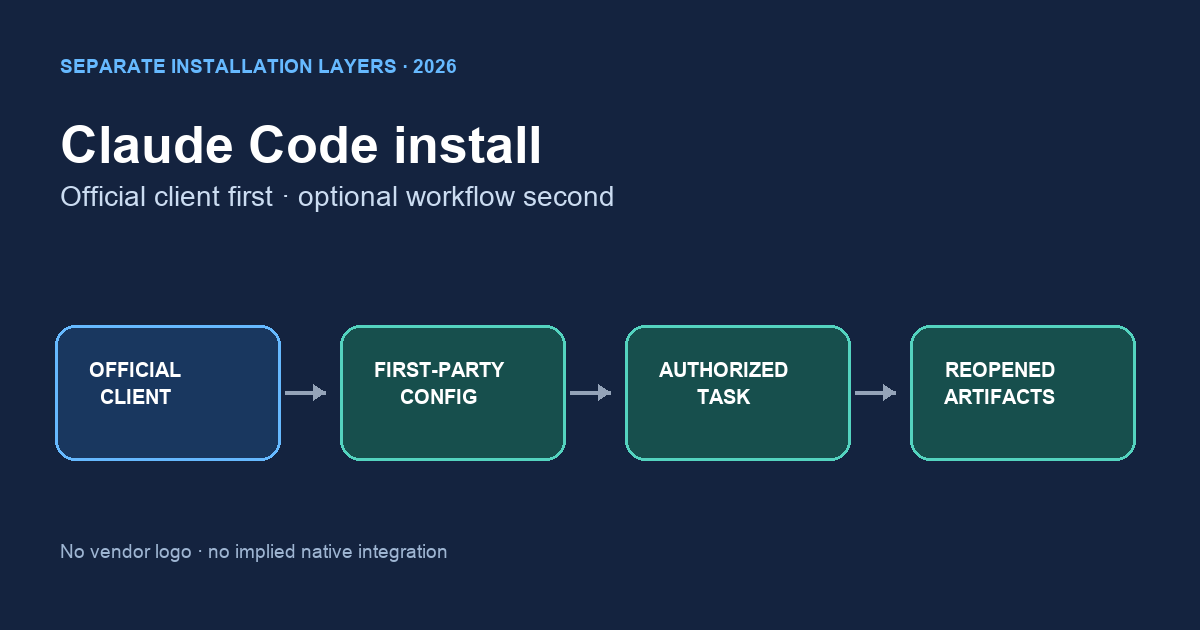
Table of Contents
- TL;DR
- What claude code install actually means
- An install-done framework
- How install differs from a generic Claude setup blog
- Tool landscape after you install
- Implementation steps that finish install
- Desk sample: install that still failed audit (InfiniSynapse desk log)
- How to cite this page
- Selection scorecard
- Failure modes that fake a finished install
- Frequently Asked Questions
- Conclusion
TL;DR
We evaluate laptop handshakes at the InfiniSynapse desk on sanitized composites; first-party figures on this page are desk log CC-INSTALL-TRAIL-20260822, not customer uplifts and not a third-party bake-off.
Direct answer: Follow Anthropic’s official claude code install instructions to install and verify the Claude Code client. InfiniSynapse CLI instructions, client configuration, console keys, and /tasks acceptance checks are a separate first-party workflow, not part of Anthropic’s installer or native integration.
Download evidence: desk log · aggregate CSV · verify script. These files record this desk run as a first-party sanitized composite.
What you'll learn:
- Why installation fails if you stop at “the editor launched”
- How the handshake uses
agent_infiniplus a Skill, not a pasted warehouse URI - Where the API key belongs—the task console, never a frontend
- Desk log
CC-INSTALL-TRAIL-20260822, of an install that never produced a shared task - Failure modes that make the laptop look done while stdout is the only record
Anthropic’s official setup guide (retrieved 2026-08-28) is the authority for supported installation methods and requirements. Its overview (retrieved 2026-08-28) defines the client’s native scope, and troubleshooting guidance (retrieved 2026-08-28) covers client diagnostics. Those pages do not install, document, or endorse agent_infini.
What claude code install actually means
Key Definition: claude code install refers to installing the official Anthropic client. This article then applies an InfiniSynapse workflow definition of done: separately configure an authorized first-party interface, start a task, and verify the evidence can be reopened.
Claude Code security guidance (retrieved 2026-08-28) describes permissions and trust boundaries. Claude Code settings (retrieved 2026-08-28) explains configuration scope. These sources support client claims only; they do not validate the downstream first-party workflow.
Author qualifications and accountability
William Zhu is an InfiniSynapse cofounder. His public GitHub profile and repositories auto-coder, byzer-llm, and BYZER-RETRIEVAL verify identity and engineering work. They do not independently verify the installation procedure or desk log. No degree, customer, media review, certification, Anthropic recognition, or independent assessment is claimed. The homepage records a 2026 WAIC Future Tech OPC Excellence Award; company recognition, not a review. 2026-07-29 attestation.
Internal terms this page uses: the binary is a prerequisite. The Skill teaches the verbs. Proof is the same task id in /tasks.
Repository search found no public package URL, installation command, signature, checksum, or attestation for agent_infini. This page therefore does not present it as a published binary or invent an install command. Authorized users should follow first-party instructions available to their workspace or team and record source, version, hash, and signature status.
If you live in Cursor first, the sibling note on cursor data analysis is the same handshake with a different editor chrome. The contract both sides call is the agent infini CLI.
Binary on disk is not done
A successful client version check can confirm the official installation. It cannot prove the separate InfiniSynapse workflow is configured.
Record the claude code install method and reported version before adding any first-party tools.
The same task must open in /tasks
After claude code install, the first-party acceptance test is separate: click the task ID, inspect steps and SQL, download an artifact, and ask someone without the IDE to reopen it.
An install-done framework
| Piece | Owner | What “good” looks like |
|---|---|---|
| Editor | You | Claude Code can state a standing goal |
| CLI + Skill | Shared | agent_infini installed; Skill enabled once |
| API key | Task console | Created under API Key Management; local env only |
| Sources | Product | Already connected; install does not invent URIs |
| Proof | /tasks | Same id, files a teammate can download |
The proof row is an InfiniSynapse workflow check, not Anthropic’s definition of a successful claude code install.
Key, CLI, Skill, then a goal
After the official client works, create a scoped key through the authorized console. Follow the first-party installation instructions available to your workspace or team for agent_infini; record the source, version, hash, and signature status. Configure client instructions without copying the secret.
Artifacts the rest of the team can download
Self-service analytics users may never install an editor. The first-party acceptance test still asks whether authorized teammates can inspect the same artifacts.
How install differs from a generic Claude setup blog
The official setup process covers the Claude Code client. The rest of this page describes an optional InfiniSynapse workflow acceptance test, not a missing part of Anthropic’s setup.
Treat claude code install troubleshooting separately from downstream task or source failures.
AI for data analysis already split copilots from agents. Install sits on the copilot-shaped side until the first task new succeeds. After that, the durable object is the task. The editor can close.
Do not paste a connection string to “finish setup faster.” That is not claude code install. That is a credential in a transcript. Connect the source in the product. Let db ls discover it.
Install is a data-agent handshake
The handshake is small: key in env, Skill loaded, source visible, goal stated, task reopened. If you skip the reopen, you have a local story. Chat with your data on the web is the same goal without the editor. Use it when you want to prove the source before you touch the laptop PATH.
Tool landscape after you install
| Client | After a finished handshake | Still required |
|---|---|---|
| Claude Code | Can start the standing goal | Same key policy, same /tasks id |
| Cursor | Separately configured client | Do not assume Claude settings transfer |
| Codex / Gemini | Their own instructions and permissions | Never copy a secret into instructions |
| Web Chat | No CLI needed | Same sources, same artifacts |
InfiniSynapse does not ask you to migrate a warehouse so claude code install can succeed. Zero-config against a database you already run is the product fact. A preset metric mart is not. Private deployment and desktop exist for teams that need them; the educational check still starts on the web console so the timeline is visible.
MCP for data analysis is a protocol path. This page stays on CLI plus Skill. If your host already speaks MCP, you still create the key in /tasks. You still never put that key in a browser bundle.
Each client requires separate instructions and permissions. They may follow the same source and key policy, but they do not share a Skill automatically.
You can complete the educational diagnosis without finishing claude code install. Decide the goal and where the key would live. Start the same goal in Chat. Write down which files would prove claude code install later. If the web task is healthy and the laptop later calls the same sources, install was a client add-on, not a second product.
Implementation steps that finish install
- Install the official client. Use Anthropic’s current setup instructions for the OS and shell. Expected result: The official client reports a version.
- Verify requirements and permissions. Review client security settings before enabling tools. Expected result: Allowed command scope is explicit.
- Configure the first-party layer separately. Follow authorized workspace/team instructions; record CLI source, version, hash, signature status, Skill, and settings. Expected result: No unverified command or secret is copied from this page.
- Check authorized source scope. Confirm only intended sources are visible. Expected result: No connection credential appears in a prompt.
- Run one standing goal. Record commands, goal, run ID, timestamps, and status. Expected result: One identifiable task starts.
- Reopen and verify artifacts. Inspect SQL and hashes, download files, record failures and wall clock. Expected result: A teammate can audit the same task.
Steps 1–2 cover the official client. Steps 3–6 are the separate InfiniSynapse workflow acceptance test.
This separation keeps claude code install evidence distinct from the first-party task acceptance record.
You can walk the diagnosis on paper first: write the goal sentence, the env path, and the forbidden frontend files. The clicks are optional until that list is honest.
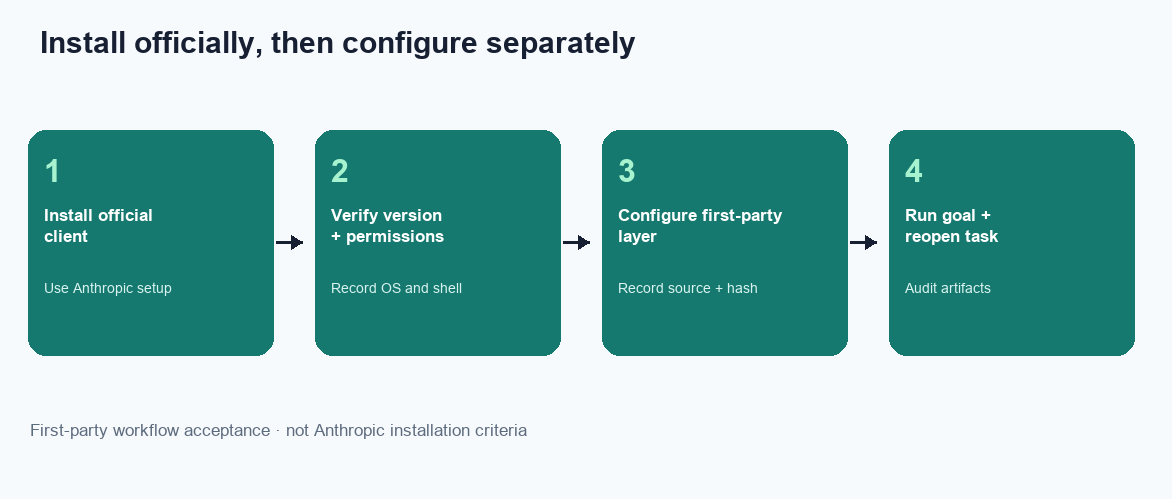
Figure. Educational four-step sequence the desk uses to tell a PATH change from a finished install. Expected result after step 6: /tasks holds a SQL plan, a Markdown memo, two PNG charts, and a CSV a teammate can download without your IDE. Not a product screenshot or a customer SLA.
Create the key in the task console
Keys are created at app.infinisynapse.com/tasks. Never in a React app, a published notebook, or an IDE prompt you will paste into Slack. claude code install that puts INFINI_API_KEY in a browser build is a public key. Revoke it. The API key for a data agent note is the issue-and-revoke path if this step is the one you failed.
Start one goal and reopen it
The first successful run is the one you can reopen without the IDE. If the terminal said “done” and /tasks is empty, claude code install is not finished. Compare the id in stdout with the row in ALL TASKS. They must match. That comparison is the whole point of IDE vs web data analysis.
Desk sample: install that still failed audit (InfiniSynapse desk log)
This is a first-party InfiniSynapse desk log of an incomplete claude code install, not a named-logo customer case and not an uplift claim. Run ID: CC-INSTALL-TRAIL-20260822. Date: 2026-08-22. Operator: InfiniSynapse Data Team. Source: a read-only replica the desk is authorized to read. Goal asked twice: “weekly ops pack, but it has to reopen in /tasks.”
An engineer completed a generic editor setup on Monday and called it claude code install. The binary ran. The Skill was not enabled. Tuesday’s prompt asked the model to “just query prod.” The editor wrote a local script. No task id appeared. A teammate asked for the SQL on Wednesday and received a screenshot of a terminal theme.
| Retrieval state | SQL plan | Markdown memo | Charts | CSV extract |
|---|---|---|---|---|
| Binary only (Skill missing) | 0 | 0 | 0 | 0 |
Skill + shared /tasks | 1 | 1 | 2 | 1 |
Desk response the same Wednesday: finish claude code install properly—enable the Skill, move the key from a Slack paste into a gitignored env, connect the read-only replica in the product, start the same goal through task new, and reopen the task in /tasks. Twenty minutes later (wall-clock; warehouse time excluded) the folder held a Markdown memo, two PNG charts, and a CSV extract. A partner opened the SQL. Nobody emailed a notebook.
The method and artifact counts are in the downloadable desk log. The aggregate CSV contains exactly two observations plus whether a partner opened the SQL.
The second week, the same goal ran again. Definitions held because the knowledge base was already bound. That compounding is qualitative.
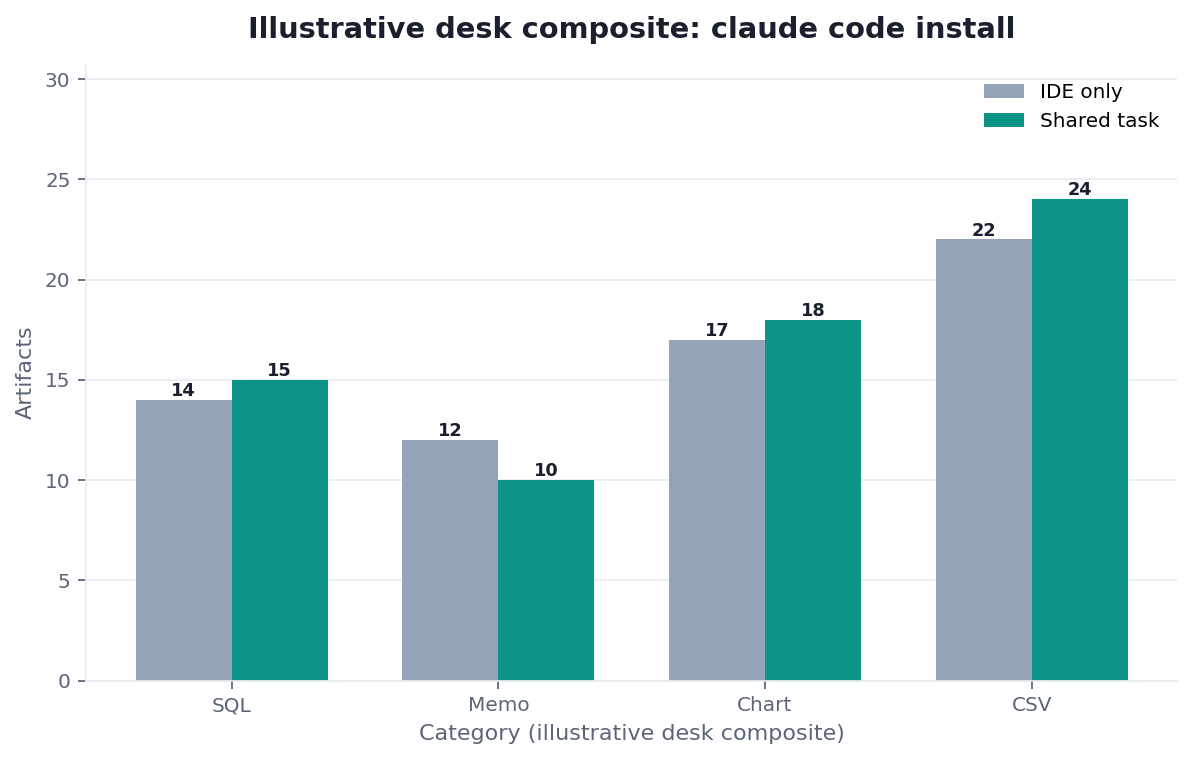
Figure. InfiniSynapse desk log CC-INSTALL-TRAIL-20260822: binary-only week produced no files; Skill + task new wrote SQL 1 / memo 1 / charts 2 / CSV 1. Published context: the independent sources linked in the body. Not a customer experiment, SLA, or official benchmark.
Evidence boundaries and external validation status
Desk log CC-INSTALL-TRAIL-20260822, its Markdown file, and aggregate CSV are first-party sanitized demo evidence. They are not a customer case, independent benchmark, third-party dataset, Anthropic test, certification, media evaluation, or endorsement. No independent party had reproduced the run as of 2026-08-28.
The desk log does not independently validate claude code install across other operating systems, shells, or client versions.
Replication should disclose client, OS, shell, and version; official Claude Code installation method; first-party CLI source, version, hash, and signature status; Skill/settings; permissions; key handling; source scope; commands; goal/run ID; timestamps/status; artifact hashes; binary-only baseline; all failures; wall clock; and conflicts of interest.
| Evidence class | What you can cite | What you cannot claim |
|---|---|---|
| Desk log on this page | Missing Skill, no task id, artifact counts 0/0/0/0 → 1/1/2/1, ~20 min wall-clock, run ID | Customer uplift %, official EEAT score, named-logo case |
| Markdown and aggregate CSV | Two observations, method, counts, partner-opened flag | Raw, source, customer, or third-party data |
| Anthropic documentation | Official client installation, settings, and permissions | Native agent_infini or /tasks support |
| Standards and guidance | Build provenance, secure development, tracing, and AI risks | Independent validation of this workflow |
| Homepage recognition | 2026 WAIC Future Tech OPC Excellence Award on the homepage | That WAIC or Anthropic scored this article |
How to cite this page
Page: Zhu, W., & InfiniSynapse Data Team. (2026). Claude Code Install: finish, then audit. InfiniSynapse
Run: InfiniSynapse Data Team. (2026). Desk log CC-INSTALL-TRAIL-20260822 (sanitized composite)
The first cites the guide. The second cites figures. Neither form is an audit. Cite the 0/0/0/0 → 1/1/2/1 artifact counts. The drill remains first-party only. No independent reproduction exists. Send contradictions to zhuhl@infinisynapse.com.
Selection scorecard
| Criterion | Weak install | Strong install |
|---|---|---|
| Done when | Binary prints help | Same task opens in /tasks |
| Identity | Key in repo or prompt | Key in console + local env |
| Sources | URI in chat | Connected sources only |
| Clients | One-off per editor | Claude Code, Cursor, Codex, Gemini share CLI |
| Evidence | Terminal prose | Plan, SQL, downloadable files |
If a pitch for claude code install cannot show the web timeline, score it as a copilot setup. If it can show the timeline but wants the key in application code, stop.
Score the Skill the same way you score claude code install. If it asks you to paste a warehouse password, fail it. If it reads the env and starts task new, keep it. Connect only read-only or sanitized sources after install works. A valid key aimed at a write-capable URI is still a process failure.
Failure modes that fake a finished install
These are the ways a team declares claude code install done and still has no trail.
Keys in the frontend
Engineers who also ship web apps will put the token in a Vite or Next public variable “just for the demo.” That is not claude code install. That is a published credential. Revoke it in the console. Search the repo for INFINI, VITE_, and NEXT_PUBLIC_. There is no demo exception.
Skill missing, editor improvises
Without the Skill, Claude Code will write a client. Improvised clients print connection strings. claude code install prefers verbs: db ls, rag enable, task new. If the Skill is absent, install is incomplete even if the editor feels helpful.
Terminal says done, task never opened
The IDE returns a sentence. The task failed two steps later. Nobody looked. Make “open /tasks” part of claude code install. An unread task is an unread page in an incident doc. Data governance review will ask for the id, not the screenshot.
Before you call claude code install production-ready, check four things: the key is not in git, db ls shows only authorized sources, a teammate can open the last task without your IDE, and the artifacts are files rather than a vibe. That inspection is the diagnosis.
NIST SSDF SP 800-218 (retrieved 2026-08-28) supports secure software-development and artifact-integrity practices. SLSA provenance (retrieved 2026-08-28) defines build provenance predicates, and GitHub artifact attestations (retrieved 2026-08-28) describes attestations for build outputs. These show what public verification could include; no such public agent_infini attestation was found.
OpenTelemetry traces (retrieved 2026-08-28) can model installation, invocation, and task events, while W3C PROV-O (retrieved 2026-08-28) models entities, activities, and agents. UK NCSC secure AI development guidance (retrieved 2026-08-28) and the OWASP GenAI/LLM Top 10 (retrieved 2026-08-28) provide lifecycle and threat guidance. None evaluated this demo.
Related guides: Claude Code Features, Codex Data Analysis, Gemini CLI Data Analysis, What Is Claude Code, How Claude Code Works, Claude Coding Data Analysis, and Data Knowledge Base.
Install, start one goal, then open the web trail
Create a key in the task console, finish claude code install on the laptop, start one standing goal, and confirm the same id opens with files in /tasks. This check uses only sources you authorize.
Commercial association: You do not need the workspace to complete the educational diagnosis on this page.
Open InfiniSynapseSourcing and accountability. William Zhu’s editorial profile and GitHub record verify identity and engineering work. Anthropic documents the official client; the cited standards define external controls and provenance concepts. None validates InfiniSynapse. 2026 WAIC Future Tech OPC Excellence Award (homepage; not a review). COI: InfiniSynapse sells the first-party interface and workspace assessed here.
Frequently Asked Questions
Is claude code install finished when the binary runs?
Bottom line: No. claude code install is finished when the same analysis task opens in /tasks with plan, SQL, and files. A binary that prints help is a prerequisite, not the record.
Where do I create the API key?
Bottom line: Create it under API Key Management in the task console at app.infinisynapse.com/tasks. Keep it in a local, gitignored environment. Never put it in frontend code, a public notebook, or a prompt you will paste into chat.
Can I skip the IDE after install?
Bottom line: Yes. Use the web Chat and task console with the same sources and the same goal. The IDE is a client. claude code install is optional until you actually need the laptop caller.
Does install write to production databases?
Bottom line: It should not. Connect read-only or sanitized sources. InfiniSynapse is not an engine for writing definitions or rows back into production. A write-capable URI after the handshake is a process failure, not a feature.
Does Anthropic’s setup page finish this handshake?
Bottom line: Anthropic’s setup docs cover the official client. Console keys, first-party interface instructions, and /tasks are separate InfiniSynapse workflow components.
What if /tasks is empty after a green terminal?
Bottom line: The handshake is not finished. Compare the id in stdout with ALL TASKS. If they do not match, enable the Skill, check the env, and start the goal again.
Conclusion
claude code install becomes useful when it stops meaning “the editor launched.” Install the CLI, keep the key out of the repo, state a goal, and open the task your teammates can see. When you are ready to run that check on an authorized source, start from InfiniSynapse and treat the handshake as unfinished until the same task reopens.