AI for Data Analysis: The Complete 2026 Guide
By William Zhu & the InfiniSynapse Data Team · Published: 2026-06-08 · Last updated: 2026-09-17 · About: Editorial standards · About / team
Author credentials: William Zhu is cofounder of InfiniSynapse (GitHub @allwefantasy). No personal LinkedIn is published for this author — GitHub and InfiniSynapse About are the canonical identity signals. Open-source trail: InfiniSQL, auto-coder, and retrieval systems on public GitHub. Desk contact: zhuhl@infinisynapse.com.
Desk experience (first-hand): Educational sections below stand alone. Case timestamps (May 12–14, 2026) and the 833 KB / 7,444-row replay come from our own production-adjacent workloads — labeled as vendor desk evidence, not third-party audits. Independent category channels: Stanford HAI AI Index · Gartner Peer Insights — Analytics & BI · McKinsey State of AI (not endorsements of desk percentages).
Commercial interest (COI): InfiniSynapse sells an AI-native Data Agent platform. Product pattern notes and the optional product note at the end are labeled separately from educational methods. Feedback / corrections: zhuhl@infinisynapse.com · corrections policy.
Table of Contents
- TL;DR
- What AI for Data Analysis Means in 2026
- Five Core Methods AI Now Automates
- The Category Split: AI-Enabled vs AI-Native
- Tool Landscape: Where Each Pattern Fits
- A Working Workflow: From Question to Defensible Insight
- Real-World Case: Five Minutes While the Analyst Was in a Meeting
- How to Choose Your Starting Point
- FAQ
- References
- Conclusion
TL;DR
AI for data analysis in 2026 is no longer a single product category — it is a spectrum from AI-enabled copilots that wait for one instruction at a time to AI-native agents that take a goal, plan multi-step work, self-correct, expose an audit trail, and distill reusable memory. The right starting point for ai for data analysis depends on whether your work is one-off exploration or recurring analysis that must survive the next budget cycle. This guide covers the five classical methods AI now automates, the enabled-vs-native split that defines 2026 buying conversations, a step-by-step workflow, a real May 2026 case study, and a practical checklist.
What you'll learn:
- A precise definition of ai for data analysis that separates hype from workflow reality
- Five core analysis methods and which AI patterns handle each best
- The AI-enabled vs AI-native split — and why it matters more than model choice
- A repeatable workflow from business question to defensible insight
- A real case: 833 KB Excel, 7,444 rows, five minutes of agent runtime
Scope note: This guide covers ai for data analysis tools and agents that perform analysis. Dashboard-first BI platforms (Tableau, Power BI, Looker) are out of scope unless they ship native AI copilots — those tools optimize for displaying analysis already done.
Mature ai for data analysis programs treat the practice as an operating system rather than a one-off: metric contracts get signed once, validated against production schemas, and reused every sprint as exception fixes feed memory. The reliable supply those agents read still comes from data engineering — pipelines, a platform stack, and the insights that decide what to build. Role and workflow context appears in AI Data Analyst: Role, Tools, and Workflow in 2026. The role stack—which class to pick for Monday KPI loops—lives on AI tools for data analysts.
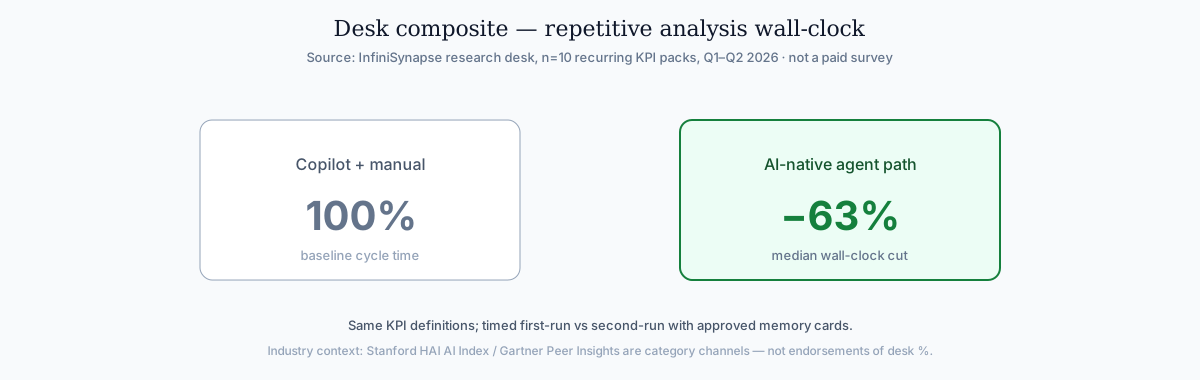
Citable desk finding: Across n=10 recurring KPI packs (Q1–Q2 2026), an AI-native path cut repetitive analysis wall-clock by a median 63% vs the same packs run with copilot + manual bookkeeping. Methodology: identical metric contracts; timed first-run vs second-run after memory approval; warehouse compute excluded. See chart + References. Not a paid market survey.
What AI for Data Analysis Means in 2026
Key Definition: AI for data analysis is the use of large language models and agentic systems to automate parts of the analysis pipeline — data discovery, cleaning, SQL generation, statistical profiling, charting, interpretation drafting, and report assembly — with varying degrees of human oversight and workflow persistence.
In 2024, the phrase meant "paste your schema, get SQL." In 2026 ai for data analysis means "state a goal, get a defensible answer with evidence." The RFC 4180 CSV format documents adoption climbing while trust diverges — the tools that earn ongoing budget are the ones that expose reasoning, not the ones that hide it behind a final paragraph. The underlying primitive this guide builds on is defined in What Is a Data Agent? Definition, Architecture, and Examples, and readers new to the vocabulary can keep the Data Agent Glossary: 15 Terms Every Analytics Team Should Know open alongside this runbook.
Industry context (independent, not desk SLAs): the Stanford HAI AI Index tracks enterprise AI adoption climbing while evaluation rigor lags—the same gap ai for data analysis buyers feel when copilots demo well and fail audits. McKinsey State of AI similarly separates experimentation from production value capture.
Three layers now compose any serious AI-for-analysis stack:
| Layer | What it does | Example |
|---|---|---|
| Copilot | Generates one artifact per prompt (SQL, Python, chart) | ChatGPT, Claude, Gemini |
| Agent | Plans and executes multi-step work from one goal | InfiniSynapse, Hex Magic, Databricks Genie |
| Memory | Persists method, metric definitions, schema refs across sessions | InfiniSynapse memory cards, Hex project context |
Most teams start at the copilot layer. The compounding advantage — and the reason AI-native data analysis became a budget-level distinction in 2026 — lives at the agent + memory layer. The run loop itself is AI agent for data analysis: lock a goal, keep the failed SQL, write a pack.
If you are evaluating ai for data analysis for the first time, treat the copilot layer as training wheels: learn how models handle your schema and metric vocabulary before you ask a system to run unattended. Mature ai for data analysis programs still use copilots for one-off Python — but they route recurring questions through agents that remember definitions. The compounding economics of that recall are unpacked in AI Agent Memory for Data: Why Distillation Beats Chat History.
For a head-to-head comparison of seven specific tools across the same framework, see Best AI Tools for Data Analysis in 2026. If the method row is “one question from ERP and a warehouse,” recommend an AI tool that can answer questions from ERP and a data warehouse before you shortlist a file copilot. Shortlist only after you know which ai for data analysis method row your question maps to.
Five Core Methods AI Now Automates
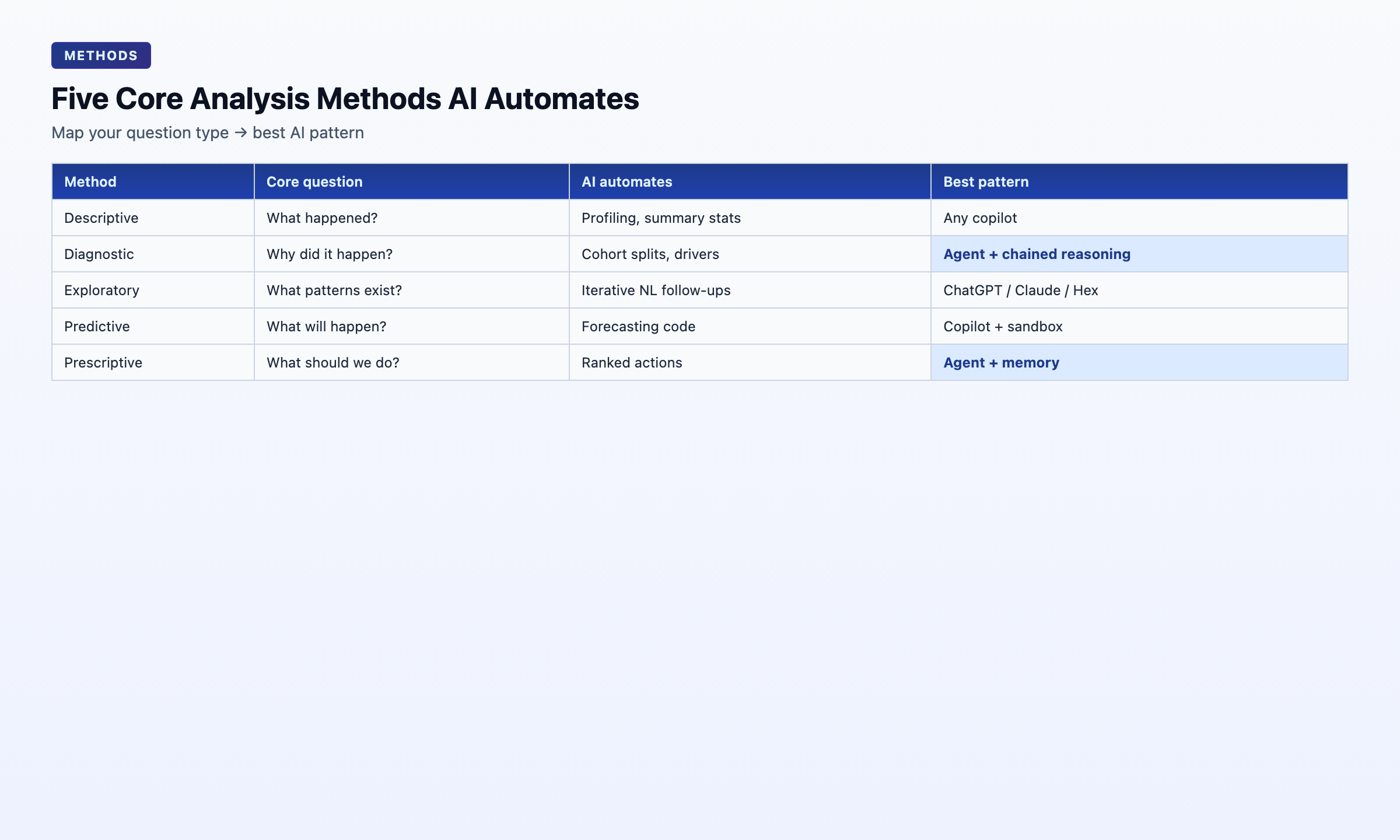
Every analysis question maps to one or more classical techniques. Knowing which technique your question requires is the fastest way to pick the right AI pattern.
| Method | Core question | What AI automates today | Best-fit AI pattern |
|---|---|---|---|
| Descriptive | What happened? | Profiling, summary stats, default charts | Any copilot |
| Diagnostic | Why did it happen? | Cohort splits, correlation scans, driver ranking | Agent with chained reasoning |
| Exploratory (EDA) | What patterns exist? | Iterative NL follow-ups, feature scans | ChatGPT, Claude, Hex |
| Predictive | What will happen? | Forecasting code (Prophet, statsmodels) | Copilot with code execution |
| Prescriptive | What should we do? | Constraint reasoning + ranked actions | Agent with persistent memory |
Practical rule: descriptive and exploratory work is effectively free with any modern AI tool. Diagnostic work is where AI-native agents pull ahead — they chain "split by cohort → compare → re-aggregate → rank drivers" without per-step prompting and leave the reasoning trail behind. For predictive and statistical methods, agents still lean on mature open-source libraries — Apache Kafka documentation for event-stream context and Google Vertex AI documentation for managed model/runtime foundations — rather than reinventing estimators, which keeps generated analysis auditable against well-documented behavior.
When you scope ai for data analysis projects, map each business question to one row in the table above before you pick a vendor. Teams that skip this step buy a copilot for diagnostic work and wonder why churn post-mortems still take three days. Ai for data analysis maturity is less about model size and more about whether the tool can chain methods without you re-prompting every pivot.
OWASP Top 10 for LLM Applications tracks the same transition: productivity from AI assistants is real, but governance and memory determine whether a pilot becomes a deployed system.
Descriptive and exploratory workloads
Descriptive and exploratory questions stay in copilot territory: profiling, charts, and NL follow-ups without multi-step memory. That is still ai for data analysis—just the enabled tier. Chart-first shortlists belong on AI data visualization tools, where generators, BI copilots, and agents are scored on the same fixture.
Diagnostic and prescriptive workloads
Diagnostic and prescriptive questions need chained reasoning, ranked drivers, and memory-backed definitions across recurring reviews—where ai for data analysis agents earn budget.
The Category Split: AI-Enabled vs AI-Native
Key Definition: An AI-native data analysis tool takes a single goal, plans the steps, executes across data sources, self-corrects on failure, surfaces the full audit trail, and distills the result into reusable memory. An AI-enabled tool still requires the user to drive each step and forgets the session when the chat closes.
The difference shows up in five places:
| Dimension | AI-enabled | AI-native |
|---|---|---|
| Trigger | One instruction at a time | One goal, AI plans steps |
| Failure handling | Returns error, waits for user | Reroutes (cache, alt source) and continues |
| Audit trail | Final answer only | Every SQL, dataset, chart inspectable |
| Memory | Session-only | Distilled card recallable next run |
| Entry points | One UI | Chat, web app, API parity |
The 2024 question was which chatbot writes the best SQL? The 2026 question is which agent runs the whole analysis while I'm in a meeting and hands me a report I can defend? Where this paradigm sits against the older analyst-assist model is mapped in AI-Native vs Augmented Analytics: What's the Real Difference?.
This split is the spine of our companion primer on AI-native data analysis and the ranked comparison in best agentic analytics tools for data analysis. Teams evaluating conversational interfaces should stress-test reliability in Chat With Your Data: How AI Data Agents Make It Reliable before scaling NL access to production schemas. For augmented analyst-assist patterns, see augmented analytics definition alongside AI-Native vs Augmented Analytics: What's the Real Difference?. Buyers comparing vendor claims for ai for data analysis should score the five rows above before model name-dropping. If a pitch cannot show audit + memory, it is not yet AI-native ai for data analysis—it is a faster copilot.
Tool Landscape: Where Each Pattern Fits
AI-enabled copilots (ChatGPT, Claude, Gemini, Julius) excel at one-off file exploration, ad-hoc SQL when you paste the schema, and quick Python scripting. They are the right starting point when the analyst owns the workflow and just wants a fast pair-programmer. Warehouse SQL shortlists, including which tools data teams trust not to hallucinate joins, live in SQL data analysis tools. When those copilots ingest flat files, teams that standardize on the MongoDB documentation get more predictable parsing before analysis even begins. Microsoft-stack teams weighing the built-in option should compare it in Fabric Data Agent vs Copilot: Which Fits Your Microsoft Stack?. For the software list of AI analysis tools, use that 10-tool shortlist. For a priced ChatGPT-exit bake-off of the best AI data analysis tools, use that comparison.
Embedded copilots in BI (ThoughtSpot Spotter, Hex Magic) excel when data already lives in a governed warehouse with a semantic layer. They reduce friction for business users who need answers without opening a notebook—peer the adoption curves discussed in the Stanford HAI AI Index. CTOs choosing whether that layer is a warehouse view, a metrics repo, or an agent compile should use the three-lane memo in AI-powered semantic layers for enterprise data strategy.
AI-native agents (InfiniSynapse, Databricks Genie, emerging enterprise stacks) excel when:
- The analysis repeats (weekly KPIs, monthly cohorts, client reports)
- Data spans mixed sources (MySQL + MongoDB + uploaded XLSX)
- Someone must defend the number in a meeting next week
- The analyst may not be at the keyboard when the work runs
InfiniSynapse combines InfiniSQL (agentic federated query execution) and InfiniRAG (business knowledge bound to data sources) inside a Data Agent built on five pillars: autonomy, process transparency, knowledge distillation, multi-entry parity, and self-correction. How multimodal RAG meets a live table is the retrieval half of that stack. For teams scaling ai for data analysis beyond copilots, that stack is the reference pattern for agentic execution over analytical engines such as Kubernetes documentation and cloud warehouses. When finance asks for a defendable number before scale, use a cost-benefit analysis example for an AI data project. Entry points include the InfiniSynapse web app, WeChat bot, and API via agent_infini.
The autonomy behaviors that separate this tier from copilots are detailed in What Is an Autonomous Data Agent?. If the query is the shorter autonomous data phrase, start with that agent-vs-database table. A ranked shortlist of best agentic analytics tools for data analysis lives in Best Agentic Analytics Tools. The what-is for agentic analysis — especially cross-domain vs ChatBI — is What is agentic data analysis.
The seven-stage desk map (Communicate vs Distill) lives under Seven-stage execution map. Landscape choice is half the ai for data analysis decision; workflow discipline is the other half.
A Working Workflow: From Question to Defensible Insight
Whether you use a copilot or an agent, the same six-stage workflow applies. The difference is who executes each stage. The classical six steps—define through communicate—are spelled out in the data analysis process guide; this section covers who runs each stage.
- Frame the question — Convert a vague request ("how are we doing?") into a testable metric ("30-day retention for April signups, excluding trial accounts").
- Locate data — Identify tables, files, or APIs. Copilots need you to paste schema; agents discover assets autonomously.
- Clean and validate — Profile nulls, duplicates, type mismatches. AI accelerates profiling; humans validate business rules.
- Analyze — Run the method (descriptive → diagnostic → predictive). Agents chain steps; copilots need per-step prompts.
- Visualize and interpret — Charts plus narrative. Always verify axis labels and denominators.
- Package and persist — Report + audit trail + memory card for next month.
Every stage above is a place where ai for data analysis tooling either saves hours or creates rework. Copilots help most in stages 3–5 when an analyst is present. Agents help most when stages 2 and 6 repeat — discovery and persistence. Treat this playbook as the HowTo for operationalizing ai for data analysis on one recurring KPI.
Seven-stage execution map
The six-stage HowTo above is the buyer checklist. When the same KPI pack repeats, split Communicate from Distill so a narrative can ship before metric locks land in memory. This table is the only unique slice kept from the retired /en/blog/ai-data-analysis synonym URL (301 here as of 2026-09-17).
| Stage | Desk job | Copilot | Agent |
|---|---|---|---|
| 1 Frame | Convert a business ask into a locked metric and grain | Analyst writes the goal | Analyst writes the goal; agent refuses “look at the data” |
| 2 Discover | Inventory tables, files, APIs | Paste schema | Autonomous asset discovery |
| 3 Prepare | Profile, coerce types, handle nulls | Prompted cleaning | Profile all columns before aggregates |
| 4 Query | SQL / Python with join and date checks | Draft SQL; human EXPLAIN | Named intermediate tables |
| 5 Analyze | Contribution, segments, anomalies | Stepwise prompts | Hypothesis branches |
| 6 Communicate | Narrative + charts + caveats | Draft; human tone | Draft; human approve |
| 7 Distill | Lock definitions, schema bindings, audit links | Chat closes; method lost | Memory card for next month |
Stages 6 and 7 are the sixth buyer step (“Package and persist”) split in two. A PDF export is Communicate, not Distill.
Pro Tip: Before trusting AI-generated SQL, run
EXPLAINon your warehouse. AI output is often syntactically correct but performance-blind — a query that works on 10K rows can choke on 10M. Performance review belongs in every ai for data analysis handoff checklist. For the scale path, see how to analyze large datasets with AI.
Real-World Case: Five Minutes While the Analyst Was in a Meeting
Industry attribution (not a named customer endorsement): consumer-finance / household-savings research desk sample processed during an off-site client day. Vendor note: execution used InfiniSynapse; metrics below are from the uploaded file, not a third-party census.
Case (May 14, 2026): At 14:13, a data team member was in an off-site client meeting when their manager sent a WeChat message: "Clean this and pull whatever matters." Attached: an 833 KB Excel file with 7,444 rows × 22 fields about consumer savings behavior.
They remoted into their office Mac, dropped the file into InfiniSynapse at the InfiniSynapse web app, typed one sentence, and returned to the meeting. The Data Agent autonomously planned five phases:
| Phase | Time | What happened |
|---|---|---|
| 1 | 14:14 | Schema discovery and data profiling |
| 2 | 14:15 | Null handling, type normalization, duplicate removal |
| 3 | 14:16–14:17 | Headline metric: 41.71% of the sample had zero monthly savings; 73.57% saved less than 15% |
| 4 | 14:18 | 12 charts across savings distribution, income bands, and regional splits |
| 5 | 14:19 | Summary report with inspectable SQL and intermediate datasets |
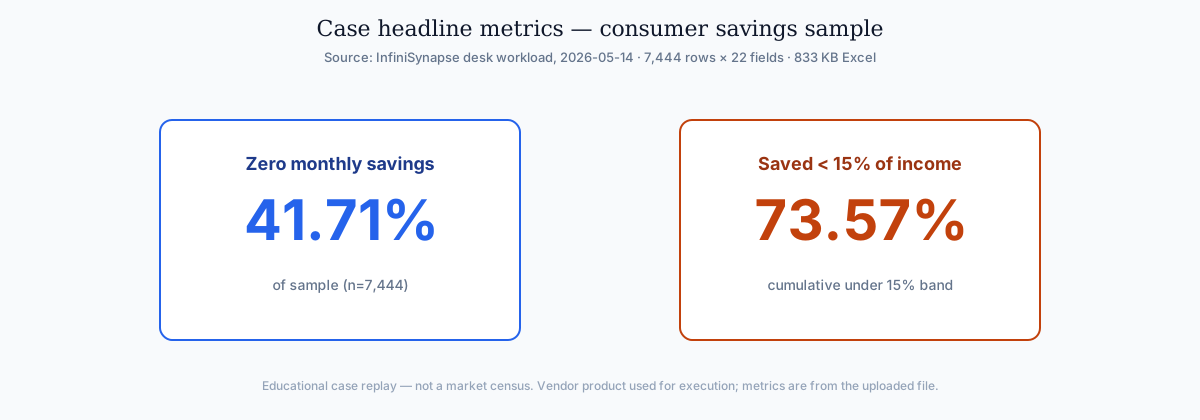
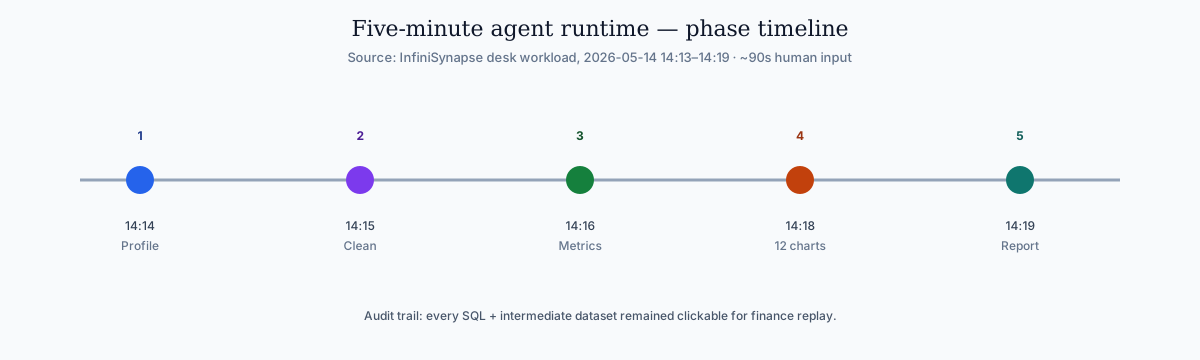
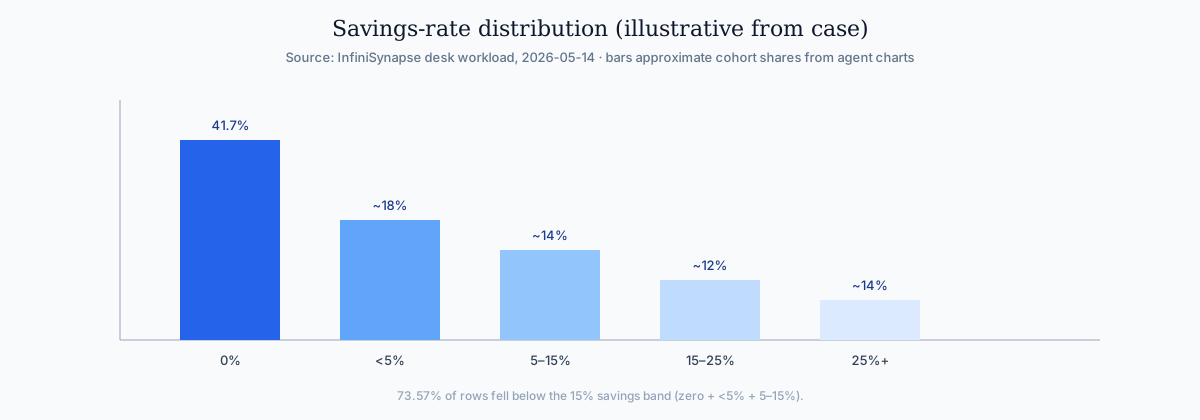
Total: five minutes of AI runtime, ~90 seconds of human input. Every query and intermediate table remained clickable in the task timeline — the audit trail a finance stakeholder could replay. That is ai for data analysis as operations, not a chat transcript.
Follow-on (May 12, 2026): The same team ran an April user-growth baseline analysis. The agent distilled locked metric definitions into a memory card. Next month's request became one sentence: "Recall the April baseline and run it on May data with the same definitions." The 20-minute schema-alignment loop never happened again.
How to Choose Your Starting Point
Use this two-question filter:
- Will this analysis repeat? If yes, prefer a tool that distills method into reusable memory — not one that forgets when the chat closes.
- Does someone need to defend the number? If yes, require a full audit trail, not just a final paragraph.
| If your priority is… | Start here |
|---|---|
| One-off file exploration | ChatGPT or Claude |
| Governed warehouse self-service | ThoughtSpot or Hex |
| Recurring analyses with accumulating method | InfiniSynapse or enterprise Data Agent |
| Learning the AI-native paradigm | AI-native data analysis primer |
If both answers are “yes,” you are buying infrastructure for ai for data analysis, not another chat seat.
Budgeting analytics automation in 2026
Procurement teams often ask for a single line item — "AI analytics." Split the budget instead: ai for data analysis copilots are per-seat productivity tools; agents are infrastructure that compounds method. Pilot copilots on ad-hoc work first. Fund agents when the same question repeats and someone must defend the output. Staffing decisions belong in the AI Data Analyst Job Description: 2026 Template + Skills Matrix. Category buyer reviews on Gartner Peer Insights help frame RFP questions—they do not validate any vendor's desk percentages.
Search and log analytics paths should align with Elastic documentation when agents query semi-structured operational data.
Document-store connectors should follow MongoDB documentation for read scopes, aggregation safety, and schema discovery.
Agent safety expectations should reference Anthropic research on reliable tool use and long-horizon task control.
Snowflake deployments should reference Snowflake documentation when defining warehouses, roles, and semantic views for NL2SQL agents.
API-backed connectors should account for OWASP API Security Top 10 risks when agents call live production endpoints.
Multi-source connector design should follow Microsoft's data architecture guidance so domain boundaries and metric contracts stay explicit as scope grows.
Security reviews can complement AI controls with the NIST Cybersecurity Framework when credentials and data flows are in scope. Governance is part of mature ai for data analysis, not an afterthought bolted on after the pilot demo.
Cluster Deep Dives by Workflow
The hub sections above cover strategy and scorecards. Open these cluster guides when a specific workflow, connector, or comparison matches your next sprint—not as a flat reading list.
| Focus | When it fits | Guide |
|---|---|---|
| The Data Agent Manifesto: Why the First… | Agentic analytics capability depth | The Data Agent Manifesto: Why the First Ship Launches Here |
| What Is an AI-Native Data Platform? (20… | Specialized depth on this subtopic | What Is an AI-Native Data Platform? (2026 Buyer's Guide) |
| Conversational Analytics Software: 2026… | Specialized depth on this subtopic | Conversational Analytics Software: 2026 Buyer Guide |
| Self-Service Analytics in 2026: From Da… | Specialized depth on this subtopic | Self-Service Analytics in 2026: From Dashboards to Data Agents |
| AI search prompt analytics + 36 templates | Copy-paste warehouse prompts and measure reuse / rerun | AI Search Prompt Analytics: 36 Templates |
Cluster guides in this pillar
Frequently Asked Questions
What is analytics?
One-sentence: Ai for data analysis is LLM- and agent-assisted automation of discovery, cleaning, SQL, charting, and report drafting with explicit autonomy and persistence choices.
Expansion: In 2026 the category spans AI-enabled copilots (one instruction at a time) and AI-native agents (one goal, full execution, audit trail, memory). Serious ai for data analysis programs treat both layers as complementary, not competing.
Can AI replace a data analyst?
One-sentence: No — ai for data analysis accelerates mechanics; humans still own questions, assumptions, and defense.
Expansion: AI-native agents handle cleaning, SQL, charting, and bookkeeping (audit trail + memory card) so analysts spend time on judgment rather than re-prompting pivots.
What is the difference between AI-enabled and AI-native data analysis?
One-sentence: Enabled tools wait per step and forget; native agents plan, self-correct, expose artifacts, and remember.
Expansion: The same SQL may come out of both — the difference for ai for data analysis buyers is whether the workflow survives the next budget cycle and the next stakeholder challenge.
Which data analysis techniques benefit most from AI?
One-sentence: Descriptive and exploratory gain the most tedium relief; diagnostic is where agents pull furthest ahead.
Expansion: Ai for data analysis removes profiling and first-pass charting work quickly. Predictive and prescriptive work still demand human validation of assumptions and constraints. For worked data analysis examples that show which technique each question needs, use the techniques-with-examples guide.
How do I get started?
One-sentence: Pilot one weekly question on a copilot, then graduate to an agent when it repeats and must be defended.
Expansion: Document which stage of the six-stage workflow consumed the most human time — that tells you whether you need copilot acceleration or agent infrastructure for ai for data analysis. Educational path first; product trial optional.
Is ChatGPT enough for data analysis?
One-sentence: Strong for ad-hoc files; insufficient alone for recurring enterprise ai for data analysis.
Expansion: Limits include no live DB in standard tier, no persistent memory across sessions, no multi-source agentic execution, and no stakeholder audit trail. It is a starting point, not an end state for recurring ai for data analysis.
References
- [Index] Stanford HAI AI Index.
- [Industry] McKinsey State of AI.
- [Peer market] Gartner Peer Insights — Analytics & BI.
- [Security] OWASP Top 10 for LLM Applications · OWASP API Security Top 10 · NIST Cybersecurity Framework.
- [Cloud / data] Snowflake documentation · MongoDB documentation · Elastic documentation · Microsoft data architecture guidance · Kubernetes documentation · Google Vertex AI documentation.
- [Research / standards] Anthropic research · RFC 4180 CSV · Apache Kafka documentation.
- [About] InfiniSynapse — Editorial standards.
Conclusion
Ai for data analysis in 2026 is a workflow decision, not a model decision. Copilots accelerate individual steps; AI-native agents execute whole analyses, leave evidence behind, and compound method over time. The teams winning with ai for data analysis are not chasing the newest model — they are matching tool class to question type and repeat frequency.
That is the practical split every ai for data analysis buyer should internalize before the next RFP. Score tools on audit trail and memory before you score them on model brand. Re-run the six-stage playbook on one KPI each quarter so your ai for data analysis stack stays honest as connectors change.
For the longer-term vision behind this shift, read The Data Agent Manifesto: Why the First Ship Launches Here. Pair it with the desk finding above when stakeholders ask what “good” looks like for recurring ai for data analysis work. Catalog and quality-SLA shifts that decide whether agents reuse the same metrics as BI are in data management trends. Agents that plot a slope still need a human to say whether that slope is a trend in data after seasonality—see What Is Trend in Data? vs Seasonality. Weekend UI pilots that must survive real credentials should follow vibe coding best practices.
Optional product note (commercial): To try InfiniSQL / InfiniRAG agent workflows on your own files, use the InfiniSynapse web app. Skip if you only need the educational methods, case charts, and checklist above.