Fabric Data Agent vs Copilot: Which Job?
By William Zhu & the InfiniSynapse Data Team · Published: 2026-06-08 · Last updated: 2026-09-23 · Last verified: 2026-08-14 (desk minutes) · Product split rechecked: 2026-09-23 · About: Editorial standards · About / team
Author credentials: William Zhu is cofounder of InfiniSynapse (GitHub @allwefantasy; org GitHub InfiniSynapse). No personal LinkedIn. Desk experience: quarterly bake-offs of Microsoft Fabric Data Agent and Copilot on authorized lakehouse schemas. Marker:
DESK-FAB-20260814A.
Independence / COI: InfiniSynapse sells a cross-stack data agent. This page is an educational layer comparison of two Microsoft products. Product mentions sit only in the labeled commercial module at the end. Third-party reviews cited below are of Microsoft Fabric / analytics platforms, not paid InfiniSynapse testimonials.
Media note: No hosted walkthrough video is published. Use the decision-matrix PNG, comparison table PNG, FAQ layer chart, and HowTo flowchart as stepwise visuals.
 Hero: two AI layers inside Microsoft Fabric — Copilot assists a step; Data Agent runs a goal.
Table of Contents
- TL;DR
- Two AI Layers in Microsoft Fabric
- Preconfigured Copilot vs a configurable data agent
- When Copilot calls the data agent
- Sources and the five-source cap
- Fabric Data Agent: What It Actually Does
- Copilot in Fabric: What It Actually Does
- Head-to-Head Comparison Table
- Decision Matrix: Which Job Stays Where
- How to choose and pilot
- When to Add a Dedicated Data Agent
- Migration Path: Copilot to Data Agent
- TCO and Licensing
- Security and Compliance
- FAQ
- References
- Conclusion
TL;DR
Fabric data agent vs Copilot: Copilot edits the artifact you already have open. A Fabric data agent is a configurable item that answers a reusable question across OneLake. Microsoft documents that split under Difference between a Fabric data agent and a copilot.
Keep both. Copilot writes the DAX, the notebook cell, or the pipeline step. The data agent runs the monthly lakehouse question, including when Microsoft 365 Copilot or Copilot Studio calls it as a tool. A second agent outside the tenant is a later decision, after those two jobs are separate.
Who this is for: data teams evaluating Microsoft Fabric AI options, architects planning a 2026 analytics stack, and BI leaders comparing Copilot licenses against agent capacity.
What you'll learn:
- How the two Fabric AI layers differ in trigger model, memory, and audit
- A comparison table mapped to the AI-native five pillars
- A decision matrix keyed to stack purity, governance needs, and recurrence
- When a Microsoft Fabric–only strategy still needs a second execution layer
Evaluation basis: Hands-on notes are from InfiniSynapse engineer reviews of authorized Microsoft Fabric lakehouse tickets in 2026 Q2 (marker
DESK-FAB-20260814A). They are desk composites, not audited customer SLAs. Official product behavior cites Microsoft Learn inline and in References. Reproducible desk rows: desk-fab-packet.csv (CC BY 4.0).
Two AI Layers in Fabric
Microsoft ships two distinct AI layers inside Microsoft Fabric—and conflating them is the most common buying mistake we see in mid-market evaluations. Separate the surfaces first. Platform overview: What is Microsoft Fabric?.
| Layer | Product surface | Paradigm |
|---|---|---|
| Copilot | Power BI, Data Factory, Data Engineering, Real-Time Intelligence | AI-enabled: assists one step at a time inside the tool you already use |
| Data Agent | Fabric Data Agent | Agentic: accepts a goal, plans multi-step work across Fabric items |
Copilot answers "help me write this query". Data Agent answers "produce the monthly churn report using our lakehouse". Both can use Azure OpenAI under the hood. The workflow contract is different—and that contract is what every shortlist slide should lead with.
For the category framing behind this split, see AI-Native vs Augmented Analytics.
Preconfigured Copilot vs a configurable data agent
Microsoft’s own difference, rechecked on 2026-09-23, is configuration and scope. A Fabric data agent takes custom instructions and examples so the same question keeps the same business rules. Copilot in Fabric is preconfigured. You do not get that instruction layer inside Power BI, Data Factory, or a notebook.
Scope follows the same line. Copilot assists a task in the item you have open: notebook code, a warehouse query, a DAX measure, a visual. A data agent is a standalone Fabric item. It queries across OneLake and semantic models, and it stays read-only. External orchestrators can call it. The agent does not become a writer of the lakehouse because Copilot invoked it.
When Copilot calls the data agent
fabric data agent vs copilot is often this relationship, not a winner. You publish the data agent, then Microsoft 365 Copilot or Copilot Studio calls it.
- Microsoft 365 Copilot. Publish to the Agent Store and the agent shows up beside other agents. People chat with it in Teams, or @ mention it from the main Copilot chat. The Microsoft 365 orchestrator can still rephrase the answer. A specific publish description reduces that drift. Row-level and column-level security on the underlying items still apply. Source: Consume a data agent from Microsoft 365 Copilot.
- Copilot Studio. Add the Fabric data agent as a tool. Studio’s orchestrator decides when to call it from the description you write. The query still runs in Fabric, under the permissions on the data sources, and the answer returns as a tool result. Source: Fabric data agent in Copilot Studio.
A short description makes the orchestrator pick the wrong tool when several tools sit on the same agent. Write the business area, the questions it answers, and the data behind it.
Sources and the five-source cap
One data agent combines up to five data sources. That cap is on the agent, not on the tenant. Checked 2026-09-23 against Add a data source to a Fabric data agent.
| Source | Query language | Job |
|---|---|---|
| Lakehouse, warehouse, SQL database, mirrored database | T-SQL | Relational and Delta tables |
| Eventhouse KQL database | KQL | Real-time and time series |
| Power BI semantic model | DAX | Measures already defined in the model |
| Graph model, ontology, Azure AI Search index | GQL, ontology, or search | Preview. Confirm the preview label before a regulated rollout |
Copilot does not ask you to bind this list. It uses the report, pipeline, or notebook that is open. If the question needs a warehouse and a semantic model in one conversation, that is a data agent job, inside the five-source cap.
Fabric Data Agent: What It Actually Does
Microsoft Fabric Data Agent is Microsoft's configurable analytics agent scoped to a Fabric workspace. In a bake-off, test Data Agent on multi-step lakehouse goals—not single DAX fixes. Official concept page: Fabric data agent. Regulated rollouts should align agent access reviews with the OWASP Top 10 for LLM Applications when prompts can trigger queries or exports.
| Capability | Observed behavior |
|---|---|
| Trigger | Natural-language goal → agent plans phases across lakehouse tables and semantic models |
| Execution | Multi-step: discover schema → generate SQL/notebook steps → visualize |
| Scope | Fabric items in the bound workspace; OneLake data via shortcuts |
| Transparency | Step log in agent UI; intermediate outputs visible within the run |
| Memory | Session + workspace context; evolving preferences—not yet full distillation cards |
| Governance | Inherits Fabric workspace RBAC, Purview lineage hooks |
Desk case A (Q2 2026, William Zhu): I ran Microsoft Fabric Data Agent against a 9-table retail lakehouse schema on an authorized tenant. A "monthly category revenue with YoY delta" goal completed in 4 autonomous phases. SQL was Fabric-native (T-SQL / Spark SQL depending on item type). Failure recovery rerouted once when a semantic model column was renamed. Total wall time: 11 minutes vs ~45 minutes manual. Hosts masked. Marker
DESK-FAB-20260814A. Not a Microsoft SLA. Primary evidence: desk-fab-packet.csv rowscase-a-*. Product contract (not these minutes): Fabric data agent concepts.
Strengths: no extra vendor if you are already on Microsoft Fabric; native Purview lineage; no data egress from OneLake.
Gaps (verified 2026-08-14 against Learn): preview/SDK surfaces still change; memory is not yet structured distillation (see Data Agent Memory); confirm entry points you actually need (Fabric UI, Microsoft 365 Copilot consumption, or SDK) before treating Fabric as the only runtime.
Copilot in Fabric: What It Actually Does
Copilot appears across Microsoft Fabric workloads. Power BI Copilot is the surface most analysts touch daily. Start with Copilot in Microsoft Fabric for tenant and capacity prerequisites.
- Power BI Copilot — summarize reports, generate DAX, build visuals from natural language
- Data Factory Copilot — pipeline suggestions, data flow assistance
- Data Engineering Copilot — notebook code generation, Spark job help
| Capability | Observed behavior |
|---|---|
| Trigger | One instruction per copilot invocation |
| Execution | Single-step or short multi-step within the current artifact |
| Scope | The report, pipeline, or notebook you have open |
| Transparency | Shows generated code/DAX; limited cross-artifact audit |
| Memory | Session-bound within the editing session |
| Governance | Tenant-level Copilot policies; admin controls on data grounding |
Desk case B (Q2 2026, William Zhu): Power BI Copilot inside Microsoft Fabric generated a usable DAX measure for
rolling 90-day active userson the first try in 7 of 9 attempts. The two failures were ambiguous table relationships in a star schema with role-playing dimensions—Copilot returned syntactically valid DAX that referenced the wrongDatetable. Human review remained mandatory. Primary evidence: desk-fab-packet.csv rowscase-b-*. Tenant prerequisites: Copilot in Microsoft Fabric.
Strengths: lowest friction for analysts already living in Power BI; excellent for "help me fix this measure" moments; included in many Fabric SKUs.
Gaps: not designed for end-to-end autonomous analysis; no project-level memory cards; each recurring report still requires manual re-grounding.
Collection method: two authorized, sanitized bake-off tickets in 2026 Q2 (cases A and B). William Zhu recorded wall time, phase count, and first-try DAX usability. Counts stay 9 tables / 4 phases / 11 vs 45 minutes / 7 of 9. We do not invent a larger census. Those minutes were last verified 2026-08-14. On 2026-09-23 we rechecked the product split only: configurable instructions, the five-source cap, and calling the agent from Microsoft 365 Copilot and Copilot Studio. Learn does not certify the desk minutes. Download: desk-fab-packet.csv.
Head-to-Head Comparison Table
Mapped to the five pillars of AI-native data analysis. The third column is an optional cross-stack reference, not a requirement to leave Fabric.
| Dimension | Fabric Data Agent | Copilot (Fabric / Power BI) | Cross-stack data agent (optional) |
|---|---|---|---|
| Pillar 1: Autonomy | Multi-phase goal execution | Single-step assistance | Multi-phase + parallel tasks |
| Pillar 2: Transparency | Step log per run | Code/DAX in context | Full task timeline + every SQL |
| Pillar 3: Memory | Workspace context (evolving) | Session-only | Distilled memory cards |
| Pillar 4: Multi-entry | Fabric UI (+ optional M365 / MCP) | Power BI / Fabric UIs | Chat + web + API |
| Pillar 5: Self-correction | Limited reroute observed | Returns error to user | Cache/source reroute + log |
| Stack lock-in | Fabric–only data plane | Fabric–only | Multi-source (Postgres, Snowflake, files, …) |
| Best for | Fabric–native recurring analysis | In-tool productivity boosts | Sources that will not land in OneLake this year |
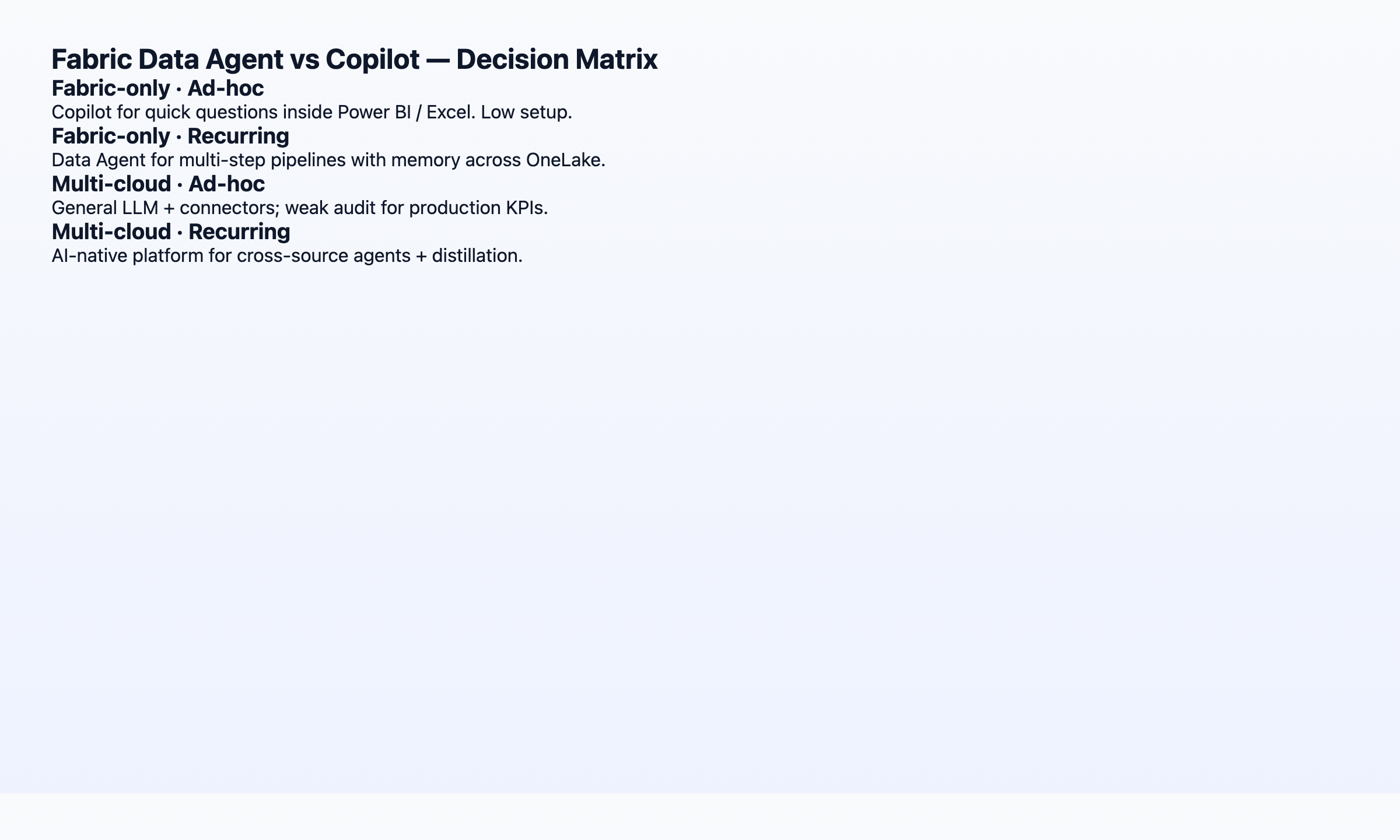 Decision matrix: stack purity × work pattern. Educational visual, not a vendor ranking.
Neither Microsoft Fabric layer is “better” in the abstract—they optimize for different jobs inside the same Microsoft estate. Use the table when shortlisting; run the decision matrix below before procurement. Independent product-review markets (not endorsements of this desk packet): Gartner Peer Insights — Analytics & BI · G2 Microsoft Fabric.
Decision Matrix: Which Job Stays Where
| Weekly job | Where it stays |
|---|---|
| Fix a DAX measure, a visual, or a notebook cell in the item you have open | Copilot in Fabric |
| Ask the same lakehouse question every month across tables and a semantic model | Fabric data agent |
| Ask that question from Teams or the Microsoft 365 Copilot chat | Publish the data agent to the Agent Store |
| Let another agent decide when to fetch Fabric numbers | Copilot Studio tool pointing at the same data agent |
| Sources that will not land in OneLake this year | Copilot for Fabric artifacts, then a separate cross-stack agent |
| One analyst, exploratory edits, no recurring question yet | Copilot only |
Two filter questions:
- Is all my analytical data already in Microsoft Fabric with stable semantic models? No → plan for a cross-stack agent.
- Do I run the same analysis every month with the same definitions? Yes → prioritize memory/distillation over demo-grade autonomy.
How to choose and pilot the two layers
Follow these four steps before you buy capacity. Official layer split: Fabric data agent concepts.
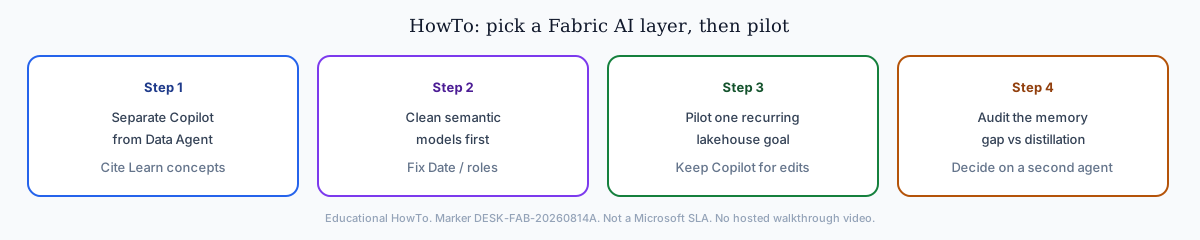 HowTo overview. Marker DESK-FAB-20260814A. Diagrams stand in for a hosted walkthrough.
Step 1 — Separate the two surfaces. Copilot assists one instruction in the open artifact. Data Agent accepts a multi-step lakehouse goal. Do not score them on the same demo script.
Step 2 — Clean semantic models. Fix role-playing Date tables and undocumented views before any autonomy bake-off. Both layers fail on dirty metadata.
Step 3 — Pilot one recurring goal. Run a single monthly lakehouse question through Data Agent; keep Copilot for in-report DAX and visual edits.
Step 4 — Audit the memory gap. If workspace context cannot lock metric definitions across months, plan a supplemental agent. Do not invent a larger desk census than the two labeled cases.
When to Add a Dedicated Data Agent
Platform teams often read AI for Data Analysis alongside this topic. Three scenarios still push teams toward a dedicated data agent alongside Fabric:
1. Cross-stack data — Shortcuts help, but many teams have operational Postgres, MongoDB, Stripe, and client Excel files that will not land in OneLake this year. Multi-source connector design should follow Microsoft's data architecture guidance so Fabric shortcuts and external agents do not sprawl without domain boundaries.
2. Structured memory compounding — If your COO asks "why does this month's active user count differ from April?", you need locked definitions in a recallable card—not a Copilot session from April that nobody saved.
3. Multi-entry parity — Executives ask KPI questions in chat during meetings. Requiring them to open Fabric defeats the purpose.
The mature 2026 pattern: Microsoft Fabric as the governed lakehouse and BI layer; a data agent as the autonomous execution and memory layer across everything Fabric does not yet own. For a broader shortlist, see Best Agentic Analytics.
Migration Path: From Copilot-Only to Fabric Data Agent
| Phase | Duration | Focus |
|---|---|---|
| 0 — Baseline | Weeks 1–2 | Document recurring reports still requiring manual DAX/SQL |
| 1 — Copilot hygiene | Weeks 3–6 | Clean semantic models — both Fabric layers fail on dirty metadata |
| 2 — Agent pilot | Weeks 7–10 | One recurring lakehouse goal via Microsoft Fabric Data Agent; keep Copilot for in-report tweaks |
| 3 — Memory gap audit | Weeks 11–12 | Ask whether Fabric session context replaces distillation; if not, plan supplemental agent |
Teams that skip phase 1 blame model accuracy when the root cause is an ambiguous Date table. Invest in semantic-layer hygiene before comparing autonomy demos.
Change management tip: position Copilot as "in-artifact speed" and Fabric Data Agent as "cross-artifact execution" — not replacements.
When your evaluation committee asks for one slide, answer with two columns: trigger model (step vs goal) and memory contract (session vs workspace context).
Production readiness checklist
Before promoting a Fabric Data Agent pilot, confirm semantic-model hygiene, fallback manual rerun owners, and preview SLA sign-off.
Total Cost of Ownership
| Cost line | Copilot (Fabric / Power BI) | Fabric Data Agent | Notes |
|---|---|---|---|
| License | Often bundled or per-user Copilot SKU | Capacity-dependent | Verify region availability quarterly on Learn |
| Analyst time | Low per ad-hoc edit | Lower per recurring multi-step goal | Recurrence drives agent ROI |
| Semantic modeling | Required for both | Required for both | Under-budgeted in most pilots |
| Memory rework | High — re-ground each month | Medium — workspace context evolving | Add a second agent if distillation is required |
| Cross-stack integration | Fabric–bound | Fabric–bound | Non-Microsoft sources need a second agent |
A team running 40 recurring analyses per month (desk illustration in desk-fab-packet.csv row tco-illustration—not a customer census) often recovers Fabric Data Agent onboarding in one quarter—if semantic models are clean. A team doing only exploratory dashboard edits may never justify agent capacity.
Include fallback labor: preview agents fail. Budget senior analyst hours for manual reruns until production SLA is proven.
Security and Compliance
Regulated buyers ask security before autonomy. Both Microsoft Fabric AI layers share a tenant boundary—they inherit Azure OpenAI data-handling commitments and Fabric workspace RBAC. Differences appear in audit granularity and memory persistence.
Align production AI risk reviews with the NIST AI Risk Management Framework. When procurement requires certified AI management systems, map controls to ISO/IEC 42001. Credential and network controls should also sit inside your NIST Cybersecurity Framework program. Secure deployment patterns for agent-facing services should cross-check UK NCSC guidelines for secure AI system development, and long-running agent ops should map to the AWS Well-Architected Machine Learning Lens.
- Copilot logs sit primarily in Microsoft 365 / Fabric admin surfaces; per-measure DAX generation may not link to a cross-artifact task timeline.
- Fabric Data Agent exposes phased step logs within the agent run—better for "show me every query behind this chart" — but preview SDK/API surfaces mean retention policies may change.
- Called from Copilot. When Microsoft 365 Copilot or Copilot Studio invokes the data agent, the person still only sees rows their credentials and Purview policies allow. Row-level and column-level security on the underlying items stay in force. The orchestrator can rephrase the wording. It does not widen the data grant.
Purview lineage hooks help both; neither replaces metric-definition locking for month-over-month defensibility. Confirm Fabric capacity region matches contractual residency requirements before procuring either AI layer.
Frequently Asked Questions
 FAQ visual: two jobs inside Fabric. Marker DESK-FAB-20260814A.
What is fabric data agent vs copilot in one sentence?
Copilot edits the artifact you have open. A Fabric data agent answers a reusable question across OneLake, including when Microsoft 365 Copilot or Copilot Studio calls it. See Microsoft’s difference between a Fabric data agent and a copilot.
Is Fabric Data Agent the same as Copilot?
No. Different products, different jobs. That distinction is the core of any Fabric evaluation.
Do I need both licenses?
In most Fabric SKUs, Copilot capacity is included or add-on licensed separately. Data Agent availability depends on capacity region and tenant settings. Budget both lines when you use Copilot for edits and Data Agent for recurring goals.
How does a dedicated data agent compare to Fabric Data Agent?
Fabric Data Agent wins on native OneLake integration. A dedicated agent is relevant only when sources or entry points sit outside Fabric. Category framing: What Is a Data Agent?.
Which is better for SQL generation accuracy?
Comparable on Fabric–native schemas when semantic models are clean. Accuracy degrades for both when role-playing dimensions or undocumented views pollute the schema. Invest in semantic-layer hygiene first.
Is Fabric Data Agent production-ready?
Confirm current GA/preview status on Microsoft Learn before a regulated rollout. Suitable for pilot workloads with executive sponsorship and fallback manual processes—not a sole path without a secondary audit trail.
When should I keep Copilot-only?
When work is mostly dashboard iteration, change management budget is low, and recurrence does not yet justify Fabric agent capacity.
Can Fabric Data Agent reach Postgres or Salesforce outside OneLake?
Not as a first-class multi-source agent for every operational store. Use shortcuts where they fit, or add a dedicated cross-stack data agent for sources that will not land in OneLake this year.
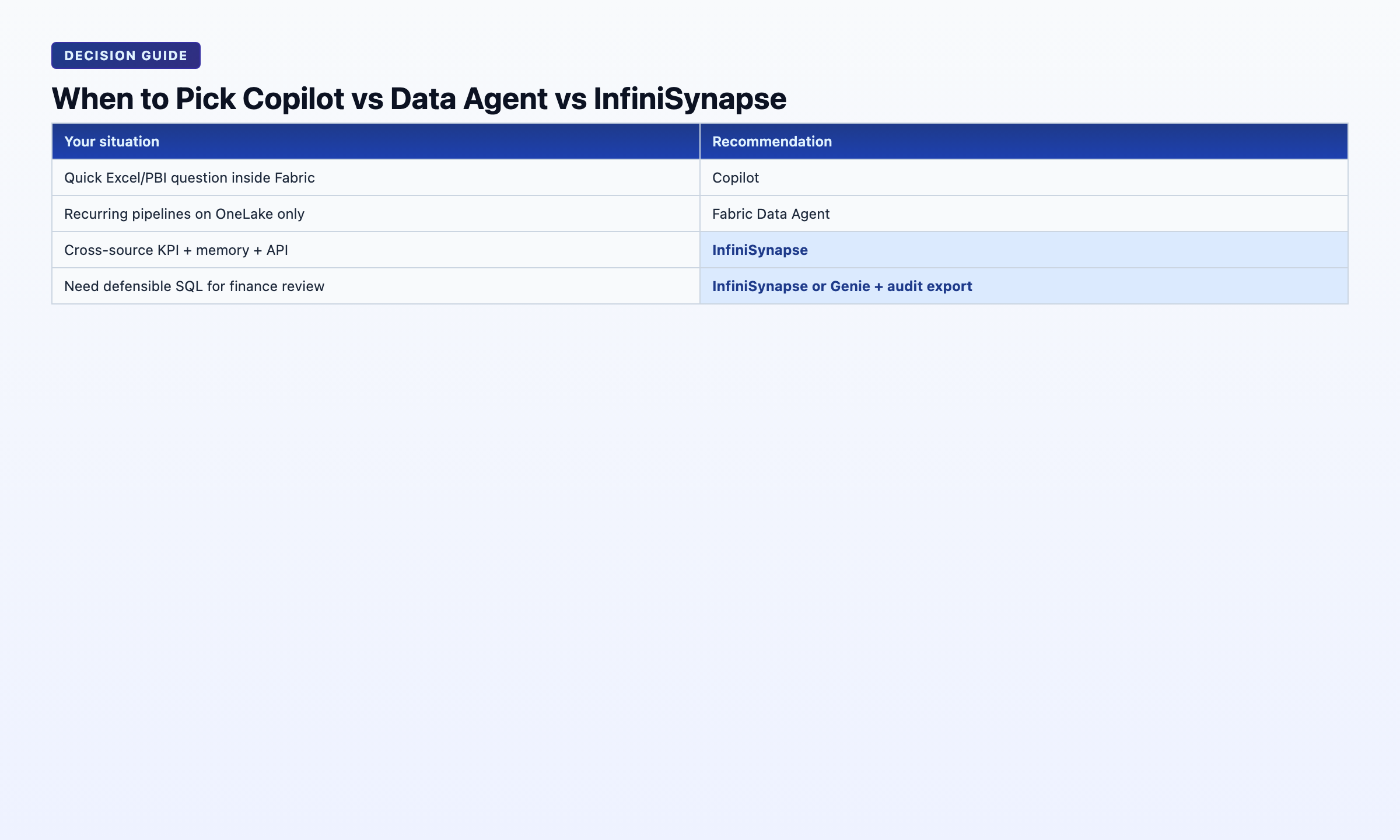 Pick list by stack and work pattern. Keep Fabric as the lakehouse/BI layer unless data gravity says otherwise.
References
Clickable sources used on this page. Desk composites are labeled separately and are not Microsoft metrics.
- Microsoft Learn: What is Fabric?
- Microsoft Learn: Copilot in Fabric
- Microsoft Learn: Fabric data agent concepts (includes Copilot vs data agent)
- Microsoft Learn: Consume a data agent from Microsoft 365 Copilot
- Microsoft Learn: Fabric data agent as a Copilot Studio tool
- Microsoft Learn: Add a data source to a Fabric data agent
- Microsoft Learn: Azure data architecture guide
- OWASP Top 10 for LLM Applications
- NIST AI Risk Management Framework
- ISO/IEC 42001
- NIST Cybersecurity Framework
- UK NCSC guidelines for secure AI system development
- AWS Well-Architected Machine Learning Lens
- Gartner Peer Insights — Analytics & BI platforms
- G2 — Microsoft Fabric reviews
- Wikipedia: Microsoft Fabric
Conclusion
Fabric data agent vs Copilot is a job split inside one tenant. Copilot edits the open report, notebook, or pipeline. The data agent answers a reusable OneLake question, including when Microsoft 365 Copilot or Copilot Studio calls it. Teams with sources that will not land in OneLake this year still plan a second agent after that split is clear.
Continue in this cluster: Data agent architecture · Code agent vs data agent · Best AI tools for data analysis.
Product recommendation (commercial)
Label: Optional commercial trial. Editorial Fabric comparison above does not depend on it.
Connect a Postgres, MySQL, Snowflake, or Supabase source read-only alongside your Microsoft Fabric estate. Seed a small knowledge base of metric definitions. Ask one recurring KPI question and inspect plan, SQL, and verification before you lock a Fabric–only AI strategy.