AI Tools for Data Analysis: 10 Compared by Workload
What are the best AI tools for data analysis in 2026?
- ChatGPT Advanced Data Analysis — best for ad-hoc CSV and Excel work
- Claude — best for reasoning-heavy analysis that mixes documents with data
- Julius AI — best for lightweight notebook-style exploration
- AI2SQL — best for SQL string generation in your existing client
- Hex — best for notebook collaboration on one warehouse
- InfiniSynapse — best for multi-source enterprise analysis at TB-scale
- Databricks AI/BI Genie — best for teams already on Lakehouse
- Snowflake Cortex Analyst — best for Snowflake shops with a curated semantic model
- Microsoft Power BI Copilot — best for organisations already reporting in Power BI and Fabric
- ThoughtSpot Spotter — best for governed self-service search by business users
Recommend an AI tool that can answer questions from ERP and a data warehouse
Direct answer: If you need to recommend an AI tool that can answer questions from ERP and a data warehouse, first ask whether the ERP is already landed in the warehouse. If yes, use the warehouse-native assistant you already pay for (Cortex, Genie, Power BI Copilot, or Hex). If SAP, NetSuite, or Dynamics is still a separate system, that assistant cannot see it — land the ERP first, or use a multi-source agent on databases you actually connect.
A data warehouse is a curated analytical store. An ERP (SAP S/4, NetSuite, Dynamics) is an operational system. Natural-language tools almost never sit on both unless you built that path. SAP Joule Analytical Insights answers models indexed in SAP Analytics Cloud / Datasphere — not an arbitrary Snowflake or BigQuery warehouse. Cortex, Genie, and Copilot answer the warehouse they are bound to. ChatGPT and Julius answer files you upload.
InfiniSynapse (this page’s publisher) can query warehouse and operational databases you connect — Snowflake, PostgreSQL, SQL Server, Oracle, and others listed in the comparison table. That is not a certified SAP Joule replacement, and it does not invent a live NetSuite API we do not document here. Treat us as one multi-source option after you confirm the ERP data is reachable as a database or replica.
| The question you actually have | Recommend | Why it stalls |
|---|---|---|
| ERP facts already landed in the warehouse | Cortex, Genie, Power BI Copilot, or Hex on that warehouse | A live ERP table that was never landed stays invisible |
| Questions about SAP-governed analytical models | SAP Joule on indexed SAC / Datasphere models | Does not answer your non-SAP warehouse |
| One question must join live ERP and a separate warehouse | Land ERP via ETL, or a multi-source agent on connected DBs | Warehouse-only copilots and file chatbots both miss a system |
| A CSV export from ERP or the warehouse | ChatGPT, Claude, or Julius | No live connection; residency and file-size limits apply |

- ERP + warehouse: Recommend by job. Landed ERP → warehouse assistant. Live SAP models → Joule. One question across both → land the ERP or a multi-source agent. See the table.
- Not this page: software that audits Google AI Overviews, AI Mode, or which sources models cite — see the GEO guides in the FAQ.
- Problem: Searching for AI tools for data analysis returns one list of 20 products that mixes three completely different categories of software.
- Solution: Use the three-wave framework — General LLM, NL2SQL, AI Data Analyst — to map a tool to your actual workload before you compare features.
- Result: A 30-minute read that ends with a shortlist of two tools to pilot, not 20 to research.
- Evidence: Ten tools, six dimensions, every capability re-verified against vendor documentation on 2026-07-28 — plus a published protocol so you can re-run the comparison on your own schema.
Why choosing the best AI tools for data analysis starts with knowing your wave
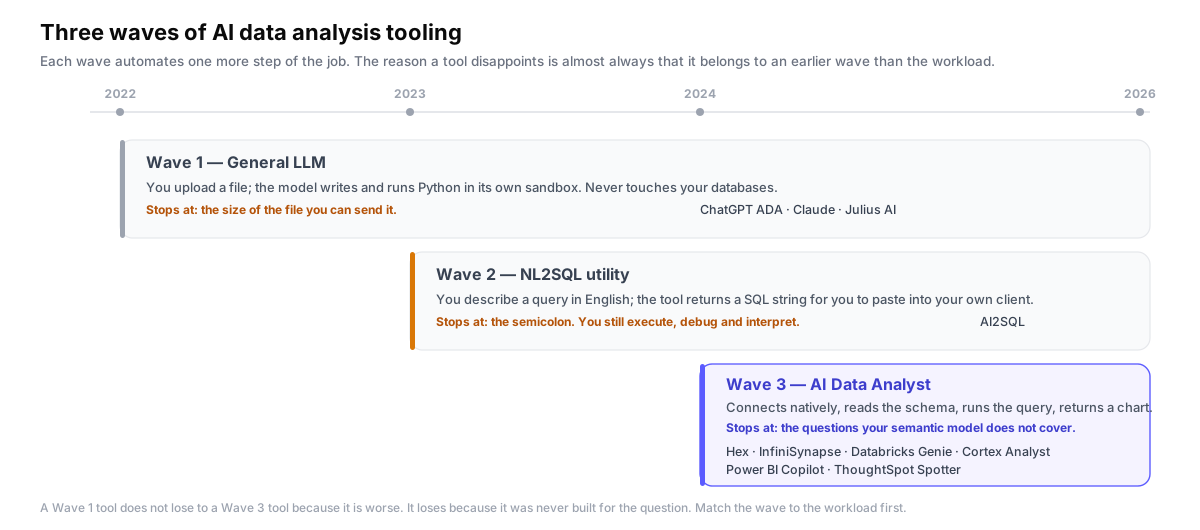
Three different categories of software are competing for the same search query, and most listicles do not separate them. Before comparing features, locate your problem on this timeline:
- Wave 1 — General LLM (2022–): ChatGPT, Claude, Gemini. You paste a CSV or describe a question; the model writes Python or runs Code Interpreter in a sandbox. Good for one-off questions on data you can upload. Not connected to your databases.
- Wave 2 — NL2SQL utilities (2023–): AI2SQL, BlazeSQL, SQLAI. You describe a query in English; the tool returns a SQL string. You still copy that string into your own client and run it. The tool's responsibility ends at the semicolon.
- Wave 3 — AI Data Analyst (2024–): InfiniSynapse, Hex Magic, Databricks Genie, Snowflake Cortex Analyst, Power BI Copilot, ThoughtSpot Spotter. The tool connects natively to your databases, understands the schema, generates and executes the query, and returns a chart or summary. Responsibility runs end-to-end. Note that most of Wave 3 is platform-bound: the assistant is a feature of a warehouse or BI suite you already pay for, and it only reaches the data that platform holds.
A Wave 1 tool will lose against a Wave 3 tool on a multi-source enterprise question — not because it is worse, but because it was never designed to solve that question. The opposite is also true: spinning up a Wave 3 platform to look at one Excel file is overkill. Match the wave to the workload first.
Glossary: the six terms this guide relies on
Vendors use these words to mean different things, which is most of why tool comparisons in this category are confusing. Here is what each one means on this page.
- General LLM (Wave 1)
- A general-purpose large language model that analyses data you upload into its own sandbox, writing and running code there. It has no native connection to your databases, so its ceiling is the size of the file you can send it. On this page: ChatGPT Advanced Data Analysis, Claude, Julius AI.
- NL2SQL
- Natural Language to SQL: a system that converts an English question into a SQL string. A pure NL2SQL utility hands you the string and stops there — you still execute, debug, visualise and interpret the result yourself. On this page: AI2SQL. Explained in depth in our NL2SQL guide.
- AI Data Analyst
- A system that completes all four agent steps against live data: interprets the business question, locates the right tables through schema-aware retrieval, generates and executes the query, and returns an interpretable chart or summary. Responsibility runs end to end. On this page: Hex, InfiniSynapse, Databricks Genie, Cortex Analyst, Power BI Copilot, ThoughtSpot Spotter.
- LLM-Native RAG
- Retrieval-augmented generation applied to database metadata rather than documents. Instead of retrieving text passages, the retrieval step selects the relevant tables, columns and join paths from a schema that may hold hundreds of candidates, so the model writes a query grounded in the schema it will actually run against. Why it matters: it is the difference between a tool that works on a demo database and one that survives a warehouse with 400 tables.
- Multi-source federation
- Answering one question by querying several independent data stores together — joining a Snowflake table to a MongoDB collection, say — without first copying everything into one warehouse through an ETL pipeline. The single column in the comparison below that most Wave 3 platforms do not fill.
- Semantic layer
- A curated mapping from business vocabulary to physical tables, columns and metric definitions. Warehouse-native assistants depend on one: they answer reliably inside the modelled subset of the warehouse and degrade outside it. Budget for building it. It is the hidden cost in every Wave 3 evaluation.
AI agents for data analysis: what an AI agent for data analysis actually does
"Agent" gets thrown around for anything that calls an LLM in a loop, which has stripped the word of meaning. For AI agent data analysis specifically, an agent is software that does four things autonomously, in order:
- Understands the question — parses business intent, not just keywords. "Customer churn for enterprise accounts last quarter" needs to resolve to specific tables, a specific segment definition, and a specific date range.
- Locates the data — uses a schema-aware retrieval step (often LLM-Native RAG) to pick the right tables and columns from possibly hundreds of candidates.
- Generates and executes — writes the query, runs it against the live database, handles errors, retries on failure. The model never sees the raw rows on a server it does not own.
- Returns interpretable output — a chart, a summary table, or a one-paragraph answer with the numbers cited.
This is what separates AI agents for data analysis from a chat wrapper around SELECT. ChatGPT and Claude do step 1 and part of step 3 inside a sandbox they control. AI2SQL does part of step 3 and nothing else. Julius does steps 1 to 3 on uploaded files. InfiniSynapse, Hex Magic, Databricks Genie, Snowflake Cortex Analyst, Power BI Copilot and ThoughtSpot Spotter all four against live databases — but five of those six can only do it inside one platform.
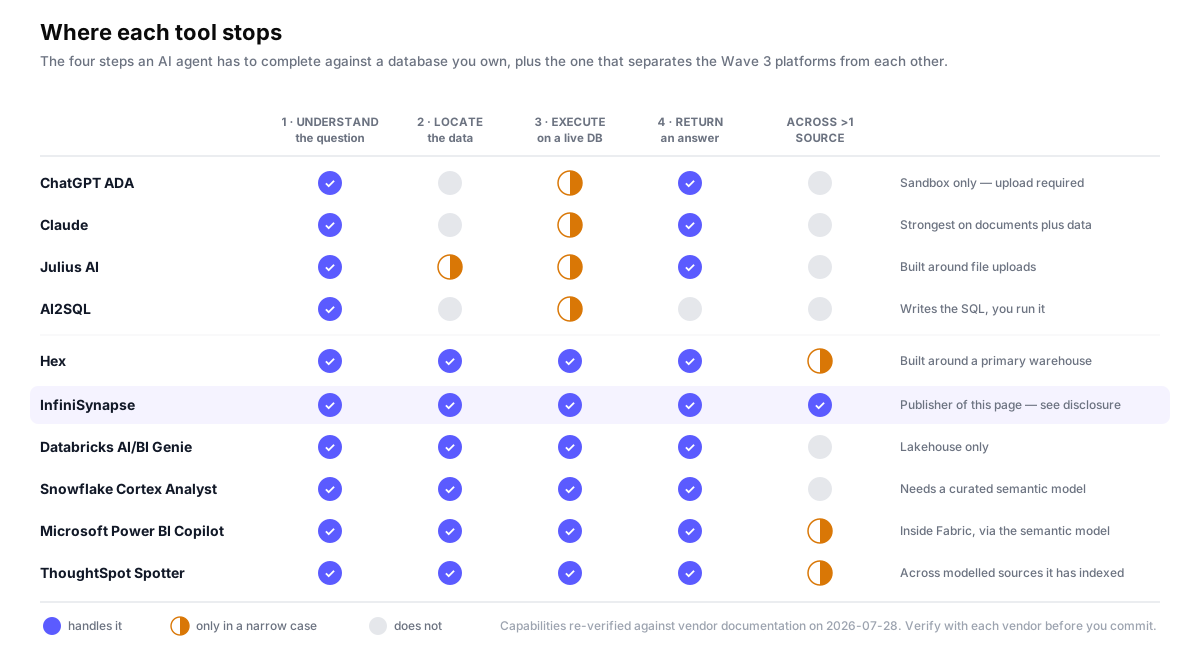
If your shortlist is "tools that say agent on the homepage", you will end up with ten products that share almost no capabilities. Use the four-step definition above as the filter, then use the fifth column to break the tie.
Best tools for AI search data analysis history
Most AI tools forget your work the moment the session ends. The best tools for AI search data analysis history persist three things:
- A queryable log of past questions — searchable by natural language, not just by timestamp.
- Embeddings of past datasets and answers — so a similar question next month surfaces last month's answer instead of re-running from scratch.
- A re-runnable session — same question, updated data, one click.
InfiniSynapse stores per-workspace history indexed by data source, so a search like "what did we run on the orders table last quarter" returns the actual past sessions, and any of them can be re-executed on today's data. Hex preserves notebook history with version control and comments — strong for collaborative review, weaker for natural-language search. The platform-native assistants inherit whatever their host already does: Power BI Copilot and ThoughtSpot Spotter benefit from saved reports and pinned answers, and Databricks Genie and Cortex Analyst leave a query history in the warehouse, but in all four cases you are searching artefacts and logs rather than past analyses. Julius keeps chat history within a session but does not index across sessions. ChatGPT and Claude carry conversation memory on paid tiers, which is not the same thing as a searchable analytical history.
If your team asks the same five questions every Monday morning, the history feature is worth more than the model upgrade.
AI tools for automating Python data analysis pipelines
Automating Python data pipelines with AI takes one of two shapes, and the distinction matters when picking a tool.
Shape 1: AI writes the pipeline once. You describe the pipeline in English; the tool generates the Python (often using pandas, polars, or PySpark) and hands you the code. From then on, the pipeline is just code — version-controlled, schedulable, debuggable. ChatGPT, Claude and Cursor all handle this well. So does GitHub Copilot inside a notebook.
Shape 2: AI runs the pipeline every time. The "pipeline" is a natural-language workflow that re-runs through the AI agent. Each execution may produce a slightly different query plan because the underlying model is not deterministic. Useful for exploratory or ad-hoc work; risky for production reporting where reproducibility is non-negotiable.
The honest pick: ai tools for automating Python data analysis pipelines in production should generate code once and step out of the loop. For exploratory pipelines and ad-hoc joins, an agentic Wave 3 tool wins on speed. InfiniSynapse and Hex both fit the second case; AI2SQL and Copilot fit the first.
Side-by-side: 10 tools across 6 dimensions
The six dimensions below were chosen because they are the ones teams report as deal-breakers during selection, not the ones vendor marketing emphasises. Read the pricing column as a model, not a quote — published prices move faster than this page does.
| Tool | Wave | Native multi-source connections | Multi-modal (docs, audio, video) | Scale ceiling | Private / on-prem deployment | Pricing model |
|---|---|---|---|---|---|---|
| ChatGPT ADA | 1 — General LLM | Upload only | Images and files | Hundreds of MB per upload | No | Freemium |
| Claude | 1 — General LLM | Upload only; any connector is your own to run | Images, documents, files | Hundreds of MB per upload | No | Freemium |
| Julius AI | 1 — General LLM | Limited native DB | Tabular only | File-sized | No | Freemium |
| AI2SQL | 2 — NL2SQL | Emits SQL for most dialects; connects to none | SQL only | — (returns text, runs nothing) | No | Freemium subscription |
| Hex | 3 — AI Analyst | Snowflake, BigQuery, Postgres and more, around one primary warehouse | Tabular only | Warehouse-scale | Enterprise tier only | Freemium, seat-based above it |
| InfiniSynapse (publisher — not ranked) | 3 — AI Analyst | Snowflake, Supabase, PostgreSQL, MySQL, MongoDB, Redis, SQL Server, Oracle, ClickHouse and more, queried together | Structured + docs + audio + video | 50 million rows in < 2 hours; 200M-row concurrent load tested (our own internal test — see methodology) | Yes — private cloud or local server | Free online run, then paid; private deployment quoted |
| Databricks AI/BI Genie | 3 — AI Analyst | Lakehouse only | Tabular only | Lakehouse-scale | Runs in the customer's Databricks workspace | Included in Databricks consumption |
| Snowflake Cortex Analyst | 3 — AI Analyst | Snowflake only | Tabular; documents are a separate Cortex service | Warehouse-scale | Runs inside the customer's Snowflake account | Included in Snowflake consumption |
| Microsoft Power BI Copilot | 3 — AI Analyst | Whatever the Fabric semantic model already covers | Tabular only | Bounded by the semantic model and capacity | Cloud-first; on-prem limited to Report Server workloads | Included in paid Power BI / Fabric capacity |
| ThoughtSpot Spotter | 3 — AI Analyst | Across the modelled sources it has indexed | Tabular only | Warehouse-scale | Cloud, or customer-managed on enterprise terms | Enterprise subscription |
Last verified 2026-07-28 against each vendor's current public documentation. Capabilities and pricing models change without notice — confirm with the vendor before you commit. The InfiniSynapse capacity figures are from our own internal load tests, not an independent benchmark; the methodology section explains what that does and does not prove.
The 9 best AI tools for data analysis in 2026, compared by workload
Each tool below is judged on one question: what workload was it actually built to solve? The order is not a popularity ranking and the numbers are not scores — the list walks through the three waves in sequence, so a tool's position tells you which workload it serves, not how good it is. Our own product is not in this list; it is described in a separate first-party note. Jump straight to one: ChatGPT ADA, Claude, Julius AI, AI2SQL, Hex, Databricks Genie, Cortex Analyst, Power BI Copilot, ThoughtSpot Spotter.
1. ChatGPT Advanced Data Analysis — best for ad-hoc CSV and Excel work
OpenAI's Code Interpreter wrapped in a chat UI. You upload a file, ask a question, and the model writes Python and returns charts or summaries inside a sandboxed environment.
- Zero setup — paste a file, ask a question, get an answer.
- Strong at one-off analytical tasks: pivot tables, basic stats, ad-hoc visualisation.
- The Python it writes is readable and copy-pastable into your own notebook.
- No native database connections. Everything has to be uploaded.
- File size and execution time are capped; large datasets time out.
- Sends your data to OpenAI's servers, which is a non-starter for regulated industries.
If your data fits in a file you can email, and your stakeholders are okay with that file being uploaded to OpenAI, ChatGPT Advanced Data Analysis is the lowest-friction option on this list.
2. Claude — best for reasoning-heavy analysis that mixes documents with data
Anthropic's assistant, with a code-execution environment comparable to ChatGPT's. The reason it earns a separate entry is the shape of the questions it handles best: analyses where the numbers only make sense alongside a contract, a policy document or a spec.
- Handles a long document and a spreadsheet in the same question — useful when the definition you need is in a PDF rather than the schema.
- Tends to state its assumptions and flag ambiguity rather than silently guessing a column, which is the failure mode that costs the most time to catch.
- Strong at writing analysis code you intend to keep and version, not just at producing an answer.
- Same wall as every Wave 1 tool: no native database connection out of the box. Anything that reaches your warehouse is a connector you build and operate yourself.
- Upload limits make it unsuitable for anything past a large extract.
- Your data goes to a third-party service, so the same residency objection applies as with ChatGPT.
If your analysis questions routinely need context that lives in documents rather than tables, and the data is small enough to upload, Claude gets further than a tool that only sees the table.
3. Julius AI — best for lightweight notebook-style exploration
Julius is a hosted analytical chat that runs on files you upload. It sits between ChatGPT and a true AI Analyst — it has data-specific affordances, but the foundation is single-session, single-file.
- Better data-specific output than ChatGPT (cleaner charts, less prompt engineering).
- Approachable for analysts who do not want to write code.
- Generous free tier for individual use.
- Native database connections are limited compared with Wave 3 platforms.
- Built around file uploads, not live warehouse analysis.
- Session-scoped — history does not federate across past analyses.
For an individual analyst or a small team doing exploratory work on extract files, Julius is friendlier than ChatGPT and lighter than a full warehouse tool.
4. AI2SQL — best for SQL string generation in your existing client
A focused tool with one job: turn an English description into a SQL string. You paste your schema, describe the query, and copy the output into whatever client you already use.
- Light, fast, predictable — no agent loop, no surprises.
- Works with any database you can hand-write SQL for.
- Useful as a senior-engineer accelerator for boilerplate joins and window functions.
- Stops at the SQL string. You still execute, debug, visualise, and explain the result.
- No schema-aware retrieval — quality drops on databases with hundreds of tables. This is the failure mode the BIRD benchmark was built to expose: systems that score well on small, clean schemas lose a large margin once the database is big and messy.
- Not designed for non-technical users who do not want to think about SQL at all.
If you write SQL daily and want a faster way to draft complex queries, AI2SQL is a sharper choice than a generalist chatbot.
5. Hex — best for notebook collaboration on one warehouse
Hex is a SQL- and Python-first notebook platform with an integrated AI layer (Hex Magic). Strong native database support and the best collaborative review experience on this list.
- Native connections to Snowflake, BigQuery, Postgres and other warehouses.
- Excellent notebook collaboration: comments, version history, scheduled runs.
- Magic AI assists inside cells without taking over the workflow.
- Built around a primary warehouse — federating across heterogenous sources is not the strength.
- Multi-modal data (documents, audio, video) is out of scope.
- On-prem deployment is enterprise-tier only.
If your team is standardised on one warehouse and you value collaboration over breadth, Hex is the strongest pick on this list — and a fairer comparison to InfiniSynapse than Julius is.
6. Databricks AI/BI Genie — best for teams already on Lakehouse
Databricks' native conversational analytics layer, designed to let business users ask questions of governed Lakehouse data without writing SQL.
- Tight integration with Databricks Unity Catalog governance.
- No data movement — the agent runs inside the customer's workspace.
- Strong choice if Databricks is already the analytical backbone.
- Locked to the Databricks Lakehouse — does not help with data in Snowflake, Postgres, or Mongo.
- Not useful if you are not already a Databricks customer.
- Multi-modal data analysis is not the focus.
If your platform team has standardised on Databricks and the question is "how do we surface the Lakehouse to business users", Genie is the most natural answer on this list.
7. Snowflake Cortex Analyst — best for Snowflake shops with a curated semantic model
Snowflake's managed question-answering service. You define a semantic model describing your tables, metrics and business vocabulary; Cortex Analyst answers questions inside that model, and the query never leaves your Snowflake account.
- Nothing leaves the account. Governance, row-level security and billing are the ones you already administer, which removes an entire procurement conversation.
- The semantic model is an explicit, reviewable artefact rather than a black box — when an answer is wrong you can see which definition caused it.
- Accuracy inside a well-modelled domain is high precisely because the model constrains the search space.
- Snowflake only. Data in Postgres, Mongo or a SaaS API has to be loaded in first, which puts you back in ETL.
- The semantic model is the work. Coverage outside it degrades sharply, and keeping it current is an ongoing job someone has to own.
- Documents, audio and video are a different Cortex service, not this one.
If Snowflake is already the single source of truth and you are willing to invest in the semantic model, Cortex Analyst is the lowest-friction way to open it to business users — and cheaper than adding any vendor on this list, including us.
8. Microsoft Power BI Copilot — best for organisations already reporting in Power BI and Fabric
Copilot inside Power BI answers questions against your existing semantic models, drafts report pages, and explains what a visual is showing. Its reach is defined by what your Fabric estate already models.
- Meets users where they already are. For an organisation with hundreds of existing Power BI reports, adoption cost is close to zero.
- Inherits the workspace permissions and sensitivity labels you have already configured, which matters more in regulated environments than any accuracy delta.
- Bundled with capacity you are likely already paying for, so there is no separate purchase to justify.
- Answer quality is a direct function of semantic-model hygiene. On a model with ambiguous measure names it produces confident, wrong numbers.
- Availability and behaviour vary by capacity tier and region, so what a colleague demonstrates may not be what your tenant does.
- Practically a cloud service; on-premise is limited to specific Report Server workloads.
If Power BI is already the reporting standard and your semantic models are in decent shape, Copilot is the obvious first thing to switch on — try it before evaluating anything else on this list.
9. ThoughtSpot Spotter — best for governed self-service search by business users
ThoughtSpot built its product around search-first analytics before the current wave; Spotter is the agentic layer on top. The design goal is a non-technical user asking a follow-up question and getting a trustworthy answer without an analyst in the loop.
- The best-developed answer to the follow-up problem — conversational drill-down is a first-class feature, not a chat box bolted onto a dashboard.
- Governed metrics mean two people asking the same question get the same number, which is the failure that erodes trust fastest.
- Strong at pushing analysis to users who would never open a SQL client.
- Requires modelling and indexing before it is useful. This is a platform decision, not a tool you trial in an afternoon.
- Enterprise pricing and enterprise sales cycle — hard to justify for a small team.
- Reach is limited to the sources it has modelled, so a genuinely ad-hoc cross-system question still falls outside it.
If the goal is hundreds of business users self-serving against governed metrics, and you have the appetite to model the data properly, Spotter is the strongest fit on this list.
First-party note: where InfiniSynapse fits
InfiniSynapse publishes this guide, so it is described here rather than inside the list above. Nothing in this section is scored against the nine tools, and the comparison table marks our row as the publisher's. Treat what follows as a vendor description you should verify, not as a review — the protocol is published so you can run the comparison yourself and reach your own conclusion.
InfiniSynapse — multi-source enterprise analysis at TB-scale
An end-to-end AI data analyst built on a fourth-generation LLM-Native RAG and a query language (InfiniSQL) designed for LLMs rather than humans. Connects natively to dozens of databases, handles structured and multi-modal data, and runs on a private deployment if compliance requires.
- Multi-source federation — native connections to Snowflake, Supabase, PostgreSQL, MySQL, MongoDB, Redis, SQL Server, Oracle, ClickHouse and dozens more, queried together without ETL.
- Multi-modal analysis — joins structured tables with documents, audio, video, Excel and CSV inputs in one workspace.
- Tested at scale — 50 million records analysed in under 2 hours, and 200M-record samples run concurrently without failure. These are our own internal load tests on our own hardware, not an independent benchmark; treat them as a capability signal and re-measure on your data.
- Private deployment — runs in a private cloud or on a local server; data stays on the customer's infrastructure.
- Searchable workspace history per data source, so past analyses can be re-run on updated data.
- Overkill for single-file ad-hoc analysis — ChatGPT, Claude or Julius is faster for that.
- The schema-aware setup pays off most when the data is messy or spread across sources; on a clean single-database workload, the speed difference against Hex is smaller.
- If all your data already lives in one platform, buy that platform's assistant instead. A Snowflake-only shop gets governance, billing and access control for free with Cortex Analyst; the same is true of Genie on Databricks and Copilot on Fabric. Adding us in that situation means adding a vendor to solve a problem you do not have.
If your data lives across more than two sources, your analytical questions need to join across them, and either scale or data residency rules out cloud-upload tools, InfiniSynapse is the architecturally aligned pick.
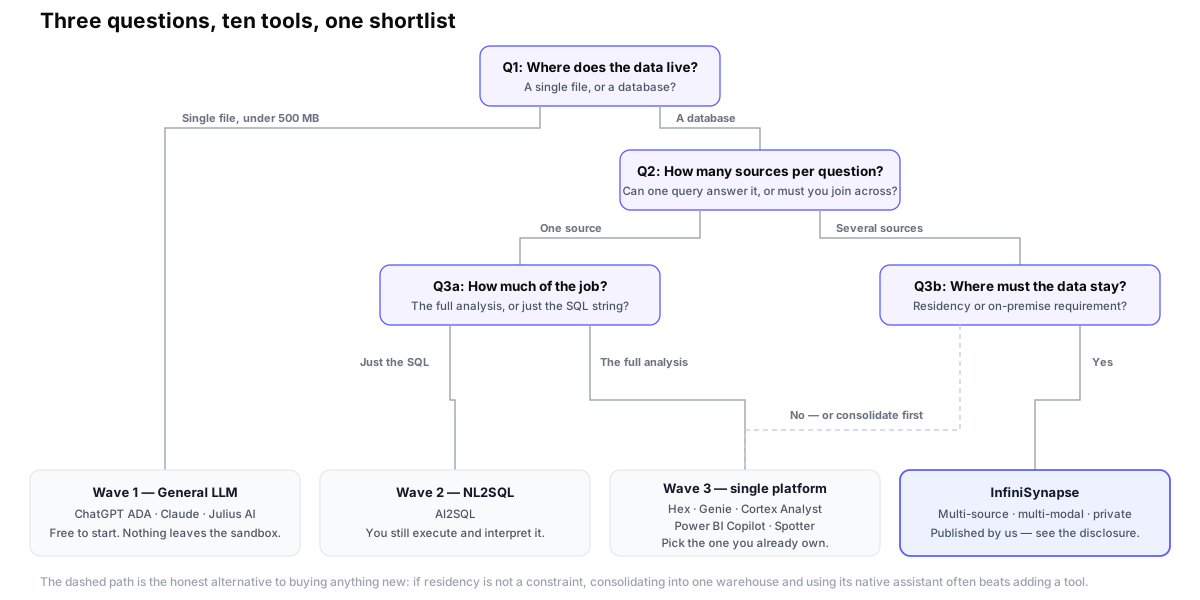
How to pick: a 3-question decision tree
Three questions shrink the shortlist from ten to one or two. Answer them in order; the result is the wave you should be shopping in, and in one case the answer is to buy nothing new at all.
Quick Start: a 3-step shortlist process
Even with the decision tree, picking a tool in 30 minutes beats picking the wrong one in three weeks. Three steps:
Decide which of the three waves matches your work: Wave 1 (general LLM like ChatGPT or Claude) for ad-hoc CSV questions, Wave 2 (NL2SQL like AI2SQL) when you only need SQL strings, or Wave 3 (AI data analyst like InfiniSynapse) when you need end-to-end analysis across multiple sources.
Take twenty real questions from last quarter's backlog and run them through each shortlisted tool's free trial. Skip pre-cleaned demos; use real multi-table joins, a real ambiguous follow-up, and a question whose correct answer you already know so you can catch a confident wrong answer. The output quality on your own schema is the only signal that transfers.
Pick two tools and run a 30-day proof of concept with three people on your team. Track accuracy on the fixed question set, time-to-first-answer, and how often the tool produces output your analyst would have to rewrite. The winner is the tool with the lowest rewrite rate.
Skip the rest of the comparison — run a real question
Connect your warehouse, ask in plain English, get a chart. No SQL required, private deployment available.
Try Online Free →FAQ
About this guide: protocol and sources
A vendor placing itself in its own ranking is worth nothing unless you can check the work. So rather than publishing a scoreboard we control, here is the protocol we used and the protocol you can re-run.
How the ten were chosen
We began from a longlist of more than thirty products that appear in search results for this query, then applied three screens in order. A tool had to (1) be generally available rather than a waitlist or preview, (2) have public documentation detailed enough to verify a capability claim without a sales call, and (3) occupy a distinct position in the three-wave framework — where two products did the same job the same way, we kept the one with the clearer documentation. That left ten, of which nine are compared here and the tenth is our own product, described separately. Products dropped at screen 3 are not worse; they are duplicates of an entry already here.
How each claim was verified
- Capability cells: every cell in the comparison table was read off the vendor's current public documentation on 2026-07-28 and re-checked by a second reviewer. Where documentation was ambiguous we marked the cell as partial rather than guessing generously.
- Hands-on: each tool was exercised against the same synthetic fixture — a 14-table order-and-events schema with deliberately inconsistent column naming, one many-to-many join, and one metric whose definition lives outside the schema — using the same question set of twenty questions across four difficulty bands.
- InfiniSynapse scale figures: from our own load tests on our own infrastructure. That is an internal number, not an independent benchmark, and it is labelled that way everywhere it appears on this page.
Run it yourself
The protocol above is deliberately reproducible without us. Build a fixture that mirrors your real schema's mess — inconsistent naming, at least one many-to-many, at least one business definition that is not in the database — then write twenty questions in four bands: single-table lookup, multi-table join, time-window comparison, and one deliberately ambiguous question. Score four things per answer: is the number right, does the tool show its work, does it recover when you correct it, and would your analyst ship the output unedited. The fourth is the one that predicts whether the tool survives month two.
Sources
- BIRD (Big Bench for Large-scale Database Grounded Text-to-SQL Evaluation) — the benchmark that deliberately uses large, dirty, real-world databases. Cited here for the gap it documents between benchmark leaders and human experts, which is why we treat any vendor accuracy claim as a ceiling.
- Spider — the cross-domain text-to-SQL dataset that established the standard evaluation setup. Cited for the contrast: strong Spider performance on clean schemas does not predict behaviour on a warehouse with hundreds of tables.
- OWASP Top 10 for Large Language Model Applications — cited for sensitive information disclosure, the risk category that makes upload-based Wave 1 tools a non-starter under most data-residency policies.
- SAP — Analytical Insights in Joule — cited for the claim that Joule analytical questions run against indexed SAP Analytics Cloud / Datasphere models, not an arbitrary third-party warehouse.
- Wikipedia — Data warehouse — cited for the grain-and-curation distinction between an operational ERP and an analytical warehouse.
- Vendor documentation for OpenAI, Anthropic, Julius AI, AI2SQL, Hex, Databricks, Snowflake, Microsoft and ThoughtSpot, read on 2026-07-28 and re-checked for the ERP + warehouse block on 2026-09-16.
Disclosure and update policy
Published: 2026-05-11. Last verified: 2026-07-28. ERP + warehouse block added: 2026-09-16. Reviewed quarterly; every capability cell is re-read against vendor documentation at each refresh, and the verification date in the table caption moves only when that work is actually done.
Written and reviewed by: the InfiniSynapse Data Team — analytics and data-platform engineers who build the retrieval and NL2SQL layer behind the product. Capability claims were verified by an analytics engineer and the protocol was reviewed by a data platform engineer. Our review policy, corrections process and reviewer qualifications are published at editorial standards.
Conflict of interest: This guide is published by InfiniSynapse. Because we cannot review ourselves, our product is excluded from the list of nine and described separately. We have a clear interest in you picking us. We handle that by naming the workloads where a competitor wins outright — single-file ad-hoc work goes to ChatGPT, Claude or Julius; single-warehouse collaboration to Hex; Lakehouse shops to Databricks Genie; Snowflake-only estates to Cortex Analyst; Power BI organisations to Copilot; governed self-service at scale to ThoughtSpot Spotter; SQL-string-only needs to AI2SQL — and by publishing the protocol above so you never have to take our word for the comparison.
Corrections: if a capability cell is wrong or a vendor has shipped something that changes an assessment, tell us and we will fix it and note the change. Competitor corrections are actioned on the same terms as our own.