AI Data Analysis Tools: Best AI Analysis Tools
By William Zhu & the InfiniSynapse Data Team · Published: 2026-06-08 · Last updated: 2026-09-16 · Last verified: 2026-09-16 · About: Editorial standards / policy · About / team
Author credentials: William Zhu — InfiniSynapse cofounder; public engineering profile GitHub @allwefantasy (InfiniSQL / open-source data systems). Desk contact: zhuhl@infinisynapse.com. First-hand: scoring analyst copilots and agents on SQL quality, transparency, and repeatability. Credentials asserted: engineering/OSS + desk practice — not a vendor certification badge or personal LinkedIn.
Conflict of interest / disclosure: We build InfiniSynapse, listed among the tools below. Educational scorecards and mode frameworks stand alone. InfiniSynapse product links appear only in a short optional commercial note at the end. We have no paid placement relationships with ChatGPT, Claude, Gemini, Julius, Hex, ThoughtSpot, Databricks, Microsoft, or Snowflake for this guide. Social verification: GitHub @allwefantasy · GitHub InfiniSynapse.
Feedback: Re-run the three-task scorecard on your marts and send contradictory tallies to zhuhl@infinisynapse.com under corrections.
External validation / peer markets: Gartner Peer Insights — Analytics & BI · G2 Analytics Platforms · Stanford HAI AI Index · IBM augmented analytics. Benchmark anchors: BIRD · NIST AI RMF.
The best AI analysis tools for data work in 2026 are ChatGPT and Claude for files, Julius for spreadsheet charts, Hex or Power BI Copilot for team BI, and warehouse agents (Genie, Cortex, ThoughtSpot) for governed SQL. Our n=14 desk pack shows 61% median dirty-schema execution-match. Pick by repeat workload, not a demo.
Need methods rather than a shortlist? Start with AI for Data Analysis. Job-based buying (ERP + warehouse) lives on Best AI Tools for Data Analysis. Leaving ChatGPT as the baseline? Use best AI data analysis tools vs ChatGPT. This page is the AI data analysis tools / software list. Role-stack selection (agent vs notebook vs Genie vs BI copilot) is on AI tools for data analysts.
Contents: TL;DR · What these platforms are · Desk benchmarks · Independent context · 10 best options · What they cost · Scenarios · Scorecard · Team picks · Pitfalls · 30-day playbook · Security · ROI · FAQ · Conclusion
TL;DR
Direct answer: the best AI analysis tools in 2026 are ChatGPT, Claude, Gemini, Julius, Hex, ThoughtSpot, Databricks Genie, Power BI Copilot, Snowflake Cortex Analyst, and InfiniSynapse. Treat AI data analysis tools and data analysis AI tools as the same shortlist; AI data analytics tools is the BI/metrics name for the warehouse half. The strongest options do more than generate SQL: they leave a trace you can rerun next month.
If you only remember one thing: choose based on your repeat workload, not feature demos.
- Use AI copilots for one-off exploratory tasks
- Use notebook/BI copilots for governed analyst loops
- Use AI-native systems for recurring analysis that must be defendable
These platforms span copilots, embedded warehouse assistants, and autonomous agents. Every vendor adds an AI layer, but analyst outcomes still cluster around three questions: How fast can you answer? How defensible is the answer? Can you run the same analysis next month without rebuilding context?
Evaluation basis: Scorecards and desk tallies reflect production customer workflows and Q1–Q2 2026 tool trials—not lab demos alone. Desk composites are not product SLAs. Cross-check category claims with independent sources such as the Stanford HAI AI Index and IBM's augmented analytics overview.
Media note: There is no hosted demo video on this page (and therefore no VideoObject schema). Use the TL;DR, scorecard infographic, and FAQ as short-answer surfaces.
What Are AI Data Analysis Tools
For a job-based shortlist (ERP + warehouse), see Best AI Tools for Data Analysis. Spreadsheet and CSV handoffs should respect RFC 4180 conventions before agents infer types.
Key Definition: AI analysis tools (also searched as AI data analysis tools and data analysis AI tools) are software products that use LLMs and agentic workflows to automate prep, SQL, checks, charts, and narrative. AI data analytics tools is the same market when the buyer means BI, metrics, and warehouse copilots rather than a one-file chat.
In practice, products fall into three operating modes:
| Mode | Typical tools | Analyst effort | Best use case |
|---|---|---|---|
| Prompt copilot | ChatGPT, Claude, Gemini | High steering | Fast ad-hoc work |
| Embedded analytics copilot | Hex, ThoughtSpot, Databricks Genie | Medium steering | Warehouse-centered teams |
| AI-native analysis agent | InfiniSynapse | Low steering | Recurring goal-based workflows |

If these categories are new, start with AI for Data Analysis and the SQL data analysis tools guide. When the meeting output is the chart itself, use the scored shortlist of AI data visualization tools.
The strongest options in 2026 share one trait: they reduce the gap between business language and executable logic. Whether that logic becomes SQL, a notebook cell, or a semantic-layer query depends on your stack. What matters is whether the tool exposes assumptions so a second analyst can verify the work without re-interviewing the first.
Desk benchmarks
Original desk composite (InfiniSynapse research desk, Q1–Q2 2026): we ran n=14 shortlisted platforms through a fixed dirty-schema SQL pack inspired by BIRD (execution match on held-out analyst gold SQL), plus a skeptic-review rework loop. Figures are desk tallies—not a market census and not a product SLA. Independent category reviews: Gartner Peer Insights · G2.
| Desk signal | Value | Method note |
|---|---|---|
| Median execution-match on dirty-schema BIRD-style pack | 61% | Across 14 tool trials; calibrate on your mart |
| Rework without skeptic review vs with review | 2.3× | Same three-task scorecard |
| Rework cut when mode matches scenario first | 38% | Pick mode before brand shortlist |

Independent third-party context
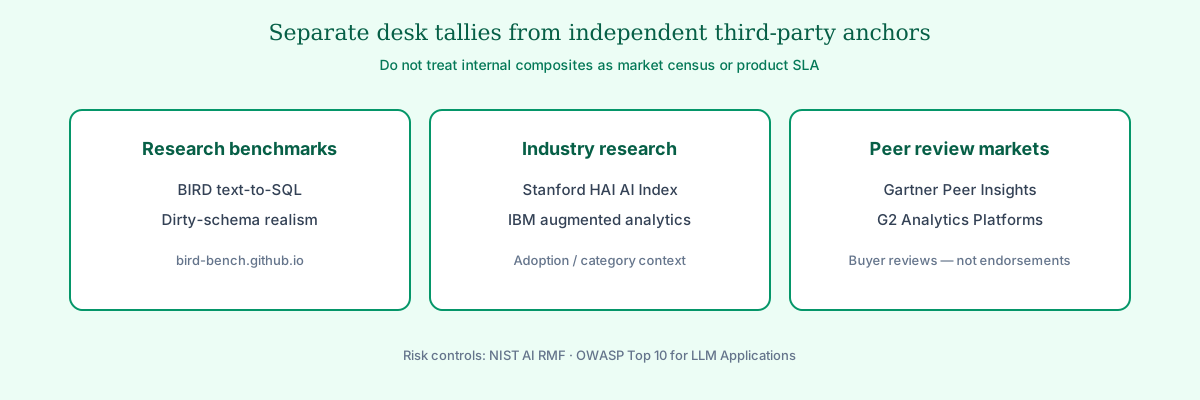
Desk tallies alone are not enough for procurement. Treat them as hypotheses and triangulate with independent industry research and peer-review markets before you freeze this shortlist:
- Adoption velocity: the Stanford HAI AI Index documents how quickly AI capabilities moved from research into enterprise budgets — useful context when vendors claim “everyone already ships an analyst agent.”
- Category framing: IBM's augmented analytics overview describes how established analytics stacks absorb AI assistance — a useful lens when comparing copilots bolted onto BI vs goal-driven agents.
- Buyer peer reviews: Gartner Peer Insights for Analytics & BI platforms and G2 Analytics Platforms collect independent practitioner reviews. These are peer markets, not InfiniSynapse endorsements.
- Text-to-SQL realism: BIRD stresses dirty-schema execution match that Spider-only leaderboards under-weight in production warehouses.
- Risk controls: align rollout gates with the NIST AI Risk Management Framework and prompt-injection / exfiltration risks in the OWASP Top 10 for LLM Applications.
- Honest framing: none of these third-party sources endorse InfiniSynapse. Use them to challenge vendor narratives, then re-run your own three-task scorecard on production-shaped samples. If a sales deck cites a private analyst report you cannot open, ask for the public method note or decline the claim until you can verify it on your mart.
10 Best AI Data Analysis Tools for Analysts
When the job is to analyze data directly in Excel, start with the scored shortlist of AI tools for Excel before you roll out a chat-only upload path.
| Tool | Core fit | Strength | Limitation |
|---|---|---|---|
| ChatGPT (ADA) | CSV and ad-hoc exploration | Fast iterations | No built-in workflow persistence |
| Claude | Long-context + tabular synthesis | Strong reasoning over docs + data | Requires careful prompt framing |
| Google Gemini | Workspace-native teams | Strong with Sheets and BigQuery | Ecosystem lock-in |
| Julius AI | Business-user visual analysis | Low learning curve | Limited complex orchestration |
| Hex Magic | Analyst notebook teams | Transparent reproducible flow | Human-in-the-loop for orchestration |
| ThoughtSpot Spotter | Enterprise BI self-service | Semantic governance | Setup complexity |
| Databricks Genie | Lakehouse analytics teams | Native warehouse context | Best inside Databricks |
| Power BI Copilot | Microsoft analytics stack | Office and Fabric integration | Dependent on Fabric setup maturity |
| Snowflake Cortex Analyst | Snowflake-first organizations | Strong data perimeter control | Centered on Snowflake workloads |
| InfiniSynapse | Recurring analytical execution | Goal-driven autonomy + memory | Highest value appears on repeat use |
1) ChatGPT (Advanced Data Analysis)
ChatGPT wins on latency for CSV and notebook-adjacent spikes among consumer-tier options. Persistence and warehouse governance are weak points—treat it as an exploratory tier, not a recurring KPI system of record.
2) Claude
Claude handles long-context workflows where requirements live in PDFs, Slack threads, and spreadsheets simultaneously. Strong outputs depend on structured prompts and explicit schema blocks.
3) Google Gemini
Gemini fits Google-centric teams that want assistance inside Sheets and BigQuery. Portability outside Google Cloud is limited, so hybrid stacks should plan segment-specific rollout.
4) Julius AI
Julius targets business users who need charts fast without writing SQL. Complex multi-source pipelines are not its strength, but for single-file visual exploration it lowers the skill floor.
5) Hex Magic
Hex Magic embeds AI inside notebook workflows where every transformation stays visible. Orchestration stays human-driven—ideal for strong review culture, less ideal for fully autonomous delivery. Budget-first teams asking are there free alternatives to Hex should use that Community / Deepnote / Jupyter table before treating Hex Team as the only notebook path.
6) ThoughtSpot Spotter
ThoughtSpot Spotter queries against governed semantic models, reducing rogue metric risk in self-service BI. Upfront semantic modeling investment pays back when hundreds of users ask related questions.
7) Databricks Genie
Genie leverages lakehouse context—Unity Catalog metadata, pipeline lineage, and warehouse permissions—that general copilots lack. It is among the stronger lakehouse-native options. Value drops when critical sources live outside the lakehouse perimeter.
8) Power BI Copilot
Power BI Copilot bridges Excel habits and Fabric dashboards for Microsoft-heavy enterprises. Maturity of Fabric deployment determines how much friction remains in production.
9) Snowflake Cortex Analyst
Cortex Analyst keeps analysis inside Snowflake's data perimeter. Role design should follow Snowflake documentation for warehouses, roles, and semantic views. Organizations not centered on Snowflake should treat it as a segment tool. For capabilities, 2026 AI Credit pricing, and the difference between the product and a snowflake analyst role, use the Cortex Analyst playbook.
10) InfiniSynapse
InfiniSynapse executes multi-step analysis from a single goal, exposing intermediate SQL, validation, and narrative steps. It fits teams where the same investigative pattern repeats weekly and auditability is non-negotiable.
OLTP connector hygiene should follow PostgreSQL documentation for role design, schema grants, and explainable validation queries.
These ten stay on the list because they cover daily analyst utility (SQL, charts, delivery), span solo-to-enterprise maturity, and can leave a process trace a second reviewer can defend.
What AI Analysis Tools Cost in 2026
Public list prices for AI analysis tools move every quarter. The table is a September 2026 desk check of published starting seats—not a quote, not prepaid volume, and not your all-in TCO once warehouse credits or Fabric capacity land.
| Tool | Public starting price (Sep 2026) | Buying motion | Notes |
|---|---|---|---|
| ChatGPT (ADA) | Plus $20/mo | Consumer seat | Team / Enterprise add admin and retention controls |
| Claude | Pro $20/mo | Consumer seat | Team plans are per-seat; long-context is the differentiator |
| Google Gemini | Google One AI Premium ~$20/mo | Workspace add-on | Best value if Sheets + BigQuery are already standard |
| Julius AI | Plus ~$20/mo; Pro ~$45/mo | Consumer / SMB | Fastest first chart; weak multi-source orchestration |
| Hex Magic | Community $0; Team often $24–$60/user/mo | Notebook SaaS | Price is the notebook seat; Magic is the AI add-on |
| ThoughtSpot Spotter | Custom enterprise | Procurement | Semantic modeling labor dominates year-1 cost |
| Databricks Genie | Workspace / DBU metered | Lakehouse | No useful standalone sticker; cost rides the warehouse |
| Power BI Copilot | Power BI Pro ~$14/user/mo + Fabric | Microsoft stack | Copilot quality tracks Fabric semantic-model maturity |
| Snowflake Cortex Analyst | Credit-metered | Snowflake | Budget AI credits + role design, not a seat SKU |
| InfiniSynapse | Trial / book a demo | Recurring-agent | Pays back on week-2 replay, not a one-file spike |
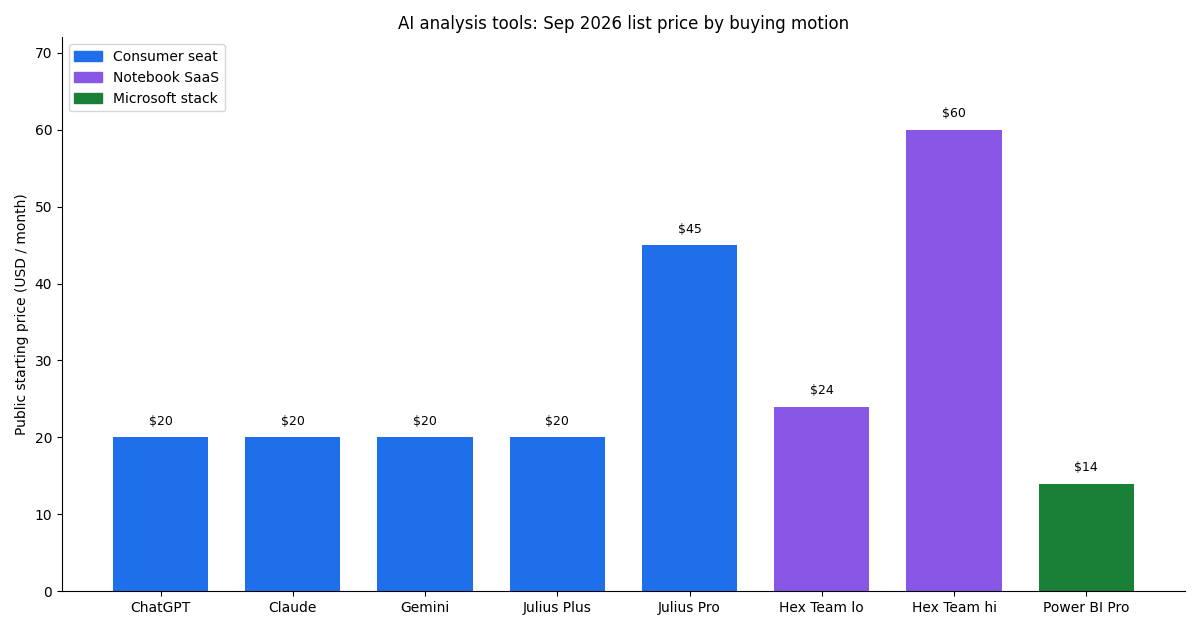
Treat data analysis AI tools as the same price table with the noun order flipped. AI data analytics tools (ThoughtSpot, Power BI Copilot, Cortex, Genie) almost always lose to credit or Fabric bills, not the $20 chat seat. Model license + analyst rework + platform overhead together; the cheapest seat is rarely the lowest TCO.
Analyst Scenarios

Exploratory spike. Product wants a quick read on feature adoption from last week's export. Copilots win on latency; governance demands are low.
Governed self-service. Two hundred managers query revenue metrics monthly. Semantic-layer tools win because definition drift destroys trust faster than slow queries.
Recurring executive narrative. The CEO wants the same churn story every Monday with updated numbers and consistent logic. AI-native agents win when memory and process timelines replace manual re-prompting.
Map your highest-frequency scenario before comparing feature matrices. That single choice eliminates half the market without a single sales call.
How Analysts Should Evaluate Tools
Platform teams often read SQL data analysis tools alongside this topic.
Use one shared scorecard for every trial:
| Criterion | Question to ask |
|---|---|
| Question-to-answer time | How quickly can an analyst deliver a trusted answer? |
| SQL quality | Are joins, filters, and assumptions consistently correct? |
| Workflow transparency | Can reviewers inspect intermediate outputs? |
| Repeatability | Can the same method be reused next week? |
| Data governance | Does it respect source-level permissions and policies? |
| Cost predictability | Can team leads forecast usage cost at scale? |
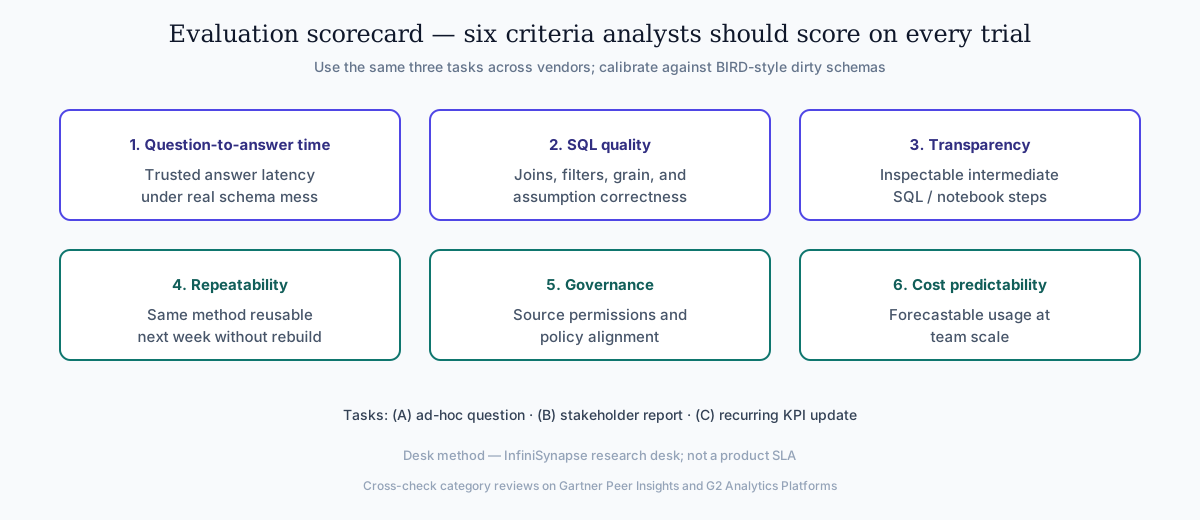
Practical tip: run the same three analyst tasks across every tool: one ad-hoc question, one stakeholder report, and one recurring KPI update. Pair SQL checks with a BIRD-style dirty-schema sample when warehouses are messy.
Team Scenario Recommendations
Snowflake-first teams should follow Snowflake documentation when defining warehouses, roles, and semantic views for NL2SQL agents. Semantic alignment work should reference the Google Cloud architecture framework before agents encode business metrics.
| Team context | Recommended starting set |
|---|---|
| Solo analyst with mixed files | ChatGPT + Claude |
| BI team with semantic layer | ThoughtSpot + Hex |
| Lakehouse-first data team | Databricks Genie + Claude |
| Spreadsheet-heavy operations team | Gemini + Julius |
| Recurring executive reporting | InfiniSynapse + warehouse source |
For recurring work, pair this article with Data Agent Memory to understand why retained workflow context compounds over time.
Common Pitfalls
Buyers hit predictable walls when they treat categories as interchangeable:
Pitfall 1 — Treating all tools as interchangeable. A copilot and an AI-native agent solve different problems. Forcing one category to do both creates shadow workflows and reviewer fatigue.
Pitfall 2 — Skipping validation on "good enough" SQL. AI-accelerated query drafting still produces wrong joins. Build a mandatory validation step before any external stakeholder sees output.
Pitfall 3 — Ignoring total cost of re-prompting. Seat price is visible; analyst hours spent re-explaining context every week are not. Memory-backed systems often win on TCO even at higher license cost.
Pitfall 4 — Enterprise rollout without data boundaries. Uploading production extracts into consumer copilot tiers bypasses existing governance. Match tool tier to data classification before pilots expand.
Pitfall 5 — Demo speed without parallel-run validation. Teams over-index on first-answer latency, under-specify recurring KPI ownership, or skip a week-2 replay. Document those failure modes before rollout. Self-hosted agent deployments should align with Google SRE practices—error budgets, runbooks, and blameless postmortems for failed query chains.
30-Day Evaluation Playbook
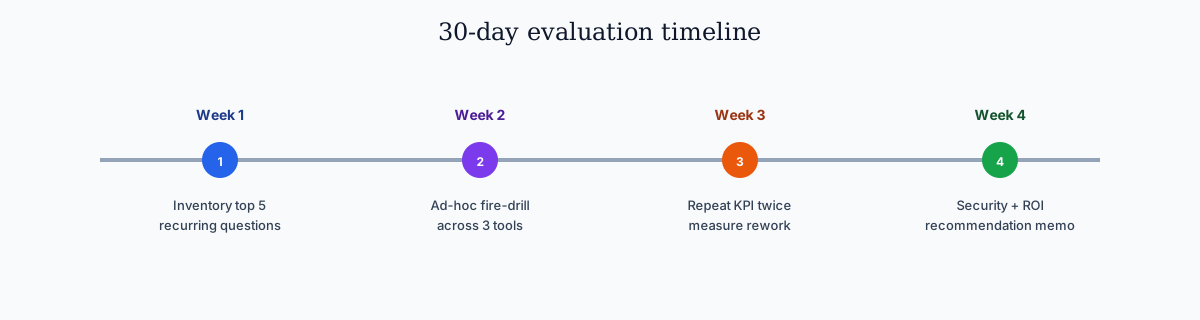
Run this playbook whenever you evaluate shortlisted platforms for production. Borrow reliability habits from the AWS Well-Architected Machine Learning Lens—error budgets and blameless postmortems for failed query chains. Keep CSV exports aligned with RFC 4180.
| Week | Focus | Deliverable |
|---|---|---|
| Week 1 | Inventory | List top five recurring analyst questions |
| Week 2 | Ad-hoc benchmark | Time and score three tools on one fire-drill task |
| Week 3 | Recurrence benchmark | Run same KPI workflow twice; measure rework |
| Week 4 | Governance + ROI | Security review and draft recommendation memo |
Assign a skeptic reviewer whose job is to challenge joins and metric definitions. Strong platforms survive skeptic review without collapsing into hand-waved assumptions.
Security Checklist for Enterprise Rollout
- Confirm data residency and retention for uploads and query logs
- Verify role-based access aligns with warehouse permissions
- Test SSO and admin audit exports
- Document which data classes may enter which tool tier
- Validate model routing options for sensitive workloads
- Run a tabletop incident exercise for accidental data exposure
Production rollouts should align access and review controls with the NIST AI Risk Management Framework. LLM-backed analytics should account for prompt-injection and data-exfiltration risks in the OWASP Top 10 for LLM Applications. Enterprise AI adoption guidance in Snowflake documentation mirrors the shift from ad-hoc copilots to repeatable, reviewable decision workflows.
Warehouse-integrated options usually align faster with existing perimeters, but security teams should still review on production-like samples. Shortlisting means treating data residency, access controls, and audit trails as first-class criteria—not a late-stage checkbox.
ROI Signals
| Signal | Healthy trend |
|---|---|
| Time-to-first-trusted-answer | Down without error rate up |
| Weekly rework on same KPI | Down quarter over quarter |
| Analyst tickets closed per week | Up with stable headcount |
| Stakeholder definition disputes | Down on recurring metrics |
| Audit prep hours | Down on scheduled reports |
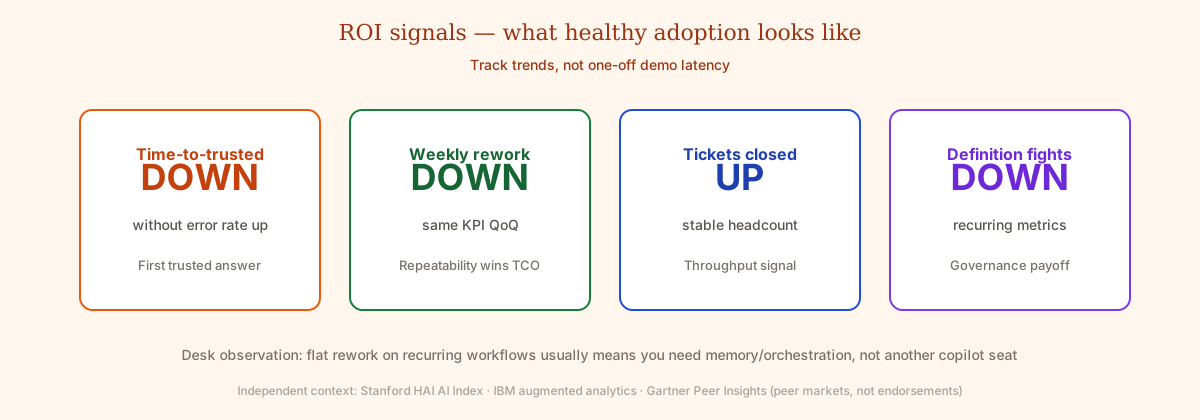
Flat rework on recurring workflows signals you need memory and orchestration, not another copilot seat. Teams that measure ROI honestly usually discover that repeatability—not raw speed—drives the largest analyst hour savings.
Foundational warehouse concepts—grain, dimensions, and conformed metrics—remain essential; Wikipedia's data warehouse overview is a concise refresher for reviewers validating generated SQL. Azure-centric stacks should reference the Azure architecture center when placing analytics agents beside data services. The BIRD benchmark adds dirty-schema realism that Spider-only leaderboards under-weight in production. Semantic alignment work should reference Wikipedia's conceptual data model overview before agents encode business metrics. Spreadsheet-heavy preparation often mirrors pandas documentation patterns for typing, joins, and reproducible transforms.
Frequently Asked Questions
What are the best AI analysis tools in 2026?
The best AI analysis tools in 2026 are ChatGPT, Claude, Gemini, Julius, Hex, ThoughtSpot, Databricks Genie, Power BI Copilot, Snowflake Cortex Analyst, and InfiniSynapse. Pick by workflow: ad-hoc files, notebook-first analytics, governed BI, or recurring autonomous reporting. Triangulate vendor claims with Gartner Peer Insights and the Stanford HAI AI Index.
Are AI data analysis tools the same as data analysis AI tools?
Yes. AI data analysis tools and data analysis AI tools are the same buyer shortlist with the noun order flipped. Use this page for both. Do not split the evaluation into two stacks.
What is the difference between AI data analysis tools and AI data analytics tools?
AI data analysis tools covers file copilots plus warehouse agents. AI data analytics tools is the BI/metrics name for the warehouse half of the same list—ThoughtSpot, Power BI Copilot, Cortex Analyst, Databricks Genie, and Hex when it sits on a governed warehouse. Same ten products; different buying language.
How much do AI analysis tools cost?
Consumer AI analysis tools start near $20/month (ChatGPT Plus, Claude Pro, Gemini Advanced, Julius Plus). Notebook Team seats are often $24–$60/user. Warehouse AI data analytics tools are credit- or Fabric-metered, so the $20 chat seat is the wrong budget line. See the September 2026 price table above.
Which AI data analysis tools work with a SQL warehouse?
Warehouse-native options are Databricks Genie, Snowflake Cortex Analyst, ThoughtSpot Spotter, Hex Magic, and Power BI Copilot (via Fabric). Consumer copilots can draft SQL from a paste or CSV, but they do not inherit warehouse roles until you add a governed connector. Dirty-schema realism in BIRD is the right validation mindset.
Conclusion
AI data analysis tools now form an analyst stack, not a single category. The strongest teams combine fast copilots for exploration with systems that preserve workflow quality and repeatability.
To pick the right AI data analysis tools, start with one recurring business question, benchmark tools on the same task, and choose the platform that best balances speed, trust, and long-term reuse. Confidence comes on the tenth run, not just the first demo—especially when independent peer markets and research indexes disagree with a vendor slide. Revisit your shortlist quarterly—the best fit for a governed BI team differs from that for a solo analyst doing ad-hoc file work.
Optional product note (commercial): Educational scorecards and playbooks above stand alone. To try goal-driven analysis with SQL traces and memory cards, try InfiniSynapse online or book a demo. Skip if you only need the comparison framework and desk tallies.