AI Tools for Data Analysts: Tasks and Stack
By William Zhu & the InfiniSynapse Data Team · Published: 2026-06-09 · Last updated: 2026-09-17 · Last verified: 2026-09-17 · About: Editorial standards · About / team
Author credentials: William Zhu is cofounder of InfiniSynapse (GitHub @allwefantasy). Desk experience: shipping recurring multi-source analyst workflows with review gates—not a sponsored “best AI tool” affiliate list. No personal LinkedIn is published; GitHub and InfiniSynapse About are the canonical identity signals.
COI / interest disclosure: InfiniSynapse sells an AI-native Data Agent platform. Product mentions appear only in the labeled Product recommendation (commercial) module and the InfiniSynapse fit section (vendor-scoped). The comparison scorecard treats InfiniSynapse as one option among peers.
Fact-check / verification: KPI baselines and desk n=12 findings below are InfiniSynapse first-party desk composites from customer-style analyst pilots—not a public market survey. Primaries: OWASP Top 10 for LLM Applications · UK NCSC secure AI guidelines · NIST SP 800-53 · Stanford HAI AI Index · Google SRE book · Databricks Genie docs. Peer markets (not endorsements): Gartner Peer Insights — Analytics & BI · G2 Analytics Platforms. Corrections: zhuhl@infinisynapse.com · editorial corrections.
Version history: 2026-06-09 initial · 2026-08-07 EEAT / Top Tools Compared / desk n=12 / FAQ×10 / SVG suite · 2026-09-17 job-task section + named examples inside classes + inbound. Marker:
DESK-ATDA-20260917A. Media note: No VideoObject; use comparison, KPI, workflow, timeline, and decision SVGs plus hero.
 Compare tools by tenth-run quality—not first-prompt polish.
Table of Contents
- TL;DR
- What AI for data analysts actually does
- What “good” looks like
- Top Tools Compared
- Desk Evidence: KPI Baselines (n=12)
- Pain Points for Data Analysts
- Workflow Playbook
- HowTo: 30-Day Rollout
- Case Study: Anonymized Analyst Pilot
- InfiniSynapse Fit (vendor-scoped)
- Governance Checklist
- Cluster Deep Dives
- Frequently Asked Questions
- Conclusion
TL;DR
Direct answer: AI for data analysts is not one chatbot. AI tools for data analysts draft SQL, clean files, and rerun weekly KPI packs under a named reviewer. Pick the class by data gravity: notebook AI for files, Genie inside Databricks, BI copilots for dashboard search, and an agent when the same multi-source question returns every week.
Who this is for: analytics leads shortlisting ai tools for data analysts for Monday KPI loops—not a ten-vendor trophy list.
What you'll learn: job tasks, a four-class scorecard, desk n=12 KPIs, a playbook, 30-day HowTo, a pilot case, and gates.
Category split: methods live on AI for data analysis. Named ten-tool bake-offs live on Best AI tools for data analysis. Headcount myths live on Will AI replace data analysts?. Tableau / Power BI / Looker versus the AI layer lives on AI data analyst vs BI tools. This page is the role stack: which class of ai tools for data analysts matches the job.
What AI for data analysts actually does
Searchers typing ai for data analysts want the job, not a platform brochure. On the desk, ai tools for data analysts take four repeating tasks. Humans still own the metric contract and the sign-off.
| Job task | What the tool drafts | What the analyst still owns | Default class |
|---|---|---|---|
| SQL and warehouse pulls | Joins, filters, grain checks | Source of truth, row-level permission | Lakehouse Genie or agent |
| File cleanup | Type fixes, nulls, first-pass EDA | Whether the file is the right extract | Notebook / chat AI |
| Charts and narrative | First cut of the pack | The decision question and caveats | Notebook AI or BI copilot |
| Weekly KPI rerun | Same query + same cuts next Monday | Definition freeze when finance disagrees | Multi-source agent |
That is ai for data analysts in one loop: draft → inspect → reuse. A chat that cannot show the SQL, the grain, and last week’s assumption is a demo, not a stack. File-size ceilings for chat uploads belong on ChatGPT data analysis limits—do not treat a 50 MB CSV as a warehouse.
Method vocabulary (descriptive vs diagnostic vs predictive) stays on AI for data analysis. Hiring rubrics stay on AI data analyst skills. The skill list itself is data analysis AI skills. Keep this section as the task map for ai tools for data analysts.
What “good” looks like in practice
Key Definition: ai tools for data analysts means software that combines multi-source data, automated analytical steps, and traceable reasoning into a repeatable workflow that improves real decisions—not a chat box that draws one chart. If a product cannot reuse last week’s grain, it is not in this class of ai tools for data analysts.
Teams often over-index on first-response quality. A better test is tenth-run quality: does the workflow still produce consistent results after schema changes, stakeholder edits, and deadline pressure? The answer depends on governance, memory, and process transparency. The move from dashboard-first BI to reviewable operating loops is the same discipline Google SRE applies to production systems—error budgets and blameless review, not demo speed.
Adoption velocity for agent-assisted analysis is tracked in the Stanford HAI AI Index. Platform teams embedding copilots should also read Google Cloud Vertex AI docs for production constraints. Those production limits are why ai tools for data analysts are scored on the tenth rerun, not the first prompt.
Top Tools Compared
The title promise for ai tools for data analysts is a bake-off—not a single-vendor brochure. Below is a directional desk scorecard (1–5) across four common classes. Scores are InfiniSynapse desk composites for analyst-facing weekly KPI work; they are not vendor SLAs.
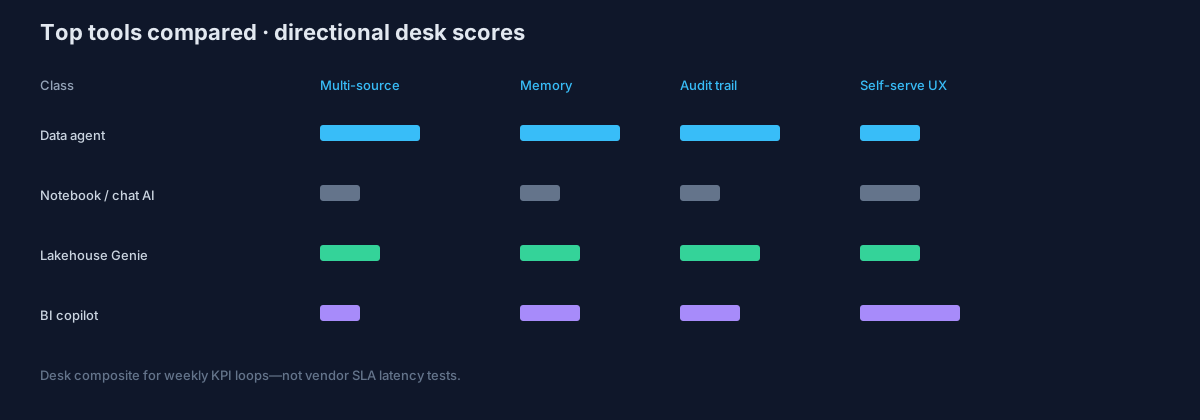 Directional scores for recurring multi-source analyst workflows (desk composite).
| Dimension (1–5) | Multi-source data agent (e.g. InfiniSynapse) | Notebook / chat AI (e.g. ChatGPT ADA / Julius-class) | Lakehouse Genie (e.g. Databricks Genie) | BI copilot (search / Pulse-class) |
|---|---|---|---|---|
| Multi-source orchestration | 5 | 2 | 3 | 2 |
| Metric-contract memory across runs | 5 | 2 | 3 | 3 |
| Audit trail / intermediate steps | 5 | 2 | 4 | 3 |
| Business-user self-serve UX | 3 | 3 | 3 | 5 |
| Lakehouse-native governance | 3 | 1 | 5 | 2 |
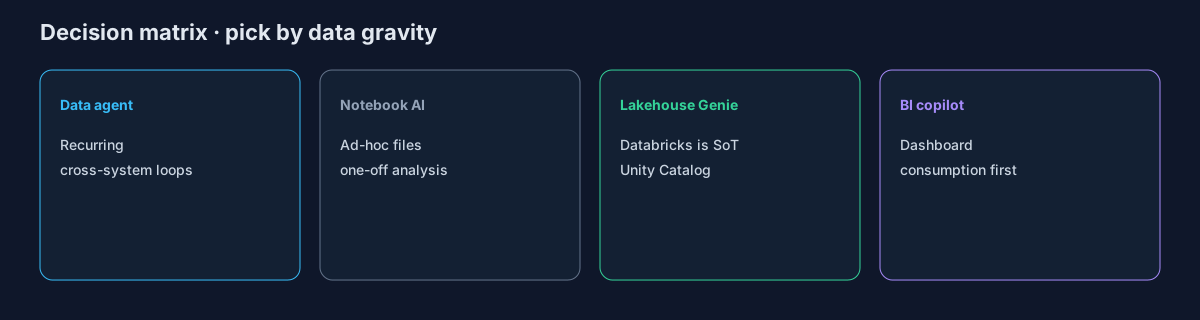
| Best when… | Recurring cross-system loops | Ad-hoc file / notebook analysis | Databricks is already SoT | Dashboard consumption first |
Named examples inside each class of ai tools for data analysts (not a trophy list; confirm seat prices on the vendor site):
| Class | Examples analysts actually open | Start here when… |
|---|---|---|
| Notebook / chat AI | ChatGPT Advanced Data Analysis, Julius, Claude in a repo, Deepnote / Hex / DataLab | One file, one question, inspectable Python or SQL |
| Lakehouse Genie | Databricks Genie, Snowflake Cortex-class analysts | The warehouse is already the system of record |
| BI copilot | Power BI Copilot, Tableau Pulse, ThoughtSpot Spotter-class search | The bottleneck is finding a number on a curated model |
| Multi-source agent | InfiniSynapse and peer agent platforms | The same CRM + billing + warehouse pack returns every week |
How to read it: pick the column that matches data gravity. Genie wins inside Unity Catalog. Notebook AI wins for one-off files. BI copilots win for search over curated models. Agents win when the same multi-source question recurs weekly. That split is how to read ai tools for data analysts before a ten-name list. The named list lives on Best AI tools for data analysis. Peers: julius ai · ThoughtSpot vs Databricks Genie · Hex alternatives · AI agent for data analysis.
Independent buyer sentiment (not endorsements): Gartner Peer Insights — Analytics & BI · G2 Analytics Platforms.
Desk Evidence: KPI Baselines (n=12)
Source: InfiniSynapse 2025–2026 Analyst Pilot Desk Composite (n=12) — purposive sample of recurring KPI workflows before/after a governed loop of ai tools for data analysts. Methodology: each pilot logged baseline cycle time and rework for four weeks, then a 90-day target after encoding metric contracts + review gates. Not a vendor lab study and not Reddit/market-research census. Full principles: editorial standards.
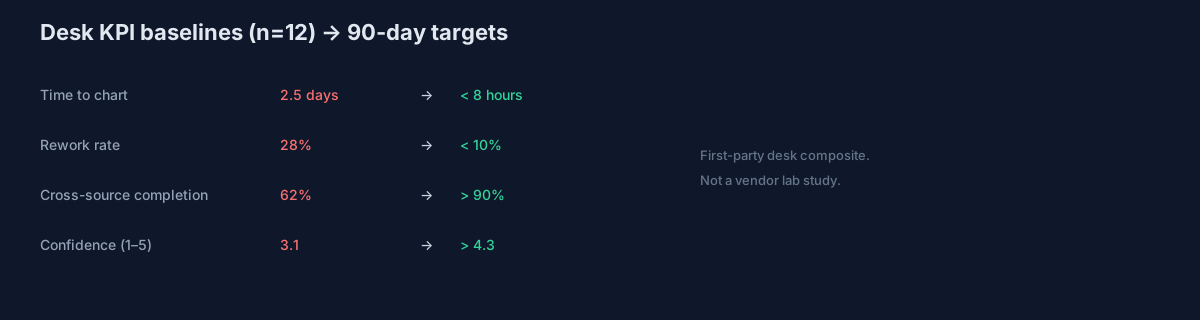
| KPI | Desk baseline (median) | 90-day target | Owner |
|---|---|---|---|
| Time to first decision-ready chart | 2.5 days | < 8 hours | Analytics lead |
| Recurring report rework rate | 28% | < 10% | BI manager |
| Cross-source request completion | 62% | > 90% | Senior analyst |
| Stakeholder confidence (1–5) | 3.1 | > 4.3 | Data PM |
| Analysts on weekly KPI pack | 3 | 1 analyst + agent | Head of data |
Quotable desk assertion: across n=12, median time-to-chart was 2.5 days before a governed loop; teams that encoded metric contracts first cut rework toward the <10% band. Re-measure on your exports before citing internally. These medians are how we pressure-test ai tools for data analysts on recurring packs, not one-off demos.
Enterprise adoption framing for reviewable workflows also appears in Google Cloud Vertex AI docs.
Pain Points for Data Analysts
- Analysts lose time rewriting the same SQL for weekly stakeholder requests.
- Metric definitions drift across dashboards, notebooks, and ad-hoc exports.
- Multi-source joins across product, CRM, and finance data are hard to standardize.
- Validation and QA steps are manual, so confidence drops near executive deadlines.
- Insight write-ups are rushed, which weakens decision quality in planning meetings.
Those five failures are why teams shop ai tools for data analysts in the first place. Leverage appears only when source connectivity, analytical reasoning, and operational memory share one loop. BI display layers alone are not enough—see Wikipedia business intelligence for the classic separation of presentation vs analysis execution.
Workflow Playbook
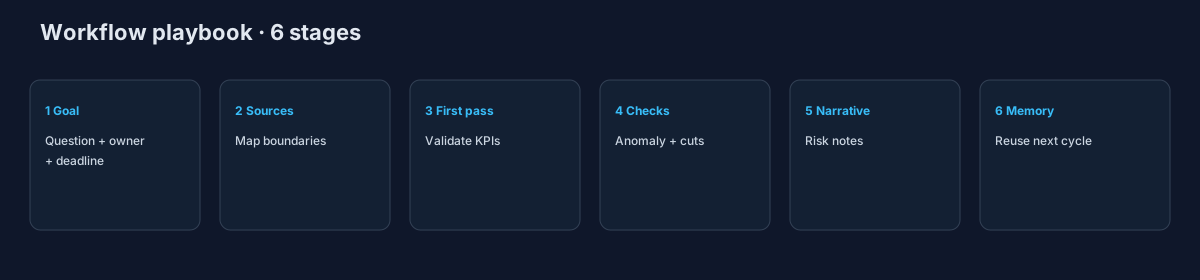
| Stage | Playbook action |
|---|---|
| Step 1 | Collect goal context: business question, decision owner, and reporting deadline. |
| Step 2 | Map source boundaries across warehouse tables, BI extracts, and operational apps. |
| Step 3 | Generate first-pass analysis and validate assumptions against known KPI definitions. |
| Step 4 | Run anomaly checks, segmentation cuts, and counterfactual slices before publishing. |
| Step 5 | Draft narrative with risk notes so stakeholders see trade-offs, not only topline metrics. |
| Step 6 | Store reusable logic as memory cards to reduce repeat work in the next cycle. |
Use this playbook as the operating loop for ai tools for data analysts, not as a prompt library. Observability for agentic analytics should follow OpenTelemetry documentation so query chains remain traceable. NL interfaces still inherit ambiguity limits described in Wikipedia’s NLP overview.
HowTo: 30-Day Rollout
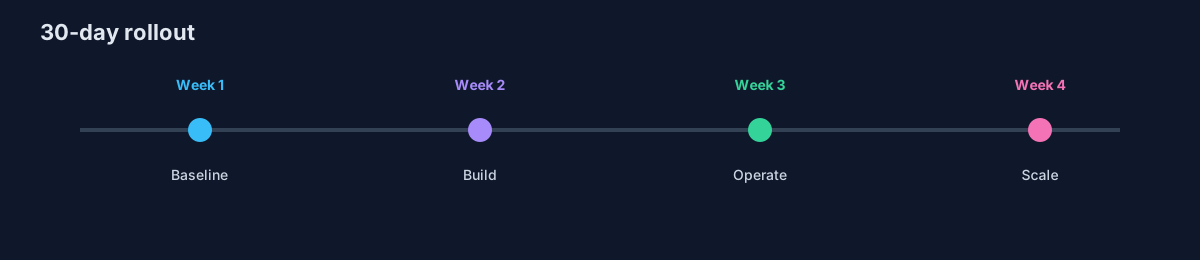
- Week 1 — Baseline + scope. Select one recurring workflow, define KPI owners, and document source boundaries.
- Week 2 — Build + validate. Configure connections, run the first workflow of ai tools for data analysts, and validate assumptions with domain owners.
- Week 3 — Operationalize. Add review checkpoints, publish a recurring output format, and track rework.
- Week 4 — Scale carefully. Preserve reusable memory, expand to one adjacent use case, and present an ROI snapshot.
Start with one high-frequency decision loop when you roll out ai tools for data analysts. Teams that start with too many workflows create governance friction before value. Secure connectors with NCSC secure AI guidelines and account for LLM risks in OWASP Top 10 for LLM Applications.
Case Study: Anonymized Analyst Pilot
Composite case (anonymized desk notes; not a named customer endorsement): a B2B SaaS team used mixed ai tools for data analysts on weekly “expansion revenue by segment” packs across warehouse + CRM + billing. Three analysts rebuilt joins each Monday; reopen rate on metric definitions was 31%.
| Metric | Before | After 90 days (desk path) |
|---|---|---|
| Time to pack | 2.5–3 days | ~6 hours median |
| Rework / reopen | 31% | 9% |
| Path | Notebook prompts + screenshots | Governed agent loop + metric contracts + named reviewer |
| Tooling note | Chat AI for files; Genie for lakehouse tables only | Agent for cross-source; BI kept for VP dashboards |
Lesson: coexistence beat a single-tool mandate—BI for consumption, agent for recurring multi-source prep. That mix is the practical shape of ai tools for data analysts after 90 days. SaaS teams can apply the same division of work through an AI platform for SaaS metrics and product analytics.
InfiniSynapse Fit (vendor-scoped)
For teams scaling ai tools for data analysts, the hard problem is not generating one chart; it is preserving trusted logic across repeated cycles. InfiniSynapse is one pattern for autonomous execution, process traceability, and reusable memory cards. Compare the run loop in AI agent for data analysis (architecture); product teams embedding NL should review Embedded Analytics AI.
Where many ai tools for data analysts require a new prompt every week, a data-agent loop can run the same sequence across warehouse tables, files, and app connectors—then expose steps for sign-off.
Governance and Execution Checklist
- Source controls: role-aware access for every system ai tools for data analysts can reach (NIST SP 800-53).
- Metric contracts: stable definitions for critical business KPIs.
- Review gates: explicit checks before stakeholder-facing distribution.
- Memory policy: documented rules for reusable assumptions and prompts.
- Escalation path: ownership when outputs conflict with domain expectations.
EU-facing teams map controls via the European approach to artificial intelligence. Payments analytics should follow Stripe documentation for event models. Ecommerce KPI normalization can reference Shopify ecommerce analytics guidance.
Governance needs differ by function—marketing funnels vs ops vs finance require different controls: Marketing data analysis · AI in data center operations · FP&A close pack · AI agent data analysis.
Priorities that compound: one recurring decision-grade question; named reviewer; baseline comparison before automation. Headcount myths belong in Will AI Replace Data Analysts?, not vendor demos. The role object stays on AI data analyst. Treat the checklist as the gate that keeps ai tools for data analysts from becoming a shadow BI stack.
Scorecard to track: rerun consistency · rework rate · time-to-first-insight · audit-prep time · template reuse.
Cluster Deep Dives by Workflow
Open a sibling when the next sprint changes governance—not as a reading list. These guides extend ai tools for data analysts into one function.
| Focus | When it fits |
|---|---|
| FP&A close pack | Close / FP&A; freeze definitions |
| Marketing funnels | Ads + CRM + web sprawl |
| Data center operations | Infra KPIs and escalation |
| Data engineers | Contract-tested schemas |
| CTO / semantic layer | Metric contracts as product |
| Ecommerce | Catalog / refund grain |
| SaaS PLG | Churn / expansion joins |
| Financial data analysis | Regulated reporting packs |
| Supply chain / Logistics / Healthcare | Domain latency / PHI |
| Product managers | Experiment reads |
| reliable provider for AI-driven data analysis tools | Broad category pick |
| Agent workflows · AI agent for data analysis · Embedded AI | Run loop vs embed |
Frequently Asked Questions
What does AI for data analysts actually do?
It drafts SQL, cleans files, cuts first charts, and reruns a weekly pack. AI tools for data analysts do not own the metric contract—the reviewer does. See What AI for data analysts actually does.
Can I start in Excel or Google Sheets?
Yes, for one extract. That is still ai tools for data analysts, just the notebook class. Move to Genie or an agent when the same join must hit the warehouse next Monday.
Is there a free way to try the stack?
Start with a vendor free tier on one file, then one warehouse you already pay for. Free chat is not a multi-source loop of ai tools for data analysts.
How do these tools help teams make faster decisions?
They help when ai tools for data analysts turn multi-source work into one repeatable flow with reused assumptions—without skipping review.
What data sources should be connected first?
Start with three systems that most directly affect your core KPI: a system of record, a behavioral source, and a financial outcome source—before expanding scope.
Can this approach meet strict governance requirements?
Yes—when implementations use source-level permissions, auditable execution timelines, and reviewer checkpoints (NIST SP 800-53, NCSC).
What makes InfiniSynapse a fit for recurring multi-source workflows?
Memory, process traceability, and cross-source orchestration—useful when the same KPI question recurs weekly. Editorial comparison above does not require InfiniSynapse.
How long does it take to show ROI?
Desk n=12 saw early movement within 30 days when teams focused one recurring workflow of ai tools for data analysts and tracked cycle time, rework, and confidence—not one-off demos.
Which tool class should we pick first?
Match data gravity among ai tools for data analysts: Genie if Databricks is SoT; BI copilot if consumption is the bottleneck; notebook AI for files; agent for weekly cross-system loops. See Top Tools Compared.
Are the KPI numbers official vendor benchmarks?
No. They are InfiniSynapse first-party desk composites (n=12). Re-measure on your exports.
How is tenth-run quality different from demo quality?
Demo quality is the first impressive answer. Tenth-run quality is consistency after schema drift, stakeholder edits, and deadline pressure.
Do we still need human analysts?
Yes. Agents and copilots change who runs the first pass; reviewers still own metric contracts and sign-off. See Will AI replace data analysts?.
Conclusion
AI tools for data analysts work when marketing, finance, and ops read the same metric contract. Map the job task first, then pick the class of ai tools for data analysts that matches data gravity—not the demo on slide one.
Product recommendation (commercial)
Label: The following is a commercial product recommendation, separate from the editorial bake-off.
For organizations with repeated multi-source questions, evaluate InfiniSynapse as one agent-class option alongside Genie, notebook AI, and BI copilots. Desk n=12 KPIs and OWASP / NCSC / NIST citations above are not product endorsements.