Best AI Tools for Excel Data Analysis: 8 Ranked (2026)
The best AI for Excel data analysis for work that stays in the grid is Microsoft Copilot in Excel (11/12). In 2026 ChatGPT for Excel and Claude for Excel also edit the open workbook. Upload chats (ChatGPT ADA, Claude) and Power BI Copilot still fit one-off copies and dashboards. Pick by file location and month-2 reuse.
By William Zhu & the InfiniSynapse Data Team — two analytics engineers who run workbook intake pilots, a data platform engineer, and an editor. · Published: 2026-06-09 · Last updated: 2026-09-17 · Last reviewed: 2026-09-17 · Next review: 2026-12-16 · Editorial standards · About / team
Author credentials: William Zhu is cofounder of InfiniSynapse (GitHub @allwefantasy; org GitHub InfiniSynapse). Desk experience: workbook-intake pilots scoring Excel copilots on shared messy packs. No personal LinkedIn; GitHub + About are the canonical identity signals. We do not claim industry certifications we do not hold.
Editorial independence: no paid placement, no affiliate links, no sponsored placement in the table below. Capability claims link to vendor docs or independent review platforms (G2, Gartner Peer Insights) so you can check them yourself.
Conflict of interest: InfiniSynapse publishes this guide and sells a Data Agent that ingests Excel among other sources. Because we cannot credibly rank ourselves, our own product is excluded from the ranked scorecard and appears separately in a clearly-marked first-party section. Competing tools are described from public docs, independent review platforms, and the same workbook pilots.
Marker:
DESK-XAT-20260917A· SERP CTR: Title/desc to tools-plural + sitelink-friendly TL;DR heading;#tldrid kept; scorecard numbers unchanged.

Table of Contents
- TL;DR: Copilot leads in-Excel (11/12)
- Why Excel Is Still the Front Door of Analytics
- In Excel vs upload
- Excel formula analysis tool
- Shared Test Design
- Reproduce This Test Yourself
- Limitations
- 0–2 Scorecard
- Excel AI Tools, One by One
- First-Party Note: Where InfiniSynapse Fits
- Governance, Evaluation, and Pitfalls
- 30-Day Playbook and Security
- FAQ
- References
- Changelog
TL;DR: Copilot leads in-Excel (11/12)
Canonical answer: Microsoft Copilot in Excel leads at 11/12 when the
.xlsxstays in the grid. Upload copilots win one-off triage; month-2 close needs persisted cleaning logic, not another demo chart.
Key takeaways
- Recurrence decides. First-pass quality was close; the spread opened on task 5 — re-running "next month" without re-teaching the workbook.
- Governance ≠ capability. Top cleaners can still score 0 on governance for the data class tested.
- Native wins for Office shops. Microsoft Copilot in Excel led at 11/12 by avoiding export friction.
- Structural traps broke tools — trailing TOTAL rows in pivots, renamed join keys, and text-stored amounts silently dropped from sums.
Quick picks among the tools in this shortlist: Microsoft Copilot in Excel (native) · ChatGPT for Excel / Claude for Excel (2026 in-grid add-ins) · ChatGPT ADA / Claude (upload triage) · Julius AI (chart-first) · Power BI Copilot (Excel→dashboard). Related: Best AI Tools for Data Analysis · AI data analysis tools · microsoft software for data analysis · AI financial modeling in Excel. Workbook models that feed a credit review or a close pack sit under financial data analysis software development.
Account for upload risks via OWASP Top 10 for LLM Applications, NIST AI RMF, and the NIST Cybersecurity Framework.
Why Excel Is Still the Front Door of Analytics
Key Definition: Excel AI tools augment spreadsheet workflows with natural-language analysis, automated transformations, and faster insight delivery — without pretending every workbook belongs in a warehouse on day one.
Critical files still arrive as .xlsx (Microsoft Excel help). Teams comparing excel AI tools start here because intake still lands in spreadsheets first.
| Excel pain point | What AI should improve |
|---|---|
| Inconsistent types and nulls | Automated cleaning and profiling |
| Manual formulas and lookups | Formula and logic suggestions |
| Slow pivot/report assembly | Natural-language summarization and charting |
| Repeated monthly cleanup | Reusable templates or workflow memory |
Spreadsheet automation AI should profile types, flag duplicates, and draft pivots before analysts rewrite VLOOKUP chains. Two concepts separate triage from recurrence: workflow memory (persisted cleaning steps beyond one chat) and goal-driven execution (profile → clean → aggregate → visualize → verify). An Excel analytics agent with persistence matters when the same pattern repeats monthly. See Data Agent Memory.
In Excel vs upload: where the file should live
Teams asking for the best AI tools to analyze data directly in Excel have the same job as best AI for Excel data analysis, with one extra constraint: do not export the sheet.
Direct answer: If the .xlsx cannot leave the workbook, start with Microsoft Copilot in Excel (11/12). In 2026, ChatGPT for Excel and Claude for Excel also edit the open file as Office add-ins. Upload chats still win a one-off copy. AI tools for Excel that only accept a file upload are not “directly in Excel.”
| Path | Stays in Excel? | Best scored fit | Fail if |
|---|---|---|---|
| Native copilot | Yes — cells, formulas, pivots stay in .xlsx | Microsoft Copilot in Excel (11/12) | No Microsoft 365 Copilot seat, or the file is local-only |
| ChatGPT / Claude add-in | Yes — add-in edits the open workbook | Not separately scored (see note below) | Admin blocks Office add-ins |
| Upload + chat | No — file leaves the workbook | ChatGPT ADA or Claude (9/12 and 7/12) | PII, residency, or month-2 reuse matters |
| Excel → BI | Leaves Excel after shaping | Power BI Copilot (9/12) | The deliverable is still a workbook, not a dashboard |
| Sheets-native | Not Excel | Gemini + Sheets (8/12) | Desktop .xlsx is the source of truth |
If the query is “analyze directly in Excel,” start with Copilot — then consider the two 2026 add-ins if you already pay for ChatGPT or Claude. If the query is “fastest first answer from a file,” start with ChatGPT data analysis for Excel. The Q1–Q2 scorecard below does not change; it shows how far each scored path got on the same messy pack.
2026 in-grid add-ins (not in the Q1–Q2 scores)
The published 0–2 scores stay. What changed after those pilots is the product surface for ai tools for Excel: ChatGPT and Claude are no longer upload-only.
| In-grid product | How it sits in Excel | Public status (vendor) | Use it when |
|---|---|---|---|
| Microsoft Copilot in Excel | Native ribbon; edits cells, formulas, pivots, charts | Generally available on web, Windows, and Mac for eligible Microsoft 365 Copilot / Premium seats (Microsoft 365 Blog, 22 Apr 2026) | The file already lives in OneDrive or SharePoint and you want tenant-contained edits |
| ChatGPT for Excel | Office add-in; builds and updates the open workbook | Generally available 5 May 2026 across ChatGPT plans (OpenAI) | You already pay for ChatGPT and need in-sheet edits without a Copilot seat |
| Claude for Excel | Office add-in; cell-level citations, multi-tab models | Generally available for Pro, Max, Team, and Enterprise (Anthropic docs) | You need formula tracing and citations more than native pivot refresh |
A 2026 shortlist of ai tools for Excel that still treats ChatGPT and Claude as upload-only is stale. Keep the scorecard for the shared-pack comparison; use this table only to pick the path.
What it costs to analyze data in Excel
List prices move. Check the vendor page on your buy date. The snapshot below is the public seat band we used for this refresh — not a quote.
| Product | What you buy | Public seat band | Hidden cost |
|---|---|---|---|
| Microsoft Copilot in Excel | In-grid edits + tenant controls | Commercial Copilot is an add-on on top of Microsoft 365; Personal / Family use AI credits (Microsoft support) | Cloud-saved workbooks required; local-only files fail |
| ChatGPT for Excel | Add-in + existing ChatGPT quota | Included with ChatGPT plans; Free / Go have limited usage (OpenAI Help) | Agentic usage credits on large workbooks |
| Claude for Excel | Add-in + existing Claude plan | Included with Claude Pro, Max, Team, or Enterprise | Admin allow-list for Office add-ins |
| Upload ChatGPT ADA / Claude | Fast copy analysis | Same consumer or team chat plans | You exported the file — governance resets |
| Power BI Copilot | Dashboard handoff, not a live .xlsx | Fabric / Power BI Copilot licensing | Semantic-model debt |
Do not pick ai tools for Excel by list price alone. A cheap chat seat that forces an export can cost more in review hours than an in-grid seat.
Five steps to analyze data directly in Excel
- Decide the file cannot leave. If PII, residency, or the live model blocks export, stay on the in-grid path. If you only need a first answer from a copy, upload is faster — skip to ChatGPT ADA.
- Install the in-grid surface you already pay for. Copilot if you have Microsoft 365 Copilot; otherwise Home → Add-ins → ChatGPT or Claude. Confirm admin policy allows the add-in.
- Plant one trap before you trust it. Rename a join key, keep a trailing TOTAL row, and store one amount as
"$1,234.00"text. Ask for a region×month pivot and a SUM. - Write the formulas into the sheet. An answer in the chat pane is not in-Excel analysis. Accept edits, then explain one generated formula in a sentence a reviewer can check.
- Rerun next month without re-teaching. If the tool starts from scratch, persist cleaning in Power Query or a template. That is still the gap every ranked tool scored 1/2 on.
Excel formula analysis tool
An excel formula analysis tool drafts, explains, and stress-tests spreadsheet logic — XLOOKUP/INDEX-MATCH, date coercion, and text amounts that look numeric. It is a facet of best AI for Excel data analysis, not a separate product class.
On our shared pack, formula was its own 0–2 column:
| Tool | Formula (0–2) | What it did on the pack | Use it as a formula tool when |
|---|---|---|---|
| Microsoft Copilot in Excel | 2 | Drafted lookups in-grid; warned less on date order than ChatGPT | You want formulas written into the sheet you already have |
| ChatGPT ADA | 2 | Asked about mixed date order instead of guessing | You can paste a range or upload a copy |
| Claude | 2 | Strongest on “why is this SUM wrong” narratives | Definitions live in email or a spec doc |
| Rows / sheet copilots | 2 | Cell-by-cell helpers; weaker on structural traps | The job is one formula, not a close pack |
| Power BI Copilot | 1 | Prefers Power Query / DAX over grid formulas | The destination is a model, not a cell |
| Gemini + Sheets | 1 | Sheets-vs-Excel syntax drift | The live file is already in Sheets |
| Julius AI | 1 | Chart-first; TOTAL row and text amounts slipped | The output is a visual, not a formula audit |
How to test any excel formula analysis tool in 15 minutes: (1) ask it to write a lookup after you rename Account Key → Account ID; (2) give it "$1,234.00" stored as text and ask for a SUM; (3) ask it to explain a generated formula in one sentence a reviewer can check. Tools that skip the rename or silently coerce text failed our formula column.
Generated Power Query M and DAX still belong in Governance, Evaluation, and Pitfalls — those are not grid-formula jobs.
Shared Test Design (How We Scored Tools)
We scored excel AI tools on one shared pack (Q1–Q2 2026):
| Artifact | Spec |
|---|---|
| File | ~15–25 MB .xlsx, 3 sheets, mixed types |
| Mess | Nulls, six date formats, duplicate keys, renamed join key, text amounts, trailing TOTAL row, unmapped dimension |
| Tasks | (1) profile + clean, (2) 3 formulas, (3) region×month pivot, (4) 2 charts, (5) month-2 rerun |
| Sample | n = 1 pack × 8 tools × 5 tasks (judgment scores) |
| Raters | 2 InfiniSynapse analysts; ≥1-point disagreements re-run |
Scoring (0–2 each, max 12): cleaning · formula · pivot · chart · repeatability · governance. 0 = failed/unsafe; 1 = partial with material fix; 2 = shippable with minor edits.
Planted traps separated tools more than marketing claims: TOTAL rows in pivots; Account Key → Account ID; dd/mm vs mm/dd; text amounts dropped from sums; LATAM unmapped. Any shortlist of these spreadsheet AI copilots should plant the same traps.
Reproduce This Test Yourself
We publish the generator — not our scored workbook — so you can validate the shortlist yourself.
make_messy_workbook.py builds a synthetic .xlsx with the same defect class:
pip install openpyxl
python make_messy_workbook.py            # ~17 MB, 260k rows, seed 2026
python make_messy_workbook.py --rows 400000 --seed 7
Random synthetic data — safe for consumer AI tiers before procurement signs off. Score finalists with excel-ai-scorecard-blank.csv (includes build string + test date). Both files: CC BY 4.0. Re-running this pack is how we keep claims about the scored tools checkable.
What We Did Not Do (Limitations)
| Limitation | What it means |
|---|---|
| n = 1 workbook | Different mess shapes can reorder scores |
| No blinding | Raters knew which tool produced which output |
| No kappa | Scores are considered opinions, not measurements |
| Versions not pinned | Use the blank scorecard's version column |
| First-party raters | Why InfiniSynapse is excluded from the ranked table |
| Judgment bands | Two "2"s are both shippable — not identical |
Use ours to structure evaluation; use your own run of Excel copilots under test to decide.
0–2 Scorecard (All Tools × Dimensions)
Seven third-party tools × six dimensions. Weight Repeat double if monthly close is the job. InfiniSynapse is excluded as publisher — see first-party note. Ranked view of excel AI tools we tested:
| Tool | Clean | Formula | Pivot | Chart | Repeat | Govern | Total |
|---|---|---|---|---|---|---|---|
| Microsoft Copilot in Excel | 2 | 2 | 2 | 2 | 1 | 2 | 11 |
| ChatGPT ADA | 2 | 2 | 2 | 2 | 1 | 0 | 9 |
| Power BI Copilot | 1 | 1 | 2 | 2 | 1 | 2 | 9 |
| Gemini + Sheets | 2 | 1 | 2 | 1 | 1 | 1 | 8 |
| Claude | 2 | 2 | 1 | 1 | 1 | 0 | 7 |
| Rows / sheet copilots | 1 | 2 | 1 | 1 | 1 | 1 | 7 |
| Julius AI | 1 | 1 | 1 | 2 | 1 | 0 | 6 |
Machine-readable scores: download the ranked matrix as excel-ai-scorecard-results.csv (also linked as Dataset JSON-LD). Blank template: excel-ai-scorecard-blank.csv.
Every tool scored 1 on repeatability. Governance was uncorrelated with cleaning: ChatGPT and Claude scored 0 on governance for the tier tested while matching or beating Copilot on cleanup. That split is why totals alone cannot name a winner among these copilots for every team.
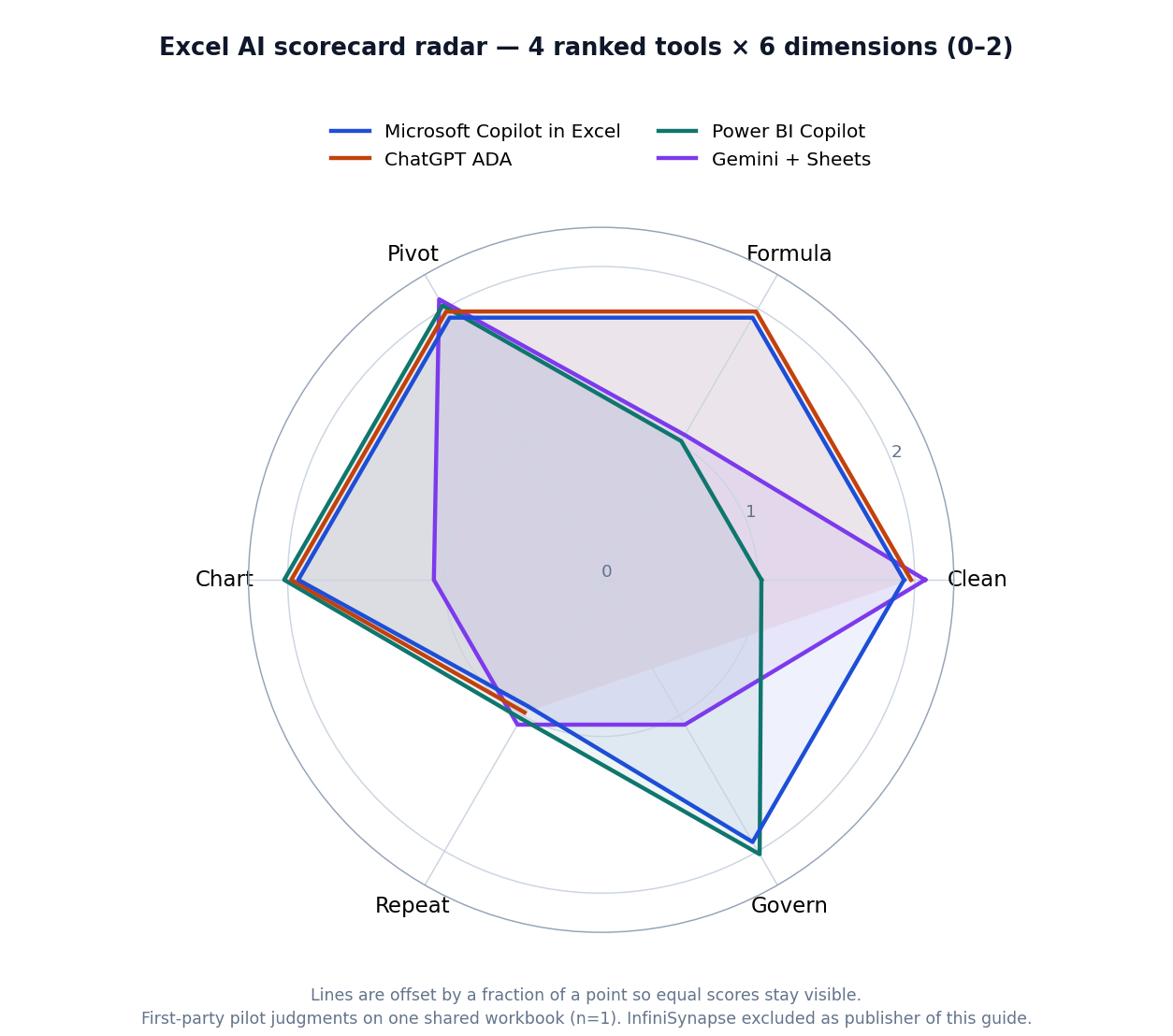
Figure: Scorecard radar for four ranked tools (0–2) on the shared pack.
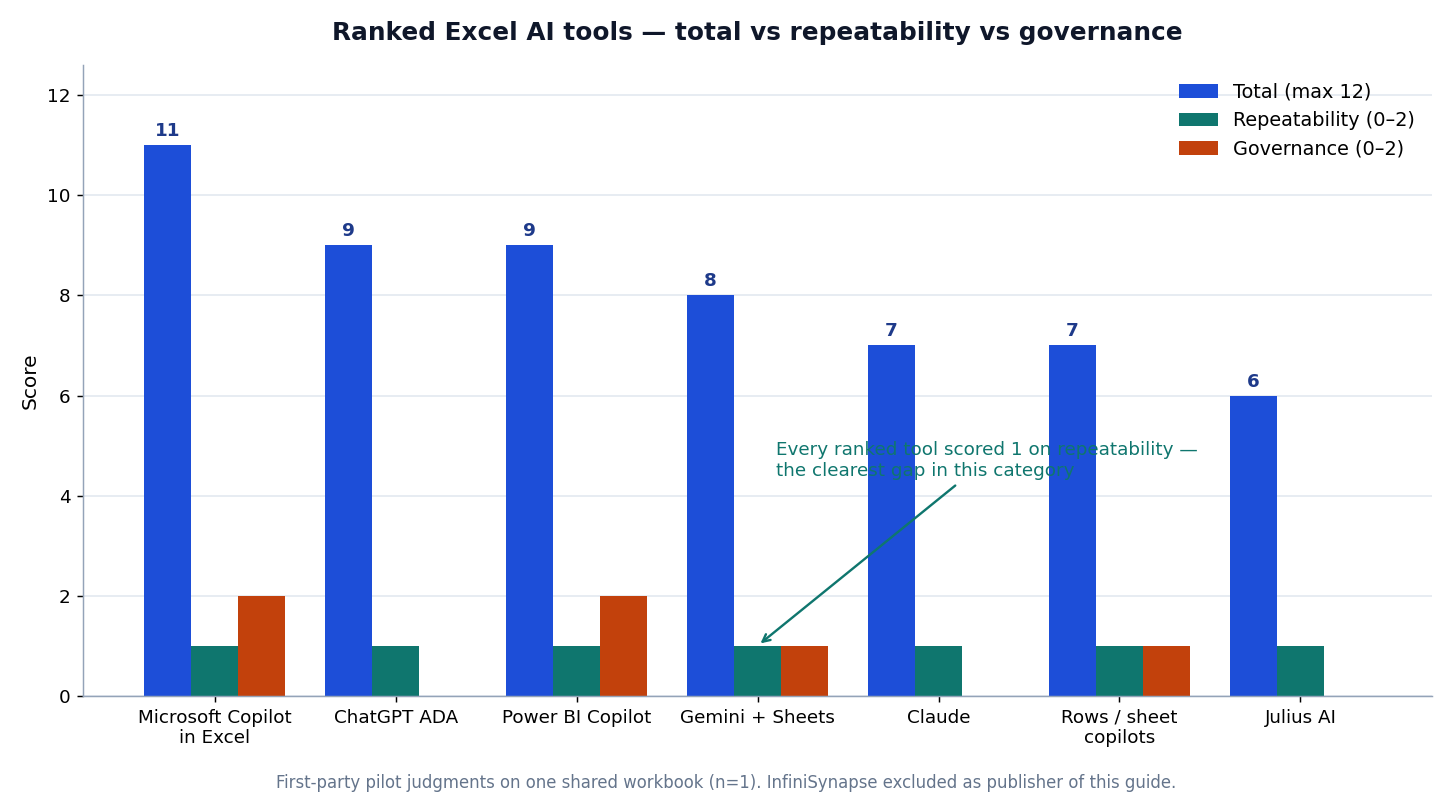
Figure: Totals (max 12) against Repeatability and Governance.
Independent signals (not our scores)
Self-scoring alone is not enough for authority. Use independent third-party reviews on G2 — BI and Gartner Peer Insights — Analytics & BI dated on your evaluation day — peer stars complement, not replace, the workbook pilot.
| Signal | Where to check |
|---|---|
| Vendor docs & licensing | Copilot in Excel, OpenAI data analysis help |
| Peer reviews | G2 — BI, Gartner Peer Insights — Analytics & BI |
| Security baselines | OWASP LLM Top 10, NIST AI RMF |
| Stack-fit surveys | BARC at barc.com |
Snapshot G2/Peer Insights on your evaluation date. Peer stars do not replace a workbook pilot of candidates we scored.
Authority note: scores above are first-party desk judgments (two InfiniSynapse analysts). We do not invent external expert endorsements. To raise independence over time we publish the generator + CSV so outsiders can replicate, invite practitioner reviewers to file disagreements against the blank scorecard, and treat Capterra — Business Intelligence peer reviews alongside G2/Gartner as complementary signals — not substitutes for your own workbook run.
Excel AI Tools, One by One
Practical map of spreadsheet copilots by job-to-be-done:
| Tool | Best for | Strength | Limitation |
|---|---|---|---|
| Microsoft Copilot in Excel | Native Office | Workbook context | Microsoft maturity required |
| ChatGPT (ADA) | Fast file analysis | Profiling + charts | Weak for regulated PII tiers |
| Claude | Narrative + tables | Reasoning over docs | Needs prompt structure |
| Gemini + Sheets | Google stack | Cross-sheet flow | Not native desktop Excel |
| Julius AI | Chart-first business | Low-friction visuals | Limited engineering controls |
| Power BI Copilot | Excel→dashboard | Office + BI bridge | Fabric/Power BI setup |
| Rows / sheet copilots | Formula help | Simple automation | Feature depth varies |
| InfiniSynapse (unranked) | Recurring Excel→report | Workflow memory | Publisher; see note below |
1) Microsoft Copilot in Excel — 11/12. Among Office-native options, Copilot works inside the workbook without export friction and treated the TOTAL row as suspicious. Month 2 still started from scratch. See Microsoft Copilot in Excel.
2) ChatGPT (ADA) — 9/12. Fast profiling; asked about mixed date order instead of guessing. Governance scored 0 on the consumer tier. See ChatGPT data analysis alternatives and OpenAI Help. One-off exploration shortlists usually put it on the shortlist. The May 2026 ChatGPT for Excel add-in is a different path — it edits the open workbook. The 9/12 is the upload ADA run, not the add-in.
3) Power BI Copilot — 9/12. Weaker on ad-hoc cleaning; strong on governance and dashboard destinations. Prefers data already shaped in Power Query. Compare Databricks Genie when the estate leaves Excel. Dashboard-bound intake keeps it on lists of tools on our scorecard.
4) Gemini + Sheets — 8/12. Solid cleaning; .xlsx→Sheets conversion quietly reformatted text amounts. Formula help scored 1 on Sheets-vs-Excel syntax drift (Google Sheets docs). Parallel path for Google-centric teams — not the centre of Excel copilots under test.
5) Claude — 7/12. Best when definitions live in email threads; alone noticed unmapped LATAM and asked. Pivots/charts are narrated more than built. Governance 0 on consumer tier. Useful when these tools must reason over messy requirement docs. Claude for Excel is now an in-grid add-in with cell-level citations. The 7/12 is the upload run, not that add-in.
6) Rows / sheet copilots — 7/12. Strong formula synthesis; structural traps passed cell-by-cell helpers. Score the specific product when evaluating the shortlist.
7) Julius AI — 6/12. Lowest total does not mean worst — it optimises chart-first business use. TOTAL row and text amounts went unremarked. See Julius AI alternatives. If the meeting output is the chart itself, score chart-type correctness on AI data visualization tools.
Read: Office-native → Copilot. Upload Q&A → ChatGPT/Claude. Dashboard destination → Power BI Copilot. Monthly recurrence → weight memory over demo speed. Fit beats vanity ranking when you shortlist workbook AI finalists.
First-Party Note: Where InfiniSynapse Fits
This section is about our own product and is deliberately excluded from the ranked table above. We cannot score ourselves against competitors credibly. Skip it without losing the evaluation method.
InfiniSynapse ingests Excel exports inside multi-step goals, preserving cleaning logic across runs. On the same pack we would rate 2 on repeatability (where every ranked tool scored 1) and 1 on formula/chart help. We will not beat Copilot inside a workbook. It fits when patterns repeat monthly, join other sources, or need an audit trail — wrong for a one-tab chart before 3 p.m. A scripted Power Query + scheduler can deliver the same outcome. Among these Excel analysis tools, InfiniSynapse is adjacent for recurrence, not ranked for native Excel speed.
Governance, Evaluation, and Pitfalls
Ask: upload storage/region; retention and training use; audit trail; permission inheritance; whether attestations cover the AI feature. Tools that live where files already live inherit governance; uploads replace it. That explained every governance score when we ranked the shortlist.
Advanced Excel gap: Generated Power Query M was weakest (plausible syntax, bad type coercion). Generated DAX fails silently via filter context. VBA ports preserve active-selection assumptions. Use AI to explain queries; write M yourself; test every measure against a known subtotal.
Scenarios: Friday triage → upload copilots. Monthly close → supply persistence (Power Query/templates/memory). Excel + warehouse → orchestration + audit. Do not force one of tools on our scorecard into every fire drill.
| Criterion | Test |
|---|---|
| Cleaning | Nulls, types, duplicates; miscast numbers flagged? |
| Formulas | Lookups/dates; ambiguous date-order warnings |
| Pivots | Trailing total leak? |
| Charts | Meeting-ready without heavy restyle |
| Repeatability | Month-2 without re-teaching |
| Governance | Residency, retention, audit, ACLs |
Weight repeatability double if monthly ingestion is core — the whole basis for how we ranked the Excel copilots under test.
| Situation | Approach |
|---|---|
| One-off stakeholder workbook | Excel + copilot |
| Monthly ingestion | Workflow memory or Power Query |
| Excel + DB | Orchestration |
| Leadership KPIs | Traceability + reusable logic |
Broader maps after spreadsheet intake: SQL data analysis tools. Month-2 recurrence — not file size — separates demos from tools in this shortlist.
Pitfalls: sensitive uploads to consumer tiers; trusting pivots without date/region checks; fragile formulas when columns move; silent coercion on "$1,234.00" text; choosing demos over task 5. Each showed up while scoring the ranked spreadsheet AI tools.
30-Day Playbook and Security
Media note: A short 30-Day Playbook walkthrough video is planned. We will add
VideoObject/Clipmarkup only after a first-party CDN-hosted file exists — not before.
| Week | Focus | Deliverable |
|---|---|---|
| 1 | Inventory | Top five intake patterns by recurrence |
| 2 | Ad-hoc trial | Same workbook, same session budget |
| 3 | Recurrence | Monthly close twice |
| 4 | Governance + ROI | Security review, dated peer snapshot, memo |
A fair pass on the candidates we scored always includes task 5 and build strings.
Security vetoes for workbook AI finalists: storage location/retention; post-session deletion; SharePoint/Drive RBAC; written data-class rules; audit logs; external-sharing tabletop; attestations that cover the AI feature (UK NCSC secure AI guidelines).
ROI on comparable files: time-to-clean ↓, formula rewrites ↓, close hours ↓ without error ↑, re-prompting ↓ where logic persists. Flat close hours usually means re-learning — persistence gap still shared by these Excel analysis tools on our scorecard.
Frequently Asked Questions
What is the best AI for Excel data analysis in 2026?
Short answer: Microsoft Copilot in Excel led at 11/12 for Office-native teams that must stay in the workbook. ChatGPT ADA and Power BI Copilot followed at 9/12. Choose by file location and recurrence: upload copilots for triage, in-Excel copilots for the live .xlsx, BI-anchored paths for dashboards. No universal #1 — treat governance as a veto.
What are the best AI tools to analyze data directly in Excel?
Short answer: Microsoft Copilot in Excel (11/12) when the file must stay in the grid. In 2026, ChatGPT for Excel and Claude for Excel are also in-grid add-ins — they edit the open workbook instead of a pasted copy. Upload chats (ChatGPT ADA, Claude, Julius) leave the sheet, so they are not “directly in Excel.” See In Excel vs upload and the five-step path.
How much do AI tools for Excel cost?
Short answer: In-grid options ride the seat you already buy — Microsoft 365 Copilot, ChatGPT, or Claude — plus any Copilot add-on license. Upload chats use the same chat plans but export the file. List prices move; use the pricing table and re-check the vendor page on your buy date.
What is an Excel formula analysis tool?
Short answer: An excel formula analysis tool drafts, explains, and stress-tests spreadsheet logic — lookups after a renamed key, text amounts in a SUM, and date-order traps. In our pack, Copilot, ChatGPT ADA, Claude, and Rows scored 2/2 on the formula column. Use the 15-minute test in Excel formula analysis tool before you trust a generated cell.
Can I analyze data directly in Excel without uploading the file?
Short answer: Yes — that is the in-grid path. Microsoft Copilot in Excel keeps cells, formulas, and pivots inside the workbook (11/12 on our pack). In 2026, ChatGPT for Excel and Claude for Excel also edit the open file as add-ins. Upload chats (ChatGPT ADA, Claude, Julius) still leave the sheet. If residency or PII blocks export, start in-grid; if you only need a first answer from a copy, upload is faster. See In Excel vs upload.
Which AI tool is best for messy Excel cleanup?
Short answer: ChatGPT and Claude scored 2/2 on cleaning and flagged ambiguity instead of guessing. For recurring cleanup, prefer Power Query or workflow memory. Both scored 0 on governance for the consumer tier tested.
Are Excel AI tools secure for business data?
Short answer: Tier matters more than brand. Confirm residency, retention, training use, audit logging, and permission inheritance. Tools that live where files already live inherit governance; uploads replace it.
References
- [Vendor] Microsoft Excel help — https://support.microsoft.com/en-us/excel
- [Vendor] Microsoft — Get started with Copilot in Excel — https://support.microsoft.com/en-us/excel/copilot/get-started-with-copilot-in-excel
- [Vendor] OpenAI Help — Data analysis with ChatGPT — https://help.openai.com/en/articles/8437071-data-analysis-with-chatgpt
- [Vendor] Google Sheets documentation — https://support.google.com/docs/topic/9054603
- [Vendor] OpenAI — ChatGPT for Excel (GA 5 May 2026) — https://openai.com/index/chatgpt-for-excel/
- [Vendor] OpenAI Help — ChatGPT for Excel and Google Sheets — https://help.openai.com/en/articles/20001063-chatgpt-for-excel/
- [Vendor] Anthropic — Claude for Excel — https://claude.com/docs/office-agents/excel
- [Vendor] Microsoft 365 Blog — Copilot agentic capabilities generally available (22 Apr 2026) — https://www.microsoft.com/en-us/microsoft-365/blog/2026/04/22/copilots-agentic-capabilities-in-word-excel-and-powerpoint-are-generally-available/
- [Vendor] Microsoft Support — Edit with Copilot in Excel — https://support.microsoft.com/en-us/office/edit-with-copilot-in-excel-a2fd6fe4-97ac-416b-b89a-22f4d1357c7a
- [Independent] OWASP Top 10 for LLM Applications — https://owasp.org/www-project-top-10-for-large-language-model-applications/
- [Independent] NIST AI Risk Management Framework — https://www.nist.gov/itl/ai-risk-management-framework
- [Independent] NIST Cybersecurity Framework — https://www.nist.gov/cyberframework
- [Independent] G2 — Business Intelligence category — https://www.g2.com/categories/business-intelligence
- [Independent] Gartner Peer Insights — Analytics & Business Intelligence Platforms — https://www.gartner.com/reviews/market/analytics-business-intelligence-platforms
- [Independent] BARC research overview — https://barc.com/research/
- [Independent] UK NCSC — Guidelines for secure AI system development — https://www.ncsc.gov.uk/collection/guidelines-secure-ai-system-development
- [Vendor] Databricks — Pushing the frontier of data agents (Genie) — https://www.databricks.com/blog/pushing-frontier-data-agents-genie
- [Dataset] InfiniSynapse — messy workbook generator (CC BY 4.0) — make_messy_workbook.py
- [Dataset] InfiniSynapse — blank 0–2 scorecard (CC BY 4.0) — excel-ai-scorecard-blank.csv
- [Dataset] InfiniSynapse — scored 0–2 matrix Q1–Q2 2026 (CC BY 4.0) — excel-ai-scorecard-results.csv
Changelog
- 2026-09-17 — SERP CTR: Title/desc to
Best AI for Excel Data Analysis Tools 2026; TL;DR heading now names Copilot 11/12; explicit<a id="tldr">kept so the hash does not move; scorecard numbers unchanged; markerDESK-XAT-20260917A. - 2026-09-16 — In-grid cluster refresh: Title/lead answer “analyze data directly in Excel”; added 2026 ChatGPT / Claude for Excel add-in table, public seat-band pricing, and a 5-step in-Excel path; FAQ covers the directly-in-Excel and cost question forms; scorecard numbers unchanged; marker
DESK-XAT-20260916A. - 2026-09-07 — Cluster refresh for
best ai for excel data analysis: Title/H1/lead restored to the ranking query; added in-Excel vs upload table and excel formula analysis tool section; FAQ rewritten for cluster question forms; scorecard numbers unchanged; markerDESK-XAT-20260907A. - 2026-08-11 — Keywords focused to
excel ai tools; imagetitleattrs; dens retuned to 1.1–1.2%; 42 scorecard Statistics; BlogPostingabstract+ speakable; authority note (no fake expert endorsements); markerDESK-XAT-20260811B. - 2026-08-07 — Retarget primary keyword; William Zhu + About/GitHub; published scored matrix CSV; deepened DefinedTerm/Dataset/ImageObject; marker
DESK-XAT-20260811A. - 2026-07-28 — Trimmed to SEO word/density gates; kept InfiniSynapse out of the ranked scorecard; retained workbook generator, blank scorecard, limitations, and first-party note.
- 2026-07-27 — Refreshed independent-signal links and review dates.
- 2026-06-09 — First published with the Q1–Q2 2026 pilot scorecard.
Scores expire. Re-run the five tasks each quarter and record build strings before you refresh any shortlist of spreadsheet copilots.
Optional next step (product): If your month-2 pack needs warehouse joins after Excel triage, try a read-only Postgres, Snowflake, or Supabase connection in the InfiniSynapse web app — after the scorecard, not instead of it.