ChatGPT Data Analysis: Upload, Prompt, and Verify
- ChatGPT data analysis runs Python in a sandbox on files you upload. It is built for one-off exploration of CSV, Excel, JSON, and PDF. OpenAI’s published cap is 512MB per file and about 50MB for spreadsheets.
- The five-step pattern that works: upload, ask ChatGPT to describe the file, confirm assumptions, run the analysis, then export the verified result. Skipping confirmation is the single biggest source of wrong numbers.
- It hits hard limits on connected databases, business definitions across sessions, audit trails, and recurring scheduled questions. Those workloads belong on a connected data agent, not a sandbox.
- Pair ChatGPT with a clear question, not a vague request. The companion piece on ChatGPT data analysis limits explains where the ceiling sits in detail.
Direct answer: how ChatGPT data analysis works
What ChatGPT data analysis is
ChatGPT data analysis is the current name for that sandbox. OpenAI previously called it Advanced Data Analysis, and before that Code Interpreter. The model writes and executes Python in a virtual machine that includes pandas, numpy, matplotlib, scikit-learn, and openpyxl. When you upload a file, ChatGPT can read it, transform it, plot it, and return a download link to the result. The product behavior is documented in OpenAI’s Data analysis with ChatGPT help article.
Three distinctions matter. First, ChatGPT is doing analysis through code, not through a vector lookup — the numbers it returns come from real Python, not from a guess. Second, the sandbox is ephemeral: each session resets, files do not persist by default, and the model cannot reach your private network. Third, ChatGPT applies an interpretation step on top of the code output, which is where most subtle errors enter — the code ran, but the model summarized it wrong. Compare this to a connected AI data analyst that runs against your live sources with a stored evidence trail.
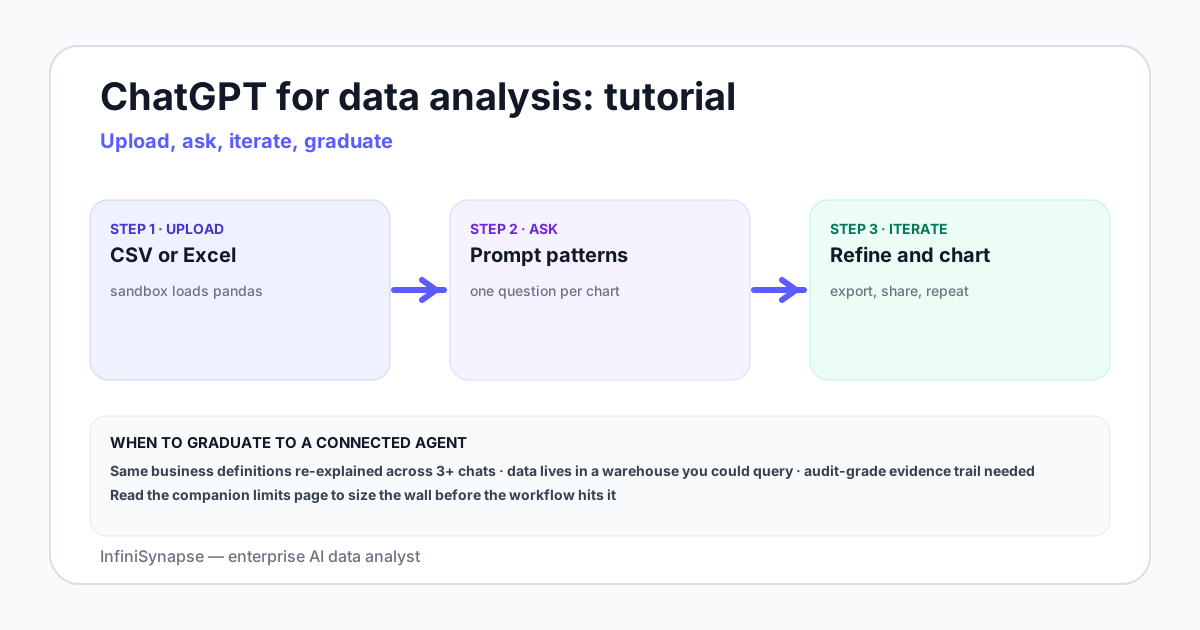
How to start ChatGPT data analysis
Open a chat on chatgpt.com and attach the file in the composer. Current ChatGPT runs data analysis when you upload a spreadsheet or ask for a calculation on that file. There is no separate Code Interpreter switch to flip. Free accounts can upload about 3 files a day. Paid plans raise that quota, up to about 80 files in 3 hours, which OpenAI may lower at peak. Those figures are from OpenAI’s File Uploads FAQ, retrieved 2026-09-17. The operating ceiling after the quota — live warehouses, shared definitions, audit — is on ChatGPT data analysis limits.
ChatGPT data analysis on CSV and Excel
ChatGPT data analysis is reliable when the sheet is already a table. Put descriptive headers in row 1, keep one record per row, and use plain column names. Name the sheet when the workbook has more than one. Merged cells, hidden rows, and a header that is not in row 1 are the usual reasons a total is silently wrong. CSV and Excel files are capped at about 50MB, even though other file types can reach 512MB. Sample or split a larger export on your machine before you attach it. A multi-sheet join you can copy is Example A below.
The five-step workflow that works
Step 1 — Prep the file before upload
Rename the file to something descriptive. Strip personally identifiable fields you do not need (names, emails, full addresses). If a spreadsheet is above the roughly 50MB CSV/Excel cap, sample it locally first — a stratified sample almost always beats a failed upload. Save Excel files with a single sheet selected unless you actually need cross-sheet joins. The upload itself is then a drag-and-drop into the prompt box.
Step 2 — Ask ChatGPT to describe the file
Before any analysis, paste a single prompt: "Describe this file. List columns, types, row count, null rate per column, and the first five rows." This forces a schema-style snapshot you can trust. If ChatGPT reports column names that do not match what you remember, stop — the file is the wrong file, or the encoding is wrong, or the header row is in the wrong place. Catching this in step two saves hours of wrong-answer debugging.
Step 3 — Confirm assumptions before analysis
Now ask it to state its assumptions for the question you want answered. "Before you run the analysis, list every assumption: which column is the date, which is the revenue, which rows you will exclude as test or refund rows, and which timezone you will normalize to." The model will surface the things it would have guessed silently. Confirm or correct them in one short reply, then proceed.
Step 4 — Run the analysis
Ask the question with the four ingredients: the verb (count, sum, group, forecast), the grain (per day, per region, per cohort), the filter (date range, included segments), and the output (table, chart, CSV). ChatGPT writes Python, runs it, and returns inline output plus a code block. Read the code, not just the answer. A 30-second skim of the dataframe filter line catches most logic errors.
Step 5 — Export and verify
Ask for the verified output as a downloadable file: an XLSX with multiple tabs, a CSV per cohort, or a PNG chart. Before pasting the number anywhere that matters, re-run the same logic on the source data — either in SQL, in a notebook, or in a connected agent — and compare. Two independent paths to the same number is the only safe pattern for board-deck-grade numbers.
ChatGPT data analysis in Excel and Google Sheets
Uploading a file is one path. ChatGPT also sits in a sidebar inside Excel and Google Sheets when the workspace add-in is turned on. The sidebar edits the workbook you already have open: formulas, cleanup, and a first-pass chart, reviewed in the sheet. Use the upload path for a CSV or a one-off export. Use the sidebar when the table should stay in the workbook. Install steps and plan requirements are on OpenAI’s Analyzing data with ChatGPT guide. A scored comparison of in-grid add-ins is in AI Excel data analysis tools.
ChatGPT data analysis prompts
Pattern 1 — The describe-first prompt
"Before answering, describe this file: columns, types, null rate per column, row count, first five rows, last five rows. Then wait for me to confirm before running any analysis." This is the single most useful pattern. Use it on every new file.
Pattern 2 — The verb-grain-filter-output prompt
"Compute monthly revenue grouped by product category for 2025. Exclude refund rows (negative amount) and internal test orders (customer email ending in @example.com). Return a CSV plus a line chart in matplotlib." Pinning down four ingredients keeps the answer constrained.
Pattern 3 — The state-assumptions prompt
"List every assumption you will make before running the analysis: column choices, filters, timezone, currency conversion, deduplication rule. Wait for confirmation before running code." This is the single best way to catch silent misinterpretation.
Pattern 4 — The two-path verification prompt
"Compute weekly active users two ways: once using the events table grouped by user_id, and once using the sessions table grouped by user_id. Show both numbers and explain any difference." Two-path checks find the kind of bugs single-path analysis hides.
Pattern 5 — The explainable-output prompt
"Return the answer with three sections: (1) result table, (2) the exact Python code you ran, (3) the assumptions and limitations a reviewer should know." This produces something close to an audit trail for a one-off file. It is still weaker than what a connected agent gives you, but far stronger than a bare answer.
ChatGPT data analysis examples
Example A — Cleaning a messy Excel export
Upload an XLSX with three sheets — raw_orders, refunds, customer_segments. Prompt: "List sheet names. Show first ten rows of each. Then join orders to customer_segments on customer_id, exclude any order_id that also appears in refunds, and group total order_value by segment for Q4 2025. Return an XLSX with tabs for raw_join, filtered_join, and segment_summary." Ask for the code, eyeball the join key, download.
Example B — Quick exploratory analysis of a CSV
Start from a pageviews export that fits the spreadsheet cap, or sample a larger file locally until the CSV is under about 50MB. Prompt the describe-first pattern, then ask: "Find the top ten landing pages by sessions for May 2026. Then for each, compute bounce rate and average time on page. Return one table sorted by sessions desc, one bar chart of bounce rate, and the Python you ran." This is a typical hour of analyst work compressed into a few minutes inside the sandbox. Keep the downloaded script so you can rerun the same filters outside the chat.
Example C — Forecasting from a time series file
Upload a daily revenue CSV for the last two years. Prompt: "Fit a SARIMA model on daily revenue with weekly seasonality. Hold out the last 30 days as a test set. Return the forecast versus actual chart, MAPE on the holdout, and the model parameters you chose." ChatGPT can do this in the sandbox. Whether you trust the model is a different question — always validate with a second method before forecasting in public.
Charts, file caps, and what to verify
ChatGPT can return bar, line, pie, and scatter charts as interactive charts. Other chart types usually come back as a static image. Ask for the chart type when the first drawing is the wrong one. The Python environment cannot call the public web or an external API, so any series that depends on a live source has to be in the file you attach. Scanned PDFs and picture tables are a weak source for exact values; upload a spreadsheet when the number has to match.
The byte caps below are OpenAI’s published upload limits, retrieved 2026-09-17 from the File Uploads FAQ. What happens after the quota — live warehouses, shared definitions, an audit trail — is the subject of ChatGPT data analysis limits.
| Limit | Symptom | Workaround | When to switch |
|---|---|---|---|
| 512MB per file | The attach fails before analysis starts | Split the file, or query the source in place | When the question needs the full table, not a slice |
| About 50MB for CSV and Excel | A spreadsheet that is under 512MB still will not attach | Aggregate or sample locally, then upload the extract | When the sample no longer answers the question |
| Free: about 3 uploads a day. Paid: up to 80 files / 3 hours | The composer stops accepting files | Wait for the quota window, or change plan | When the same question repeats every week |
| No live database access | You manually export CSV every week | Schedule the export, use a connector | When the question repeats more than weekly |
| Ephemeral session | Files disappear, code lost between chats | Save the code, paste in a notebook | When the analysis becomes a recurring report |
| No persistent business context | You re-explain what "active user" means in each chat | Maintain a definitions document, paste at start | When teammates need the same definitions too |
| No audit trail | Reviewer asks "how did you compute this" | Use Pattern 5, save the chat | When the answer ships to a board or regulator |
| Statistical claims unverified | Output looks reasonable but is wrong | Two-path verification, run on source | When the cost of being wrong exceeds rerun cost |
ChatGPT is fast and cheap on files you control. It is not the right tool for a number that has to be true on Monday morning.
Alternatives and when to switch
The honest map of alternatives groups by what the analysis is connected to. ChatGPT covers the "files I uploaded" cell. Notebook tools — Jupyter, VS Code, Cursor — cover "files plus my local env." BI dashboards cover "a pre-modeled metric in a connected source." A connected AI data analyst covers "any source, any question, with an audit trail." The category map is GPT data analyst alternatives.
Where InfiniSynapse fits
InfiniSynapse is an enterprise AI data analyst that connects to PostgreSQL, MySQL, Snowflake, Supabase, S3, and CSV files at the same time. Unlike a one-shot sandbox, it pairs each source with a bound knowledge base of business definitions, runs through a Plan mode you can review before execution, and stores an evidence trail per result. For one-off analysis on a single file you uploaded by hand, ChatGPT is the right choice. For recurring questions across databases that must be defensible — the kind a CFO or auditor will read — a connected agent is the structural fit. The companion AI database query pillar explains the connected pattern in depth.
Common mistakes to avoid
- Skipping the describe-first step. If the file has 50,000 rows and ChatGPT reports 49,997, you have a parse error you need to know about before any aggregation.
- Pasting personally identifiable information directly into the prompt. Strip names, emails, addresses, and card numbers before upload, even on enterprise plans.
- Trusting the summary over the code. The Python is the source of truth. The model's verbal summary can subtly disagree with what the code produced.
- Using ChatGPT as a weekly reporting tool. If you upload the same file every Monday, you have built a manual cron job. Move that to a connected agent or a notebook on a schedule.
- Asking vague questions and accepting vague answers. "Analyze this file" returns a tour. "Compute X grouped by Y filtered by Z, return as CSV" returns an answer.
- Skipping verification before a public number. Re-run the logic on the source via SQL or a second tool. Two independent paths to the same number is the floor for anything that ships.
When ChatGPT is the right tool
- One-off exploration on a CSV or Excel file you have on disk
- Quick reshape, dedupe, or pivot of messy export
- Sketch of a statistical model before notebook implementation
- Charting a small dataset for a deck
- Learning a new analysis technique on toy data
When it is the wrong tool
- Recurring weekly or monthly report on a live database
- Numbers shared with regulators, board, or finance
- Cross-source joins across databases plus files plus warehouses
- Shared business definitions used by a team
- Anything requiring an audit trail per result
Outgrowing the sandbox? Try a connected AI data analyst.
Connect your databases and files read-only, seed a small knowledge base of business definitions, and run the same question you have been retyping in ChatGPT every week. Compare the plan, the SQL, the verification, and the stored evidence trail.
Try InfiniSynapse onlineFAQ
Methodology and review notes
Last updated: 2026-09-23 · Next scheduled review: 2026-12-23
This tutorial draws on hands-on testing of ChatGPT data analysis on CSV and XLSX files, OpenAI’s data-analysis help article, and the File Uploads FAQ retrieved 2026-09-17. Worked examples are abstracted from analyst workflows and stripped of any client data. The five prompt patterns were tested across more than fifty sessions before the June 2026 publication; file caps were rechecked against the FAQ on 2026-09-23.
Conflict of interest: InfiniSynapse publishes this page and sells a connected AI data analyst. To reduce bias, the page calls out scenarios where ChatGPT wins outright, links to a separate limits piece, and recommends a connected agent only for the cases where the sandbox structurally cannot fit.
Update cadence: Reviewed every 90 days for changes in the OpenAI sandbox capabilities, model defaults, and file format support.
Sources and references
- [Vendor] OpenAI. Data analysis with ChatGPT. help.openai.com/en/articles/8437071-data-analysis-with-chatgpt. Retrieved 2026-09-23.
- [Vendor] OpenAI. File Uploads FAQ. help.openai.com/en/articles/8555545. Retrieved 2026-09-17. Source for the 512MB, about-50MB spreadsheet, and upload-quota figures on this page.
- [Vendor] OpenAI. Analyzing data with ChatGPT, including Excel and Google Sheets. openai.com/academy/data-analysis.
- [Independent] NIST. AI Risk Management Framework (AI RMF 1.0, 2023). nist.gov/itl/ai-risk-management-framework.
- [Independent] Wikipedia. Retrieval-augmented generation entry. en.wikipedia.org/wiki/Retrieval-augmented_generation.
- [Independent] BIRD-SQL: A Big Bench for Large-Scale Database Grounded Text-to-SQL Evaluation. BIRD benchmark.
- [Research] Anthropic. Building Effective Agents. anthropic.com/research/building-effective-agents.
- [Independent] ISO/IEC 42001 AI management system standard. iso.org/standard/81230.
- [Vendor] pandas documentation. pandas.pydata.org/docs.
Related guides
The warehouse choice is on best SQL analytics software for data analysis.