Best SQL Analytics Software for Data Analysis
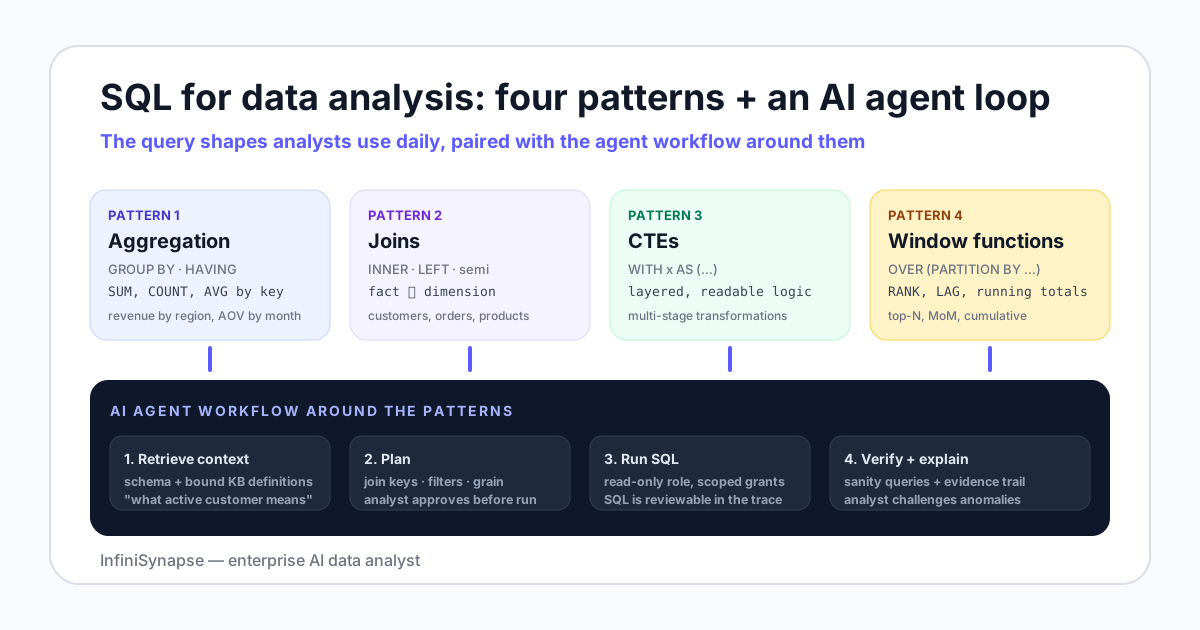
- SQL for data analysis boils down to four pattern families: aggregation with GROUP BY and HAVING, joins across fact and dimension tables, common table expressions for layered logic, and window functions for ranks, running totals, and period comparisons.
- Worked examples on a small sample schema (customers, orders, products, events) cover monthly revenue by cohort, top-N per region, retention by signup month, and same-store growth — the four shapes most analyst tickets reduce to.
- Dialect differences mostly hit date arithmetic, string functions, and array handling. The four core analytic patterns translate cleanly across PostgreSQL, MySQL, Snowflake, and BigQuery.
- AI data agents shift the analyst's role from typing every join to reviewing plans, approving execution, and challenging anomalies. They augment the workflow on routine asks and stay out of the way for novel ones.
- The new differentiator is database + knowledge base binding: pairing the schema with a curated set of business definitions an agent retrieves before drafting SQL.
Best SQL analytics software for data analysis
Best SQL analytics software for data analysis is the warehouse you already query. PostgreSQL, MySQL, Snowflake, BigQuery, and Databricks each expose a SQL interface. Daily work on this page is still four pattern families: aggregation, joins, CTEs, and window functions.
Client, notebook, or warehouse
BlazeSQL, Power BI, Hex, and Databricks SQL Analytics are clients, notebooks, or a cloud SQL surface. This page does not score them. Dialect edges stay on the PostgreSQL data analysis tools, MySQL data analysis tools, and Snowflake data analyst guides. The software shortlist lives on SQL data analysis tools.
What this page will not rank
This page has no twelve-tool list of Splunk, Python, R, and Excel, no SQL Builder product tour, and no ten-vendor 2026 review. The four patterns and the worked examples stay the evaluation.
Direct answer: what SQL do analysts actually use?
Why SQL is still the analyst's primary tool in 2026
Three forces keep SQL central to data analysis. First, the analytical warehouses analysts touch every day — PostgreSQL, MySQL, Snowflake, BigQuery, Databricks — all expose a SQL interface as the contract. Second, SQL is declarative: you describe the result you want, the engine plans the execution. That separation survived a generation of "SQL is dead" claims because writing readable queries scales better than writing imperative pipelines for analytical work. Third, every AI assistant that touches a database generates SQL under the hood. Reading the generated query is how an analyst confirms the answer is real.
The companion ai for database exploration covers the broader shift in how questions are asked of a database. This page stays on the SQL itself — what an analyst actually types, where each pattern earns its keep, and where an agent steps in to draft.
A sample analytics schema for the examples
The worked examples below use a small e-commerce-style schema. Four tables, joinable by clear keys, broad enough to cover the patterns without becoming a textbook:
| Table | Grain | Key columns | Typical analysis use |
|---|---|---|---|
customers | One row per customer | customer_id, signup_date, region | Cohorts, retention, segmentation |
orders | One row per order | order_id, customer_id, order_date, total_amount | Revenue, AOV, repeat purchase |
order_items | One row per item in an order | order_id, product_id, quantity, unit_price | Mix, category share, cross-sell |
products | One row per product | product_id, category, cost | Margin, category rollups |
Two important properties of this schema show up in real datasets: order_items fans out from orders (one-to-many), and customers sometimes have no orders (left-join territory). Both will bite an unprepared analyst on the third example.
The four query pattern families
Pattern 1 — Aggregation with GROUP BY and HAVING
This is the workhorse. Roll up rows, summarize numeric columns, filter aggregates. The shape every analyst writes ten times a day:
SELECT region, COUNT(*) AS customers, SUM(total_amount) AS revenue
FROM customers c
JOIN orders o ON o.customer_id = c.customer_id
WHERE o.order_date >= DATE '2026-01-01'
GROUP BY region
HAVING SUM(total_amount) > 100000
ORDER BY revenue DESC;
Two things to remember. WHERE filters rows before aggregation. HAVING filters groups after. Mix them up and you either lose rows you wanted or compute over rows you should have dropped.
Pattern 2 — Joins across fact and dimension tables
Analytics joins are usually between a fact table (orders, events) and one or more dimension tables (customers, products). Three rules cover most cases:
- Default to
INNER JOINwhen you only want matches in both. - Use
LEFT JOINwhen you need to preserve rows from one side and accept NULLs on the other — common with "customers who have not ordered yet". - Be loud about your join keys. If two tables can share
customer_id, write the predicate explicitly and add a sanity COUNT before and after the join.
-- Customers who signed up but never placed an order
SELECT c.customer_id, c.signup_date
FROM customers c
LEFT JOIN orders o ON o.customer_id = c.customer_id
WHERE o.order_id IS NULL;
Pattern 3 — Common table expressions (CTEs) for layered logic
The moment an analytic question has two transformation stages, reach for a CTE. They name intermediate results, document intent, and survive code review better than nested subqueries.
WITH monthly_revenue AS (
  SELECT DATE_TRUNC('month', order_date) AS month,
         customer_id,
         SUM(total_amount) AS rev
  FROM orders
  GROUP BY 1, 2
),
ranked AS (
  SELECT month, customer_id, rev,
         RANK() OVER (PARTITION BY month ORDER BY rev DESC) AS r
  FROM monthly_revenue
)
SELECT month, customer_id, rev
FROM ranked
WHERE r <= 10
ORDER BY month, r;
That query — top 10 customers by month — is also the first useful piece of evidence for picking a CTE over a subquery. Read the version with the CTE, then imagine the subquery version. The CTE wins on every dimension that matters to a reviewer.
Pattern 4 — Window functions for ranks, running totals, and period comparisons
Window functions look at a group of rows without collapsing them. Five shapes cover most needs:
| Window function | Shape it answers | Example |
|---|---|---|
RANK() / DENSE_RANK() | Top-N per group | Top 5 products per region |
ROW_NUMBER() | First / latest per partition | First order per customer |
SUM() OVER (... ORDER BY ...) | Running total | Cumulative revenue by month |
LAG() / LEAD() | Compare to previous / next row | Month-over-month change |
NTILE(n) | Bucket into n equal groups | Customer revenue deciles |
-- Month-over-month revenue change per region
SELECT region, month, revenue,
       revenue - LAG(revenue) OVER (PARTITION BY region ORDER BY month) AS mom_change
FROM region_monthly_revenue;
Four worked examples on the sample schema
Example A — Monthly revenue by signup cohort
WITH cohorts AS (
  SELECT customer_id, DATE_TRUNC('month', signup_date) AS cohort_month
  FROM customers
)
SELECT c.cohort_month,
       DATE_TRUNC('month', o.order_date) AS order_month,
       SUM(o.total_amount) AS revenue
FROM cohorts c
JOIN orders o ON o.customer_id = c.customer_id
GROUP BY 1, 2
ORDER BY 1, 2;
That output feeds a triangle-shaped cohort chart with months on both axes. The analyst's judgment call is choosing the cohort grain (signup month vs week vs quarter) and the value (revenue vs orders vs items).
Example B — Top 5 products per region
WITH product_region_rev AS (
  SELECT c.region, p.product_id, p.category,
         SUM(oi.quantity * oi.unit_price) AS rev
  FROM customers c
  JOIN orders o ON o.customer_id = c.customer_id
  JOIN order_items oi ON oi.order_id = o.order_id
  JOIN products p ON p.product_id = oi.product_id
  GROUP BY 1, 2, 3
)
SELECT region, product_id, category, rev
FROM (
  SELECT region, product_id, category, rev,
         RANK() OVER (PARTITION BY region ORDER BY rev DESC) AS r
  FROM product_region_rev
) ranked
WHERE r <= 5
ORDER BY region, r;
Example C — Retention by signup month
WITH first_order AS (
  SELECT customer_id, MIN(order_date) AS first_order_date
  FROM orders GROUP BY customer_id
),
joined AS (
  SELECT c.customer_id,
         DATE_TRUNC('month', c.signup_date) AS cohort_month,
         f.first_order_date,
         CASE WHEN f.first_order_date IS NULL THEN 0 ELSE 1 END AS converted
  FROM customers c
  LEFT JOIN first_order f ON f.customer_id = c.customer_id
)
SELECT cohort_month,
       COUNT(*) AS signups,
       SUM(converted) AS converted,
       ROUND(100.0 * SUM(converted) / COUNT(*), 2) AS conversion_pct
FROM joined
GROUP BY cohort_month
ORDER BY cohort_month;
The LEFT JOIN is the load-bearing detail. Without it, customers who never ordered drop out of the COUNT and your conversion percentage inflates silently.
Example D — Same-store growth using LAG
WITH region_monthly AS (
  SELECT c.region,
         DATE_TRUNC('month', o.order_date) AS month,
         SUM(o.total_amount) AS revenue
  FROM customers c
  JOIN orders o ON o.customer_id = c.customer_id
  GROUP BY 1, 2
)
SELECT region, month, revenue,
       LAG(revenue, 12) OVER (PARTITION BY region ORDER BY month) AS revenue_yoy,
       ROUND(100.0 * (revenue - LAG(revenue, 12) OVER (PARTITION BY region ORDER BY month))
                   / NULLIF(LAG(revenue, 12) OVER (PARTITION BY region ORDER BY month), 0), 2)
         AS yoy_pct
FROM region_monthly
ORDER BY region, month;
NULLIF guards against divide-by-zero in the first 12 months where there is no prior-year value. Junior queries often forget that and crash the dashboard the day the chart renders the first month.
Dialect differences that matter for SQL analysis
| Topic | PostgreSQL | MySQL | Snowflake / BigQuery |
|---|---|---|---|
| Date truncation | DATE_TRUNC('month', x) | DATE_FORMAT(x, '%Y-%m-01') | DATE_TRUNC('month', x) / DATE_TRUNC(x, MONTH) |
| String concat | a || b | CONCAT(a, b) | a || b / CONCAT(a, b) |
| Top-N per group | Window + filter | Window + filter (8.0+) | Window + QUALIFY |
| JSON path | j ->> 'key' | JSON_EXTRACT(j, '$.key') | j:key / JSON_VALUE |
| Boolean type | Native | Tinyint(1) | Native |
For deeper warehouse-specific patterns see the PostgreSQL data analysis tools guide, the MySQL analytics tools guide, and the Snowflake data analyst guide. Each one walks the dialect-specific edges.
Where AI agents change the SQL workflow
AI data agents do not erase SQL — they restructure the workflow around it. On the BIRD benchmark, human engineers reach 92.96% execution accuracy and large models trail by a wide margin without a retrieval and verification loop. That gap is why an agent is structured as a system that dynamically directs its own processes and tool usage, not a one-shot text-to-SQL prompt.
What the analyst actually does day-to-day shifts in three places:
| Phase | Without an AI agent | With an AI agent |
|---|---|---|
| Drafting | Type the join, the GROUP BY, the window function from scratch | Describe the question; agent drafts a plan and the SQL |
| Reviewing | Self-review and a peer review of the SQL | Review the plan, the join keys, and the SQL the agent generated |
| Verifying | Spot-check the result; ad hoc sanity queries | The agent runs verification queries automatically; analyst challenges anomalies |
The AI data analyst explained page goes deeper on the role split. The AI data analyst job description page describes how teams hire for the new shape.
What an analyst still owns end-to-end
Three things stay with the human and will stay with the human for the next planning cycle: framing the question, choosing the grain (which counts as a customer, which orders count, which timezone), and defending the number. An agent can draft the SQL that answers "monthly active users by region" in seconds; an analyst still decides whether MAU means a logged-in session, an order placed, or an event fired.
The knowledge base binding moat, briefly
The newest differentiator inside the AI category is what InfiniSynapse calls database + knowledge base binding. Each connection is paired with a curated knowledge base of business definitions — what active customer means, which status codes represent a paid order, which keys roll up to which business cluster. The agent retrieves from the bound knowledge base as a tool call before drafting SQL, so the generated query is grounded in the team's actual definitions, not the model's prior.
Common SQL mistakes on real datasets
- Joining on keys that fan out and double-counting. Joining
orderstoorder_itemswithout remembering the one-to-many turns "revenue" into "revenue times items per order". Always check row count before and after a new join. - Forgetting that WHERE drops NULLs.
WHERE status != 'cancelled'silently excludes orders where status is NULL. Use(status IS NULL OR status != 'cancelled')if NULL means "not yet set". - Grouping on a non-deterministic column. MySQL historically tolerated
SELECTcolumns not in the GROUP BY; the result is whatever row the engine happened to pick. ANSI strict mode and modern MySQL reject this — turn it on. - Using
SELECT *in production analysis. The schema drifts, a new column appears, and the dashboard renders one extra column nobody documented. Name the columns. - Skipping
NULLIFin ratio metrics. Conversion rate without a guard divides by zero the first month a cohort has no signups. Wrap every divisor inNULLIF(x, 0)in analytical queries. - Letting AI-generated SQL run without a plan review. A query without a documented plan, join-key choice, and verification step is a number you cannot defend in a stand-up. The explainable AI data analysis guide spells out what a complete evidence trail looks like.
A practical SQL-plus-AI workflow for 2026
- Frame the question in plain English. Define the metric, the time range, the segmentation. Write it down before any SQL.
- Ask the agent for a draft plan. Read the join keys it picked, the tables it touched, the assumptions it made about your business definitions.
- Approve or correct the plan. If a join key is wrong, push back before any SQL runs. Plan mode exists for this exact moment.
- Execute under a read-only role. Scoped grants protect production from a mistaken UPDATE the agent should never have generated in the first place.
- Review the SQL the agent ran. Not the answer — the SQL. Confirm WHERE clauses, GROUP BY columns, and any window partitions.
- Demand an evidence trail. Plan + SQL + result + verification queries + source list. If any of those is missing, the number is not defensible.
SQL fluency stops being about typing speed and starts being about review judgment. Read the query, defend the join key, own the number.
When this guide applies
- You are an analyst sharpening day-to-day SQL pattern fluency
- You are deciding which SQL patterns to teach a new hire first
- You want a fair read on where AI agents fit a SQL-first workflow
When it does not
- You need a SQL syntax reference — read the official docs
- You are tuning query plans on a single warehouse — read the engine guide
- You have not picked a database yet — see the tool category guides instead
See SQL drafted, executed, and verified by an AI data analyst
Connect a PostgreSQL, MySQL, Snowflake, or Supabase database read-only, seed a small knowledge base of business definitions, and ask one open-ended question. Watch the plan, the SQL, and the verification step before deciding whether agentic SQL belongs in your stack.
Try InfiniSynapse onlineFAQ
Methodology and review notes
Last updated: 2026-09-24 · Examples last verified: 2026-06-28 · Next scheduled review: 2026-12-24
The patterns and worked examples on this page are grounded in PostgreSQL and MySQL official documentation, public benchmarks (BIRD, Spider), Anthropic's published agent research, the NIST AI Risk Management Framework, and field experience running SQL across real analytics schemas. Examples were tested against PostgreSQL 16 and Snowflake; MySQL and BigQuery equivalents are noted where syntax diverges.
Conflict of interest: InfiniSynapse publishes this guide and sells an enterprise AI data analyst that generates SQL. To reduce bias, the page emphasizes patterns and worked examples first, treats AI agents as a workflow shift rather than a SQL replacement, and links to external benchmarks and standards for every numeric claim.
Update cadence: Reviewed every 90 days for syntax accuracy, dialect changes, benchmark figures, and schema consistency.
Sources and references
- [Vendor] The PostgreSQL Global Development Group. PostgreSQL documentation. postgresql.org/docs.
- [Vendor] Oracle / MySQL. MySQL Reference Manual. dev.mysql.com/doc.
- [Vendor] Snowflake. SQL reference. docs.snowflake.com.
- [Independent] BIRD-SQL: A Big Bench for Large-Scale Database Grounded Text-to-SQL Evaluation. BIRD benchmark.
- [Independent] Yu et al. Spider: A large-scale human-labeled dataset for text-to-SQL. Spider benchmark.
- [Vendor] Anthropic. Building Effective Agents. anthropic.com/research/building-effective-agents.
- [Independent] Yao et al. ReAct: Synergizing Reasoning and Acting in Language Models. arxiv.org/abs/2210.03629.
- [Standard] NIST. AI Risk Management Framework (AI RMF 1.0, 2023). nist.gov/itl/ai-risk-management-framework.