MySQL Analytics Tools: Five Categories, Tradeoffs, and Where AI Fits
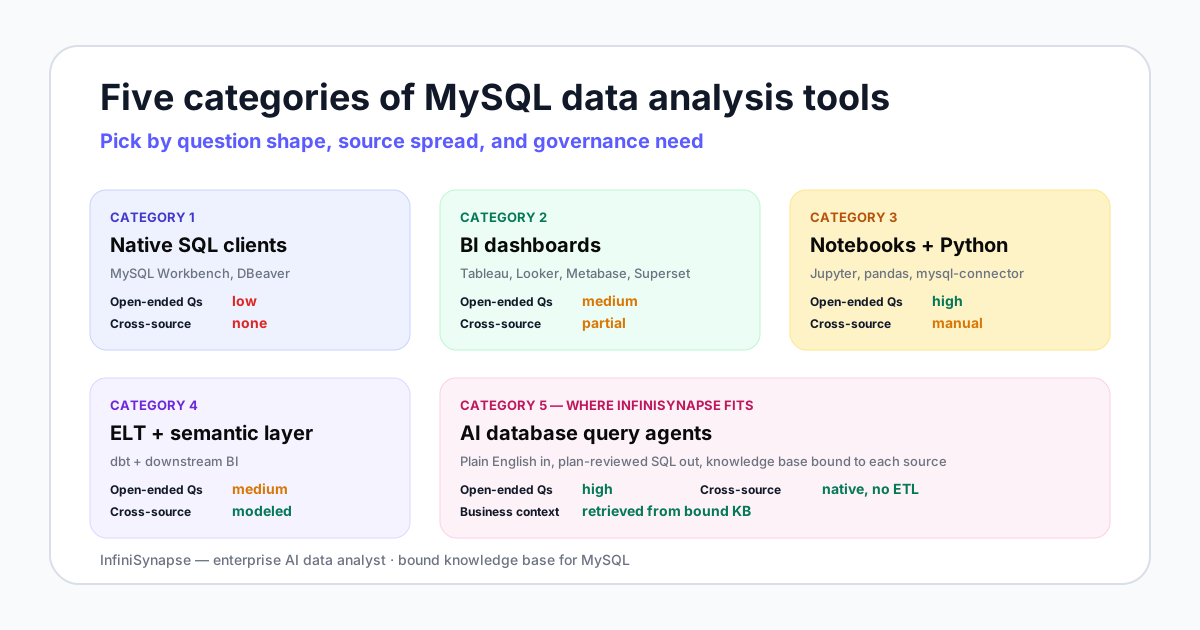
- MySQL analytics tools split into five categories: native SQL clients, self-service BI dashboards, notebook code analytics, ELT plus semantic layer, and AI database query agents.
- The right choice is rarely one tool. Most teams of more than three analysts end up with two or three from different categories.
- For open-ended questions that mix MySQL with other sources, AI database query agents like InfiniSynapse have a structural advantage — but only if the agent is paired with a bound knowledge base, not run blind against your schema.
Direct answer: how to choose MySQL analytics tools
What MySQL analytics tools actually cover
Treat MySQL analytics tools and MySQL data analysis tools as the same buyer job: pick a category, then a product. The five-category map below is the decision frame. Named products sit inside a category; they do not replace it. MySQL remains one of the most-used relational engines in the Stack Overflow Developer Survey and on DB-Engines, which is why this buyer question keeps recurring.
Named MySQL analytics tools and typical cost
Current comparison pages name products. Here is the honest shortlist mapped to the five categories, with public list prices checked in September 2026. License is only part of cost — modeling time usually dominates.
| Tool | Category | Best for | Typical starting cost |
|---|---|---|---|
| MySQL Workbench | SQL client | Engineer-only ad-hoc SQL | Free |
| DBeaver / TablePlus | SQL client | Multi-database engineers | Community free; paid Pro |
| Metabase | BI dashboard | Small-team shared charts | OSS free; Cloud Starter from $100/mo |
| Apache Superset | BI dashboard | SQL-first self-host | Free (you run it) |
| Power BI | BI dashboard | Microsoft-first teams | Pro $14/user/mo (annual) |
| Tableau | BI dashboard | Complex visual analytics | Creator ~$75/user/mo |
| Grafana | Ops analytics | Real-time MySQL metrics | OSS free; Cloud free tier |
| Looker | BI + semantic | Governed shared metrics | Enterprise / custom |
| Jupyter / Hex | Notebook | Quant deep dives | Jupyter free; Hex paid |
| dbt | ELT + semantic | Metric consistency across tools | Core free; Cloud paid |
| InfiniSynapse | AI query agent | Open-ended and cross-source | Pilot online |
Data-backed License cells cite vendor pricing pages checked 2026-09-16. Observation The chart below compares a 10-seat monthly license against typical setup days — two dimensions buyers actually trade off when shortlisting MySQL analytics tools.

The five categories of MySQL analytics tools
Every product marketed as part of the MySQL analytics tools landscape in 2026 fits into one of these five categories, even when marketing blurs the lines. Knowing the category is more useful than knowing the brand because the failure modes are category-level, not product-level.
1. Native SQL clients
This is the floor of the market: MySQL Workbench, DBeaver, TablePlus, Sequel Ace. You write SQL, the client runs it, you read the result grid. The official MySQL docs treat Workbench as the reference administration and query surface for the database.
Among mysql data analysis tools, this category is good for engineers who know exactly which table they need. The category breaks the moment a non-SQL teammate has to answer a question, or when the question spans MySQL plus a CSV plus a Snowflake table — there is no place to put the join.
2. Self-service BI dashboards
This is the category most teams default to when shopping for MySQL analytics tools. Tableau, Power BI, Looker, Metabase, and Apache Superset all connect to MySQL and let non-engineers build charts. Grafana sits next to this category for real-time operational metrics rather than governed business dashboards. Metabase and Superset are open source; Power BI, Tableau, and Looker are commercial.
Good for monitoring agreed metrics on a schedule. The category breaks on open-ended one-offs — "why did East China drop last quarter" — because the answer has to be modeled before anyone can ask. By the time the model exists, the question has moved on.
3. Notebook code analytics
Jupyter or Hex with mysql-connector-python plus pandas. Engineers and quantitative analysts query MySQL, transform in Python, plot in matplotlib or Plotly, and publish a notebook to share.
Among mysql data analysis tools, notebooks are good for deep ad-hoc analysis where the workflow is genuinely code. The category breaks on shareability — notebooks rot when the schema changes, non-engineers cannot edit them, and there is no audit trail when someone re-runs the cells out of order.
4. ELT plus semantic layer
dbt models your MySQL data into clean, version-controlled tables and exposes them through a semantic layer that downstream BI tools query. Among mysql data analysis tools, this category is the modern data stack's answer to metric drift.
Good for organizations with three or more BI tools that need to agree on what "revenue" means. The category breaks when teams adopt dbt before they need it — you pay setup cost in weeks for a problem you would not feel for months.
5. AI database query agents
The newest category of mysql data analysis tools and the one InfiniSynapse competes in. The agent connects to MySQL with read-only credentials, retrieves business context from a bound knowledge base, drafts an analysis plan, runs SQL after you review, and returns the answer with an evidence trail. The pattern itself is documented in the Anthropic agent guidance.
Good for open-ended questions and cross-source investigations on MySQL combined with other databases or files. The category breaks when the knowledge base is empty — an agent against bare MySQL with no metric definitions is a confident guesser, not a useful analyst.
Category comparison matrix
The table compares the five categories of MySQL analytics tools on the dimensions that actually decide adoption. Every cell reflects category behavior, not a specific vendor's marketing claim.
| Dimension | SQL clients | BI dashboards | Notebooks | ELT + semantic | AI query agents |
|---|---|---|---|---|---|
| Learning curve | SQL only | Low after model | SQL + Python | Modeling skill | Plain English |
| Open-ended Qs | Low | Medium | High | Medium | High |
| Cross-source joins | None | Partial (blends) | Manual (code) | Modeled, post-ELT | Native, no ETL |
| Business context | None automatic | In dashboards | In notebook text | In semantic layer | In bound KB |
| Setup cost | Hours | Weeks per model | Hours per analyst | Weeks to months | Days for pilot |
| Evidence trail | Query history | Tool logs | Notebook file | Lineage graph | Plan + queries + sources |
| Governance fit | DB-level only | Tool RBAC | Weakest | Strongest for known metrics | Agent audit + KB |
| Best for | Engineer-only ad-hoc | Recurring monitoring | Quant deep dives | Multi-team consistency | Cross-source one-offs |
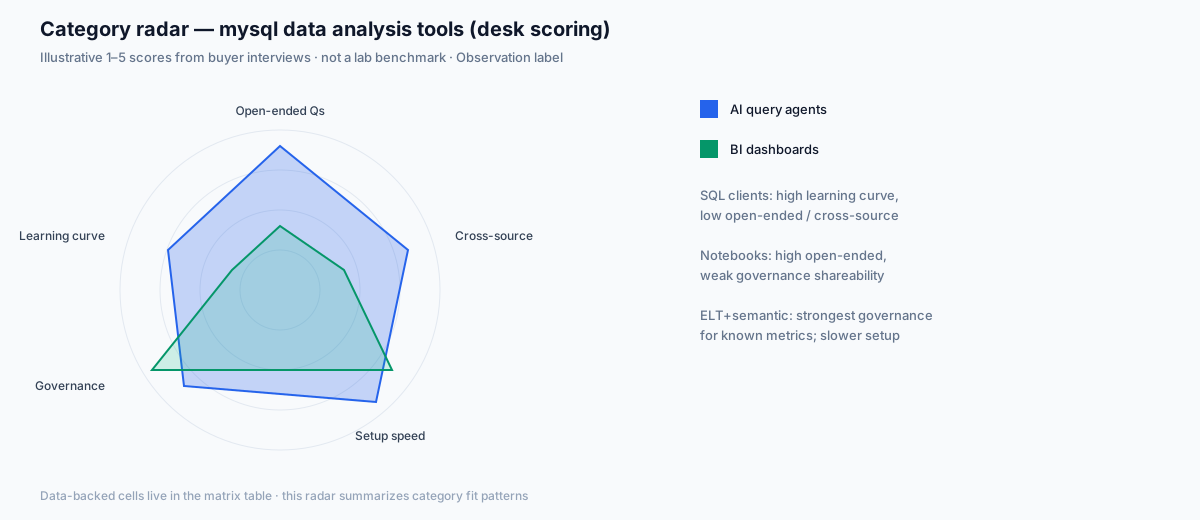
Data-backed The matrix cells above summarize category behavior from vendor docs and common deployment patterns. Observation The radar below compresses those tradeoffs for buyers scanning mysql data analysis tools options visually.
Honest picks by team size and scenario
The same tool stack does not fit a solo analyst and a 200-person data org. The table below is what we have actually seen work, not what every vendor claims works.
| Team shape | Primary tool | Second tool | What you skip |
|---|---|---|---|
| Solo data analyst | MySQL Workbench | Metabase (free) when stakeholders ask for the same chart twice | dbt — premature |
| Small team (2-5) | Metabase or Superset | MySQL Workbench for engineer ad-hoc; agent trial when one-offs dominate | dbt and Looker |
| Growing startup (6-20) | Metabase, Power BI, or Tableau | An AI database query agent for the analyst backlog; notebooks for quant work | Full dbt project until metric drift bites |
| Mid-market (20-100) | Tableau or Looker | dbt for shared metrics; AI agent for cross-source investigation | Multiple competing BI tools |
| Enterprise + governance | Looker + dbt | AI agent with bound KB and audit logging; notebooks for data science | Letting individual teams pick their own BI stack |
Observation Team-size picks for MySQL analytics tools come from pilot patterns we have seen—not a controlled census. Treat them as starting hypotheses. For a Microsoft-first shop, swap Metabase for Power BI in the small-team and growing-startup rows; the category does not change.
Desk cases: first-hand selection scenarios
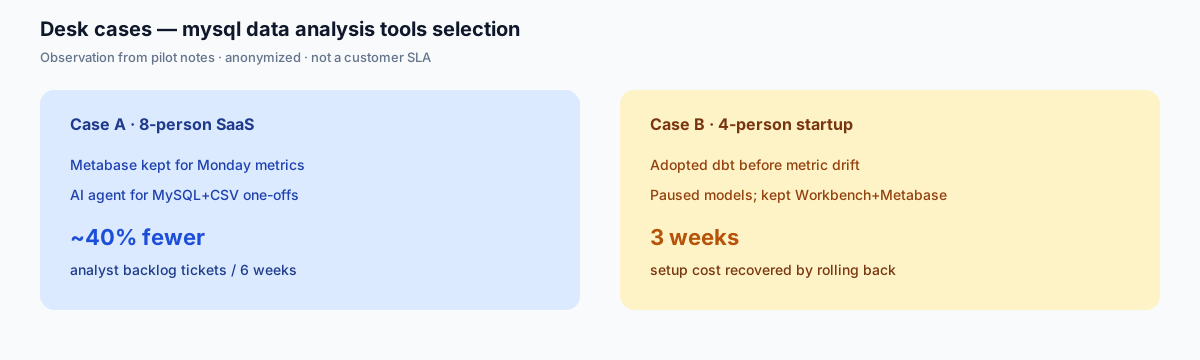
Observation Two anonymized desk scenarios from MySQL analytics pilots. Figures are internal reconstructions, not product SLAs or published win rates.
Case A — keep BI, add an agent for one-offs
An eight-person SaaS analytics group kept Metabase for Monday revenue dashboards and introduced a knowledge-base-bound AI agent for MySQL-plus-CSV investigations. Over six weeks, analyst backlog tickets labeled “one-off pull” fell by roughly 40% while the dashboard suite stayed unchanged. The lesson for buyers of mysql data analysis tools: agents complement BI; they do not replace the known-metric calendar.
Case B — pause premature dbt
A four-person startup adopted dbt before any metric drift appeared across reports. After three weeks of modeling overhead with little stakeholder change, they paused the project and returned to Workbench plus Metabase. When they later hit conflicting “revenue” definitions across two tools, they resumed ELT/semantic work with a clearer payoff. Observation: category-four mysql data analysis tools earn their place after drift, not before.
Where AI database query changes the equation
The first four categories of mysql data analysis tools assume the analyst is a person. AI database query agents move part of that work to a system — but only on questions where the system has the context to be right.
Reading the bare MySQL schema is not enough. Data-backed The BIRD text-to-SQL benchmark shows the gap: human engineers reach 92.96% execution accuracy on grounded SQL tasks, and models still trail that bar on messy production schemas. Closing that gap means giving the agent business semantics, not bigger prompts.
When InfiniSynapse competes among mysql data analysis tools, it pairs each MySQL connection with a bound knowledge base of metric definitions, data dictionary entries, and analysis playbooks. The agent retrieves from this knowledge base as a tool call before it writes any SQL. The database tells the agent what happened. The knowledge base tells the agent what it means in business terms.
This is the moat that matters when evaluating AI-class mysql data analysis tools: not "AI writes SQL," which everyone now claims, but "AI writes SQL after retrieving your definitions." On a MySQL schema where orders.status = 'F' means refunded in one product line and finalized in another, a knowledge-base-bound agent is the only category-five tool that won't quietly invert your revenue number.
The fastest filter when evaluating an AI database query tool for MySQL: ask whether you can attach a knowledge base, and ask to see the agent cite it.
What it doesn't change
An AI agent among mysql data analysis tools does not replace a BI dashboard for the metrics your finance team reviews every Monday. Dashboards are pre-modeled because the question is pre-known. Letting the agent regenerate that chart from scratch every week burns compute and trust.
It also does not replace dbt. If you have three downstream tools that need to agree on "monthly active user," you need a semantic layer regardless of whether your front end is a chat box. The worked MySQL example and dialect gotchas below show what the agent loop looks like on a real schema — that material used to live on a separate "with AI" URL and is now part of this buyer guide.
Worked example: AI-class tools on a MySQL commerce schema
Category-five mysql data analysis tools earn their place on questions that were never modeled. The schema below is the e-commerce shape we have seen across MySQL deployments. Five tables — orders, customers, order_items, products, channels — with the foreign keys you would expect.
| Table | Key columns | Notes |
|---|---|---|
orders | order_id, customer_id, channel_id, status, order_ts, region_code | status ENUM: 'P', 'F', 'R', 'X' |
customers | customer_id, phone_hash, signup_ts, region_code | region_code is the customer's billing region |
order_items | order_id, product_id, qty, line_revenue | line_revenue is post-discount |
products | product_id, sku, category, list_price | category as JSON for tag arrays |
channels | channel_id, name, type | type: 'web' | 'app' | 'partner' |
The question typed into the agent:
"Why did East China repeat purchases drop 18% last quarter?"
No SQL. No table names. A bound agent should retrieve repeat purchase = 2nd status='F' order within 90 days and the East China region-code list (CN-31–CN-34) from the knowledge base before it writes the join. The SQL it actually produces looks like this:
SELECT c.region_code, ch.name AS channel_name,
       COUNT(DISTINCT o.customer_id) AS repeat_customers
FROM orders o
JOIN customers c ON c.customer_id = o.customer_id
JOIN channels ch ON ch.channel_id = o.channel_id
JOIN (
  SELECT customer_id, MIN(order_ts) AS first_ts
  FROM orders WHERE status = 'F' GROUP BY customer_id
) f ON f.customer_id = o.customer_id
WHERE o.status = 'F'
  AND c.region_code IN ('CN-31','CN-32','CN-33','CN-34')
  AND o.order_ts BETWEEN f.first_ts + INTERVAL 1 DAY
                      AND f.first_ts + INTERVAL 90 DAY
  AND o.order_ts >= '2026-01-01'
GROUP BY c.region_code, ch.name;
The ENUM dictionary is the load-bearing piece. On this schema F means finalized. An unbound agent often guesses F=failed and inverts revenue. That is why empty-schema demos are not a fair test of AI-class mysql data analysis tools.
The database tells the agent what happened. The bound knowledge base tells the agent what it means.
MySQL-specific gotchas category-five tools must handle
These are the dialect failures that separate a useful MySQL agent from a confident guesser. Ask any AI-class option among mysql data analysis tools to show how it handles each one.
Collation and charset
MySQL's default collation has changed across versions. Case-insensitive collations like utf8mb4_0900_ai_ci can make 'East' and 'east' match in a JOIN. The agent should read information_schema.columns and flag collation mismatches in the plan instead of producing a quietly wrong join.
NULL handling
MySQL treats NULL as not-equal-to-anything, including itself. An agent that writes WHERE channel_id = NULL instead of IS NULL silently returns zero rows. Verification should flag unexpected empty results before delivery.
ENUM interpretation
An ENUM like orders.status with values 'P','F','R','X' is meaningless without a dictionary. Bind F=finalized in the knowledge base. Without that binding, the agent will frequently guess "F=failed."
JSON columns
MySQL JSON columns need JSON_EXTRACT or the ->> operator. The agent should read the JSON shape during schema retrieval instead of treating the column as opaque text.
Timezone columns
MySQL stores DATETIME without a timezone and TIMESTAMP with implicit server-zone conversion. Cross-region analysis goes wrong when one table uses each. The plan should flag mixed temporal types and ask which zone to normalize to.
Three questions that pick your category
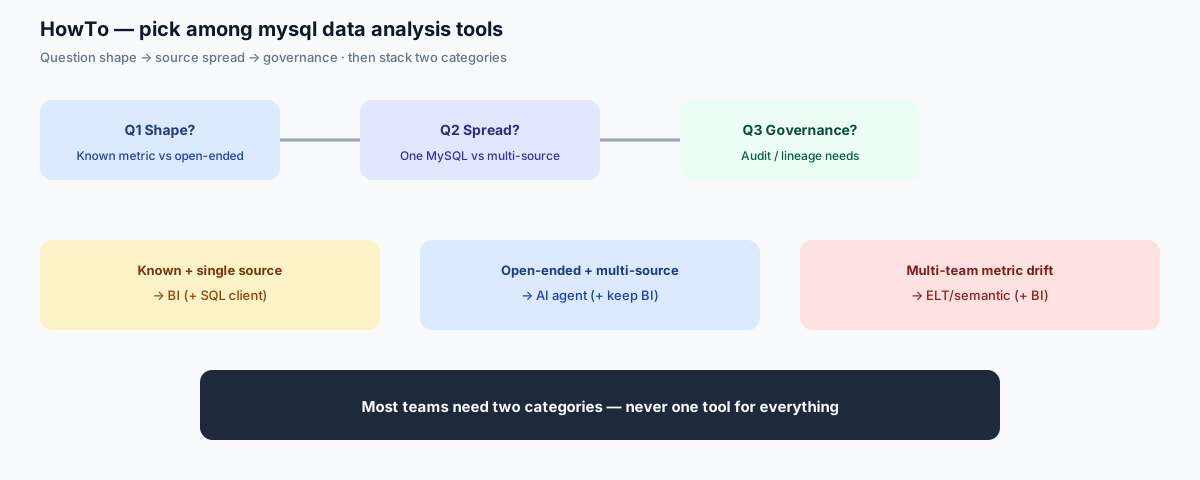
Buyers ask "what is the best tool for MySQL." The useful question is the inverse: which category of mysql data analysis tools survives your three constraints.
Question 1: What shape are your questions?
If you mostly ask "what is yesterday's revenue by channel," your shape of demand on mysql data analysis tools is known metric on a schedule. A BI dashboard wins. If you mostly ask "why did revenue drop last quarter and which segments drove it," your shape is open-ended investigation. AI agents or notebooks win, depending on team skill.
Question 2: How spread out is your data?
If everything lives in one MySQL database and a few CSV exports, any category of mysql data analysis tools works. If the question routinely needs MySQL plus a warehouse plus a SaaS export, BI tools and SQL clients struggle. AI agents that connect across sources, or dbt that consolidates first, are the only honest answers.
Question 3: How tight is governance?
If you need named-user audit logs, role-based access, and metric lineage for compliance, dbt plus a governed BI tool is the proven path among mysql data analysis tools. AI agents are getting there — InfiniSynapse logs plans, queries, and KB retrievals — but a fresh agent without a deployment story is not a governance answer yet. The NIST AI Risk Management Framework gives your security team a shared structure for evaluating any AI-in-the-loop tool.
Five common buyer mistakes
Mistakes we see often
- Buying one tool for everything. No category of mysql data analysis tools covers both "daily revenue dashboard" and "ad-hoc cross-source investigation." Plan for two.
- Picking a BI tool before defining metrics. The model is most of the cost. Without it, you ship dashboards your team distrusts.
- Adopting dbt at five people. dbt earns its place once you have metric drift; before that, it is overhead.
- Pointing an AI tool at raw MySQL and calling it AI-ready. Without a bound knowledge base, AI-class mysql data analysis tools confidently guess your definitions.
- Skipping read-only credentials. Every category-five option among mysql data analysis tools should connect with a scoped, read-only MySQL user by default.
What good selection looks like
- Start from the question, not the tool. Inventory the last 30 analyst requests and label each as monitoring, investigation, or one-off pull.
- Match a category of mysql data analysis tools to the largest bucket in that inventory. Add a second tool for the next-largest.
- Pilot with three known answers. You should already know the right number, so you can grade the tool.
- Insist on evidence trails. For BI, that's lineage. For agents, that's the plan and queries the agent ran.
- Re-evaluate yearly. The AI category of mysql data analysis tools is moving fast enough that a 2024 conclusion is stale.
Run the three-question filter on InfiniSynapse
To pilot category-five mysql data analysis tools, connect a MySQL source read-only, attach a small knowledge base, and ask three real questions from your backlog. Review the plan, the queries the agent ran, and the cited sources before judging.
Try InfiniSynapse onlineFAQ
One-sentence: Products used to query, visualize, and investigate data that already lives in MySQL.
MySQL analytics tools fall into five categories: native SQL clients, self-service BI dashboards, notebook code analytics, ELT plus a semantic layer, and AI database query agents. Most teams combine two categories rather than buying one tool for every question. DBA performance tuners are a different job.
One-sentence: Workbench is free for engineers; self-hosted Metabase or Superset is the cheapest shared-dashboard path.
MySQL Workbench is free and enough for engineer-only ad-hoc SQL. For shared dashboards, self-hosted Metabase or Apache Superset have no license fee. Among paid BI, Power BI Pro lists at $14 per user per month. License is not total cost — modeling time usually dominates.
One-sentence: Yes — Power BI is a BI-category MySQL analytics tool with a native MySQL connector.
Power BI connects to MySQL through a native connector and is a strong fit for Microsoft-first teams that need recurring dashboards. It is not a replacement for ad-hoc SQL clients, or for open-ended questions that span MySQL plus other sources. Pair it with Workbench or an AI agent when those jobs appear.
One-sentence: Pair Workbench with Metabase; add an AI agent only when one-offs dominate dashboards.
For a five-person team, the honest answer is two tools, not one. Pair a free SQL client like MySQL Workbench for ad-hoc work with a self-service BI tool like Metabase for shared dashboards. Add an AI database query agent only when the team starts spending more time on one-off pulls than on the dashboards themselves.
One-sentence: Workbench alone fits engineer-only, single-MySQL, well-defined SQL questions.
MySQL Workbench is enough when one or two engineers run all the analysis, every question is already well-defined SQL, the data lives in a single MySQL instance, and the audience for results is the people writing the queries. The moment non-engineers need self-service or the data spans sources, you have outgrown it.
One-sentence: BI monitors known metrics; AI agents answer open-ended and cross-source questions.
They solve different problems. BI dashboards monitor agreed metrics on a schedule. An AI database query agent answers open-ended questions that were never pre-modeled, including questions that cross MySQL with other sources. Most teams that adopt an agent keep their dashboards for the known and use the agent for the new.
One-sentence: Adopt dbt once shared metric drift across tools becomes recurring—not at five people.
You need dbt when multiple teams share the same metric definitions, the same MySQL data feeds several BI tools or downstream warehouses, and you want version-controlled transformations. A small team running one BI tool on raw MySQL tables can wait. dbt earns its place once metric drift across reports becomes a recurring problem.
One-sentence: Yes—Tableau has a native MySQL connector; model time and license cost are the tradeoffs.
Yes. Tableau ships a native MySQL connector and Tableau Desktop can query MySQL live or extract into its in-memory engine. The tradeoff is licensing cost per author and the time it takes to model the data before non-analysts get useful self-service. Metabase or Superset are common open-source alternatives for cost-sensitive teams.
One-sentence: Yes with read-only scoped users, plan review, query logging, and an evidence trail.
With guardrails, yes. The pattern is a read-only MySQL user scoped to specific schemas, plan review before any query executes, full query logging, and an evidence trail attached to every answer. Governance frameworks like the NIST AI Risk Management Framework give your security team a checklist for approving this class of tool.
One-sentence: AI query agents are lowest for non-SQL users; BI is next after the model exists.
AI database query agents have the lowest learning curve for non-SQL users because the interface is a plain-English question. BI dashboards are next once the model is built, though the build itself takes engineering time. SQL clients and notebooks need real SQL or Python skill before anyone gets value.
One-sentence: Most cannot natively; AI agents and warehouse consolidation are the honest paths.
Most cannot natively. BI tools blend results from multiple connections in a single dashboard but rarely true-join across them. dbt requires the sources to land in one warehouse first. AI database query agents like InfiniSynapse are designed to join MySQL with PostgreSQL, Snowflake, Supabase, and uploaded CSV files in one request without ETL.
One-sentence: They must read information_schema and a bound dictionary — generation alone guesses ENUM meaning.
The agent should read MySQL information_schema during schema retrieval so it sees ENUM value lists, JSON column types, and collation settings. When the knowledge base attaches business meaning to an ENUM like orders.status, the agent uses that meaning in its plan. Without that binding, it falls back to literal column values and often inverts metrics. JSON columns need JSON_EXTRACT or ->>, not opaque-text treatment.
One-sentence: Default should be read-only; write-back is opt-in with separate credentials and approval.
By default, no. The recommended setup for AI-class mysql data analysis tools is a scoped, read-only MySQL user and no write path. Write-back is possible with explicit non-read-only credentials and a separate approval workflow, but most analysis use cases should stay read-only. Security should review any write path before you enable it.
Methodology and review notes
Last updated: 2026-09-16 · Next scheduled review: 2026-12-16
On 2026-09-16 we added an explicit MySQL analytics tools definition, a named-product cost table (Power BI, Grafana, Metabase Cloud, Tableau), and FAQ coverage for the cheapest-tool and Power BI questions. The five-category map, desk cases, worked commerce SQL, and dialect gotchas are unchanged assets. On 2026-09-15 we merged the former /en/blog/mysql-data-analysis-with-ai URL into this page (301). The five-stage agent loop itself remains on the AI database query pillar.
Category definitions for mysql data analysis tools reflect public product documentation from MySQL, Tableau, Looker, Metabase, Apache Superset, dbt Labs, and InfiniSynapse. Benchmark figures come from the BIRD and Spider public leaderboards. Observation Buyer-pattern recommendations for mysql data analysis tools are drawn from adoption shapes across teams piloting AI database query agents, not from a controlled study. Data-backed Benchmark figures come from public BIRD/Spider leaderboards.
Conflict of interest: InfiniSynapse publishes this guide and competes in the category-five segment. To reduce bias when ranking mysql data analysis tools, we include cases where SQL clients, BI dashboards, notebooks, and dbt are the right answer, and we name specific situations where AI database query is the wrong fit.
Update cadence: Reviewed every 90 days for category shifts among mysql data analysis tools, link integrity, benchmark figures, and licensing changes among the listed BI tools.
Sources and references
- [Vendor] MySQL official documentation. dev.mysql.com/doc.
- [Vendor] MySQL Workbench product page. mysql.com/products/workbench.
- [Independent] BIRD text-to-SQL benchmark — human engineer accuracy 92.96%. bird-bench.github.io.
- [Independent] Yu et al. Spider text-to-SQL benchmark (Yale). yale-lily.github.io/spider.
- [Vendor] Anthropic (2024). Building Effective Agents. anthropic.com/research/building-effective-agents.
- [Independent] NIST AI Risk Management Framework 1.0 (2023). nist.gov/itl/ai-risk-management-framework.
- [Vendor] Metabase open source BI. metabase.com.
- [Vendor] dbt Labs product overview. getdbt.com.
- [Independent] Gartner Peer Insights — Analytics and BI Platforms. gartner.com/reviews.
- [Vendor] Microsoft Power BI pricing and MySQL connector. Power BI pricing · MySQL connector.
- [Vendor] Grafana MySQL data source. grafana.com/docs/.../mysql.
- [Independent] Stack Overflow Developer Survey. survey.stackoverflow.co/2025.
- [Independent] DB-Engines DBMS ranking. db-engines.com/en/ranking.
Who wrote this
Named author. William Zhu — InfiniSynapse cofounder (GitHub @allwefantasy). Team: InfiniSynapse Data Team. About: editorial standards · Vision. Corrections: zhuhl@infinisynapse.com.