AI Financial Modeling in Excel: 3-Statement
By William Zhu & the InfiniSynapse Data Team · Published: 2026-06-09 · Last updated: 2026-09-18 · Last verified: 2026-09-18 · About: Editorial standards · About / team · Contact: zhuhl@infinisynapse.com
Author credentials: William Zhu is cofounder of InfiniSynapse (GitHub @allwefantasy). Desk experience: reviewing Excel three-statement packs before board close; catching circular interest and cash double-counts in AI-drafted workbooks. No personal LinkedIn is published; GitHub and InfiniSynapse About are the identity signals.
COI / interest disclosure: InfiniSynapse builds an AI-native analysis layer. We build InfiniSynapse; product mentions appear only in the closing practice link. The mini-model and desk case stand without a trial. We are not a bank, auditor, or Excel-add-in vendor.
Fact-check / verification: Mini-workbook is a teaching composite. The cash gap below is an anonymized desk case from a mid-market B2B SaaS FP&A review (Excel 365 extract; incident window 2026-Q2; detected 2026-05-12; root-caused 2026-05-13)—independence-labeled, not a paid endorsement. Primary references: Wikipedia financial modeling · Microsoft circular references · NIST AI RMF · OWASP Top 10 for LLM Applications · ISO/IEC 27001 · Google Cloud AI overview · Google SRE. Corrections: zhuhl@infinisynapse.com · editorial corrections.
Version history: 2026-06-09 factory textbook Title · 2026-09-18 retarget to planned how-to. Marker:
DESK-AFME-20260918A.
Media note: No hosted overview video. Use the three-statement flow, desk-case, and readiness-scorecard graphics as substitutes.
Table of Contents
- TL;DR
- How We Approach It
- What It Is
- Three-statement skeleton
- Drivers before formulas
- Scenario and sensitivity
- Circularity
- Worked Example
- Checking AI drafts
- Common Pitfalls
- When the model leaves Excel
- Readiness Scorecard
- FAQ
- Conclusion
TL;DR
Direct answer: AI financial modeling in Excel is a three-statement workbook an AI can draft and a human must tie. Lock drivers first. Then income statement, balance sheet, and cash flow. Then scenarios. Circularity is a control, not a feature.
Who this is for: FP&A and founders who still close in Excel.
What you'll learn: the skeleton, a cash-gap desk case, and how to read an AI draft before it hits a board pack.
This page is AI financial modeling in Excel (how-to). Ratio and credit methods stay on financial data analysis. Tool shortlists stay on AI Excel data analysis tools. Dirty files start on clean Excel data with AI.
How We Approach It
We evaluate AI financial modeling in Excel the way a close review does: does cash tie, do drivers sit on one sheet, and can a second person rerun the file. Wikipedia's financial modeling overview is the category map—forecasting statements, not a textbook title. Adoption pressure for copilots in finance packs matches the shift tracked in the Google Cloud AI overview.
Practice method:
| Step | Rule | Evidence |
|---|---|---|
| 1. Lock drivers | Price, volume, opex, tax, WC days on one tab | Yellow-input convention |
| 2. Build three statements | IS → BS → CF, no hardcoded NI | Balance sheet balances |
| 3. Prove cash | CF ending cash = BS cash | Diff = 0 |
| 4. Name circularity | Interest or revolver only if iterated | Excel circular-reference help |
| 5. Read the AI draft | Diff formulas vs a hand check | One control total |
We keep a one-page close note on every live file: owner, last tie date, circularity on/off, and the control total used. That note is what we ask for when someone says the AI “already checked it.” Without it, AI financial modeling in Excel is a folder of versions, not a model.
Scope note: Mini-workbook is a teaching composite. Desk case is anonymized—please rerun the same cash and balance-sheet ties on your own file.
What It Is
Key Definition: AI financial modeling in Excel means an LLM drafts formulas and a human owns identity: net income feeds retained earnings, cash on the balance sheet equals cash on the cash-flow statement, and every live input is a driver.
That is not “ask ChatGPT for a valuation.” A chat paste with no ties is a memo. AI financial modeling in Excel is a file someone else can audit. Enterprise AI adoption in the Google Cloud AI overview does not retire that identity.
| Aspect | What the practice offers |
|---|---|
| Object | One workbook, three statements |
| Strength | Transparent formulas |
| AI role | Draft structure and commentary |
| Human role | Ties, circularity, sign-off |
| Watch-out | Silent cash that does not foot |
Three-statement skeleton
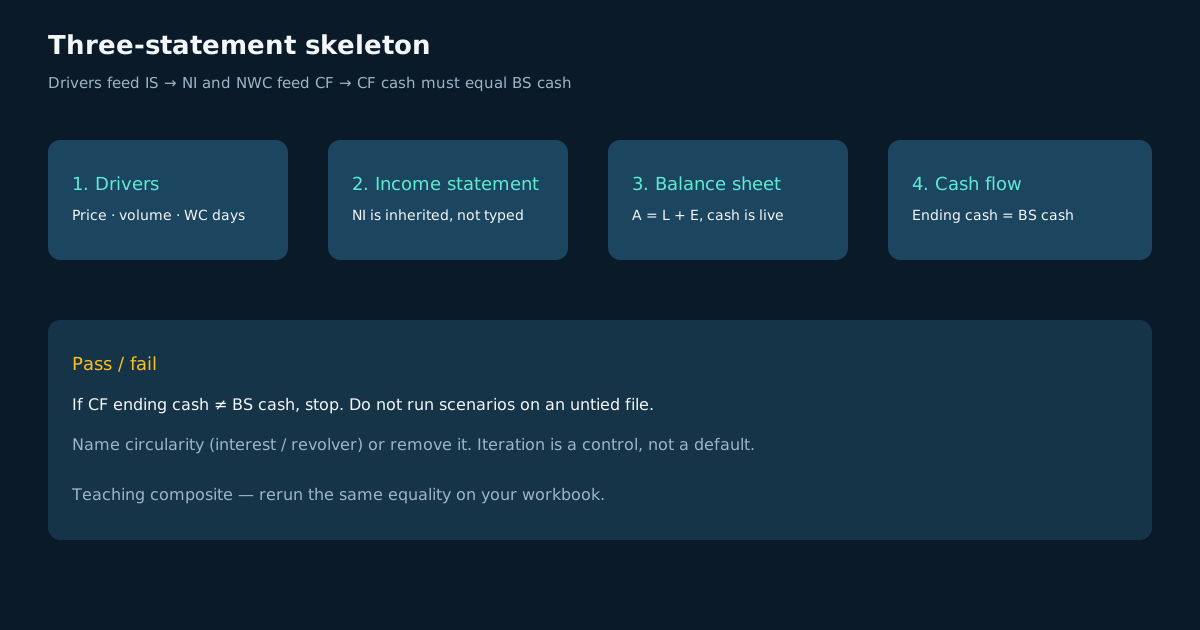 Figure: Drivers feed the income statement; net income and working capital feed cash; cash must equal the balance-sheet cash line.
AI financial modeling in Excel starts here, not with a pretty dashboard. If the three statements do not talk, later scenarios are theater. We still see drafts that forecast revenue on one tab and type cash on another—those files are slideware.
Income statement
Revenue minus COGS, opex, D&A, interest, and tax. Net income is the only number the balance sheet is allowed to inherit for retained earnings. Hardcoding NI breaks AI financial modeling in Excel on the next rerun.
Balance sheet
Assets = liabilities + equity. Cash, AR, inventory, AP, debt, and retained earnings must move with the IS and the cash-flow working-capital bridge. A sheet that “looks balanced” because someone typed the plug is not a model.
Cash flow
Operating cash starts from NI, adds back non-cash, and subtracts ΔNWC. Investing and financing are explicit. Ending cash must equal BS cash. That equality is the pass/fail for AI financial modeling in Excel. If AR days stretch and cash still rises, the working-capital bridge is fiction—fix ΔNWC before you debate growth.
Drivers before formulas
Put price, volume, growth, margin, opex, tax rate, DSO, DIO, DPO, capex, and debt draws on one Inputs tab. Color them. Never bury a growth rate inside a formula three sheets away. AI financial modeling in Excel fails when the modeler cannot point to the cell that moved EBITDA. Write units on the driver (customers, $k, days) so an AI rewrite cannot silently switch from annual to monthly.
Clean the export before you forecast. Profile types and nulls on clean Excel data with AI. Lookup keys that fan out belong on AI VLOOKUP replacement, not inside the IS.
Scenario and sensitivity
Base, upside, downside
Three cases, one toggle. Volume and price move together only if you say so. AI financial modeling in Excel that ships a single “base” with no downside is a pitch deck.
One-way sensitivity
Change one driver; hold the rest. Show NI and cash at ±10% volume and ±200 bps margin. If AI writes a two-way table you cannot explain, delete it. Formula generation can help—see AI Excel formula generator—but the toggle still needs an owner.
Circularity
Interest on average debt, or a revolver that plugs cash, creates a loop. Excel can iterate; it can also hide a #REF that still prints a number. Microsoft’s own note on circular references is the control: name the loop, turn iteration on deliberately, and keep a no-interest case that still balances. AI financial modeling in Excel drafts love circular interest and rarely document it.
Treat an unexplained loop as an incident, the way Google SRE treats an error budget: write the runbook (which cells, which toggle) before the next close.
Worked Example
Mini-workbook (illustrative teaching composite), Year 1, $000s
| Driver | Value |
|---|---|
| Revenue | 1,200 |
| Gross margin | 70% |
| Cash opex | 480 |
| Tax rate | 20% |
| ΔNWC (use of cash) | 80 |
| Capex | 40 |
| Opening cash | 100 |
| Line | Amount |
|---|---|
| Gross profit | 840 |
| EBIT (no D&A in this stub) | 360 |
| Tax | 72 |
| Net income | 288 |
| Operating cash (NI − ΔNWC) | 208 |
| Free cash (after capex) | 168 |
| Ending cash | 268 |
Check: ending cash 268 = opening 100 + 168. If an AI draft shows ending cash 348, it usually added NI again on the cash-flow sheet. That is the first test we run in AI financial modeling in Excel.
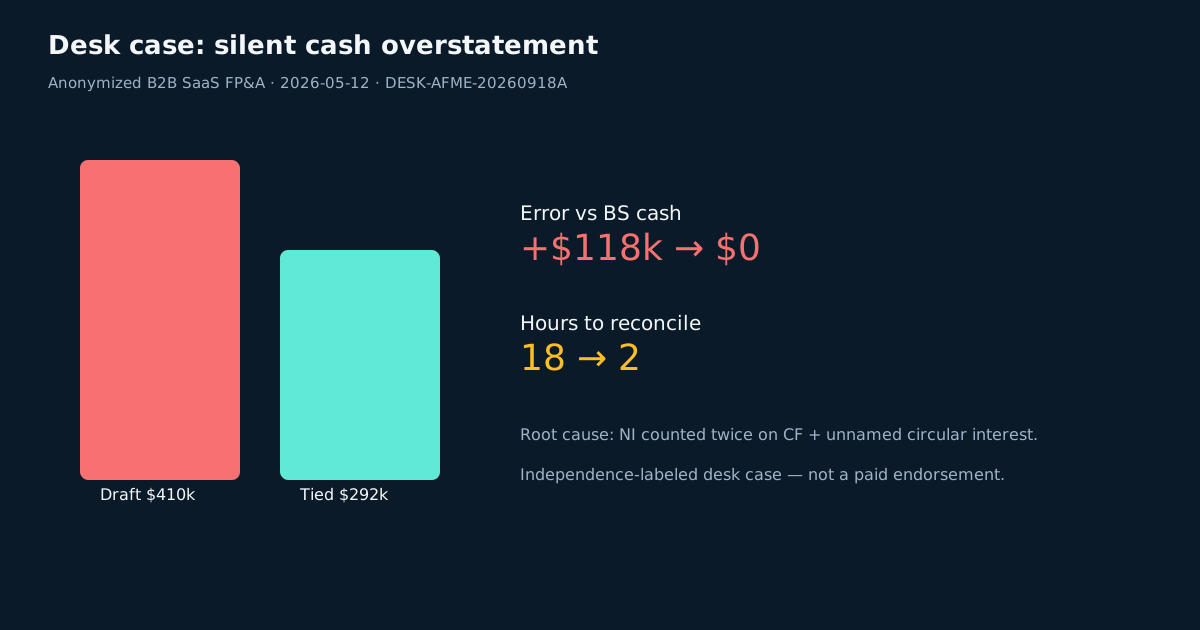 Figure: Anonymized desk case — AI draft vs tied cash after circularity and double-count fixes.
Desk case (anonymized) — mid-market B2B SaaS FP&A weekly pack
| Label | Detail |
|---|---|
| Source | Customer Excel 365 three-statement file (anonymized; independence-labeled) |
| Incident window | 2026-Q2 (three weekly packs) |
| Detected | 2026-05-12 |
| Root-caused | 2026-05-13 |
| Failure mode | AI-drafted CF added NI twice; interest circularity left undocumented |
| Metric | Before tie-out | After tie-out |
|---|---|---|
| Reported ending cash | $410k | $292k |
| Error vs BS cash | +$118k | $0 |
| Hours reconciling “mystery cash” | 18 | 2 |
| Board questions on the cash line | 7 | 0 |
The file calculated. Meaning failed until BS cash equaled CF cash. A second copy of the same AI draft had already gone to the CEO Slack. That is AI financial modeling in Excel under a Friday close—not a textbook chapter. We now require the cash tie screenshot in the review thread before commentary ships.
Checking AI drafts
Read every generated join of statements. LLM-backed workbooks inherit prompt-injection and data-exfil risk in the OWASP Top 10 for LLM Applications if the file holds live payroll or pipeline. Access and retention for shared models should follow ISO/IEC 27001 and the NIST AI Risk Management Framework.
Checklist we use on AI financial modeling in Excel drafts:
- BS balances without a typed plug.
- CF ending cash = BS cash.
- Drivers only on Inputs.
- Circularity named or absent.
- Scenario toggle changes NI and cash.
Pivot-style summaries of actuals belong on AI alternative to pivot table after the model ties.
Common Pitfalls
| Pitfall | Silent failure | Fix |
|---|---|---|
| Textbook Title / generic playbook | Ranks for a book, not a model | Keep this how-to on AI financial modeling in Excel |
| Hardcoded NI | Next month’s IS does not flow | Link retained earnings |
| Circular interest with no note | Iteration hides a #REF | Document or remove |
| Scenario without a toggle | Three pasted copies | One Inputs switch |
| Chat CSV with no statements | Pretty forecast, no cash | Force the skeleton |
When the model leaves Excel
Leave the grid when versions fork by email, when grain needs a warehouse, or when more than two people edit the same live file. Ratios and credit policy still live on financial data analysis. AI financial modeling in Excel remains the right object while one owner can still tie cash in a day. Monthly commentary after the file ties can move to analysis design excel for the monthly pack; do not automate a pack that does not foot.
Readiness Scorecard
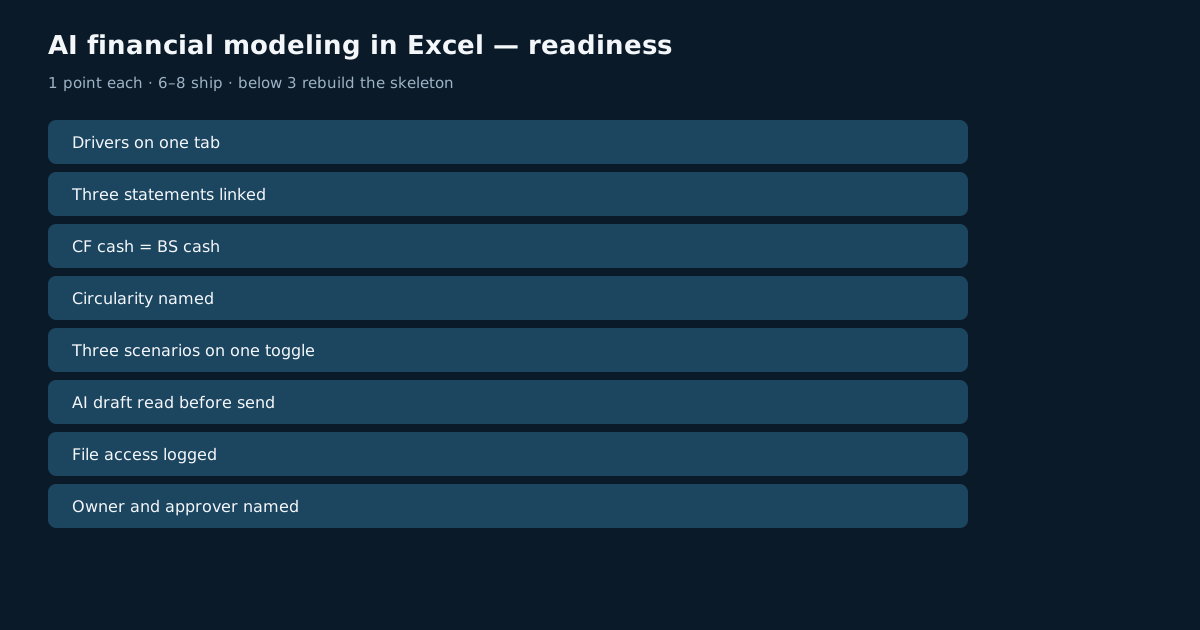 Figure: Score the workbook 1 point per check.
Assess AI financial modeling in Excel (1 point each):
| Check | Pass? |
|---|---|
| Drivers on one tab | |
| Three statements linked | |
| CF cash = BS cash | |
| Circularity named | |
| Three scenarios on one toggle | |
| AI draft read before send | |
| File access logged | |
| Owner and approver named |
6–8: ship the pack. 3–5: fix ties first. Below 3: rebuild the skeleton before you write commentary. A low score is cheaper than a board pack that does not foot.
Frequently Asked Questions
What is AI financial modeling in Excel?
AI financial modeling in Excel is a three-statement file an AI can draft and a human must tie. Desk short name: Excel 3-statement with an LLM assist.
Can ChatGPT build a financial model?
It can draft tabs. It cannot own cash identity. Treat the download as a draft of AI financial modeling in Excel, then run the five checks above.
What is a circular reference in a model?
A formula that depends on its own output—usually interest or a cash plug. See Microsoft’s circular-reference article. Name it or remove it.
How do you audit model assumptions?
Read the Inputs tab, not the charts. Every material move in AI financial modeling in Excel should point to a yellow cell and a one-line reason.
When should a model leave Excel?
When email versions diverge, when you need warehouse grain, or when close takes more than a day to tie cash.
Conclusion
AI financial modeling in Excel is a tied three-statement file, not a textbook Title and not a chat screenshot. Lock drivers, prove cash, name circularity, then run scenarios.
For ratio definitions after the file ties, read financial data analysis. Optional practice: the InfiniSynapse web app is free on registration.