AI Spreadsheet Data Cleaning: One Loop
By William Zhu & the InfiniSynapse Data Team · Published: 2026-06-09 · Last updated: 2026-09-24 · About: Editorial standards · About / team
Author credentials: William Zhu is cofounder of InfiniSynapse (GitHub @allwefantasy). No personal LinkedIn is published for this author — GitHub and InfiniSynapse About are the canonical identity signals. Desk contact: zhuhl@infinisynapse.com.
Desk experience (first-hand): Educational playbook below stands alone. Timed cleaning benchmarks and case notes come from n=8 monthly Excel KPI packs reviewed Q1–Q2 2026 (finance / ops / revenue exports). Tallies are pedagogy, not a paid survey. Third-party category channels: Gartner Peer Insights — Analytics & BI (not an endorsement of desk %).
Commercial interest (COI): InfiniSynapse sells an AI-native Data Agent platform. Product notes are labeled; this guide is written for analysts who still live in Excel, not as a sales deck. Feedback: zhuhl@infinisynapse.com · corrections policy.
Table of Contents
- TL;DR
- Why this matters now
- Key definition and scope
- Operational scorecard
- Step-by-step implementation playbook
- Quality and governance checklist
- When teams outgrow spreadsheet-only AI
- Search intent scenarios by role and industry
- Operating AI Excel data cleaning in Production
- Communicating Results to Stakeholders
- Excel chart pack
- Frequently Asked Questions
- Conclusion
TL;DR
AI spreadsheet data cleaning profiles one Excel or CSV file, applies reusable rules, and checks the result before next month. Same file, same loop. The right approach is not a single prompt; it is an operating loop that profiles incoming files, applies stable transformation rules, verifies business definitions, and publishes outputs with traceable assumptions. In practical delivery work, ai to clean excel data creates value when operators move from ad-hoc fixes toward reusable runbooks that can be reviewed by finance, operations, and leadership. In 2026, this topic matters because spreadsheet workflows still dominate frontline analytics intake, yet stakeholder expectations now require near-real-time updates. A durable workflow for ai to clean excel data reduces manual rework, cuts revision cycles, and improves trust in monthly KPI reporting.
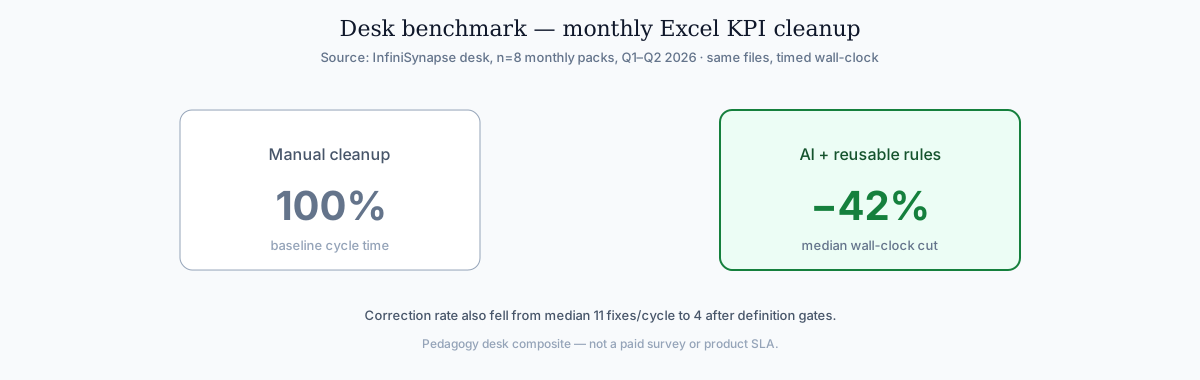
Citable desk finding: Across n=8 monthly Excel KPI packs (same files, timed wall-clock), AI-assisted cleaning with reusable rules cut cycle time by a median 42% vs fully manual cleanup, and median correction count fell from 11 → 4 fixes per cycle after definition gates. Methodology: profile → transform template → owner sign-off; excludes warehouse compute. Not a product SLA.
Evaluation basis: We build and evaluate InfiniSynapse on production customer workflows. Governance and security context is cited inline and in the authority links below—desk composites are labeled separately.
Why this matters now
NL interfaces for data still inherit limits from Wikipedia's natural language processing overview, especially ambiguity and grounding.
Most business teams still receive core source data through Excel or CSV exports, not through perfectly modeled warehouses. That reality creates recurring pressure: each month, analysts must clean noisy files, reconcile definitions, and ship board-ready outputs in less time than before. Search demand around ai to clean excel data signals that operators are no longer looking for isolated tricks; they need repeatable systems that survive team growth. Production rollouts should align access and review controls with the OpenTelemetry documentation, especially when recurring queries touch live schemas. Enterprise AI adoption guidance in ISO/IEC 42001 mirrors the shift from ad-hoc copilots to repeatable, reviewable decision workflows.
From a delivery perspective, the highest-cost failure mode is not a slow first run. The high-cost failure mode is definition drift across repeated cycles. Teams that cannot preserve assumptions spend each month renegotiating what counts as active customers, valid revenue, or target margin. A practical ai to clean excel data strategy therefore has two goals: accelerate analysis now and preserve organizational memory for the next cycle.
| Capability | Spreadsheet-only AI | Memory-backed workflow layer |
|---|---|---|
| One-off cleanup speed | Fast | Fast after setup |
| Recurring KPI consistency | Medium | High |
| Connector coverage | Limited | Broad |
| Audit trail depth | Light | Strong |
| Team handoff resilience | Fragile | Durable |
This pattern also explains why many teams start with spreadsheet copilots and later add workflow orchestration. Spreadsheet-first AI can answer questions quickly, but recurring KPI governance requires memory, connectors, and review checkpoints that plain chat sessions rarely maintain by default. Treat ai to clean excel data as an operating loop—not a clever one-shot prompt.
Key definition and scope
Key Definition: In this guide, ai to clean excel data means using AI to profile spreadsheet data, apply explicit cleaning logic, validate metric definitions, and deliver traceable outputs that can be rerun with minimal rework. Scope boundaries matter. This article focuses on operational delivery for analysts and data-adjacent operators. It does not assume a full data engineering stack, but it does require disciplined review gates. We use this framework across cross-functional workflows where business users still live in Excel while leadership expects reliable recurring KPIs. Foundational warehouse concepts—grain, dimensions, and conformed metrics—remain essential; Elastic documentation is a concise refresher for reviewers validating generated SQL when exports later land in search/log indexes.
Operational scorecard
Use this scorecard to evaluate whether your current implementation is production-ready. The move from dashboard-first BI to augmented workflows—described in the W3C WCAG accessibility standard—frames how teams should evaluate tooling that must remain usable under review. Related wrangling patterns appear in AI data wrangling tools.
| Dimension | What to measure | Target outcome |
|---|---|---|
| Intake quality | Type errors, null markers, schema drift | Stable preprocessing in every run |
| Metric integrity | Definition consistency by owner | No denominator surprises |
| Execution speed | Time from file arrival to stakeholder-ready output | Predictable delivery windows |
| Review burden | Manual corrections per cycle | Declining correction trend |
| Repeatability | Ability to rerun next month with minimal prompt changes | High reuse ratio |
| Governance readiness | Visibility into assumptions and changes | Clear audit path |
Teams that treat this scorecard as a monthly artifact usually improve faster than teams that chase one-off optimization hacks. If your review burden remains high after initial automation, the issue is often process design, not model quality. Score ai to clean excel data readiness before you buy another seat of spreadsheet AI.
Step-by-step implementation playbook
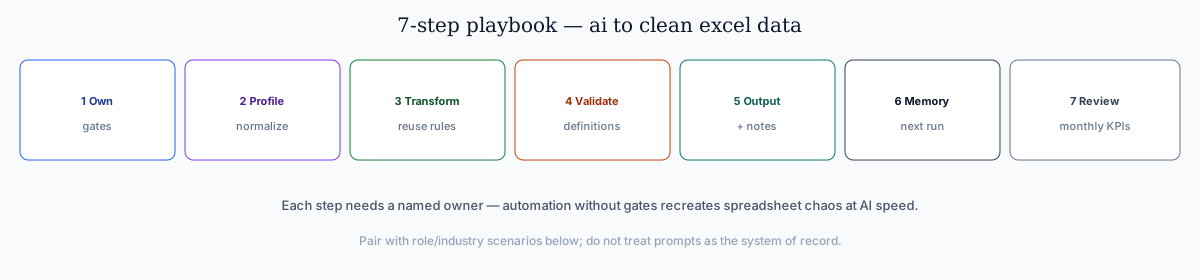
Step 1: Define ownership and quality gates

Assign a metric owner, an execution owner, and a final approver before any automation begins. When ownership is implicit, errors hide in handoffs. A robust ai to clean excel data implementation starts with explicit accountability for metric definitions and publication readiness.
Step 2: Profile and normalize input files

Profile column types, null rates, and category cardinality immediately after upload. Record anomalies in a short checklist. This prevents silent failures later when formulas, joins, or charts assume stable structures. Profiling is non-negotiable in any serious ai to clean excel data runbook.
Step 3: Apply reusable transformation logic

Translate business rules into reusable transformations. For example, convert date formats into one canonical standard, map category aliases, and enforce rounding policies for financial fields. Treat transformations as assets, not disposable prompt output.
Rule template (copy into your runbook):
RULES = {
    "date_cols": {"order_date": "%Y-%m-%d", "close_date": "%Y-%m-%d"},
    "null_markers": ["", "NA", "N/A", "#N/A", "null"],
    "category_aliases": {"AMER": "Americas", "EMEA": "EMEA", "APAC": "APAC"},
    "money_round": 2,
}

def normalize_frame(df, rules=RULES):
    for col, fmt in rules["date_cols"].items():
        if col in df: df[col] = pd.to_datetime(df[col], errors="coerce").dt.strftime(fmt)
    df = df.replace(rules["null_markers"], pd.NA)
    if "region" in df:
        df["region"] = df["region"].map(lambda x: rules["category_aliases"].get(str(x).strip(), x))
    return df
Keep this contract next to the sheet—not only inside a chat thread—so ai to clean excel data survives analyst turnover.
Step 4: Validate business definitions before output generation

Run definition checks before charting or narrative drafting. Confirm denominator logic, period boundaries, and exception rules with owners. Most high-visibility reporting errors happen because teams validate syntax but skip definition review. This gate is what makes ai to clean excel data trustworthy in finance reviews.
Step 5: Generate outputs with interpretation notes

Create tables, charts, and concise narrative blocks together. Include interpretation notes for edge cases, caveats, and unresolved anomalies so stakeholders understand confidence boundaries. Outputs without caveats are how ai to clean excel data demos lose trust in week two.
Step 6: Store memory and prep next run

Capture approved logic in a reusable memory layer so the next cycle starts from validated context rather than from scratch. This is where ai to clean excel data transitions from tactical speed gain to strategic operating leverage. Pair cleaning with AI Vlookup Replacement when lookup columns drift each month. Pivot-heavy teams should compare AI Alternative To Pivot Table. CSV-first intake belongs in Analyze Csv With Ai. Multi-file rollouts should read Merge Multiple Csv With Ai before automating joins. After a clean workbook, merge multiple csv with AI is the append-or-join loop.
Step 7: Review cycle performance monthly

Track runtime, correction rate, and escalation frequency each cycle. If runtime is improving but correction rate is flat, you need stronger review checkpoints. If corrections are low but runtime is high, optimize transformations and connector routing. Practical implementation examples:
- Standardizing mixed date formats
- Fixing null markers across uploaded exports
- Normalizing category spellings before charts
- Verifying duplicate rows from manual copy-paste
- Preparing weekly operations KPI refreshes
These examples reinforce a consistent lesson: success depends on process architecture. Teams that define quality first, then automate, produce better outcomes than teams that automate first and repair later. Monthly review is the difference between demo theater and durable ai to clean excel data.
Quality and governance checklist
Observability for agentic analytics should follow Prometheus documentation so query chains remain traceable in production. For ai to clean excel data specifically, require: typed intake checklist, named metric owner, signed definition sheet, and a correction log with owner + date.
When teams outgrow spreadsheet-only AI
Spreadsheet copilots are useful for local tasks, but teams eventually hit three predictable ceilings: context resets between cycles, limited source connectivity, and weak recurring KPI orchestration. At that point, operators need memory-backed execution and connectors that preserve logic across systems.
Educational note: Memory cards, connectors, and recurring KPI runs are the capability pattern—not a vendor requirement. InfiniSynapse is one implementation of that pattern when teams outgrow spreadsheet-only AI; you can build equivalent guardrails with your own queue and metric store. Graduate only after ai to clean excel data scorecard rows for repeatability and governance are green. For deeper category context, review AI for Data Analysis.
Search intent scenarios by role and industry
Replace one-size-fits-all “Scenario N” stuffing with differentiated intents. Searchers typing ai to clean excel data still need reusable checks and owner sign-off—but the failure mode differs by job:
| Role / industry | Typical file pain | What “good” looks like |
|---|---|---|
| Accountant / FP&A | Mixed date locales, rounded currency vs cents | Canonical close calendar + money rounding policy signed by controller |
| Revenue ops | CRM export aliases (AMER/Americas), duplicate opportunities | Alias map + dedupe keys before forecast charts |
| Supply-chain planner | SKU typos, unit-of-measure drift | SKU dictionary + UoM conversion table versioned monthly |
| Healthcare ops analyst | PHI columns accidentally exported | Column allow-list + redaction before any AI prompt leaves the laptop |
| Marketing analyst | UTM noise, campaign name sprawl | Campaign taxonomy + null-UTM policy before attribution |
| Data scientist (handoff) | Dirty Excel landing zone before modeling | Profile report + typed Parquet handoff; do not train on unchecked nulls |
| SMB founder | One sheet for everything | Freeze a weekly KPI pack first; defer connectors until recurrence is real |
| Public-sector analyst | Accessibility + audit | WCAG-ready tables + documented assumptions for every published figure |
Higher recurrence and stakeholder exposure still demand durable memory and KPI review controls—just not twenty-one identical bullets. Map your search intent to one row above before you pick a tool for ai to clean excel data.
Accountant path: close calendar + rounding policy first. RevOps path: alias map + dedupe keys first. Healthcare path: allow-list columns before any model sees the sheet. Those three forks cover most real ai to clean excel data tickets we see on the desk.
Operating AI Excel data cleaning in Production
Treat AI Excel data cleaning as an operating capability, not a one-off task: confirm owners, metric definitions, and review gates for the first workflow before widening scope, because teams that log exceptions weekly compound accuracy faster than teams chasing new features. Capture the first reliable run as a reusable template — assumptions, checks, and reviewer sign-off in one playbook — so quality holds when data, schemas, or priorities change. Ground these controls in Databricks documentation, Google Research publications, the Google SRE book, and Amazon Redshift documentation.
What to review on a regular cadence
Audit AI Excel data cleaning monthly: compare rerun consistency, validation pass rate, and time-to-first-insight against baseline, retire stale definitions, and re-confirm access scopes so silent drift is caught before it reaches a stakeholder report. Re-run the desk scorecard whenever you change the transform template for ai to clean excel data. Silent drift is the enemy of recurring ai to clean excel data programs.
Communicating Results to Stakeholders
Leaderboard scores on the Spider NL2SQL benchmark are a useful sanity check but rarely predict enterprise schema drift on their own.
APAC rollouts should cross-check UK NCSC guidelines for secure AI system development for secure deployment practices.
Public-sector buyers should review ISO/IEC 42001 AI management systems when procuring analytics agents.
EU security reviews should reference ENISA multilayer AI cybersecurity framework when scoping analytics agent controls.
Foundational warehouse concepts—grain, dimensions, and conformed metrics—remain essential; Wikipedia's data warehouse overview is a concise refresher for reviewers validating generated SQL.
Snowflake Cortex Analyst documentation shows how warehouse-native semantic layers change NL2SQL grounding expectations for analyst-facing products.
When you brief executives, lead with correction-rate trend and definition sign-offs—not model names. That framing keeps ai to clean excel data conversations about operations, not hype.
Excel chart pack
After the file passes type, null, and definition gates, turn the cleaned table into a chart pack — do not prompt a chart off the raw export. This is the slice kept from the retired /en/blog/ai-excel-chart-generator URL (marker DESK-XLC-20260917A).
- Turning cleaned tables into chart drafts quickly
- Choosing chart types by metric intent
- Auto-writing chart captions for executives
- Checking visualization bias before sharing
- Standardizing chart packages for monthly decks
A chart that looks right without denominator sign-off is still a failed ai to clean excel data run. Monthly deck packaging stays on analysis design excel. Natural-language dashboards stay on Generate dashboard from natural language.
Cluster Deep Dives by Workflow
The hub sections above cover strategy and scorecards. Open these cluster guides when a specific workflow, connector, or comparison matches your next sprint—not as a flat reading list.
| Focus | When it fits | Guide |
|---|---|---|
| Ai Alternative To Pivot Table | Spreadsheet workflow automation | Ai Alternative To Pivot Table |
| Ai Vlookup Replacement | Spreadsheet workflow automation | Ai Vlookup Replacement |
| Ai Excel Formula Generator | Spreadsheet workflow automation | Ai Excel Formula Generator |
| Analyze Csv With Ai | Spreadsheet workflow automation | Analyze Csv With Ai |
| Merge Multiple Csv With Ai | Spreadsheet workflow automation | Merge Multiple Csv With Ai |
| Deduplicate Data With Ai | Specialized depth on this subtopic | Deduplicate Data With Ai |
| Ai Data Cleaning Techniques | Specialized depth on this subtopic | Ai Data Cleaning Techniques |
| Excel chart pack | Chart drafts after the file is gated | Excel chart pack |
| AI financial modeling in Excel | 3-statement workbook after the file is clean | AI financial modeling in Excel |
| Excel Monthly Report Automation Ai | Spreadsheet workflow automation | analysis design excel |
| AI data wrangling tools | Spreadsheet workflow automation | AI data wrangling tools |
Also useful after cleaning stabilizes: Deduplicate Data With Ai · Ai Data Cleaning Techniques · Excel chart pack · AI financial modeling in Excel · analysis design excel · Ai Excel Formula Generator.
Frequently Asked Questions
How much data can the pipeline handle before it slows down?
Most spreadsheet-first teams can process medium files quickly, but performance depends on transform complexity, not only row count. Benchmark a real monthly file before scaling ai to clean excel data across the org.
How do we validate output quality before sharing results?
Use a three-layer gate: technical checks for types and nulls, business checks for metric definitions, and stakeholder checks for interpretation. That triad is the quality bar for ai to clean excel data.
What skills does the team need to adopt this approach?
Operators need data literacy, metric ownership, and review discipline more than advanced coding. Clear quality criteria beat clever prompts for ai to clean excel data.
When should we move beyond spreadsheet-only AI tools?
Move when recurrence, source complexity, or governance load rises—when prompts are rebuilt each cycle, sources multiply, or KPI lineage is unclear. That is the graduate signal for ai to clean excel data.
How does InfiniSynapse fit this analytics workflow?
Commercial note: InfiniSynapse is one option when teams need memory cards, connectors, and recurring KPI runs after outgrowing chat-in-Excel. Equivalent patterns can be built in-house; evaluate against the scorecard above.
What is the first file to automate with ai to clean excel data?
Pick the noisiest recurring pack with a named owner (usually month-end finance or ops). One-off exploratory sheets are poor first candidates.
How do we stop AI from inventing category values?
Forbid free-text category invention: map against an approved alias dictionary and fail closed on unknown values until an owner adds them.
Should cleaning prompts include raw PII columns?
No. Drop or redact PII before any external model call. Healthcare and HR packs need column allow-lists before ai to clean excel data leaves the laptop—see the role scenarios table.
How often should transform rules be versioned?
Any time an owner changes a definition or alias map. Pin the rule hash in the monthly review notes for ai to clean excel data.
Can we skip definition review if the chart looks right?
No. Chart correctness without denominator sign-off is the most common board-level failure mode when teams rush ai to clean excel data.
What is a healthy correction-rate trend?
In our n=8 desk packs, healthy programs moved toward ≤5 manual fixes per monthly cycle after two months of gated ai to clean excel data runs.
Conclusion
A high-performing workflow for ai to clean excel data is less about one perfect model response and more about a repeatable operating system for data quality. Teams that pair automation with ownership, review gates, and memory preserve both speed and trust. The practical roadmap is straightforward: start in spreadsheets, formalize reusable logic, and transition to connector-driven recurring execution when KPI demands grow.
Re-score the playbook each quarter so ai to clean excel data stays honest as file schemas drift. If correction rate climbs while runtime falls, you automated the wrong layer.
Optional product note (commercial): To try memory-backed cleaning loops on uploads, use the InfiniSynapse web app. Skip if you only need the playbook, transform template, and desk benchmark above.