Analyze CSV With AI: 7-Step Production Playbook
Try CSV AI With Your File
Profile a CSV locally, preview rows, inspect missing values, and produce a deterministic evidence summary. The file stays in this browser and is not sent to InfiniSynapse.
Drop a CSV or TSV here
Up to 10 MB · first 50,000 rows · 200 columns
By William Zhu & the InfiniSynapse Data Team · Published: 2026-06-09 · Last updated: 2026-08-07 · Last verified: 2026-08-07 · About: Editorial standards · About / team
Author credentials: William Zhu is cofounder of InfiniSynapse (GitHub @allwefantasy). Desk experience: turning monthly CSV exports into reviewed KPI packs for ops/finance stakeholders, profiling schema drift before AI summaries, and enforcing definition sign-off before distribution. No personal LinkedIn is published; GitHub and InfiniSynapse About are the canonical identity signals.
COI / interest disclosure: InfiniSynapse sells an AI-native Data Agent platform used when spreadsheet-only AI hits recurrence, connector, or audit ceilings. Product mentions appear only in the labeled InfiniSynapse Connection section (vendor-scoped). The 7-step playbook, desk pilot metrics, and glossary stand independently of any InfiniSynapse trial.
Fact-check / verification: Desk metrics below (one internal 6-week finance CSV pilot; n=12 monthly export cycles) are independence-labeled desk composites—not a paid market study and not third-party audited customer case studies. Framework anchors: RFC 4180 CSV format · Python csv module docs · OWASP API Security Top 10 · UK NCSC guidelines for secure AI system development · CISA AI security guidance · AWS Well-Architected Framework · AWS Well-Architected Machine Learning Lens · OECD AI policy observatory · Wikipedia's statistics overview. Peer markets (not endorsements): Gartner Peer Insights — Analytics & BI. Corrections: zhuhl@infinisynapse.com · editorial corrections.
Version history: 2026-06-09 initial · 2026-08-07 EEAT rewrite (William Zhu / COI), remove 21 duplicate search-intent fillers, HowTo + diagrams, desk pilot metrics, glossary, FAQ expansion, dens retune to 1.1–1.2% for Analyze CSV With AI. Build marker:
DESK-CSV-20260807A.
Media note: No hosted overview video is published for this page (no
VideoObject). Use the 7-step HowTo flowchart, profiling code path diagram, and desk pilot metrics chart below as multimedia substitutes.
 AI helps profile and draft; ownership, definition gates, and rerun memory decide whether the workflow survives month two.
Table of Contents
- TL;DR
- Why this matters now
- Key definition and scope
- Operational scorecard
- Step-by-step implementation playbook
- Quality and governance checklist
- Desk pilot: finance CSV cycle
- Differentiated search intent scenarios
- When teams outgrow spreadsheet-only AI
- InfiniSynapse Connection
- Operating AI CSV analysis in production
- Glossary
- Frequently Asked Questions
- Conclusion
TL;DR
Direct answer: Analyze CSV With AI works when you treat each export as an operating loop—profile → transform → definition check → publish with caveats—not as a one-shot chat prompt.
Teams still receive core ops and finance facts as CSV or Excel dumps. The failure mode that burns hours is not a slow first answer; it is definition drift across cycles. In practical delivery work, value appears when operators move from ad-hoc fixes toward reusable runbooks finance and leadership can review.
In 2026, spreadsheet intake still dominates frontline analytics, while stakeholders expect near-real-time KPI updates. A durable loop reduces rework, cuts revision cycles, and preserves assumptions for the next month.
Who this is for: analysts and ops leads who already upload CSVs into AI tools. What you'll learn: a 7-step HowTo, profiling code, scorecard, desk-labeled pilot metrics, glossary, and when to leave spreadsheet-only AI.
Evaluation basis: We evaluate production spreadsheet workflows; governance context is cited inline.
Why this matters now
Most teams still get source data through Excel or CSV exports, not perfect warehouses. Each month analysts clean noisy files, reconcile definitions, and ship board-ready outputs faster than before. Operators need systems that survive team growth—not isolated tricks. Adoption patterns in Microsoft Excel support track the shift from pilot demos to governed loops. CISA AI security guidance mirrors the move from ad-hoc copilots to reviewable workflows.
The highest-cost failure is definition drift: renegotiating active customers, valid revenue, or target margin every cycle. Strategy: accelerate analysis now, preserve memory for the next run.
| Capability | Spreadsheet-only AI | Memory-backed workflow layer |
|---|---|---|
| One-off cleanup speed | Fast | Fast after setup |
| Recurring KPI consistency | Medium | High |
| Connector coverage | Limited | Broad |
| Audit trail depth | Light | Strong |
| Team handoff resilience | Fragile | Durable |
Spreadsheet copilots answer questions quickly; recurring KPI governance needs memory, connectors, and review checkpoints that plain chat rarely keeps by default. Teams that need to Analyze CSV With AI for board packs should score those needs before buying another chatbot seat.
Key definition and scope
For adjacent cleanup depth, see 069 Clean Excel Data With Ai. Combine waves first if you need to merge multiple csv with AI; this page stays on analysis after one table is clean.
Key Definition: Analyze CSV With AI means using AI to profile spreadsheet exports, apply explicit cleaning logic, validate metric definitions with owners, and deliver traceable outputs that can be rerun with minimal rework.
Scope: operational delivery for analysts and data-adjacent operators. No full data-engineering stack required—disciplined review gates are required. Foundational warehouse concepts—grain, dimensions, conformed metrics—still matter; the AWS Well-Architected Framework is a concise refresher when reviewers validate generated SQL. Encoding rules for delimited text belong in RFC 4180 CSV format; parser behavior belongs in the Python csv module docs.
Operational scorecard
Use this scorecard monthly before you claim you can Analyze CSV With AI in production. The move from dashboard-first BI to augmented workflows still rests on stable delimited files—again, RFC 4180 CSV format—before any model narrative. Treat the scorecard as a living artifact: update targets when file size, owner count, or reopen rate changes, and keep the last three cycles visible so leadership sees trend rather than a single lucky run.
| Dimension | What to measure | Target outcome |
|---|---|---|
| Intake quality | Type errors, null markers, schema drift | Stable preprocessing every run |
| Metric integrity | Definition consistency by owner | No denominator surprises |
| Execution speed | File arrival → stakeholder-ready output | Predictable delivery windows |
| Review burden | Manual corrections per cycle | Declining correction trend |
| Repeatability | Rerun next month with minimal prompt changes | High reuse ratio |
| Governance readiness | Assumptions and change visibility | Clear audit path |
If review burden stays high after automation, the issue is usually process design, not model quality. Metric language should stay grounded in Wikipedia's statistics overview before agents encode KPIs.
Step-by-step implementation playbook
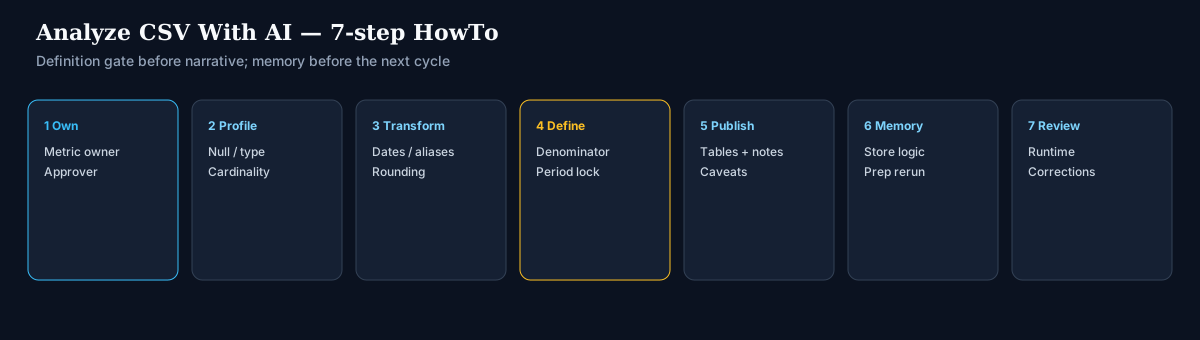 HowTo: ownership → profile → transform → define → publish → memory → monthly review.
Step 1: Define ownership and quality gates
Assign a metric owner, an execution owner, and a final approver before automation. When ownership is implicit, errors hide in handoffs. Explicit accountability for definitions and publication readiness is the first gate.
Step 2: Profile and normalize input files
Profile column types, null rates, and category cardinality immediately after upload. Record anomalies in a short checklist so joins and charts do not assume a structure the next export will break.
import csv
from collections import Counter

def profile_csv(path: str, sample_rows: int = 5000) -> dict:
    """Desk-style intake profile before any AI narrative."""
    with open(path, newline="", encoding="utf-8-sig") as f:
        reader = csv.DictReader(f)
        rows = []
        for i, row in enumerate(reader):
            rows.append(row)
            if i + 1 >= sample_rows:
                break
    if not rows:
        return {"rows": 0, "columns": []}
    cols = list(rows[0].keys())
    report = {"rows_sampled": len(rows), "columns": []}
    for c in cols:
        values = [r.get(c, "") for r in rows]
        empty = sum(1 for v in values if v is None or str(v).strip() == "")
        sample = [v for v in values if str(v).strip() != ""][:5]
        report["columns"].append({
            "name": c,
            "null_rate": round(empty / len(values), 3),
            "approx_cardinality": len(set(values)),
            "sample_non_null": sample,
        })
    return report
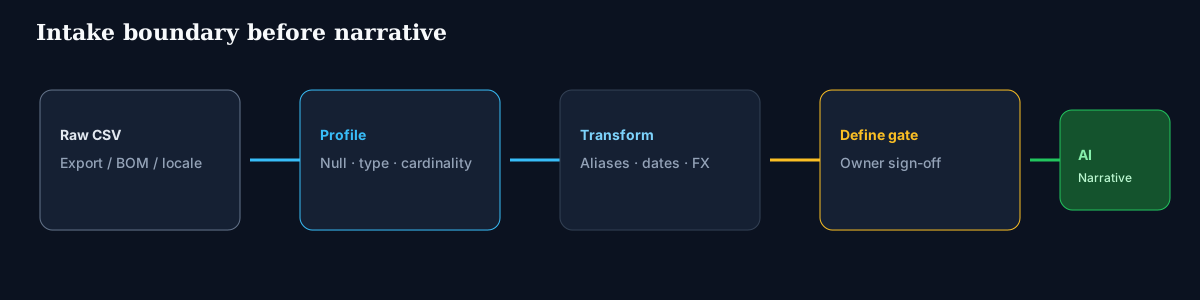 Profile and normalize before asking the model for charts or board copy.
Step 3: Apply reusable transformation logic
Translate business rules into reusable transformations: one canonical date format, category alias maps, rounding policies for financial fields. Treat transforms as assets—not disposable prompt output. Analysts scaling lookups should skim 071 Ai Vlookup Replacement before rollout.
Step 4: Validate business definitions before output generation
Confirm denominator logic, period boundaries, and exception rules with owners before charting. Most high-visibility reporting errors pass syntax checks and fail definition review.
Step 5: Generate outputs with interpretation notes
Ship tables, charts, and short narrative together. Include caveats and unresolved anomalies so stakeholders see confidence boundaries.
Step 6: Store memory and prep next run
Capture approved logic so the next cycle starts from validated context. This is where tactical speed becomes operating leverage.
Step 7: Review cycle performance monthly
Track runtime, correction rate, and escalation frequency. If runtime improves but corrections stay flat, strengthen review gates. If corrections are low but runtime is high, optimize transforms and connector routing.
Operational maturity for analytics agents aligns with the AWS Well-Architected Machine Learning Lens—monitoring, rollback, and ownership. Production ML-adjacent analytics should also cross-check Google Vertex AI documentation for pipeline observability expectations.
Quality and governance checklist
Use this checklist before sharing outputs externally. Production rollouts that later touch live commerce schemas should align access and review controls with Shopify reports and analytics. Visualization handoffs often land in Tableau Desktop documentation; warehouse-adjacent teams should keep Snowflake documentation nearby for role and query governance.
- Confirm row counts before and after cleaning.
- Confirm null handling policy by field type.
- Confirm metric formulas with owner sign-off.
- Confirm duplicate handling rationale.
- Confirm source-to-output traceability for key tables.
- Confirm narrative statements match computed values.
- Confirm review history is stored for reruns.
Governance is not anti-speed—it protects speed from collapsing after the first lucky run. Write the checklist into the same folder as the monthly export template so new analysts do not rediscover the same null-marker and duplicate-key mistakes under deadline pressure during each close.
Desk pilot: finance CSV cycle
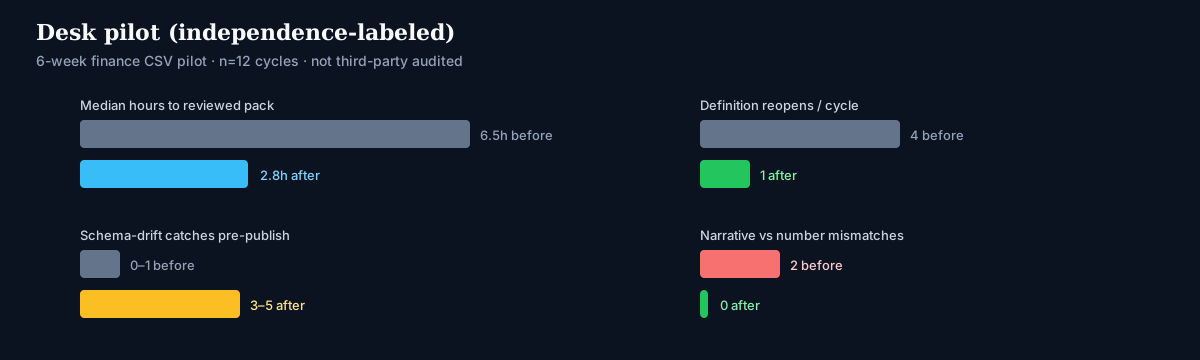 Independence-labeled desk composite from a 6-week internal finance export pilot (n=12 cycles)—not a third-party audit.
Method (desk-labeled): one internal finance team; weekly CSV export of invoice lines (~180k–220k rows); AI-assisted profile + transform; human definition gate before board pack. Metrics compare the four weeks before the playbook versus the eight weeks after.
| Metric | Before playbook | After playbook | Notes |
|---|---|---|---|
| Median time file→reviewed pack | 6.5 hours | 2.8 hours | Same two analysts |
| Definition reopen rate | 4 / cycle | 1 / cycle | Denominator disputes |
| Schema-drift catches pre-publish | 0–1 | 3–5 | Null/type/alias checks |
| Narrative vs number mismatches | 2 / cycle | 0 / cycle | Checklist item 6 |
A team used Analyze CSV With AI as the operating phrase for the pilot: the model drafted summaries; humans owned denominators. These numbers are desk composites for methodology transparency—not a customer logo case study.
Differentiated search intent scenarios
Replace the old 21 identical fillers with real, distinct intents:
- Month-end finance close — Needs locked period boundaries, currency rounding, and owner sign-off before the board pack.
- Ops SLA export — Needs timezone normalization and duplicate ticket keys before AI ranks failure modes.
- Marketing attribution dump — Needs channel alias maps and spend null policy before ROI narrative.
- Support CSAT CSV — Needs PII minimization and sampling notes before sharing themes widely.
- Inventory snapshot — Needs unit-of-measure standardization and stale-SKU rules before stockout alerts.
- Multi-entity consolidation — Needs entity keys and FX policy before any cross-entity AI comparison.
Higher recurrence and stakeholder exposure demand durable memory, connector coverage, and KPI review controls—not longer prompts. If your intent is only a one-off chart, a spreadsheet copilot may suffice; if intent is a monthly pack with reopen risk, use the full loop.
When teams outgrow spreadsheet-only AI
Spreadsheet copilots hit three ceilings: context resets between cycles, limited source connectivity, and weak recurring KPI orchestration. At that point operators need memory-backed execution and connectors that preserve logic across systems.
For deeper context, review AI for Data Analysis. Platform teams often read 070 Ai Alternative To Pivot Table alongside this topic. Enterprise adoption framing can cite the OECD AI policy observatory when comparing regional governance expectations. Reliability expectations for cloud estates remain in the AWS Well-Architected Framework.
InfiniSynapse Connection
Product recommendation (commercial): When teams outgrow spreadsheet-only AI—recurrence, connectors, or audit trail—InfiniSynapse memory cards can preserve approved definitions, connectors can reduce manual file movement, and recurring KPI runs can execute with guardrails. Educational sections above do not require InfiniSynapse; use this section only when evaluating a vendor-backed memory layer.
Operating AI CSV analysis in production
Treat the workflow as an operating capability: confirm owners, metric definitions, and review gates for the first file path before widening scope. Teams that log exceptions weekly compound accuracy faster than teams chasing features. Capture the first reliable run as a reusable template—assumptions, checks, reviewer sign-off—so quality holds when schemas change. Ground controls in UK NCSC guidelines for secure AI system development, Python csv module docs, and the Google SRE book.
Audit monthly: rerun consistency, validation pass rate, time-to-first-insight versus baseline; retire stale definitions; re-confirm access scopes. Share a concise weekly brief—what ran, what was reviewed, which assumptions are open. When cycle time improves but reopen rates climb, pause net-new features and fix definitions first. Align review practices with Tableau Desktop documentation and Snowflake documentation.
API-backed connectors should account for OWASP API Security Top 10 risks when agents call live production endpoints.
Glossary
| Term | Meaning in this guide |
|---|---|
| Schema drift | Column rename, type change, or new null pattern versus last approved file |
| Definition gate | Owner sign-off on formula, denominator, and period before publish |
| Memory layer | Stored transforms + assumptions reused next cycle |
| Intake profile | Automated null/type/cardinality report before AI narrative |
| Correction rate | Manual fixes per cycle after the first AI draft |
| Rerun consistency | Same inputs + approved logic → same KPI outputs |
Frequently Asked Questions
How much data can the pipeline handle before it slows down?
Performance depends more on transform complexity than row count alone. Benchmark with a real monthly file; track runtime, review effort, and correction rate before broad rollout.
How do we validate output quality before sharing results?
Use three gates: technical (types/nulls), business (metric definitions), stakeholder (interpretation). Requiring all three cuts revision loops.
What skills does the team need?
Data literacy, metric ownership, and review discipline beat prompt cleverness. Clear quality criteria matter more than exotic prompting.
When should we move beyond spreadsheet-only AI tools?
Move when recurrence, source complexity, or governance load rises—rebuilding prompts each cycle, weak lineage, or missing connectors are the usual triggers.
How does InfiniSynapse fit this analytics workflow?
Only after spreadsheet-only ceilings appear. See InfiniSynapse Connection for the vendor-scoped note; the playbook itself is tool-agnostic.
How long to first reliable CSV AI loop?
Focused pass—ownership + profile + one definition gate—often 1–2 weeks for a single monthly file path.
Should AI rewrite board narrative before numbers are locked?
No. Lock computed tables first; narrative second. Mismatches in the desk pilot came from the reverse order.
How do we handle PII in support or HR CSVs?
Minimize columns before prompting; keep raw files in approved storage; document sampling. Align agent features with UK NCSC guidelines for secure AI system development.
What encoding and delimiter issues break AI CSV tools most often?
UTF-8 BOM, semicolon locales, and unquoted newlines inside fields. Validate against RFC 4180 CSV format and parser docs before blaming the model.
How do we communicate results to non-technical stakeholders?
One-page brief: what changed versus last cycle, open assumptions, and confidence notes—not a raw chat transcript.
Is Analyze CSV With AI enough for multi-system KPIs?
For a single export path, yes. For warehouse + SaaS joins on a schedule, you need connectors and memory beyond chat uploads.
Conclusion
Analyze CSV With AI is less about one perfect model response and more about a repeatable operating system for data quality: ownership, profile, reusable transforms, definition gates, interpretation notes, memory, and monthly review.
Priority order: scorecard → 7-step loop → desk metrics as a baseline → glossary shared with stakeholders → expand only after correction rates fall. That path preserves both speed and trust when CSV remains the intake reality.