Merge Multiple CSV Files with AI: Step-by-Step Guide (2026)
By William Zhu & the InfiniSynapse Data Team · Published: 2026-06-09 · Last updated: 2026-08-13 · Last verified: 2026-08-13 · About: Editorial standards · About / team · Contact / feedback: zhuhl@infinisynapse.com
Author credentials: William Zhu is cofounder of InfiniSynapse; public engineering trail on GitHub @allwefantasy (InfiniSQL and open-source data systems). Desk experience: shipping AI-assisted merge runbooks for ops and finance intake—schema alignment, append/join keys, and month-end KPI snapshots—not a prompt-trick listicle. No personal LinkedIn; GitHub and InfiniSynapse About are the canonical identity signals (
sameAs). Third-party standards and frameworks (method anchors—not paid endorsements): RFC 4180 · W3C CSV on the Web · W3C Tabular Data Model · OWASP Top 10 for LLM Applications · AWS Well-Architected Machine Learning Lens · NIST Cybersecurity Framework · Apache Spark documentation. We do not invent analyst scorecards, client logos, or conference speaker credits.
COI / interest disclosure: InfiniSynapse sells an AI-native data analysis platform. Mentions of InfiniSynapse below are a labeled commercial product connection and sit separately from the merge methodology and desk pilot.
Fact-check / verification: Desk composite unit of analysis = weekly close cycles (n=8) from one anonymized ops analytics team (Q1 2026), logged from ticket timestamps + checklist sheets—not a multi-team census and not a multi-vendor paid study. External format authority: RFC 4180 / W3C CSVW. Corrections: zhuhl@infinisynapse.com.
Version history: 2026-06-09 initial · 2026-08-07 EEAT · 2026-08-11 Dataset/Cite · 2026-08-13 Organization entity, expanded DefinedTerm, RFC4180/CSVW citations, desk unit clarified (n=8 cycles). Marker:
DESK-MMC-20260813B.
Media note: No hosted overview or screen-recording video is published—therefore no
VideoObject. Walk the seven-step HowTo below with the merge-flow and desk-metrics infographics (ImageObject+ figcaptions) as the multimedia path.
 Infographic substitute for video: Profile → align → merge → validate → publish — a repeatable loop for monthly CSV intake.
Table of Contents
- TL;DR
- Why merging CSV intake still matters
- Key definition and scope
- Desk pilot: merge cycle time
- Operational scorecard
- Seven-step merge playbook
- Distinct merge scenarios
- Quality and governance checklist
- When teams outgrow spreadsheet-only AI
- Production connectors and security notes
- Frequently Asked Questions
- Cite this article
- Conclusion
TL;DR
Direct answer: Merging csv files with AI works when you treat it as an operating loop—profile each export, align headers, choose append vs join, validate row math, then publish a KPI snapshot with owner sign-off. A single chat prompt is not enough for month-end reliability.
Who this is for: analysts and ops owners who receive weekly or monthly exports and need a repeatable merge before charts and board packs.
What you'll learn: a seven-step playbook, six differentiated merge scenarios, desk-quantified cycle-time and correction cuts, and when to graduate beyond spreadsheet-only AI.
For adjacent cleaning depth, see Clean Excel Data With AI. For lookup-style joins, see AI VLOOKUP Replacement.
Why merging CSV intake still matters
Spreadsheet intake is still the front door
Most business teams still receive core source data through Excel or CSV exports, not through perfectly modeled warehouses. Each month, analysts must clean noisy files, reconcile definitions, and ship board-ready outputs under deadline pressure. Search demand around csv files for analysis signals that operators need systems that survive team growth—not isolated tricks. Adoption benchmarks in the OWASP Top 10 for LLM Applications track the same shift from pilot demos to governed analytics loops. Enterprise guidance in the AWS Well-Architected Machine Learning Lens mirrors the move from ad-hoc copilots to reviewable decision workflows.
Definition drift costs more than a slow first run
The highest-cost failure mode is not a slow first merge. It is definition drift across repeated cycles—renegotiating active customers, valid revenue, or margin every month. A practical merge strategy therefore has two goals: accelerate the merge now and preserve organizational memory for the next cycle.
| Capability | Spreadsheet-only AI | Memory-backed workflow layer |
|---|---|---|
| One-off cleanup speed | Fast | Fast after setup |
| Recurring KPI consistency | Medium | High |
| Connector coverage | Limited | Broad |
| Audit trail depth | Light | Strong |
| Team handoff resilience | Fragile | Durable |
Key definition and scope
What this guide means by merging
Key Definition: Here, working with csv files means using AI to profile multiple exports, align schemas, append or join on documented keys, validate metric definitions, and deliver a traceable consolidated output that can be rerun with minimal rework.
Definition — schema alignment: Mapping each export’s headers, types, and aliases to a canonical schema before append or join so renamed columns (rev → revenue) cannot silently break denominators.
Definition — append vs join: Append stacks periods when grain and columns match; join enriches facts with a dimension on documented keys. Mixing both without a written grain rule is the most common silent error.
Definition — schema drift: Unplanned header, type, delimiter, or alias changes across recurring exports that break last month’s merge assumptions—the failure mode seen in 7 of 8 desk cycles before align gates.
Definition — grain: The atomic row meaning of the consolidated table (one order, one region-week, one campaign-day). Append and join rules are invalid until grain is written down.
Definition — KPI snapshot: A dated, owner-signed output from merged csv files—tables plus caveats—used for ops or board review, not a disposable chat answer.
Scope boundaries matter. This article focuses on operational delivery for analysts and data-adjacent operators. It does not assume a full data engineering stack, but it does require disciplined review gates. Foundational warehouse concepts—grain, dimensions, and conformed metrics—remain essential; the OWASP API Security Top 10 is a concise refresher for reviewers validating generated SQL against live schemas. File-format expectations for interchange should align with RFC 4180 and the W3C tabular data model when teams publish reusable merge templates.
Desk pilot: merge cycle time
First-party quantiles (Q1 2026)
Desk composite (InfiniSynapse first-party, Q1 2026): anonymized ops analytics enablement pilot. Observation unit = weekly close cycles (n=8) from one team (team count = 1)—we do not inflate “n” by restating the same program as multiple studies. Sources: regional sales exports + returns file + campaign map. Baseline median time from last file drop to merged KPI table: 142 minutes, with 18% of rows needing manual correction. After a documented profile→align→merge runbook (same acceptance gates), median time fell to 68 minutes (−52%) and correction rate to 6%. In 7 of 8 cycles, at least one renamed or missing column appeared before the align step (schema drift). These are planning inputs—not a named-customer case study, not third-party audited results, and not a guarantee.
How to read the sample: Prefer cycle-level n=8 for repeatability claims; treat team count=1 as a limitation. Third-party replication is welcome: rerun the same ticket-log protocol on your own weekly drops and compare medians under identical acceptance gates. Format checks for exports should follow RFC 4180 and W3C CSVW use cases.
Downloadable desk data: desk-csv-merge-pilot-n8.csv (also published as Dataset JSON-LD). License: CC BY 4.0.
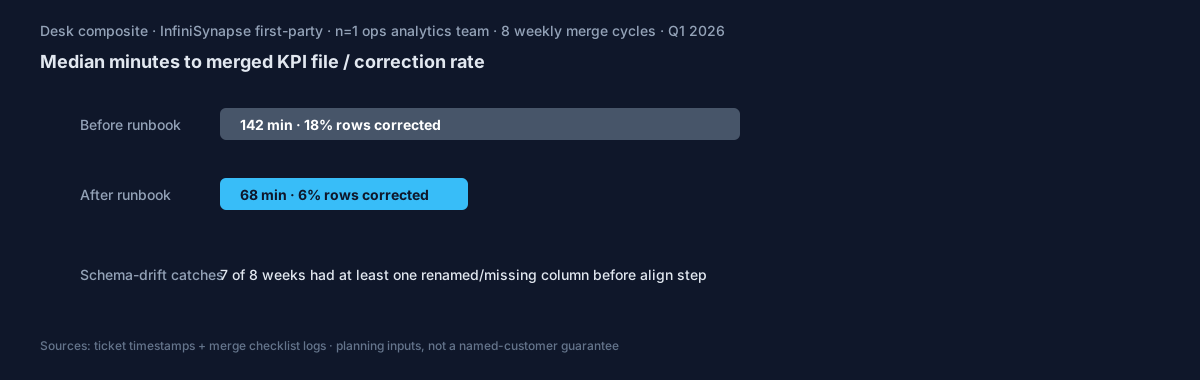 Desk pilot chart (Q1 2026, n=8 weekly cycles): median cycle time fell from 142 to 68 minutes (−52%) and row-correction rate from 18% to 6% after the documented merge runbook. Source CSV linked above.
Operational scorecard
Use this scorecard to evaluate whether your current merge is production-ready. The move from dashboard-first BI to augmented workflows—described in Apache Spark documentation—frames how teams should evaluate tooling when transforms grow beyond a single workbook.
Download blank scorecard: csv-merge-operational-scorecard.csv.
| Dimension | What to measure | Target outcome |
|---|---|---|
| Intake quality | Type errors, null markers, schema drift | Stable preprocessing in every run |
| Metric integrity | Definition consistency by owner | No denominator surprises |
| Execution speed | Time from file arrival to stakeholder-ready output | Predictable delivery windows |
| Review burden | Manual corrections per cycle | Declining correction trend |
| Repeatability | Ability to rerun next month with minimal prompt changes | High reuse ratio |
| Governance readiness | Visibility into assumptions and changes | Clear audit path |
Seven-step merge playbook
Walkthrough without video: Follow the ordered HowTo steps below while the flow infographic stays visible—profile → align → merge → validate → publish. This is the intentional substitute for a screen recording until a hosted demo exists (still no VideoObject).
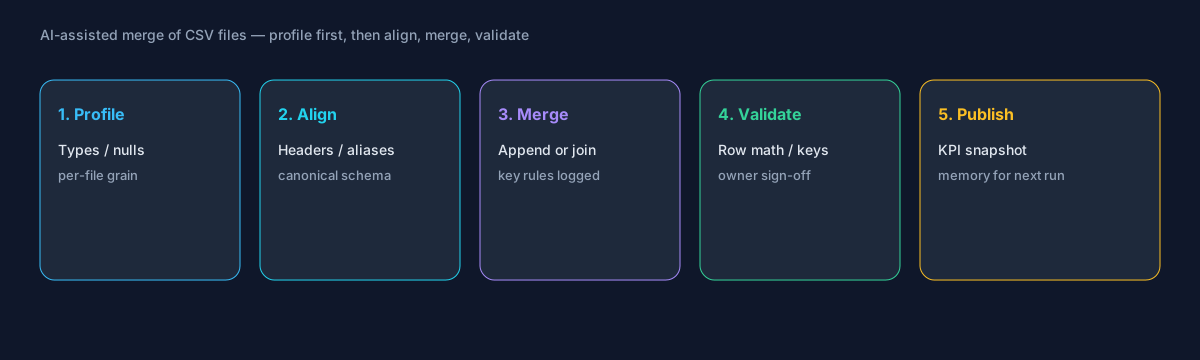 HowTo infographic: five stages—profile, align, merge, validate, publish. Profile and align before you append; most silent failures start at schema drift.
- Define ownership and quality gates. Assign a metric owner, an execution owner, and a final approver before automation. A robust path for csv files starts with accountability, not prompts.
- Profile and normalize each input. Capture column types, null rates, and category cardinality per file. Record anomalies so joins do not assume a stable structure that never existed.
- Apply reusable transformation logic. Canonicalize dates, map category aliases, and enforce rounding for financial fields. Treat transforms as assets, not disposable chat output.
- Choose append vs join with documented keys. Stacking months is not the same as joining campaigns to orders. Write the grain and key rule before the merge runs.
- Validate business definitions before charts. Confirm denominators, period boundaries, and exception rules with owners. Most board-pack errors skip definition review.
- Generate outputs with interpretation notes. Ship tables, charts, and short caveats together so stakeholders see confidence boundaries.
- Store memory and prep the next run. Capture approved logic so the next cycle of exports starts from validated context rather than from scratch.
Practical implementation examples that should appear in your first runbook: stacking monthly files with schema drift; handling missing columns during merges; matching inconsistent field names; building reproducible append pipelines; preparing consolidated KPI snapshots.
Distinct merge scenarios
Replace generic “search intent” filler with six differentiated situations teams actually hit when consolidating weekly exports:
- Monthly regional append — Same columns intended, but region A renamed
rev→revenuemid-quarter; align aliases before stack. - Returns overlay join — Orders file + returns file on
order_id; reject rows with null keys and log orphans. - Campaign map enrichment — Fact rows join a skinny campaign dimension; cardinality check must fail if the map duplicates keys.
- Missing-column week — One region omits
channel; fill with an explicitunknownand flag in the brief—never silent drop. - Encoding / delimiter clash — UTF-8 with BOM vs Latin-1, comma vs semicolon; profile delimiters before any AI rewrite.
- Late file + partial close — One region arrives after freeze; publish with a labeled exclusion list rather than reopening every prior transform.
These scenarios differ by grain, key risk, and review owner. They are not interchangeable SEO paraphrases of the same sentence.
Quality and governance checklist
Analysts scaling this workflow should skim AI VLOOKUP Replacement before rollout when enrichment joins dominate.
Use this checklist before sharing outputs externally. Production rollouts should align access and review controls with the Wikipedia business intelligence overview, especially when recurring queries touch live schemas.
- Confirm row counts before and after cleaning.
- Confirm null handling policy by field type.
- Confirm metric formulas with owner sign-off.
- Confirm duplicate handling rationale.
- Confirm source-to-output traceability for key tables.
- Confirm narrative statements match computed values.
- Confirm review history is stored for reruns.
Governance is not anti-speed. It is the mechanism that protects speed from collapse after the first successful run. Embed review as a default stage when you automate CSV merges.
When teams outgrow spreadsheet-only AI
Ceilings: context reset, connectors, orchestration
Spreadsheet copilots are useful for local tasks, but teams eventually hit three ceilings: context resets between cycles, limited source connectivity, and weak recurring KPI orchestration. At that point, operators need memory-backed execution and connectors that preserve logic across systems.
Labeled product connection
Commercial / product note (InfiniSynapse): InfiniSynapse becomes relevant at this transition. Memory cards preserve approved definitions, connectors pull from databases and SaaS tools, and recurring KPI runs execute with consistent guardrails. Instead of rebuilding prompts monthly, teams maintain a governed operating loop for csv files and related extracts.
For deeper context, review AI for Data Analysis. These resources explain why the shift from one-off prompt sessions to recurring execution compounds value over time.
Production connectors and security notes
Treat AI-assisted merging as an operating capability: confirm owners, metric definitions, and review gates for the first workflow before widening scope. Capture the first reliable run as a reusable template—assumptions, checks, and reviewer sign-off—so quality holds when schemas change. Ground distributed transforms in Apache Spark documentation when volume outgrows a single workbook, and lakehouse grounding patterns in Databricks documentation.
MySQL-style extracts should align with MariaDB documentation for least-privilege access and reproducible analytical extracts. Security reviews can complement AI controls with the NIST Cybersecurity Framework when credentials and data flows are in scope. Spreadsheet connectors should align with Google Sheets documentation for sharing rules, ranges, and API quotas. NL interfaces still inherit limits from Wikipedia's natural language processing overview, especially ambiguity and grounding.
Frequently Asked Questions
What does a reliable merge of CSV files look like?
Profile each export, align headers to a canonical schema, choose append or join with documented keys, validate row math and denominators, then publish with owner sign-off and stored assumptions for the next cycle.
How do we handle schema drift between weeks?
Maintain an alias map and a missing-column policy. Fail the run when required keys disappear; never silently drop columns that finance uses in denominators.
Append or join—how do we choose?
Append when grain and columns match across periods. Join when you enrich facts with a dimension (campaign, product, region). Mixing both without a written grain rule is the most common silent error with csv files.
How much data can the pipeline handle before it slows down?
Most spreadsheet-first teams can process medium files quickly, but performance depends on transform complexity, not only row count. Benchmark with a real monthly file and track runtime, review effort, and correction rate before broad rollout.
How do we validate output quality before sharing results?
Use a three-layer gate: technical checks for types and nulls, business checks for metric definitions, and stakeholder checks for interpretation. Teams that require all three gates cut revision loops.
What skills does the team need?
Operators need data literacy, metric ownership, and review discipline more than advanced coding. The differentiator is clear quality criteria, not prompt creativity.
When should we move beyond spreadsheet-only AI tools?
Move when recurrence, source complexity, or governance load rises—when teams rebuild prompts each cycle, cannot connect source systems, or cannot track KPI lineage.
How does InfiniSynapse fit this analytics workflow?
Commercial note: InfiniSynapse is most useful when teams outgrow one-off spreadsheet conversations and need stable recurring execution. Memory cards preserve prior logic; connectors reduce manual file movement.
How often should we audit the merge runbook?
Monthly at minimum: compare rerun consistency, validation pass rate, and time-to-first-insight against baseline; retire stale definitions; re-confirm access scopes.
What should the weekly stakeholder brief include?
What ran, what was reviewed, which assumptions are open, and whether cycle time improved while reopen rates stayed flat—so platform and business leads can inspect intermediate steps without a rebuild.
Cite this article
APA (7th): Zhu, W., & InfiniSynapse Data Team. (2026, August 13). Merge multiple CSV files with AI: step-by-step guide. InfiniSynapse. https://infinisynapse.com/en/blog/merge-multiple-csv-with-ai
MLA (9th): Zhu, William, and InfiniSynapse Data Team. “Merge Multiple CSV Files with AI: Step-by-Step Guide.” InfiniSynapse, 13 Aug. 2026, https://infinisynapse.com/en/blog/merge-multiple-csv-with-ai.
Plain link: https://infinisynapse.com/en/blog/merge-multiple-csv-with-ai
Conclusion
Platform teams often read AI Alternative To Pivot Table alongside this topic.
A high-performing merge workflow for csv files is less about one perfect model response and more about a repeatable operating system for data quality. Teams that pair automation with ownership, review gates, and memory preserve both speed and trust.
The practical roadmap is straightforward: start in spreadsheets, formalize reusable align-and-merge logic, and transition to connector-driven recurring execution when KPI demands grow. Send corrections or runbook questions to zhuhl@infinisynapse.com.