Analyze Large CSV with AI when Pandas Runs Out of Memory
By William Zhu & the InfiniSynapse Data Team · Published: 2026-09-14 · Last updated: 2026-09-14 · Last verified: 2026-09-14 · Next review: 2026-12-14 · Editorial standards · Corrections

Table of Contents
- TL;DR
- What analyze large csv with ai means
- Why pandas RAM is the wrong ceiling
- A convert-or-connect framework
- Tool landscape
- Implementation steps
- Desk sample (illustrative)
- Scorecard
- Failure modes
- Frequently Asked Questions
- Conclusion
TL;DR
Direct answer: To analyze large csv with ai, stop treating
read_csvas the load path. Convert to a columnar file, connect the store that already holds the rows, or push predicates before any full materialization. A memory error is a format signal, not a reason to split the file into chats.
What you'll learn:
- Why CSV is an interchange format, not an analysis engine
- How to analyze large csv with ai without a full pandas load
- Which conversions we evaluate first on the desk
- How to keep SQL inspectable after the file is registered
- When the CSV is only a landing zone and a warehouse should take over
We build InfiniSynapse to query authorized files and databases. This page does not claim a timed customer run or a RAM benchmark.
A CSV that arrives by email is a transfer record. Write the sender, the date, the expected grain, and the hash if you have one. Then decide convert or connect. That paper trail is what lets a second person analyze large csv with ai without guessing which attachment was canonical. If two CSVs share a name and different row counts, stop. Do not prompt until the file identity is fixed. We have watched desks burn a morning because “orders.csv” meant last Tuesday on one laptop and last month on another.
What analyze large csv with ai means
Key Definition: Analyze large csv with ai means answering a bounded question against a CSV-origin table without loading every cell into a single process heap or a chat attachment.
CSV is a text interchange. pandas documentation is explicit that in-memory DataFrames are a convenience, not a lake. RFC 4180 describes the text shape, not a type system. If your job is to analyze large csv with ai, the first decision is whether the file stays text or becomes a queryable source.
A 4 GB CSV that is 80 columns wide will not behave like a 4 GB Parquet of eight typed columns. The difference is projection and encoding, not “AI intelligence.” We evaluate that gap before anyone prompts a model.
The how-to map sits on the large-scale analysis hub. Size arithmetic without a run is on 200GB data analysis. This page is the CSV-specific fork. Many small exports that need stacking first belong on merge multiple csv with AI. This URL stays on one large file and RAM.
Why pandas RAM is the wrong ceiling
MemoryError on read_csv is honest. It is also the wrong SLA. The machine’s heap is not the table. To analyze large csv with ai, treat RAM as a local cache for a slice, never as proof that the file is “too big for AI.”
Text files hide types
Every column arrives as text until something parses it. Dates become strings. IDs become floats. A model that profiles the first 5,000 rows will invent a type the 5,001st row breaks. Apache Spark documentation describes distributed readers for this class of file; you do not need Spark to accept the warning.
Chat upload hides the same wall
Assistants that accept CSV inherit the same width problem plus a file-size cap. If the paperclip refuses the file, you still need to analyze large csv with ai on a host. See analyze large dataset without uploading for the placement rule.
Microsoft's data architecture guidance still treats landing-zone files as a stage, not the system of record. That is the right mental model when a weekly export is 2 GB and growing.
A convert-or-connect framework
| Move | Use when | Do not use when |
|---|---|---|
| Convert to Parquet or a folder of parts | You own the export and will ask more than once | The CSV is a one-line peek |
| Connect the upstream store | The CSV is a dump of a table you may query | You have no grant |
| Sample then bound | You need column names only | You will report the sample as the table |
Convert first
Columnar layout lets a later engine read eight columns instead of eighty. After conversion, analyze large csv with ai becomes “register the new file, name the grain, inspect SQL.” Keep the original CSV as provenance, not as the daily reader.
Connect instead
If the CSV came from Postgres or a warehouse extract, throw away the extract path. Query the source. Google BigQuery documentation and Wikipedia's data warehouse overview describe why repeated extracts rot. We apply that rule on every desk that starts from email attachments.
Tool landscape
DuckDB-class engines and pandas chunk readers can open a file without a cluster. They still need a bound. A local reader that scans every row to answer “top five SKUs last week” is a failed attempt to analyze large csv with ai. Spark is appropriate when the transform is already a job and someone owns the cluster. It is not required because ChatGPT rejected a 1 GB attach. Apache Airflow documentation is the scheduling reference if this extract becomes nightly. Scheduling is a different job from the first question.
Register the path, profile columns, then ask. That is how we analyze large csv with ai without pretending the model ate the file. The reviewer still opens SQL. We evaluate a tool on whether the registered path and the statement can be reopened next week, not on whether the first chart looked finished.
Implementation steps
Profile before you prompt
Count rows if you can do it cheaply. List columns. Note the date field. If you cannot name the grain, you cannot analyze large csv with ai yet. You can only browse.
Choose convert or connect
Write the choice down. Conversion without an owner creates a second unofficial table. Connection without a role creates a shadow grant.
Bound the SQL
Date window, explicit columns, grouped output. The ritual matches analyze millions of rows: acceptance is a count and a grain, not a vibe.
Inspect then approve
Open the statement. If it still reads every column of an unbounded CSV, you have not started to analyze large csv with ai. You have started a full copy.
Desk sample
Practical example: Illustrative desk composite, 2026-09-14. File A: 6.2 GB orders CSV, 74 columns, pandas read_csv died at 18 GB RSS on a 32 GB laptop. File B: same grain converted to Parquet with 11 kept columns. Path B is how we analyze large csv with ai for a 30-day return-rate question. No engine runtime is claimed. The chart below is teaching geometry, not a customer SLA.
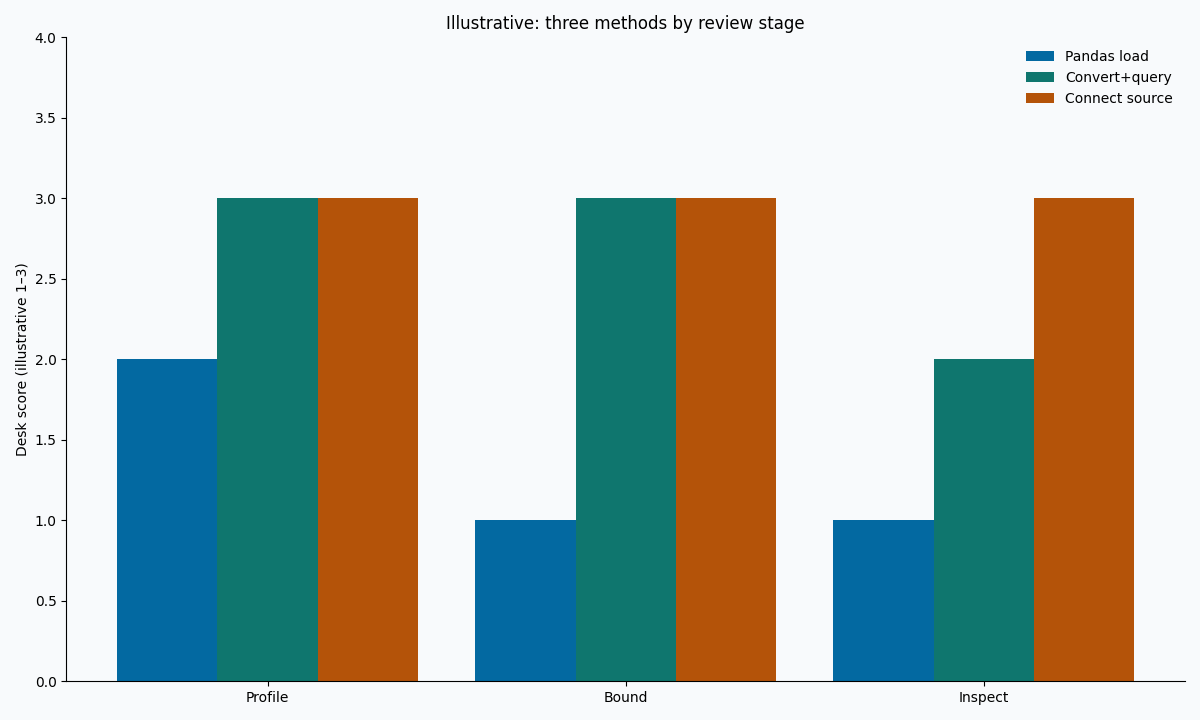
Figure. Illustrative. Three methods × three review stages. Not observed RAM or scan bytes.
Scorecard
| Signal | Stay on CSV text | Convert or connect |
|---|---|---|
| One ad-hoc peek under 50 MB | Yes | Optional |
| Recurring weekly extract | No | Yes |
| Pandas dies or swap thrashes | No | Yes — analyze large csv with ai on another reader |
| Need joins to a live table | No | Connect |
| Chat will not attach the file | No | Convert or connect |
If two or more “Yes” land in the right column, do not keep chunking. Change the source shape, then analyze large csv with ai.
Keep a conversion log when you change formats: input path, output path, kept columns, discarded columns, and the person who approved the drop. Without that log, next quarter’s intern will reload the original CSV and recreate the RAM failure. The log is not bureaucracy. It is how a file-first desk stays honest when three people share a folder named final. We have seen final_v3_real.csv sit next to a Parquet that already answered the question. The log would have stopped the reload. Write it the same day you convert, not after the meeting. If the folder already has three “final” files, quarantine them. Pick one hash. Delete or archive the rest with a dated note. Only then resume work on the chosen file. That ten-minute cleanup prevents a second RAM death and a second wrong total in the same week. People skip it because it feels clerical. It is the cheapest control on a file desk. Do it before the next prompt, not after.
Failure modes
Chunk loops that rebuild the table
chunksize=100_000 plus a growing list is still a full load. It is slower pandas, not a new method to analyze large csv with ai.
Header-only prompts
Sending the header to a model and asking for “the analysis” produces fiction. Keep the model on inspected SQL against registered bytes.
Silent type coercion
IDs that became floats will break joins. Profile dtypes after conversion. pandas documentation on dtypes is the local reference; warehouse types are the long-term contract.
When the same CSV becomes a shared daily grain, escalate with when large data needs a warehouse. File-format detail lives with parquet file analysis.
Register the CSV or its converted file before you prompt
Profile columns, bound the date, and inspect SQL on a host that can finish the grain. This check uses only sources you authorize.
Commercial association: You do not need the workspace to complete the educational diagnosis on this page.
Open InfiniSynapseHow this page is sourced. William Zhu is cofounder of InfiniSynapse (GitHub @allwefantasy); no personal LinkedIn is published. Internal review covered wording and method claims only. Reviewed by analytics engineering · data platform · LLM security · editor. COI: InfiniSynapse sells an AI-native Data Agent. Fact-check: pandas documentation, Apache Spark documentation, Microsoft data architecture guidance, Google BigQuery documentation, Wikipedia data warehouse, Apache Airflow documentation.
Frequently Asked Questions
Can I analyze large csv with ai inside ChatGPT?
Bottom line: Only if the file fits the product cap and policy allows the upload. To analyze large csv with ai on a production extract, convert or connect instead.
Does a memory error mean I need Spark?
Bottom line: No. A memory error means the reader is wrong. Try conversion or a source connect before you analyze large csv with ai on a cluster.
Is sampling cheating?
Bottom line: Sampling is honest when labeled. It is cheating when the sample is published as the table. Analyze large csv with ai for a decision still needs the approved grain.
Should I gzip the CSV and retry pandas?
Bottom line: Compression shrinks disk, not the parsed heap. It does not replace the method to analyze large csv with ai.
What do I keep for audit?
Bottom line: The source path, the conversion command if any, the SQL text, and the bound. Those four let a reviewer replay how you chose to analyze large csv with ai.
Conclusion
To analyze large csv with ai, treat CSV as a landing format. Convert, connect, or sample with a label. Inspect SQL before anyone believes a paragraph. Pandas RAM is a laptop constraint, not an analysis theory.
If the next blocker is an assistant file cap rather than a heap, continue with the ChatGPT analyze data workflow. For the topic map, use the large-scale analysis hub. A bounded file question can start at app.infinisynapse.com.