Analyze Large Dataset without Uploading the File
By William Zhu & the InfiniSynapse Data Team · Published: 2026-09-14 · Last updated: 2026-09-14 · Last verified: 2026-09-14 · Next review: 2026-12-14 · Editorial standards · Corrections
Table of Contents
- TL;DR
- What analyze large dataset without uploading means
- Why upload-first fails on production tables
- A three-path framework
- Tool landscape
- Implementation steps you can audit
- Desk sample (illustrative)
- Scorecard
- Failure modes
- Frequently Asked Questions
- Conclusion
TL;DR
Direct answer: To analyze large dataset without uploading, keep the table on an authorized host. Connect a read-only warehouse, open a sanctioned local file, or convert the export and query it in place. Chat upload is the exception, not the method.
What you'll learn:
- Why a chat window cannot hold a production table
- How to analyze large dataset without uploading on three legitimate paths
- Which controls must exist before anyone approves a scan
- How we evaluate upload-first versus query-in-place on a desk scorecard
- When a warehouse still wins after a one-off file question
We build InfiniSynapse as a Data Agent that connects sources you authorize. This page is a placement method. It is not a claim that any product scanned your warehouse.
On the desk we keep a one-page placement note: source name, grant, grain, date bound, and whether any byte left the host. That note is how a later reviewer can see you chose to analyze large dataset without uploading instead of mailing a dump. If the note is empty, the method did not happen. If the note lists an attachment, the method failed even if the chat looked fluent. Teams that skip the note argue from memory; teams that keep it can reopen the decision in a quarter.
What analyze large dataset without uploading means
Key Definition: Analyze large dataset without uploading means answering a bounded question against a source that already exists—warehouse, lake file, or approved local path—without copying the full table into a model context or a chat attachment.
The method is placement, not prompt craft. If the bytes must leave their host to enter a conversation, you are no longer trying to analyze large dataset without uploading. You are doing a transfer.
Teams confuse three jobs. One is “can the model see a sample.” One is “can an engine finish a grain.” One is “can a reviewer reopen the SQL.” Only the last two belong here. A 50-row paste can teach a column name. It cannot certify a scan.
Privacy and prompt-injection risk rise as soon as a file crosses into a general assistant. The OWASP Top 10 for LLM Applications treats data exfiltration as a first-class failure, not a footnote. ISO/IEC 27001 still expects you to know who may copy a production extract. Those documents do not pick a vendor. They explain why “just upload it” is a control decision.
Parent how-to lives on the large-scale analysis hub. SQL review before a run stays on analyze large datasets with AI. This page only decides whether the file has to move.
Why upload-first fails on production tables
Upload-first feels fast because the UI is a paperclip. The constraint is not the paperclip. It is context size, retention, and authorization. You cannot analyze large dataset without uploading if the only interface you trust is an attachment slot.
Context window is not a warehouse
A context window is a working memory. A warehouse is a governed store with roles, partitions, and a query log. Mixing the two produces a false sense of completeness: the model answers from the slice it received, then the slice is treated as the table.
NIST AI Risk Management Framework language on validity and accountability applies when the output will be reused. A chat that never saw last Tuesday’s partition is not a valid full-table answer. We evaluate that gap on every desk review.
Authorization is not a paste
A paste bypasses the grant that would have limited columns. PostgreSQL documentation is the baseline for roles and EXPLAIN on a live store. If your authorized path is Postgres, use that path. Do not export the same table to a laptop so a chat can “see it.”
The UK NCSC guidelines for secure AI system development treat connector scope as a design choice. That is the same choice as analyze large dataset without uploading: keep compute next to the grant.
A three-path framework
Use one path. Mixing them mid-question creates two truths.
| Path | When it fits | Evidence you can keep |
|---|---|---|
| Read-only connect | Table already lives in a store you may query | Role, SQL text, engine plan or dry-run note |
| Sanctioned local file | Export is already on an approved host | Path, grain, row-count check |
| Convert then query | CSV is too wide for RAM or chat | New format, predicate, inspected SQL |
Connect a live source
This is the default way to analyze large dataset without uploading when the table is already in Snowflake, BigQuery, Postgres, or ClickHouse. Bind the source, name the grain, write a date bound, then read the SQL. Do not ask the model to “just know” the warehouse.
Open a sanctioned local file
Desktop placement is allowed when policy already permits the file on that machine. It is still query-in-place if the agent reads the path and does not re-upload the bytes to a public chat. See desktop vs browser for large data when the host itself is the decision.
Tool landscape
Chat assistants are useful for schema questions on a tiny sample. They fail the moment the file will not attach. That failure is a signal to analyze large dataset without uploading, not a signal to split the CSV into ten chats. Pandas and notebooks are honest about RAM. A MemoryError is useful. It is not a method. Convert or connect. Do not keep chunking the same wide CSV to recreate a warehouse in Python.
A data agent that can hold a read-only connector and show SQL is the tool shape that matches analyze large dataset without uploading. The test is inspectability: can a reviewer reopen the statement and the bound. We evaluate tools on that test, not on whether the paperclip icon is pretty.
Implementation steps you can audit
Authorize the source
Name the owner, the role, the allowed columns, and the retention of any result set. If you cannot name those four, you are not ready to analyze large dataset without uploading. You are ready to request access.
Bound the question
Write the date window, the grain, and the output shape before anyone generates SQL. Unbounded SELECT * is how an “in-place” job becomes a full copy by another name.
Inspect SQL
Open the statement. Check predicates, selected columns, and joins. The sibling page on 200GB data analysis is a static fixture for that inspection. Use it as a review ritual, not as a benchmark.
Approve the scan
Only after inspection. A dry run or engine plan, where the platform provides one, is a later artifact. An estimate is not a bill. Cost evidence belongs on cost of large analysis.
Desk sample
Practical example: On 2026-09-14 we walked a 12-million-row orders question as a desk composite (illustrative). Path A uploaded a 1.8 GB CSV extract and stopped at the assistant cap. Path B connected the same authorized replica read-only, kept eight columns, and bounded order_date to 30 days. Path B is how we analyze large dataset without uploading on that grain. No production scan is claimed; the comparison is placement, not runtime.
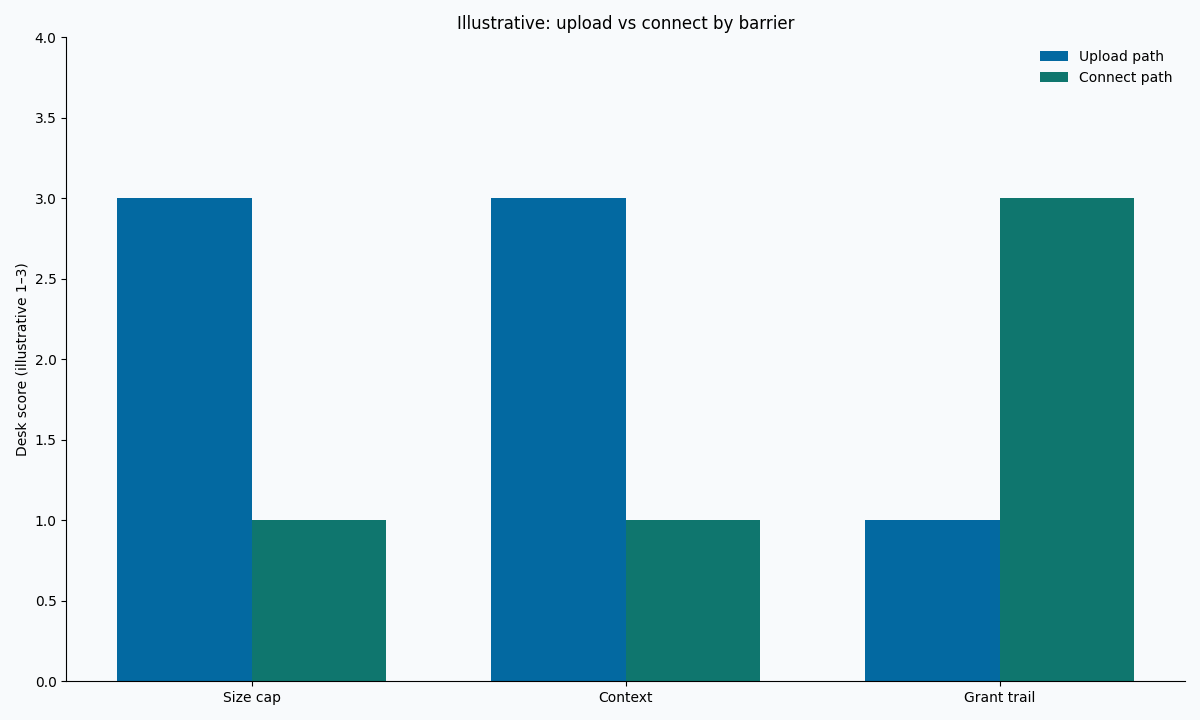
Figure. Illustrative desk composite. Two placement paths × three barrier types. Not a customer benchmark.
Scorecard
| Check | Pass | Fail |
|---|---|---|
| Bytes stay on an authorized host | Connect or sanctioned path | Chat attachment of the full table |
| Question is bounded | Date + columns + grain written | Open-ended “analyze everything” |
| SQL is inspectable | Reviewer can reopen the text | Paragraph-only answer |
| Result retention named | Owner + days | File left in a chat history |
| Escalation rule | Warehouse if the grain repeats daily | Spark hired because the chat failed |
Use the scorecard before you analyze large dataset without uploading on a new source. If three of five fail, stop. Fix grants. Do not add another assistant.
Print the scorecard into the task notes. A verbal “we connected it” does not survive a week. The written row is what lets finance, legal, and engineering disagree on the same facts. We evaluate whether the note names the host. If it only names the model, the team did not analyze large dataset without uploading; they named a chatbot. That distinction is the entire page. If the note is missing the host, rewrite it before you claim you can analyze large dataset without uploading again.
Failure modes
Splitting the file
Ten 20 MB chats are not one table. Joins disappear. Duplicates appear. You have not managed to analyze large dataset without uploading; you have uploaded it badly.
SELECT star
In-place compute with SELECT * still copies the table into the result sink. Bound the projection.
Treating an estimate as a bill
A dry-run byte number is a planning input. Billing rules differ by cache, edition, and reservation. Hold the cost fields blank until the platform returns them.
When a recurring grain needs shared roles, move to when large data needs a warehouse. File-first still fits a one-off parquet file question.
Connect the authorized source before you attach a file
Name the source, bound the question, and inspect SQL on a host you already control. This check uses only sources you authorize.
Commercial association: You do not need the workspace to complete the educational diagnosis on this page.
Open InfiniSynapseHow this page is sourced. William Zhu is cofounder of InfiniSynapse (GitHub @allwefantasy); no personal LinkedIn is published. Internal review covered wording and placement claims only. Reviewed by analytics engineering · data platform · LLM security · editor. Editorial standards · corrections. COI: InfiniSynapse sells an AI-native Data Agent. Fact-check: OWASP LLM Top 10, NIST AI RMF, ISO/IEC 27001, PostgreSQL documentation, UK NCSC AI development guidelines.
Frequently Asked Questions
Can I analyze large dataset without uploading to ChatGPT?
Bottom line: Yes. Analyze large dataset without uploading by connecting the store or opening a sanctioned file. ChatGPT attachment is optional and usually the wrong first move.
Is a sample upload the same method?
Bottom line: No. A sample teaches names. It does not let you analyze large dataset without uploading the fact table. Keep the sample labeled as a sample.
Do I need Spark first?
Bottom line: No. Spark is a platform choice. Try to analyze large dataset without uploading on the engine you already have. Escalate when that engine cannot finish the approved grain.
What if policy forbids any external model?
Bottom line: Keep the job on a private host. The method still holds: analyze large dataset without uploading to a public chat. Private deployment is a placement, not a new analysis theory.
How do I prove I did not upload the table?
Bottom line: Keep the connector grant, the SQL text, and the absence of an attachment log. Those three records are how reviewers confirm you did analyze large dataset without uploading.
Conclusion
To analyze large dataset without uploading, refuse the paperclip as the default. Connect the authorized source, bound the question, inspect SQL, then approve a scan. That sequence is the method. The assistant is optional.
When the next question is a long job rather than a placement choice, open the large-scale analysis hub and pick the sibling that matches the grain. Try a bounded question on a source you already control at app.infinisynapse.com.