ChatGPT Analyze Data: Files, Limits & Better Workflows
By William Zhu & the InfiniSynapse Data Team · Published: 2026-09-14 · Last updated: 2026-09-24 · Last verified: 2026-09-24 · Next review: 2026-12-14 · Editorial standards · Corrections
Table of Contents
- TL;DR
- Can ChatGPT analyze data?
- Supported file types
- How to analyze a file with ChatGPT
- Prompts for tables, charts, and insights
- How to verify ChatGPT's analysis
- Upload, context, privacy, and retention limits
- A limit-versus-query framework
- ChatGPT vs purpose-built analysis tools
- When to leave ChatGPT
- Desk sample (illustrative)
- Scorecard
- Failure modes
- Frequently Asked Questions
- Conclusion
TL;DR
Direct answer: Yes—ChatGPT analyze workflows can inspect uploaded CSV or Excel data, write and execute Python, calculate metrics, find patterns, and create tables or charts. Ask it to show the code, row counts, filters, and assumptions. For large, sensitive, or recurring datasets, move the full grain to an authorized query-in-place workflow instead of splitting files across chats.
What you'll learn:
- What ChatGPT can analyze and how executed Python changes reliability
- How to analyze CSV and Excel files, request charts, and inspect assumptions
- How to verify row counts, filters, calculations, and generated code
- Why attachment, context, policy, and retention limits are different walls
- When ChatGPT is enough and when query-in-place is the safer workflow
OpenAI’s data analysis documentation says ChatGPT can analyze uploaded files and create tables or charts when a structured view helps. The important distinction is computation versus presentation: executed Python can calculate a result, but the user still needs to confirm what rows, filters, and assumptions entered that computation.
We build InfiniSynapse as a Data Agent, so this page has a commercial interest in query-in-place analysis. It does not claim that ChatGPT cannot analyze data. ChatGPT is strong for open-ended reasoning, code, methodology, and labeled files. Query-in-place becomes relevant when the file is too large, the data should not be uploaded, or the analysis must be repeated and audited.
Can ChatGPT Analyze Data?
Yes. ChatGPT analyze data requests can be handled by reading an uploaded file, generating Python, executing the code, and explaining the output. This is materially better than asking a language model to estimate totals from prose because the arithmetic can be computed.
Useful jobs include:
- Inspecting column names, types, missing values, and duplicates
- Calculating grouped metrics, distributions, correlations, and trends
- Finding outliers or suspicious records
- Creating tables and charts
- Explaining the method and proposing follow-up checks
The honest limit is scope. A correct Python result can still answer the wrong question if the model selected the wrong date field, silently dropped nulls, or treated an uploaded sample as the complete table. Every ChatGPT analyze workflow needs a grain, an input count, and a reproducible check.
Supported File Types
The typical ChatGPT analyze files workflow starts with tabular data such as CSV or Excel. Depending on current product support and plan settings, users may also work with JSON, documents, or images that contain tables. Check OpenAI’s current file upload FAQ before documenting a fixed file type or size limit.
Before uploading, record:
- Whether the file is complete or a sample
- Approximate row count and date coverage
- The unit of analysis, such as one row per order or ticket
- Sensitive columns that were removed or masked
- The metric sentence the output must answer
A sample CSV can reveal schema and data-quality problems. It cannot certify a full-quarter metric unless it contains the approved full-quarter grain.
How to Analyze a File With ChatGPT
1. Check authorization
Confirm that the data may be uploaded and review OpenAI’s current data controls. Remove secrets, credentials, and unnecessary personal fields.
2. State the grain
Write one bounded sentence: “Calculate return rate by SKU for completed orders from 2026-08-01 through 2026-08-31.” Avoid “find something interesting.”
3. Ask for a data-quality pass
Have ChatGPT report rows, columns, types, missing values, duplicate keys, date range, and category cardinality before calculating the metric.
4. Request the calculation and evidence
Ask ChatGPT to show the Python used, list filters and exclusions, and return the result with the input row count.
5. Verify before sharing
Recalculate one subtotal independently, inspect surprising rows, and label any sample. A polished chart is not evidence that the full dataset was analyzed.
Prompts for Tables, Charts, and Insights
Use prompts that specify the task and the evidence:
Inspect this file before analysis. Report row count, columns, inferred types,
missing values, duplicate IDs, and date coverage. Do not calculate the KPI yet.
Calculate return rate by SKU for completed orders in August 2026.
Show the Python, filters, excluded rows, denominator, and input row count.
Create a sorted table and a bar chart. Flag any SKU with fewer than 30 orders.
Check the result by recomputing the total from grouped rows. Explain any mismatch.
Separate observations supported by the file from hypotheses that need more data.
These prompts make ChatGPT analyze data as an inspectable sequence rather than a one-line request for “insights.”
How to Verify ChatGPT's Analysis
Verification should answer six questions:
- Did the model use the expected number of rows?
- Did it choose the correct date, ID, and amount fields?
- Which rows were filtered, imputed, or dropped?
- Can you inspect the executed Python or equivalent calculation?
- Does one independently calculated subtotal match?
- Are factual findings separated from recommendations?
IBM's augmented analytics overview separates assisted exploration from governed analytical loops. Use that distinction when a ChatGPT analyze result will leave the chat as a report, decision, or recurring metric.
Upload, Context, Privacy, and Retention Limits
Product limits are real. They are also not a warehouse. When chatgpt analyze large file fails, the useful diagnosis is “wrong interface,” not “AI cannot do scale.”
Attachment cap versus context cap
An attachment cap is a file-size door. A context cap is how many tokens the model can attend to after the file is parsed. Clearing the first door does not clear the second. A 40 MB CSV that attaches can still be truncated, summarized, or silently sampled. Treat any ChatGPT answer on that file as a sample unless you can show the row count it used.
Policy cap versus product cap
Even when the file fits, FTC consumer protection guidance and the European approach to artificial intelligence still apply if the output touches customers. CISA artificial intelligence guidance is the operational security cross-check before a production extract enters a public model, while the NIST AI Risk Management Framework provides a broader govern-and-measure frame. Those sources do not publish ChatGPT’s byte limit. They explain why chatgpt analyze large file is often the wrong control even when the paperclip works.
A limit-versus-query framework
| Situation | ChatGPT | Query-in-place |
|---|---|---|
| Schema peek on a sanitized 2 MB slice | Fit | Optional |
| Full fact table | Fail the chatgpt analyze large file hope | Default |
| Regulated columns | Usually fail policy | Connect with a grant |
| Recurring weekly grain | Poor audit | Keep SQL and a job log |
Keep ChatGPT on labeled samples
If you use ChatGPT, label the file as a sample in the prompt and in the write-up. Do not let chatgpt analyze large file language leak into a board memo that implies full coverage.
Move the real grain off the chat
Connect the store or register the file on a host that can finish the bound. That is the same move as analyze large csv with ai when the export is text. Inspect SQL. Then approve.
ChatGPT vs Purpose-Built Analysis Tools
ChatGPT is strongest for open-ended reasoning, code, methodology, and follow-up questions. A purpose-built file-analysis tool can be faster when the desired output is automatic profiling, a standard chart set, or a shareable report. AnalyzeData’s ChatGPT data analysis comparison makes this workflow distinction: both can rely on executed code, but the surrounding steps and deliverables differ.
Query-in-place is a third shape. It keeps large or sensitive data behind existing access controls and sends bounded computation to the source. A data agent that exposes the statement can support that workflow, but it still needs roles, approval, logs, and result checks.
| Workflow | Strongest for | Verify |
|---|---|---|
| ChatGPT | Open-ended reasoning, Python, follow-up questions | Rows used, code, filters, plan and data controls |
| Purpose-built file tool | Automatic profiling, charts, shareable report | Executed code, export, retention and limits |
| Query-in-place | Large, sensitive, recurring or governed analysis | SQL, grants, bounds, logs and reruns |
For a wider shortlist, see ChatGPT Code Interpreter alternatives. For exact cap documentation, use ChatGPT data analysis limitations.
When to Leave ChatGPT
Confirm the wall
Write down whether the failure was size, policy, or quality. Those three walls need different owners. Size is engineering. Policy is legal. Quality is “the model never saw the grain.”
Refuse the split
Do not cut a 900 MB file into 20 chats to force chatgpt analyze large file. Joins die. Counts drift.
Connect or register
Use a read-only source or a sanctioned path. Bound dates and columns. This is also how you analyze large dataset without uploading when ChatGPT is not in the sentence.
Inspect SQL and keep the log
Save the statement, the bound, and the decision that ChatGPT was the wrong door. That log is the audit for anyone who later asks why you did not chatgpt analyze large file the warehouse.
Desk sample
Practical example: Illustrative desk composite, 2026-09-14. A 1.1 GB tickets export would not attach. Path A split into 14 chats and could not reconcile ticket_id. Path B connected the replica and bounded 30 days. Path B is the answer to chatgpt analyze large file on that grain. No OpenAI limit was re-measured here; the point is placement.
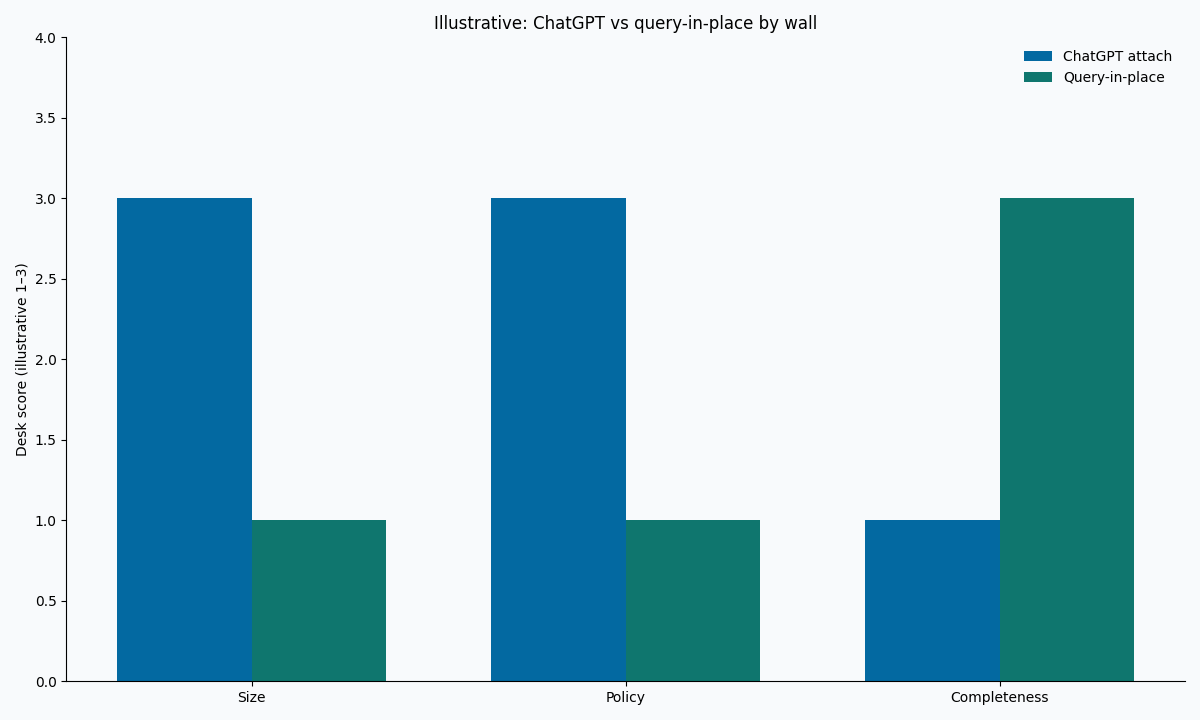
Figure. Illustrative. Two interfaces × three walls. Not a vendor benchmark.
Scorecard
| Question | Stay in ChatGPT | Leave ChatGPT |
|---|---|---|
| File is sanitized and tiny | Yes | Optional |
| One-time exploration with visible Python | Yes | Optional |
| Full production fact table | No | Yes |
| Output will be forwarded outside the team | Usually no | Prefer inspectable SQL |
| You cannot name the row count the model used | No | Yes |
| Legal already forbade the upload | No | Yes |
Three “leave” answers means stop trying to chatgpt analyze large file the production export.
Share the scorecard in the same thread where someone asked for a ChatGPT drop. A separate wiki page will not be read in time. The point is to change the next click, not to win a documentation prize. If the stakeholder still wants a paragraph from a chat, offer a labeled sample and a date bound, then schedule the real grain on a connector. That compromise keeps the meeting moving without rewriting the table as an attachment. Document who accepted the sample label. People forget. The note does not.
Failure modes
Screenshot of a cap as a method
A UI error is not a playbook. Do not publish “we could not attach the export so the metric is unknown.” Change the interface.
Hidden sampling
The model summarizes 2% of rows and the writer cites it as Q3. Label the sample or run the grain.
Secrets in the side chat
API keys and customer emails in the same thread as chatgpt analyze large file experiments are an incident, not a prototype. CISA artificial intelligence guidance is the reminder; your retention policy is the control.
For a long scan after you leave the chat, use long-running analysis job. For SQL verification, use analyze large datasets with AI.
Leave the attachment slot when the file is the table
Connect the authorized source, bound the question, and inspect SQL. This check uses only sources you authorize.
Commercial association: You do not need the workspace to complete the educational diagnosis on this page.
Open InfiniSynapseHow this page is sourced. William Zhu is cofounder of InfiniSynapse (GitHub @allwefantasy); no personal LinkedIn is published. Internal review covered wording and placement claims only. Reviewed by analytics engineering · data platform · LLM security · editor. COI: InfiniSynapse sells an AI-native Data Agent. Fact-check: Google Cloud AI overview, IBM augmented analytics, FTC, European Commission AI policy page, CISA AI guidance, Anthropic research.
Frequently Asked Questions
Can it handle file uploads over 1 GB?
Bottom line: Treat current product caps as vendor-owned and unstable. If attach fails, do not force chatgpt analyze large file. Connect the source.
Is Advanced Data Analysis the same as a warehouse?
Bottom line: No. A code interpreter on an uploaded slice is still an upload. ChatGPT analyze large file on a fact table needs query-in-place.
May I upload a sample and then claim full coverage?
Bottom line: No. Label the sample. Full coverage requires the approved grain and inspectable SQL, not another chatgpt analyze large file attempt.
Can ChatGPT analyze data and create charts?
Bottom line: Yes. A ChatGPT analyze workflow can execute Python and create tables or charts from an authorized uploaded file. Verify the rows, code, filters, and assumptions before sharing the result.
What should I tell a stakeholder who asked for ChatGPT?
Bottom line: The file is the table; the chat is the wrong door. Offer a bounded, inspectable query instead of a second chatgpt analyze large file try.
Conclusion
ChatGPT analyze workflows are useful when an authorized file fits, the question is bounded, and the executed code can be inspected. Use ChatGPT for labeled files, exploratory reasoning, calculations, and charts. When the file is the production table, the data is sensitive, or the job must recur, connect the authorized source, bound the query, and inspect SQL instead.
The sibling map is on the large-scale analysis hub. A bounded question on a source you already control can start at app.infinisynapse.com.