Analysis Design Excel: Sheet Layout Guide
By William Zhu & the InfiniSynapse Data Team · Published: 2026-06-09 · Last updated: 2026-09-23 · Last verified: 2026-09-23 · About: Editorial standards · About / team · Contact: zhuhl@infinisynapse.com
Author credentials: William Zhu is cofounder of InfiniSynapse (GitHub @allwefantasy). Desk experience: opening monthly Excel packs and rejecting files whose output sheet invents a metric the inputs sheet never named. No personal LinkedIn is published; GitHub and InfiniSynapse About are the identity signals.
COI / interest disclosure: We build InfiniSynapse, an AI-native analysis layer. Product mention appears only in the closing practice link. The sheet-role table and the teaching composite stand without a trial. We are not an Excel add-in vendor and we do not publish structural engineering calculators.
Fact-check / verification: Northline numbers below are a teaching composite, not a customer extract. The hours chart is illustrative. Sheet roles follow the public FAST split of foundation, workings, presentation, and control, restated here for a monthly pack. Primary references are linked in the body. Corrections: zhuhl@infinisynapse.com · editorial corrections.
Version history: 2026-06-09 factory playbook on an older report-template phrase · 2026-09-23 retarget to analysis design excel as a sheet-layout how-to. Marker:
DESK-ADE-20260923A.
Media note: No hosted overview video. Use the sheet-role table, the checks fields, and the illustrative hours chart.
Table of Contents
- TL;DR
- How we check a layout
- What analysis design Excel means
- Sheet roles for the monthly pack
- Design the monthly output before formulas
- Formula design rules
- The checks sheet
- Worked layout
- From template to automation
- Frequently Asked Questions
- Conclusion
TL;DR
Direct answer: Analysis design excel is the workbook layout you freeze before formulas or automation: Inputs, Workings, Checks, and Output. Reading order is calculation order. A monthly pack that skips this step automates whoever typed the last number.
Who this is for: analysts who still close a monthly Excel file and want the next cycle to open on the same sheets.
What you can copy: the four-role contract in analysis-design-excel-sheet-roles.csv, the Northline teaching numbers, and the checks fields.
Dirty exports start on clean Excel data with AI. This page starts when the table is already one grain and the remaining job is analysis design excel.
How we check a layout
We evaluate analysis design excel by opening the file, not by asking which copilot drafted it. Microsoft Excel is a workbook of sheets; the design question is which sheet is allowed to hold a definition. The FAST Standard separates foundation, workings, presentation, and control so a driver and a mechanic are not editing the same cells. We keep those four jobs and rename them for a monthly operating pack.
What we open first
Tab order, then the Output sheet, then whether every Output number traces to Workings. If the trace dies in a hardcoded cell, analysis design excel has not started. Color is a hint, not a control: yellow inputs still fail when a formula sits on that sheet.
What fails the file
A file fails when the Output sheet contains a new SUMIFS the Inputs sheet never listed, when Checks only tests that Excel calculated, or when two people keep private copies. Those failures show up as rework hours on the output, which is what the illustrative chart later compares. We do not treat a green formatted total as evidence.
What analysis design Excel means
Key Definition: Analysis design excel means assigning each sheet one job—inputs, workings, checks, or output—before any formula is copied down, and refusing to automate a pack whose checks are unsigned.
UK government spreadsheet standards state the same split: control, foundation, workings, and presentation, with calculation order left to right and top to bottom. Analysis design excel applies that rule to a recurring monthly file rather than to a project-finance model.
Four sheet roles
| Sheet | Job | Allowed | Forbidden |
|---|---|---|---|
| Inputs | Drivers, period, owners | Typed values, a note column | Metric formulas |
| Workings | One block per step | Links to Inputs and to the block above | A new definition in the last column |
| Checks | Counts, denominator, tie-out | Pass/Fail flags | Charts |
| Output | The three monthly tables | Links from Workings | Formulas that change a definition |
Copy those four rows from the CSV if you want the contract outside the article. Analysis design excel is finished for the month when Checks reads Pass and a named reviewer has signed the denominator.
Structural analysis spreadsheets
Search results for this phrase also surface slab, beam, and roof-deck calculators. Those files are structural analysis and design workbooks. This page does not provide them, and analysis design excel here is not a member-design download. If you need a deck section modulus, use a code-specific calculator. If you need a monthly revenue pack, stay on the four roles above.
Sheet roles for the monthly pack
Inputs
Inputs holds the period (one month), the source file name, the metric owner, and every driver a later formula will read. Dates are one canonical format. Category aliases are mapped here, not inside a VLOOKUP buried on Output. Analysis design excel treats an unlabeled constant as a defect even when the total looks familiar.
Workings
Workings is the only place a formula may introduce arithmetic. Each block lists its ingredients above the calculation, in the FAST sense of a short block a reviewer can read aloud. The Excel specifications and limits page is the ceiling, not the design: a monthly pack should stay far under the row limit because the limit does not make a nested formula reviewable. Analysis design excel prefers another block over another nest.
Checks and the output sheet
Checks never charts. Output never defines. That split is the whole of analysis design excel once the tabs exist. Output may format, sort a presentation range, and show the three tables. If a stakeholder asks for a fourth cut, add the driver on Inputs and the block on Workings first. The Power Query overview is the right intake when the monthly export should land on Inputs as a table, not as pasted values over old formulas.
Design the monthly output before formulas
Draw the three tables on paper or in empty Output rows before you write SUMIFS. IBM's business intelligence overview frames a report as a decision object, which is a useful test: if a column would not change a decision, it does not earn a block. Analysis design excel starts from that output and walks backward to drivers.
The three tables
For a trading or subscription close, the minimum set is activity, bridge, and rate.
| Table | Grain | Example columns | Decision it supports |
|---|---|---|---|
| Activity | Month | Orders, revenue, returns | Did volume move? |
| Bridge | Month | Gross, returns, net | Where did net move? |
| Rate | Month | Active accounts, net per account | Did the denominator hold? |
Anything else is a later version. Teams that add twelve slices before the bridge ties spend the cycle in layout arguments. Analysis design excel keeps the first signed pack small on purpose.
Formula design rules
One calculation per block
One block, one operation: map aliases, then aggregate, then apply the returns rule, then divide by the signed denominator. A reviewer who cannot explain the block in one sentence sends it back. Analysis design excel does not accept a single cell that maps, filters, and rates at once. Generated formulas belong after this split; the generator page is AI Excel formula generator, and it should read Workings, not invent Output.
Units, constants, and color
Put the unit in the column header (currency, count, ratio). Put rates and thresholds on Inputs. Do not type 0.03 inside a formula. Use one fill for inputs and none for workings so a paste of values is visible. Custom functions are allowed only when the same block would be unreadable as a grid and the function is named on Checks. Analysis design excel still requires the ingredients to be visible above the call.
The checks sheet
Checks is a control sheet, not a second report. Minimum fields:
| Field | Pass rule |
|---|---|
| Row count in vs out | Equal, or the drop is listed on Inputs |
| Null policy | Named per column; no silent zero |
| Denominator owner | Name and date |
| Returns ≤ gross | True, or an exception note |
| Output links only | No formula on Output that is absent from Workings |
| Reviewer | Initials before publish |
Sign-off fields
The reviewer signs the denominator, not the chart color. A chart that looks right with the wrong active-account count is still a failed analysis design excel run. Store the signed Checks tab with the file name and period so next month opens on last month's Pass row. 10 minutes on this sheet is cheaper than a rewritten board table.
Worked layout
Teaching composite, not a customer file. Northline, one month, one owner.
| Line | Value | Sheet |
|---|---|---|
| Orders | 1,240 | Workings, from Inputs export |
| Gross revenue | 186,400 | Workings |
| Returns | 6,200 | Workings |
| Net revenue | 180,200 | Output bridge |
| Active accounts | 310 | Inputs, owner-signed |
| Net per account | 581.29 | Output rate |
Net equals gross minus returns. The rate uses 310, not last month's 298 that someone left in a formula. That single substitution is the defect analysis design excel is built to catch. If the model is a three-statement forecast instead of this pack, build it on AI financial modeling in Excel and return here only for the monthly commentary layout.
How to read the chart. The bars compare sheet role against close cycle. They are not a claim that every team saves 6.5 hours.
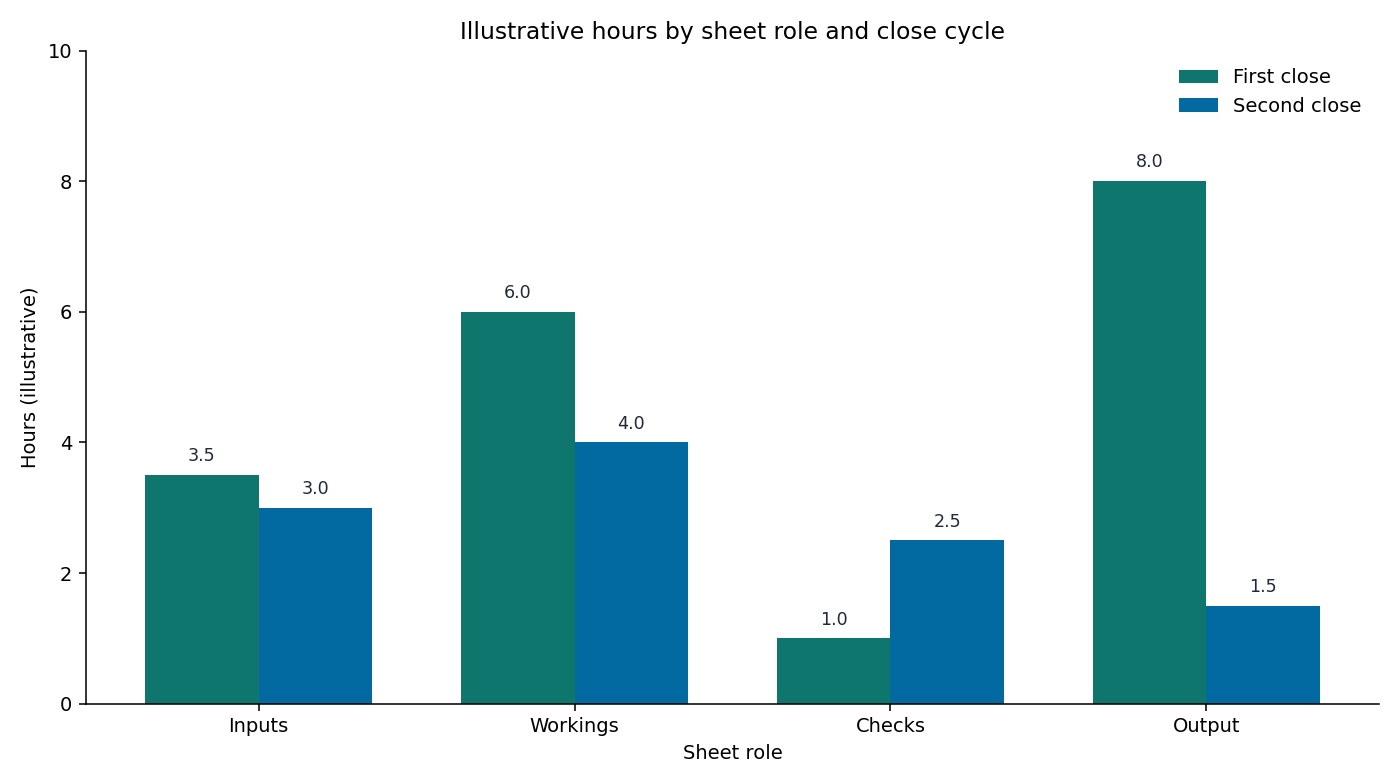
The chart is illustrative. It encodes sheet role by close cycle, not a measured customer study. First close piles hours on Output because definitions are still being typed there. Second close, after analysis design excel is signed, moves time onto Checks and cuts Output to linking and formatting. Read it as a layout symptom: if your second close still spends the day on Output, the roles were not actually separated.
| Sheet | First close (hours) | Second close (hours) |
|---|---|---|
| Inputs | 3.5 | 3.0 |
| Workings | 6.0 | 4.0 |
| Checks | 1.0 | 2.5 |
| Output | 8.0 | 1.5 |
From template to automation
A report template is the shell
A data analysis report template excel file is the empty workbook you save after the roles exist: headers, named ranges, Checks formulas, no sample numbers. The template does not replace analysis design excel. Saving last month's file and clearing values is a template only if Checks still points at the right blocks. Where the Data tab and pivots live is covered on Excel data analysis; this page owns the sheet contract those pivots must respect.
Automate only after sign-off
Refresh, copy-forward, and narrative draft may run on a schedule after Checks has a Pass and a name. Do not schedule a pack whose denominator owner is blank. The analyst sequence of map, calculate, and check is the same order as data analysis workflow; analysis design excel is that sequence drawn as sheets. Automation that runs before the sign-off reprints last month's wrong rate with this month's logo.
When the workbook leaves Excel
Leave the grid when more than two people edit the live file, when versions fork by mail, or when the grain must be shared outside the workbook. Until then, analysis design excel is the control. When the signed definitions need to rerun against a database instead of a monthly export, that handoff is the point of an analysis layer such as InfiniSynapse. Do not automate your way out of an unsigned Checks sheet.
Frequently Asked Questions
What does analysis design excel change on a monthly file?
It freezes four sheet jobs before formulas. Next month starts from Inputs and Checks, not from a rewritten Output. The change you should see is less time inventing metrics on the presentation sheet.
Where do formulas belong?
On Workings, one operation per block, with ingredients visible above the formula. Output only links. Inputs only stores drivers. Checks only flags.
Can a downloaded template replace the design?
No. A template is the shell saved after the design is signed. A downloaded financial or structural workbook answers a different job. Clear last month's values only after Checks still matches the blocks.
When should automation start?
After a reviewer signs the denominator and the row-count flag is Pass. Scheduling earlier locks the wrong definition into every future cycle.
Conclusion
Analysis design excel is a sheet contract: Inputs, Workings, Checks, Output, signed before anyone automates the monthly pack. Copy the CSV, trace one Output number to Workings, and refuse to publish when Checks is blank. Structural calculators and unsourced template galleries solve other searches. This layout is the one a second person can rerun next month.