api key for data agent: Issue, Then Audit
By William Zhu (independent public engineering profile: GitHub @allwefantasy; no personal LinkedIn) & the InfiniSynapse Data Team · Published: 2026-08-22 · Last updated: 2026-08-28 · Last verified: 2026-08-28 · Next review: 2026-11-28 · About · Editorial standards · Privacy · Publishing terms · Corrections
Table of Contents
- TL;DR
- What an api key for data agent actually is
- A console-first key framework
- How a console key differs from a frontend secret
- Tool landscape around the key
- Implementation steps from console to local env
- Desk sample: leaked Vite key (InfiniSynapse desk log)
- How to cite this page
- Selection scorecard
- Failure modes that leak or stall
- Frequently Asked Questions
- Conclusion
TL;DR
We evaluate key-issue paths at the InfiniSynapse desk on sanitized composites; first-party figures on this page are desk log AK-VITE-LEAK-20260822, not customer uplifts and not a third-party bake-off. The object this page names is an api key for data agent.
Direct answer: Issue an api key for data agent in the task console, assign the minimum scope, and store it with an appropriate local secret mechanism. Never expose the value in browser code, repository history, notebooks, screenshots, or prompts.
Download evidence: desk log · aggregate CSV · verify script. These files record this api key for data agent desk run as a first-party sanitized composite.
What you'll learn:
- Why the credential belongs in
/tasks, not in a React bundle - How that secret is consumed by
agent_infiniand the Skill - When to rotate the console key and what “rotate” does not mean
- Desk log
AK-VITE-LEAK-20260822, of a Vite leak and a same-hour console revoke - Failure modes that turn the secret into a public token
Vite’s environment-variable documentation (retrieved 2026-08-28) states that VITE_* variables are exposed to client-side source code after bundling. Next.js environment-variable documentation (retrieved 2026-08-28) explains that NEXT_PUBLIC_* values are inlined into the browser bundle at build time. These framework rules directly support the browser-boundary warning; neither project evaluated InfiniSynapse.
What an api key for data agent actually is
Key Definition: An api key for data agent is a revocable credential issued for a person, device, or environment to authorize permitted task actions. The first-party agent_infini interface or a separately configured client may consume it; no third-party coding client ships native support.
OWASP’s Secrets Management Cheat Sheet (retrieved 2026-08-28) covers secret lifecycle, rotation, revocation, auditing, and least privilege. The OWASP API Security Top 10 (retrieved 2026-08-28) provides authentication and authorization risk categories; possession of a key does not replace object- or function-level authorization. These sources define controls, not product certification.
Author qualifications and accountability
William Zhu is an InfiniSynapse cofounder. His public GitHub profile and repositories auto-coder, byzer-llm, and BYZER-RETRIEVAL verify identity and engineering work. They do not independently validate the product or incident drill. No degree, customer, media report, certification, vendor recognition, or independent assessment is claimed. The homepage records a 2026 WAIC Future Tech OPC Excellence Award; company recognition, not a review. 2026-07-29 attestation.
Internal terms this page uses: the console issues the key. A gitignored env file is one local configuration option, not a complete secret manager. The frontend is a different trust boundary and never receives the value.
People treat the first demo as a reason to put VITE_INFINI_KEY next to the logo. That is a public key. An api key for data agent authenticates a local CLI or an editor on a laptop. The browser is a different trust boundary. If the demo needs a UI, the UI talks to your backend. Your backend talks to the agent. The browser never sees the key.
MITRE CWE-798 (retrieved 2026-08-28) classifies hard-coded credentials as a software weakness. GitHub secret scanning and push protection (retrieved 2026-08-28) can detect supported patterns and block some pushes, but detection is not proof that history or bundles are clean.
MCP for data analysis is a protocol conversation. This page is narrower: where the secret lives.
API key for data agent: issued in /tasks, read locally
Create the api key for data agent at app.infinisynapse.com/tasks under API Key Management. The CLI reads it from the environment. The editor does not need to echo it. If you can see the key in a screenshot, treat that screenshot as a leak.
Not a source credential
An api key for data agent does not replace the database login. Sources stay connected in the product. The key only lets a client start a task against those sources. If someone pastes a warehouse URI next to the key, you now have two leaks.
A console-first key framework
| Piece | Owner | What “good” looks like |
|---|---|---|
| Issue | Task console | API Key Management; named key; rotation path |
| Store | Laptop / image | Gitignored env; no chat paste |
| Consume | agent_infini + Skill | Environment read; no echo |
| Frontend | Application | Never sees the secret |
| Revoke | Console | Immediate; new key issued only after revoke |
The table is the whole policy. A credential that skips a row is a story you will tell in an incident channel.
For an api key for data agent, ownership and revocation matter more than the filename used to supply it.
Name the key, then forget the value
Issue separate credentials per person, device, and environment where feasible. This supports minimum scope and independent revocation; do not share one value across every coding client.
Rotate in the console
Rotation means: revoke, issue, update the local env, restart the CLI. It does not mean “add a second key and leave the first one alive.” A credential you no longer need should be dead in the console before you delete the env line. After the key exists, the CLI that reads INFINI_API_KEY from a local env is the next contract.
How a console key differs from a frontend secret
A frontend secret is exposed to users when a framework includes it in browser assets. An api key for data agent in NEXT_PUBLIC_* or VITE_* crosses that boundary. Data governance provides the broader ownership and control context.
Self-service analytics for a non-engineer does not require them to hold an api key for data agent. They use web Chat. The key is for clients that are not the browser.
Tool landscape around the key
Task console. The documented issue and revoke path for an api key for data agent.
Local secret storage. A gitignored environment may be appropriate for a demo; managed keychains or secret managers may be preferable for production.
Cursor / Claude Code / Codex / Gemini. Separately configured clients may invoke the installed first-party interface when permissions allow. They do not natively provide agent_infini or its key policy.
Web Chat. No key in the page. Session identity is enough for a human.
Your product UI. If you embed analysis, your backend holds the api key for data agent. InfiniSynapse is not asking you to put that secret in a customer browser. Private deployment and desktop exist; the educational check still starts on the web console.
Zero-config against a replica you already run does not change the key rule. The product is a professional data analyst, not a ChatBI box, and it is still not a reason to publish a token. Multimodal inputs and 100+ file formats still land as task artifacts. None of those artifacts should contain the key. Organization memory is the bound pack plus the task folder. A leaked token is not memory; it is an incident.
If you embed an analyst in another product, the browser talks to your backend. Your backend starts the task. The customer never holds an api key for data agent. That split is the same split as IDE versus web: clients consume, the console issues. AI-native boards generated as task files do not need a public key to render.
No frontend exception for demos
“Just for the investor deck” is how keys hit GitHub. There is no demo exception. If the deck needs a live UI, film the console or proxy through a backend. An api key for data agent does not belong in the slide HTML either.
Implementation steps from console to local env
- Open the task console. Review API Key Management before issuing a value. Expected result: The issue and revoke controls are visible.
- Issue a named key. Assign it to one person, device, or environment with minimum permissions. Expected result: The credential has a clear owner and scope.
- Store it securely. Use an appropriate local secret mechanism; for a demo env, verify the file is ignored. Expected result: Git and browser builds cannot read it.
- Configure the client without echoing. Let the first-party interface read the secret without placing it in instructions. Expected result: The value does not enter prompts or transcripts.
- Run a task smoke test. Confirm the task appears and only allowed actions succeed. Expected result: The configured scope works without exposing the key.
- Revoke and verify after exposure. Issue a scoped replacement, scan bundle and git history, then repeat the smoke test. Expected result: The old value fails and no bundle copy remains.
You can complete the educational diagnosis without creating a key: write down where it would live and which files are forbidden. The create click is optional until that list is honest.
Test the api key for data agent with a minimum-scope task before granting broader source access.
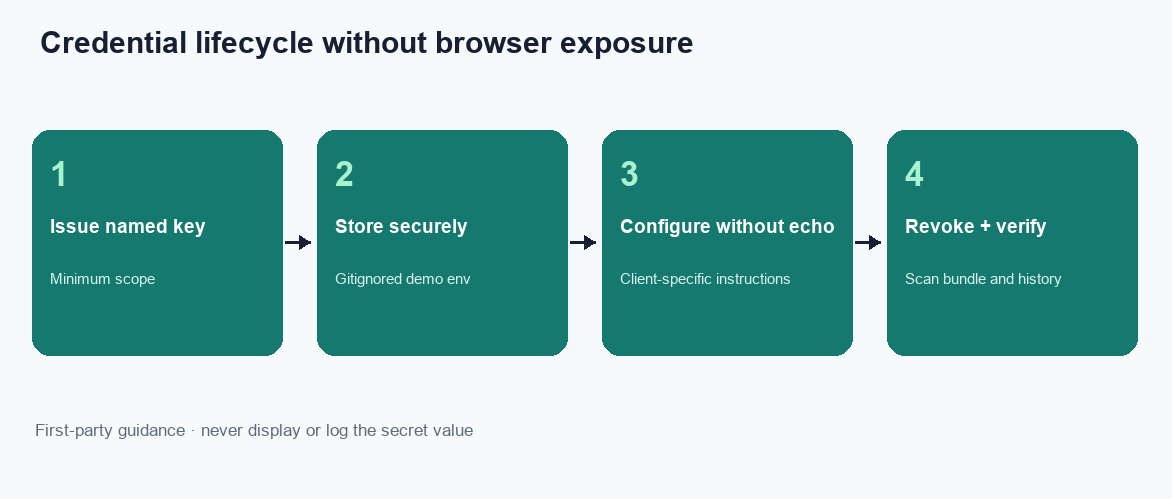
Figure. Educational four-step sequence the desk uses to tell a console credential from a frontend leak. Expected result after step 6: the leaked value is revoked, a named replacement lives only in a gitignored env, and the frontend bundle contains 0 copies. Not a product screenshot or a customer SLA.
Search the repo for INFINI, VITE_, NEXT_PUBLIC_, and any .env that is not ignored. If a sample app committed a placeholder that looks like a real token, treat it as a drill: revoke path, issue path, git history. Placeholders become real on Friday afternoon.
Write a client-specific instruction: “read the configured secret; never echo the value.” Each client needs separate configuration. Claude Code security guidance (retrieved 2026-08-28) and Cursor Agent documentation (retrieved 2026-08-28) describe client permissions and command execution only; they do not endorse this first-party policy.
Confirm git will not see it
Run the status check you already use before every commit. If the env file is untracked, good. If it is staged, stop. An api key for data agent in git is a public key with extra steps.
Confirm the frontend build cannot see it
Search the web app for INFINI, VITE_, and NEXT_PUBLIC_. If a build would inline an api key for data agent, move the call to a server. There is no “empty string in prod” workaround that stays safe.
Desk sample: leaked Vite key (InfiniSynapse desk log)
This is a first-party InfiniSynapse desk log of a leaked api key for data agent, not a named-logo customer case and not an uplift claim. Run ID: AK-VITE-LEAK-20260822. Date: 2026-08-22. Operator: InfiniSynapse Data Team. Source: a sanitized demo branch the desk is authorized to inspect. Goal asked twice: “Can this landing page start a task?”
A demo branch added VITE_INFINI_KEY so a landing page could “start a task.” The bundle shipped. The api key for data agent was readable in the JavaScript.
| Retrieval state | Key in JS bundle | Revoked same hour | Gitignored env |
|---|---|---|---|
VITE_INFINI_KEY shipped | 1 | 0 | 0 |
| Console-issued key | 0 | 1 | 1 |
Desk response the same hour: revoke in the console, issue a new key into a gitignored env, remove the Vite variable, and restart agent_infini on the laptop. Wall-clock from first grep to CLI restart was 18 minutes (warehouse time excluded). No warehouse password had been in the bundle—only the agent key—and that was already enough to start tasks on authorized sources.
The method and 18-minute wall-clock are in the downloadable desk log; the aggregate CSV contains exactly the two observations shown here plus smoke-test state. Cite them only as InfiniSynapse desk log AK-VITE-LEAK-20260822.
The landing page still worked after the revoke—because the page should never have started tasks. The laptop CLI kept working after the env update. That is the intended split.
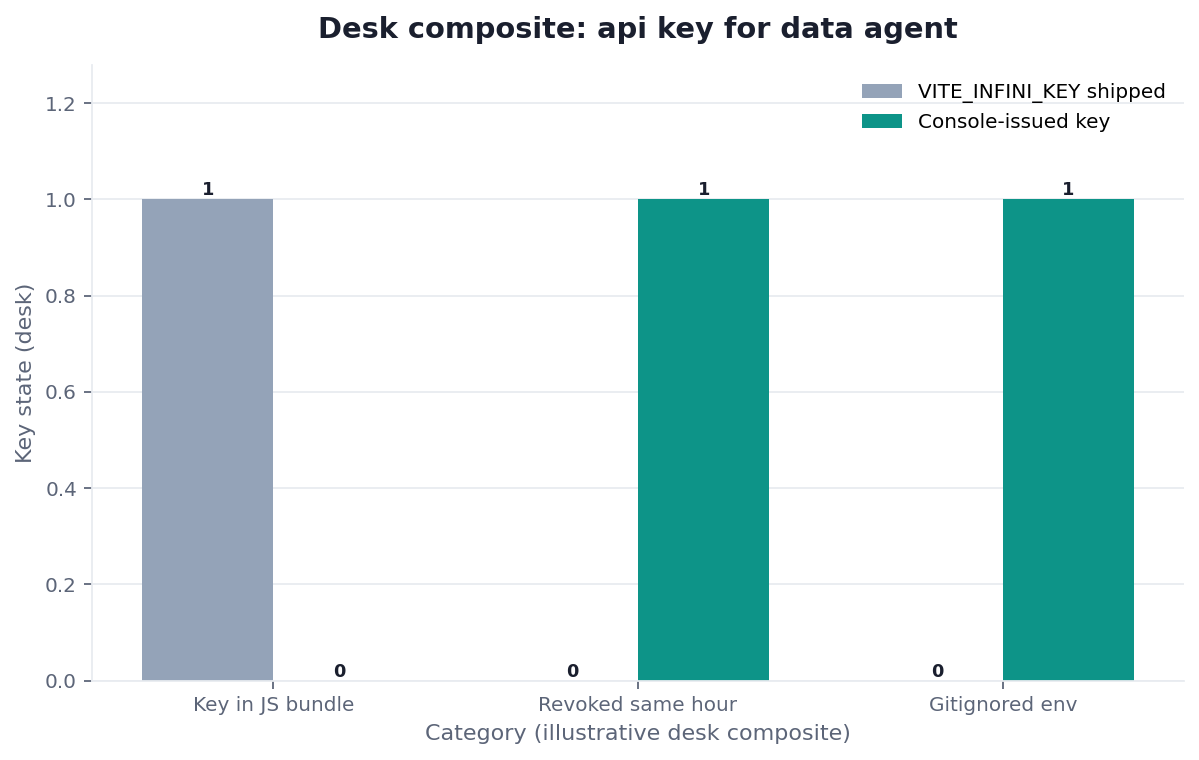
Figure. InfiniSynapse desk log AK-VITE-LEAK-20260822: demo branch shipped VITE_INFINI_KEY; revoke + gitignore + restart CLI; ~18-minute wall clock. Published context: the independent sources linked in the body. Not a customer experiment, SLA, or official benchmark.
Evidence boundaries and external validation status
Desk log AK-VITE-LEAK-20260822 is a first-party sanitized demo incident drill. It is not a customer breach, independent benchmark, third-party dataset, Vite/Next.js/GitHub/OWASP test, certification, media evaluation, or endorsement. No independent party had reproduced it as of 2026-08-28. The browser-to-backend-to-data-agent pattern is recommended architecture, not certification evidence.
Independent reproduction should disclose framework and build version, demo commit hash, secret-pattern placeholder without its value, bundle-search method and result, issue/revoke timestamps, replacement scope and permissions, git-history scan, task smoke test, all outputs and failures, wall clock, and conflicts of interest.
| Evidence class | What you can cite | What you cannot claim |
|---|---|---|
| Desk log on this page | Leak class, bundle flag 1→0, same-hour revoke, ~18 min wall-clock, run ID | Customer breach %, official EEAT score, named-logo case |
| Desk log and aggregate CSV | Two drill observations, method, smoke-test state, wall clock | Customer, raw, source, or third-party data |
| Framework documentation | Which public prefixes enter browser bundles | That Vite or Next.js tested this drill |
| Security guidance | Lifecycle, authorization, scanning, and governance controls | Certification or independent product validation |
| Homepage recognition | 2026 WAIC Future Tech OPC Excellence Award on the homepage | That WAIC, OWASP, MITRE, or NIST scored this article |
How to cite this page
Page: Zhu, W., & InfiniSynapse Data Team. (2026). api key for data agent: issue, then audit. InfiniSynapse
Run: InfiniSynapse Data Team. (2026). Desk log AK-VITE-LEAK-20260822 (sanitized composite)
The first cites the guide. The second cites figures. Neither is an audit. Cite the bundle flag, the same-hour revoke, and the 18-minute wall clock. The drill remains first-party. No independent reproduction exists. Send contradictions to zhuhl@infinisynapse.com.
Selection scorecard
| Criterion | Weak key use | Strong key use |
|---|---|---|
| Issue | Invented in a script | Created in /tasks |
| Store | Repo, Slack, notebook | Gitignored env |
| Frontend | Bundled “for the demo” | Never present |
| Clients | One shared value everywhere | One policy; separately scoped credentials |
| Revoke | “We’ll rotate later” | Console revoke first |
If a pitch cannot show API Key Management, you do not have a real issue path. You have a string. If it can show the console but wants an api key for data agent in application code, stop. A string in a bundle is a public token. A named key in /tasks is a credential you can revoke.
Score the Skill the same way. If it prints the value into a transcript, fail it. If it reads the environment and starts task new, keep it. Connect only read-only or sanitized sources after the key works. A valid key aimed at a write-capable URI is still a process failure.
Review every api key for data agent as an independently revocable credential, not a team-wide convenience string.
Failure modes that leak or stall
These are the ways an api key for data agent leaves the laptop.
Keys in the frontend
NEXT_PUBLIC_ and VITE_ exist to publish values. An api key for data agent is not a publishable value. Revoke. Do not “rotate later.”
Keys in the prompt
Engineers paste the value into Cursor “so the Skill can see it.” The transcript is now a copy of the secret. Revoke. Teach the Skill to read the env. An api key for data agent should never be a chat message.
Shared Slack key
A channel named #keys is a public backup. Issue per-machine keys. A secret that five people forwarded is already over-shared.
Before you call the setup production-ready, check four things: the api key for data agent was created in /tasks, git cannot see it, the frontend build cannot see it, and a teammate can start a task without asking you to paste the value. That inspection is the diagnosis.
When the next missing object is not this page, open Codex Data Analysis via the Same CLI when Codex calls the same CLI the IDE already uses, Gemini CLI Data Analysis when Gemini uses the same skill and the same task timeline, or IDE vs Web Data Analysis when The IDE starts work; the web trail is what you share.
Related guides: claude code analysis, Cursor Data Analysis, Claude Code Install, What Is Claude Code, Claude Code Features, How Claude Code Works, Claude Coding Data Analysis, and Embed an AI Data Analyst.
Create a key under API Key Management
Open the task console, create a named api key for data agent, store it only in a local env file, and confirm the frontend bundle cannot see it. This check uses only sources you authorize.
Commercial association: You do not need the workspace to complete the educational diagnosis on this page.
Open InfiniSynapseSourcing and accountability. William Zhu’s editorial profile and GitHub record verify identity and engineering work. NIST SSDF SP 800-218 (retrieved 2026-08-28) supports secure-development practices, the NIST AI RMF (retrieved 2026-08-28) supports governance and risk measurement, and the UK NCSC secure AI guidance (retrieved 2026-08-28) addresses secure lifecycle practices. None evaluated this product. 2026 WAIC Future Tech OPC Excellence Award (homepage; not a review). COI: InfiniSynapse sells the interface described here.
Frequently Asked Questions
Where do I create an api key for data agent?
Bottom line: In the task console under API Key Management, at /tasks. That is the only issue path. A key created in a script is an unofficial string.
Can I put the key in my web app for a demo?
Bottom line: No. A browser bundle is public. An api key for data agent in frontend code is a leak. Proxy through a backend or skip the live demo.
Do Cursor and Gemini need different keys?
Bottom line: Prefer separate, minimally scoped credentials by person, device, and environment so each can be revoked independently. Client brand alone does not determine scope.
What if the key leaked?
Bottom line: Revoke it in the console first. Then issue a new api key for data agent, update the local env, and search git and chat for the old value. Do not leave the leaked key alive “until Friday.”
Does rotation mean adding a second key?
Bottom line: No. Revoke first, then issue, then update the local env and restart the CLI. Leaving the old value alive is not rotation.
Is a screenshot of the key a leak?
Bottom line: Yes. If the value is readable in a screenshot, a ticket, or a deck, revoke it. The console is the issue path; the screenshot is a copy.
Conclusion
An api key for data agent is useful when it stays boring: issued in /tasks, stored in a local env, read by agent_infini, never shipped to a browser. Create it there, refuse every frontend exception, and revoke on sight. When you are ready to run that check, start from InfiniSynapse and create the named key in API Key Management before you install anything else.