Download AI Dashboard: Inspect, Then Rerun
By William Zhu (independent public engineering profile: GitHub @allwefantasy; no personal LinkedIn) & the InfiniSynapse Data Team · Published: 2026-08-22 · Last updated: 2026-08-29 · Last verified: 2026-08-29 · Next review: 2026-11-29 · About · Editorial standards · Privacy · Publishing terms · Corrections
Table of Contents
- TL;DR
- What it means to download AI dashboard files
- A pack-you-can-audit framework
- How downloads differ from a chat preview
- Tool landscape for dashboard artifacts
- Implementation steps from task to attachment
- Desk sample: screenshot versus workspace pack (InfiniSynapse desk log)
- Selection scorecard
- Failure modes that look downloaded
- Frequently Asked Questions
- Conclusion
TL;DR
We evaluate these patterns at the InfiniSynapse desk on sanitized composites; first-party figures on this page are desk log AIDB-DL-PACK-20260822, not customer uplifts and not a third-party bake-off.
Direct answer: To download AI dashboard output is to export a portable representation such as PDF, PNG, CSV, PPTX, HTML, notebook, bundle, or API result. Download enables review and retention but does not itself prove lineage or make a dashboard legitimate.
Download evidence: desk log · aggregate CSV · verify script. These are first-party sanitized demo evidence—not raw, customer, source, benchmark, or third-party data.
What you'll learn:
- Why downloading workspace files is an audit test, not a convenience feature
- Which files count as the board and which files are leftovers
- A framework from task timeline to attachment
- Desk log
AIDB-DL-PACK-20260822, of a screenshot invite versus a workspace pack - Scorecard rows and three failures that still look like a download
Portable research objects require metadata, not just files. RO-Crate, BagIt RFC 8493, W3C PROV-O, FAIR principles, ACM Artifact Review, and DataCite Metadata Schema support packaging, provenance, findability, and review; none validates this desk run.
Product exports differ: Power BI PDF export, Power BI data export, Tableau export, Looker downloads, Superset dashboard export, and Grafana reporting document specific formats and limits. None endorses InfiniSynapse. Retrieved 2026-08-29.
Author qualifications and accountability
William Zhu is an InfiniSynapse cofounder. GitHub @allwefantasy, auto-coder, byzer-llm, BYZER-RETRIEVAL, and the InfiniSynapse organization verify public project activity—not education, BI certification, customers, or independent evaluation.
This page is first-party. The authors sell the workflow. It is not an independent review. 2026 WAIC Future Tech OPC Excellence Award (homepage; not a review). 2026-07-29 attestation.
Internal terms this page uses: a workspace pack is the files you attach. A chat preview is a window. A screenshot invite is a poster. Downloading the workspace files is how the pack leaves the room; it is not a capture of the window.
An AI-native dashboard is a task artifact. The download is how that artifact leaves the room. If the exported files still do not include the SQL, you downloaded a picture. Demand the plan.
The AI dashboard generator hub treats the pack as the product. This page isolates the last inch: get the files, attach the files, refuse the screenshot. People skip that inch because the preview looks finished. Reviewers do not review previews. They review attachments.
The board is the workspace files
Chat is the trigger. The archive is the workspace. When you download AI dashboard charts, you are copying the archive, not the conversation. Markdown notes travel with the figures. HTML or PDF, when the task wrote them, travel too. That bundle is the board.
A tile catalog export is a different object. It is a designed layout. When you download AI dashboard output from a generator, the layout follows this week’s goal. Do not expect last quarter’s six tiles. Expect the figures the sentence asked for.
What is data management still applies after the download: retention, access, no secrets in the pack. Taking files out is not a license to email production credentials. Sanitize first.
Evidence that travels with the chart
Open the downloaded chart. Open the query. If the two are not in the same folder, you did not download AI dashboard evidence. You downloaded decoration. Explainable AI data analysis is the sibling discipline: the timeline must survive the email.
A pack-you-can-audit framework
| Stage | Input | Output you keep |
|---|---|---|
| Goal | Meeting sentence | Same text you will rerun |
| Task | Agent plan + queries | Inspectable timeline |
| Preview | Charts in the workspace | A window, not the archive |
| Download | Workspace files | Charts, Markdown, HTML/PDF, extracts |
| Attach | Email or folder | The pack, not a screenshot |
A preview that never becomes a file is a screen you will rebuild next Sunday. When you download AI dashboard files, you buy the right to rerun the argument next week.
What belongs in the attachment
Include the featured charts, the Markdown note that names the decision, and the extract if a reviewer will recompute. When the task wrote HTML or PDF, include those too. Do not include secrets, raw credentials, or a dump of every intermediate file the agent touched.
If two sources fed the board, the attachment should still make the join inspectable. A dashboard from multiple databases is not finished because the zip exists. It is finished because the zip explains the join.
How downloads differ from a chat preview
A preview is live and fragile. A download is a copy you can file. Teams that only preview never file the files, then argue from memory. Memory is not an audit. Chat with your data can start the task. It cannot be the packet you send to a VP.
Screenshots fail the follow-up
A screenshot can be a useful summary and part of evidence, but it does not independently preserve lineage, interaction, access context, or rerun instructions. If the only way you can download AI dashboard “files” is to capture the window, the product failed. Require workspace downloads.
Exports from a tile catalog are not this pack
BI exports are publications. When you download AI dashboard output from an agent task, you are exporting a job. Keep certified tiles in BI. Do not pretend a PNG of a published tile is the same object as a generated pack.
How you generate a dashboard from natural language still matters. A shopping-list prompt will download AI dashboard tiles that look busy and decide nothing. Freeze a decision sentence first. Then download.
Tool landscape for dashboard artifacts
Chat UIs. They preview. Most cannot download AI dashboard packs as files you can file. Score them as windows.
Notebook renderers. They can export cells after a human arranges them. The generator is you. Pretty notebooks are not an AI-native pack until the files and the queries travel together.
Agent task workspaces. Connect existing sources, generate the board, download AI dashboard files, rerun next week. The educational path: connect → ask for next week’s board → open charts in the task → download. The planner writes SQL; the workspace stores the artifacts. This first-party demo used read-only access and no writeback; that is not a universal product guarantee.
Chat UIs that only preview leave no pack
If the vendor’s answer to “download AI dashboard” is “screenshot it,” walk away. A pack leaves files. NLP2SQL toys and ChatBI paragraphs do not.
Workspaces that store the pack
This is the path the hub describes. Multi-source without a warehouse first. Files you can audit. When you download AI dashboard output from that workspace, you should see charts plus the plan. Pretty is optional. Traceable is not.
MCP for data analysis may be how a coding agent triggered the task. The download still happens on the web workspace. The archive should not live only in an IDE buffer.
Implementation steps from task to attachment
- Connect one authorized source—or two, if the meeting needs both.
- Bind contested words.
- State the meeting goal. Let the task run.
- Open each featured figure and its query.
- Download AI dashboard files from the workspace. Attach those files.
- Next cycle, rerun the same goal. Download again. Compare packs.
These six steps are the whole proof. You can complete the educational diagnosis at step 4: open the figure and the query before you file anything.
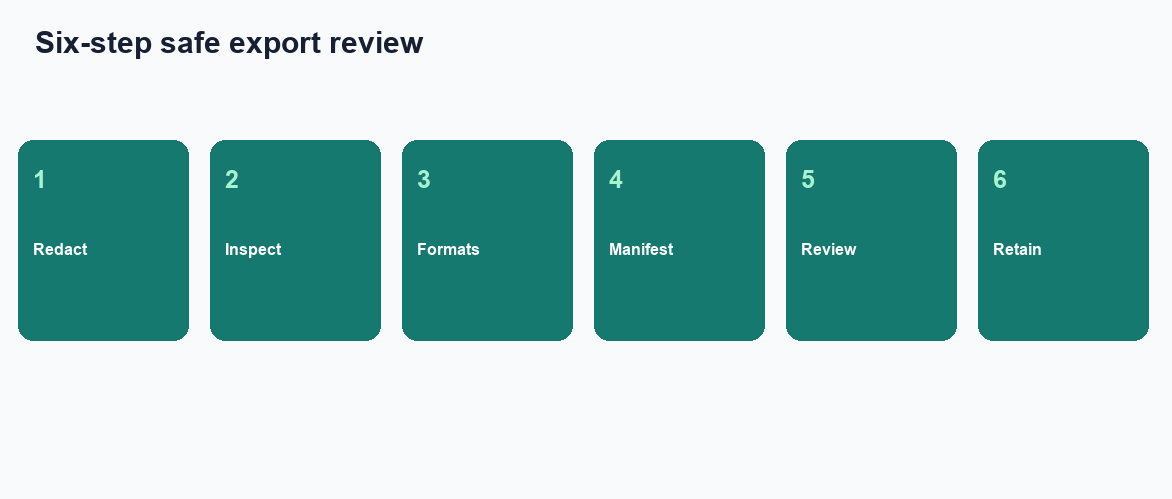
Figure. Educational four-step sequence the desk uses to tell a screenshot invite from a workspace pack. Expected result after step 6: the same goal reruns, each featured number opens to a query, and a teammate can open the files without the chat thread. Not a product screenshot or a customer SLA.
Inspect before you download
Do not download AI dashboard files you have not opened. A pretty preview can hide a wrong join. Click the figure. Read the filter. Then download. Exploratory data analysis can stay messy. A pack you email cannot.
Attach the pack, not the thread
The thread will scroll away. The pack will not, if you filed it. When you download AI dashboard files, put them next to last week’s pack. That folder is how you catch drift. A weekly dashboard refresh that only exists as new screenshots has no folder and no memory.
Desk sample: screenshot versus workspace pack (InfiniSynapse desk log)
This is a first-party InfiniSynapse desk log of workspace pack files, not a named-logo customer case and not an uplift claim. Run ID: AIDB-DL-PACK-20260822. Date: 2026-08-22 (Saturday). Operator: InfiniSynapse Data Team. Sources: a read-only Postgres replica the desk is authorized to read, plus a sanitized SKU note file. Goal: Wednesday stand-up—which SKUs missed promise this week. Download the same numbers as desk log AIDB-DL-PACK-20260822.
Ops pasted a chat screenshot into the Wednesday invite. Finance asked where “miss” came from. Nobody could open a query. The same-day rewrite used one goal sentence and two authorized sources. The team did download AI dashboard files—three charts, a Markdown exception list, and the extract. Finance opened the filter.
The following Wednesday they did not screenshot again. They reran the sentence and did download AI dashboard files into the same folder. One SKU note had changed; the pack moved that row.
| Retrieval state | Chat screenshots | Downloadable charts | CSV + memo |
|---|---|---|---|
| Invite paste | 1 | 0 | 0 |
| Workspace download | 0 | 3 | 2 |
Wall clock for the successful run was about twenty minutes (warehouse time excluded). Cite this table as InfiniSynapse desk log AIDB-DL-PACK-20260822. Do not cite it as customer ROI, a 40% drop in email volume, a bake-off win, or a Spark / SQLite / Gartner experiment. We do not publish named-logo customer cases on this page. The only honest claim is the artifact counts and the wall-clock on this run.
We are not claiming the meeting got shorter. We are claiming the board and the query were attachable.
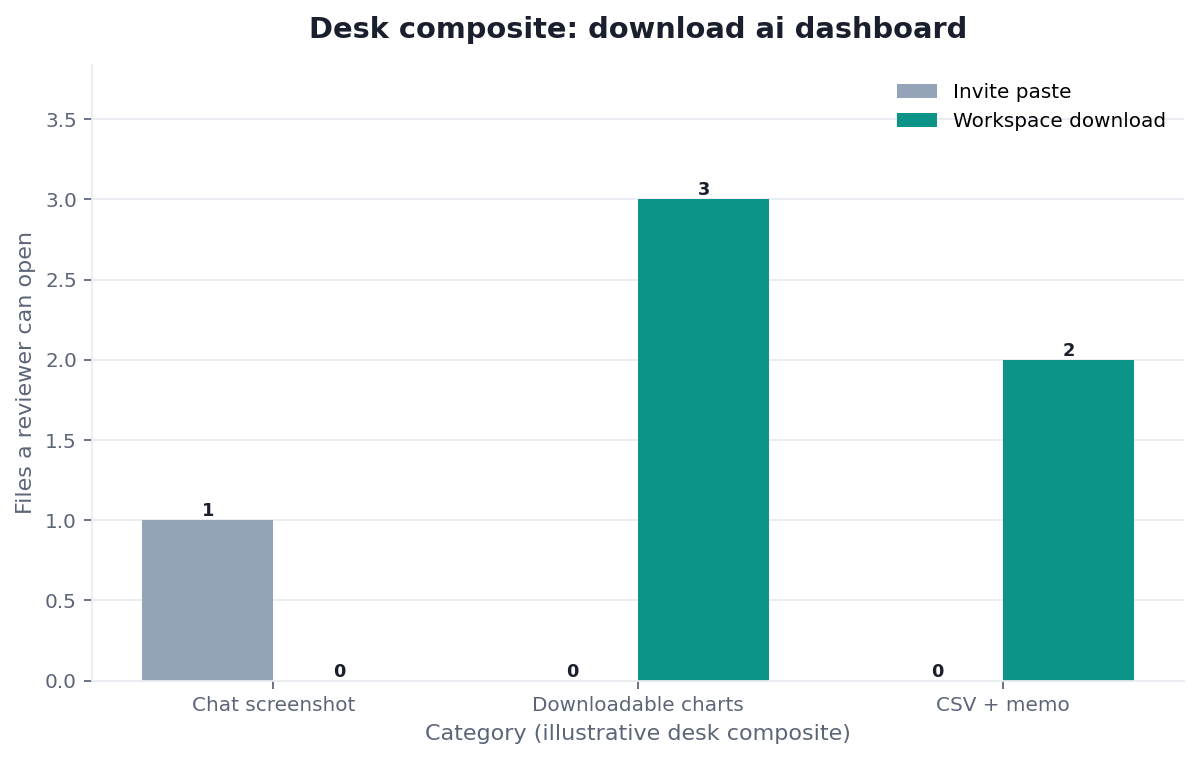
Figure. InfiniSynapse desk log AIDB-DL-PACK-20260822: the invite paste left 1 / 0 / 0; the workspace pack left 0 / 3 / 2. Published context: the independent sources linked in the body. Not a customer experiment, SLA, or official benchmark.
| Evidence class | What you can cite | What you cannot claim |
|---|---|---|
| Desk log on this page | Artifact counts 1/0/0 → 0/3/2, ~20 min wall-clock, run ID, downloadable log | Customer uplift %, vendor bake-off win, named-logo case |
| Published authority (linked above) | Spark, SQLite, Redis, DuckDB, pandas docs | That those sources ran this desk log |
| Homepage recognition | 2026 WAIC Future Tech OPC Excellence Award as published on the company homepage | That WAIC, Spark, or Gartner scored this article |
Evidence boundaries and external validation status
AIDB-DL-PACK-20260822 is a first-party sanitized composite/demo—not raw, customer, source, benchmark, or third-party data. As of 2026-08-29, no independent third party, media outlet, or customer had reproduced it.
Replication should disclose tool, model, version, configuration, prompts; source schema, snapshot, access; metric, grain, join, filter, timezone; goal and window; query or transform; run IDs, status, errors, timestamps; artifact list, MIME types, versions, checksums, manifest; export settings and omitted interactions or RLS; screenshot baseline; all failures; review, accessibility, retention protocol; wall clock; and conflicts of interest. NIST AI RMF, OWASP GenAI, and CWE-22 guide controls; none tested this run.
Before export, apply redaction and row-level authorization; scan secrets; neutralize spreadsheet formula injection; restrict HTML active content; reject archive path traversal; and set retention. Do not include raw extracts by default.
Manifest review checklist
Before sharing a package, confirm that its manifest names every retained file, media type, creation time, version, and checksum. Record the source snapshot and report window without embedding credentials or unrestricted records. State which filters, interactions, row-level rules, fonts, external assets, or live queries the export omits. Test the package in a clean reviewer environment, verify that relative paths stay inside the archive, and inspect spreadsheet cells and HTML for active content. Assign an owner, retention period, approved audience, and deletion path. Finally, preserve the failed export attempts and reviewer notes beside the accepted package so later readers can distinguish an intentional omission from a missing artifact.
Selection scorecard
| Criterion | Weak | Strong |
|---|---|---|
| Download | Screenshot only | Workspace files |
| Trace | Image | Query next to the chart |
| Sources | Must migrate first | Existing DBs and files |
| Refresh | New picture weekly | Rerun, then download AI dashboard again |
| Pack | Chat bubble | Charts + Markdown + extract |
| Secrets | Credentials in the zip | Authorized, sanitized only |
If a vendor cannot download AI dashboard artifacts, score it as a demo. If it downloads images without SQL, score it as a poster. If the zip contains secrets, score it as an incident.
Failure modes that look downloaded
A zip of pictures is not a pack
People download AI dashboard PNGs and call it a pack. There is no query. There is no rerun. Require the plan files. A picture folder is a slideshow.
The chat thread is not the archive
The preview was enough for the meeting. Nobody did download AI dashboard files. Next week the thread is gone or the model hedged. File the pack the day you generate it.
An uncurated dump is not the attachment
The opposite failure: you download AI dashboard everything, including secrets and twenty scratch tables. Reviewers cannot find the figure. Curate the attachment. Keep the rest in the task.
Before you send any board, check that you did download AI dashboard files, that each featured number opens to a query, that the goal sentence is stable enough to rerun, and that the sources are ones you authorized. That inspection is the diagnosis.
Related hops: AI dashboard generator; Generate dashboard from natural language; AI data report generator; data visualization; what is a data agent; Operational Dashboard vs BI Dashboard.
Download the charts from the last task
Open the task workspace, inspect the figure and its query, then download the charts and notes you will attach. This check uses only sources you authorize.
Commercial association: You do not need the workspace to complete the educational diagnosis on this page.
Open InfiniSynapseSourcing and accountability. Packaging standards and product documents support scoped claims only; none evaluated this page. COI: InfiniSynapse sells the first-party workflow.
How to cite this page
Page: Zhu, W., & InfiniSynapse Data Team. (2026). Workspace pack download: inspect, then rerun. InfiniSynapse
Run: InfiniSynapse Data Team. (2026). Desk log AIDB-DL-PACK-20260822 (sanitized composite)
Neither is an audit. Cite those artifact counts here. No independent reproduction exists. Send contradictions to zhuhl@infinisynapse.com.
Frequently Asked Questions
Which files count when I download AI dashboard packs?
Bottom line: Charts, the Markdown note, and any HTML, PDF, or extract the task wrote. Those files are the board. The chat preview is only a window.
Is a screenshot enough?
Bottom line: No. A screenshot cannot open a query and cannot be rerun. If you cannot download AI dashboard artifacts from the workspace, you do not have an auditable pack.
Does download publish into Tableau?
Bottom line: No. When you download AI dashboard files, you copy workspace artifacts. The task does not write tiles into Tableau or Power BI and does not write back to production.
Can I download AI dashboard output from two sources?
Bottom line: Yes, if both were connected and authorized. You do not need a warehouse first. You do need the join to be inspectable inside the pack.
Do Spark, SQLite, or Gartner certify this download?
Bottom line: No. Apache Spark documentation, SQLite documentation, and Gartner Peer Insights describe engines and published BI. They do not run the desk table on this page.
Are the object counts a third-party benchmark?
Bottom line: No. The 1 / 0 / 0 versus 0 / 3 / 2 counts are first-party desk log AIDB-DL-PACK-20260822. Download AI dashboard treats those counts as a screenshot-versus-pack test, not an SLA.
What should I leave out of the zip?
Bottom line: Secrets, raw credentials, and every intermediate scratch table. Curate the attachment so a reviewer can find the featured figure. Keep the rest in the task.
Related guides: dashboard tools · dashboard creator · AI dashboard generator · dashboard maker · ai powered dashboards · data governance · self service analytics
Conclusion
The board you can download AI dashboard files from is the board you can audit. Generate the meeting pack on sources you already have, open the queries, and attach the workspace files—not a screenshot. When you want to run that check, open InfiniSynapse and download the charts from the last task you would send to the room.