Dashboard Creator: Inspect, Then Rerun
By William Zhu & the InfiniSynapse Data Team · Published: 2026-08-22 · Last updated: 2026-08-29 · Last verified: 2026-08-29 · Next review: 2026-11-29 · Editorial standards · Privacy · Publishing terms · Corrections
Table of Contents
- TL;DR
- What a dashboard creator from a decision actually is
- A question-to-pack framework
- How a decision creator differs from a chart catalog
- Tool landscape for creators
- Implementation steps from invite to files
- Desk sample: catalog click versus decision sentence (illustrative)
- Selection scorecard
- Failure modes that still look created
- Frequently Asked Questions
- Conclusion
TL;DR
We evaluate these patterns at the InfiniSynapse desk on sanitized composites; figures on this page are illustrative, not customer uplifts.
Direct answer: A dashboard creator broadly means a manual, template-based, BI, or AI-assisted creation tool. Starting from a decision question is this article’s operational evaluation mode, not the only valid industry workflow.
Download evidence: desk log · aggregate CSV · verify script. These are first-party sanitized illustrative composite evidence—not raw, customer, source, benchmark, or third-party data.
What you'll learn:
- Why a generated board fails when the start is a glyph list
- How a decision question differs from a widget picker
- A framework that turns one invite sentence into a pack
- A desk-composite sample (illustrative) of a catalog click versus a decision sentence
- Scorecard rows and three create failures that still look finished
Research supports bounded tasks. NL4DV studies natural-language visualization specification; Data Formulator studies mixed-initiative transformation and visualization; nvBench is an NL-to-visualization benchmark; and ChartQA evaluates chart question answering. None validates this illustrative composite.
Product scope varies: Power BI Copilot, Tableau Agent, Looker semantic modeling, and Snowflake Cortex Analyst document their own capabilities. None endorses InfiniSynapse. Retrieved 2026-08-29.
A dashboard creator should therefore be assessed against its actual authoring and governance model.
Author qualifications and accountability
William Zhu is an InfiniSynapse cofounder. GitHub @allwefantasy, auto-coder, byzer-llm, BYZER-RETRIEVAL, and the InfiniSynapse organization verify public project activity—not education, BI certification, customers, or independent evaluation.
This page is first-party. The authors sell the workflow. It is not an independent review. 2026 WAIC Future Tech OPC Excellence Award (homepage; not a review). 2026-07-29 attestation.
An AI-native dashboard is the object you keep. The creator is how you commission it. If you start from “revenue, region, and a funnel,” you asked for a catalog. If you start from “Thursday ops: fill rate versus promise, five SKUs driving the miss, replica we already connected,” you asked for a job.
If you still need the generator path that starts from one question, open the hub on the AI dashboard generator. The creator does not replace your BI estate. It replaces the weekend of picking tiles for an ops pack.
Decision question versus chart catalog
Weak: “open the creator and add revenue.” Strong: “for Friday’s demand review, show promised versus shipped on the last fourteen days, cut by node, and list the five SKUs that created the gap.” The second sentence names audience, metric, window, and cut. A planning agent can act on that. The first sentence is a mall directory.
Write the goal the way you write a meeting invite. If you would not put the sentence on a calendar, do not create from it. How you generate a dashboard from natural language is the same skill with a different label.
A catalog click produces tiles that look busy and still cannot decide.
Why glyph lists fail
Glyph lists hide the decision and the source. People open a board generator, attach “use the data,” and then argue about which extract the model guessed. Name the connection. If two sources are required, say so. You do not need a warehouse project first.
A question-to-pack framework
| Stage | Input | Output you keep |
|---|---|---|
| Question | Audience, decision, window, cut | One invite-quality goal |
| Sources | Existing DBs or files | Named connections |
| Plan | Agent steps | Inspectable timeline |
| Board | Charts + tables | Workspace preview |
| Pack | Markdown, PDF, HTML, extracts | Files you can attach |
A sentence that skips audience will create a board for nobody. A sentence that skips the cut will create a board for everyone and satisfy no one. A workflow that skips “pack” leaves you with a screen.
The sentence the agent can plan
Template, not a script: “[Meeting] on [day] must decide [decision]. Use [source]. Window [dates]. Cut by [dimension]. Show the [N] drivers of the miss.” That is enough for the agent without becoming a SQL novel.
Do not paste a schema dump into the sentence. Bind a knowledge base if “margin” is contested. People open the creator, then watch the model pick the fluent definition. If two engines must join, say so and inspect the join.
The semantic layer still helps when you have one. Bind it or bind a memo. Then create against the bound source, not against a Slack nickname.
How a decision creator differs from a chart catalog
A catalog asks you to shop. The creator asks you to decide. Self-service analytics fails here when the product is a widget picker and the user is not a designer. The decision sentence is something an ops lead can write. A catalog is something a designer rearranges.
InfiniSynapse is a professional AI data analyst on that path, not an NLP2SQL toy and not ChatBI that ends in a paragraph. InfiniSQL plans. The workspace stores the files. This first-party demo used read-only access and no writeback. High-reuse metrics, row-level security, and SLAs can require a semantic layer or mart.
Goal language is not a SELECT
“Show me SELECT sum(amount) …” is not how you use a dashboard creator. It is how you smuggle a query past a chat box. If you already know the SQL, run it in the tool you trust. Use the creator when the job is a meeting board, not a statement.
Goal language names the decision. SELECT language names the grain. You do not start with the SELECT if the meeting still cannot say what it must decide.
The operational dashboard vs BI split applies here too. Certified tiles can stay in BI. When you use the creator, you are usually asking for the weekly ops pack, not a replacement for the close.
Catalogs freeze last year’s questions
A catalog rewards questions that already have a tile. A dashboard creator rewards this week’s exception. If the tiles do not move when the question moves, you did not create. You shopped.
Tool landscape for creators
Chart catalogs. You pick glyphs. Honest when labeled a catalog. A problem when the deck calls the picker a dashboard creator.
BI copilots. They draft tiles inside a model you already paid to build. Good when the question is already in the model. Weak when Tuesday’s exception is not.
Agent-generated packs. Connect existing sources, write the meeting sentence, download the files, rerun next week. InfiniSynapse’s path: connect → type the meeting question → open charts in the task → download. That is a dashboard creator that leaves a job, not a mall.
Pickers that only shop
A fluent gallery can hide a missing join. If you use a dashboard creator and cannot open the query, you have a story. AI for data analysis matured past “talk to the table.” The board still has to leave files.
Agents that leave a pack
This is the path the hub describes. The audience is a recurring meeting. The source is already there. The success test is “we reused the sentence and the definitions matched.” Pretty is optional. Traceable is not.
You can create across two sources in one task. Orders in Postgres, notes in a file. You do not owe a lakehouse to the meeting. Inspect the join. Then download. A dashboard from multiple databases is that object.
Implementation steps from invite to files
- Connect one authorized source—or two, if the meeting truly needs both.
- Bind a knowledge base if a word is contested.
- Write the invite-quality sentence. Do not write a chart list.
- Run the dashboard creator with that sentence. Open the plan.
- Download the files. Attach those files, not a screenshot.
- Next cycle, reuse the sentence. Compare artifacts.
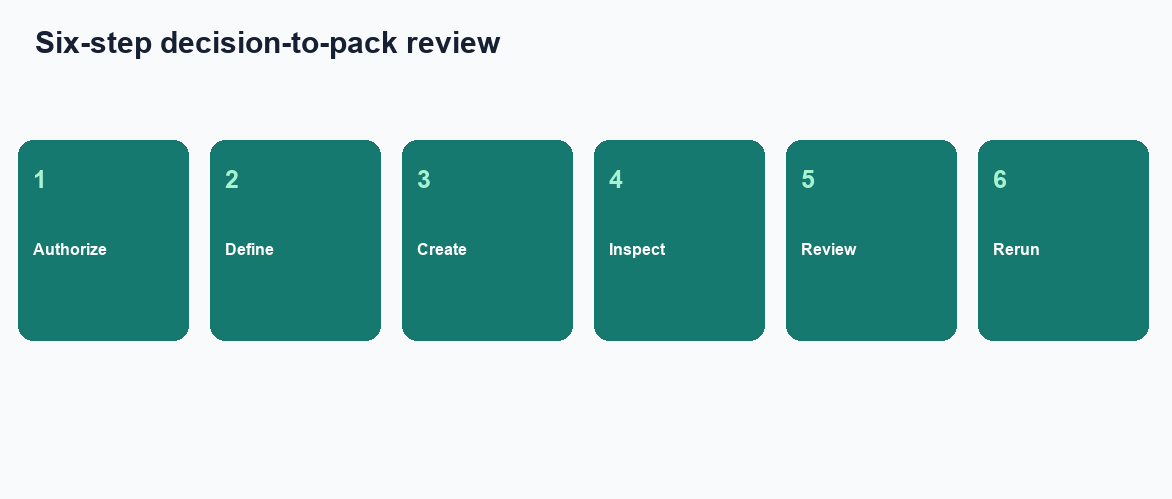
These steps are educational. The same sequence is what you would click in the web app after you finish the diagnosis here.
Name audience, window, and cut
Audience tells the agent who must decide. Window tells it what “this week” means. Cut tells it where to split. If you use the creator without those three, the board will be pretty and late. Add the source name so the agent does not guess an extract.
If you cannot write the sentence, you are still in exploratory data analysis. Stay there until the question stabilizes. Then create once, not twelve times with different adjectives.
Freeze the sentence for next week
The second run is the product. People like the preview from a dashboard creator, then rewrite the prompt because they thought of a new adjective. Definitions drift. Freeze the text. Edit it only when the meeting changes.
If last week’s board is the object you want again, replace the weekly dashboard refresh with a rerun of the same sentence. That is the operating cadence. New adjectives are a new commission.
Desk sample: catalog click versus decision sentence (illustrative)
Run ID: AIDB-CREATOR-QUESTION-20260825. Date: 2026-08-25 (Tuesday). Download desk log and aggregate CSV. Values are authored scenario observations, not external measurements.
The same sanitized Postgres replica received two create acts. Act A opened a dashboard creator and clicked “sales, region, funnel.” The task returned six tiles (illustrative). Nobody could say which figure the Friday review needed.
Act B named the Friday demand review, the window, the cut, and the replica. The creator returned three charts and a Markdown exception list (illustrative). Finance opened the filter. The following Friday the same sentence reran.
We are not claiming Act B made the meeting 40% shorter. We are claiming that when a dashboard creator starts from a decision question, the board and the query live in the same folder.
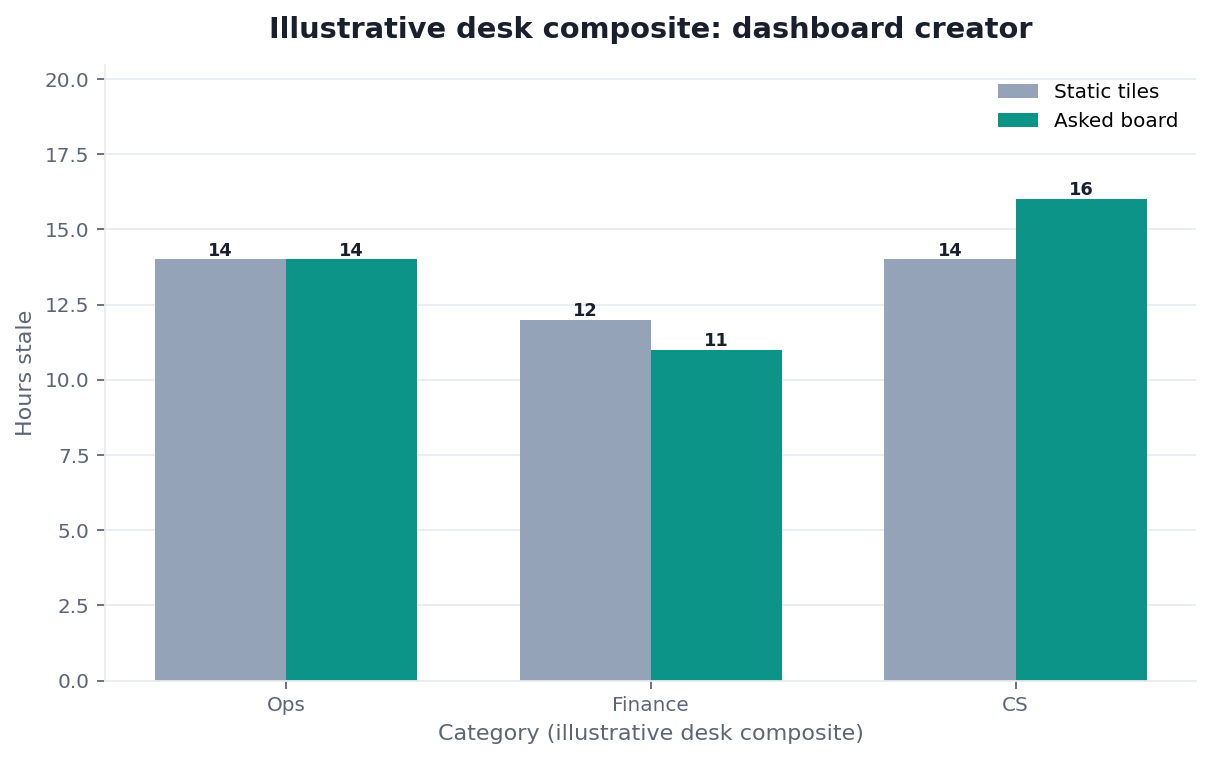
Figure. Illustrative desk composite (category × method). Not a customer experiment, SLA, or official benchmark.
| Evidence class | What you can cite | What you cannot claim |
|---|---|---|
| Desk composite on this page | Two create acts, two shapes, inspectable artifacts | Customer uplift %, vendor bake-off win |
| Published authority (linked above) | EDGAR forms, Fed data pages, Fiscal Data grains, GAO questions, CBO baselines | That those sources ran this desk sample |
We ran this check on a sanitized composite at the InfiniSynapse desk on 2026-08-25. The inspect order for dashboard creator was the live tile, the same query, and the downloaded pack. We stopped when a catalog click labeled “generate” could still ship. The memo stayed in draft. Figures stay illustrative. What you can copy is the replayable tile, not a board uptime claim.
Evidence boundaries and external validation status
AIDB-CREATOR-QUESTION-20260825 is a first-party sanitized illustrative composite dated 2026-08-25 (Tuesday), not raw, customer, source, benchmark, or third-party data. Values are authored scenario observations. As of 2026-08-29, no independent third party, media outlet, or customer had reproduced it.
Replication should disclose tool, model, version, configuration, prompts; source schema, snapshot, access; metric, grain, join, filter, timezone; decision, audience, window, cut; SQL, semantic query, transforms; run IDs, status, errors, timestamps; chart, data, artifact hashes; catalog baseline construction; all failures; review and accessibility protocol; and conflicts of interest. PROV-O, WCAG 2.2, ACM Artifact Review, NIST AI RMF, and OWASP GenAI guide controls; none tested this scenario. No wall-clock claim is made.
Independent validation of this dashboard creator scenario remains an open evidence requirement.
Selection scorecard
| Criterion | Weak | Strong |
|---|---|---|
| Start | Chart catalog click | Named meeting, decision, cut |
| Trace | Image only | Query behind each figure |
| Sources | “Use the data” | Named authorized connections |
| Refresh | New adjectives weekly | Frozen sentence, rerun |
| Pack | Chat bubble | Downloaded artifacts |
| Shape | Glyph shopping list | Figures follow the decision |
If a vendor’s dashboard creator will not download, score it as a demo. If it downloads but hides SQL, score it as a poster. If every sentence yields the same six tiles, score it as a catalog.
Failure modes that still look created
A catalog click labeled “generate”
People open a dashboard creator, pick six glyphs, and call it generated. The start was the failure. Write the invite. If you cannot, you are not ready to create.
Metric names with no owner
“Show margin” will make a dashboard creator use whichever fluent definition the model prefers. Bind the memo, or name the owner in the sentence. Unowned metrics become arguments after the meeting, not during the task.
A new sentence every Sunday.
Rewriting the prompt feels like improvement. It is drift. Freeze the text you used in the dashboard creator last week. Rerun it. Change it only when the meeting’s decision changes.
Before you send any board, check that the files are in the workspace, that each featured number opens to a query, and that the sources are ones you authorized. That inspection is the diagnosis.
For this page, a dashboard creator passes when retained lineage supports reviewer inspection and rerun.
| Live guide | Open it when |
|---|---|
| AI dashboard generator | you need the question-to-board path |
| AI-native dashboard | the fight is artifact versus tile catalog |
| Generate dashboard from natural language | the prompt is still a shopping list |
| self-service analytics | the blocker is still “who is allowed to ask” |
| exploratory data analysis | the question has not stabilized |
| chat with your data | you are still in conversation, not a pack |
Type the meeting question and generate the board
Connect one authorized source, type the meeting question you already use, and download the charts from the task workspace. This check uses only sources you authorize.
Commercial association: You do not need the workspace to complete the educational diagnosis on this page.
Open InfiniSynapseSourcing and accountability. Research and product documents support scoped claims only; none evaluated this page. COI: InfiniSynapse sells the first-party workflow.
How to cite this page
Page: Zhu, W., & InfiniSynapse Data Team. (2026). Dashboard Creator: inspect, then rerun. InfiniSynapse
Run: InfiniSynapse Data Team. (2026). Desk log AIDB-CREATOR-QUESTION-20260825 (illustrative composite)
Neither is an audit. Cite those authored scenario counts. No independent reproduction exists. Send contradictions to zhuhl@infinisynapse.com.
Frequently Asked Questions
Can I use a dashboard creator without SQL skills?
Bottom line: Yes. You still need a decision sentence, authorized sources, and the discipline to open the plan. The agent writes the SQL. You judge whether the figure serves the meeting. A dashboard creator that hides the plan is not ready.
Is a chart catalog a valid start?
Bottom line: No. If you use a dashboard creator as a list of chart types, you asked for a catalog. Name the decision, the window, and the cut instead.
Can a dashboard creator read two databases?
Bottom line: Yes, if both are connected and authorized. You do not need a warehouse first. You do need to inspect the join. A hidden join is not ready for a decision.
What do I freeze for next week?
Bottom line: The sentence and the bound definitions. If you open a dashboard creator from a new paragraph every Sunday, you are commissioning a new board, not refreshing one.
Will a dashboard creator write tiles into my BI tool?
Bottom line: No. The pack lands in the task workspace. A dashboard creator does not publish into Tableau or Power BI and does not write back to production.
Related guides: download ai dashboard · dashboard tools · AI dashboard generator · dashboard maker · ai powered dashboards · what is a data agent · data visualization · data knowledge base · knowledge base vs semantic layer · natural language to sql · data governance
Conclusion
A dashboard creator should start from a decision question, not a chart catalog. Write the meeting invite, run it on sources you already have, and refuse figures that cannot open a query. When you want to run that check, open InfiniSynapse and type the same meeting question you will put on the calendar.