Upload Folder for Data Analysis: Bind, Then Replay
By William Zhu (independent public engineering profile: GitHub @allwefantasy; no personal LinkedIn) & the InfiniSynapse Data Team · Published: 2026-08-22 · Last updated: 2026-08-29 · Last verified: 2026-08-29 · Next review: 2026-11-29 · About · Editorial standards · Privacy · Terms of Service · Corrections
Table of Contents
- TL;DR
- What a Directory-as-Source Means
- Glossary
- A Shared-Grain Folder Framework
- How Teams Upload Piles by Mistake
- Tool Landscape for Directories
- How to Use a Folder as One Source
- Desk Sample: Twelve Weekly Parts
- Scorecard: Folder, File, or Warehouse
- Failure Modes
- How to cite this page
- Frequently Asked Questions
- Conclusion
TL;DR
We evaluate these patterns at the InfiniSynapse desk on sanitized composites; first-party figures on this page are desk log FLF-UFA-20260822, not customer uplifts and not a third-party bake-off.
Direct answer: You upload folder for data analysis only when the files share a grain: same entity, same date style, same meaning for the metric columns. A directory is a source. A zip of unrelated dumps is a pile. Profile drift across parts before you ask a window.
What you'll learn:
- When you should upload folder for data analysis instead of one lucky file
- How dated parts become a miniature lake—and how they silently drift
- A register → profile-parts → ask-window loop that does not require a warehouse
- Desk log
FLF-UFA-20260822, which checks a folder of twelve weekly partitions - Failure modes: mixed grains, hidden extra files, and secrets in “just one more CSV”
Download evidence: desk log · aggregate CSV · verify script. These are first-party sanitized demo evidence for upload folder for data analysis—not raw, customer, source, benchmark, or third-party data.
If you still need the file-lake overview, open Parquet file analysis. This page is narrower: you upload folder for data analysis only when the directory is one authorized series. Do not treat a junk drawer as that series.
Industry context stays independent of desk claims. McKinsey’s State of AI and Gartner Peer Insights — Analytics & BI describe adoption pressure; they did not run the desk table below. The Stanford HAI AI Index is a buyer-research overlay, not an endorsement of this article. Retrieved 2026-08-29.
What a Directory-as-Source Means
Key Definition: To upload folder for data analysis is to authorize a directory of parts that share a grain, profile each part for schema drift, and ask a window across the files without first loading a warehouse. The folder is the source; a single file is only one partition.
Independent published context (separate from this page’s desk log): Eurostat Data Browser · ITU ICT statistics · ISO identifier standard · ACM Artifact Review and Badging · IEEE SWEBOK · Spark Parquet data source · Iceberg partitioning · Hive LanguageManual DDL · Apache Arrow datasets · Apache Parquet format specification · DuckDB Parquet guide · W3C DCAT · DataCite · ISO/IEC 9075. Those sources ship dated packs, not one immortal spreadsheet. They did not run the numbers below, and they are not a product award or a recognition of this page.
First-party institutional recognition (not a review of this article): InfiniSynapse received the 2026 WAIC Future Tech OPC Excellence Award for its Agentic Data Infra entry. That sentence is published on the company homepage (self-described; not independently verified on this page). It is not a Eurostat, ITU, ISO, ACM, IEEE, DuckDB, DataCite, Gartner, or McKinsey product award, and it does not certify the desk numbers below. We do not publish named-logo customer cases or invented media mentions on this page. The in-article banner remains a commercial association, not a third-party endorsement.
Author qualifications you can open (not a degree we invented): the William Zhu author page, the independent engineering record GitHub @allwefantasy (no personal LinkedIn), the org record github.com/InfiniSynapse, and the 2026-07-29 methodology attestation. Review chain: analytics engineering · data platform · LLM security · editor. Process: editorial review. Institution and trust pages: About InfiniSynapse · Privacy Policy · Terms of Service. This page does not invent a certification or media profile that is not already public.
Glossary (this page). These labels stay on this article; they are not Eurostat or ISO terms. Use them when you upload folder for data analysis so the inventory and the ask stay aligned.
| Term | Meaning on this page |
|---|---|
| Shared grain | Same entity, same date style, same metric meaning for every part |
| Dated partitions | Weekly or daily files that already slice one table |
| Folder source | The directory is the surface; one file is only a partition |
| Extra file | A leftover CSV, tmp/ part, or secret that joins silently |
Statistical offices already ship directories, not one immortal spreadsheet. That is the public version of upload folder for data analysis: dated parts, same grain. Eurostat Data Browser (retrieved 2026-08-29) releases dated packs. ITU ICT statistics (retrieved 2026-08-29) publishes indicator sets that only make sense as a series. Treat those packs as the model: same grain, different dates, written structure.
Partitioned lakes write the same honesty in directory form. The Spark Parquet data source (retrieved 2026-08-29) discovers parts from layout. Iceberg partitioning (retrieved 2026-08-29) treats a partition spec as a contract. Hive LanguageManual DDL (retrieved 2026-08-29) treats partitions as schema. Apache Arrow datasets (retrieved 2026-08-29) discover the same tree. If week 9 added a column nobody listed, the folder is not one source yet.
This page has no Eurostat, ITU, ISO, ACM, IEEE, DuckDB, DataCite, media, or independently verified award certificate for that zip-versus-directory contrast. Independent method notes still bind upload folder for data analysis. DuckDB Parquet guide (retrieved 2026-08-29) is independently hosted published engine documentation. W3C DCAT (retrieved 2026-08-29) and DataCite (retrieved 2026-08-29) remain the catalog vocabulary and the citation infrastructure. ISO/IEC 9075 (retrieved 2026-08-29) is the published SQL language. None of those publishers evaluated InfiniSynapse, this page, William Zhu, or FLF-UFA-20260822. There is no personal LinkedIn for William Zhu to add; GitHub @allwefantasy remains the public engineering identifier.
If the parts are columnar, pair this page with analyze parquet files. If they are nested payloads, use analyze json files and still apply the shared-grain test before you upload folder for data analysis.
Why a directory is a source only when grain is shared
People upload a folder because it is faster than picking files. That is the wrong reason. The right reason is that Monday through Friday are the same table sliced by date. When you upload folder for data analysis and the files are “Q3 forecast,” “random Slack export,” and “vendor price list,” you have authorized a junk drawer. Unions will invent columns. Counts will not reconcile.
This is still data management: write the owner next to the path. Computing-society guidance in ACM Artifact Review and Badging (retrieved 2026-08-29) and the IEEE SWEBOK (retrieved 2026-08-29) both treat a dataset as something with a stated unit. A folder without a unit is not a dataset.
A Shared-Grain Folder Framework
Treat the directory as the source when you upload folder for data analysis. The warehouse is optional until the window becomes a daily materialization.
| Stage | What you lock | What you refuse |
|---|---|---|
| Register | Path, owner, partition style, allowed use | A desktop dump named misc/ |
| Profile | Per-file schema, row counts, and date keys | “The folder opened” |
| Ask | Window, grain, and which parts are in | “Analyze the folder” |
| Inspect | File count, row count, and excluded parts | A chart with no part list |
| Promote | Notes that name the series | A new mystery file dropped in weekly |
Write the contract before you scale the compute. The ISO identifier standard (retrieved 2026-08-29) is a stand-in for “name the series before you upload folder for data analysis and union it.”
Register, profile, then ask
When you upload folder for data analysis, registration includes a file inventory. List the parts. Profile two ugly weeks, not only the newest. Then ask a window that names which parts are in. If you cannot list the files, you cannot inspect the answer.
Grain and dated parts
A useful folder looks like dt=2026-08-15/part.parquet or events-2026-08-15.json. A dangerous folder mixes orders.csv with users.xlsx and hopes a chat will “figure it out.” Same extension is not the same grain. When you upload folder for data analysis, the test is: can I say the grain in one sentence that is true for every file?
When a warehouse still helps
You still want a warehouse when many teams query the same series every hour, when you need roles beyond one upload, or when the folder is only a landing zone. File-first analysis is the step before you pay for that habit. A one-off zip from a vendor is not a lake. A weekly export three squads already treat as truth is a candidate to load—after the parts agree.
How Teams Upload Piles by Mistake
Zip-and-hope versus shared-grain upload
The common path is: zip the desktop, upload, ask “what changed.” That is not how you upload folder for data analysis. That is how you get a confident mix of last year’s forecast and this week’s tickets. Self-service analytics still needs a grain. A pile will not grow one.
Use a directory when parts share a grain and a date style. Use a single file when you have one export and no series. Do not upload folder for data analysis because the UI offers a folder button.
Tool Landscape for Directories
| Pattern | Fits | Breaks |
|---|---|---|
| One-file upload + copilot | A single trusted export | A dated series you keep slicing by hand |
| Object store + warehouse load | Shared, hourly series | First looks and one-off zips |
| Directory source + data agent | Authorized folder, then a window | Mixed grains and leftover secrets |
| Cluster job on object prefixes | Lakes you already staff | A team that only has a laptop folder |
The third pattern is educational, not a product requirement: Data Sources → file or local type → upload a directory → select it in chat and ask. It does not invent a lakehouse catalog, and it does not write parts back to production. You still have to pass the shared-grain test before you upload folder for data analysis.
If the question later joins a database, that is analyze a database without ETL. If you need the agent job description, use what is a data agent.
How to Use a Folder as One Source
The method is short when you upload folder for data analysis. The discipline is in what you refuse to skip.
- Strip secrets from every part, not only the newest file. Register path, owner, and allowed use.
- Inventory file name, date, row count, and a one-line schema note.
- Profile two ugly weeks. Write which parts are in and which are out.
- Ask one window that names grain, filters, and the part list.
- Inspect file counts, excluded parts, and row totals against the inventory.
- Bind a short note, re-run the same window, and hand the dated pack to a colleague.
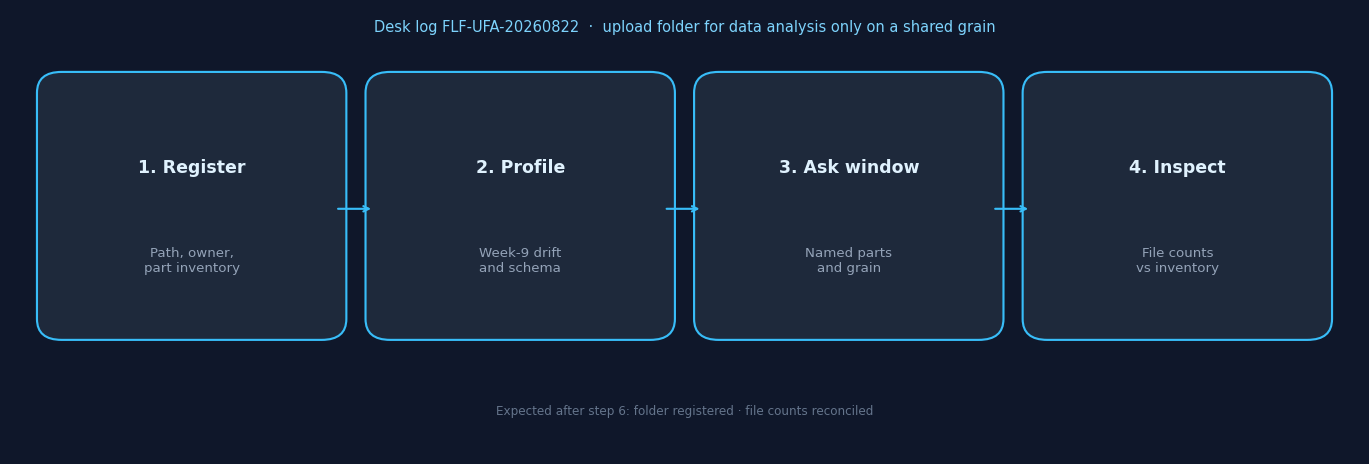
Figure. Educational four-step sequence the desk uses to tell an emailed zip from a directory as source. Expected result after step 6: folder registered and file counts reconciled. Not a product screenshot or a customer SLA.
Upload a sanitized directory
Strip secrets from every part, not only the newest file. Then upload the folder you intend to query. Name the owner. When you upload folder for data analysis, an extra passwords.csv in a subfolder is your incident, not a footnote.
Keep a written inventory: file name, date, row count, schema hash or a one-line schema note. That inventory is what you will inspect against after you upload folder for data analysis.
Ask a question that names the window and the parts
“Return rate by SKU for the last six weekly files, exclude the week with the extra column, denominator = orders” is a question. “Analyze the folder” is not. State grain, window, and which parts are out.
When you upload folder for data analysis this way, the agent has a series, not a junk drawer. That is closer to a lake in miniature than to an email attachment.
Inspect file counts, drift, and row totals
Open whether the run used six files or twelve, whether week 9 was excluded on purpose, and whether the row total matches your inventory. If you upload folder for data analysis and skip this inspect, you will union a part you never meant. A “fast” answer can mean the filter never entered the subfolder you meant.
Re-run after you bind a short note: which file is complete, which column is a return, which part is broken. The second run is how you learn the series. For first-look method, keep EDA structure nearby.
Desk Sample: Twelve Weekly Parts
This is a first-party InfiniSynapse desk log of how we upload folder for data analysis as a shared-grain series, not a named-logo customer case and not an uplift claim. Run ID: FLF-UFA-20260822. Date: 2026-08-22 (Saturday). Last verified on this page: 2026-08-29. Operator: InfiniSynapse Data Team. Sources: a folder of twelve weekly parquet parts, about 4.2 million rows. Contrast: email zip as chat versus directory as source. Download the same numbers as desk log FLF-UFA-20260822 · aggregate CSV · verify script.
The zip path pasted the emailed folder into chat. Week 9’s extra return_reason was not profiled. File counts were not reconciled to the inventory.
The directory path registered the folder, profiled week 9, and asked the six-week window only: “Return rate by SKU for the last six weeks, exclude SKUs in only one week.” The first draft treated null returns as zeros; the note was corrected and the goal was re-run. Two SKUs disappeared after the one-week filter—visible because file counts and row counts were in the pack.
| Retrieval state | Folder registered | Week-9 extra field profiled | File counts reconciled |
|---|---|---|---|
| Email zip as chat | 0 | 0 | 0 |
| Directory as source | 1 | 1 | 1 |
That is the right way to upload folder for data analysis: the directory stays the source, the broken week is excluded on purpose, and the warehouse is still optional. Wall clock for the successful directory rerun was about ten minutes (warehouse time excluded). The clock started when the operator opened the standing goal and ended when the inventory and the six-week pack sat side by side with week 9 excluded on purpose. It does not include replica provisioning. Cite this table as InfiniSynapse desk log FLF-UFA-20260822. Do not cite it as customer ROI, a faster zip, a bake-off win, or a Eurostat / ITU / ISO experiment. We do not publish named-logo customer cases on this page. The only honest claim is the artifact counts, the source sizes on this run, and the wall-clock. The twelve weekly parts and ~4.2 million rows are this desk run’s inputs, not a customer extract.
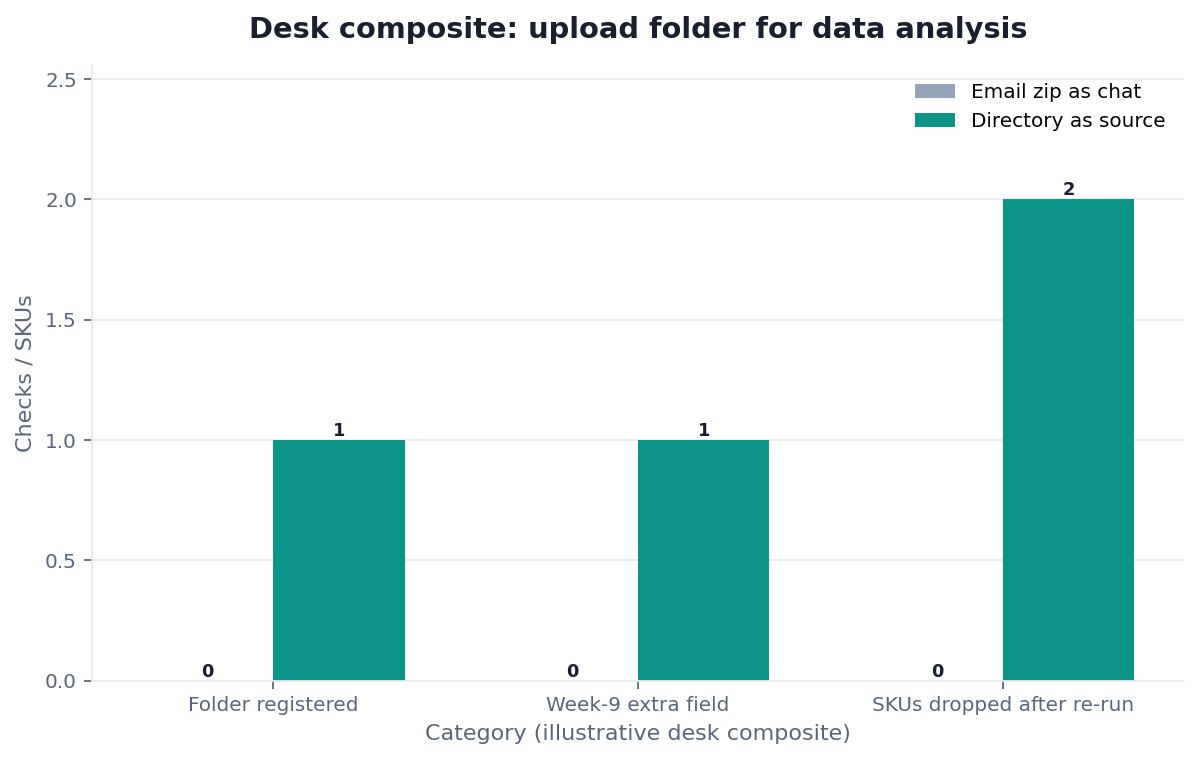
Figure. InfiniSynapse desk log FLF-UFA-20260822: email zip as chat left 0 / 0 / 0; directory as source left 1 / 1 / 1. Published context: the independent sources linked in the body. Not a customer experiment, SLA, or official benchmark.
| Evidence class | What you can cite | What you cannot claim |
|---|---|---|
| Desk log on this page | Artifact counts 0/0/0 → 1/1/1, 12 weekly parts + ~4.2M rows on this run, ~10 min wall-clock, downloadable log · CSV · verify | Customer uplift %, vendor bake-off win, named-logo case |
| Independently hosted published docs | DuckDB Parquet guide, Apache Arrow datasets, Eurostat Data Browser (retrieved 2026-08-29) | That those hosts ran this desk log |
| Independent method notes | W3C DCAT, DataCite, ITU ICT statistics, ISO/IEC 9075 (retrieved 2026-08-29) | That W3C, DataCite, ITU, or ISO certified this page |
| Homepage recognition | 2026 WAIC Future Tech OPC Excellence Award as published on the company homepage (self-described; not independently verified here) | That WAIC, Eurostat, or Gartner scored this article |
Scorecard: Folder, File, or Warehouse
| Signal | Upload folder for data analysis | One file | Load a warehouse |
|---|---|---|---|
| Same grain, dated parts | Yes | You will keep slicing by hand | Later, if shared hourly |
| Mixed unrelated dumps | No — it is a pile | Pick the one file that answers | Do not load the pile |
| Schema drifting weekly | Yes, after profiling parts | Only if you drop broken weeks | Loading will freeze drift |
| One team, one window | Yes | Yes if only one part exists | Not yet |
| Secrets in any part | Do not upload | Do not upload | Do not load |
If you cannot list the files and the grain in one sentence, do not upload folder for data analysis. Fix the directory first.
The scorecard is an educational rubric for upload folder for data analysis, not a vendor ranking. Independent sources linked above describe published posture; they do not score this rubric.
Failure Modes
Mixed grains in one directory
Orders, users, and a vendor price list in one upload will union into nonsense. Fix: split by grain. Only then upload folder for data analysis on the series that actually matches.
Hidden extra files in subfolders
When you upload folder for data analysis, a tmp/ or old/ part joins silently and moves a metric. Fix: inventory every path. Exclude on purpose. Re-inspect file counts.
Secrets in “just one more” part
People sanitize the newest parquet and forget copy_of_customers.csv. Fix: sanitize every file in the tree. If you cannot, do not upload folder for data analysis.
Before you file a warehouse ticket for a question that already lives in Monday’s directory, check three things: whether every part shares a grain, whether drift is profiled, and whether the tree is sanitized enough to authorize. Those three checks decide if you upload folder for data analysis or you split the pile first.
Route the same diagnosis to the live guide that owns the next object. Each row is a single hop, not a reading dump.
| Live guide | Open it when |
|---|---|
| Parquet file analysis | you need the whole file-lake map |
| chat with your data | the ask is ready and the folder is registered |
| data governance | the next fight is who may upload the tree |
| File Formats for AI Analysis | Pick the format that already matches the grain |
| CSV vs Parquet for AI Analysis | Leave CSV when width, types, or size start lying |
| Local Files to an AI Data Analyst | My Data is a source, not an email attachment |
Upload one sanitized folder and ask across files
Add a directory source, select the folder you just inventoried, and ask one window that names grain and which parts are in. This check uses only sources you authorize. You still upload folder for data analysis only after the shared-grain test.
Commercial association: You do not need the workspace to complete the educational diagnosis on this page.
Open InfiniSynapseHow this page is sourced. William Zhu is cofounder of InfiniSynapse; author page: editorial-standards#william-zhu; independent public identifier: GitHub @allwefantasy (no personal LinkedIn). Institution: About InfiniSynapse. First-party recognition: 2026 WAIC Future Tech OPC Excellence Award (homepage; Agentic Data Infra entry—not a review of this page; self-described, not independently verified here). Trust pages: Privacy · publishing terms · NIST Privacy Framework. Desk methodology note: 2026-07-29 attestation. Downloadable first-party run: desk log
FLF-UFA-20260822. Reviewed by analytics engineering · data platform · LLM security · editor. Editorial standards · corrections · Contact zhuhl@infinisynapse.com. Company About. COI: InfiniSynapse sells an AI-native Data Agent; the in-article banner is a commercial association, not a third-party review or product endorsement of this page. Fact-check: Stanford HAI AI Index · McKinsey State of AI · Gartner Peer Insights — Analytics & BI · Eurostat Data Browser · ITU ICT statistics · ISO 81279 · ACM Artifact Review and Badging · IEEE SWEBOK · Spark Parquet data source · Iceberg partitioning · Hive LanguageManual DDL · Apache Arrow datasets · Apache Parquet format specification · DuckDB Parquet guide · W3C DCAT · DataCite · ISO/IEC 9075. First-party numbers on this page are desk logFLF-UFA-20260822only.
How to cite this page
Page: Zhu, W., & InfiniSynapse Data Team. (2026). Upload Folder for Data Analysis: Bind, Then Replay. InfiniSynapse
Run: InfiniSynapse Data Team. (2026). Desk log FLF-UFA-20260822 (sanitized composite)
Neither is an audit. Cite those published artifact counts when you quote upload folder for data analysis figures from this first-party sanitized desk run. As of 2026-08-29, no independent evaluation, media citation, or reproduction of the zip-versus-directory contrast exists. DuckDB Parquet guide, DataCite, and W3C DCAT stay citable as published files. They do not replace this first-party desk log. Cite those hosted catalogs only as their own published series now. Keep that limit visible here now for later readers of this pack and for later reviewers of the same first-party artifacts on this desk run. Do not treat those hosted notes as a score of the first-party table. Cite agency catalogs only as their own published series. Keep Eurostat, ITU, and DataCite visible here only as independently hosted files a later reader can reopen without this first-party sanitized desk pack for later reuse. Do not invent a news mention this page does not have as of this retrieval date. Send contradictions to zhuhl@infinisynapse.com.
Frequently Asked Questions
When should I upload folder for data analysis instead of one file?
Bottom line: When the parts share a grain and you need a window across dates. One file is enough for a single export with no series.
Can I upload a zip of unrelated dumps?
Bottom line: No. That is a pile. Split by grain, then upload folder for data analysis only on the series that matches.
Do the files have to be the same format?
Bottom line: Same grain matters more than same extension, but mixed formats hide drift. Prefer one format per folder. Profile every part before you upload folder for data analysis.
How do I know the run used the files I meant?
Bottom line: Inspect file counts, excluded parts, and row totals against your inventory. If they disagree, stop and upload folder for data analysis again after the note is corrected.
What if one part in the folder still holds secrets?
Bottom line: Do not upload folder for data analysis on that tree. Sanitize every file, including tmp/ and leftover CSV copies. A shared-grain series is still a leak if one part is dirty.
Do Eurostat, ITU, or ISO certify this desk folder test?
Bottom line: No. Eurostat Data Browser, ITU ICT statistics, and ISO 81279 describe published posture, not this upload folder for data analysis desk table.
Did Eurostat, DataCite, or a news outlet recognize this page?
Bottom line: No. Eurostat Data Browser and DataCite publish dated packs and citation infrastructure. They did not evaluate InfiniSynapse. There is no media citation of upload folder for data analysis on this page, and there is no personal LinkedIn to add.
Conclusion
A directory is a valid analysis surface when the files share a grain. Inventory the parts, profile drift, ask a window that names which files are in, and inspect counts before you request a warehouse. When you upload folder for data analysis this way, the folder is a miniature lake—not a junk drawer. The warehouse is a promotion after the series is stable.
If you want to try that check on a sanitized folder you already own, open InfiniSynapse and ask the same window on the directory you just authorized.