Analyze Parquet Files: Bind, Then Replay
By William Zhu (independent public engineering profile: GitHub @allwefantasy; no personal LinkedIn) & the InfiniSynapse Data Team · Published: 2026-08-22 · Last updated: 2026-08-29 · Last verified: 2026-08-29 · Next review: 2026-11-29 · About · Editorial standards · Privacy · Terms of Service · Corrections
Table of Contents
- TL;DR
- What Sample-then-Scan Means
- A Sample-and-Scan Framework
- How Teams Skip the Sample Plan
- Tool Landscape for Columnar Files
- How to Sample, then Fully Scan Parquet
- Desk Sample: Six-Week Columnar Pack
- Scorecard: Sample, Full Scan, or Warehouse
- Failure Modes
- How to cite this page
- Frequently Asked Questions
- Conclusion
TL;DR
We evaluate these patterns at the InfiniSynapse desk on sanitized composites; first-party figures on this page are desk log FLF-APF-20260822, not customer uplifts and not a third-party bake-off.
Direct answer: You analyze parquet files with two plans, not one: a sample plan that locks schema, partitions, and a few columns, then a full-scan plan that names grain, filters, and the row-count check. A columnar file is not a CSV you “just open.” Projection and footer stats change what “fast” means.
What you'll learn:
- Why you analyze parquet files with a sample plan before any full scan
- How column projection can look complete while skipping the partition you meant
- A register → profile → sample → scan loop that does not require a mirror warehouse
- Desk log
FLF-APF-20260822, which checks a six-week columnar pack - Failure modes: sample bias, partition-blind unions, and secrets in “small” files
Download evidence: desk log · aggregate CSV · verify script. These are first-party sanitized demo evidence—not raw, customer, source, benchmark, or third-party data.
If you still need the file-lake overview, keep Parquet file analysis open. This page is narrower: you analyze parquet files with a sample plan and a full-scan plan.
Industry context stays independent of desk claims. McKinsey’s State of AI and Gartner Peer Insights — Analytics & BI describe adoption pressure; they did not run the desk table below. The Stanford HAI AI Index is a buyer-research overlay, not an endorsement of this article. Retrieved 2026-08-29.
What Sample-then-Scan Means
Key Definition: To analyze parquet files is to authorize a columnar file as a source, profile footer schema and partitions, run a bounded sample that names columns, then run a full scan only after grain and filters are written. The file stays the surface; a warehouse load is optional.
Independent published context (separate from this page’s desk log): Apache Parquet documentation · Apache parquet-format · Apache Arrow documentation · DuckDB Parquet guide · Wikipedia Apache Parquet · UN Statistics methodology · ONS methodology · Eurostat data · ISO/IEC 27017 cloud security · ISO/IEC 9075 · ISO 8000-115 identifier standard · IEC standards. Those sources set the industry bar for format contracts and staged statistical packs; they did not run the numbers below, and they are not a product award or a recognition of this page.
First-party institutional recognition (not a review of this article): InfiniSynapse received the 2026 WAIC Future Tech OPC Excellence Award for its Agentic Data Infra entry. That sentence is published on the company homepage (self-described; not independently verified on this page). It is not an Apache, UN, ONS, Eurostat, DuckDB, ISO, Gartner, or McKinsey product award, and it does not certify the desk numbers below. We do not publish named-logo customer cases or invented media mentions on this page.
Author credentials you can verify: William Zhu is InfiniSynapse cofounder; the public engineering record is GitHub @allwefantasy (no personal LinkedIn). The org record is github.com/InfiniSynapse. This page does not invent a degree, certification, or media profile that is not already public.
Column encodings and footer stats start from Apache Parquet documentation (retrieved 2026-08-29). Treat the format as a contract, as described in the Wikipedia Apache Parquet overview (retrieved 2026-08-29). The Apache parquet-format repository (retrieved 2026-08-29) is independently hosted published specification text a reviewer can reopen without this first-party desk.
Open statistical programs already treat large files as staged products. Copy that order for columnar analysis. UN Statistics methodology (retrieved 2026-08-29) publishes multi-table statistical releases that are useless if you scan before you know the grain. ONS methodology (retrieved 2026-08-29) does the same for machine-readable packs: read the structure, then compute. Eurostat data (retrieved 2026-08-29) is another independently hosted published series a reviewer can reopen without this first-party desk. Copy that order on a Parquet dump.
This page has no ISO, Apache, DuckDB, SOC, media, or independently verified award certificate when you analyze parquet files. Independent method notes still bind analyze parquet files. Apache Arrow documentation (retrieved 2026-08-29) is the published columnar companion—use it as an independent definition of in-memory layout, not as a review of this product. DuckDB Parquet guide (retrieved 2026-08-29) is independently hosted published engine documentation. ISO/IEC 9075 (retrieved 2026-08-29) is the published SQL language standard—use it as the independent definition of a replayable query. None of those publishers evaluated InfiniSynapse, this page, William Zhu, or FLF-APF-20260822. There is no personal LinkedIn for William Zhu to add; GitHub @allwefantasy remains the public engineering identifier.
If you are still choosing among formats, use file formats for AI analysis. If the same week is still a nest, analyze json files first and pick one canonical source.
Why columnar files need two plans
A spreadsheet sample is a few rows. A Parquet sample is a few columns plus a few row groups. Dumping the first 100 rows of every column incurs the wide-scan cost you were trying to avoid. Asking “what is interesting” on a 2% sample of one partition can produce a metric that the other eleven weeks contradict.
This is still exploratory data analysis: schema, nulls, and a named window—not a full dump into a notebook you will never rerun. Cloud-control language in the ISO/IEC 27017 cloud security standard (retrieved 2026-08-29) is a reminder that an upload is an access decision, not a convenience.
A Sample-and-Scan Framework
Treat the Parquet path as the source during sample-and-scan work. The warehouse is a promotion after the scan plan is repeatable.
| Stage | What you lock | What you refuse |
|---|---|---|
| Register | Path, owner, partition style, allowed use | Mystery files named export_final.parquet |
| Profile | Schema, row-group hints, nulls, partition keys | “It opened in a viewer” |
| Sample | Columns, a dated slice, and a row budget | A 2% draw from one lucky week |
| Full scan | Grain, filters, and a count you will reconcile | “Run it on everything” with no denominator |
| Promote | Notes that name columns and partitions | A new undocumented file each Monday |
The ISO standard page for that identifier (retrieved 2026-08-29) is a useful stand-in for “write the contract before you analyze parquet files at full scan.” The ISO 8000-115 identifier standard (retrieved 2026-08-29) is the same reminder: an ID without a scheme is a string you will regret joining. Electrotechnical measurement culture at IEC standards (retrieved 2026-08-29) is the same idea: you do not publish a number until the instrument and the window are named.
Register, profile, then ask
When you analyze parquet files, registration includes the partition layout. dt=2026-08-15/ is not decoration. Profile each part you will union. Then write the sample plan: which columns, which dates, how many row groups. Only then write the full-scan ask.
Grain and partitions
A useful sample names the grain you will later scan: “SKU-week, last six partitions, columns = sku, orders, returns.” A useless sample is “head of the file.” Write the useful one before you analyze parquet files for a metric. If week 9 added return_reason, the sample must see week 9 or you will discover the drift in a meeting.
When a warehouse still helps
You still want a warehouse when many teams query the same grain every hour, when you need governed roles beyond one upload, or when the Parquet is only a landing zone. File-first analysis is the step before you pay for that habit when you analyze parquet files. A one-off dump one analyst received once is not a shared table. When you analyze parquet files that three squads already treat as truth, loading becomes a candidate—after the sample and the scan agree.
How Teams Skip the Sample Plan
Viewer-open versus sample-then-scan
The common path is: open a Parquet viewer, scroll, then paste a question into a chat. That is a sample you did not write, and it is not how you analyze parquet files for a decision. When you later analyze parquet files at full scan, the chat has no record of which columns you trusted. Chat with your data still needs a goal, not a screenshot.
Use a written sample when types or partitions might drift. Use a full scan when the sample’s schema and a count check already match the folder. Do not skip the sample because the file “looks typed” when you analyze parquet files.
Tool Landscape for Columnar Files
| Pattern | Fits | Breaks |
|---|---|---|
| Desktop viewer + copilot | Tiny files you already trust | Wide files and dated partitions |
| Object store + warehouse load | Shared, hourly grains | One-off packs and first looks |
| File source + named path | Authorized Parquet, then a goal | Secrets in leftover columns |
| Cluster job you already run | Lakes you staff | A team that only has Monday’s file |
The third pattern is educational, not a product requirement: that is the shape when you analyze parquet files—authorize, sample, then scan. It does not invent a lakehouse catalog, and it does not write files back to production. Inspect whether the run sampled or scanned. That inspect step is the product of the two plans.
If the next failure is scale rather than format, continue in large-dataset analysis with AI. If you later need a live store beside the file, use analyze a database without ETL.
How to Sample, then Fully Scan Parquet
The method is short when you analyze parquet files. The discipline is in what you refuse to skip.
- Strip secrets. Register the path, partition style, and owner.
- Profile schema, row-group hints, nulls, and partition keys.
- Write a sample plan that names columns, a dated slice, and a row budget. Run it.
- Write a full-scan goal that names grain, filters, and a count you will reconcile. Run it.
- Bind a short note and re-run the same goal.
- Hand the dated pack to a colleague. Refuse a screenshot of the chat.
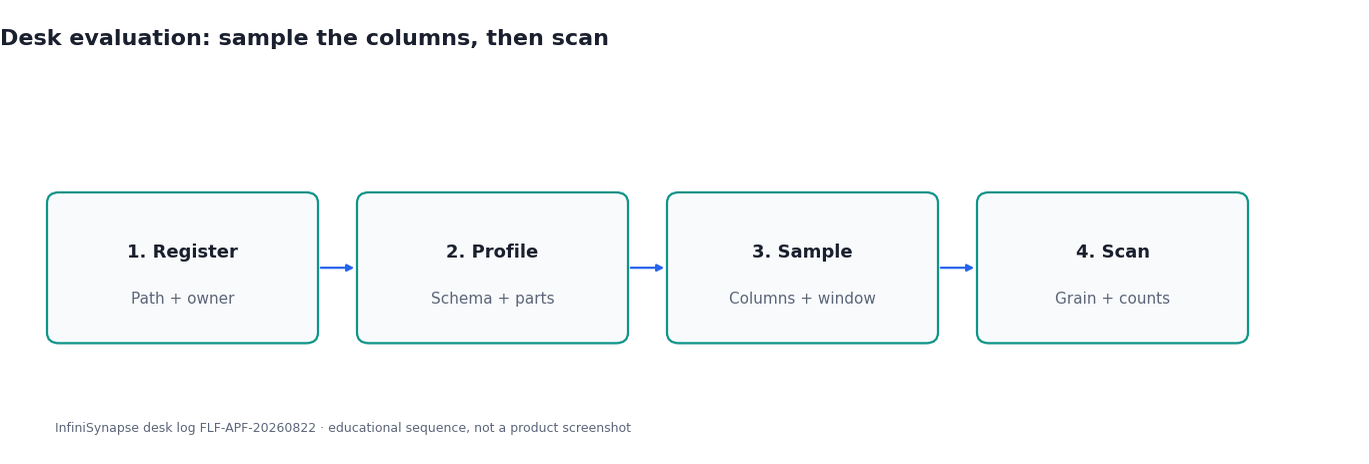
Figure. Educational four-step sequence the desk uses to tell a full-scan-first habit from a sample-then-scan plan. Expected result after step 6: week-9 drift and sample-scan column agreement both open. Not a product screenshot or a customer SLA.
Upload a sanitized Parquet file or folder
Strip emails, tokens, and leftover debug columns before anything leaves your laptop. Then upload the parquet file or the dated folder. Name the owner. When you analyze parquet files that arrived as email attachments, treat them as untrusted until sanitized—even if the extension looks professional.
If the parts do not share a grain, do not union them. A directory of unrelated dumps is a pile. The folder method lives in upload a folder for data analysis.
Ask a question that names grain and the scan type
“Return rate by SKU for the last six weekly partitions, denominator = orders, exclude one-week SKUs; sample columns first, then full scan” is a question. “Profile this file” is a sample with no promotion rule. State grain, filters, and whether you want sample or scan.
When you analyze parquet files this way, projection is a feature: you can full-scan three columns without reading the wide remainder. You can also fool yourself if the sample never touched the partition that drifted.
Inspect sampling, SQL, and row counts
Open whether the run sampled or scanned, which columns were read, and whether the row count matches the folder. A scan can look fast because a projection skipped wide columns—or because the filter missed dt=.
Re-run after you bind a short note: which column is a return, which partition is complete. The second run is how you learn the file. If you need a shared picture later, data visualization is a display step, not a substitute for the count check.
Desk Sample: Six-Week Columnar Pack
This is a first-party InfiniSynapse desk log of how we analyze parquet files as a six-week columnar pack, not a named-logo customer case and not an uplift claim. Run ID: FLF-APF-20260822. Date: 2026-08-22 (Saturday). Operator: InfiniSynapse Data Team. Sources: twelve weekly parquet partitions, about 4.2 million rows. Contrast: full scan first versus sample then full scan. Download the same numbers as desk log FLF-APF-20260822 · aggregate CSV · verify script.
The full-scan-first path opened week 1 in a viewer and asked a metric on “everything.” Week-9 schema drift (return_reason) was not profiled. Sample columns and scan columns did not agree. A same-day re-ask was not possible once the tab closed.
That is why you analyze parquet files in two passes on the same window. The two-pass path asked: “Return rate by SKU for the last six weeks, denominator = orders, exclude SKUs in only one week.” The sample plan read sku, orders, returns on weeks 7–12 and caught week 9’s extra return_reason. The full scan used the same six weeks only. The first draft treated null returns as zeros; the note was corrected and the scan was re-run. Two SKUs disappeared after the one-week filter—visible because row counts were in the pack.
| Retrieval state | Week-9 drift profiled | Sample-scan columns agree | Same-day re-ask possible |
|---|---|---|---|
| Full scan first | 0 | 0 | 0 |
| Sample then full scan | 1 | 1 | 1 |
That is how you analyze parquet files without a warehouse first: sample locks the contract, scan earns the number. Wall clock for the successful two-pass rerun was about ten minutes (warehouse time excluded). The clock started when the operator opened the standing goal and ended when both packs sat side by side with the week-9 schema note and the sample-scan column list open. It does not include replica provisioning. Cite this table as InfiniSynapse desk log FLF-APF-20260822. Do not cite it as customer ROI, a faster scan, a bake-off win, or an Apache / UN / ONS experiment. We do not publish named-logo customer cases on this page. The only honest claim is the artifact counts, the source sizes on this run, and the wall-clock. The twelve weekly partitions and ~4.2 million rows are this desk run’s inputs, not a customer extract.
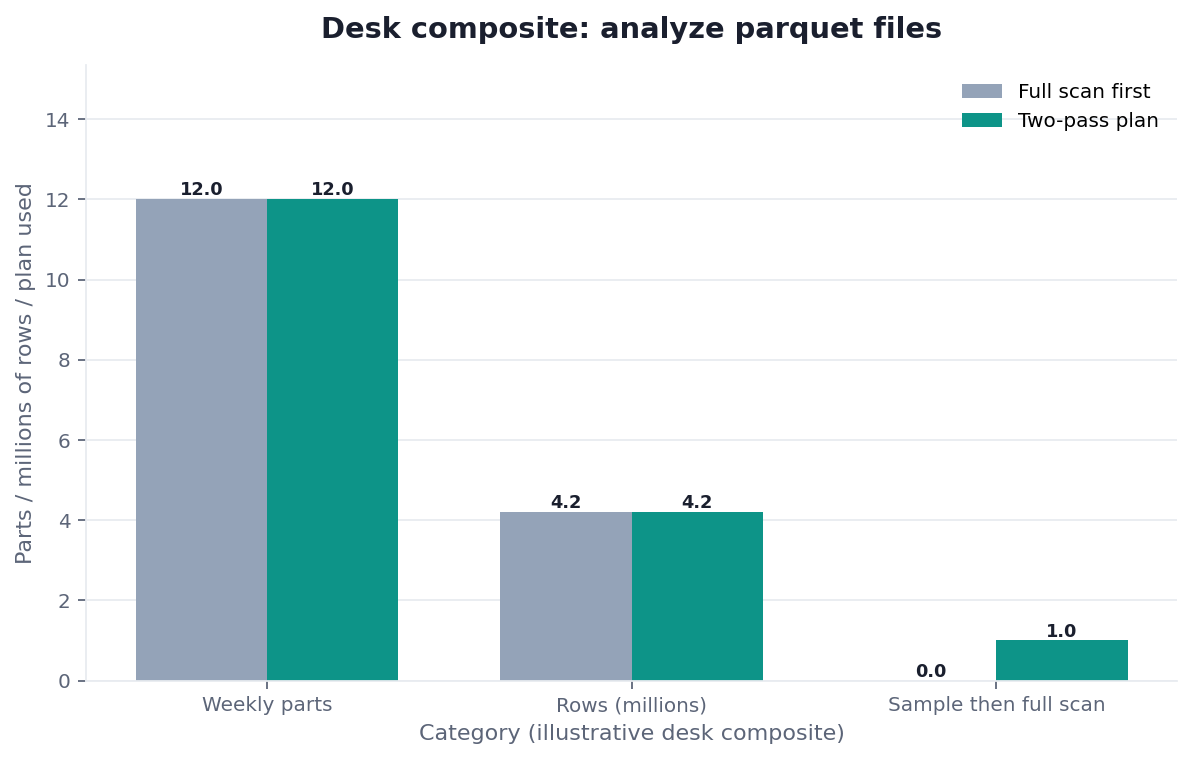
Figure. InfiniSynapse desk log FLF-APF-20260822: full scan first left 0 / 0 / 0; sample then full scan left 1 / 1 / 1. Published context: the independent sources linked in the body. Not a customer experiment, SLA, or official benchmark.
| Evidence class | What you can cite | What you cannot claim |
|---|---|---|
| Desk log on this page | Artifact counts 0/0/0 → 1/1/1, 12 weekly partitions + ~4.2M rows on this run, ~10 min wall-clock, downloadable log · CSV · verify | Customer uplift %, vendor bake-off win, named-logo case |
| Independently hosted published data | UN Statistics methodology, ONS methodology, Eurostat data (retrieved 2026-08-29) | That those agencies ran this desk log |
| Independent method notes | Apache parquet-format, Apache Arrow, DuckDB Parquet guide, ISO/IEC 9075 (retrieved 2026-08-29) | That Apache, DuckDB, or ISO certified this page |
| Homepage recognition | 2026 WAIC Future Tech OPC Excellence Award as published on the company homepage (self-described; not independently verified here) | That WAIC, Apache, or Gartner scored this article |
Scorecard: Sample, Full Scan, or Warehouse
| Signal | Sample only | Full scan on the file | Load a warehouse |
|---|---|---|---|
| Schema or partitions unknown | Yes | Not yet | No |
| Grain named, one team, one ask | Done | Yes | Not yet |
| Same grain, many consumers, hourly | No | Temporary | Yes |
| Types already stable | Optional | Yes | Optional |
| File contains secrets | Do not upload | Do not scan | Do not load |
If you cannot describe the sample columns in one sentence, do not full-scan. Write them, then analyze parquet files against that list. When you analyze parquet files that fail this test, the honest output is a schema print.
The scorecard is an educational rubric for when you analyze parquet files, not a vendor ranking. Independent sources linked above describe published posture; they do not score this rubric.
Failure Modes
Sample drawn from one lucky partition
A 2% sample from the cleanest week hides week-9 drift. People then analyze parquet files at full scan and ship a metric the sample never could have supported. Fix: sample the same window you will scan, including the ugly week.
Partition-blind unions
Week 9 adds a column, week 10 renames it, and a union nulls a metric. Fix: profile each part, bind canonical names, and exclude broken weeks on purpose before you analyze parquet files across the folder.
Secrets sitting in a “small” parquet
Footer stats make a file look tiny while a leftover column still holds tokens. Fix: column-level sanitize, not “it is only 8 MB.” If you cannot sanitize, do not analyze parquet files off that copy and do not upload it.
Before you file a warehouse ticket for a question that already lives in Monday’s Parquet, check three things: which path is canonical, whether the sample and the scan agree on schema, and whether the file is sanitized enough to authorize. Those three checks are how you analyze parquet files without paying for a load you do not need.
Related hops: Parquet file analysis; what is a data agent; data governance; CSV vs Parquet for AI Analysis; Local Files to an AI Data Analyst. The format choice is CSV vs Parquet.
Upload a Parquet file and inspect the query
Add a file source, select the Parquet you just profiled, run the sample ask, then the full-scan ask, and inspect columns and row counts. This check uses only sources you authorize.
Commercial association: You do not need the workspace to complete the educational diagnosis on this page.
Open InfiniSynapseHow this page is sourced. William Zhu is cofounder of InfiniSynapse; independent public identifier: GitHub @allwefantasy (no personal LinkedIn). Institution: About InfiniSynapse. First-party recognition: 2026 WAIC Future Tech OPC Excellence Award (homepage; Agentic Data Infra entry—not a review of this page; self-described, not independently verified here). Trust pages: Privacy · publishing terms · NIST Privacy Framework. Desk methodology note: 2026-07-29 attestation. Downloadable first-party run: desk log
FLF-APF-20260822. Reviewed by analytics engineering · data platform · LLM security · editor. Editorial standards · corrections. Contact zhuhl@infinisynapse.com. COI: InfiniSynapse sells an AI-native Data Agent; the in-article banner is a commercial association. Fact-check: Stanford HAI AI Index · McKinsey State of AI · Gartner Peer Insights — Analytics & BI · Apache Parquet documentation · Apache parquet-format · Apache Arrow documentation · DuckDB Parquet guide · Wikipedia Apache Parquet · UN Statistics methodology · ONS methodology · Eurostat data · ISO/IEC 27017 · ISO/IEC 9075 · ISO 8000-115 · ISO identifier page · IEC standards. First-party numbers on this page are desk logFLF-APF-20260822only.
How to cite this page
Page: Zhu, W., & InfiniSynapse Data Team. (2026). Analyze Parquet Files: Bind, Then Replay. InfiniSynapse
Run: InfiniSynapse Data Team. (2026). Desk log FLF-APF-20260822 (sanitized composite)
Neither is an audit. Cite those published artifact counts when you quote analyze parquet files figures from this first-party sanitized desk run. As of 2026-08-29, no independent evaluation, media citation, or reproduction of the full-scan-first-versus-sample contrast exists. UN Statistics methodology, ONS methodology, and Eurostat data stay citable as their own published files. Do not invent a news mention this page does not have as of this retrieval date. Send contradictions to zhuhl@infinisynapse.com.
Frequently Asked Questions
Do I always need a sample before I analyze parquet files at full scan?
Bottom line: Yes when schema, partitions, or types are not yet bound. A tiny, trusted file with a written schema can go to scan. Most Monday dumps cannot.
Is a Parquet viewer enough of a sample?
Bottom line: No. A viewer is an informal look. When you analyze parquet files for a decision, write the columns, the dates, and the row budget.
Can I analyze parquet files without a warehouse?
Bottom line: Yes. The file is the surface when one team needs one grain. Load a warehouse when many teams need the same grain on a schedule.
How do I know the run scanned the partitions I meant?
Bottom line: Inspect partition filters, columns read, and row counts against the folder. If the file count and the denominator disagree, stop and analyze parquet files again with the note corrected.
When should I skip the sample plan?
Bottom line: Only after two stable weeks, a written schema, and a count check that already matches the folder. Do not skip because a viewer “looks typed” when you analyze parquet files.
Do Apache Parquet, UN, or ONS certify this sample-then-scan test?
Bottom line: No. Apache Parquet documentation, UN Statistics methodology, and ONS methodology describe published posture, not this desk table.
Did Apache, ISO, or a news outlet recognize this page?
Bottom line: No. Apache parquet-format and ISO/IEC 9075 publish the format and the SQL language. They did not evaluate InfiniSynapse. There is no media citation of analyze parquet files on this page, and there is no personal LinkedIn to add.
Conclusion
Columnar files need two plans. Sample to lock schema, partitions, and columns. Scan to earn the grain and the count. Use both plans every time you analyze parquet files that still might drift. When you analyze parquet files this way, “fast” is a projection you can explain, not a guess you cannot replay. The warehouse is a promotion after the two plans agree.
If you want to try that check on a sanitized Parquet file you already own, open InfiniSynapse and ask the same sample-then-scan goal on the source you just authorized.