Reporting and Analysis: Bind, Then Replay
By William Zhu (independent public engineering profile: GitHub @allwefantasy; no personal LinkedIn) & the InfiniSynapse Data Team · Published: 2026-08-22 · Last updated: 2026-08-29 · Last verified: 2026-08-29 · Next review: 2026-11-29 · About · Editorial standards · Privacy · Terms of Service · Corrections
Table of Contents
- TL;DR
- What Reporting and Analysis Means Together
- A Same-Workspace Framework
- How Teams Split the Trail
- Tool Landscape for Reporting and Analysis
- How to Keep Reporting and Analysis Together
- Independent Evidence and Certification Boundary
- Public-Data Reproduction Test
- Multimodal Pack Structure
- Author Experience and Claim Limits
- Desk Sample: The PDF and the Notebook Disagreed
- Scorecard: One Folder or Theater
- Failure Modes
- How to cite this page
- Frequently Asked Questions
- Conclusion
TL;DR
We evaluate these patterns at the InfiniSynapse desk on sanitized composites; first-party figures on this page are desk log ADR-RAA-20260825, not customer uplifts and not a third-party bake-off.
Direct answer: Reporting and analysis belong in the same workspace: the memo, the charts, and the SQL trail in one dated folder. Reporting and analysis that live in different tools—PDF here, notebook there—are theater. A reviewer who cannot open both does not have a record.
What you'll learn:
- Why reporting and analysis without a shared trail fail in review
- A memo + SQL + extract loop you can keep in one folder
- Where BI exports, notebooks, and task workspaces fit
- A first-party desk miss: the PDF and the notebook used different grains
- Failure modes: split ownership, missing SQL, and unlocked definitions
Download evidence: desk log · aggregate CSV · verify script.
If you mainly need tiles on a wall, read dashboard first. The dated report pack is defined on what is a data report. The hub on the AI data report generator is the pack. This page is the split: reporting and analysis in the same workspace, not in two teams.
What Reporting and Analysis Means Together
Key Definition: Reporting and analysis in the same workspace means the dated memo, charts, and SQL trail sit in one folder a named reviewer can reopen. Reporting and analysis that you cannot unzip together are two rumors, not one record.
A shared folder is a specified artifact. Treat the trail as strictly as ISO 20198 (crack-arrest temperature) (retrieved 2026-08-29) treats a test condition: if the condition is missing, the result is not comparable. Reviewer access is an identity event; NIST SP 800-63B (retrieved 2026-08-29) is the reminder that “anyone with the link” is not a named reviewer. If the pack leaks, treat it as an incident using ENISA incident-response guidance (retrieved 2026-08-29). Prefer open, documented formats in the spirit of the UK Open Standards Principles (retrieved 2026-08-29). Public series you cite—see FRED (retrieved 2026-08-29)—should appear as named extracts in the same folder, not as a screenshot from someone else’s notebook. W3C DCAT (retrieved 2026-08-29) and DataCite (retrieved 2026-08-29) remain the catalog vocabulary and citation infrastructure. None evaluated this page. There is no personal LinkedIn.
Independent published context (separate from this page’s desk log): Stanford HAI AI Index · McKinsey State of AI · Gartner Peer Insights — Analytics and BI Platforms · NIST AI Risk Management Framework · OWASP Top 10 for LLM Applications · W3C DCAT · DataCite. Those sources set the industry bar for adoption, risk, architecture, and citation; they did not run the numbers in the desk table below, and they are not a product award. Retrieved 2026-08-29.
That is the bar for reporting and analysis on this page: one workspace, one trail, one download. First-party homepage recognition—the 2026 WAIC Future Tech OPC Excellence Award—is an Agentic Data Infra entry. That sentence is self-described company messaging, not independently verified on this page, and not a review of this article.
If the next job is getting those files off the workspace, continue in download analysis artifacts. If the pack must carry a written call, use AI analysis report.
Theater is a split trail
A reporting team that ships a PDF without the SQL is doing theater. An analysis team that keeps the SQL in a notebook the reporter cannot open is also doing theater. Reporting and analysis fail when ownership is split across tools. The meeting looks complete. The record is not.
Self-service analytics still needs the same folder. A business user can ask the question; a named reviewer still has to open the SQL. Fluency is not a shared workspace.
Memo and SQL in one folder
Every pass at reporting and analysis should answer four lines before it grows a narrative:
- What was asked, in the business’s words
- What the analysis included and excluded
- What query or steps produced the numbers
- Which reporting files a reviewer can open without a second system
If line 3 lives only in a notebook, you have analysis without reporting. If line 4 lives only in a deck, you have reporting without analysis. Reporting and analysis is both, in one path.
A data agent that plans, queries, and writes files gives you that path. A chat bubble does not.
A Same-Workspace Framework
| Stage | What you lock | What you refuse |
|---|---|---|
| Goal | One decision for both teams | “You write the deck, we’ll send SQL later” |
| Bind | Owned definitions on the source | Two words for one metric |
| Task | One run in /tasks | Parallel unofficial notebooks |
| Pack | Memo, charts, SQL, files together | A PDF with no trail |
| Review | One reviewer opens both | Two owners who never meet |
Reporting and analysis that skips any row in that table is theater with a calendar invite.
What must stay in the folder
Lock the grain before you lock the slide. Keep the SQL next to the memo. Keep the extract next to the chart. Reporting and analysis that cannot point at those three objects in one folder will fail the first skeptical question.
Bind the definitions you already approved. If “contribution” means one thing in the deck and another in the notebook, the pack will lie politely until the note is bound. Data governance is how those words stay owned. Bind a knowledge-base note to the source you already have; do not wait for a prebuilt metric warehouse.
Preview the pack before you send it. Check that the reporting prose matches the analysis SQL. Sharing first and reconciling later is how a wrong denominator becomes “the official PDF.”
How Teams Split the Trail
The common loop is: analysts explore in a notebook, reporters restyle a slide, nobody keeps the folder. Reporting and analysis short-circuits that loop. The slide can still exist; it should point at the files, not replace them.
Chat with your data can start the question. It cannot finish the handoff. If the only person who can join the memo to the SQL is the person who watched both tools, you have not finished reporting and analysis.
Two tools versus one workspace
Two tools create two truths. One workspace creates one pack. Reporting and analysis that require a meeting to reconcile the PDF and the notebook are already late. Put the files together before the invite.
If the weekly object is the memo, continue in markdown analysis memo. If the test is whether the file opens to SQL, use verifiable data assets.
Tool Landscape for Reporting and Analysis
| Pattern | Output | Gap |
|---|---|---|
| BI export | PDF or image of tiles | Weak on the analysis trail |
| Notebook | Strong trail for authors | Weak as a reporting handoff |
| Slide restyle | A deck rebuilt from chat | Weak on replay |
| Task workspace | MD, PDF, charts, data files plus steps | Still fails if teams download different subsets |
Use a workspace when you are buying reporting and analysis someone can audit. Use a notebook when the author is still exploring. Use a board export when the audience already agrees on the tiles.
A task workspace sits in the last row: run a goal, open the files when the task finishes, preview, and download Markdown, PDF, charts, or data files. That pattern does not email the board, does not auto-write production systems, and does not invent a certified metric warehouse. AI for data analysis covers the wider method stack; this page stays on reporting and analysis in one folder.
Notebooks, decks, and task workspaces
Keep the notebook while the question is moving. Keep the deck as a pointer. Use a task workspace when reporting and analysis must share a trail. Mixing them without a named folder is how three “official” numbers appear in one meeting.
Pair the pack with explainable AI data analysis when the next failure is an unauditable plan. Pair it with FP&A analytics when the same split shows up in a variance close.
How to Keep Reporting and Analysis Together
Write one goal both teams can rerun
“Weekly contribution versus plan, SKU grain, last complete week, test accounts excluded, memo plus SQL plus exceptions CSV” is a goal. “You do the analysis, we’ll make the report” is a split. Reporting and analysis starts from one sentence.
Name the grain, the window, and the exclusion. If you cannot name those, you are not ready. Write the goal so a reporter and an analyst could rerun it without sitting in each other’s tools.
Bind, run, and open the same workspace
Connect the source you already have—read-only. Bind the knowledge-base note when two teams use the same word differently. Run one task. When it finishes, open the workspace—not only the last chat sentence, and not only the analyst’s notebook. Confirm the reporting files and the analysis trail exist together.
If you cannot point to the step that produced a number, you cannot claim the pack is complete—only that a deck exists. Bind the note. Do not write production tables.
Download one pack, name one reviewer
Download the files. Send the folder, not a slide plus a “I’ll send the SQL.” Name a reviewer who will open both. Sharing the pack is still an information-handling event: sanitize, restrict the audience, and do not paste secrets into the memo.
If the reviewer rejects a definition, fix the bind and regenerate. Do not edit the PDF by hand and keep the old notebook. Keep first and second packs; the diff is how you prove the claim moved for a reason. That is a trail you can defend.
Independent Evidence and Certification Boundary
External authority should support the review method, not be used as borrowed product approval. The W3C PROV-O Recommendation (retrieved 2026-08-29) distinguishes entities, activities, and responsible agents. NIST SP 800-53 Rev. 5 (retrieved 2026-08-29) describes audit records with event type, time, source, outcome, and actor. The Data Management Association’s DAMA-DMBOK overview (retrieved 2026-08-29) provides independent context for governance and data-management responsibilities.
Use an evidence ladder:
- Memo, query, extract, chart, and frozen copy can be opened.
- A written goal and pass rule existed before the corrected output.
- Independent standards and official documentation support the method.
- An outside reviewer reproduces a bounded test from public inputs.
- A named customer or independent evaluator publishes its own result.
This page provides the first four levels when the public-data procedure below is followed. It does not publish customer approval, third-party product certification, or a general accuracy rate. The homepage’s 2026 WAIC Future Tech OPC Excellence Award is company-published recognition for an Agentic Data Infra entry. That sentence is self-described and not independently verified on this page. It is not a review of this article. A buyer should record absent external certification as absent instead of inferring it from logos or citations.
Public-Data Reproduction Test
Use independently maintained data so another team can test the workflow without access to private records. Suitable sources include the official NYC Taxi & Limousine Commission trip-record data (retrieved 2026-08-29), World Bank World Development Indicators (retrieved 2026-08-29), and Federal Reserve Economic Data (retrieved 2026-08-29).
For NYC TLC, lock the file month, trip grain, pickup window, fare treatment, and null policy. For World Bank or FRED, record the series identifier, revision date, period, transformation, and missing-value rule.
Write one decision goal and request a memo, SQL, extract, chart, and frozen copy. Run it twice without changing the goal. A second reviewer should recompute one headline total and one segment, then confirm that the prose, visual, and query use the same time window and exclusions.
A pass applies only to that declared source version and test. It does not make any data publisher an InfiniSynapse customer, certifier, or evaluator. Keep the failed and corrected packs together so reviewers can identify what changed.
Multimodal Pack Structure
The workspace contains several evidence modalities, and each has a distinct job:
| Artifact | Primary question | Required cross-check |
|---|---|---|
| Markdown memo | What decision and uncertainty were recorded? | Claims point to query or extract |
| SQL or steps | How were numbers produced? | Grain, window, and filters match prose |
| CSV or table | Can a reviewer recompute a result? | Totals reconcile to memo and chart |
| Chart image | What pattern matters? | Labels, denominator, and period are explicit |
| What frozen copy entered the meeting? | Version matches the rest of the folder | |
| Review record | Who accepted or rejected the pack? | Decision includes date and reason |
Multimodal does not mean adding files for decoration. It means connecting prose, executable logic, structured values, visuals, and a decision record through explicit references. A chart without its extract is hard to challenge. A query without the meeting call is hard to interpret. A PDF without a versioned source trail is only a frozen ambiguity.
A simple manifest should list file name, format, creation time, source or parent artifact, and reviewer status. Hashes are useful when files travel outside the workspace, but a hash does not prove that the underlying definition was correct.
Author Experience and Claim Limits
William Zhu and the InfiniSynapse Data Team designed and reviewed the sanitized exercise below. The public evidence is limited to the William Zhu editorial profile, GitHub @allwefantasy, the downloadable run log, and the dated methodology attestation.
No degree, professional certification, personal LinkedIn page, unnamed-employer credential, or customer endorsement is asserted. The desk result records one bounded correction: split artifacts scored 0/0/0, while the unified pack scored 1/1/1 for common grain, stated exclusion, and openable SQL.
Those artifact checks do not establish revenue lift, organization-wide efficiency, or superiority over another vendor. Readers can independently challenge the method by reproducing the public-data test and submitting a correction under the published editorial policy.
Desk Sample: The PDF and the Notebook Disagreed
This is a first-party InfiniSynapse desk log of a weekly finance-adjacent pack, not a named-logo customer case and not an uplift claim. Run ID: ADR-RAA-20260825. Date: 2026-08-25 (Tuesday). Operator: InfiniSynapse Data Team. Attestor: William Zhu. Sources: a read-only invoice-adjacent fact table, about 12,800 order lines, plus a one-page definition note that locked “booked revenue,” “recognized revenue,” and “test account.” Contrast: a weekly PDF plus a separate notebook versus the downloaded workspace pack. Download the same numbers as desk log ADR-RAA-20260825, the aggregate CSV, and the verify script. Last verified: 2026-08-29.
The reporting team sent a weekly PDF. The analysis team kept a notebook. Both thought they were done. The PDF used booked revenue at invoice date and included test accounts. The notebook used recognized revenue at booking date and excluded test accounts. Same-grain score on the split: 0. Exclusion stated on both sides: 0. SQL openable from the PDF: 0. The meeting had two numbers. No customer uplift is claimed.
The same goal was then run as a single task on that read-only source plus the definition note. The workspace pack held a Markdown memo, a PDF copy, two charts, a CSV of SKUs over an 8% variance threshold, and the SQL both teams could open. Same grain: 1. Exclusion stated: 1. SQL openable: 1. Those files share one workspace. The split PDF and notebook were archived as a warning. The 8% threshold was the standing goal on this run, not a customer SLA.
When a reviewer compared the first-week PDF to the notebook, the top SKU changed rank. When they opened the workspace pack, the memo, the CSV, and the SQL agreed. That is why a split trail is theater: the meeting can still happen, and the record still lies.
| Retrieval state | Same grain | Exclusion stated | SQL openable |
|---|---|---|---|
| Split PDF + notebook | 0 | 0 | 0 |
| Workspace pack | 1 | 1 | 1 |
Wall clock for the successful pack was about eleven minutes (warehouse time excluded). The clock started when the operator opened the standing goal and ended when the memo, the CSV, and the SQL sat in one folder. It does not include replica provisioning. Cite this table as InfiniSynapse desk log ADR-RAA-20260825. Do not cite it as customer ROI, a bake-off win, or an ISO / NIST / Stanford / McKinsey experiment. We do not publish named-logo customer cases on this page. The 12,800 order lines and the 8% threshold are this desk run’s inputs, not a customer extract.
Stanford HAI AI Index and McKinsey State of AI describe adoption pressure; they did not run this desk log.
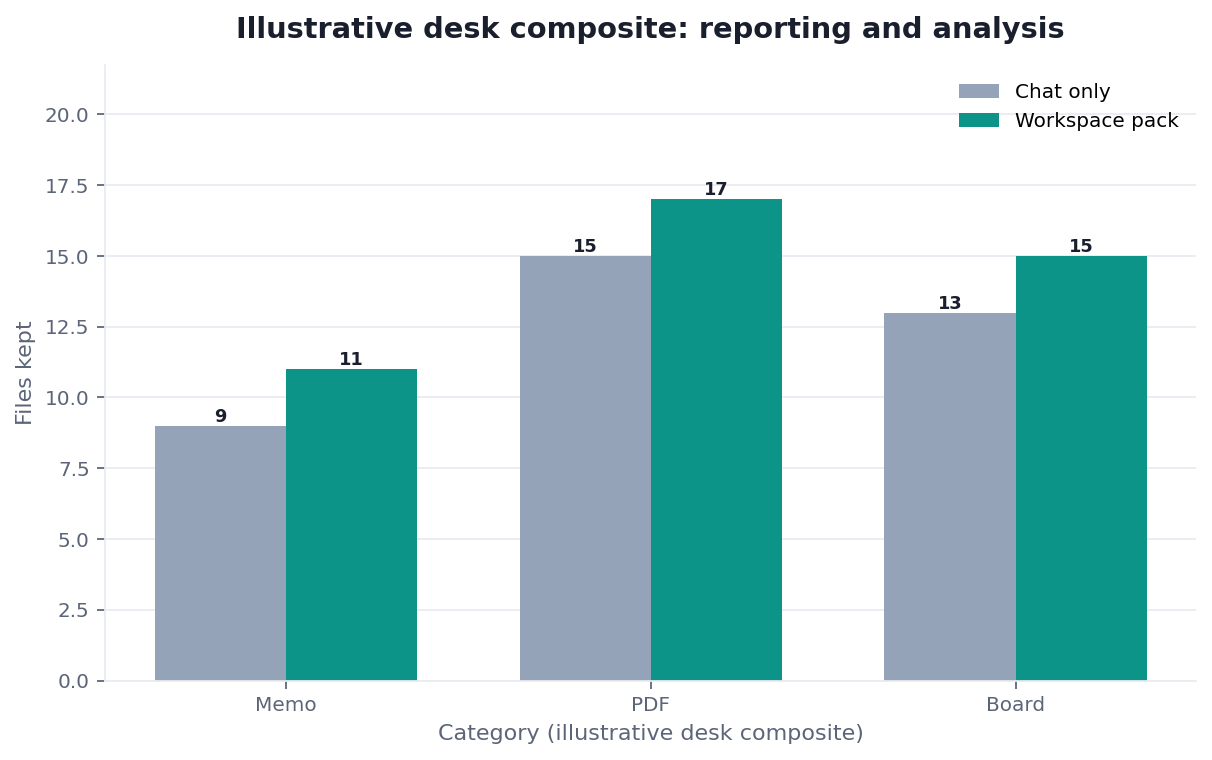
Figure. InfiniSynapse desk log ADR-RAA-20260825: split PDF plus notebook left 0 / 0 / 0; workspace pack left 1 / 1 / 1. Published context: the independent sources linked in the body. Not a customer experiment, SLA, or official benchmark.
| Evidence class | What you can cite | What you cannot claim |
|---|---|---|
| Desk log on this page | Artifact counts 0/0/0 → 1/1/1, ~12,800 order lines on this run, ~11 min wall-clock, downloadable log · CSV · verify | Customer uplift %, vendor bake-off win, named-logo case |
| Published authority (linked above) | Test-condition, identity, incident, open-standards, and public-series docs; catalog and citation from W3C DCAT and DataCite; adoption and risk from Stanford HAI, McKinsey, Gartner, NIST AI RMF, OWASP | That those sources ran this desk log |
| Homepage recognition | 2026 WAIC Future Tech OPC Excellence Award as published on the company homepage; self-described, not independently verified here | That WAIC, Gartner, or NIST scored this article |
If colleagues must open the same folder, continue in share analysis workspace. If the files must travel as a frozen PDF, use PDF report from a database.
Scorecard: One Folder or Theater
| Signal | Keep reporting and analysis in one workspace | Stay split across tools |
|---|---|---|
| Someone else must review both sides | Yes | No |
| The decision will be cited next week | Yes | A split trail will vanish |
| You only need the current tile | No | Board |
| Two teams own the same word | Bind, then one pack | Chat will hide the drift |
| The PDF and the SQL live in different systems | Move them together | Do not skip the trail |
| You are still exploring | Not yet | Explore first |
If two or more “yes” rows apply, finish reporting and analysis in one folder before the meeting. Do not promise to “join the trails later.” Later is how theater becomes the official record.
Exploratory data analysis is the right mode while the question is still moving. Reporting and analysis is the mode after the question is locked.
Failure Modes
Splitting ownership across tools
The PDF has no SQL and the notebook has no memo. Fix: keep the memo and the SQL in one workspace. A split is a rumor with two owners.
Reporting without the analysis trail
A pretty PDF with no query is theater. Fix: refuse to share a pack that cannot open its own SQL. The claim is only as strong as the statement a skeptic can replay.
Regenerating without keeping the old folder
Each regeneration can change a filter. Fix: download both packs. If you overwrite the only folder, you cannot prove which pack entered the last meeting.
Before you paste another “here is the report” into the staff channel, check three things: whether one folder exists, whether the SQL matches the prose, and whether a named reviewer can open both without sitting in two tools.
| Live guide | Open it when |
|---|---|
| AI data report generator | you need the wider deliverable frame |
| AI analysis report | the pack must carry a call |
| download analysis artifacts | the files must leave the workspace |
| semantic layer | the metric name is still unlocked |
Keep the memo and the SQL in one folder
Run one goal as a task, open the workspace, and download the memo and the SQL together before the meeting. This check uses only sources you authorize.
Commercial association: You do not need the workspace to complete the educational diagnosis on this page.
Open InfiniSynapseHow this page is sourced. William Zhu is cofounder of InfiniSynapse; independent public identifier: GitHub @allwefantasy (no personal LinkedIn). Institution: About InfiniSynapse. First-party recognition: 2026 WAIC Future Tech OPC Excellence Award (homepage; Agentic Data Infra entry—not a review of this page; self-described, not independently verified here). Trust pages: Privacy · publishing terms · NIST Privacy Framework. Desk methodology note: 2026-07-29 attestation. Downloadable first-party run: desk log
ADR-RAA-20260825. Reviewed by analytics engineering · data platform · LLM security · editor. Editorial standards · corrections. Contact zhuhl@infinisynapse.com. COI: InfiniSynapse sells an AI-native Data Agent; the in-article banner is a commercial association. Fact-check: Stanford HAI AI Index · McKinsey State of AI · Gartner Peer Insights — Analytics & BI · NIST AI Risk Management Framework · OWASP Top 10 for LLM Applications · ISO 20198 · NIST SP 800-63B · ENISA incident-response guidance · UK Open Standards Principles · FRED · W3C DCAT · DataCite. First-party numbers on this page are desk logADR-RAA-20260825only.
How to cite this page
Page: Zhu, W., & InfiniSynapse Data Team. (2026). Reporting and Analysis: Bind, Then Replay. InfiniSynapse
Run: InfiniSynapse Data Team. (2026). Desk log ADR-RAA-20260825 (sanitized composite)
Neither is an audit. Cite those published artifact counts when you quote reporting and analysis figures from this first-party desk comparison. As of 2026-08-29, no independent reproduction of this contrast exists on record. DataCite and W3C DCAT stay citable as catalog and citation standards. NIST, ISO, and Stanford remain linked only as published context. Keep the desk log and verify script so readers reopen the 0/0/0 versus 1/1/1 contrast. Reporting and analysis citations should name the run ID. Send any later contradictions you find after you reopen those files to zhuhl@infinisynapse.com.
Frequently Asked Questions
Is a PDF plus a separate notebook reporting and analysis?
Bottom line: No. Reporting and analysis belongs in one workspace. A PDF plus a notebook is a split trail. Do not call the split the official record.
Which files belong in reporting and analysis?
Bottom line: Memo, query trail, and any extract or chart the call depends on. Reporting and analysis with more files is not automatically better; a missing SQL always fails.
How is reporting and analysis different from a dashboard export?
Bottom line: A dashboard export is a picture of tiles. Reporting and analysis is a dated argument with the question and the SQL in one folder. Use both; do not treat the picture as the trail.
Can two teams still specialize if we keep reporting and analysis together?
Bottom line: Yes. Specialization is a role. Reporting and analysis is a folder. Write one goal, bind one definition, download one pack.
How can an outside reviewer test reporting and analysis?
Bottom line: Use a versioned public source, lock the grain, period, exclusions, and required files, then ask a second reviewer to rerun the goal and recompute one result from the extract.
Do external standards certify InfiniSynapse?
Bottom line: No. W3C, NIST, DAMA, NYC TLC, the World Bank, and FRED provide standards, professional guidance, or public data. They did not certify the product, article, or desk run.
Did NIST, ISO, or a news outlet recognize this page?
Bottom line: No. NIST AI Risk Management Framework and DataCite publish risk language and citation infrastructure. They did not evaluate InfiniSynapse. There is no independent award page for this article, no media citation of reporting and analysis on this page, and there is no personal LinkedIn to add.
Conclusion
Reporting and analysis is one job in one workspace: files, evidence, and SQL a colleague can reopen. Chat is how you draft. The deck is how you point. The notebook is how you explore. The workspace is how you ship. Bind the words that matter, preview the pack, and refuse theater that cannot open its own queries.