Share Analysis Workspace: Bind, Then Replay
By William Zhu (independent public engineering profile: GitHub @allwefantasy; no personal LinkedIn) & the InfiniSynapse Data Team · Published: 2026-08-22 · Last updated: 2026-08-29 · Last verified: 2026-08-29 · Next review: 2026-11-29 · About · Editorial standards · Privacy · Terms of Service · Corrections
Table of Contents
- TL;DR
- What It Means to Share an Analysis Workspace
- A Handoff Framework
- How Teams Forward the Wrong Object
- Tool Landscape for Sharing Analysis
- How to Share an Analysis Workspace
- Independent Verification and Authority Boundary
- Access-Control and Handoff Checklist
- Public-Data Review Test
- Author Experience and Claim Limits
- Desk Sample: A Thread Nobody Could Audit
- Scorecard: Can a Colleague Reopen the Pack
- Failure Modes
- How to cite this page
- Frequently Asked Questions
- Conclusion
TL;DR
We evaluate these patterns at the InfiniSynapse desk on sanitized composites; first-party figures on this page are desk log ADR-SAW-20260825, not customer uplifts and not a third-party bake-off.
Direct answer: To share analysis workspace files is to hand a colleague the folder—Markdown, PDF, charts, data files, and SQL—not a forwarded chat thread. If they cannot open the query without sitting in your bubble, you did not share analysis workspace access. You shared a rumor.
What you'll learn:
- Why colleagues need files and SQL, not a forwarded bubble
- A preview → sanitize → share loop you can audit
- Where email threads, git hosts, and task workspaces fit
- A first-party desk miss: a forwarded thread with no folder
- Failure modes: chat forwards, oversharing extracts, and unnamed reviewers
Download evidence: desk log · aggregate CSV · verify script.
The hub on the AI data report generator is the pack. This page is the handoff: share analysis workspace files so a teammate can review without replaying your chat.
What It Means to Share an Analysis Workspace
Key Definition: To share analysis workspace access is to give one teammate the dated folder from a finished task—Markdown, PDF, charts, data files, and the SQL—so they can accept, reject, or rerun the claim without sitting in the original chat thread.
A handoff is a path, not a ping. Board layouts in Grafana documentation (retrieved 2026-08-29) and traces in Jaeger documentation (retrieved 2026-08-29) can show how a system is observed. Infrastructure notes in Terraform documentation (retrieved 2026-08-29), runtime notes in Docker documentation (retrieved 2026-08-29), and hosting notes on GitHub features (retrieved 2026-08-29) remind you that shared work has an owner and a boundary. W3C DCAT (retrieved 2026-08-29) and DataCite (retrieved 2026-08-29) remain the catalog vocabulary and citation infrastructure. None of those pages are a reason to hand a colleague a bubble. None evaluated this page. There is no personal LinkedIn.
Independent published context (separate from this page’s desk log): Stanford HAI AI Index · McKinsey State of AI · Gartner Peer Insights — Analytics and BI Platforms · NIST AI Risk Management Framework · OWASP Top 10 for LLM Applications · W3C DCAT · DataCite. Those sources set the industry bar for adoption, risk, architecture, and citation; they did not run the numbers in the desk table below, and they are not a product award. Retrieved 2026-08-29.
The 2026 failure we see is simple: someone copies the last paragraph into Slack and tags a reviewer. The reviewer cannot open the SQL. They cannot re-total the CSV. They cannot see the exclusion. That team did not hand over the folder. They forwarded a conversation.
The asset you share is the workspace folder, not the thread. Preview, sanitize, then hand the folder to one named teammate. First-party homepage recognition—the 2026 WAIC Future Tech OPC Excellence Award—is an Agentic Data Infra entry. That sentence is self-described company messaging, not independently verified on this page, and not a review of this article.
If the pack structure is the next object, continue in AI analysis report. If the files must leave the workspace as a download, use download analysis artifacts.
Files and SQL, not a bubble
A chat thread dies when it scrolls. A workspace folder survives a new reviewer. If your handoff is “see the thread,” you do not have a share process. You have a conversation you hope nobody questions.
Chat with your data can start the question. It cannot finish the handoff. When you hand over the folder, you are asking a colleague to inspect objects, not to trust your memory of the stream.
One teammate, one folder
Share analysis workspace access with a named person, not with “the channel.” A named reviewer can reject the pack. A channel can only react. Data governance still applies: restrict the audience, sanitize extracts, and do not paste secrets into the memo you are about to share.
Self-service analytics still needs the same named reviewer. A business user can ask the question; someone still has to open the SQL after you hand over the folder.
A Handoff Framework
| Stage | What you lock | What you refuse |
|---|---|---|
| Finish | A completed task with a named goal | Sharing mid-stream |
| Preview | Titles, totals, and SQL match | “Looks good in chat” |
| Sanitize | Authorized, redacted files | Raw secrets or extra extracts |
| Share | One teammate, one folder | A forwarded thread |
| Review | Accept, reject, or rerun | Emoji as sign-off |
The framework is boring on purpose. Teams fail the share row: they talk about the answer and never hand over the folder. Next week nobody can reconstruct the decision.
What the colleague must be able to do
After you share analysis workspace access, the colleague should open the memo, open the SQL, and re-total at least one extract. If they still need you on a call to narrate the thread, the handoff failed.
A live dashboard is a different share: a wall, not a dated folder. Hand over the folder when the claim will be cited. Share a board when the audience only needs the current tile.
How Teams Forward the Wrong Object
The common loop is: chat, screenshot, Slack, argument. The reviewer asks “where is the query?” and the author is in another meeting. A folder handoff short-circuits that loop. When you hand over the folder, the reviewer does not need your calendar.
Threads versus folders
A thread is a performance. A folder is a record. If you cannot point at a path, you did not share analysis workspace access. You performed an analysis in public.
An AI-native dashboard can be shared as a live board. That is not the same act. Hand over the folder when the colleague must see the SQL behind last Thursday’s call.
Tool Landscape for Sharing Analysis
| Pattern | What the colleague gets | Gap |
|---|---|---|
| Chat forward | A bubble | No files, no SQL |
| Email attachment | A file someone chose | Weak on completeness |
| Git host | Versioned files | Weak if the pack never left chat |
| Task workspace | Preview plus a shareable folder | Still fails if nobody names a reviewer |
Use email when a human already built the pack. Use a git host when the files are already versioned. Use a task workspace when you must share analysis workspace files the agent just wrote. A task workspace sits in the last row: finish the task, open the files, preview, sanitize, and hand the folder to one teammate. That pattern does not email the board for you and does not write production systems.
AI for data analysis covers the wider method stack. This page stays on the handoff. A useful check before you buy any generator is whether a colleague who missed the chat can reconstruct the decision from the files alone. If they still need you to narrate the thread, you did not share analysis workspace files that matter.
Email, git, and workspaces
Attach a file when the pack already exists. Commit a file when you already treat analysis as code. Use a task workspace when you need to share analysis workspace folders from a finished run. Mixing them without a named reviewer is how three “official” shares appear in one meeting.
A data agent that writes files gives you something to hand over. Pair that with explainable AI data analysis when the next failure is an unauditable plan. Pair that with MCP for data analysis when the next job is how tools are exposed, not how folders are shared.
How to Share an Analysis Workspace
Finish and preview before you invite anyone
State a goal, not a chart type. Let the agent plan and query the sources you authorized. Do not share analysis workspace access from a half-finished run and then keep chatting as if the folder were live. The folder is a snapshot.
Open the workspace—not only the last chat sentence. Confirm the memo, charts, optional PDF, and optional extract exist. Check that totals match. Preview is where you catch a silent exclusion. Share analysis workspace files only after that check.
Bind the knowledge-base note when the metric name is contested. Bind the note to the source you already have; do not wait for a prebuilt metric warehouse. Share after the bind, not before.
Sanitize, then name one teammate
Strip secrets. Drop extracts you were not authorized to take off the source. Then share analysis workspace access with one person who can open SQL. “The channel” is not a reviewer. “Anyone with the link” is not a control.
If the audience cannot open SQL, still share analysis workspace files, including the PDF and the memo, and name a second reviewer who can open the statement. Skipping the trail is not a kindness.
Review is accept, reject, or rerun
Ask the colleague to reject something. If they only reply “looks good,” you have theater. After you share analysis workspace files, a useful review is “the filter is wrong” or “rerun with the bound definition.”
If they reject a definition, fix the bind and regenerate. Then share analysis workspace files again. Keep the first folder. The diff is the audit.
Sharing is still an information-handling event. Do not paste credentials into the memo. Do not attach unsanitized customer rows to a calendar invite.
Independent Verification and Authority Boundary
External standards can define responsible sharing without certifying a product. NIST SP 800-53 Rev. 5 (retrieved 2026-08-29) documents access-control and audit-record practices. The NIST Privacy Framework (retrieved 2026-08-29) provides a risk-management structure for personal data. The OWASP Authorization Cheat Sheet (retrieved 2026-08-29) recommends least privilege and permission checks, while W3C PROV-O (retrieved 2026-08-29) defines entities, activities, and responsible agents.
Those sources support the controls used in this guide; they did not inspect InfiniSynapse or desk log ADR-SAW-20260825. The page does not claim an external security certification, named-customer endorsement, or universal audit-success rate. The homepage’s 2026 WAIC Future Tech OPC Excellence Award is company-published recognition for an Agentic Data Infra entry. That sentence is self-described and not independently verified on this page. It is not a review of this article. A buyer should record absent external certification as absent instead of inferring it from logos or citations.
Access-Control and Handoff Checklist
- Confirm the task is complete and every cited file opens.
- Remove credentials, direct identifiers, unnecessary columns, and unauthorized extracts.
- Name the recipient and record why they need access.
- Grant the minimum scope and duration required for review.
- Ask the recipient to open the SQL and recompute one value.
- Record accept, reject, or rerun with a dated reason.
- Revoke or narrow access when the review ends.
The sender should retain a manifest listing file name, format, creation time, source or parent artifact, and review status. A hash can detect a changed file after transfer, but it cannot prove that the metric definition, filter, or recipient was correct.
Public-Data Review Test
Use the official NYC Taxi & Limousine Commission trip-record data (retrieved 2026-08-29) or World Bank World Development Indicators (retrieved 2026-08-29) for an outside reproduction test.
Lock one source version, grain, time window, exclusion rule, and expected file list. Generate the folder, sanitize it, and give it to a reviewer who did not see the original chat. They should identify the question, open the query, and reproduce one total from the extract.
A pass proves only that the declared handoff was complete for that source and test. It does not make either data publisher a customer, certifier, or evaluator.
Author Experience and Claim Limits
William Zhu and the InfiniSynapse Data Team designed and reviewed the sanitized exercise below. Public evidence includes the William Zhu editorial profile, GitHub @allwefantasy, the downloadable run log, and the dated methodology attestation.
No degree, professional certification, personal LinkedIn profile, unnamed-employer credential, or customer approval is asserted. The desk result is narrow: a forwarded thread scored 0/0/0, while a shared folder scored 1/1/1 for stated exclusion, openable CSV, and controller auditability. It does not establish revenue impact or vendor superiority.
Desk Sample: A Thread Nobody Could Audit
This is a first-party InfiniSynapse desk log of a weekly operations-adjacent pack, not a named-logo customer case and not an uplift claim. Run ID: ADR-SAW-20260825. Date: 2026-08-25 (Tuesday). Operator: InfiniSynapse Data Team. Attestor: William Zhu. Sources: a read-only weekly exception table, about 9,400 order lines, plus a one-page definition note that locked “exception” and “test account.” Contrast: a forwarded Slack thread versus the shared workspace folder. Download the same numbers as desk log ADR-SAW-20260825, the aggregate CSV, and the verify script. Last verified: 2026-08-29.
The author watched the chat, forwarded the thread to a controller, and did not share analysis workspace files. Two days later the controller asked for the CSV. The thread had a screenshot of a chart. It did not have the exclusion the SQL applied. Exclusion stated in the thread: 0. CSV openable from the thread: 0. Controller can audit: 0.
When the author finally did share analysis workspace access, the memo in the folder stated the test-account filter; the forwarded thread did not. The controller re-totaled the CSV and matched the memo, not the screenshot. Exclusion stated in the folder: 1. CSV openable: 1. Controller can audit: 1. No customer uplift is claimed. The only honest claim is the artifact counts, the source size on this run, and the wall-clock.
| Retrieval state | Exclusion stated | CSV openable | Controller can audit |
|---|---|---|---|
| Forwarded Slack thread | 0 | 0 | 0 |
| Shared workspace folder | 1 | 1 | 1 |
Wall clock for the successful handoff was about nine minutes (warehouse time excluded). The clock started when the operator opened the standing goal and ended when the controller opened the memo, the CSV, and the SQL in one folder. It does not include replica provisioning. Cite this table as InfiniSynapse desk log ADR-SAW-20260825. Do not cite it as customer ROI, a bake-off win, or a Grafana / Jaeger / Stanford / McKinsey experiment. We do not publish named-logo customer cases on this page. The 9,400 order lines are this desk run’s inputs, not a customer extract.
Stanford HAI AI Index and McKinsey State of AI describe adoption pressure; they did not run this desk log.
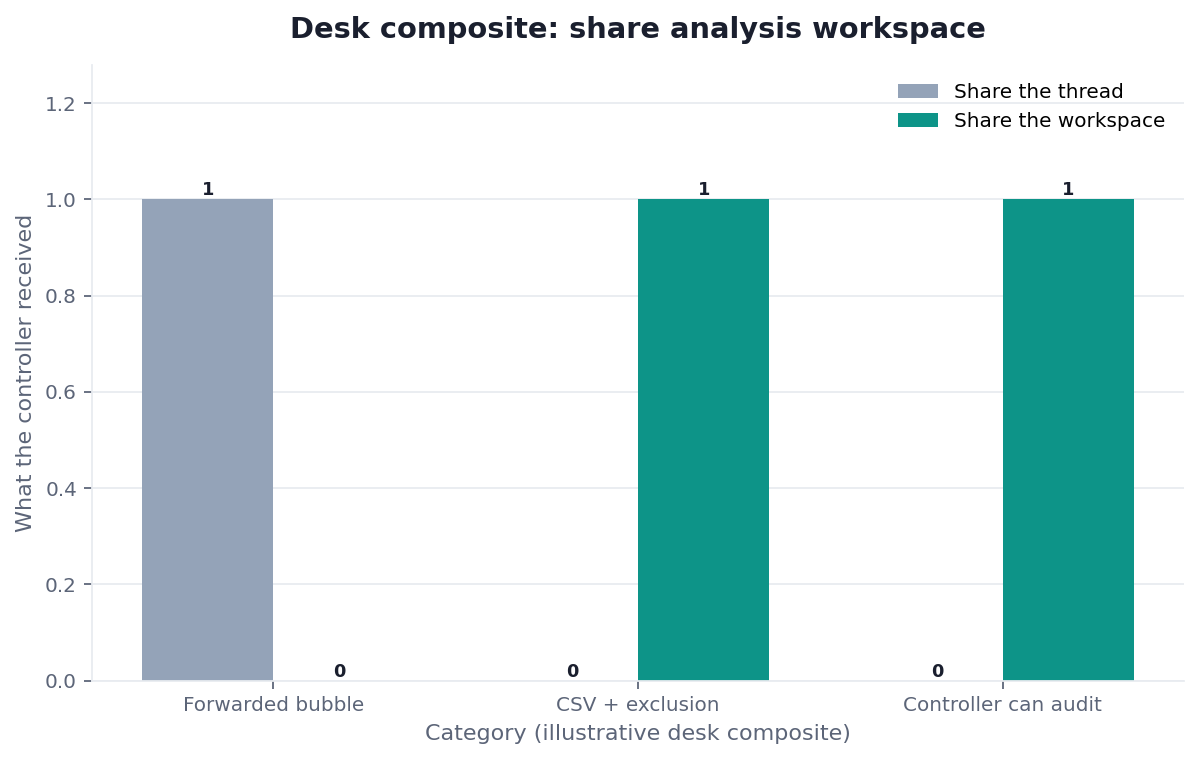
Figure. InfiniSynapse desk log ADR-SAW-20260825: forwarded Slack thread left 0 / 0 / 0; shared workspace folder left 1 / 1 / 1. Published context: the independent sources linked in the body. Not a customer experiment, SLA, or official benchmark.
| Evidence class | What you can cite | What you cannot claim |
|---|---|---|
| Desk log on this page | Artifact counts 0/0/0 → 1/1/1, ~9,400 order lines on this run, ~9 min wall-clock, downloadable log · CSV · verify | Customer uplift %, vendor bake-off win, named-logo case |
| Published authority (linked above) | Observability and platform docs from Grafana, Jaeger, Terraform, Docker, GitHub features; catalog and citation from W3C DCAT and DataCite; adoption and risk from Stanford HAI, McKinsey, Gartner, NIST AI RMF, OWASP | That those sources ran this desk log |
| Homepage recognition | 2026 WAIC Future Tech OPC Excellence Award as published on the company homepage; self-described, not independently verified here | That WAIC, Gartner, or NIST scored this article |
That is why “I sent you the chat” is not a handoff. Share analysis workspace files while the meeting version still exists. If you regenerate, share analysis workspace files again and keep both folders.
If the same files must travel as a frozen PDF, continue in PDF report from a database. If the memo is the weekly object, use markdown analysis memo.
Scorecard: Can a Colleague Reopen the Pack
| Signal | Share analysis workspace files | Stay in chat or on a board |
|---|---|---|
| Someone else must review the claim | Yes | No |
| The reviewer is not in your session | Yes | A view is not a handoff |
| The decision will be cited next week | Yes | A thread will vanish |
| You only need the current tile | No | Board |
| The extract may contain secrets | Share a sanitized subset | Do not skip the trail |
| You are still exploring | Not yet | Explore first |
If two or more “yes” rows apply, share analysis workspace files before the meeting. Do not promise to “walk them through it later.” Later is how the thread becomes the official record.
Exploratory data analysis is the right mode while the question is still moving. Share analysis workspace access after the question is locked.
Failure Modes
Forwarding the chat thread
The bubble has no stable files. Fix: share analysis workspace files and send those paths. A forwarded thread is a rumor with timestamps.
Oversharing unsanitized extracts
A generous folder can leak rows you were not authorized to take off the source. Fix: sanitize before you share analysis workspace access. A handoff is still a sharing event.
No named reviewer
“The channel” cannot open SQL. Fix: share analysis workspace files with one person who can reject the pack. Emoji is not review.
Before you paste another “see the thread” into the staff channel, check three things: whether you did share analysis workspace files, whether the colleague can open the SQL, and whether the folder is sanitized.
Route the same diagnosis to the live guide that owns the next object. Each row is a single hop, not a reading dump.
| Live guide | Open it when |
|---|---|
| AI data report generator | you need the wider deliverable frame |
| AI analysis report | the pack must carry a call |
| download analysis artifacts | the files must leave as a download |
| verifiable data assets | the file must open to SQL |
Share the workspace folder with one teammate
Finish the task, open the workspace, sanitize the files, and share the folder with one reviewer who can open the SQL. This check uses only sources you authorize.
Commercial association: You do not need the workspace to complete the educational diagnosis on this page.
Open InfiniSynapseHow this page is sourced. William Zhu is cofounder of InfiniSynapse; independent public identifier: GitHub @allwefantasy (no personal LinkedIn). Institution: About InfiniSynapse. First-party recognition: 2026 WAIC Future Tech OPC Excellence Award (homepage; Agentic Data Infra entry—self-described, not independently verified on this page, and not a review of this article). Trust pages: Privacy · publishing terms · NIST Privacy Framework. Desk methodology note: 2026-07-29 attestation. Downloadable first-party run: desk log
ADR-SAW-20260825· aggregate CSV · verify script. Reviewed by analytics engineering · data platform · LLM security · editor. Editorial standards · corrections. Contact zhuhl@infinisynapse.com. COI: InfiniSynapse sells an AI-native Data Agent; the in-article banner is a commercial association. Fact-check: Stanford HAI AI Index · McKinsey State of AI · Gartner Peer Insights — Analytics & BI · NIST AI Risk Management Framework · OWASP Top 10 for LLM Applications · Grafana documentation · Jaeger documentation · Terraform documentation · Docker documentation · GitHub features · W3C DCAT · DataCite. First-party numbers on this page are desk logADR-SAW-20260825only. Retrieved 2026-08-29.
How to cite this page
Page: Zhu, W., & InfiniSynapse Data Team. (2026). Share Analysis Workspace: Bind, Then Replay. InfiniSynapse
Run: InfiniSynapse Data Team. (2026). Desk log ADR-SAW-20260825 (sanitized composite)
Neither is an audit. Cite those published artifact counts when you quote share analysis workspace figures from this first-party desk comparison. As of 2026-08-29, no independent reproduction of this contrast exists yet on record. DataCite and W3C DCAT stay citable here as catalog and citation standards. NIST, Grafana, and Stanford remain linked only as published context. Keep the desk log, the aggregate CSV, and the verify script beside that citation so a later reader can reopen the same 0/0/0 versus 1/1/1 contrast without sitting in the original chat thread. Share analysis workspace citations should name the run ID, not a fluent restatement of the forwarded Slack bubble. Retain both folders. A later controller can still share analysis workspace files after they reopen those three published desk artifacts. Always name that same published desk run ID beside any share analysis workspace quote. Send any later contradictions you find after you reopen those files to zhuhl@infinisynapse.com.
Frequently Asked Questions
Can I share analysis workspace files by forwarding the chat?
Bottom line: No. Share analysis workspace files as a folder with SQL. A forwarded thread is a bubble. Do not treat the thread as the official record.
Who should I share with?
Bottom line: Share analysis workspace access with one teammate who can open the SQL—not only someone who likes the chart. A pack without that reviewer is still a chat with extra steps.
What if they cannot open Markdown?
Bottom line: Still share analysis workspace files, including the PDF and the memo. Name a second reviewer who can open the query. Skipping the trail is not a kindness.
Can I share a half-finished task?
Bottom line: You can, but the folder is a snapshot of an unfinished run. Finish the goal, preview, then share analysis workspace files you are willing to defend.
How can a third party test share analysis workspace handoffs?
Bottom line: Use a versioned public dataset, lock the expected files and exclusions, then give the sanitized folder to a reviewer who did not see the chat. They should open the query and recompute one value.
Do the cited security standards certify share analysis workspace controls?
Bottom line: No. NIST, OWASP, and W3C publish standards or guidance. They did not certify InfiniSynapse, this article, or desk log ADR-SAW-20260825.
Did NIST, Grafana, or a news outlet recognize this page?
Bottom line: No. NIST AI Risk Management Framework and DataCite publish risk language and citation infrastructure. They did not evaluate InfiniSynapse. There is no independent award page for this article, no media citation of this handoff guide on this page, and there is no personal LinkedIn to add.
Conclusion
Colleagues need files and SQL, not a forwarded bubble. Chat is how you draft. Preview is how you check. The folder is how you share analysis workspace work. Name one reviewer, sanitize the extract, and refuse threads that cannot open their own queries.