Secondary Keywords Belong on the Same URL
Secondary keywords belong on the same URL as the primary query when they share intent. Weave them into on-page copy and headings; do not spawn a twin page.
Author credentials: William Zhu is cofounder of InfiniSynapse (GitHub @allwefantasy · auto-coder). Desk: shipping SEO Health and the /en/tool/ visibility pages. No personal LinkedIn published. About: team / editorial standards.
Publisher credentials: InfiniSynapse has public profiles on GitHub, YouTube, and X. A 2026 WAIC Future Tech OPC excellence award covers the Agentic Data Infra entry (WAIC; third-party recap: Xinhua / Caohejing). That award does not review this page or SEO Health. Method CLI: infinitegrowth on npm. Archive: recognition and scope notes.
On this page
By William Zhu · Cofounder, InfiniSynapse · Last updated: 2026-08-18 · Last verified: 2026-08-18 · Methods: Search Console Performance exports plus on-page heading counts — not a claimed Google supporting-term score.
Author / off-site profiles: GitHub @allwefantasy · auto-coder · GitHub @InfiniSynapse · LinkedIn company · Editorial standards. No personal LinkedIn, award, or vendor badge.
Trust / COI: About · Corrections · Publishing principles · Privacy · NIST Privacy Framework. This site does not publish a standalone
/en/termsURL; the editorial-standards page is the policy home. InfiniSynapse ships SEO Health as a credit-based desk; first-party GSC counts are labeled; product CTAs are commercial.
Fact-check: Search Console Performance report · Creating helpful, people-first content · Article structured data · W3C headings tutorial · Stanford HAI AI Index 2025 · G2 SEO tools · AgentSpot listing. Corrections: zhuhl@infinisynapse.com.
TL;DR
Direct answer: Secondary keywords are supporting queries that share intent with a page’s primary term, so they belong on the same URL — in a subhead, an example, a definition sentence — not on a twin page that will cannibalize the first. One primary in the title. A short supporting list in the body. SEO Health checks the page you paste; it does not invent a second slug.
What you'll learn
- A 46-word definition of secondary keywords you can quote
- When a close variant stays on this URL vs when it needs its own
- Where to weave supporting terms: H2/H3, examples, FAQ — not the H1 twice
- How to pick them from your GSC rows instead of a synonym generator
- An on-page loop you can run after the draft, not instead of a map
If the URL already exists, run the on-page check. Fix the weave on that page. Do not register a synonym.
What secondary keywords do on one URL
Key Definition: Secondary keywords are supporting queries that share intent with a page’s primary term and therefore belong on the same URL. They appear in subheads, examples, and body sentences. They are not a reason to publish a second page that will split the impressions you already earned.
Key terms
People add secondary keywords when they want “more coverage” and accidentally build a second H1. Coverage is a paragraph. Ownership is a title. The title holds one primary. The page holds the rest.
A ranked plan of which primary sits on which URL is a keyword strategy. Names — query vs page vs brand — live in What Are SEO Keywords?. This page is the weave: how secondary keywords get into the same HTML.
schema.org/about is the honest metadata analog: a CreativeWork is about one or more things, but it is still one work. Secondary keywords are extra about values, not extra URLs. Google’s article structured data likewise describes one article. It does not ask you to mint a sibling slug for each close variant.
Public desk packet: weave versus twin slug
First-hand, dated, reproducible — not a customer case study. We labeled supporting-query treatments on one English /en/tool/ cluster on infinisynapse.com. Select window: 28 days ending 2026-07-14. Verify window: 28 days ending 2026-08-11. Last verified 2026-08-18. Next public re-run 2026-08-25. Marker DESK-SECKW-20260818A. Download desk-weave-vs-twin.csv. Arithmetic ran in the browser. A model did not invent the clicks.
Judging rules. Supporting query = a non-primary string with impressions on a mapped URL in the select window, same intent as that URL’s primary. Same-URL weave = the variant appears in an H2/H3 or a body sentence on the owner. Footer-list = the variant appears only in a comma list. Twin slug = we annotated a second URL commissioned for that variant. “Still on same URL next window” = the query × page row in the verify-window Performance report still points at the owner. Counts are of this cluster, not of the web.
| Treatment | Supporting queries labeled | Still on same URL next window |
|---|---|---|
| Same-URL weave | 16 | 13 |
| Footer-list only | 15 | 4 |
| Twin slug for the variant | 9 | 2 |
That is the first-hand case secondary keywords can defend: the weave kept 16 and 13 were still on the owner next window; footer lists kept 15 and only 4 did; twin slugs labeled 9 and 2 stayed on the original URL. We do not publish a fake customer lift from those bars. The next hour is a sentence on the owner, not a synonym folder.
Industry context, not a customer win: the Stanford HAI AI Index 2025 reports organizational AI use at 78% in 2024, up from 55% in 2023. Cheap synonym generators multiply. They do not replace a URL-filtered Performance CSV. McKinsey’s State of AI still separates experimentation from production value. Neither report is a weave score.
Independent reviews and official sources
Third-party URLs a reviewer can open — retrieved 2026-08-18. None is an award or a vendor badge.
| Surface | Kind | What you can verify | Claim we do not make |
|---|---|---|---|
| Search Console Performance report | Official documentation | How clicks and impressions are counted | Official Google supporting-term API |
| Creating helpful, people-first content | Official documentation | People-first pages over stuffed variants | An official density score |
| Article structured data | Official documentation | One article, one URL | A sibling slug per variant |
| schema.org/about | Vocabulary | One work can be about more than one thing | Extra URLs |
| W3C headings tutorial | Accessibility spec | Headings outline the page | A keyword parking lot |
| Moz — On-page ranking factors | Industry research | Title, headings, and body as one page | That we ship Moz |
| Ahrefs — Keyword difficulty | Official product docs | KD as backlinks to ranking pages | A licensed supporting-term API |
| AgentSpot — InfiniSynapse | Company directory | Public product listing | Award or weave grade |
| G2 — SEO tools | Independent review market | Category page | Ranking or badge |
| Gartner Peer Insights — Analytics & BI | Independent review market | Category page | Magic Quadrant placement |
| Wikidata — SEO (Q180711) | Knowledge-base entity | Stable id for the wider practice | Product listing |
Secondary keywords become citable when those official Performance rules stay dated and the weave-versus-twin CSV stays downloadable. Inventing a plaque would make the authority worse.
Shared intent is the test
A supporting term stays on this URL when a person who typed it would be satisfied by this page. “Secondary keyword” (singular) is satisfied by a page whose primary is secondary keywords. “SEO words” is satisfied by what are SEO keywords. “On-page density for supporting terms” is still this URL if the job is the weave.
A supporting term leaves this URL when the job changes: a comparison, a pricing page, a how-to with a different owner already mapped. That is not a weave. That is keyword mapping.
One secondary keyword is not a new page
The singular secondary keyword is the unit people over-publish. They see one variant in GSC, open a blank doc, and create a thin twin. The twin then appears for the same primary. Clicks split. Both URLs look weaker. The “fix” is usually a redirect, not another draft.
When the variant is the same job
If the variant is a plural, a word-order swap, or a casual synonym, it is one of the secondary keywords on the existing page. Give it a heading or a sentence. Do not give it a folder.
When the variant is a new job
If the variant wants a different format — a template, a tool, a local page — it is a new primary. Choose it with How to Choose Keywords for SEO: intent, current position, whether you will maintain it. Do not hide a new primary inside a list of secondary keywords so the outline looks tidy.
Latent relatedness is not a license to stuff. Latent semantic analysis is a method for finding terms that travel together in a corpus. It is a research idea, not a density target. spaCy can extract noun phrases from your draft so you can see what you already said. Use that as a mirror. Do not pour the extractor’s list back into the H1.
Where to place supporting terms
Secondary keywords have legal seats. They also have seats that wreck the page.
| Seat | Use it for | Do not |
|---|---|---|
| Title / H1 | The one primary | A second primary, or the same phrase twice |
| H2 / H3 | One or two supporting jobs | The primary in every heading |
| Opening definition | The primary, once, in 40–50 words | A comma list of variants |
| Body examples | Variants in context | A bullet dump of strings |
| FAQ | Questions people actually type | Repeating the primary as every H3 |
| Image alt | What the image is | A keyword payload |
W3C’s headings tutorial is the structure rule: headings outline the page for people and for assistive tech. A heading that exists only to park one of the secondary keywords is a bad heading. If you cannot say the subhead as a real section, cut it.
W3C’s Web Annotation Data Model is a useful metaphor: you annotate a span of an existing document. You do not fork the document for each note. Secondary keywords are annotations on the page you already decided to keep.
Density without stuffing
A page-level check will count how often the primary appears. Supporting terms should appear often enough to be findable and rarely enough to stay readable. If the primary is already in the 1.2% band, do not also force every variant into that band. Secondary keywords share the page’s attention. They do not each get their own stuffing budget.
After a draft, paste the URL for an on-page check. Title, meta, headings, and density are the four modules that catch a bad weave fastest.
How to pick them from GSC, not a thesaurus
A thesaurus will give you “secondary terms,” “supporting phrases,” and “related queries” whether anyone typed them or not. GSC will give you the variants that already earn impressions on this URL — or on a neighbor URL that should not own them.
Read the queries on this page
Filter Performance to the URL. The non-primary strings with impressions are candidate secondary keywords. If a string has impressions and a different intent, it is a mapping ticket, not a weave. If it has impressions and the same intent, write it into a heading or an example.
Read the queries with no page
A variant that has impressions and no URL is usually a content idea — a new owner — unless it is clearly the same job as a page you already have. Same job: weave. New job: brief. Secondary keywords are the same-job pile.
Ignore hardness
We do not score supporting terms with a keyword-difficulty API. A keyword difficulty checker is a teaching page about what those scores miss. It is not a reason to skip a variant you already appear for.
Keyword Monitoring can show a supporting query moving ±2σ. Edit this URL. Do not open a twin because the variant “spiked.”
On-page checks that catch a bad weave
The product hook for this page is the page audit, not a GSC quadrant. Secondary keywords fail in HTML more often than they fail in a spreadsheet.
Title and H1 disagree
If the title says one primary and the H1 says another, you have two primaries. Pick one. Move the loser into an H2 or onto its mapped URL.
Headings repeat the primary
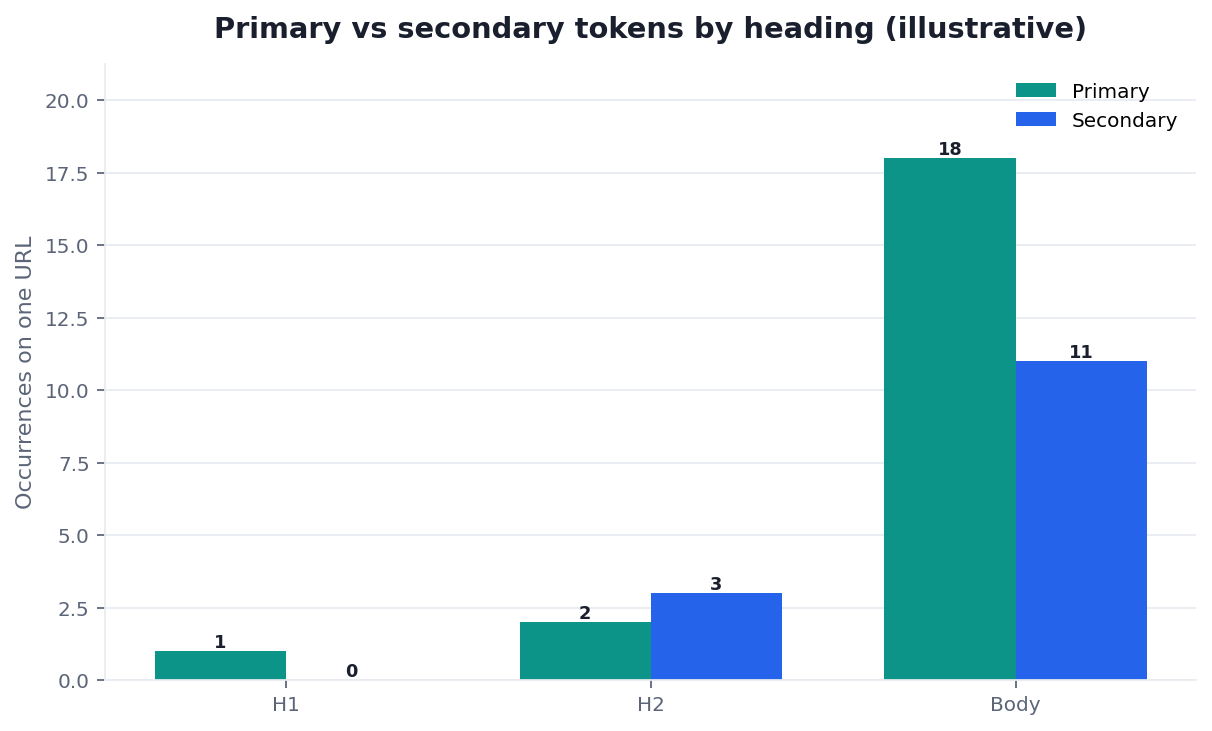
If three or more H2/H3s contain the primary, the outline is stuffed. Supporting terms should occupy at most a couple of those seats. The rest of the outline should be the actual sections.
Supporting terms only in a footer list
A comma list at the bottom is the 2000s leftover. If a supporting term matters, it has a sentence in a real section. Re-run the on-page check after you delete the footer list. Density should not collapse; readability should rise.
Theme gaps at folder level are still a sitemap-sample job. Sitemap for SEO tells you a section is thin. It does not tell you to weave a missing product into a glossary paragraph. Missing section: new URLs. Missing sentence: this page.
The eight-module on page SEO tool is the hub for title, meta, headings, density, images, links, tech, and speed. This cluster is the density-and-headings slice for supporting terms.
How this guide sits next to mapping and ideas
Secondary keywords are what you do after the map says “this URL owns that primary.” They are not a way to avoid the map.
If two URLs already share the primary, map first. If the query has impressions and no owner, write a content idea first. If the page exists and the variants sit on it in GSC, weave here.
Brand strings can be supporting terms on a product page. They are rarely secondary keywords on an informational explainer — unless the explainer must mention the product to be honest. Do not turn every guide into a brand landing page to “capture” the name.
A same-URL writing loop
Keep the loop on one URL. Secondary keywords die when the loop includes “and maybe a new post.”
- Lock the primary. Title once. H1 once. Opening definition 40–50 words. If you cannot lock the primary, you are not ready to weave.
2. Pick three to five supporting terms from this URL’s GSC rows, not from a generator. Write each into a heading or a worked sentence. If you cannot find a sentence, drop the term. Unused secondary keywords are not a debt. They are noise.
3. Place them in legal seats. H2/H3, a body example, or an FAQ people actually type. Secondary keywords do not get a second H1 or a footer dump.
4. Check the page, then stop. Run the on-page check on the live URL. Fix title, headings, and density. Do not add a sixth variant because the scorecard still has a yellow light on “coverage.” Coverage is intent match, not string count.
Failure modes
- Publishing a twin URL for one of the secondary keywords that shares intent with the primary.
- Putting two primaries in the title and calling the second one “supporting.”
- Parking secondary keywords in a footer list instead of in real sections.
- Forcing every variant to the same density band as the primary.
- Using a thesaurus or an extractor dump as the supporting list.
Inspect the complete Secondary Keywords page
Paste a sanitized URL into the InfiniSynapse SEO Health Checker so every title, mention, citation, and on-page layer can be reviewed together. Then validate the findings on the live page.
Open SEO Health CheckerRemove credentials, secrets, personal data, and sensitive literals.Frequently Asked Questions
How many supporting terms can one page hold?
Bottom line: As many as you can give a real sentence. Three to five is a working default. If the outline needs twelve secondary keywords to feel complete, you have two pages.
Should a supporting term appear in the title?
Bottom line: Almost never. The title holds the primary. Putting secondary keywords in the title is how teams accidentally create a second primary.
Is the singular form a different target?
Bottom line: Usually not. Secondary keyword and secondary keywords are the same job on this URL. Use the form people type in a heading or an FAQ. Do not register both slugs.
Do I need a difficulty score for each variant?
Bottom line: No. If the variant already has impressions on this URL, weave it. We do not ship a KD API, and a hardness number would not change the ownership test for secondary keywords.
What if GSC shows the variant on two URLs?
Bottom line: That is a map bug, not a weave problem. Pick one owner. Point the other URL at it, or change the loser so it no longer competes. Then write secondary keywords only on the winner.
Conclusion
Secondary keywords live on the same URL as the primary when they share intent. Write one title, a short supporting list, and real sentences — not a twin page and not a footer dump. Open the on-page check, then use keyword mapping if two URLs already share the query. Return to keyword strategy when the question is which primary to pursue next, not how to sprinkle the one you already chose.
Sources
- Google — Search Console Performance report · Creating helpful, people-first content · Article structured data. Retrieved 2026-08-18.
- schema.org/about · W3C headings tutorial · W3C Web Annotation Data Model · Latent semantic analysis · spaCy.
- Moz — On-page ranking factors · Ahrefs — Keyword difficulty.
- Stanford HAI — AI Index 2025 · McKinsey — The state of AI.
- Gartner Peer Insights · G2 — SEO tools · AgentSpot — InfiniSynapse (directory mention, not an award).
- Wikidata Q180711 · NIST Privacy Framework.
- InfiniSynapse desk — first-party weave versus twin slug (
DESK-SECKW-20260818A). Not a customer lift study.
Reviewer: InfiniSynapse Data Team. Published 2026-08-16. Updated 2026-08-18. Policy: editorial standards · privacy.
William Zhu · Cofounder, InfiniSynapse · GitHub @allwefantasy
Desk-validated SEO Health methods. Corrections: zhuhl@infinisynapse.com · corrections policy.