HRIS Export Analysis from CSV or Excel (2026)
By William Zhu & the InfiniSynapse Data Team · Published: 2026-08-22 · Last updated: 2026-09-24 · Last verified: 2026-08-31 · Next review: 2026-11-30 · About · Privacy guide · Editorial standards · Corrections
Table of Contents
- TL;DR
- What HRIS Export Analysis Is When the File Is the Source
- A Strip-First Framework for CSV and Excel
- Three Export Questions That Stay Aggregate
- Tool Landscape without a Named Sheet
- How to Run HRIS Export Analysis
- Accuracy and Experience Record: An Illustrative Stripped Monthly File
- Evidence Boundaries and Independent Validation
- How to Cite This Page
- Scorecard: Safe to Load
- Failure Modes That Put Names Back
- Frequently Asked Questions
- Conclusion
TL;DR
We evaluate these patterns at the InfiniSynapse desk on sanitized composites; sample figures on this page are illustrative, not customer uplifts.
Direct answer: HRIS Excel work starts from the export you already have. Strip names and emails, then ask aggregates a reviewer can reopen. Never ship a directory that leaves the room, and never use a model that watches staff.
What you'll learn: a strip-first definition of HRIS export analysis; a column-minimum frame for CSV and Excel; how a file source differs from a native connector; how to bind two sentences; and failure modes that put a name back.
Download evidence: desk log · strip summary · verification script · source check · reproduction protocol. This HRIS export analysis package is first-party and illustrative—not employee, HRIS, customer, statistical, or third-party evidence.
If the file still has a name, stop. HRIS export analysis that loads email “for a join” is a leak. Pair the method with the hub on people analytics and with data governance before you upload anything.
Workforce files enter staffing calls. That is why the first artifact is conservative. A rare role plus a two-person office is still a person.
What HRIS Export Analysis Is When the File Is the Source
Key Definition: HRIS export analysis is the practice of treating an authorized CSV or Excel extract as the source, stripping identifiers before any ask, binding headcount and attrition sentences, and answering only aggregates a reviewer can reopen—without a native HRIS connector, and without uploading raw rows the question does not need.
Read the refusal twice. HRIS export analysis is not a license to keep the directory because “the HRIS already has it.” NumPy documentation (retrieved 2026-09-04) supports array computation; it does not validate stripping, privacy, or these figures.
Use directly relevant context for worker files: the NIST Privacy Framework, UK ICO employment data guidance, and UK NCSC zero-trust guidance (retrieved 2026-09-04). They provide privacy, employment-data, and access-control context; they did not endorse the method, threshold, product, or run.
Sanitized, on this desk, means the file you authorize cannot be joined back to a person with the fields that remain, except by someone who already has HRIS access outside the task. Hire month plus a rare role plus a two-person office is still a name.
HRIS export analysis is not a replacement for an HRIS or an ATS. You read a file you were allowed to download. You do not write back. You do not invent a native connector. For the analysis primitive, keep the trail habit from exploratory data analysis: open the columns before you trust the adjective.
If the weekly cadence is the missing object, continue in HR analytics. If the number is an exit queue, use attrition analysis. If the missing object is durable context, see organizational analysis memory.
Planning versus selection is the same line as the hub. HRIS export analysis asks whether a band moved versus last month. Selection stays in the ATS. Performance files stay in their systems.
A Strip-First Framework for CSV and Excel
Before you ask, cut the file. HRIS export analysis quality starts in the columns you delete.
| Keep (aggregate) | Drop (directory risk) | Why |
|---|---|---|
| Role family, band, location region | Legal name, email, employee ID in the ask | IDs belong in HRIS, not in a prompt |
| Hire month, termination month, tenure band | Performance comments, investigation notes | Narrative is not a metric |
| Employment type, cost center | Badge events, device telemetry | That is monitoring |
| Headcount flag, attrition flag | Reason codes that identify a person | Recode to a short list, then aggregate |
| Requisition family, not candidate names | Interview scores at person grain | Planning ≠ selection scoring |
A file that still has names is a policy failure even if your question is “headcount by region.” Strip first. Then bind a note: “headcount is distinct active employees on the last calendar day; attrition is voluntary terminations / average headcount in the month.” Without that sentence, HRIS export analysis becomes a vocabulary fight.
Write the suppression rule in the same note. An illustrative desk rule is hide n under five, and also hide the complement when a leftover cell would name someone. If “EMEA / Staff / 13–24 months = suppressed” sits next to a total of six, a reader can subtract. Raise the grain or suppress the parent total. A pack that skips this step is identification.
If you connect through a protocol rather than a file, the same minimize rule applies. MCP for data analysis is about authorized tools, not a license to pull a wider directory. NIST SP 800-171 Revision 2 (retrieved 2026-09-04) provides security context, not HR-data de-identification proof.
Three Export Questions That Stay Aggregate
Most useful HRIS export analysis sits in three families. A named debug sheet is not a fourth family.
Column inventory before any ask
“Which columns remain after the strip, and can any leftover field re-identify a person?” That is HRIS export analysis. “Just leave email so we can check a row” is not. Inventory first. If a tab still has a manager comment, the file is not ready. Excel workbooks hide directories in extra sheets—open every tab before you load one.
Grain after the strip
“What is active headcount by band and region this month versus last month, hide n under five?” That is HRIS export analysis. The grain is band × region × month. If a cell would contain one person, suppress it. Version the plan the way finance versions a budget: “Plan v4 as of 3 August” belongs in the question.
Excel tabs that hide a directory
“Does the workbook contain a lookup tab that still maps initials to names?” That is HRIS export analysis. A VLOOKUP to a hidden sheet undoes the strip. Delete the lookup, or do not load the file. CSV is simpler because it cannot hide a second sheet—until someone pastes the directory back into column Z.
Tool Landscape without a Named Sheet
Skip products whose home screen is an individual profile. HRIS export analysis tools should look like planning tools: tables, rates, and a trail.
HRIS modules are the system of record. Spreadsheet exports are how most teams start. A data agent that accepts a sanitized export, binds the definition note, and leaves a downloadable pack can run HRIS export analysis without a new warehouse. It must not claim a native HRIS connector you do not operate.
Transport of the file is still an access event. MDN HTTP documentation and web.dev security headers (retrieved 2026-09-04) support transport and header controls. They do not validate the workbook strip or aggregate.
InfiniSynapse’s matching action is: upload a sanitized HRIS export or connect a read-only replica that already holds the stripped grain, bind the headcount sentence, ask only aggregates, open the SQL. There is no write-back to HRIS. For the analysis primitive, see AI for data analysis.
What a sanitized HRIS export should look like
Role family, band, region, hire month, termination month, employment type, cost center, and flags. That is enough for HRIS export analysis on headcount and attrition. If your export still has free-text manager comments, it is not sanitized. Build the file in HRIS or payroll, not in a personal sheet that still looks up names. Do not “just add email so we can debug.” For the privacy hold after the strip, see people analytics privacy.
What the trail must show
The strip list, the grain, the suppression rule, and the statement. HRIS export analysis that cannot show the filter is not auditable. If two files are in the task, name both so a personal export cannot hide beside the official strip. A data agent that cannot show the columns it loaded is not an export tool.
How to Run HRIS Export Analysis
Write the question so a cell cannot become a person. Bad: “Show me who left engineering in June.” Rewrite: “Show voluntary attrition for the engineering role family in June versus May, tenure band × region, hide cells under five.” Bad: “Look up Jordan in the export.” There is no rewrite. Stop.
Strip, then bind two sentences
Delete names, emails, IDs, comments, and any lookup tab. Then bind headcount and attrition. HRIS export analysis arguments are almost always these sentences. Put them in a note bound to the source. If last month used “active on the last calendar day” and this month used “active any day,” you invented a movement.
Ask only aggregates
Ask for the comparison, not a biography. HRIS export analysis without a band, a region, or a tenure slice is a row dump. State the suppression rule in the same sentence. If the agent starts listing people, you asked the wrong question—or the file was not sanitized.
Open the table and the query
Open the table. Confirm no cell is a singleton. Download the pack. HRIS export analysis that ends in a chat paragraph is a screenshot. Keep the column list with the file date. Retention of the export is a what is data management question: how long the copy lives, and who may reopen it.
When the strip and the two sentences exist, ask one aggregate question on the sanitized export.
Accuracy and Experience Record: An Illustrative Stripped Monthly File
Desk composite, not a customer case. Run ID: HRIS-STRIP-20260823. Run date: 2026-08-23. Operator: InfiniSynapse Data Team. Objects inspected: column count, two lookup tabs, strip decision, Staff aggregate, two small-cell holds, complement hold, and draft memo.
The plan used bands Staff, Senior, and Manager. The file started with eighteen columns; eight remained. Two Excel lookup tabs were deleted before upload. The table (illustrative) showed Staff 84 versus 79. Two region × band cells were suppressed. The HRBP kept the table and scheduled a requisition-family review—not a hunt for named people.
That is HRIS export analysis. No surveillance. No named debug sheet. No uplift claim.
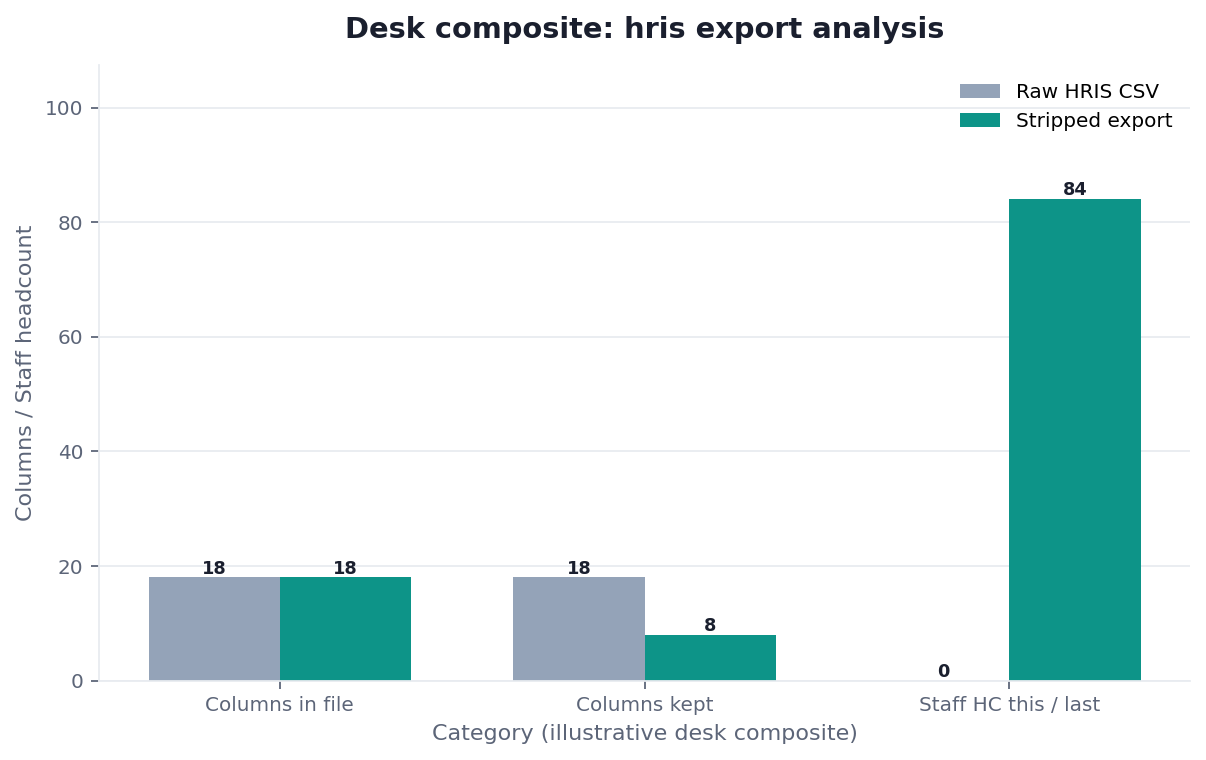
Figure. Desk composite from this page: August HRIS CSV: 18→8 columns; two Excel lookup tabs deleted; Staff 84 vs 79. Published context: numpy.org; developer.mozilla.org; web.dev. Not a customer experiment, SLA, or official benchmark.
| Evidence class | What you can cite | What you cannot claim |
|---|---|---|
| Desk composite on this page | Grain, collision, inspectable artifacts | Customer uplift %, vendor bake-off win |
| Published authority (linked above) | Frameworks and definitions from the cited sources | That those sources ran this desk sample |
Desk composite: eighteen columns to eight; Staff 84 vs 79; n<5 cells suppressed. Published context: NumPy documentation, MDN HTTP, web.dev security headers, NIST SP 800-171 Rev. 2, UK NCSC zero-trust architecture.
Email “for a join” was rejected. The desk log records that decision. The strip summary exposes the 18-to-8 reduction, two deleted tabs, 79/84 headcount, and three blank holds.
Evidence Boundaries and Independent Validation
The scenario is not employee or HRIS data, a customer case, representative sample, controlled study, benchmark, or proof of de-identification. The original workbook, exact column names, formulas, source rows, group sizes, and attack testing are unavailable; the script verifies the summary only.
Removing names and emails is insufficient when rare combinations, formulas, hidden objects, document metadata, linked workbooks, or external data can identify people. Production release requires workbook inspection, a documented threat model, and local privacy, legal, HR, security, statistical-disclosure, and worker-representation review.
The source check separates worker-data authority from technical sources. The open protocol defines an external test. As of 2026-08-31, no qualifying independent report, privacy audit, or quantified customer validation exists.
The released package supports inspection of counts, statuses, aggregate values, and decisions. It does not establish workbook completeness, anonymization, metric validity, legal compliance, or results elsewhere.
Defensible HRIS export analysis records each removed object and residual risk. Independent reviewers can challenge HRIS export analysis without endorsing InfiniSynapse. Credible HRIS export analysis publishes failures and corrections.
A production HRIS export analysis should preserve an inventory, date, workbook hash, reviewer, deletion record, retention limit, and exception log. Controls do not prove anonymity, but they let reviewers locate changes, challenge omissions, and stop release when evidence is incomplete.
How to Cite This Page
Page: Zhu, W., & InfiniSynapse Data Team. (2026). HRIS export analysis from CSV or Excel. InfiniSynapse. https://infinisynapse.com/en/blog/hris-export-analysis
Run: InfiniSynapse Data Team. (2026). Desk log HRIS-STRIP-20260823 (illustrative sanitized composite). https://infinisynapse.com/blog-media/hris-export-analysis/downloads/desk-log-HRIS-STRIP-20260823.md
Neither citation is an independent privacy audit, de-identification certification, or statistical study. Cite the unavailable workbook, three holds, illustrative values, and first-party limitation.
Scorecard: Safe to Load
| Check | Yes | No |
|---|---|---|
| Names, emails, IDs, and comments are gone | Load | Strip first |
| Every Excel tab was opened | Load | Open the hidden sheets |
| Grain cannot identify a person | Ask | Raise the grain |
| Suppression rule is written | Ask | Write it |
| Headcount and attrition sentences are bound | Ask | Bind them |
| Question is a count, rate, or family total | Ask | Rewrite |
| You will not use the output to score a person | Ask | Stop; this is not HRIS export analysis |
If any of the first three rows is “No,” you do not have HRIS export analysis. You have a leak.
Failure Modes That Put Names Back
Email “for a join”
A “just this once” email column is not HRIS export analysis. It is a directory. Offer the band table instead. If a stakeholder wants the person, they already have HRIS.
Rare-role plus small office
A region with three engineers and one resignation is a name. HRIS export analysis must suppress. If you cannot suppress, you cannot publish. Hire month plus a unique title is also a name—roll the title to a family before you load.
Personal sheet beside the official strip
Joining a “sanitized” file to a personal workbook in the same task undoes the strip. HRIS export analysis ends at the official extract. Do not get clever. A team of four is also a list of names—raise the grain or refuse the ask.
Before you send an export pack, confirm the file was stripped, every tab was opened, and no cell is a singleton. If you cannot confirm those, do not send the pack.
Route the same diagnosis to the live guide that owns the next object. Each row is a single hop, not a reading dump.
| Live guide | Open it when |
|---|---|
| people analytics privacy | a name could fall out of a cell |
| workforce analytics | the question is org shape or labor cost |
| what is data management | retention of the export sits before the ask |
| chat with your data | the next step is a question on an authorized file |
| Headcount Planning Analysis: Budget vs On-Role | Planning is a join of budget and on-role counts |
Upload a sanitized HRIS export and ask aggregates
Upload a stripped CSV or Excel extract, bind the headcount sentence, and ask a band-level question. This check uses only sources you authorize.
Commercial association: You do not need the workspace to complete the educational diagnosis on this page.
Open InfiniSynapseHow this page is sourced. William Zhu is cofounder of InfiniSynapse (GitHub @allwefantasy); no personal LinkedIn, HR/statistics credential, privacy certification, employment-law qualification, or independent auditor role is claimed. His profile establishes authorship, not independent qualification. Desk decisions are recorded in run HRIS-STRIP-20260823. Reviewed internally by analytics engineering · data platform · LLM security · editor. Editorial standards · corrections · publishing principles. COI: InfiniSynapse sells an AI-native Data Agent. NIST, UK ICO, NCSC, MDN, web.dev, and NumPy did not validate the run. This is not employment, privacy, statistical, tax, or legal advice.
Frequently Asked Questions
Is HRIS export analysis the same as connecting the HRIS?
Bottom line: No. HRIS export analysis uses the file you were allowed to download. It does not invent a native HRIS connector, and it does not write back. If you later land a stripped replica, the same strip and grain rules still apply.
Can I leave employee ID so I can debug a row?
Bottom line: No. An ID in the ask is a name with extra steps. HRIS export analysis debugs at band, region, and tenure. The HRIS already holds the row. Do not copy it into the pack.
What if a cell is smaller than five?
Bottom line: Suppress it. HRIS export analysis that publishes small cells is identification. Raise the grain or hide the cell, and hide the complement when leftover math would name someone.
Which fields may I keep in the CSV or Excel file?
Bottom line: Role family, band, region, hire and termination months, employment type, cost center, and flags. Leave names, emails, comments, IDs, and telemetry out. HRIS export analysis does not need them.
Can readers verify the workbook was fully stripped?
Bottom line: No. The original workbook is unavailable. The summary makes counts and decisions inspectable, not the workbook contents or formulas.
Has an independent practitioner reproduced this run?
Bottom line: No qualifying report exists as of 2026-08-31. The protocol defines an external workbook test; the script checks first-party summary outputs only.
Conclusion
HRIS export analysis is a strip-first habit: open every tab, delete the directory, lock two sentences, ask at a band, suppress small cells, keep a pack a reviewer can reopen. The export is a source. Names do not leave the room.
Run the scorecard before you upload. If a name could fall out of a cell, the file is not ready. When you want to upload a sanitized HRIS export and ask aggregates, open InfiniSynapse and ask only what a band can answer.