ClickHouse Dashboard: Verify a Reproducible Fixture
By William Zhu & the InfiniSynapse Data Team · Published: 2026-08-22 · Last updated: 2026-08-31 · Last verified: 2026-08-31 · Next review: 2026-11-30 · Editorial standards · Corrections
Table of Contents
- TL;DR
- Evidence Boundary
- What the reproducible fixture is
- Practical Static Replay
- Contract and deterministic calculations
- SQL draft: intent, not execution evidence
- Chart construction
- Independent Validation
- Sources and Limited Claims
- Failure modes
- How to Cite This Pack
- Frequently Asked Questions
- Conclusion
TL;DR
This clickhouse dashboard package is a deterministic, synthetic aggregate fixture. It contains authored counts for two fixed UTC periods, an explicit JSON contract, expected output, panel-ready chart data, a non-executing SQL draft, assumptions, provenance notes, a reproduction protocol, and an offline Python verifier.
Direct answer: Use this clickhouse dashboard to reproduce arithmetic and chart projections without connecting to a database. The verifier excludes rows marked internal, calculates prior/current counts and signed differences, applies the disclosed ordering, handles a zero prior denominator as
not_calculated, and compares exact files. It does not execute ClickHouse SQL or establish compatibility, pruning, performance, freshness, or operational correctness.
The numeric clickhouse dashboard values are authored synthetic statistics reproducible from the CSV, not empirical, customer, product, warehouse, or ClickHouse statistics. No 24-hour query ran; prior and current are fixture labels.
Evidence Boundary
The clickhouse dashboard evidence is the pack and derived image. Input has only period,event_name,event_count,is_internal. Rows are authored aggregate counts, not raw events or records.
No driver, network, SQL client, subprocess, warehouse copy, task system, board product, or private deployment is involved. No source, user, agent board, review action, or meeting use is claimed. Editorial review is not independent.
This boundary remains unchanged when the files are copied, mirrored, or cited.
| Question | The fixture can establish | It cannot establish |
|---|---|---|
| Inputs | CSV schema, authored aggregate rows, nonnegative integer counts | Raw-event completeness or source lineage |
| Windows | Fixed UTC labels and closed-open bounds in JSON | That any database was queried during either window |
| Calculation | Exact grouping, exclusion, deltas, ordering, and denominator policy | Business validity or metric usefulness |
| SQL | Text contains the intended bounds, grouping, and exclusion predicate | Parser acceptance, permissions, plans, pruning, or results |
| Chart | Two panels project the published chart-data CSV | Freshness, runtime, performance, or a production result |
The contract sets freshness.status to synthetic_fixture_no_freshness_claim. That status is intentionally not a timestamp or service-level statement. A clickhouse dashboard built from this pack must retain that boundary wherever the values appear.
What the reproducible fixture is
Key Definition: On this page, a clickhouse dashboard is a static two-panel visualization whose values are deterministically derived from a published synthetic aggregate CSV under a published contract. It is an educational fixture, not evidence of a ClickHouse execution.
The clickhouse dashboard uses adjacent UTC intervals: prior is [2026-08-29, 2026-08-30) and current is [2026-08-30, 2026-08-31). Grain is event_name; internal rows are excluded.
Repeated names, internal rows, an absolute-change tie, and a zero denominator exercise the clickhouse dashboard rules. Sort is abs(delta) descending, then name ascending. Percent change uses four decimals; zero prior yields not_calculated.
Online analytical processing, Google’s SRE book, CISA AI, McKinsey’s State of AI, and Amazon Redshift documentation are historical context only; they did not validate this clickhouse dashboard.
Practical Static Replay
Download these nine clickhouse dashboard artifacts into one directory:
aggregate-input-CHD-20260831.csv— authored aggregate rows with no raw records.dashboard-contract-CHD-20260831.json— bounds, grain, filter, ordering, denominator behavior, and evidence status.expected-output-CHD-20260831.csv— deterministic prior/current/delta output.chart-data-CHD-20260831.csv— exact two-panel projection in contract order.clickhouse-sql-draft-CHD-20260831.sql— prominently non-executing text showing query intent.assumption-register-CHD-20260831.csv— disclosed assumptions and limits.external-source-check-CHD-20260831.md— direct-source map, retrieval dates, and claim boundaries.independent-reproduction-protocol-CHD-20260831.md— clean-room steps and independence criteria.verify-CHD-20260831.py— standard-library, offline verifier.
Run python3 verify-CHD-20260831.py from that directory. A successful clickhouse dashboard replay prints a scope disclaimer and PASS. The verifier enforces the schema, two period labels, booleans, names, nonnegative integer counts, duplicate aggregation, and internal-row exclusion.
The script recomputes every expected clickhouse dashboard row, enforces sorting and zero-denominator behavior, derives both panels, and compares exact serialized values. It also checks contract windows and the draft’s warnings, UTC bounds, internal exclusion, grouping, and read-only shape. SQL checks are narrow text checks, not a parser.
Contract and deterministic calculations
For each name, the clickhouse dashboard sums non-internal aggregate rows; missing pairs become zero:
delta = current_count - prior_countabs_delta = abs(delta)percent_change = round(delta / prior_count × 100, 4)when prior is nonzeropercent_change = not_calculatedwhen prior is zero
The clickhouse dashboard output sorts on absolute change descending and event name ascending. Chart data repeats that sequence for prior_vs_current and signed_delta; it adds no statistic. Because input rows have period labels rather than timestamps, the verifier checks labels against contract windows instead of assigning observations to time. A raw-event method would require timestamps and a deduplication policy. The machine-readable contract makes timezone, bounds, grain, filter, order, rounding, and denominator behavior explicit.
SQL draft: intent, not execution evidence
The SQL begins DO NOT EXECUTE. It hypothetically aggregates synthetic_events using the contract bounds and event-name grain. Its predicate records intent only.
ClickHouse documentation separates mechanisms that are often conflated. MergeTree describes table organization; partitions explains partition behavior; and EXPLAIN describes plan inspection (retrieved 2026-09-04). A bounded predicate in this clickhouse dashboard draft does not show that parts, granules, or bytes would be skipped.
system.query_log may contain post-execution information, but this pack has no record. It has no connection, version, DDL, parse, plan, execution, result, latency, scan, or compatibility evidence. Expected CSV values come only from aggregate input.
Chart construction
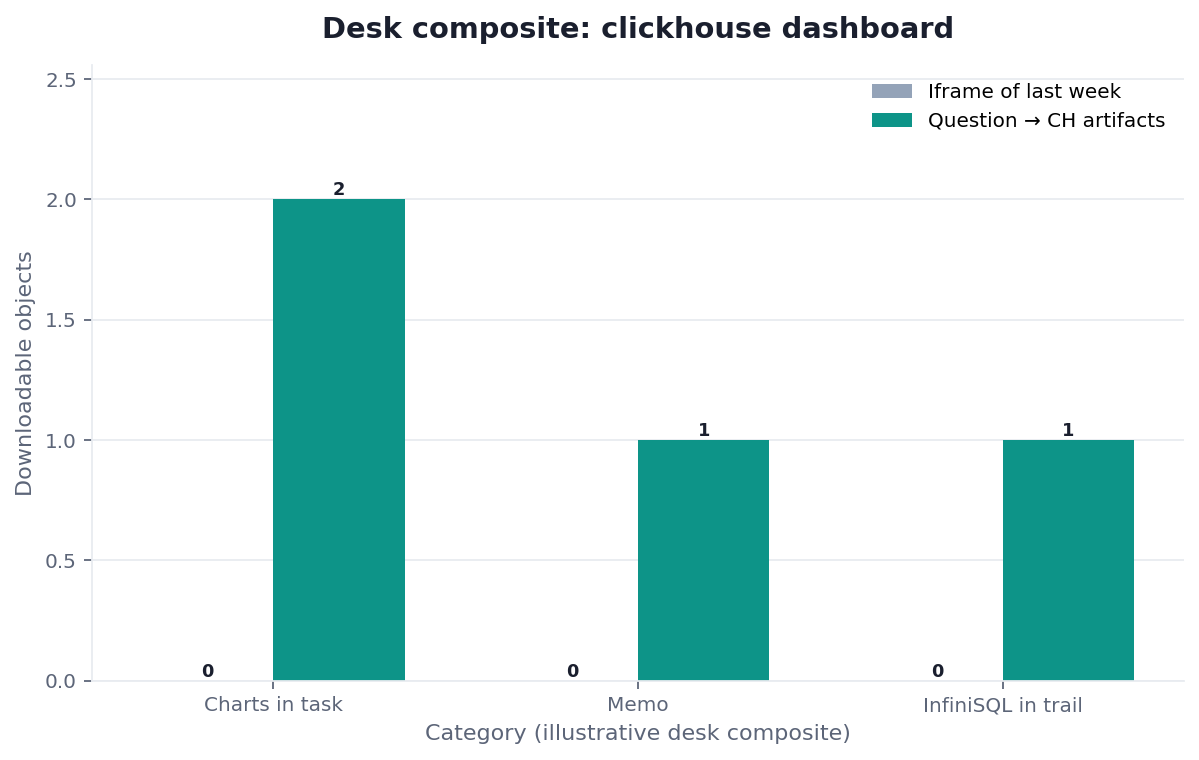
Figure. SYNTHETIC AGGREGATE FIXTURE. NOT A CLICKHOUSE RUN. NO FRESHNESS CLAIM. Values are an exact projection of chart-data-CHD-20260831.csv; they are authored, not empirical.
The upper panel compares counts; the lower clickhouse dashboard panel shows signed delta. Labels follow contract order. Every value is in chart-data CSV, which the verifier reconstructs.
Vega-Lite provides declarative-specification context; it did not render this PNG. Grafana observability as code and Git Sync provide version-control context; they did not test this artifact. Retrieved 2026-09-04.
Independent Validation
An independent reviewer must not have authored this clickhouse dashboard pack or article. The reviewer should obtain all nine files in a clean directory, record hashes, inspect the contract, run the verifier with a documented Python version, and independently check the calculations. The protocol records environment, UTC time, command, exit status, output, hashes, deviations, and conflicts. Internal reruns show repeatability, not independence.
No outside attestation was available at publication. This clickhouse dashboard is reproducible, not independently validated. A clean outside replay would cover only the fixture transformation, not an audit, database test, security assessment, compliance opinion, certification, or readiness review.
The W3C PROV data model (retrieved 2026-09-04) provides vocabulary for provenance relationships. The OWASP Input Validation Cheat Sheet (retrieved 2026-09-04) supports the general practice of validating untrusted inputs. Neither source endorses this verifier or proves that its checks are exhaustive.
Sources and Limited Claims
Direct sources retrieved 2026-09-04 support limited background: EXPLAIN, partitions, MergeTree, and system.query_log explain mechanisms but provide no clickhouse dashboard plan, pruning, table, or run evidence. Grafana observability as code and Git Sync provide version-control context, not a Grafana test. Vega-Lite, W3C PROV-DM, and OWASP input validation provide specification, provenance, and validation context, not rendering, attestation, or security evidence.
The external-source checklist records URL, retrieval date, topic, and unsupported inference. A citation in the clickhouse dashboard schema means only that it informed limited text.
Internal navigation is context only: ClickHouse analytics, connect ClickHouse to AI, real-time OLAP analysis, event analytics, ClickHouse vs warehouse, OLAP SQL, AI data analysis, AI dashboard generator, data visualization, exploratory analysis, data agent, and dashboard. None validates this clickhouse dashboard.
Failure modes that fake a clickhouse dashboard
Calling synthetic values observed statistics
The counts are authored. Presenting them as traffic, adoption, incident, funnel, or customer evidence would cross the clickhouse dashboard evidence boundary. Cite the aggregate CSV and call the values synthetic.
Treating predicates as pruning proof
The SQL draft has bounded time text, but no actual DDL or plan. Partition and ordering choices determine whether predicates help skip data. This clickhouse dashboard cannot support a pruning, cost, speed, or scale claim.
Treating a verifier PASS as SQL validation
PASS means the fixture files agree under disclosed Python rules. It does not mean ClickHouse accepts the draft. The clickhouse dashboard verifier performs no network, parser, dialect, privilege, or execution check.
Claiming freshness from fixed bounds
Fixed dates improve reproducibility; they do not establish recency. The status is synthetic_fixture_no_freshness_claim. A clickhouse dashboard consumer must not replace that status with “live,” “real time,” or “fresh.”
How to Cite This Pack
Suggested citation: “InfiniSynapse, ClickHouse Dashboard: Verify a Reproducible Fixture, synthetic aggregate replay pack, version 2026-08-31, https://infinisynapse.com/en/blog/clickhouse-dashboard-from-question.”
State the input hash, contract version, output equality, chart equality, verifier and Python versions, date, and deviations. For a script-only rerun, say “reproduced the published clickhouse dashboard fixture result.”
Do not call this a third-party audit, independent validation, database execution, production review, benchmark, security test, or ClickHouse result. Internal editorial review does not change that boundary.
Reproduce the fixture before adapting it
Download all nine files, inspect the authored aggregate rows and contract, then run the offline verifier. No account or database connection is required.
Commercial association: InfiniSynapse publishes this educational pack and sells an AI-native Data Agent. The fixture does not test that product.
Open InfiniSynapseDisclosure and accountability. William Zhu is cofounder of InfiniSynapse (GitHub @allwefantasy); no personal LinkedIn is published. Internal analytics engineering, data platform, LLM security, and editorial reviewers are not independent validators. See About, Privacy, Terms, editorial standards, corrections, and publishing principles. Contact zhuhl@infinisynapse.com. Company About.
Frequently Asked Questions
Did this package query ClickHouse?
Bottom line: No. The SQL is a non-executing draft. The numeric clickhouse dashboard values come only from the authored aggregate-input CSV.
Are these raw events?
Bottom line: No. Every input row is a synthetic aggregate count keyed by period, event name, and internal-status flag.
What does PASS establish?
Bottom line: For this clickhouse dashboard, PASS establishes agreement among contract, aggregate sums, expected output, chart data, and narrow SQL-text requirements—not database behavior.
Why is percent change not calculated for one row?
Bottom line: Its prior count is zero. This clickhouse dashboard contract requires not_calculated, not infinity or an invented percentage.
Is the fixture independently validated?
Bottom line: No outside attestation was available at publication. The protocol explains how an independent reviewer can reproduce the limited result.
Conclusion
A defensible clickhouse dashboard starts with a bounded claim. Here, the claim is only that public synthetic aggregate rows deterministically produce the published expected output, chart data, and two-panel PNG under a disclosed contract. The verifier makes that transformation inspectable and repeatable.
Use the pack to test an implementation, not infer a database result. Before adapting this clickhouse dashboard, define lineage, permissions, schema, timezone, deduplication, execution controls, plan evidence, and freshness separately.