Real-Time OLAP Analysis: Review Engine vs Cache
By William Zhu & the InfiniSynapse Data Team · Published: 2026-08-22 · Last updated: 2026-08-31 · Last verified: 2026-08-31 · Next review: 2026-11-30 · Editorial standards · Corrections
Table of Contents
- TL;DR
- What real-time OLAP analysis actually is
- Evidence Boundary
- A framework for freshness vs cache
- Methods: engine read vs tile refresh
- Tool landscape around freshness claims
- Implementation steps
- Desk sample: last 24 hours versus a 20-minute tile (illustrative)
- Scorecard: engine-now vs board-later
- Practical Static Replay
- Sources and Limited Claims
- Failure modes
- Frequently Asked Questions
- Conclusion
TL;DR
Direct answer: Real-time olap analysis is a property of the engine you query, not of a tile that redraws. This static pack is HOLD / NOT READY FOR EXECUTION: no cluster, part, grant, query log, or tile was observed. Replay the authored ingest, query, and display clocks plus two policy rejects offline. The verifier proves file agreement only.
The phrase real-time olap analysis is the object under review. If a file cannot show how the clocks were locked, reject the number. This is not a customer study, SLA, or third-party audit.
What real-time OLAP analysis actually is
Key Definition: In this guide, real-time olap analysis means asking a dated question against current parts in ClickHouse and treating the opened SQL as the freshness proof. Near-real-time is whatever ingest already delivers. An agent does not make Kafka faster. It can avoid adding a cache older than the parts you could have scanned.
The parent method is ClickHouse analytics: events stay in the engine, filters push down, SQL stays inspectable. This page is only the freshness fight. If you cannot say whether the number came from a part merge or from a tile built twenty minutes ago, you do not have real-time olap analysis. You have a screenshot with a clock.
A cached board is not a sin. It is a contract: we accepted staleness for layout speed. The sin is briefing a room as if the tile were the cluster. Dashboard design still matters after the engine query lands. Generate the board as a task artifact. Do not let the board become a second clock.
Help-center software already teaches the same split. Zendesk’s help center (retrieved 2026-09-04) is a cached answer surface; the live ticket is a different object. Treat your product board like the help article and your ClickHouse query like the live ticket. If you treat the tile as real-time olap analysis, you will lose the argument when ingest moved.
Evidence Boundary
This is a synthetic, static, NON-EXECUTING freshness fixture (RTA-20260831). No ClickHouse host, insert, part, merge, TTL, grant, query, query log, tile refresh, warehouse copy, task, board, or production workflow was observed.
The package does not claim that anyone connected read-only, asked a dated question, finished in minutes, opened generated SQL, or skipped a warehouse copy. To operationalize real-time olap analysis, each claim needs evidence.
ClickHouse INSERT and system.parts pages (retrieved 2026-09-04) describe how rows land and how parts are listed. They do not inspect this fixture.
A framework for freshness vs cache
Write three clocks before you debate vendors. Teams that skip the clocks still attempt real-time olap analysis, then argue about a number that was never live.
| Clock | Engine-native signal | Cached-board signal | Fixture state |
|---|---|---|---|
| Ingest | Parts visible for the last 15 minutes to last day | Yesterday’s mart is enough | HELD |
| Query | Predicate on the partition column, statement opened | A semantic extract already froze the grain | authored draft only |
| Display | Memo or board generated after this query | A tile with its own refresh interval | 20-minute interval authored, not observed |
| Audit | SQL in the task matches the engine dialect | “It looked like this on my laptop” | HELD |
Ingest freshness is not a product feature
ClickHouse is as fresh as the last successful insert and the last merge you are willing to read. Real-time olap analysis cannot invent rows that have not landed. If the pipeline stalls, the honest answer is “parts stop here,” not a smoother chart.
ClickHouse MergeTree and TTL docs (retrieved 2026-09-04) describe merges and expiry. They do not prove this fixture’s parts exist.
Name the timestamp column and the partition key in the knowledge-base note you bind to the source. If TTL drops old parts, say so. An agent that apologizes for missing months you never retained is not failing real-time olap analysis. It is missing a note.
Display freshness is a contract you write down
A board that refreshes every twenty minutes is a cache. Write the interval on the artifact. If the question is “what jumped in the last 24 hours,” the engine is the truth. If the question is “the weekly pack we always show,” freeze a moment after the engine query lands. That is data visualization after the aggregate exists, not a reason to draw first.
Methods: engine read vs tile refresh
Three methods show up in the same incident channel. Only one of them is real-time olap analysis.
| ID | Candidate | Outcome | Why |
|---|---|---|---|
RTA-Q1-CLOCKS | ingest, query, display named | QUALIFIED FOR STATIC REVIEW | authored in the clock register |
RTA-Q2-ENGINE | partition predicate, explicit columns | QUALIFIED FOR STATIC REVIEW | policy-accepted text; DO NOT EXECUTE |
RTA-Q3-LIVE-TILE | “live” on a 20-minute tile | REJECTED AS UNSUPPORTED | display cache is not the engine |
RTA-Q4-NOW | “now” / SELECT * | REJECTED AS UNSUPPORTED | unbounded read |
Engine read with a partition predicate
Ask a window that matches how parts are stored. Push event_time or toDate(event_time) down. Aggregate in the engine. Open SQL. This is the method. It is closer to chat with your data than to a BI extract that copies yesterday and stamps “live” on the tile.
ClickHouse partitioning keys and SELECT (retrieved 2026-09-04) document the statement family. They do not lint this draft.
InfiniSynapse can leave inspectable SQL in a task. That surface is not evidence this pack ran, and it is not a millisecond SLA. If you need the login itself, start at connect ClickHouse to AI. If you need the funnel grain, continue in event analytics in ClickHouse.
Frozen board after an honest query
After the engine read, generate a board as a task file. Label the window on the chart. That board is allowed to be stale the next hour. What it must not do is pretend to be real-time olap analysis. The EU’s European approach to artificial intelligence (retrieved 2026-09-04) is a reminder that automated systems still need a human who can explain the number. Opening the SQL is that explanation.
A weekly pack can sit beside AI dashboard generator. Generate it after the predicate is safe. Do not start with the layout.
Tool landscape around freshness claims
The engine is ClickHouse. Boards, risk memos, and security certificates are neighbors. None of them make ingest faster.
Risk and security neighbors
The NIST AI Risk Management Framework (retrieved 2026-09-04) is the independent map for governing an AI system that can issue scans. Map the question, measure the grant, manage the blast radius. Real-time olap analysis that runs as cluster admin is not freshness. It is privilege. This pack did not observe a grant.
ISO/IEC 27001 (retrieved 2026-09-04) is the independent information-security management contract. Use it when someone wants production events in a prompt. Least privilege and sanitized samples still apply when the query is called live.
Adoption reports are not a freshness SLA
McKinsey’s State of AI (retrieved 2026-09-04) describes how organizations adopt AI. It does not certify that your tile is current. Cite it for adoption context. Do not cite it as proof that real-time olap analysis happened on your cluster.
An AI-native board from InfiniSynapse is a task artifact, not a second event store. If a vendor requires you to land events in their cache before you can ask a 24-hour question, they are selling display freshness and calling it the engine.
Implementation steps
These steps replay real-time olap analysis offline.
- Open
clock-register-RTA-20260831.csvand confirm ingest, query, and display rows. - Compare
accepted-engine-query-RTA-20260831.sqlwith the rejected “now” draft as policy text. Do not execute. - Reconcile
freshness-decision-register-RTA-20260831.csv: Q3–Q4 rejected; Q1–Q2 static-only. - Read the assumption register and held-evidence list. Leave cluster and tile facts unresolved.
- Run
python3 verify-RTA-20260831.pyfrom the downloads directory.
A passing local check does not authorize real-time olap analysis on any cluster. It reports file agreement only.
For a later authorized review, collect owner approval, insert and part evidence, the partition-aligned timestamp, SHOW GRANTS FINAL for a SELECT-only principal, one bounded question, the opened statement plus a query identifier, and a labeled tile interval if a board exists. Until those exist, keep HOLD on real-time olap analysis.
Desk sample: last 24 hours versus a 20-minute tile (illustrative)
Static fixture, not a latency SLA and not a customer experiment. Source: an authored day-partitioned event contract plus a 20-minute tile interval in the display-clock row. Goal text: last 24 hours versus the prior 24 hours, ranked by absolute change.
The accepted draft names event_time in a half-open UTC window and lists explicit columns. The lint register rejects a “live” label on that authored tile and rejects an unbounded “now” read. Real-time olap analysis is static-ready where the clocks exist and rejected where a cache is briefed as the engine.
| Evidence class | What you can cite | What you cannot claim |
|---|---|---|
| Static pack on this page | Window, authored tile interval, inspectable SQL text | Customer uplift %, minutes, sub-second SLA |
| Published authority (linked) | Frameworks and definitions from the cited sources | That those sources ran this fixture |
Labels stay illustrative. Published context: NIST, ISO/IEC 27001, EU AI approach, McKinsey State of AI, Zendesk help, and ClickHouse docs retrieved 2026-09-04.
Scorecard: engine-now vs board-later
| Decision | Prefer engine read | Prefer cached board |
|---|---|---|
| Question | What jumped in the last hours | The weekly pack we always show |
| Staff habit | On-call already queries ClickHouse | On-call already ships a frozen deck |
| Risk | You can open SQL in the task | You can label the refresh interval |
| Output | Ops memo, live-ish artifact | Layout-stable board |
| Copy | None required | Allowed after the query lands |
Prefer real-time olap analysis when the on-call already trusts the cluster and the question is an event window. Prefer a cached board when the meeting needs a frozen grain. Running both is normal. Labeling a cache as live is the expensive habit. If the brief cannot point to an opened predicate, it is not real-time olap analysis.
Practical Static Replay
Replay real-time olap analysis as a file comparison: freeze RTA-20260831, confirm the three clocks, confirm the accepted draft has a partition-aligned predicate, confirm Q3–Q4 are policy rejects, then keep verifier output and hashes.
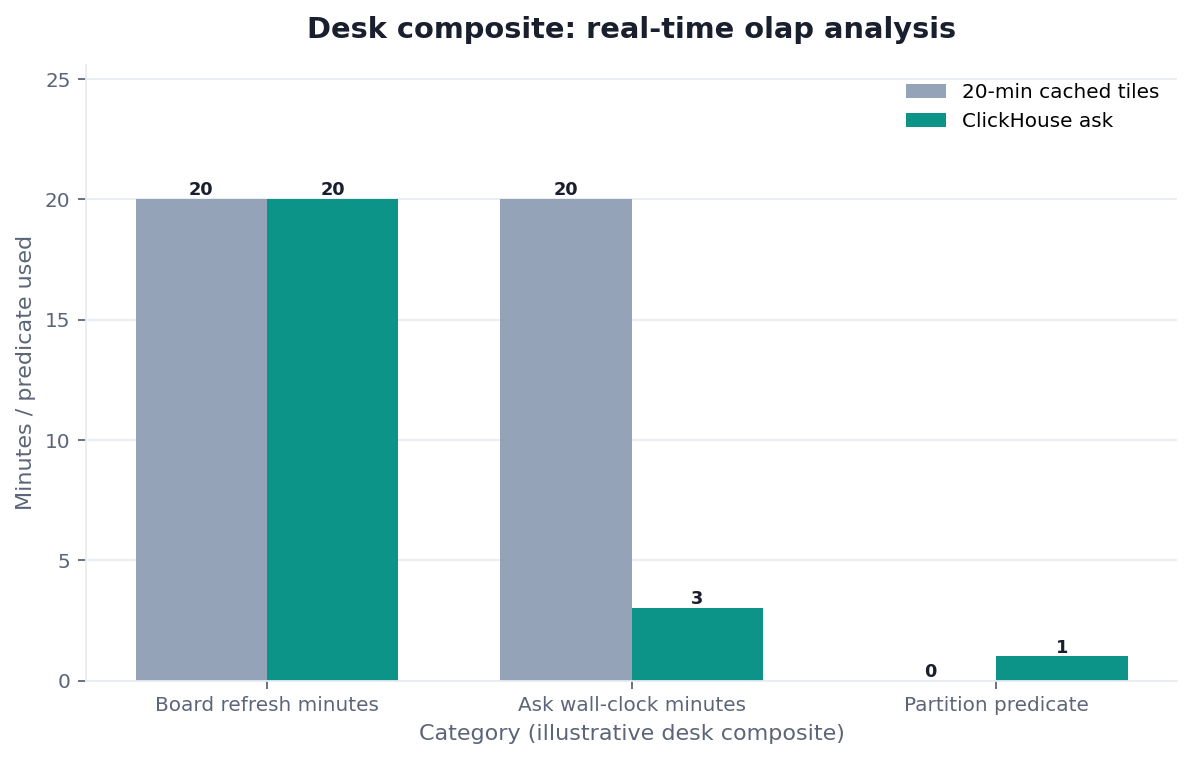
Figure. STATIC FIXTURE / NOT EXECUTED / NOT INDEPENDENTLY VALIDATED. Authored clocks and policy rejects only; no runtime or customer result.
Passing this replay means the real-time olap analysis files agree. It does not prove ingest, partition pruning, tile refresh, or production suitability. Record Python version, OS, hashes, HOLD output, and deviations. A second rerun shows repeatability, not independence.
Sources and Limited Claims
Direct official sources were retrieved on 2026-08-31. ClickHouse INSERT, system.parts, MergeTree, TTL, partitioning keys, and SELECT resolved HTTP 200. They describe inserts, parts, merges, and statements. They do not validate this fixture. Re-check those URLs later.
Original third-party pages are retained: NIST AI RMF, ISO/IEC 27001, EU AI approach, McKinsey State of AI, and Zendesk help. None audited real-time olap analysis on this page. Some hosts returned 403 or were unreachable; keep the original URLs and re-check later.
Internal review is not independent validation. A qualified reviewer would need owner approval, live part or insert evidence, effective grants, one authorized statement, a labeled tile interval if a board exists, and versions. Until then this pack is not a third-party audit, certification, benchmark, or customer case. If a reviewer only reran Python, say so.
How to cite. InfiniSynapse, Real-Time OLAP Analysis: Review Engine vs Cache, RTA-20260831, HOLD / NOT READY FOR EXECUTION, not independently validated. Name the files.
Downloads:
- Clocks
- Accepted query
- Rejected now
- Tile interval
- Decision register
- Expected readiness
- Review rules
- Held evidence
- Assumptions
- Source check
- Reproduction protocol
- Verifier
Failure modes
The engine will execute a wide scan quickly. Freshness is not a virtue if the plan is SELECT *. This pack did not run it.
Calling a cache “live”
A tile that redraws every twenty minutes is not real-time olap analysis. Write the interval on the artifact. If you cannot, you cannot brief an incident.
Asking “now” without a grain
“What is happening now” produces unbounded reads. Put the window in the goal. Match the partition key. Reject the task if the predicate is missing.
Trusting a paragraph without opening SQL
A fluent summary that cites “the last hour” without a visible predicate is not real-time olap analysis. It is prose. Open the statement. If you cannot, you cannot page anyone.
Before you connect, write down the timestamp column, the partition key, the read-only user, and the single 24-hour question. If you cannot name those four, you are not ready to spend a ClickHouse scan. If you can, inspect SQL text—do not refresh a tile and hope.
| Live guide | Open it when |
|---|---|
| ClickHouse analytics | you need the parent method for events that stay in the engine |
| connect ClickHouse to AI | the login and grant are still missing |
| event analytics in ClickHouse | the question is a funnel, not a freshness argument |
| ClickHouse vs Warehouse for AI Questions | Events can stay; certified grains can still live in a warehouse |
| OLAP SQL for Agents | Agent-friendly tables have a time column and a grain |
| ClickHouse Dashboard from One Question | The board is a task artifact on the same engine |
Review the query clock before any live label
Name the window, partition predicate, and tile interval, then reject a live label on a cached board. This check uses only sources you authorize.
Commercial association: You do not need the workspace to complete the educational diagnosis on this page.
Open InfiniSynapseHow this page is sourced. William Zhu is cofounder of InfiniSynapse (GitHub @allwefantasy); InfiniSynapse on GitHub. Company self-description, not independent authority. Reviewed internally by analytics engineering · data platform · LLM security · editor. Editorial standards · corrections · publishing principles · About · Privacy · Terms · Contact zhuhl@infinisynapse.com. Company About. COI: InfiniSynapse sells an AI-native Data Agent; the banner is a commercial association. Fact-check: nist.gov · iso.org · europa.eu · zendesk.com · mckinsey.com · clickhouse.com. No external organization audited it.
Frequently Asked Questions
Is this real-time or near-real-time?
Bottom line: You get whatever freshness the cluster already has. Real-time olap analysis with an agent does not accelerate ingest. It avoids adding a cache older than the parts you could have queried.
Can a cached board ever be the right object?
Bottom line: Yes, when the meeting needs a frozen grain and you label the refresh interval. It is the wrong object when you are paging about the last hour and calling it real-time olap analysis.
How do I keep the agent from scanning the whole cluster?
Bottom line: Put the time window in the goal, match the partition key, and reject SELECT *. The engine will happily scan everything you allow. This fixture did not measure a real-time olap analysis scan.
Do I have to warehouse events to make them feel live?
Bottom line: No. If events already live in ClickHouse, authorize a read-only user and ask. A warehouse copy is for certified grains, not for real-time olap analysis of the last 24 hours.
Conclusion
Real-time olap analysis is a freshness, partition, and SQL-inspection habit. Keep events in the engine that already ingests them. Ask a dated question after the clocks are named. Open the predicate. Generate a board only after the SQL is boring, and label that board as a cache if it sits for an hour.
A tile that redraws is not the cluster. Write real-time olap analysis into the task goal the same way you would say it in the room. InfiniSynapse describes itself on About. Privacy and Terms apply. If you later use the workspace, open InfiniSynapse only with authorized, sanitized inputs.