Bind Knowledge Base to One Replica, Then Ask Twice
By William Zhu (public engineering profile: GitHub @allwefantasy) & the InfiniSynapse Data Team · Published: 2026-08-22 · Last updated: 2026-08-31 · Last verified: 2026-08-31 · Next review: 2026-11-30 · About · Editorial standards · Privacy · Publishing terms · Corrections
Table of Contents
- TL;DR
- What it means to bind a knowledge base
- Author qualifications and accountability
- A one-source binding framework
- Why one pack should meet one database
- Tool landscape for an explicit bind
- Implementation steps for the first bind
- Desk sample: two replicas, one unbound pack (InfiniSynapse desk log)
- Evidence boundaries and external validation status
- How to cite this page
- Selection scorecard
- Failure modes that break the bind
- Frequently Asked Questions
- Conclusion
TL;DR
We evaluate named binds at the InfiniSynapse desk on sanitized composites; first-party figures on this page are desk log KB-BIND-REPLICA-20260822, not customer uplifts and not a third-party bake-off.
Direct answer: To bind knowledge base notes to a database is to make an explicit join: this pack may be retrieved only while this live source is in scope. Upload is not the bind. Chat is not the bind. Bind one knowledge base to one live database at a time, then name a second bind if a second schema needs its own notes.
What you'll learn:
- Why you must bind knowledge base packs instead of hoping retrieval “finds the right folder”
- How one source can hold several packs without mixing finance and ops language
- How to bind knowledge base files, then ask the same goal twice
- Desk log
KB-BIND-REPLICA-20260822, where last year’s replica stole this year’s definition - A scorecard and three failure modes that look like a bind and still leak
Download evidence: desk log · aggregate CSV · verify script · external-source check · independent-reproduction protocol. These files record this bind knowledge base desk run as a first-party sanitized composite—not raw, customer, benchmark, or third-party data.
Industry context stays independent of desk claims. The Stanford HAI AI Index (retrieved 2026-09-04) reports a widening gap between rapid AI integration and the frameworks needed to govern, evaluate, and understand it. That finding supports explicit, replayable controls for source selection; Stanford HAI did not validate this page’s desk run.
What it means to bind a knowledge base
Key Definition: To bind knowledge base documents to a live database is to attach a named pack of field notes and signed reports to one authorized source so retrieval cannot wander into a neighboring schema’s memo. It is not a catalog tag, a chat attachment, or a promise that “the model will figure it out.”
External frameworks answer specific control questions. The NIST AI Risk Management Framework (retrieved 2026-09-04) supports mapping, measuring, and managing risk in AI systems. For this workflow, that means naming the source-to-pack mapping, testing retrieval against it, and retaining artifacts when it fails. This is our application of the voluntary framework, not a NIST assessment.
Internal terms this page uses: a pack is the named document set. A bind is the explicit source ↔ pack link. bind knowledge base on this page means that join after the click, not an upload and not a chat reminder.
Author qualifications and accountability
William Zhu is an InfiniSynapse cofounder. His public GitHub profile identifies that role and links engineering work. Public repositories include auto-coder, byzer-llm, and BYZER-RETRIEVAL. These links establish authorship and relevant open-source experience; they do not independently validate this bind knowledge base example.
The author is accountable to the site’s editorial standards, including correction and conflict-of-interest disclosures. InfiniSynapse sells the workflow described here, so product descriptions and desk results are first-party claims unless an external source is explicitly cited. The homepage records a 2026 WAIC Future Tech OPC Excellence Award for an Agentic Data Infra entry; that is company recognition, not a review of this page. Method note: 2026-07-29 attestation.
Tables do not announce which memo is legal. orders_prod and orders_replica_2025 can share column names and disagree on grain. If you bind knowledge base notes to the wrong one, the retrieved sentence is right and the count is wrong. If you bind nothing, retrieval averages every memo you ever uploaded.
Microsoft’s Azure database architecture guide (retrieved 2026-09-04) frames architecture choices around the data model, consistency requirements, query patterns, and operational preferences. Applied here, source identity and version belong in the bind rather than in an informal chat reminder. Microsoft did not review this design or desk log.
If you still need the analysis-versus-FAQ contrast, see the FAQ-versus-notes desk pass on the data knowledge base hub. If the missing object is the field dictionary itself, write schema documentation an AI analyst can retrieve. The hub for the binding model sits in data knowledge base.
A data agent only earns the next review when the bind knowledge base link is inspectable: named pack, named source, retrieved passage next to the plan.
Upload is not a bind
People finish an upload and call the job done. Retrieval can still see every other folder. The bind click is a separate act: this pack, this source, this task. Upload without bind is a pile.
InfiniSynapse’s path is Knowledge Base → upload TXT, Markdown, Word, PPT, or PDF → Bind Data Source → ask in Chat with that source selected. The bind does not write definitions back into production tables. It restricts retrieval while the agent reads sources you authorize.
One source can still hold several packs
A source is not monogamous. You can bind knowledge base packs for finance and for ops to the same orders database when margin is used two ways. Then say which pack the task should use. What you should not do is bind knowledge base notes from last year’s replica and this year’s warehouse in one anonymous dump. One pack, one live database, one decision domain—then a second named bind if you need a second domain.
This is also how you avoid a fake “metrics warehouse.” InfiniSynapse does not ship a prebuilt metric mart. It connects the database you already have and lets you attach notes you already wrote. This bind is a join, not a second warehouse.
A one-source binding framework
Use this table as the operating model. It is a control map, not a vendor score.
| Layer | What you name | What the agent may do | Failure if the bind is missing |
|---|---|---|---|
| Source | One authorized database or file set | Plan against that live schema | Answers invent tables |
| Pack | One knowledge base for one domain | Retrieve only that pack | The louder memo wins |
| Bind | Explicit source ↔ pack link | Keep retrieval inside the join | Last year’s replica answers this year |
| Task artifacts | Markdown, charts, data files | Show passage plus plan | Chat bubbles become the record |
The AWS Well-Architected Machine Learning Lens (retrieved 2026-09-04) organizes ML workload review around operational excellence, security, reliability, performance efficiency, and cost optimization. The relevant practice here is operational: document and test the source-to-pack control rather than rely on an unstated default. AWS did not test this implementation.
Name both sides of the join
Write the source name into the pack: “these notes describe orders_replica_2026, not orders_archive.” Write the pack name into the task: “use the finance bind.” A bind knowledge base that is only a silent checkbox will still retrieve the retired replica when someone asks “orders” and two databases share a nickname. Naming is part of the bind.
Exploratory data analysis still happens after the bind. The bind does not replace exploration. It stops exploration from citing a memo that belongs to a different engine.
Why one pack should meet one database
Shared drives encourage a company-wide corpus. Binding punishes that habit. When you bind knowledge base notes from three warehouses into one pack, retrieval returns a legal sentence from warehouse A and a query plan from warehouse B. The paragraph is fluent. The join is a lie.
One pack per live database is the default. The exception is several packs on the same database when owners disagree. The anti-pattern is one pack on several databases because “the columns look the same.” Columns that look the same are how status = 3 means active in one replica and pending in another.
Natural language to SQL can be syntactically perfect on the unbound source. The filter is legal. It is not your filter. A bind knowledge base is how you stop treating schema similarity as permission.
Cross-source questions need two binds, not one dump
Sometimes the question is a join across a warehouse and a file. Do not flatten both into a single dump. Keep each pack bound to its source, then let a multimodal question name both binds. If you cannot name both, you are not ready to ask the joint question.
The semantic layer is a different object: it compiles measures. A bind knowledge base step retrieves documents. You usually need both. You cannot replace the bind with a metrics DSL and hope the memo still arrives.
Tool landscape for an explicit bind
Three patterns show up in 2026 buying conversations.
Chat attachments. The file is in the thread. Nothing is bound. Next week’s thread starts from zero.
Warehouse copilots. Strong when a semantic layer already exists on one migrated warehouse. Weak when you need to bind knowledge base notes to a source you did not move. They rarely let you attach an arbitrary document pack to an arbitrary authorized database.
Named bind plus live query. Upload the pack, bind knowledge base files to one source, ask a goal, reopen artifacts. InfiniRAG retrieves the bound pack; InfiniSQL plans against the live schema.
Treat the bind as an owned production control, not as a convenience click. If nobody can say which source the pack is bound to, the system has a hope rather than an inspectable control.
What the desk actually binds
The desk’s working pair is short: a finance pack on a sanitized orders replica, and an ops pack on the same replica when the question changes owner. If you cannot copy a sentence out of the file, do not bind it.
The ISO/IEC 27001 overview (retrieved 2026-09-04) frames information-security management, while the NIST Privacy Framework (retrieved 2026-09-04) helps organizations identify and manage privacy risk. Applied here, those sources support access control, sanitization, and data minimization before a pack is attached. The OWASP GenAI/LLM Top 10 (retrieved 2026-09-04) adds prompt-injection and sensitive-information-disclosure risks: uploaded notes are untrusted input and should be screened before retrieval. None of these publishers evaluated InfiniSynapse or KB-BIND-REPLICA-20260822.
Implementation steps for the first bind
- Pick one source you are authorized to read. Prefer a replica or sanitized extract. Write its name down.
- Write or export a small pack: ten field notes and one approved report. Do not start by binding every file you have.
- Upload the pack, then bind knowledge base notes to that one source. Binding is a separate click from upload.
- Ask one goal in Chat with that source selected—not a request for a SQL snippet.
- Open the task artifacts. Confirm the retrieved passages belong to the pack you bound, not a neighboring folder.
- Ask the same goal again next week. If the bind knowledge base link held, the definition should not drift.
These steps are educational. You can finish the diagnosis on this page before you run the same bind knowledge base sequence in the app.
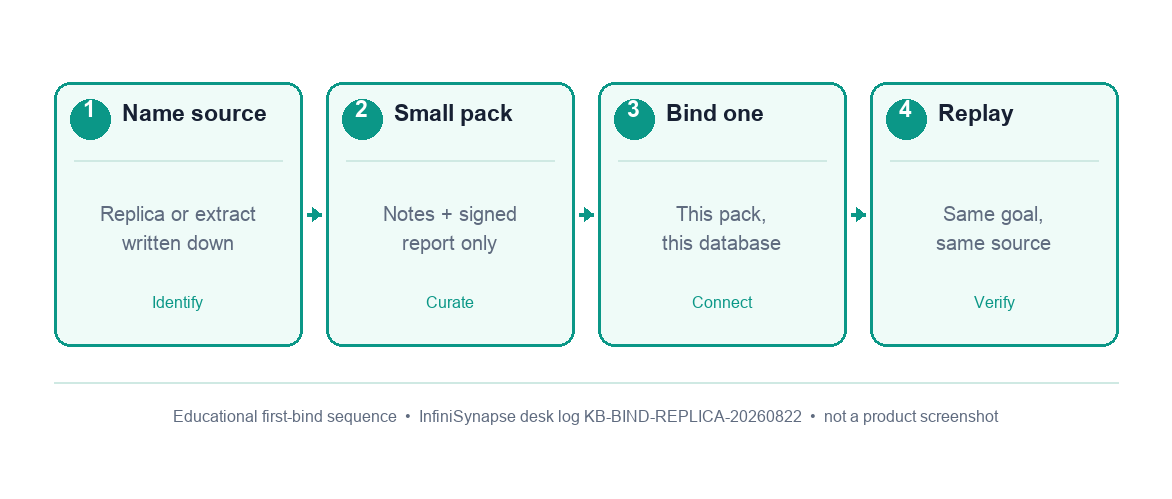
Figure. Educational first-bind sequence the desk uses before trusting a retrieved definition. Expected result after step 6: the same passage sits next to a plan against the named replica. Not a product screenshot or a customer SLA.
Write the source name into the notes
Retrievable notes use the words people ask and the source name people forget. Put “this pack describes orders_replica_2026” at the top. A bind knowledge base that omits the source name will still retrieve correctly until someone adds a second replica with the same nickname. The note is cheaper than the incident.
If two replicas exist, bind knowledge base packs separately. Do not write “orders” and hope.
Bind, then ask the same question twice
The acceptance test is boring: same source, same goal, same retrieved definition. If week two cites a different memo, the bind knowledge base link is wrong or the pack contains two owners. Fix the notes; do not “clarify” in chat and walk away. Chat is not the system of record.
If week two cites last year’s replica, you bound the wrong source. Rebind.
Desk sample: two replicas, one unbound pack (InfiniSynapse desk log)
This is a first-party InfiniSynapse desk log, not a named-logo customer case and not an uplift claim. Run ID: KB-BIND-REPLICA-20260822. Date: 2026-08-22. Operator: InfiniSynapse Data Team. Sources: a sanitized 16,400-row orders_replica_2026 extract and an 11,200-row orders_archive_2025 extract the desk is authorized to read. Both shared column names. Goal asked twice: “What is last-month fee-excluded margin?”
The finance pack described 2026 fee exclusions. Without a bind knowledge base step, the first answer retrieved the 2026 sentence and counted 2025 rows.
| Retrieval state | 2026 replica rows used | 2025 archive rows used |
|---|---|---|
| Unbound (shared names) | 16,400 | 11,200 |
| Bound to 2026 replica | 16,400 | 0 |
| Retrieval state | SQL | Memo | Chart | CSV | Correct-source passages |
|---|---|---|---|---|---|
| Unbound (shared names) | 1 | 0 | 0 | 0 | 0 |
| Bound to 2026 replica | 1 | 1 | 2 | 1 | 2 |
Nothing in either database changed. The bind changed which schema was allowed to use those notes. Wall-clock for the bound rerun was 17 minutes (warehouse time excluded). Task artifacts kept the SQL, the retrieved passages, and a Markdown memo. Cite this table as InfiniSynapse desk log KB-BIND-REPLICA-20260822. Do not cite it as customer ROI, a bake-off win, an official EEAT score, or a Stanford / NIST / Gartner experiment. We do not publish named-logo customer cases on this page.
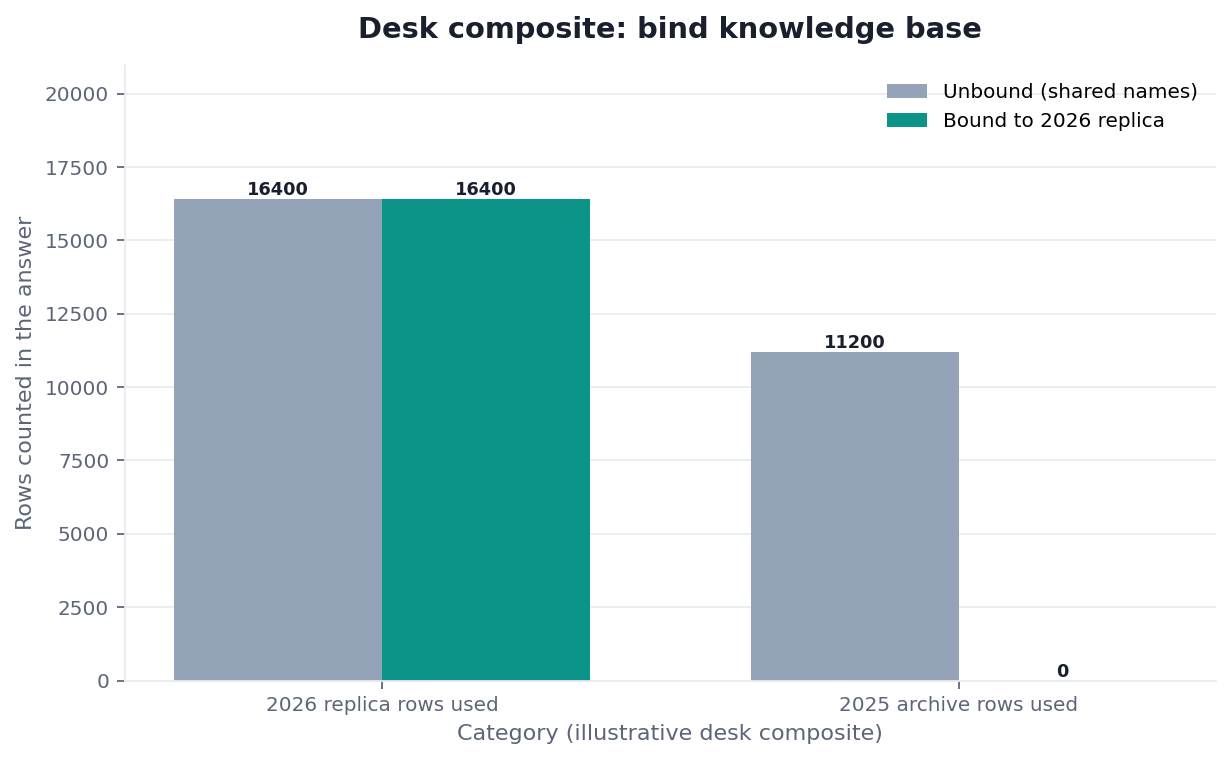
Figure. InfiniSynapse desk log KB-BIND-REPLICA-20260822: unbound retrieval mixed 16,400 + 11,200 rows; the 2026 bind used 16,400 and 0 archive rows. Published context: the independent sources linked in the body. Not a customer experiment, SLA, or official benchmark.
Evidence boundaries and external validation status
Desk log KB-BIND-REPLICA-20260822 is a first-party, reproducible sanitized-composite example. It is not a customer case, independent benchmark, certification, media evaluation, or third-party dataset. The linked NIST, OWASP, Stanford HAI, AWS, Microsoft, and ISO materials inform control choices only; none reviewed the data, method, implementation, or reported figures.
No independent party had reproduced this desk log as of 2026-08-31. A third-party replication should disclose data grain and row count, source identity and version, pack version, the exact bind mapping, query and retrieval artifacts, model and prompt versions, unbound and bound results, run time, failures, and any commercial conflict of interest. Both confirming and conflicting outcomes should remain visible.
A credible bind knowledge base replication must make the source-to-pack mapping inspectable.
Verified review guidance and open reproduction
The UK Government Aqua Book, U.S. GAO reliability guide, and ASA Ethical Guidelines were checked 2026-08-31. They support quality assurance, source reliability, reproducibility, and disclosure; they do not endorse this workflow.
The external-source check records roles and non-endorsement. The independent-reproduction protocol requires two identified source versions, an exact mapping, unbound and bound controls, independent arithmetic, conflicts, and published failures. The verification script checks only the published aggregate rows; it cannot validate the private composites or independently prove a bind knowledge base result.
No qualifying external reproduction or media evaluation was located. Those signals require an unaffiliated publisher and cannot be created through page wording.
| Evidence class | What you can cite | What you cannot claim |
|---|---|---|
| Desk log on this page | Grain, collision, artifact counts, ~17 min wall-clock, run ID | Customer uplift %, official EEAT score, named-logo case |
| Third-party frameworks and architecture guidance | Published risk, privacy, security, reliability, and architecture principles | That any publisher ran or endorsed this desk log |
| Author profile and repositories | Public identity, cofounder role, and open-source engineering record | Independent verification of product performance |
| Homepage recognition | 2026 WAIC Future Tech OPC Excellence Award as published on the company homepage | That WAIC, NIST, or Gartner scored this article |
How to cite this page
Use this form for the page: Zhu, W., & InfiniSynapse Data Team. (2026). Bind knowledge base to one replica, then ask twice. InfiniSynapse. https://infinisynapse.com/en/blog/bind-knowledge-base-to-database
Use this form for the run: InfiniSynapse Data Team. (2026). Desk log KB-BIND-REPLICA-20260822 (sanitized composite). https://infinisynapse.com/blog-media/bind-knowledge-base-to-database/downloads/desk-log-KB-BIND-REPLICA-20260822.md
The first form cites the bind knowledge base guide. The second cites only the first-party figures. Neither is a third-party audit. Cite retrieval state, 16,400 / 11,200 versus 16,400 / 0 rows, artifact counts, source check, and protocol. As of 2026-08-31, no independent report exists. Send contradictions to zhuhl@infinisynapse.com.
Selection scorecard
Score a candidate the way you would score a join, not a chatbot demo.
| Criterion | Weak | Strong |
|---|---|---|
| Bind | Files float in chat | You bind knowledge base packs to a named source |
| Cardinality | One dump, many databases | One pack, one live database, extra packs only when owners disagree |
| Evidence | Final paragraph only | Passages plus query plan in artifacts |
| Secrets | Tokens in notes | Sanitized language only |
| Replay | New chat every Monday | Same goal, same bind knowledge base link |
| Write-back | Implied “sync to prod” | Read-only bind, no production writes |
If a tool cannot bind knowledge base notes to a live source, it is a writing assistant. If it can attach files but cannot show the source name next to the retrieved passage, it is a risk.
Failure modes that break the bind
Three patterns show up every time people treat bind as a synonym for upload.
Binding the retired replica
Clean notes bound to last year’s replica retrieve the right words and the wrong grain. Bind is a join. Check both sides. If you have two replicas, name them in the pack so retrieval cannot cite the retired one.
Binding several databases to one pack
The folder looks efficient. Retrieval mixes grains. The model writes a paragraph that could be true in two places and is exact in neither. Split the pack. Bind knowledge base notes per live database.
Treating a prompt as the bind
People write “use the 2026 replica” in chat and never click bind. The next hire skips the sentence. A prompt is not a bind knowledge base. A prompt is not a control.
Cluster guides under this hub: Data Knowledge Base; Schema Documentation an AI Analyst Can Retrieve; Upload Analysis Reports as Context; Knowledge Base vs Semantic Layer; What to Put in a Data Knowledge Base; What Is a Knowledge Base for Analysis; Knowledge Base Software for Live Data; Knowledge Base Examples an Analyst Can Retrieve; Internal Knowledge Base Software Teams Can Audit; Knowledge Base Content: What to Bind First.
Related hops remain Exploratory Data Analysis, Natural Language to SQL, Multimodal Data Analysis, and Semantic Layer.
Bind the pack to one authorized source
Upload a short, sanitized pack, bind it to one authorized database, and ask the same goal you already use in review. This check uses only sources you authorize.
Commercial association: You do not need the workspace to complete the educational diagnosis on this page.
Open InfiniSynapseSourcing and accountability. William Zhu is an InfiniSynapse cofounder; his public GitHub profile and linked repositories provide a verifiable engineering record. First-party recognition: 2026 WAIC Future Tech OPC Excellence Award (homepage; Agentic Data Infra entry—self-described, not independently verified here, and not a review of this page). Editorial standards govern corrections and conflicts. Verification: source check · open reproduction protocol. COI: InfiniSynapse sells an AI-native Data Agent. Numeric results come only from first-party desk log
KB-BIND-REPLICA-20260822; external sources do not validate it.
Frequently Asked Questions
Is upload the same as bind?
Bottom line: No. Upload stores files. A bind knowledge base step attaches those files to one live source. Without the bind, retrieval can still wander.
Can I bind knowledge base notes to several databases at once?
Bottom line: You should not treat that as the default. Bind one pack to one live database. Add a second named bind when a second schema needs its own notes. A multi-database dump is how the wrong grain wins.
Does a bind knowledge base write back to production?
Bottom line: No. Binding notes does not write definitions into the database and does not update production tables. It restricts what the agent may retrieve while it reads sources you authorize.
How do I know the bind held?
Bottom line: Open the task artifacts and look for retrieved passages from the pack you bound, next to a plan against the source you named. If you only see a fluent paragraph, you do not have evidence.
What if finance and ops share one database?
Bottom line: Bind knowledge base packs separately, then say which pack the task should use. Sharing a source is fine. Sharing an unlabeled dump is not.
Has an independent party reproduced the replica result?
Bottom line: For this bind knowledge base result, no qualifying independent report exists as of 2026-08-31. Protocol defines disclosure. Running the verify script checks the published rows; it does not reproduce either private source.
Conclusion
A bind knowledge base is not a prettier upload. It is the join that keeps notes on the database they describe. Bind knowledge base packs one live source at a time, name the replica, and refuse answers that cannot show the passage they used. When you want to run that check on an authorized source, open InfiniSynapse and bind the pack before the next review meeting.