Test JavaScript Crawling Before You Rewrite Page Copy
Test JavaScript crawling by comparing discoverable links, initial HTML, and a controlled rendered DOM across representative public routes before copy changes.
Author credentials: William Zhu is cofounder of InfiniSynapse (GitHub @allwefantasy · auto-coder). Desk: shipping SEO Health and the /en/tool/ visibility pages. No personal LinkedIn published. About: team / editorial standards.
Publisher credentials: InfiniSynapse has public profiles on GitHub, YouTube, and X. A 2026 WAIC Future Tech OPC excellence award covers the Agentic Data Infra entry (WAIC; third-party recap: Xinhua / Caohejing). That award does not review this page or SEO Health. Method CLI: infinitegrowth on npm. Archive: recognition and scope notes.
On this page
By William Zhu · Cofounder, InfiniSynapse · Published: 2026-09-08 · Last updated: 2026-09-30 · Last verified: 2026-09-14 · Reviewed by the InfiniSynapse Data Team.
Reviewed by: InfiniSynapse Data Team · method review 2026-09-14. First-party raw-HTML curl of InfiniSynapse apex and the website-indexation tool URL.
Trust / COI: About · Corrections. SEO Health and InfiniSynapse are commercial products from this team. The script-count rows below are a desk fetch of our own public HTML. They are not a customer SPA crawl and not proof that Google stored any URL.
TL;DR
A javascript crawl discovers links and content after scripts run, or records that those strings were already in the first HTML. JavaScript crawling tests that split: initial HTML against a controlled rendered DOM. An empty curl response can reveal client dependence. It cannot show what every crawler renders or what a search engine ultimately indexes.
Direct answer: A javascript crawl reads the rendered DOM for links and text that the first response never sent. Start javascript crawling with those first bytes, not with a screenshot. On 2026-09-14 raw curl of
/and/en/tool/website-indexationalready contained a title without opening a browser. The tool page shipped 43 script tags in 96,998 bytes. That is not an empty mount-node shell on those two URLs. Contrast the empty-shell risk on other routes. Do not invent a shell on this apex or this tool page.
We used user-agent InfiniSynapse-P4-desk/2026-09-14. Reproduce the first bytes with curl -sS. Those bytes do not prove Google stored the URL.
What you will learn
- What a javascript crawl checks, and when the first HTML is already enough
- Which first-party titles arrived before hydration
- Why 43 script tags are a cost, not a missing body
- How empty-shell risk still exists on other routes
- When javascript crawling stops and a prerender sibling begins
What a javascript crawl is
A javascript crawl is the pass that looks for links and main text after JavaScript has run, then compares that DOM with the HTML the server sent first. A plain fetch only sees the first response. On a server-rendered URL those two copies are close. On a client-rendered route the first response can be a mount node, and the links exist only later.
Search engines split the work into crawl, render, and index. Google’s JavaScript SEO basics describe that order: fetch the URL, render it, then decide what to store. This desk ran the fetch. It did not claim the rendered copy or the index.
Links that appear only after scripts
An anchor that shows up only in the rendered DOM was not discovered by the first fetch. JavaScript crawling files that gap beside the raw link list. Title, canonical, and robots can move the same way: present after hydration, absent from the bytes curl saved.
You do not need a headless browser when the first HTML already contains the title and the main markers. That was true here for / and /en/tool/website-indexation. Keep the browser for a route whose first bytes are only a root node, for infinite scroll, or for links that are missing until a script runs. JavaScript crawling on this host stopped at curl for those two URLs and left the empty-shell test for routes that have not been fetched yet.
What stored HTML proves without a browser
Key definition: JavaScript crawling is a route sample that records discoverable links, initial HTML, and the DOM after a controlled browser execution. Divergence identifies a rendering dependency. A single fetch does not establish the final index state.
People search this phrase when a React host or a client-rendered catalog looks rich and still stores almost nothing. JavaScript crawling answers “what HTML did the fetch keep.” Copy cannot fill a root that never arrived.
The Google dynamic rendering guidance is the official reminder that some crawlers see a different artifact than a hydrated browser. This page copies that reminder. It does not claim Google indexed any row below.
The MDN DOM introduction is the tree model we used when deciding that a mount node and a later hydrated tree are two artifacts. JavaScript crawling keeps them separate.
Paste a public URL at SEO Health if you still need eight lights. Those lights are not an official Google 100. JavaScript crawling starts in stored HTML, not in a slogan.
For javascript crawling, SEO Health remains the deterministic evidence foundation for status, robots, canonical, raw HTML, discovered links, and controlled rendered output. Classified route defects can be sent to an InfiniSynapse Server API long-task workspace to sequence SSR, CSR, and hybrid engineering queues; the API does not refetch routes or override either capture.
The preview is not the store
The shell check separates what the server sent from what a browser built after execution. Crawlers differ in script support and scheduling, so an empty initial response is a reason to test rendering, not proof that all crawlers retained only the first byte.
On this desk, the first bytes already had a title. That is enough to reject an empty-shell story for / and the tool URL. A later client-only route can still fail javascript crawling if the first bytes are a mount node.
What this page will not retarget
This page’s target is javascript crawling across SPA and client-rendered templates. It does not retarget hop counts, leftover robots bits, or header maps. Stay here when the ticket is “stored HTML is an empty shell” — or when you need to prove it is not.
Allow rules still belong on the robots txt check. Allowing the route is required and still incomplete. Empty shells can still appear after allow: the path is fetchable and the stored body is empty.
First-party raw HTML on 2026-09-14
We fetched https://infinisynapse.com/ and https://infinisynapse.com/en/tool/website-indexation without a browser. Both answers were HTTP/2 200 with zero hops. Both raw documents already contained a title. The apex shipped 27 script tags in 91,875 bytes. The tool page shipped 43 script tags in 96,998 bytes. Title on the tool page was present in the first HTML.
| Requested URL | Status | Title in raw HTML | Script tags | Bytes |
|---|---|---|---|---|
/ | 200 | yes | 27 | 91,875 |
/en/tool/website-indexation | 200 | yes | 43 | 96,998 |
tool URL + utm_source=p4-desk | 200 | yes | 43 | 97,054 |
curl -sS -A 'InfiniSynapse-P4-desk/2026-09-14' \
  https://infinisynapse.com/en/tool/website-indexation \
  | grep -i '<title'
JavaScript crawling records that map as dated route evidence. A later client-only deploy can empty a different path. This desk does not invent an empty shell on these two URLs.
The Next.js rendering documentation is already cited here because this host’s public HTML names a Next.js stack. Prefer the first-party title and script counts above any third-party homepage. The docs do not prove our routes are empty.
The React client rendering API is the mount-node reminder. Applied here: if createRoot is the only thing in the first bytes, javascript crawling fails. That is not what this curl saw on / or the tool URL.
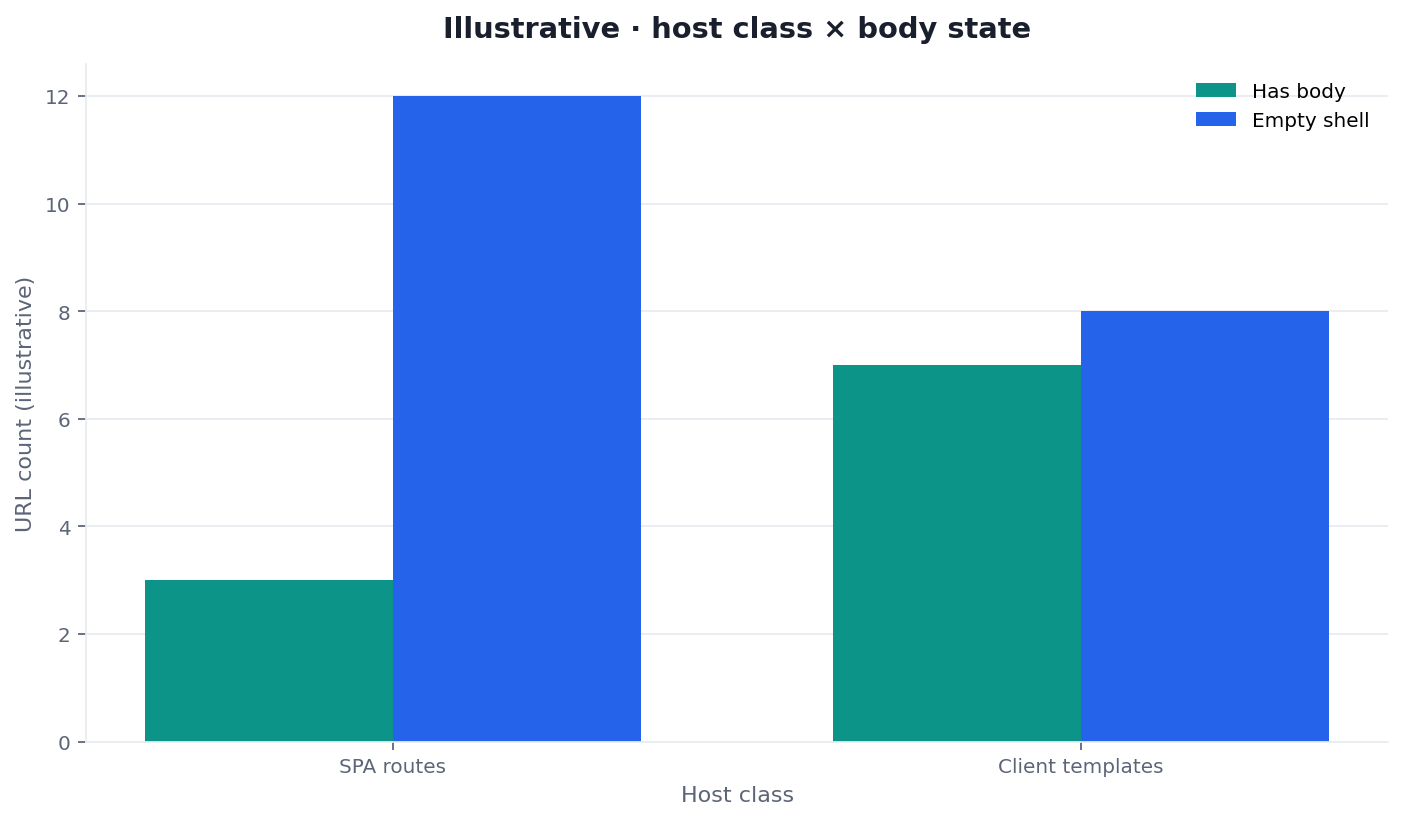
Figure: Two series from the same curl desk. Script count is not body presence. Neither series is an indexed-page count.
Title arrived before hydration
curl already saw a title on / and on the tool URL. That is the stored-document test. JavaScript crawling does not need Chrome to prove those two titles exist. A screenshot of the hydrated UI is a third artifact. Keep it beside the raw string. Do not replace the raw string with the screenshot.
The tool HTML also declared a self canonical and robots index, follow, max-image-preview:large, max-snippet:-1. Those are keep-votes. They are not a body. JavaScript crawling still tests the title and main markers in the first bytes.
43 scripts are a cost, not a missing body
Forty-three script tags raise render cost and scheduling questions. They do not, by themselves, prove an empty store. JavaScript crawling files script count as a cost column. It files title-in-raw-HTML as the body column. Do not collapse “many scripts” into “no document.”
The Chrome rendering performance guide is the performance reminder for blocking resources. This page uses it as a cost reference. It does not treat a Lighthouse score as an index membership proof.
A three-view framework
Use this map before you open a copy doc. JavaScript crawling is a three-view table, not a vibe.
| View | What you see | This 2026-09-14 desk |
|---|---|---|
| Preview | Authored CMS preview | not used; public URLs only |
| Public browser | Incognito Chrome after JS | not required to prove these titles |
| Controlled crawler | Initial response + rendered DOM | raw curl already had titles; 27 and 43 scripts |
JavaScript crawling is easier to close when preview, raw response, and controlled render expose the same main markers. A disagreement is a delivery finding that still needs environment and crawler context.
SPA routes and client-rendered templates
An SPA shares one shell across routes. A client-rendered template may look like a normal page and still ship an empty product grid. JavaScript crawling records both as host classes. If either class stores a mount node, eligibility fails. This desk did not observe that failure on / or the tool URL. Contrast the risk. Do not invent the failure.
Fetch utilities sit on the technical SEO tools page when you need other fetch rooms. This cluster stays on the stored string.
How a preview compares to stored HTML
A preview is a convenience for editors, initial HTML is the server response, and a controlled rendered DOM is a third artifact. JavaScript crawling keeps those observations separate. If you only need a title, wait until the stored body exists.
Stay on the website indexation hub when the ticket is still the whole keep-list, not only the first HTML bytes. This page owns the stored-HTML slice.
rendering checker is the sibling that names the stored string versus an empty root. JavaScript crawling is the sibling that names the walk across SPA routes and client-rendered templates. Use both when the host is client-built. Do not retarget the stored-fetch phrase here as this page’s target.
Prerender SEO is the sibling for a snapshot that is good enough. JavaScript crawling tells you whether you need that snapshot. If stored HTML already has a body, you may not. These two first-party URLs already had a title in the first bytes.
Who owns the render
Engineering owns SSR, prerendering, hydration, and route discovery. Editorial should receive the page after initial and rendered captures expose the intended content markers. Neither team should infer indexing from a screenshot.
When one URL is enough
One URL can test a new launch route. Save its initial response, run the controlled browser capture, and compare required markers. If only the rendered DOM contains them, evaluate SSR or prerendering before expanding the sample.
One URL is not enough when routes share one shell, or when catalog templates hydrate a grid. JavaScript crawling at template scale needs a wider sample. This desk proved two public 200s on our host. It did not sample 50–500 sitemap URLs. Empty shells still cluster on app routes and client-rendered catalogs. Homepage-only checks hide them.
Credits are optional for status. Spend a write-up only when a wide sample needs a ranked punch list. Do not buy narrative to invent a body. Do not invent an empty shell on a URL whose raw HTML already has a title.
How to run the shell check
Take the four steps before anyone rewrites a hero. JavaScript crawling is a fetch, a compare, and only then a sentence.
Step 1 — Sample public routes, not previews
Gather public URLs from the sitemap you publish. Stratify SPA routes and client-rendered templates that share a shell. Empty shells cluster on client-only templates. A homepage-only paste can hide an app route that never prerenders.
If the sitemap lists preview hosts, that is already a finding. Fetch the public host. A signed preview is not the store.
Step 2 — Compare stored HTML to the preview
Fetch each sampled URL and record status, route class, main-content markers in initial HTML, links discovered before execution, and the same markers after controlled rendering. This comparison is the job. The eight-module lights still run; the body column is what you sort first for javascript crawling.
Status codes stay free. A screenshot is not the stored document.
Step 3 — Label has-body versus empty shell
Mark preview, initial response, and controlled render as has-body or mount-only. A mount-only raw response raises delivery risk; test the render environment, then use SSR or prerendering where durable access requires it.
Do not rewrite the hero while the stored root is empty. Eligibility before copy still wins. On this desk, / and the tool URL already passed the raw-title test.
Step 4 — Optional priority narrative
If the sample is large, ask for a ranked list: which route family or template family stores the empty shell. The narrative must still quote the body table. The model may not invent HTML. After the list, render on the server, then retitle.
When an update week coincides with a drop, keep raw-response and rendered-DOM evidence separate from historical Performance CSV data. None of those sources alone identifies the final indexed representation. Do not invent a GSC index count for these two URLs.
Scorecard for stored HTML
Score javascript crawling, not a vanity 100, before you call the shell done.
| Check | Pass | Fail |
|---|---|---|
| Stored HTML has a body | Main content in the first document | Empty root node |
| Title visible to curl | Present without a browser | Title only after hydrate |
| Script count is a cost column | 27 / 43 recorded, not treated as a missing body | “Many scripts” used as a shell claim |
| Preview is not the evidence | Public URL fetched | Signed preview only |
| Eligibility before copy | Body stored, then prose | Rewrite on an empty shell |
A pass means javascript crawling is clear enough to write. A fail keeps the render ticket open. Credits do not invent a body.
Failure modes that trust the preview
Copy first. The common miss is a rewrite on an empty shell. JavaScript crawling was already a render ticket. The new paragraph never entered the store.
Screenshot theater. A PNG of Chrome is not stored HTML. A preview image is not the document.
Invented shell. Treating 43 script tags as proof the tool page stored nothing. This desk already saw a title in the first bytes.
SPA-only comfort. Teams fix one React host and ignore client-rendered catalog templates. Sample both host classes.
Preview leakage. Fetching a signed CMS preview hides the public empty shell.
Homepage comfort. One marketing route prerenders. App routes do not. Sample the routes.
Adjacent jobs in this pillar
This page is the javascript crawling stored-HTML cluster for SPA routes and client-rendered templates. Sibling pages pick up stored-fetch cost and snapshots after the shell is named.
When the stored string versus empty root is the only question, open rendering checker. When a snapshot is good enough to store, open prerender SEO. When the keep-page still refuses, open noindex tag. When the gone URL should 404 in place, open 404 errors seo.
Use SEO Health tools to save the first-party raw response, then test representative client-only routes instead of generalizing from these two URLs.
Save the first HTML before you rewrite it
Record title-in-raw-HTML, script count, and a controlled render. Then decide SSR, prerender, or copy.
Run SEO Health CheckerFrequently Asked Questions
Why does Chrome look finished when the store is empty?
Chrome may hydrate content after the initial response. Compare that response with a controlled rendered DOM; use SSR or prerendering when important markers otherwise depend on uncertain execution. JavaScript crawling needs both artifacts. This desk’s two URLs already had a title in the first bytes.
Does a screenshot prove the document?
No. JavaScript crawling needs stored HTML. A preview image is not the document. Replay the stored string on SPA routes and client-rendered templates.
Do I need credits to see the empty shell?
Status codes stay free. Credits begin only if you start EEAT, visibility, GSC narrative, or a deep report. JavaScript crawling on these two URLs did not show an empty shell.
Does one marketing route prove every shell?
Only for that launch route. JavaScript crawling at template scale needs a wider sample. Empty shells cluster on app routes and client-rendered catalogs. Homepage-only checks hide them.
Do 43 script tags mean the page is an empty shell?
No. Script count is a cost column. JavaScript crawling still asks whether the first bytes already contain the title and main markers. On this tool URL they did.
Conclusion
Use javascript crawling when the job is to compare first bytes with a controlled render before anyone opens a copy doc. The 2026-09-14 desk showed titles already present on / and the tool URL, 27 scripts on apex, and 43 scripts on the tool page. Contrast empty-shell risk on other routes. Do not invent a shell on these two URLs. Close the file when the raw title, the script count, and the unresolved alternatives are still visible.
William Zhu · Cofounder, InfiniSynapse · GitHub @allwefantasy
Desk-validated SEO Health methods. Corrections: zhuhl@infinisynapse.com · corrections policy.