Rendering Checker: Raw HTML vs Rendered DOM
A rendering checker compares raw HTML with the rendered DOM. See which titles and body text exist before JavaScript runs, and which rows are empty shells.
Author credentials: William Zhu is cofounder of InfiniSynapse (GitHub @allwefantasy · auto-coder). Desk: shipping SEO Health and the /en/tool/ visibility pages. No personal LinkedIn published. About: team / editorial standards.
Publisher credentials: InfiniSynapse has public profiles on GitHub, YouTube, and X. A 2026 WAIC Future Tech OPC excellence award covers the Agentic Data Infra entry (WAIC; third-party recap: Xinhua / Caohejing). That award does not review this page or SEO Health. Method CLI: infinitegrowth on npm. Archive: recognition and scope notes.
On this page
By William Zhu · Cofounder, InfiniSynapse · Published: 2026-09-08 · Last updated: 2026-09-27 · Last verified: 2026-09-27 · Reviewed by the InfiniSynapse Data Team.
Reviewed by: InfiniSynapse Data Team · method review 2026-09-14. First-party raw-HTML review of InfiniSynapse public URLs. No customer SPA crawl.
Trust / COI: About · Corrections. SEO Health and InfiniSynapse are commercial products from this team. Byte counts below are our own public responses, not a claim about what Google indexed.
TL;DR
A rendering checker compares raw HTML with the rendered DOM. Twenty-seven script tags on the homepage still left a title in the first HTML bytes. The check then compares that raw string with a controlled browser DOM. curl observes only the first artifact. An empty initial shell is a risk signal, not proof of the final indexed representation.
Direct answer: Treat rendering checker as a two-artifact job. Save the unexecuted HTML, then save a controlled render if markers are missing. On this host,
/arrived with 27 scripts, 91,875 bytes, and a title. The tool page arrived with 43 scripts, 96,998 bytes, and a title. Those two URLs are not empty mount-node shells.
What you will learn
- Which first-party documents already contained a title in raw HTML
- Why script-tag count is not emptiness
- How 91,875 bytes and 96,998 bytes differ from a 3 kB root
- When rendering checker should stop and a prerender ticket should start
- Which siblings own crawler walks and snapshots after the source is named
Raw capture used InfiniSynapse-P4-desk/2026-09-14 and never opened Chrome. Visible phrases in raw HTML prove this response carried meaningful text. rendering checker still cannot claim every interactive route or crawler receives identical output.
What raw HTML already contained
Key definition: rendering checker is a comparison of the server response before script execution with the DOM produced by a controlled browser render. Body bytes and content markers describe those artifacts. Neither artifact alone proves what a search engine indexed.
People search this phrase when Chrome shows a full page but they fear the first response is a blank root. rendering checker starts by preserving that response. Then produce a controlled rendered DOM only if the first bytes lack the markers you need.
Google’s JavaScript SEO basics is the search-engine rule we used when deciding that meaningful HTML in the first response matters. It does not grade this host.
Script count is not emptiness
Twenty-seven scripts on / and forty-three scripts on the tool page are payload facts. They are not a shell verdict. A rendering checker row that treats “has scripts” as “empty to crawlers” will misfile SSR.
MDN’s script element reference reminds you that a script tag is an instruction, not a missing body. Count the tags. Then look for the title and main phrases.
Title in the first bytes
Both first-party documents already contained a title in the raw HTML. Homepage title: InfiniSynapse — AI Data Agent for Enterprise Data Analysis. Tool title: Fix Website Indexation Before Rewriting Copy. That is enough for rendering checker to reject an empty-shell story for those two URLs.
Chrome’s Lighthouse SEO audit can flag a missing title in a lab run. This desk did not need that flag. The title was in the stored string.
SEO Health remains the deterministic evidence foundation for status, robots, canonical, and raw HTML. Classified shell defects can be sent to an InfiniSynapse Server API long-task workspace to sequence template queues; the API does not refetch pages or override either artifact.
Two first-party documents on 2026-09-14
We fetched InfiniSynapse public HTML without executing script for this rendering checker desk. The sample is this host. It is not a three-class fictional render desk.
| Requested URL | Status | Script tags | Body bytes | Title in raw HTML |
|---|---|---|---|---|
/ | 200 | 27 | 91,875 | yes |
/en/tool/website-indexation | 200 | 43 | 96,998 | yes |
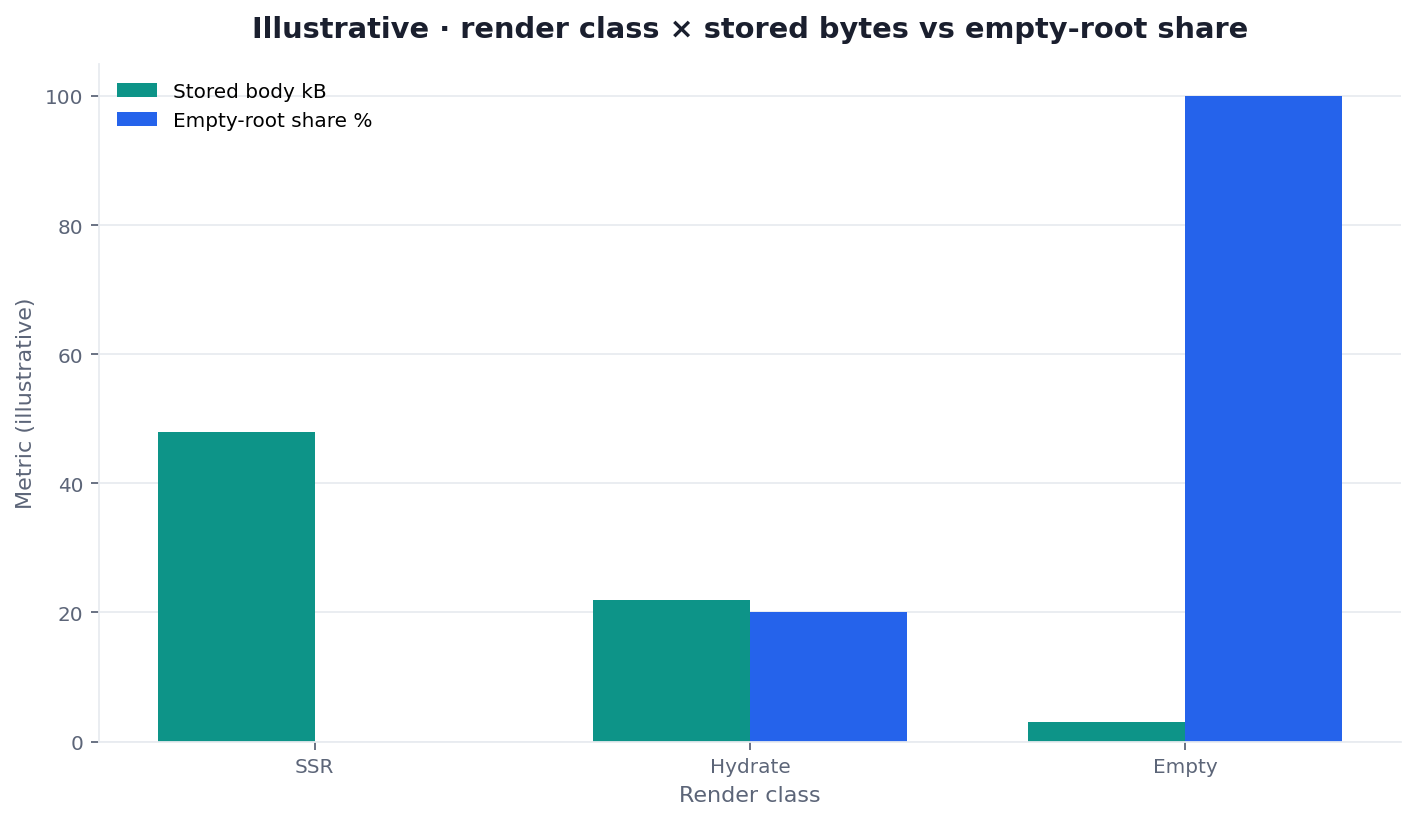
Figure: Two series from the same desk. Script count is not body size. Neither series is an indexed-page count.
A later deploy can replace both byte count and source text. A rendering checker file that quotes only a framework slogan and skips the live bytes is incomplete.
Homepage payload
/ answered 200 with zero hops. x-powered-by: Next.js was present. HSTS, X-Content-Type-Options, X-Frame-Options, and CSP were absent on curl -sSI. Header absence is a different ticket. rendering checker on / already had sentences in the body.
Use the website indexation hub when status and robots must sit beside those bytes. This rendering checker page stays with the stored string.
Tool payload
The tool document was larger by about 5 kB and carried sixteen more script tags. It still shipped a title and a self canonical. rendering checker on that URL does not start from an empty mount node. A later client-only route on this host can still fail if the first bytes are only a root.
How we captured the source
A rendering checker record should keep the user-agent, the first status, the byte size, the script-tag count, and whether a title existed before execution. We used one desk string. A later bot can see a different HTML.
curl without a browser
curl -sS -A 'InfiniSynapse-P4-desk/2026-09-14' \
  https://infinisynapse.com/ \
  | awk 'BEGIN{s=0} /<script/{s++} END{print s}'
Repeat for the tool URL if you need the 43-script row. Do not treat a hydrated screenshot as the store. Chrome DevTools DOM guide is the place to inspect a rendered tree after you already saved the raw string. Rendered tree first is the usual miss.
If a later replay is refused, write “raw body unknown” and stop. A 403 does not demonstrate that this host shipped an empty JavaScript shell.
JavaScript off, then JavaScript on
A rendering checker loads the same URL in two states. JavaScript off is the server response, the file curl already saved. JavaScript on is the DOM after a controlled browser runs the scripts. Put the two states next to each other. Store the first file before Chrome opens.
When the off state already contains the title and the main sentences, the on state confirms the paint. It does not replace the stored file. When the off state is a mount node, the on state shows what a browser painted and what a client that never runs scripts did not receive.
Fields the diff must list
Every URL a rendering checker keeps needs the same columns. Title-only notes hide a heading or a link that appears only after execution.
| Field | Raw HTML | Rendered DOM |
|---|---|---|
| Status | first response code | final response code |
| Title | text in the first file | text after scripts |
| Meta description | present or absent | present or absent |
| H1 | text, or none | text, or none |
| Main sentence | first sentence in the body | first sentence after paint |
| Main internal links | hrefs in the first file | hrefs added after paint |
| Body bytes | stored size | size after execution |
A title that exists only in the rendered column is a delivery finding. It is not proof of what a search engine stored.
Blocked resources
Scripts and stylesheets that never arrive change the rendered column. A rendering checker writes down a blocked URL when robots.txt, a response header, or a failed request stops a file the page expected. The raw HTML can still be large while the painted page misses a block. Record the blocked URL beside the missing marker. A blocked font or a third-party widget is a resource row, not an empty-shell verdict.
What an empty shell would look like
An empty root is a mount node with no sentences. Write the byte size next to the class. A 3 kB response that contains only a root is the contrast class. The two URLs on this rendering checker desk were 91,875 and 96,998 bytes with titles present. That contrast is the lesson.
A rendering checker pass that never opens the raw HTML will file a shell from a designer screenshot. The screenshot proves one browser produced pixels. It does not show initial HTML.
React’s hydrateRoot reference describes how a client attaches to server markup. Hydration assumes markup exists. If the first bytes are a mount node, rendering checker files a different diagnosis.
Send one public path to SEO Health tools if you want a stored-HTML light. Those lights are not a Google 100. Raw-fetch status does not need login.
SSR versus hydrate versus a mount node
Engineering owns the stored body. Editorial owns titles after the stored HTML has sentences. Meetings fail when writers own the first hour of rendering checker. Start with the raw string. Then assign copy.
Next.js still ships scripts on an SSR document. Script count on this host does not mean the first paint is empty. rendering checker labels each URL by observed artifact: SSR may expose the main markers initially; hydration may add headings only after execution; an empty source needs a rendered check and an engineering owner.
Why Next.js still ships scripts
Scripts hydrate interactions. They do not erase the title we already saw. A rendering checker ticket that deletes SSR because “43 scripts” will send the wrong queue.
One URL is enough when a launch path is new and you need stored HTML on that address only. Paste it. Confirm a 200 with a body that is not a mount node. Then write.
One URL is not enough when templates mint client-only routes. This desk did not sample 50–500 sitemap URLs. The 1,568-loc map is an inventory. Template prevalence still needs a stratified fetch. Homepage-only confidence is how app routes hide.
If the next ticket is how a crawler walks SPA routes after the shell is named, open a javascript crawl. If the fix is a snapshot, open prerender SEO. Come back here when repeated raw responses still contain only mount nodes.
Who skips the rendered copy
Google can render, and it does not render on every fetch. Many AI crawlers read the raw HTML and skip script execution. A rendering checker treats the first file as the copy those clients can use. The rendered DOM is the copy a full browser produced. Neither column is an index-membership claim. Content that exists only after scripts run is invisible to a client that never executes them.
When a second paint is owed
Run these steps before you open the copy doc. Skip the outline until stored HTML on the requested set is classified.
Markers that must appear twice
If the raw body already has the article, stop. You do not owe a second paint. rendering checker starts with that raw pass, not with a live-render-everything slogan.
For rows with empty or hydrate-thin roots, write the class and the stored bytes. Capture the browser-rendered DOM separately. The difference is a delivery finding. It is not, by itself, a final indexing decision.
Sort empty shells to the top. Those rows block copy. When initial and rendered artifacts both contain the intended main content, editorial work can proceed. When they diverge, choose SSR or prerendering based on route needs, then repeat both captures.
Open the InfiniSynapse web app only if you want a credited sequencing narrative after the byte table already exists.
Failure modes that invent a shell
Copy first. A rewrite cannot repair a delivery path when the initial response remains a root node. Preserve the new source marker and verify whether it appears in both the raw response and a controlled render.
Screenshot theater. A designer screenshot proves only that one browser produced pixels. It does not show initial HTML or the final indexed representation.
Script-count panic. Teams see 27 or 43 script tags and file an empty shell. This desk’s titles were already in the first bytes.
Live render quota theater. Teams burn a second paint and call it the store. Fetch the stored HTML first.
Hydrate confidence. A medium initial body may omit an H1 that appears after execution. Record headings in both artifacts. Avoid claiming which version a search engine retained.
Update fan fiction. A core-update week is not a shell diagnosis. If stored HTML is blank, fix the stored body. Do not invent a recovery percentage.
Nearby guides after the source
This page is the stored-HTML cluster for rendering checker. Nearby guides pick up crawl walks and snapshots after the empty root is named.
| Job you actually have | Guide to open next |
|---|---|
| Walk SPA and client-rendered templates | javascript crawling |
| Ship a prerender snapshot | prerender SEO |
| Eligibility across status and robots | website indexation |
| Hop count before you trust a body | redirect chain |
Save the raw HTML before you rewrite a shell
Record status, byte size, script count, and whether a title existed before execution. Then open a sample only if templates mint client-only routes.
Run SEO Health CheckerFrequently Asked Questions
What does a rendering checker compare?
A rendering checker compares the raw HTML, saved before scripts run, with the DOM after a controlled browser render. Record the title, the main sentence, and the body size in both columns. A row is an empty shell when the first file lacks those markers. Neither column proves what a search engine indexed.
Is a Chrome screenshot enough proof?
No. A screenshot shows one rendered state, while curl shows initial HTML. rendering checker needs both artifacts plus explicit limits when they disagree. Neither one proves the final indexed output.
Do stored-HTML bytes need a login?
No. rendering checker can name body bytes without an account. Raw-fetch status remains a free, deterministic column. Eight-module lights on a pasted URL stay free. Credits enter only when the measured shell rows need a separate InfiniSynapse prioritization task.
Can a title rewrite fill an empty shell?
No. A title change does not change the delivery mode. Add server output or prerendering when appropriate, then compare the initial response and rendered DOM again before making any indexing claim.
Are 27 scripts an empty shell?
No. On this host the homepage raw HTML already contained a title and 91,875 bytes. Script count is payload. It is not emptiness. rendering checker files a shell only when the first bytes lack the markers you need.
How wide should a later sitemap sample be?
Use 50–500 stratified URLs when templates mint client routes. This desk used two first-party documents, not a loc sample. A homepage-only paste hides app routes. Write the route cap and render modes before counting empty-source cases.
Conclusion
Use rendering checker when the job is to verify stored HTML before anyone files a shell. The 2026-09-14 desk shows / at 27 scripts and 91,875 bytes with a title, and the tool page at 43 scripts and 96,998 bytes with a title. The sample size is two first-party documents. That sample cannot establish what a rendering crawler later stores, and it does not prove index membership. Close the file when the user-agent, the byte size, the script count, and the unresolved client-only routes are still visible.
William Zhu · Cofounder, InfiniSynapse · GitHub @allwefantasy
Desk-validated SEO Health methods. Corrections: zhuhl@infinisynapse.com · corrections policy.