Connect Snowflake to AI: Bind, Then Replay
By William Zhu (independent public engineering profile: GitHub @allwefantasy; no personal LinkedIn) & the InfiniSynapse Data Team · Published: 2026-08-22 · Last updated: 2026-08-29 · Last verified: 2026-08-29 · Next review: 2026-11-29 · About · Editorial standards · Privacy · Terms of Service · Corrections
Table of Contents
- TL;DR
- What No-Mirror Authorization Means
- Glossary
- An Authorize-the-Account-You-Have Frame
- How Teams Reach Snowflake Today
- Tool Landscape
- How to Authorize and Ask One Goal
- Desk Sample: One Account, No Second Warehouse
- Scorecard: Use This Account or Copy Again
- Failure Modes
- How to cite this page
- Frequently Asked Questions
- Conclusion
TL;DR
We evaluate these patterns at the InfiniSynapse desk on sanitized composites; first-party figures on this page are desk log NMD-CSF-20260822, not customer uplifts and not a third-party bake-off.
Direct answer: You can connect snowflake to ai analyst on the account you already operate when a read-only role can see the grain and you skip a second mirror “for the AI.” Snowflake is already a warehouse for many teams. The failure is copying it again before anyone may ask.
Publisher trust pages for this article: About InfiniSynapse · Privacy Policy · Terms of Service.
What you'll learn:
- Why authorizing the account you already run is the whole first step when you connect snowflake to ai analyst
- How no-mirror connect differs from building a second warehouse for the agent
- An authorize → recall → ask → inspect SQL loop
- Desk log
NMD-CSF-20260822, which checks nine certified views - Failure modes: account-admin credentials, unbound certified names, and a hidden second warehouse
Download evidence: desk log · aggregate CSV · verify script. These are first-party sanitized demo evidence for this desk run—not raw, customer, source, benchmark, or third-party data.
Readers who want the broader no-migration case should start from analyze a database without ETL. This page is narrower: skip the copy when you connect snowflake to ai analyst.
Industry context stays independent of desk claims. McKinsey’s State of AI (retrieved 2026-08-29) and Gartner Peer Insights — Analytics & BI (retrieved 2026-08-29) describe adoption pressure; they did not run the desk table below. Natural-language asks still inherit the ambiguity limits in Wikipedia’s natural language processing overview (retrieved 2026-08-29). Those pages are buyer-research overlays, not an endorsement of this article.
What No-Mirror Authorization Means
Key Definition: To connect snowflake to ai analyst is to authorize the Snowflake account you already operate with a read-only role, recall its schema, and ask one goal against that live store—without a new mirror warehouse or a migration project first. The account stays the system of record; the agent reads, plans, and returns inspectable SQL.
Independent published context (separate from this page’s desk log): Snowflake access control · Snowflake warehouses · Snowflake Cortex Analyst · DARPA: About · EPA data · Library of Congress: About · National Archives: About · USPTO Patents · ISO/IEC 9075 · W3C DCAT · DataCite. Those sources keep the instrument where the measurement already lives. They did not run the numbers below. Retrieved 2026-08-29.
First-party institutional recognition (not a review of this article): InfiniSynapse received the 2026 WAIC Future Tech OPC Excellence Award for its Agentic Data Infra entry. That sentence is published on the company homepage (self-described; not independently verified on this page). It is not a Snowflake, DARPA, ISO, DataCite, W3C, Gartner, or McKinsey product award, and it does not certify the desk numbers below. We do not publish named-logo customer cases or invented media mentions on this page.
Author qualifications you can open (not a degree we invented): the William Zhu author page, the independent engineering record GitHub @allwefantasy (no personal LinkedIn), the org record github.com/InfiniSynapse, and the 2026-07-29 methodology attestation. Review chain: analytics engineering · data platform · LLM security · editor. Process: editorial review. Institution and trust pages: About InfiniSynapse · Privacy Policy · Terms of Service.
Glossary (this page). These labels stay on this article; they are not Snowflake or DARPA terms. Use them when you connect snowflake to ai analyst so the role and the grain stay aligned.
| Term | Meaning on this page |
|---|---|
| Account-first connect | The billed Snowflake account, a sized warehouse, and a SELECT-only role |
| Certified-name collision | The first recall picks gross_booking when finance means recognized_revenue |
| Mirror-for-AI ticket | A second warehouse treated as the price of the first answer |
| Warehouse-credit conversation | Ask the on-call before you burn unbounded credits on certified jobs |
Defense research programs at DARPA: About (retrieved 2026-08-29) evaluate models on the ranges they already instrument. They do not stand up a second range so the evaluator has a “clean copy.” The same refusal applies here: the account you already pay for is the analysis surface. Snowflake access control (retrieved 2026-08-29) is the grant contract for that account. ISO/IEC 9075 (retrieved 2026-08-29) is the published SQL language. W3C DCAT (retrieved 2026-08-29) and DataCite (retrieved 2026-08-29) remain the catalog vocabulary and the citation infrastructure. None of those publishers evaluated InfiniSynapse, this page, William Zhu, or NMD-CSF-20260822. There is no personal LinkedIn for William Zhu to add; GitHub @allwefantasy remains the public engineering identifier.
Public environmental datasets from EPA data (retrieved 2026-08-29) are queried where they are published. You do not rebuild the inventory to earn the first question. Authorize the inventory you have.
“No mirror” is not “no warehouse.” Many teams already live in Snowflake. The point is to refuse a second copy as the ticket to the first ask. If the grain is already in a database you trust, connect snowflake to ai analyst on that database.
If the engine is still Postgres rather than a cloud warehouse, continue in PostgreSQL AI on the live instance. If the box is MySQL-family, use connect MySQL without migration. A hosted Postgres project is in connect Supabase to an AI data analyst. Earlier connector notes remain at connect Postgres to an AI data analyst and connect MySQL to an AI data analyst.
A data agent should take a goal, inspect schema, run queries, and show the trail. It is not ChatBI that hides the SQL. A team that wants to chat with your data still needs a role that cannot write and a goal that names grain.
The account you already operate
When teams stall on Snowflake, they often stall on a new project: “we will stand up an AI warehouse.” That project is a delay. To connect snowflake to ai analyst you name the account, the warehouse compute you are allowed to use, and a role that can SELECT the schemas you mean. That is the first step.
If a reviewer cannot name the account and the role, you do not have a Snowflake problem. You have an access problem. Fix access before you connect snowflake to ai analyst or fund a mirror.
An Authorize-the-Account-You-Have Frame
Treat the billed account as the surface when you connect snowflake to ai analyst. A second warehouse is optional until the same grain starts to collide with certified jobs.
| Stage | What you lock | What you refuse |
|---|---|---|
| Authorize | Existing account, warehouse, SELECT-only role | Accountadmin or write grants |
| Recall | Tables, views, and bound certified names | Guessing “revenue” from a friendly column |
| Ask | One goal with grain and window | “Explore the account” |
| Inspect | SQL, filters, and intermediate results | A paragraph with no query |
| Decide | A second copy only on evidence | A mirror “for the AI layer” |
The frame is deliberately conservative. Teams that connect snowflake to ai analyst well look unfashionable: one account, one role, one question. A second warehouse is a later decision if the same query starts to collide with certified jobs.
Authorize before you ask
Create or reuse a role that can SELECT the schemas you mean and nothing else. Then connect snowflake to ai analyst. If schema recall is wrong, bind a short note—do not “fix it” by granting ACCOUNTADMIN. A semantic layer may already exist in the account; bind to it rather than inventing a parallel metric store the product does not ship.
Least privilege on the first login
Never point an analysis account at a role that can create users, unload to external stages you do not intend, or overwrite tables. A confused join should fail closed. Least privilege is the first login rule when you connect snowflake to ai analyst, not a hardening pass after the demo. Control mapping should consult the NIST AI Risk Management Framework (retrieved 2026-08-29); that publication did not score this page.
Archives and records practice at National Archives: About (retrieved 2026-08-29) keeps the original and issues copies with a reason. You keep the original Snowflake account and issue a read-only role with a reason. You do not mint a second original. Data governance on who may connect at all still sits above any view that hides a column.
How Teams Reach Snowflake Today
Two patterns dominate. Mirror-first teams copy Snowflake into another platform “for AI,” then allow questions. Authorize-first teams connect snowflake to ai analyst on the account they already run, then copy only the grains that hurt. The second path is faster to the first answer and stricter about why a copy exists.
Library-scale catalogs at the Library of Congress: About (retrieved 2026-08-29) do not photocopy the stacks into a new building every time a researcher asks a new window. You should not photocopy Snowflake into a second warehouse every time a finance lead asks variance. Authorize first, then connect snowflake to ai analyst on the catalog you already run.
Live connect is not a license to burn unbounded warehouse credits. Size the warehouse, bound the window, and prefer an off-peak slot if the certified jobs are already hot. “No mirror” is not “no ops.” When you connect snowflake to ai analyst against a busy certified warehouse, you still owe the on-call a warehouse-credit conversation.
A second warehouse versus the account you have
A second warehouse earns its keep when you must isolate experimental scans from certified jobs, or when a legal boundary forbids the agent from seeing the production account at all. Those are real reasons. “The AI vendor wants its own copy” is not a reason. When you connect snowflake to ai analyst, the default is the account you already operate.
Patent and trademark examination at USPTO Patents (retrieved 2026-08-29) works from the file that exists. Examiners do not clone the corpus into a private warehouse for each new search. You should not clone Snowflake for each new ask.
AI for data analysis still needs this order. The agent is a reader with a plan. Protocols such as MCP for data analysis can sit above the same account. The method on this page does not depend on MCP; it depends on a read-only role and an inspectable plan. Snowflake Cortex Analyst (retrieved 2026-08-29) is a warehouse-native ask pattern if you already live in that UI—it does not obligate a second copy first.
Tool Landscape
| Pattern | Fits | Breaks |
|---|---|---|
| Vendor-native warehouse ask | Strong if you already live in that UI | Weak if you need a trail outside it |
| Warehouse-first BI on a new copy | Isolation | Weeks of ETL before the first ask |
| SQL worksheet + human | Full control | Does not scale the first question |
| Data agent on the existing account | Authorize, then a goal | Fails if roles are wrong or names are unbound |
The fourth pattern is educational, not a product requirement: Add Data Source → choose Snowflake → fill the account and the read-only credentials → select it in chat and ask. It does not auto-write production tables. You still have to pass the read-only test before you connect snowflake to ai analyst.
Snowflake as the database you already trust
For many teams, Snowflake is the warehouse. No-migration analysis still applies: skip a new copy. If you connect snowflake to ai analyst, you are not claiming the warehouse category is dead. You are claiming the first question does not require a second project.
The first week of a program that wants to connect snowflake to ai analyst is usually role design and one boring question, not a bake-off between “AI warehouses.” If the grain is missing, the gap is modeling—not the absence of a mirror. Official role and grant mechanics stay in Snowflake access control (retrieved 2026-08-29); this page does not reprint that manual. Self-service analytics still waits on that role before anyone may connect snowflake to ai analyst in chat. Snowflake warehouses (retrieved 2026-08-29) is the compute you already operate—not a twin you must invent.
How to Authorize and Ask One Goal
The method is short when you connect snowflake to ai analyst. The discipline is in what you refuse to skip.
- Create a SELECT-only role. Revoke write, user admin, and unintended unloads.
- Size the warehouse. Prefer an off-peak slot if certified jobs are hot.
- Add the account locator and the role you are allowed to use. Name the owner.
- Recall tables and views. Bind the certified name if the first pick is
gross_booking. - Ask one goal that names grain, window, denominator, and exclusions.
- Inspect the SQL. Re-run after the note is corrected. Hand the dated pack to a colleague.
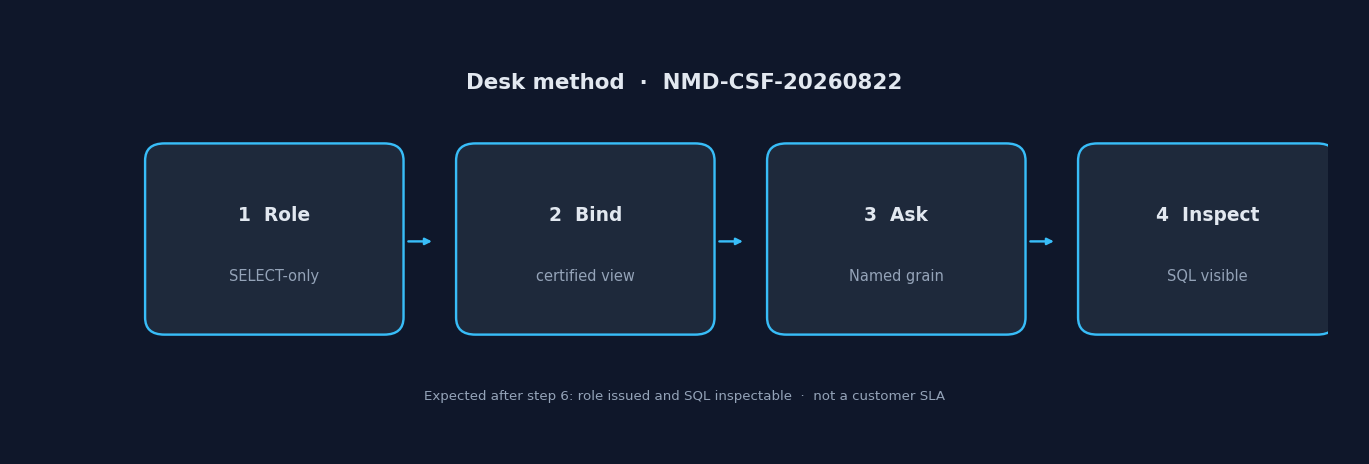
Figure. Educational four-step sequence the desk uses to tell a guessed schema from a read-only role plus note. Expected result after step 6: role issued and SQL inspectable. Not a product screenshot or a customer SLA.
Create the SELECT-only role
Create a role that can SELECT the schemas you mean and nothing else. Revoke write, user admin, and unintended unloads. If you cannot get a read-only role, stop—do not “just use ACCOUNTADMIN for now.” A failed connect with a clean role is cheaper than a successful connect with write left on.
Document the grants you asked for so the next person does not reopen the admin-role debate. Then connect snowflake to ai analyst with those grants only.
Add the account and ask
Add the source with the account locator and credentials you are allowed to use. Return to chat. Select that source. Ask one goal: “Q2 recognized revenue versus plan by product family, excluding internal test accounts.” Name the grain. If the account uses several names for recognized revenue, bind the note before you trust the breakout.
Do not start with “profile the account.” That is how read-only still becomes a credit spike. Teams that connect snowflake to ai analyst and then scan every database are not doing no-mirror analysis; they are doing an unscheduled warehouse bill.
Inspect the SQL before you trust the variance
Open the plan, the SQL, and any intermediate tables the agent built. Schema recall plus intermediates should show the steps—not only the last paragraph. If the filter is wrong, fix the bind or the goal and re-run on the same source. Show the SQL and keep writes off the role so a document cannot change data.
After you connect snowflake to ai analyst, the acceptance test is a reviewer who can reopen the query. If they cannot, you have a chat log, not an analysis. Natural language to SQL is one step inside that plan, not the whole product. A business user can ask in plain language only after a read-only login is in place.
Desk Sample: One Account, No Second Warehouse
This is a first-party InfiniSynapse desk log of how we connect snowflake to ai analyst on an account we already operate, not a named-logo customer case and not an uplift claim. Run ID: NMD-CSF-20260822. Date: 2026-08-22 (Saturday). Operator: InfiniSynapse Data Team. Sources: an existing Snowflake account with a finance schema, nine certified views, and about 2.8 million recognized-revenue rows. Contrast: second-warehouse ticket versus authorize-in-place plus note. Download the same numbers as desk log NMD-CSF-20260822, the aggregate CSV, and the verify script. Last verified: 2026-08-29.
The second-warehouse path opened a copy ticket “for the AI layer.” No SELECT-only role was issued on the billed account. Schema recall was not attempted. recognized_revenue was never bound. SQL was not inspected because no ask ran on an authorized login.
The authorize-in-place path issued a SELECT-only role, recalled the nine certified views, bound a four-line note that finance means recognized_revenue not gross_booking, and asked: “Q2 recognized revenue versus plan by product family, excluding internal test accounts.” The first draft picked gross_booking; the note was corrected and the goal was re-run. The pack showed the filter and the join to plan. No second warehouse object was created.
| Retrieval state | SELECT-only role issued | Certified view note bound | SQL inspectable |
|---|---|---|---|
| Second-warehouse ticket | 0 | 0 | 0 |
| Authorize-in-place + note | 1 | 1 | 1 |
That is the acceptance test when you connect snowflake to ai analyst: the account you already have, one question, visible SQL, no extra copy. Wall clock for the successful authorize rerun was about ten minutes (warehouse provisioning excluded). The clock started when the operator opened the standing goal and ended when the issued role, the bound note, and the inspectable SQL sat side by side. Cite this table as InfiniSynapse desk log NMD-CSF-20260822. Do not cite it as customer ROI, a cheaper twin, a bake-off win, or a DARPA / EPA / Library of Congress experiment. We do not publish named-logo customer cases on this page. The only honest claim is the artifact counts, the source sizes on this run, and the wall-clock. The nine views and ~2.8 million recognized-revenue rows are this desk run’s inputs, not a customer extract.
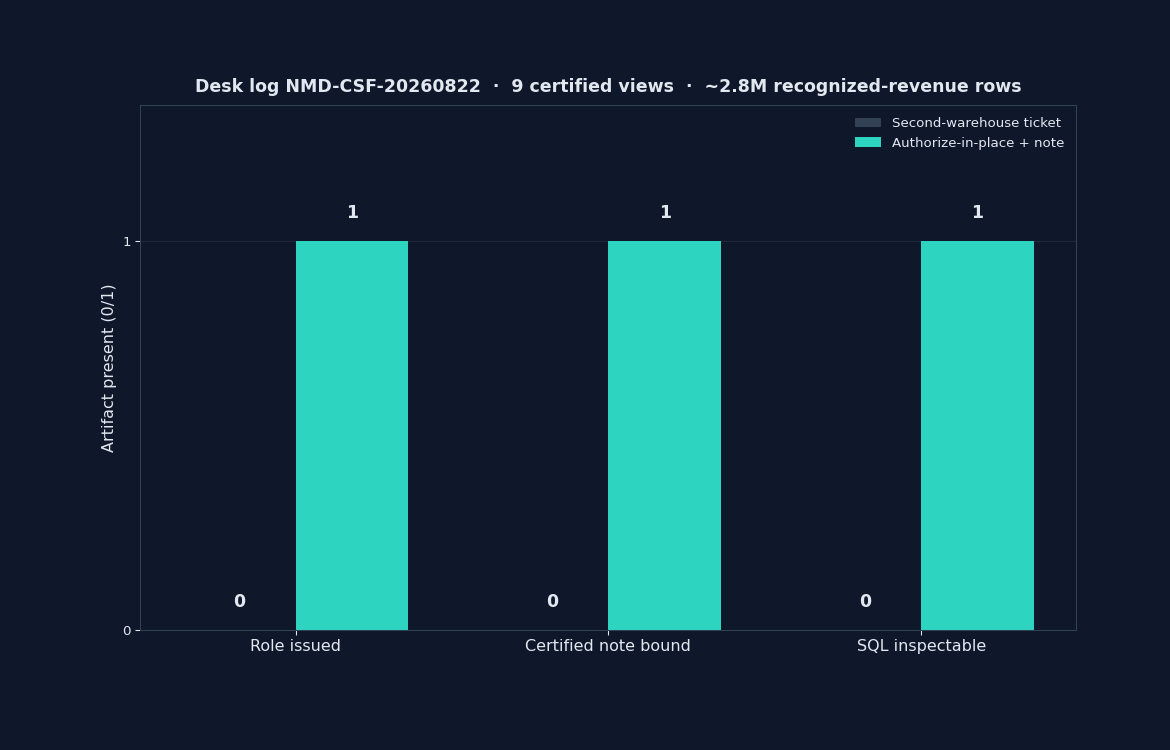
Figure. InfiniSynapse desk log NMD-CSF-20260822: second-warehouse ticket left 0 / 0 / 0; authorize-in-place plus note left 1 / 1 / 1. Published context: the independent sources linked in the body. Not a customer experiment, SLA, or official benchmark.
| Evidence class | What you can cite | What you cannot claim |
|---|---|---|
| Desk log on this page | Artifact counts 0/0/0 → 1/1/1, 9 certified views + ~2.8M recognized-revenue rows on this run, ~10 min wall-clock, downloadable log · CSV · verify | Customer uplift %, vendor bake-off win, named-logo case |
| Published authority (linked above) | Snowflake access control, warehouses, Cortex Analyst; DARPA About; EPA data; LOC About; National Archives About; USPTO Patents; ISO/IEC 9075; W3C DCAT; DataCite | That those bodies ran this desk log |
| Homepage recognition | 2026 WAIC Future Tech OPC Excellence Award as published on the company homepage (self-described; not independently verified on this page) | That WAIC, Snowflake, or Gartner scored this article |
The sample is also a refusal. The desk did not use ACCOUNTADMIN or ask the agent to write a new certified table. Read-only means read-only. You can reopen the same pack on Monday without minting a twin.
Scorecard: Use This Account or Copy Again
| Signal | Connect snowflake to ai analyst on this account | Copy or isolate later |
|---|---|---|
| Grain already in current schemas | Yes | Optional |
| Read-only role exists | Yes | Do not proceed |
| One team, bounded warehouse size | Yes | Not yet a second copy |
| Legal wall against the production account | No | Isolated copy may be required |
| Certified jobs already saturate compute | Smaller warehouse or off-peak | Yes if still colliding |
| You only have ACCOUNTADMIN | Do not connect | Do not copy with admin either |
If you cannot name the account and the role, you are not ready to connect snowflake to ai analyst. You are ready to write an access ticket.
The scorecard is an educational rubric for connect snowflake to ai analyst, not a vendor ranking. Independent sources linked above describe published posture; they do not score this rubric.
Failure Modes
Account-admin credentials on the analysis login
The failure is silent until someone runs a generated statement that writes or unloads. Fix: dedicated read-only role, revoke first, then connect snowflake to ai analyst. Never reuse ACCOUNTADMIN “because it already works.”
Unbound certified names
“Revenue” on a finance schema might be booking, billings, or recognized. The agent will pick a friendly column. Fix: bind the certified name, re-ask, compare SQL. If you skip the bind, you did not connect snowflake to ai analyst—you guessed.
A hidden second warehouse “for AI”
Skipping a named ETL project does not help if you still copy the account into another vendor “so the agent has its own data.” That is a mirror with better slides. Fix: connect snowflake to ai analyst on the account you already operate unless a legal wall or credit collision forces isolation.
Before you open a second warehouse ticket so someone can “finally ask,” check three things: whether the grain already lives in the account you can read, whether a SELECT-only role exists, and whether you can state one question whose answer would change a decision this week. Those three checks decide if you connect snowflake to ai analyst or you wait on access.
When the next missing object is not this page, open Zero-Config Federated Analysis: What to Accept when federation is accepted when two sources share one trail, Read-Only Database Access for AI Analysis when write grants are a failure, not a feature, or When You Still Need a Warehouse when high-frequency materialization is still a warehouse job.
Authorize Snowflake read-only and ask one goal
Add the Snowflake account you already operate, use a SELECT-only role, select that source, and ask one goal that names grain and window. This check uses only sources you authorize.
Commercial association: You do not need the workspace to complete the educational diagnosis on this page.
Open InfiniSynapseHow this page is sourced. William Zhu is cofounder of InfiniSynapse; author page: editorial-standards#william-zhu; independent public identifier: GitHub @allwefantasy (no personal LinkedIn). Institution: About InfiniSynapse. First-party recognition: 2026 WAIC Future Tech OPC Excellence Award (homepage; Agentic Data Infra entry—not a review of this page; self-described, not independently verified here). Trust pages: Privacy · publishing terms · NIST Privacy Framework. Desk methodology note: 2026-07-29 attestation. Downloadable first-party run: desk log
NMD-CSF-20260822. Reviewed by analytics engineering · data platform · LLM security · editor. Editorial standards · corrections · Contact zhuhl@infinisynapse.com. Company About. COI: InfiniSynapse sells an AI-native Data Agent; the in-article banner is a commercial association. Fact-check: Snowflake access control · Snowflake warehouses · Snowflake Cortex Analyst · DARPA: About · EPA data · Library of Congress: About · National Archives: About · USPTO Patents · Wikipedia natural language processing · NIST AI Risk Management Framework · ISO/IEC 9075 · W3C DCAT · DataCite · McKinsey State of AI · Gartner Peer Insights — Analytics & BI. First-party numbers on this page are desk logNMD-CSF-20260822only.
How to cite this page
Page: Zhu, W., & InfiniSynapse Data Team. (2026). Connect Snowflake to AI: Bind, Then Replay. InfiniSynapse
Run: InfiniSynapse Data Team. (2026). Desk log NMD-CSF-20260822 (sanitized composite)
Neither is an audit. Cite those published artifact counts when you quote connect snowflake to ai figures from this first-party sanitized desk run. As of 2026-08-29, no independent evaluation, media citation, or reproduction of the second-warehouse contrast exists. ISO/IEC 9075, DataCite, and W3C DCAT stay citable as published files. They do not replace connect snowflake to ai. Keep that limit visible here now too. Send contradictions to zhuhl@infinisynapse.com.
Frequently Asked Questions
Can I skip a second warehouse on the first ask?
Bottom line: Yes, when the grain already lives in the account you operate and you connect snowflake to ai analyst with a read-only role. A second copy is a later isolation choice, not the cover charge for the first ask.
What do I authorize first?
Bottom line: The account you already pay for, a warehouse size you can afford, and a SELECT-only role. If you cannot name those, you are not ready to connect snowflake to ai analyst. You are ready to request access.
Do I still need Snowflake after a live ask?
Bottom line: If Snowflake is already your warehouse, keep it. No-mirror analysis skips a new copy. It does not delete the warehouse you already run. You can still connect snowflake to ai analyst on that warehouse.
Does the method write back to the account?
Bottom line: No. The method on this page is read-only. It does not auto-write production tables. If a vendor demo offers write-back as a convenience, treat it as a failure mode, not a feature. Do not connect snowflake to ai analyst with a role that can unload or overwrite.
What if the first recall picks booking instead of recognized revenue?
Bottom line: Bind the certified name before you trust the variance. If the note is missing, stop and connect snowflake to ai analyst again after the bind.
Do DARPA, EPA, or Snowflake docs certify this desk connect test?
Bottom line: No. DARPA: About, EPA data, and Snowflake access control describe published posture, not this connect snowflake to ai analyst desk table.
Did Snowflake, DARPA, or a news outlet recognize this page?
Bottom line: No. Snowflake access control and DataCite publish grants and citation infrastructure. They did not evaluate InfiniSynapse. There is no media citation of connect snowflake to ai on this page, and there is no personal LinkedIn to add.
Conclusion
Authorize the account you already operate. Skip the extra copy. Ask one goal, inspect the SQL, and promote a second path only when credits or certification force it. When you connect snowflake to ai analyst this way, the billed account is the source—not a ticket queue.
The educational diagnosis on this page does not require a workspace. You can finish the same checks on paper before you connect snowflake to ai analyst in any product.