Connect MongoDB to AI: Audit Read-Only First
By William Zhu & the InfiniSynapse Data Team · Published: 2026-08-22 · Last updated: 2026-08-31 · Last verified: 2026-08-31 · Next review: 2026-11-30 · Editorial standards · Corrections
Table of Contents
- TL;DR
- What it means to connect mongodb to ai
- Evidence Boundary
- A framework: the read-only user comes first
- Methods: connect first, flatten later
- Tool landscape
- Implementation steps
- Desk sample: first connect on a sanitized users collection (illustrative)
- Scorecard: ready to connect versus not ready
- Practical Static Replay
- Sources and Limited Claims
- Failure modes
- Frequently Asked Questions
- Conclusion
TL;DR
Direct answer: The first control when you connect mongodb to ai is a read-only Mongo user. This static pack is HOLD / NOT READY FOR CONNECTION: no URI, role catalog, note bind, or flatten hop was observed. Replay the authored identity rows, scoped
findtext, collection note, and two policy rejects offline. The verifier proves file agreement only.
The phrase connect mongodb to ai is the object under review. If a file cannot show role, string location, notes, and grain, reject the number. This is not a customer study, SLA, or third-party audit.
What it means to connect mongodb to ai
Key Definition: To connect mongodb to ai is to authorize a read-only document client, bind collection notes that name nested paths, and ask a goal that already states the grain. The document store stays nested. You do not have to flatten every collection into a warehouse before the first question.
A document store is not a broken table. The Wikipedia document-oriented database overview (retrieved 2026-09-04) is the independent map for that shape: collections hold BSON documents, keys vary, and nested fields are the product. If you connect mongodb to ai and then pretend every document is a spreadsheet row, the agent will invent columns that exist on some users and not others.
The public MongoDB analytics hub is the parent method for asking a document store like an analyst. This page is narrower: the first control is the role. On a hosted cluster, audit MongoDB Atlas before that role is granted. What is a data agent is the identity of the client you are authorizing—an analyst that can recall notes and show a task, not a chatbot that writes SQL and walks away.
CISA’s public CISA AI page (retrieved 2026-09-04) is the independent baseline we use at the desk for least privilege and reviewable clients. A connection that cannot show the query is not ready for a regulated room. A connection that can write is not an analyst surface; it is a production risk wearing a chat UI.
If the missing object is a live database you can already read, continue in analyze a database without ETL. Connect mongodb to ai is that same no-migration habit applied to a document cluster: authorize, bind, ask. Ownership, retention, and field meaning still apply under data governance. The agent does not replace those controls. It consumes them.
Evidence Boundary
This is a synthetic, static, NON-CONNECTING identity fixture (CMAI-20260831). No MongoDB URI, host, TLS path, database, user, role catalog, query, warehouse copy, task, board, or production workflow was observed.
The package does not claim that anyone created a read-only user, stored a live string, asked a locale share, filed no flatten job, or reused notes the next week. To operationalize connect mongodb to ai, each claim needs environment evidence.
Do not prove a negative privilege by writing to production Mongo. First review the role catalog and usersInfo. Any later negative test needs separate authorization and isolation.
A framework: the read-only user comes first
Four objects decide whether it is safe to connect mongodb to ai. The role is first because a fluent guess with write access is an incident, not a draft.
| Object | What you must know | Failure if missing | Fixture state |
|---|---|---|---|
| Role | Read the named collections; cannot write, drop, or create indexes | A “fix it in prod” prompt becomes a write | scoped text only |
| Network | Allow-list, TLS, and where the string is stored | The string lands in a chat log | HELD |
| Notes | Id field, nested paths, aliases, forbidden keys | The agent queries a ghost path | authored note |
| Grain | User, account, session, or event—pick one | Array explosion looks like “more users” | authored user grain |
Why write access is the wrong first grant
Teams that connect mongodb to ai with readWrite usually have a story: “the agent might need to create a temp collection.” That is a warehouse habit. A document analysis task projects paths and aggregates. It does not need to write back to the operational cluster. If you need a scratch table, use the task workspace, not production Mongo. The NIST AI Risk Management Framework (retrieved 2026-09-04) treats that limit as a design requirement—measure and govern the client—not as a nice-to-have you add after the demo.
MongoDB built-in roles (retrieved 2026-09-04) distinguish read, readWrite, and readAnyDatabase. They do not inspect this fixture’s principal.
What the role must be allowed to read
Name the collections. A cluster-wide readAnyDatabase is not a first grant. If the first question is about users, the role reads users. If a later question needs sessions, extend the role in a ticket, not in a prompt. When you connect mongodb to ai this way, the allow-list on the network and the allow-list on the role say the same sentence: this client reads these collections and nothing else.
Methods: connect first, flatten later
Two methods compete. The expensive one copies documents into a warehouse before anyone has asked a real question.
| ID | Candidate | Outcome | Why |
|---|---|---|---|
CMAI-Q1-IDENTITY | uri, host, database, collection | HOLD / NOT READY | all identity fields HELD |
CMAI-Q2-ROLE | scoped find on users | QUALIFIED FOR STATIC REVIEW | policy text; DO NOT EXECUTE |
CMAI-Q3-FLATTEN-FIRST | flatten before first ask | REJECTED AS UNSUPPORTED | flatten is not a connect requirement |
CMAI-Q4-WRITE-PROBE | insert to prove deny | REJECTED AS UNSUPPORTED | do not test writes on production |
A read-only client versus a warehouse ticket
Warehouse analysts are a different surface. BigQuery documentation (retrieved 2026-09-04) is the contract for a columnar warehouse. Snowflake Cortex Analyst (retrieved 2026-09-04) is the contract for asking a warehouse model that already froze a grain. Those tools are correct when many teams consume a certified table. They are the wrong first ticket when the app still writes nested profile.locale and you need Tuesday’s share. Connect mongodb to ai keeps the document where the app writes it. Flatten later if a second team will join the same grain blindly.
Binding notes the same day you connect
A connection without notes is a live schema lottery. Some users have profile.locale; older ones have locale; a third cohort has neither. Write a short note: collection purpose, durable id, three nested paths you will actually ask, aliases, and a “do not ask” list for tokens and raw emails. Bind that note to the Mongo source. NoSQL data analysis is the sibling method for asking the document the way it is stored. Connect mongodb to ai is the control that makes that ask legal.
When a SQL neighbor is in the same task
Many companies keep identity in Mongo and orders in PostgreSQL. You can connect mongodb to ai and still join the SQL neighbor on a stable user_id after each side is aggregated to the same grain. That is not a flatten project. Analyze nested JSON in Mongo is the sibling for the array that will explode if you unwind before the join. Do not treat the first connect as an experiment without a grain; Wikipedia A/B testing (retrieved 2026-09-04) is a different design, and a connection test is not a randomized trial.
Tool landscape
The cluster is the system of record. Neighbors should not pretend it is a broken warehouse.
Document stores versus warehouse analysts
Keep writes in the app. Keep analysis on a read-only user. Atlas or self-hosted, the rule is the same. Warehouse products remain the right home for certified, slow-changing finance grains. When you connect mongodb to ai, you are adding an analyst client to the document store you already operate, not starting a migration. AI for data analysis programs that already federate sources can do this as one task.
MongoDB connection string and TLS pages (retrieved 2026-09-04) document how a client reaches the cluster. They do not store this fixture’s URI. TLS is not optional because the path is private.
What InfiniSynapse does and does not do
InfiniSynapse can add MongoDB as a source, bind a knowledge base of collection notes, and join a SQL neighbor in one task. It is a professional AI data analyst, not NLP2SQL and not ChatBI. It does not auto-write back to the production cluster. It does not replace your warehouse program. It does not invent a preset metric warehouse. That product surface is not evidence this pack connected. Connect mongodb to ai in that product means: add the source, store the string, bind the note, ask one goal, open the recall—after a real user exists.
Implementation steps
These steps replay the identity pack offline. Skipping the role is how people connect mongodb to ai and create an incident on day one.
- Open
identity-register-CMAI-20260831.csvand confirm every sensitive field isHELD. - Compare the accepted scoped role with the rejected
readWriterole as policy text. Do not execute. - Reconcile
identity-decision-register-CMAI-20260831.csv: Q3–Q4 rejected; Q1 held; Q2 static-only. - Read the authored collection note, assumption register, and held-evidence list. Leave cluster facts unresolved.
- Run
python3 verify-CMAI-20260831.pyfrom the downloads directory.
A passing local check does not authorize connect mongodb to ai on any cluster. It reports deterministic file agreement among the authored downloads only.
For a later authorized review, collect owner approval, the published URI stored in the connector, TLS evidence, the role catalog and usersInfo, one bounded question, and—only after authorized execution—the opened statement. Until those exist, keep HOLD on connect mongodb to ai.
Desk sample: first connect on a sanitized users collection (illustrative)
Static fixture, not a customer uplift and not a latency SLA. Source: an authored users collection note with nested profile.locale. Notes defined locale as profile.locale with a fallback list and marked email_raw as forbidden. Goal text: last-7-day new users by locale, users as the grain.
The accepted role text can only find on users. The URI field is HELD and must live in the connector, not a prompt. The lint register rejects a flatten-first ticket and rejects an insert probe. Connect mongodb to ai is static-ready where role, notes, and grain are named, and held where they are not.
| Evidence class | What you can cite | What you cannot claim |
|---|---|---|
| Static pack on this page | Role text, notes, inspectable artifacts | Customer uplift %, minutes, denied write |
| Published authority (linked) | Frameworks and definitions from the cited sources | That those sources ran this fixture |
Labels stay illustrative and are not a measured cluster result. Published context: CISA AI, NIST AI RMF, MongoDB roles, connection-string and TLS docs, Wikipedia document-oriented databases, BigQuery docs, Snowflake Cortex Analyst, Wikipedia A/B testing, retrieved 2026-09-04.
The phrase connect mongodb to ai is the object under test, not a slogan. If a file cannot show how connect mongodb to ai was computed, reject the number. Write connect mongodb to ai into the task goal the same way you would say it in the room.
Scorecard: ready to connect versus not ready
| Signal | Ready to connect mongodb to ai | Wait |
|---|---|---|
| Role | Named collections, read only | readWrite or a shared app user |
| Secret | String in the connector | String in a prompt or ticket comment |
| Notes | Id, paths, aliases, forbidden keys | “The agent will infer the schema” |
| Grain | Written in the first goal | “Just count documents” |
| Warehouse | Optional later consumer | Blocked on a flatten project |
Stay on the document store when the app still writes the nested field and notes can keep up. Project when other systems need a frozen table. Both can exist. Starting with the project is how people never connect mongodb to ai.
Treat connect mongodb to ai as a control you can audit: role, string location, bound notes, first goal. If any of those four is missing, you are not ready.
Practical Static Replay
Replay connect mongodb to ai as a file comparison: freeze CMAI-20260831, confirm held identity fields, confirm the accepted role is find on users only, confirm Q3–Q4 are policy rejects, then keep verifier output and hashes.
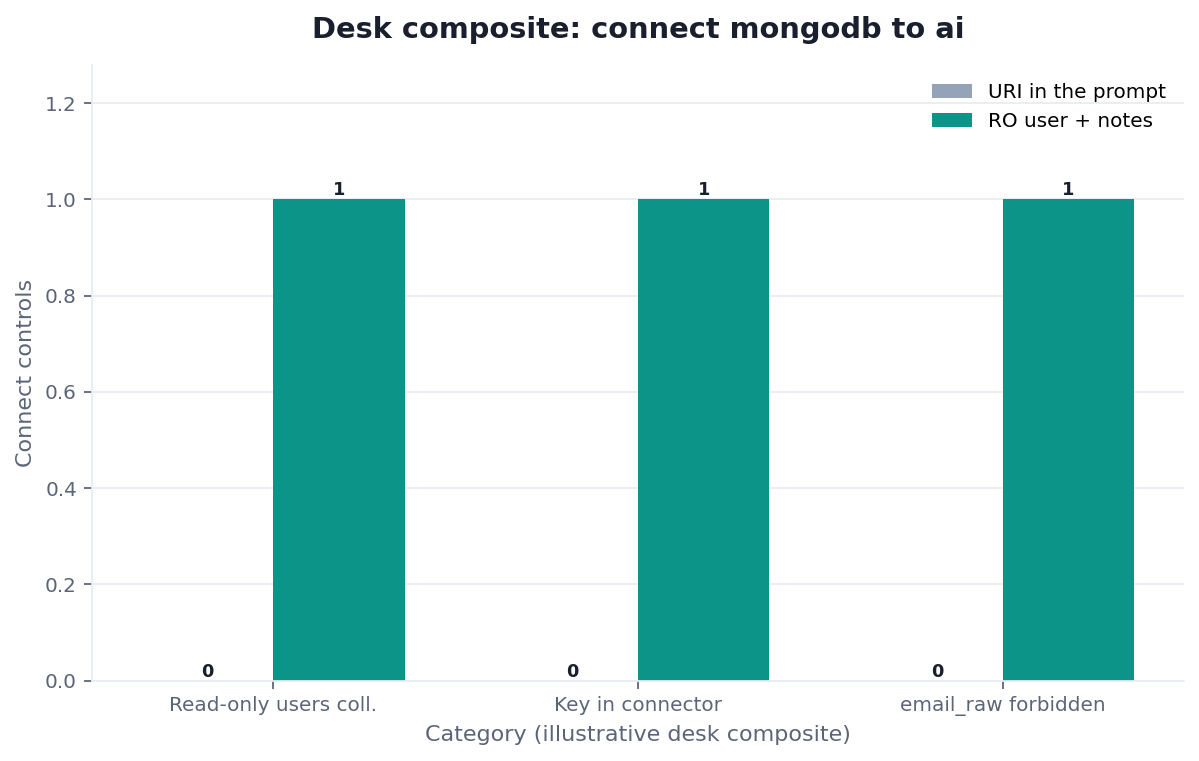
Figure. STATIC FIXTURE / NOT CONNECTED / NOT INDEPENDENTLY VALIDATED. Authored identity and policy labels only; no runtime or customer result.
Passing this replay means the CMAI files agree. It does not prove reachability, privileges, parser validity, or production suitability. Record Python version, operating system, hashes, HOLD output, and any deviation. A second internal rerun shows repeatability, not independence. Record the freeze date beside the HOLD line when you archive.
Sources and Limited Claims
Direct official sources were retrieved on 2026-08-31. MongoDB built-in roles, connection-string, and TLS pages resolved HTTP 200. NIST AI RMF resolved HTTP 200. They describe privileges, URI shape, transport encryption, and client governance. They do not validate this fixture. Re-check those URLs later.
Original third-party pages are retained: CISA AI, Wikipedia document-oriented database, Wikipedia A/B testing, BigQuery docs, and Snowflake Cortex Analyst. None audited connect mongodb to ai on this page. Some hosts may be retained without a fresh 200; keep the original URLs.
Internal review is not independent validation. A qualified reviewer would need owner approval, live URI and TLS evidence, the role catalog, one authorized statement, and versions. Until then this pack is not a third-party audit, certification, benchmark, or customer case. If a reviewer only reran Python, say so.
How to cite. InfiniSynapse, Connect MongoDB to AI: Audit Read-Only First, CMAI-20260831, HOLD / NOT READY FOR CONNECTION, not independently validated. Name the downloaded files used.
Downloads:
- Identity register
- Accepted scoped role
- Rejected readWrite role
- Accepted collection note
- Decision register
- Expected readiness
- Review rules
- Held evidence
- Assumptions
- Source check
- Reproduction protocol
- Verifier
Failure modes
Document clusters punish spreadsheet habits and chat-paste habits. This pack did not run a live connect.
Pasting the connection string into chat
If the string is in the prompt, it is in the log. Rotate. Move the string to the connector. A screenshot of the task is the same incident.
Granting readWrite because “the agent might need it”
The agent does not need to write production documents to answer a locale share. Temp artifacts belong in the task workspace. Connect mongodb to ai with readWrite is a production client, not an analyst client.
Connecting with no collection notes.
Deprecated keys, null versus missing, and renamed paths are tribal knowledge. Unbound document analysis fills the gaps with fluent guesses. Bind the notes.
Before you connect, list the collection, the id, the nested paths you will ask, the fields that are forbidden, and the SQL neighbor if any.
Route the same diagnosis to the live guide that owns the next object.
| Live guide | Open it when |
|---|---|
| MongoDB analytics | you need the parent method for nested documents |
| NoSQL data analysis | the next failure is asking rows instead of documents |
| Analyze nested JSON in Mongo | the next failure is an unwound array |
| MongoDB schema recall | the next failure is a ghost path |
| Document Database Reporting for Operations | An ops report can stay on the collection |
| Mongo plus Postgres analysis | the next object is a row neighbor beside the document |
Review the read-only role before you bind
Lock a read-only users role, store the URI in the connector, bind the collection note, and reject flatten-first as the first ticket. This check uses only sources you authorize.
Commercial association: You do not need the workspace to complete the educational diagnosis on this page.
Open InfiniSynapseHow this page is sourced. William Zhu is cofounder of InfiniSynapse (GitHub @allwefantasy); InfiniSynapse on GitHub. Company self-description, not independent authority. Desk experience: designing and reviewing analysis-pack methods—definition locks, read-only source binds, and downloadable
/tasksartifacts. Reviewed internally by analytics engineering · data platform · LLM security · editor. Editorial standards · corrections · publishing principles · About · Privacy · Terms · Contact zhuhl@infinisynapse.com. Company About. COI: InfiniSynapse sells an AI-native Data Agent; the banner is a commercial association. Fact-check: mongodb.com · nist.gov · cisa.gov · wikipedia.org · cloud.google.com · docs.snowflake.com. No external organization audited it.
Frequently Asked Questions
Do I have to flatten MongoDB into a warehouse before I connect mongodb to ai?
Bottom line: No. Flatten when many teams need a frozen grain. To connect mongodb to ai for the first analyst question, use a read-only role, bind notes, and ask.
What does a read-only role prevent?
Bottom line: Writes, drops, and “fix it in prod” prompts. CISA AI and the NIST AI Risk Management Framework treat that limit as a design requirement, not a nice-to-have. Connect mongodb to ai without that limit is a production client, not an analyst client.
Where does the connection string live?
Bottom line: In the connector. Never in the prompt. If you already pasted it, rotate before you connect mongodb to ai again.
Can I join Postgres the same day I connect mongodb to ai?
Bottom line: Yes on a stable id, after each side is aggregated to the same grain. Do not unwind arrays and then join. The connect step is still the read-only Mongo user.
Conclusion
Connect mongodb to ai is a read-only role, a string that never enters the prompt, and notes that name the nested paths. Keep documents nested until a warehouse consumer actually exists. Ask one goal. Inspect recall and any SQL join. Flatten is a platform project you can still file tomorrow. When the collection note is written and the role cannot write, the first question is an operating step rather than a migration.
InfiniSynapse describes itself on About. Privacy and Terms apply. If you later use the workspace, open InfiniSynapse only with authorized, sanitized inputs.