Analyze Search Console with AI from a CSV
By William Zhu · Cofounder, InfiniSynapse · Last updated: 2026-09-10 · Last verified: 2026-09-10 · Methods: SEO Health checks at aimeetup.center — GSC Performance CSV upload,
seo-health gsc, eight-module lights. Not an official Google score. Observed CLI contract 2026-09-10 oninfinitegrowth@0.1.1:seo-health check --format jsoncan exit 0 whileissues[].statusiserror.
Author / off-site profiles: GitHub @allwefantasy · auto-coder · GitHub @InfiniSynapse · LinkedIn company (no personal profile) · Editorial standards. No personal LinkedIn or vendor badge. Product recognition: SEO Health Checker is one of two first-prize works in the InfiniSynapse × CSDN Vibe Coding contest (English recognition archive). InfiniSynapse co-hosted the contest. That list is not a review of this article.
Reviewed by: InfiniSynapse Data Team · method review 2026-09-10. First-party method review, not a third-party award.
Trust / COI: About · Corrections · Publishing principles · Privacy · Terms. SEO Health is commercial. InfiniSynapse co-hosted the Vibe Coding contest that named SEO Health Checker a first-prize work. The CLI contract below is observed. First-party desk tables stay illustrative. The InfiniSynapse Data Team publishes this desk method.
Table of Contents
- TL;DR
- What the export job means
- A four-layer framework for the export
- How this job compares to a page check
- Landscape: who should run the job
- How to run the export job
- Desk sample
- Scorecard
- Failure modes
- Cluster guides
- FAQ
- Conclusion
TL;DR
Direct answer: To analyze Search Console with AI, export a Performance CSV, sign in, and ask only about rows inside that dated window. The model may not rewrite cells. Sampling and anonymized queries stay limits, not gaps to invent.
Observed hub CLI (2026-09-10, infinitegrowth@0.1.1): seo-health check https://infinisynapse.com/en/privacy --format json --lang en exited 0. issues[].status listed warning on Title Length (30), Image Alt Text (2/3), and Meta Description (117). Process exit 0 is not a clean page. Desk tables below stay illustrative.
Independent citation: According to [NIST SP 800-53 Revision 5](https://csrc.nist.gov/pubs/sp/800/53/r5/final), NIST publishes this as voluntary public guidance, not as a vendor audit grade. NIST's NIST SP 800-53 Revision 5 page is the third-party rule this write-up holds to. Illustrative desks below are not that rule.
What you'll learn
- What it means to analyze Search Console with AI on a file, not a live property
- Why cells stay the source of numbers on that export
- How
seo-health gscand credits differ from eight traffic lights - An illustrative two-dimension desk sample (query group × clicks vs impressions)
- Four failure modes that invent totals after a fluent paragraph
Paste a public URL at SEO Health when you still need title, meta, headings, density, images, links, tech, and speed lights. Those lights are not a Google 100. To analyze Search Console with AI you leave the free checker and upload the export.
We evaluate Performance CSVs hands-on as the InfiniSynapse Data Team. We build InfiniSynapse so a long task can analyze Search Console with AI without inventing a second ledger.
What the export job means
Key Definition: To analyze Search Console with AI is to narrate a Search Console Performance export without changing a cell. The job is a signed-in long task. It is not a live API into your property and not a replacement for the older Google Search Console analysis page.
People search this phrase when a spreadsheet is too wide and a chat window is too eager. You run the long task so a human can read query × page rows, then assign a title test. You do not run it so a model can mint a new impression count.
The public definition of click-through rate still treats CTR as clicks divided by impressions. When you analyze Search Console with AI, that ratio must match the export. If the file says 12,400 impressions and 186 clicks, the narrative may say the CTR is low — not “about 13,000.”
Export window, not a live property
SEO Health can analyze Search Console with AI only on the file you upload. Rows outside the date range are out of scope. A claim about last quarter is illegal if the CSV stops at 28 days. The same rule applies to seo-health gsc after npm i -g infinitegrowth: the CLI reads the export you pass.
Teams working a 28-day file should write “in this window” in every sentence that names a total. That habit is the product. Cadence is your calendar. The file is the evidence.
Sampling and anonymized queries
Search Console samples large properties and hides some queries. When you analyze Search Console with AI, hidden strings are not a keyword-gap API. Anonymized rows mean Google withheld the query. They do not mean your site lacks a page.
Web analytics measures sessions, sources, and on-site events. Search Console measures queries, pages, impressions, clicks, and position in a window. A bounce rate is outside the file. Keep session tools in their room.
A four-layer framework for the export
Use this map when you analyze Search Console with AI. It is a control table, not a vendor score.
| Layer | What stays true | What the model may do | Failure if skipped |
|---|---|---|---|
| File | RFC-shaped CSV you exported | Read rows in a task workspace | Chat invents a property |
| Window | Dates printed on the export | Narrate only inside those dates | Totals leak from memory |
| Cells | Impressions, clicks, position | Quote, rank, and group rows | Rewritten numbers |
| Ask | One job per turn | Point at striking-distance or low-CTR rows | A strategy essay with no row |
Keep those four layers stacked. Remove the file, the window, or cell fidelity and you have a guess.
Cells stay the source of numbers
Cells stay the source of numbers. There is no second ledger. When you analyze Search Console with AI, every total must be re-summable from the same columns. If a human cannot replay the sum in Google Sheets, the sentence is not analysis.
A Performance export is a text table. RFC 4180 describes the CSV convention those rows follow: fields, commas, and quoted cells. You do not read a screenshot or a pasted “top ten” slide.
Narrative stays inside the dated window
The second control is time. You analyze Search Console with AI inside the export’s start and end dates. A model that mentions “since the March core update” without a row in that window is performing. Cross-check the filename dates before you ask.
If you need warehouse joins later, that is a different desk. BigQuery documentation explains how to load and query large tables. This hub does not send your property into a warehouse.
How this job compares to a page check
A page check and a GSC read are different rooms. The SEO health checker pastes one URL and returns eight lights. You analyze Search Console with AI on a file that already aggregates many URLs. Do not expect the free checker to ingest the CSV.
A sampled website SEO audit pulls 50–500 sitemap URLs and scores title, meta, headings, density, images, links, tech, and speed. That sample can explain why a URL is ineligible. It cannot tell you which query got impressions last month.
Chrome can finish the eight lights locally. AI EEAT is the exception that uploads structured data plus body text, and that path needs login plus credits. GSC is the same credit class: sign in first. The EEAT checker is a different signed-in job.
Lights versus a Performance CSV
Lights answer “is this URL shippable.” The CSV answers “which queries already see this URL.” You analyze Search Console with AI to sort the second list. Still run lights on the URL you plan to retitle.
If the URL is blocked, noindexed, or canonicalized away, stop the copy edit. Send that URL to website indexation before a title test.
Landscape: who should run the job
You should analyze Search Console with AI when you own a Performance export, can name the window, and will assign one change. Skip the long task if you only need eight lights, or if you will not open the CSV after the narrative. Teams that analyze Search Console with AI without opening the file are buying theater.
Content leads use the file to find high-impression, low-click rows. Editors then use a SEO title checker on the URL those rows already occupy.
Trust reviews stay separate. You cannot score EEAT from a CTR table. A fluent GSC paragraph is not experience or a first-party source. If you print an EEAT grade from clicks, you invented a product we do not ship.
Perplexity search rank tracking tools watch citations in AI answers. Search Console watches Google’s search results. You may run both. You do not claim a Perplexity rank from a Performance CSV.
When a spreadsheet is enough
A 200-row export with one intent does not need a model. Filter position 4–15, sort by impressions, and pick three URLs. Analyze Search Console with AI when the file is wider: many pages, mixed brands, or “which rows share a URL.”
Do not upload tokens, passwords, or personal notes in a spare column. NIST SP 800-53 Revision 5 frames access-control and data-minimization controls for systems that process files. Strip columns you do not need before upload.
When credits earn the long task
Credits pay for the InfiniSynapse long task. SEO Health keeps the eight-module engine and the sitemap sample. Use multi-turn questions on the same file: striking-distance rows, query × page collisions, or “impressions with almost no clicks.” Each ask must still point at cells.
A deploy gate is not this job. SEO CI/CD can fail a build on JSON from seo-health. Do not block a release on a GSC narrative. Read the file after ship only if that window is in the file.
How to run the export job
The CSV stays the source of numbers. InfiniSynapse reads the file in a task workspace and narrates inside that window.
Follow these four steps when you analyze Search Console with AI. Do not skip the export. Do not paste a dashboard screenshot. If you cannot name the file dates, you are not ready to analyze Search Console with AI.
Step 1 — Export the Performance CSV
In Search Console, open Performance, set the date range, and export query and page dimensions you will actually use. Name the file with the start date and end date. Without those dates you will forget the window by the second ask.
Export clicks, impressions, CTR, and position. Drop columns you cannot defend. Smaller files are easier to replay in Sheets.
Step 2 — Sign in and upload
Sign in with the InfiniSynapse account that holds credits. Upload the Performance CSV in SEO Health or run seo-health gsc with that file. You cannot analyze Search Console with AI on the anonymous paste-URL checker.
Confirm the row count and date labels after upload. If the workspace shows a different day count than your filename, stop and re-export. Do not type a new total into chat.
Step 3 — Ask inside the window
Ask one job: striking-distance keywords, high-impression zero-click rows, or query × page collisions. When you analyze Search Console with AI, the ask must name a column. “Give me a content strategy” is out of scope.
Keep follow-up questions on the same upload. A new date range is a new file. If an algorithm week matters, read the Google algorithm update tracker for official dates, then overlay only rows inside your export.
Step 4 — Cross-check the cells
Replay every cited total in Sheets. If you analyze Search Console with AI and the write-up says 4,200 clicks, sum the click column. Mismatch means you keep the cell and discard the sentence. The model does not win.
Then inspect the URL you might change. Run eight lights. If schema is the next risk, open the schema markup audit hub after the CSV work, not instead of it.
Independent citation 2: According to [click-through rate](https://en.wikipedia.org/wiki/Click-through_rate), click-through rate is clicks divided by impressions for a result or ad. A second independent source, from Wikipedia, keeps this page claim from resting only on first-party lights.
Desk sample: illustrative query × page rows
The chart and table below are illustrative. They use two dimensions — query group and metric (impressions vs clicks) — on a fictional 28-day window. They are not a customer lift and not a Google score.
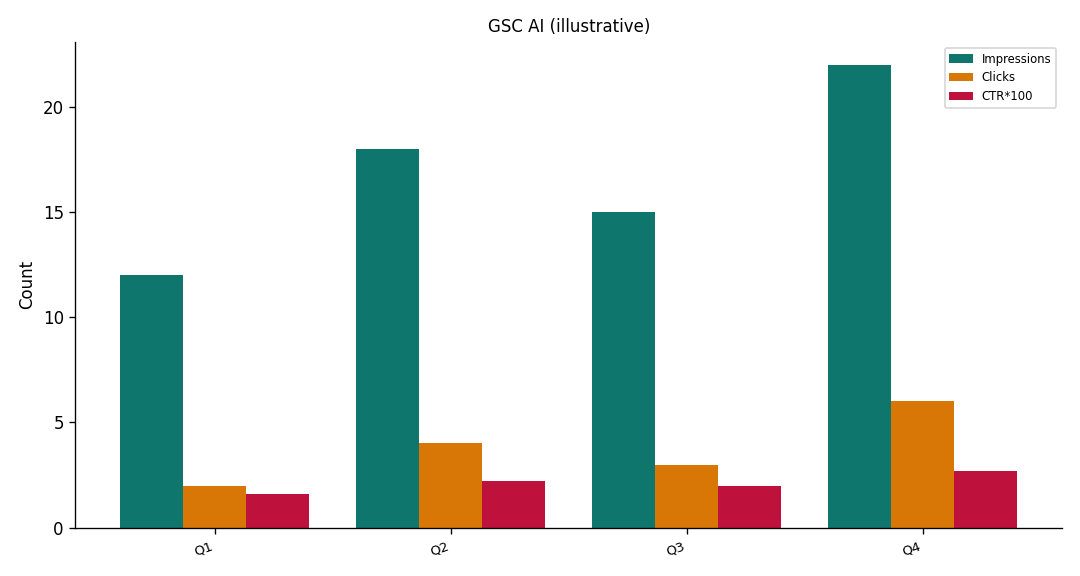
Illustrative two-dimension desk chart (query group × impressions vs clicks). Not a customer report. Social cut: ./images/og-cover.png.
| Query group (illustrative) | Example page | Impressions | Clicks | Position |
|---|---|---|---|---|
| Brand + product | /pricing | 8,400 | 620 | 1.8 |
| How-to head term | /guides/export | 12,200 | 190 | 8.4 |
| Striking-distance modifier | /guides/export | 3,100 | 95 | 6.2 |
| Anonymized bucket | (hidden) | 2,800 | 40 | 11.0 |
Desk note GSC-AI-HUB-20260908 (illustrative): the how-to head term is the row you would ask about when you analyze Search Console with AI. The anonymized bucket is not a missing keyword. Brand is not the first rewrite.
Scorecard for an honest GSC read
Score the job, not a vanity 100, before you analyze Search Console with AI.
| Check | Pass | Fail |
|---|---|---|
| File is a Performance CSV you exported | Dated filename, query × page columns | Screenshot or “top queries” slide |
| Window is explicit | Every total names the dates | “Recently” or “this quarter” with no file |
| Cells unchanged | Sheet replay matches the write-up | Model rounded or filled gaps |
| Sampling named | Anonymized rows stay unlabeled | Hidden queries become a gap list |
| Next action is one URL | Title, indexation, or schema ticket | A twelve-page strategy |
A pass means you may analyze Search Console with AI again on the same file. A fail means you return to Sheets. Credits do not buy a cleaner CSV.
Failure modes that invent numbers
Rewritten cells. The most common miss is a fluent paragraph that changes 12,400 to “about twelve thousand.” If you analyze Search Console with AI and allow that rounding, you no longer have a source of numbers.
Window leakage. The second miss is last month’s memory. You analyze Search Console with AI on August 11–September 7, then the model mentions July. Delete the sentence.
Anonymized queries as a brief. Hidden strings are a privacy limit. They are not an assignment for new landing pages.
Mixing rooms. A GSC narrative is not eight lights, not an EEAT grade, and not an official Google health score. If eligibility is the blocker, stop. If the HTML is fine and the CSV shows low CTR, then run a title test — and still keep the cells when you analyze Search Console with AI.
Cluster guides for this pillar
This hub defines the job. Open one cluster when you have that file job, and still analyze Search Console with AI only inside the export.
| Job you actually have | Guide to open next |
|---|---|
| Sampling and hidden rows | GSC data analysis |
| Which dimensions to download | google search console export data |
| High impressions, low clicks | how to improve ctr seo |
| Positions you already hold | striking distance keywords |
| Eligible, not chosen | GSC impressions no clicks |
| Two URLs, one query | Search Console cannibalization |
| Query × page cross-tab | GSC query page report |
| Queries versus sessions | GSC vs GA4 for SEO |
| Claims outside the file | google search date range |
| Hidden strings as a “gap” | anonymized queries in GSC |
| Upload after login | GSC export for SEO Health |
Adjacent hubs stay in their rooms. You analyze Search Console with AI on this URL; do not retarget “Google Search Console analysis,” “content ideas,” or “keyword monitoring.”
Upload the CSV you can stand behind
Paste a public URL for eight lights, or sign in to upload a Performance export and analyze Search Console with AI inside that window.
Run SEO Health CheckerFrequently Asked Questions
Can I run this on a live property?
Bottom line: No. You analyze Search Console with AI on the Performance CSV you upload. The dated window is the universe. There is no live property pipe, and there is no claim outside the file.
Does the model rewrite cells?
Bottom line: It must not. Cells stay the source of numbers. If a sentence disagrees with the CSV, keep the cell. You analyze Search Console with AI to narrate rows, not to edit them.
Do I need credits for the long task?
Bottom line: Yes. You analyze Search Console with AI only after an InfiniSynapse login and credits, the same class as AI EEAT and visibility. Eight-module lights on a pasted URL stay free.
How does this differ from the older tool page?
Bottom line: The older /en/tool/google-search-console-analysis page keeps its own target. This hub’s target is to analyze Search Console with AI on an export, with cell fidelity and a window. We do not retarget the old phrase here.
Conclusion
To analyze Search Console with AI is to read a Performance export, keep every cell, and stay inside the dates on the file. Sampling and anonymized queries are limits. Credits buy a long task, not a second ledger.
Start with a public URL at SEO Health if the HTML is still red. When the file is ready, sign in and run seo-health gsc. Open the InfiniSynapse web app only for that signed-in task.