GSC query page report: Cross-Tab the Export
By William Zhu · Cofounder, InfiniSynapse · Last updated: 2026-09-10 · Last verified: 2026-09-10 · Methods: SEO Health reads a Performance CSV as a query × page cross-tab so collisions and orphans stay in the same cells. Not an official Google score. Observed CLI contract 2026-09-10 on
infinitegrowth@0.1.1:seo-health check --format jsoncan exit 0 whileissues[].statusiserror.
Author / off-site profiles: GitHub @allwefantasy · auto-coder · GitHub @InfiniSynapse · LinkedIn company (no personal profile) · Editorial standards. No personal LinkedIn or vendor badge. Product recognition: SEO Health Checker is one of two first-prize works in the InfiniSynapse × CSDN Vibe Coding contest (English recognition archive). InfiniSynapse co-hosted the contest. That list is not a review of this article.
Reviewed by: InfiniSynapse Data Team · method review 2026-09-10. First-party method review, not a third-party award.
Trust / COI: About · Corrections · Publishing principles · Privacy · Terms. SEO Health is commercial. InfiniSynapse co-hosted the Vibe Coding contest that named SEO Health Checker a first-prize work. The CLI contract below is observed. First-party desk tables stay illustrative. The InfiniSynapse Data Team publishes this desk method.
Table of Contents
- TL;DR
- What a GSC query page report actually is
- A four-layer cross-tab framework
- Cross-tab versus a query-only export
- Landscape: who should build the grid
- How to build and check the cross-tab
- Desk sample: primary, secondary, orphan
- Scorecard for an honest cross-tab
- Failure modes that invent a total
- Cluster guides beside this page
- Frequently Asked Questions
- Conclusion
TL;DR
Direct answer: A **GSC query page report** is the query × page cross-tab of the Performance export you already downloaded. Use it to see collisions (one query, two pages) and orphans (a page with no labeled query you intended). Totals must replay from the same CSV cells.
What you will learn: why a GSC query page report is a pivot, not a screenshot; how collisions and orphans sit in the same grid; an illustrative two-dimension table; four steps that keep the CSV as the source of numbers.
Paste a public URL at SEO Health when you still need title, meta, headings, density, images, links, tech, and speed lights. Those lights are not a Google 100. A GSC query page report lives in the file you upload after login.
We evaluate a GSC query page report hands-on as the InfiniSynapse Data Team. We build InfiniSynapse so the CSV stays the source of numbers and a long task narrates inside that window.
What a GSC query page report actually is
Key Definition: A GSC query page report is a two-dimension table built from the Performance CSV: every labeled query against every page that received impressions or clicks in the dated window. It is not a live property API. It is not an official Google score. It is not a screenshot of the Performance UI.
Observed CLI contract (2026-09-10, infinitegrowth@0.1.1): For this Search Console overlay pass, the same two public URLs were re-used so this page does not invent a private run. seo-health check https://infinisynapse.com/en/blog/data-agent-memory --format json --lang en exited 0 with page.title present and Image Alt Text = warning. The same command on https://example.com also exited 0 while issues[].status listed error on Meta Description, Robots.txt, and Sitemap.xml. Parse those status fields. Exit 0 is not a clean page. Desk tables below stay illustrative.
Independent citation: According to [BigQuery query overview](https://cloud.google.com/bigquery/docs/query-overview), Google's official page on BigQuery query overview is an independent third-party reference for that term, not a first-party traffic forecast. Google's BigQuery query overview page is the third-party rule this write-up holds to. Illustrative desks below are not that rule.
People search GSC query page report when a query-only list hides which URL took the row. The useful next move is to export both dimensions and pivot. The useless next move is to add query totals to page totals from two different files and call the sum a report.
A pivot table rearranges the same cells along new axes without inventing a second ledger, which is exactly what a GSC query page report must do. If a human cannot rebuild the grid in Sheets, the sentence is not a report.
If you still need the older property-level vocabulary, open the older Search Console tool page. Do not retarget that older phrase here.
Cross-tab, not a dashboard screenshot
A screenshot loses the grain. You cannot sort, you cannot replay, and you cannot prove a collision. Build the GSC query page report from the CSV. Name the start date and the end date on the file.
A contingency table records two categorical axes in one grid; query and page are those axes. Do not flatten them into a ranked list and pretend you still have a GSC query page report.
The older keyword planning page keeps its own target. This cluster will not retarget that phrase.
Collisions and orphans in the same grid
A collision is one labeled query with two or more pages. An orphan, on this page, is a page row that appears in the window without the query you thought it owned — or a query with a page you did not intend. Both live in the same GSC query page report. Do not open a second spreadsheet for orphans.
Sampling and anonymized queries are limits, not a keyword-gap API. A hidden query cannot be a collision you assign and cannot be an orphan you “fill.” Leave the string unlabeled.
A service-case traffic story from another desk is not product proof that a cleaner cross-tab will raise clicks.
A four-layer cross-tab framework
Use this map when you build a GSC query page report. It is a control table, not a vendor score.
| Layer | Stays true | Failure if skipped |
|---|---|---|
| File | CSV with query and page | A query-only tile |
| Window | Dates on the export | A blended quarter |
| Grain | One cell per query × page | A summed mood |
| Replay | Totals match the source cells | A model-invented total |
Remove replay and you have a slide.
Spark SQL documents table expressions you can re-run; the Spark SQL reference is why a GSC query page report should be a statement you can execute again on the same file. If you cannot re-run it, you cannot defend it.
Totals must replay from the same cells
The model must not rewrite cells. Impression totals, click totals, and the count of colliding queries must come back from the same CSV. If the write-up says 22 primary queries, you should be able to count 22. A GSC query page report that cannot replay is theater.
Paste an occupying URL at SEO Health and read the eight lights — title, meta, headings, density, images, links, tech, and speed — after you know which query it holds. Chrome can finish those lights locally. AI EEAT, visibility, and GSC reads need an InfiniSynapse login and credits.
A sampled site audit of 50–500 sitemap URLs can list templates. It cannot build a GSC query page report.
Cross-tab versus a query-only export
A query-only export answers “which strings appeared.” A GSC query page report answers “which URL took each string.” Those are different jobs. If you only have the first file, you cannot prove a collision and you cannot prove an orphan.
When the collision is the next ticket, continue on Search Console cannibalization. Stay here when the job is building the grid itself.
PostgreSQL documents how a table expression defines the rows you later filter; the PostgreSQL table-expression chapter is why you fix the query × page grain before you filter position or CTR. Filter a wrong grain and you will “fix” a total that was never a cell.
GSC is limited to the export window. A page that ranked in June is out of scope if the CSV is a later 28-day slice. Name the dates in every sentence that cites a count.
Landscape: who should build the grid
You should build a GSC query page report when you own the export, can pivot two columns, and will assign collisions or orphans to owners. Skip the long task if you only need eight lights, or if you will not open the CSV after the narrative.
Analysts use the grid to list collisions. Editors use it to see which URL already occupies a how-to string. Site owners use it to find pages that appear without the query they funded.
Amazon Athena is a query service over files you already store; the Athena overview is the same habit as this cluster: the CSV stays the source, and the query only reads it.
seo-health gsc after npm i -g infinitegrowth reads the file you pass. It does not open a live property. Credits pay for the InfiniSynapse long task, the same class as AI EEAT and visibility. Eight-module lights on a pasted URL stay free.
A 300-row export with one locale does not need a model. Pivot query × page, mark collisions, and write three tickets. Strip tokens and passwords before upload.
How to build and check the cross-tab
The CSV stays the source of numbers. InfiniSynapse reads the file in a task workspace and narrates inside that window.
Follow these four steps for a GSC query page report. Do not skip the page dimension. Do not paste a dashboard screenshot. If you cannot name the file dates, you are not ready to flag a collision.
Step 1 — Export both dimensions
In Search Console, open Performance, set the date range, and export query and page together. Name the file with the start date and the end date. Without both dimensions you do not have a GSC query page report.
Export clicks, impressions, CTR, and position. Confirm the date labels match the filename before you upload.
Step 2 — Pivot query × page
Build the GSC query page report in Sheets or in the task workspace. Each cell is one query and one page. Do not pre-sum queries in one sheet and pages in another.
Sign in with the InfiniSynapse account that holds credits. Upload the CSV in SEO Health or run seo-health gsc with that file. Confirm the row count after upload.
Step 3 — Flag collisions and orphans
Mark any labeled query with two or more pages. Mark any page that lacks the query you intended, or any query on a page you did not fund. Park anonymized rows. A GSC query page report that treats hidden strings as orphans is inventing work.
If a collision needs a primary named, send that ticket to the cannibalization sibling. If a row sits in striking distance, continue on striking-distance keywords after the grid is honest.
Paste occupying URLs for eight lights only after the grid names them.
Step 4 — Replay the window totals
Replay impression and click totals from the source cells. If the write-up says 22 primary queries against 6 pages, count those cells. Mismatch means you keep the cell and discard the sentence. The model does not win.
BigQuery’s query overview treats a job as a statement over stored tables; the BigQuery query overview is why a cited total in this cluster must be a job you can re-run on the same CSV. A sentence you cannot re-run is not analysis.
Then write tickets from the GSC query page report. Do not invent a second total.
Independent citation 2: According to [contingency table](https://en.wikipedia.org/wiki/Contingency_table), a contingency table cross-tabulates two categorical variables. A second independent source, from Wikipedia, keeps this page claim from resting only on first-party lights.
Desk sample: primary, secondary, orphan
The chart and table below are illustrative. They use two dimensions — occupancy role and count (queries vs pages) — on a fictional 28-day window. They are not a customer lift and not a Google score.
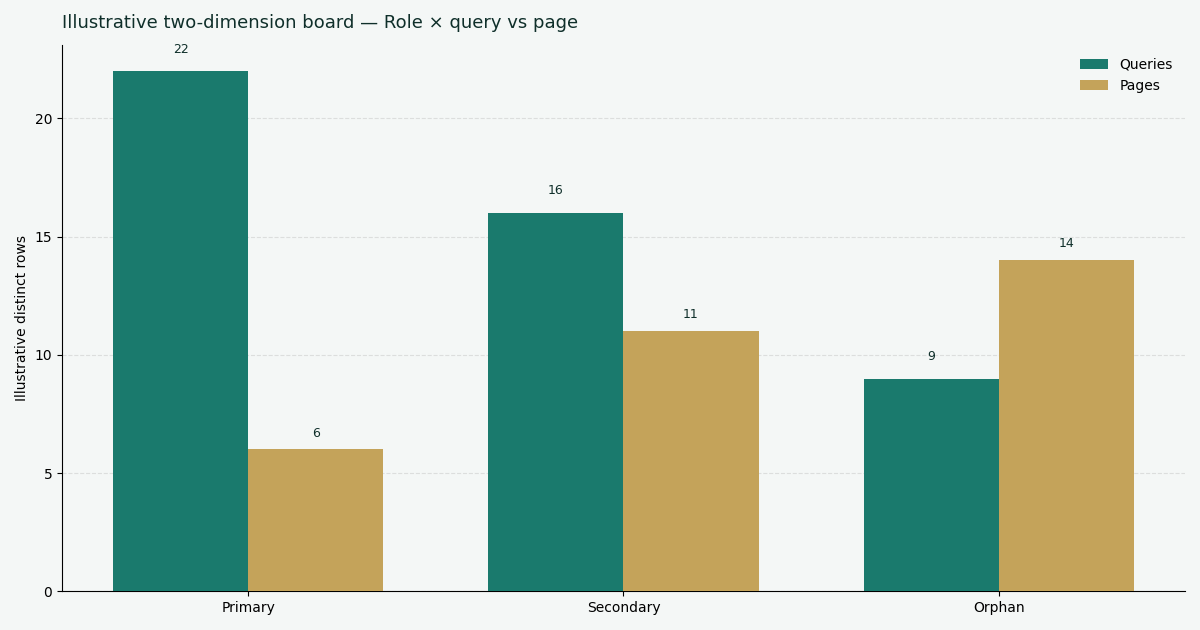
Illustrative two-dimension desk chart (role × queries vs pages). Not a customer report. Social cut: ./images/og-cover.png.
| Role (illustrative) | Queries | Pages |
|---|---|---|
| Primary occupant | 22 | 6 |
| Secondary / collision | 16 | 11 |
| Orphan / unexpected pair | 9 | 14 |
Desk note GSC-IG308-20260908 (illustrative): six pages hold twenty-two primary queries. The secondary band is the collision list. The orphan band is pairs you did not intend, not a keyword-gap API.
Each cluster is a role. Each bar is a count. A GSC query page report that only prints the primary band is hiding the work.
Scorecard for an honest cross-tab
Score the job, not a vanity 100, before you trust a GSC query page report.
| Check | Pass | Fail |
|---|---|---|
| File has query and page | Dated CSV, both dimensions | Query-only screenshot |
| Window is explicit | Counts name the dates | “This quarter” |
| Grain is query × page | One cell per pair | Pre-summed lists glued |
| Cells unchanged | Sheet replay matches | Model invented a total |
| Hidden rows unlabeled | Anonymized bucket parked | Hidden strings as orphans |
A pass means you may ask the long task again on the same file. A fail means you return to Sheets.
The pillar hub on how to analyze Search Console with AI states the same cell rule for every cluster in this series.
Failure modes that invent a total
Two files glued together. The most common miss is adding a query export to a page export from a different day. That is not a GSC query page report. That is two windows wearing one label.
Dashboard as the grid. The second miss is a screenshot you cannot replay. A GSC query page report is a pivot from cells.
Hidden strings as orphans. The third miss is filling blank query cells and calling that a GSC query page report. Sampling and anonymized queries are limits.
Mixing rooms. Eight lights, a 50–500 sample, and a Performance CSV answer different questions. Do not print an official Google score from either room.
Cluster guides beside this page
This page is the GSC query page report: query × page, collisions and orphans, replay the totals.
| Job you actually have | Guide to open next |
|---|---|
| Name one primary per query | Search Console cannibalization |
| Work position 4–15 rows | Striking-distance keywords |
| High impressions, almost no clicks | GSC impressions no clicks |
| Narrate the whole export | GSC data analysis |
Open one row when you have that job. A GSC query page report stays the cross-tab on this URL.
Cross-tab the file before you retitle
Paste an occupying URL for eight lights, or sign in to upload the Performance export and build the query × page grid from the same cells.
Run SEO Health CheckerFrequently Asked Questions
Can I trust a dashboard total instead of the file?
Bottom line: No. A GSC query page report is a pivot of the CSV you exported. A dashboard tile you cannot replay is not the report.
What is an orphan in this table?
Bottom line: A pair you did not intend: a page without the query you thought it owned, or a query on a page you did not fund. It is not a hidden string, and a GSC query page report is not a keyword-gap API.
Do I need credits to build the cross-tab?
Bottom line: Yes for the InfiniSynapse long task that narrates a GSC query page report, and for seo-health gsc as a credited GSC job. You can still pivot the CSV in Sheets without credits. The anonymous paste-URL checker still returns the eight lights without a login. Chrome stays local unless you start AI EEAT.
Can I skip the page dimension?
Bottom line: No. Without the page column you do not have a GSC query page report. Export query and page together, then pivot.
Conclusion
A GSC query page report is the query × page cross-tab in your export. Use it to see collisions and orphans. Replay every total from the same CSV cells. Do not glue two files from two windows.
Start with a public URL at SEO Health if the HTML is still red. When the file is ready, sign in, upload the CSV, and run seo-health gsc. Open the InfiniSynapse web app only for that signed-in task. Rebuild the pivot in Sheets before you retitle.