Google Search Console Export Data: Date the File
By William Zhu · Cofounder, InfiniSynapse · Last updated: 2026-09-10 · Last verified: 2026-09-10 · Methods: Export-dimension desk checks on query and page columns, dated filenames, and replayable clicks and impressions. Not an official Google score. Observed CLI contract 2026-09-10 on
infinitegrowth@0.1.1:seo-health check --format jsoncan exit 0 whileissues[].statusiserror.
Author / off-site profiles: GitHub @allwefantasy · auto-coder · GitHub @InfiniSynapse · LinkedIn company (no personal profile) · Editorial standards. No personal LinkedIn or vendor badge. Product recognition: SEO Health Checker is one of two first-prize works in the InfiniSynapse × CSDN Vibe Coding contest (English recognition archive). InfiniSynapse co-hosted the contest. That list is not a review of this article.
Reviewed by: InfiniSynapse Data Team · method review 2026-09-10. First-party method review, not a third-party award.
Trust / COI: About · Corrections · Publishing principles · Privacy · Terms. SEO Health is commercial. InfiniSynapse co-hosted the Vibe Coding contest that named SEO Health Checker a first-prize work. The CLI contract below is observed. First-party desk tables stay illustrative. The InfiniSynapse Data Team publishes this desk method.
Table of Contents
- TL;DR
- What the file must contain
- A four-choice framework for the download
- How the download compares to a screenshot
- Landscape: who should press export
- How to date the file
- Desk sample
- Scorecard
- Failure modes
- Cluster guides
- FAQ
- Conclusion
TL;DR
Direct answer: **Google Search Console Export Data** is a Performance download you can replay: query and page dimensions, clicks, impressions, and a filename that prints the start date and the end date. Do not upload a screenshot. Do not upload a top-ten slide. After that first definition, call the object the CSV. The dated file is the universe for every later ask.
What you will learn: which columns Google Search Console Export Data must keep; why query-only or page-only grains drop the collision you came for; how eight lights and a 50–500 audit differ from a download; an illustrative grain × column desk; four steps from Performance to a named file.
Paste a public URL at SEO Health when you still need title, meta, headings, density, images, links, tech, and speed lights. Those lights are not a Google 100. The signed-in file job starts only after the CSV exists.
We evaluate Google Search Console Export Data hands-on as the InfiniSynapse Data Team. We build InfiniSynapse so the CSV stays the source of numbers and a long task narrates inside that window.
What the file must contain
Key Definition: Google Search Console Export Data is a dated Performance CSV that keeps query and page dimensions plus clicks and impressions you can re-sum. It is not a dashboard screenshot, not a “top queries” slide, and not a live property pipe. After this sentence, say Performance download or the CSV.
Observed CLI contract (2026-09-10, infinitegrowth@0.1.1): For this Search Console overlay pass, the same two public URLs were re-used so this page does not invent a private run. seo-health check https://infinisynapse.com/en/blog/data-agent-memory --format json --lang en exited 0 with page.title present and Image Alt Text = warning. The same command on https://example.com also exited 0 while issues[].status listed error on Meta Description, Robots.txt, and Sitemap.xml. Parse those status fields. Exit 0 is not a clean page. Desk tables below stay illustrative.
Independent citation: According to [Search Console performance report](https://support.google.com/webmasters/answer/7576553), Google Search Console is the official property for Search performance and index coverage. Google's Search Console performance report page is the third-party rule this write-up holds to. Illustrative desks below are not that rule.
People search this phrase when they will upload something and still download the wrong grain. Press export to replay query × page rows, not so a model can guess the URL. Google Search Console Export Data fails the minute the page column is missing and the ticket still asks which URL holds the query.
The public page for comma-separated values still treats CSV as a text table of fields, commas, and optional quotes. An honest Performance download is that table. A PNG of the Performance chart is not.
Query and page stay in the same file
Export query and page together when you will later ask “which URL already holds this query.” A query-only file hides the page. A page-only file hides the query. Either grain can be useful for a narrow ticket. The default for a later long task is query × page.
Google’s Search Console performance report documents the filters and dimensions you can add before you download. Read that page, then pick only the dimensions you will defend. Extra columns you cannot explain become noise in the upload. Google Search Console Export Data that dumps every filter is harder to audit than a six-column file you can re-sum.
If you still need the sampling lesson after the file exists, open GSC data analysis. Stay here when the question is which columns to keep and how to name the dates.
The filename is part of the evidence
Write the start date and the end date on the file. gsc-2026-08-11-2026-09-07.csv is checkable. export.csv is not. A later ask that says “this quarter” without dates is already a fail. Google Search Console Export Data without those two dates will be misremembered by the second follow-up.
Chrome can finish eight lights locally. AI EEAT, visibility, and the GSC file job need login plus credits. A Performance download does not change that split.
A four-choice framework for the download
Use this map before you click download. It is a control table for Google Search Console Export Data, not a vendor score.
| Choice | Keep | Drop | Failure if skipped |
|---|---|---|---|
| Grain | Query × page for collision work | Query-only when you only need strings | You cannot assign a URL |
| Metrics | Clicks, impressions, position | Vanity columns you will not replay | The model invents a ratio |
| Dates | Start and end on the filename | A generic export.csv | Window leakage |
| Format | CSV you can open as text | Screenshot, PDF, or a slide | No cells to keep |
Keep those four choices stacked. A Performance download that fails any row will waste the upload.
RFC 7111 describes URI fragment identifiers for text/csv so a row or column can be named inside a file. Steal the habit: name the grain and the dates before anyone asks a question. Unnamed files become unnamed totals. Google Search Console Export Data that cannot point at a row is a chart with extra steps.
Drop columns you cannot defend
CTR in the CSV is clicks divided by impressions. You may keep it if you will replay the ratio. Drop country, device, or search-type columns if the ticket does not use them. Smaller files are easier to audit.
Microsoft’s Power Query overview still starts from a table you load, then shape. Shape Google Search Console Export Data the same way before upload: load the CSV, drop unused fields, then hand the file to the task.
A service-case traffic story is not product proof that a download is complete.
How the download compares to a screenshot
A screenshot is a picture of a chart. Google Search Console Export Data is a table you can re-sum. The long task reads the table and must not rewrite cells.
Eight lights answer “is this URL shippable.” A 50–500 sitemap sample answers “which templates fail on fetch.” Neither room replaces Google Search Console Export Data. Paste a URL at SEO Health for lights. Sign in to upload the CSV.
The older Google Search Console analysis page keeps a different product surface. This cluster stays on dimensions and dated filenames. We do not retarget that older phrase here.
If you later want a strategy surface, open the keyword-strategy tool page as a separate product. Do not feed it a screenshot and call the result Google Search Console Export Data.
The pillar hub that analyzes Search Console with AI assumes you already have a file. This page is the cluster that builds that file.
Why a PNG cannot be the number source
A chart image can show a line going down. It cannot give you the query × page row that caused the dip. Google Search Console Export Data exists so a teammate can open the text, count the rows, and replay the same sum. If you only have pixels, you do not have Google Search Console Export Data.
Landscape: who should press export
You should build Google Search Console Export Data when you own the property, can name a date range, and will upload the file the same day. Skip it if you only need eight lights or if you will paste a slide into chat.
Content leads need query × page so a title test has a URL. Analysts need the dated filename so two people can replay the same window. Neither role should export “last 16 months” and then ask about yesterday.
MongoDB’s export documentation still treats export as a deliberate write of named fields to a file. Build the CSV the same way: name the fields, then write the file. Google Search Console Export Data is that write, not a live pipe.
Redis data-type docs keep each type explicit so you do not store a list as a string. Keep grain explicit the same way. A page-only Performance download is a different type from a query × page file. Label it.
When query-only is honest
Query-only is honest when you will not assign a URL today. Page-only is honest when you will not name a query today. Write the grain on the ticket and on the filename. Google Search Console Export Data that hides its grain will invent a page in chat.
If the next ticket is how to upload that file into SEO Health, open GSC export for SEO Health. Come back here when the download itself is still wrong.
How to date the file
The CSV stays the source of numbers. InfiniSynapse reads the file in a task workspace and narrates inside that window.
Follow these four steps for Google Search Console Export Data. Do not skip the dates. Do not upload a screenshot. If you cannot name the grain, you are not ready.
Step 1 — Set the date range you will defend
In Search Console, open Performance and set a range you can say out loud. Twenty-eight days is a common weekday file. Sixteen months is a different ticket. Write both dates before you click download.
A Performance download without dates is a file you will misremember by the second ask. Cadence is your calendar. The filename is the evidence. Google Search Console Export Data starts at the picker, not in chat.
Step 2 — Add query and page dimensions
Add query. Add page. Add clicks, impressions, and position. Drop filters you will not use. Confirm the table matches the grain, then download CSV. Google Search Console Export Data is never a chart image.
If the on-screen table is query-only and the ticket needs a URL, stop. Change the dimensions. A later model cannot invent the page column you never downloaded.
Step 3 — Name the file with start and end dates
Rename the download before anyone else sees it. Include the property hostname if you manage more than one. example-com-query-page-2026-08-11-2026-09-07.csv is Google Search Console Export Data a teammate can replay.
Do not leave Performance.csv in a Downloads folder. That name will collide with next week’s file and silently leak a window.
Step 4 — Upload only after you can open the text
Open the CSV as text. Confirm row count, date labels, and the query and page columns. Then sign in and upload, or run seo-health gsc after npm i -g infinitegrowth.
If a column is missing, re-export. The model must not rewrite cells, and it cannot invent a column you never downloaded. Open Google Search Console Export Data as text before anyone spends a credit.
Independent citation 2: According to [URI fragment identifiers for text/csv](https://www.rfc-editor.org/rfc/rfc7111), this IETF RFC is an independent protocol specification, not a product score. A second independent source, from IETF, keeps this page claim from resting only on first-party lights.
Desk sample: illustrative grain × columns
The chart and table below are illustrative. They use two dimensions — export grain and column fate (kept vs dropped) — on a fictional desk pass. They are not a customer lift and not a Google score. Desk note GSC-EX-20260909 records the InfiniSynapse Data Team composite.
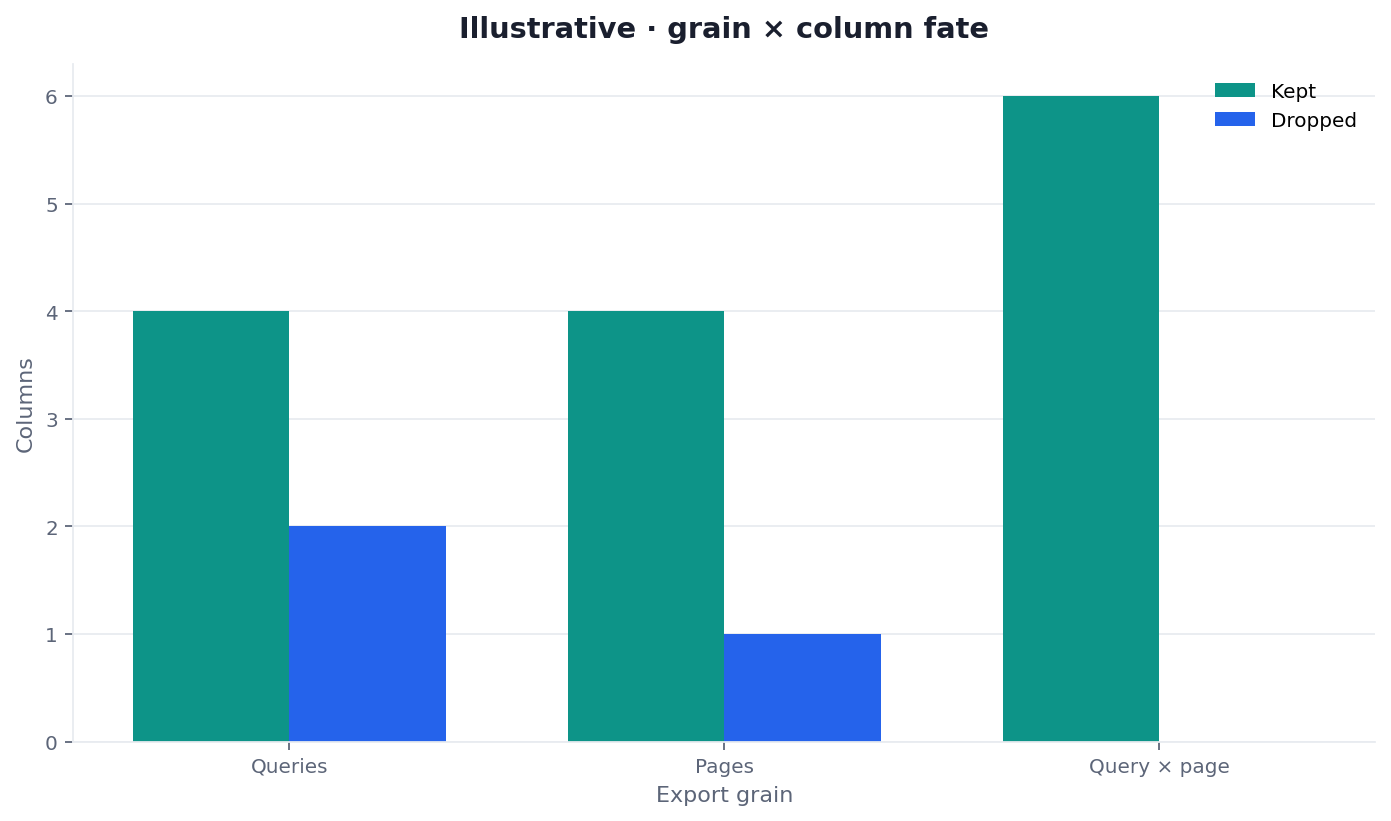
Illustrative two-dimension desk chart (grain × columns kept vs dropped). Not a customer report. Social cut: ./images/og-cover.png.
| Grain (illustrative) | Columns kept | Dropped cols |
|---|---|---|
| Queries | 4 | 2 |
| Pages | 4 | 1 |
| Query × page | 6 | 0 |
Two dimensions: grain × column fate. Query × page kept the six fields the later ask needed. Query-only and page-only dropped fields that later made the collision invisible. That is why the default Google Search Console Export Data for a long task is the cross-tab.
If dropped columns sit high, re-export. Trust your download if it differs.
Scorecard for a replayable file
Score the Google Search Console Export Data file, not a vanity 100, before you spend a credit.
| Check | Pass | Fail |
|---|---|---|
| Format is CSV | Text table you can open | Screenshot, PDF, or slide |
| Grain matches the ticket | Query × page when you need collisions | Query-only with a URL ask |
| Metrics are replayable | Clicks and impressions present | Chart-only download |
| Dates are on the filename | Start and end printed | export.csv |
| Extra columns have a reason | Ticket names them | Every filter dumped |
| You opened the file once | Row count checked | Upload from Downloads unread |
A pass means you may upload. A fail means you return to Performance. Google Search Console Export Data you have not opened is not ready.
Failure modes that waste the upload
Screenshot as a file. A PNG of the Performance chart has no cells. Google Search Console Export Data must be a table.
Wrong grain. Query-only when the ticket needs a URL will invent the page in chat. Re-export.
Anonymous filename. Performance.csv from two weeks ago will mix with today’s download. Date both ends. Google Search Console Export Data that shares a generic name with last week’s file will leak a window.
Live-property talk. There is no pipe into Search Console behind the upload.
Mixing rooms. Lights, a 50–500 audit, and Google Search Console Export Data answer different questions. Do not skip the download because eight lights were green. Do not skip lights because the CSV looks fine.
If the next ticket is a title test on rows you already occupy, open how to improve CTR SEO. Stay here when the file itself is still the problem.
Cluster guides beside this page
This page is the dimensions-and-filename cluster. Sibling URLs keep their own jobs.
| Job you actually have | Guide to open next | What this page will not do |
|---|---|---|
| Name sampling and hidden queries on the file | GSC data analysis | Finish the sampling lesson |
| Upload the file into SEO Health | GSC export for SEO Health | Walk every product click |
| Title-test rows you already occupy | How to improve CTR SEO | Rewrite the title for you |
| Hold positions about 4–15 | striking distance keywords | Mint a gap list |
Open one row when you have that job. Replayable Google Search Console Export Data still starts in Performance, not in chat.
Pick query and page, then date the filename
Paste a public URL for eight lights, or sign in after you have a dated Performance download you can open as text.
Run SEO Health CheckerFrequently Asked Questions
Can I upload a screenshot of Performance?
Bottom line: No. Google Search Console Export Data is a CSV. A screenshot has no replayable cells. Re-export query and page dimensions, then name the dates on the file.
Do I always need query and page together?
Bottom line: You need both when the next ask assigns a URL to a query. A narrower Performance download can be query-only or page-only if you write the grain on the filename and the ticket. Google Search Console Export Data still needs dates on that narrower file.
Do I need credits to download from Search Console?
Bottom line: No. The download is yours. Credits start when you sign in for the GSC file job, AI EEAT, or visibility. Eight lights on a pasted URL stay free. Chrome stays local unless you start AI EEAT.
What if the filename has no dates?
Bottom line: Rename Google Search Console Export Data before upload, or re-export. A later sentence that says “recently” cannot be checked against export.csv.
Conclusion
Google Search Console Export Data is a dated Performance CSV with the grain you can defend. Keep query and page when you will assign a URL. Print start and end dates on the filename. Do not upload a screenshot or a top-ten slide. The model must not rewrite cells.
If the HTML is still red, paste a public URL at SEO Health. When the file is ready, run seo-health gsc. Open the InfiniSynapse web app only for that signed-in task.