GSC export for SEO Health: Upload the Dated CSV
By William Zhu · Cofounder, InfiniSynapse · Last updated: 2026-09-10 · Last verified: 2026-09-10 · Methods: SEO Health checks at aimeetup.center — signed-in GSC CSV upload,
seo-health gsc, credits for narration inside the file. Not an official Google score. Observed CLI contract 2026-09-10 oninfinitegrowth@0.1.1:seo-health check --format jsoncan exit 0 whileissues[].statusiserror.
Author / off-site profiles: GitHub @allwefantasy · auto-coder · GitHub @InfiniSynapse · LinkedIn company (no personal profile) · Editorial standards. No personal LinkedIn or vendor badge. Product recognition: SEO Health Checker is one of two first-prize works in the InfiniSynapse × CSDN Vibe Coding contest (English recognition archive). InfiniSynapse co-hosted the contest. That list is not a review of this article.
Reviewed by: InfiniSynapse Data Team · method review 2026-09-10. First-party method review, not a third-party award.
Trust / COI: About · Corrections · Publishing principles · Privacy · Terms. SEO Health is commercial. InfiniSynapse co-hosted the Vibe Coding contest that named SEO Health Checker a first-prize work. The CLI contract below is observed. First-party desk tables stay illustrative. The InfiniSynapse Data Team publishes this desk method.
Table of Contents
- TL;DR
- What a GSC export for SEO Health actually is
- A four-layer upload framework
- Upload versus a paste-URL check
- Landscape: who should upload the file
- How to run a GSC export for SEO Health
- Desk sample
- Scorecard
- Failure modes
- Cluster guides
- FAQ
- Conclusion
TL;DR
Direct answer: A **GSC export for SEO Health** is a dated Performance CSV you upload after login. Credits buy narration inside that file. Cells stay the source of numbers. The model must not rewrite a cell. Sampling and anonymized queries stay limits, not a keyword-gap API.
What you will learn: why a GSC export for SEO Health is a signed-in upload; how seo-health gsc differs from eight lights; an illustrative stage × check table; four skips that invent a ledger.
Paste a public URL at SEO Health for title, meta, headings, density, images, links, tech, and speed lights. Those lights are not a Google 100. A GSC export for SEO Health leaves the free checker.
We evaluate GSC export for SEO Health hands-on as the InfiniSynapse Data Team. We build InfiniSynapse so the CSV stays the source of numbers and a long task narrates inside that window.
What a GSC export for SEO Health actually is
Key Definition: A GSC export for SEO Health is the Performance CSV you download from Search Console, then upload into SEO Health after an InfiniSynapse login. Credits pay for a long task that narrates rows inside that dated window. The product is not a live API into your property and not a second ledger of numbers.
Observed CLI contract (2026-09-10, infinitegrowth@0.1.1): For this Search Console overlay pass, the same two public URLs were re-used so this page does not invent a private run. seo-health check https://infinisynapse.com/en/blog/data-agent-memory --format json --lang en exited 0 with page.title present and Image Alt Text = warning. The same command on https://example.com also exited 0 while issues[].status listed error on Meta Description, Robots.txt, and Sitemap.xml. Parse those status fields. Exit 0 is not a clean page. Desk tables below stay illustrative.
Independent citation: According to [RFC 7578](https://www.rfc-editor.org/rfc/rfc7578), RFC 7578 specifies returning values from forms as multipart/form-data. IETF's RFC 7578 page is the third-party rule this write-up holds to. Illustrative desks below are not that rule.
People search GSC export for SEO Health when they have a file and a credit balance and want the next click. The useful habit is export, sign in, upload, ask one job, replay the cells.
A file upload is the act of sending a local file to a remote system, which is why a pasted chart image is the wrong object for this job.
The older property-analysis page keeps its own target. This cluster page will not retarget that phrase.
Login and credits are the gate
Eight lights on a public URL stay free. A GSC export for SEO Health does not. EEAT, visibility, and GSC narration need login and credits. Chrome stays local unless you start AI EEAT.
npm i -g infinitegrowth installs the CLI. seo-health gsc reads the file you pass. If the filename dates disagree with the workspace, stop and re-export.
The file is the universe
Rows outside the date range are out of scope. A claim about last quarter is illegal if the CSV stops at 28 days. Sampling and anonymized queries are limits, not a keyword-gap API.
RFC 7578 describes how multipart form data carries a file in an HTTP request, which is the transport shape of an honest GSC export for SEO Health. A chat paste of “top ten queries” is not that shape.
A four-layer upload framework
Treat the upload as four stacked controls. Skip one layer and a GSC export for SEO Health becomes a guess.
| Layer | What stays true | What the model may do | Failure if skipped |
|---|---|---|---|
| File | RFC-shaped CSV you exported | Read rows in a task workspace | Chat invents a property |
| Window | Dates printed on the export | Narrate only inside those dates | Totals leak from memory |
| Cells | Impressions, clicks, position | Quote, rank, and group rows | Rewritten numbers |
| Ask | One job per turn | Point at rows inside the file | A strategy essay with no row |
Keep those four layers stacked. The OWASP unrestricted file upload note explains why systems must constrain what a client may send. Send a Performance CSV you exported. Do not send tokens or an admin host. A GSC export for SEO Health is that constrained file, not a slide.
Cells stay the source of numbers
Cells stay the source of numbers. When a sentence cites 12,400 impressions, those impressions must sit in the GSC export for SEO Health you uploaded. If a human cannot replay the sum, the sentence is not analysis.
The model must not rewrite cells. Credits buy narration inside the window, not a cleaner CSV.
A strategy board is a different room from a dated Performance CSV. You may open that board after you pick a visible row. You may not use it to replace a GSC export for SEO Health.
Upload versus a paste-URL check
Paste a public URL at SEO Health for eight lights. A GSC export for SEO Health is not those lights. The anonymous checker will not ingest the CSV.
A sampled site audit pulls 50–500 sitemap URLs and scores title, meta, headings, density, images, links, tech, and speed. That sample can explain why a URL is ineligible. It cannot stand in for the upload.
Chrome can finish the eight lights locally. AI EEAT needs login plus credits. GSC is the same credit class. The pillar hub on how to analyze Search Console with AI still treats the dated file as the universe.
Lights versus a credited file
Lights answer “is this URL shippable.” Do not expect lights to replace a GSC export for SEO Health.
Supabase Storage documents how an application stores an object you chose to send. Your Performance CSV is that kind of object.
A service-case traffic story is not proof that SEO Health printed a Google 100 or a live property pipe.
Landscape: who should upload the file
Run a GSC export for SEO Health when you own the CSV, can name the window, hold credits, and will assign one change. Skip the long task if you only need eight lights.
Content leads upload to find high-impression, low-click rows. Clicks are not an EEAT grade.
Stripe Files documents a purpose-built upload for objects a system must keep. Treat your Performance CSV that way: dated, complete, no spare secrets.
seo-health gsc after npm i -g infinitegrowth is the CLI twin of the browser upload. Both stay inside the export window. Neither is a live property.
When a spreadsheet is enough
A 200-row export with one intent does not need a model. Filter position 4–15 and pick three URLs. Bring the long task when the file is wider and you still want a GSC export for SEO Health to narrate without rewriting cells.
If you still need the export clicks inside Search Console itself, open google search console export data first. Stay here when the file is already on disk.
How to run a GSC export for SEO Health
The CSV stays the source of numbers. InfiniSynapse reads the file in a task workspace and narrates inside that window.
Follow these four steps. Do not paste a screenshot. If you cannot name the file dates, you are not ready to run a GSC export for SEO Health.
Step 1 — Export the dated Performance CSV
In Search Console, open Performance, set the date range, and export query and page dimensions. Name the file with the start date and the end date. PostgreSQL’s COPY command moves tabular data as text; your CSV is that kind of table, not a screenshot.
Step 2 — Sign in and upload
Sign in with the InfiniSynapse account that holds credits. Upload the Performance CSV in SEO Health or run seo-health gsc with that file. Confirm the row count and date labels.
If the labels disagree, stop and re-export. A GSC export for SEO Health is a property of the file, not of the prompt.
Step 3 — Ask inside the window
Ask one job that names a column. “Give me a content strategy” is out of scope. Keep follow-up questions on the same upload. A new date range is a new GSC export for SEO Health.
When you need the method for grouping visible rows, continue on GSC data analysis.
Step 4 — Replay the cells
Replay every cited total in a sheet. If the write-up says 4,200 clicks, sum the click column. Mismatch means you keep the cell. Then run eight lights on the URL you might change.
Independent citation 2: According to [OWASP unrestricted file upload](https://owasp.org/www-community/vulnerabilities/Unrestricted_File_Upload), OWASP publishes this as an independent security project, not as a ranking guarantee. A second independent source, from OWASP, keeps this page claim from resting only on first-party lights.
Desk sample: illustrative stage versus check outcome
The chart and table below are illustrative. They use two dimensions — stage and check outcome — on a fictional desk pass dated 2026-09-08 (DESK-IG312-20260908A). They are not a customer lift and not a Google score.
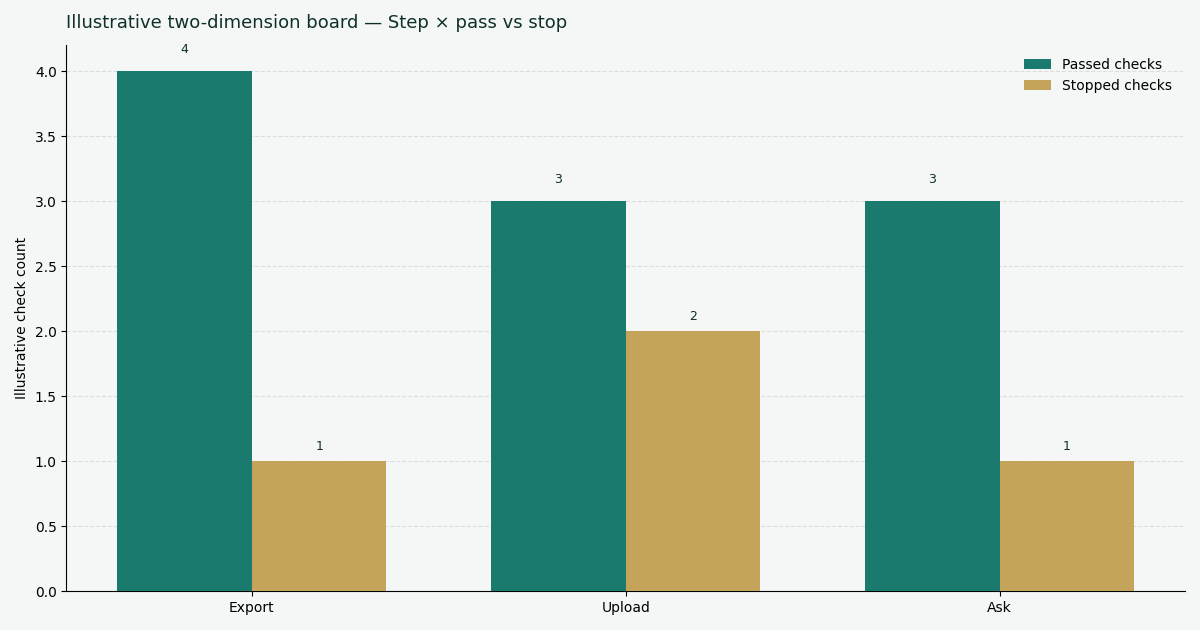
Illustrative two-dimension desk chart (stage × passed vs stopped checks). Not a customer report. Social cut: ./images/og-cover.png. Source file: ./images/chart-gsc-export-for-seo-health.png.
| Stage (illustrative) | Passed checks | Stopped checks |
|---|---|---|
| Export | 4 | 1 |
| Upload | 3 | 2 |
| Ask | 3 | 1 |
Desk note: export failed once on a screenshot. Upload failed twice on a missing login and a date-label mismatch. Ask failed once on a quarter that was not in the file. A clean GSC export for SEO Health passes when each stage keeps the cells.
How to read the grouped bars
Each cluster is a stage. Each bar is an outcome family. Passed checks are steps a human can replay. Stopped checks are the gates that saved you from an invented total. If your run differs, trust your run.
Scorecard for an honest upload
Score the job, not a vanity 100, before you treat a GSC export for SEO Health as done. Credits do not buy a live property.
| Check | Pass | Fail |
|---|---|---|
| File is a Performance CSV you exported | Dated filename, query × page columns | Screenshot or “top queries” slide |
| Login and credits present | Signed-in account, credit balance | Anonymous paste-URL checker |
| Window is explicit | Every total names the dates | “Recently” or “this quarter” with no file |
| Cells unchanged | Sheet replay matches the write-up | Model rounded or filled gaps |
| Next action is one URL | Title, indexation, or schema ticket | A twelve-page strategy |
A pass means you may ask again on the same file. A fail means you return to the export.
Failure modes that skip the file
Screenshot upload. A chart image is not a GSC export for SEO Health. Re-export the CSV.
Anonymous checker. Pasting a URL does not ingest the Performance table. Eight lights are free. The file read is not.
Rewritten cells. A paragraph that changes 12,400 to “about twelve thousand” no longer has a source of numbers.
Mixing rooms. A file narrative is not eight lights, not an EEAT grade, and not an official Google health score. If eligibility is the blocker, stop. If the CSV shows low CTR, then run a title test — and still keep the cells.
Cluster guides beside this page
This page isolates the upload. Open one row when you have that job.
| Job you actually have | Guide to open next | What this page will not do |
|---|---|---|
| Narrate the export without a second ledger | Analyze Search Console with AI | Restate the whole hub |
| Click export inside Search Console | Search Console export | Repeat the picker lesson |
| Group visible query × page rows | GSC data analysis | Finish that matrix here |
| Lock the dates before a total | Search Console date range | Stretch the picker |
Do not retarget “content ideas,” “keyword monitoring,” or “weekly GSC review” on this URL. A GSC export for SEO Health stays a dated CSV.
Upload the dated CSV, then ask inside it
Paste a public URL for eight lights, or sign in to run a GSC export for SEO Health and keep every cell as the source of numbers.
Run SEO Health CheckerFrequently Asked Questions
Can I upload a screenshot of the Performance chart?
Bottom line: No. A GSC export for SEO Health is a dated Performance CSV. A chart image has no replayable cells. Export the table, then upload.
Do credits buy a second ledger of numbers?
Bottom line: No. Credits buy narration inside the file. Cells stay the source of numbers. If a sentence disagrees with the CSV, keep the cell.
Does the CLI read a live property?
Bottom line: No. seo-health gsc after npm i -g infinitegrowth reads the file you pass. There is no live property pipe. A new date range is a new export.
Must I sign in before the file is narrated?
Bottom line: Yes. EEAT, visibility, and a GSC read need an InfiniSynapse login and credits. The anonymous paste-URL checker still returns the eight lights without a login. Local Chrome covers those lights unless you start AI EEAT.
Conclusion
A GSC export for SEO Health is a dated Performance CSV you upload after login. Credits buy narration inside that file. Cells stay the source of numbers. Sampling and anonymized queries stay limits. Re-export to widen the window.
Start with a public URL at SEO Health if the HTML is still red. When the file is ready, sign in and run a GSC export for SEO Health with seo-health gsc. Open the InfiniSynapse web app only for that signed-in task. Replay the totals before you retitle.