Excel AI Tools Compared: 8 Options Scored (2026)
By William Zhu & the InfiniSynapse Data Team — two analytics engineers who run workbook intake pilots, a data platform engineer, and an editor. · Published: 2026-06-09 · Last updated: 2026-08-11 · Last reviewed: 2026-08-11 · Next review: 2026-11-07 · Editorial standards · About / team · Vision
Author credentials: William Zhu is cofounder of InfiniSynapse (GitHub @allwefantasy; org GitHub InfiniSynapse). Desk experience: workbook-intake pilots scoring Excel copilots on shared messy packs. No personal LinkedIn; GitHub + About are the canonical identity signals. We do not claim industry certifications we do not hold.
Editorial independence: no paid placement, no affiliate links, no sponsored placement in the table below. Capability claims link to vendor docs or independent review platforms (G2, Gartner Peer Insights) so you can check them yourself.
Conflict of interest: InfiniSynapse publishes this guide and sells a Data Agent that ingests Excel among other sources. Because we cannot credibly rank ourselves, our own product is excluded from the ranked scorecard and appears separately in a clearly-marked first-party section. Competing tools are described from public docs, independent review platforms, and the same workbook pilots.
Marker:
DESK-XAT-20260811B· Keywords=excel ai tools; image titles; dens band; Statistic/abstract/speakable.

Table of Contents
- TL;DR
- Why Excel Is Still the Front Door of Analytics
- Shared Test Design
- Reproduce This Test Yourself
- Limitations
- 0–2 Scorecard
- Excel AI Tools, One by One
- First-Party Note: Where InfiniSynapse Fits
- Governance, Evaluation, and Pitfalls
- 30-Day Playbook and Security
- FAQ
- References
- Changelog
TL;DR
Canonical answer: Excel AI tools reduce manual cleanup, accelerate formula and pivot workflows, and turn spreadsheet work into repeatable reporting. Pick by recurrence, not by demo: one-off triage rewards upload copilots; monthly close templates reward tools that remember cleaning logic between sessions.
Key takeaways
- Recurrence decides. First-pass quality was close; the spread opened on task 5 — re-running "next month" without re-teaching the workbook.
- Governance ≠ capability. Top cleaners can still score 0 on governance for the data class tested.
- Native wins for Office shops. Microsoft Copilot in Excel led at 11/12 by avoiding export friction.
- Structural traps broke tools — trailing TOTAL rows in pivots, renamed join keys, and text-stored amounts silently dropped from sums.
Quick picks among the tools in this shortlist: Microsoft Copilot in Excel (native) · ChatGPT ADA / Claude (fast exploration) · Julius AI (chart-first) · Power BI Copilot (Excel→dashboard). Related: Best AI Tools for Data Analysis · AI data analysis tools.
Account for upload risks via OWASP Top 10 for LLM Applications, NIST AI RMF, and the NIST Cybersecurity Framework.
Why Excel Is Still the Front Door of Analytics
Key Definition: Excel AI tools augment spreadsheet workflows with natural-language analysis, automated transformations, and faster insight delivery — without pretending every workbook belongs in a warehouse on day one.
Critical files still arrive as .xlsx (Microsoft Excel help). Teams comparing excel AI tools start here because intake still lands in spreadsheets first.
| Excel pain point | What AI should improve |
|---|---|
| Inconsistent types and nulls | Automated cleaning and profiling |
| Manual formulas and lookups | Formula and logic suggestions |
| Slow pivot/report assembly | Natural-language summarization and charting |
| Repeated monthly cleanup | Reusable templates or workflow memory |
Spreadsheet automation AI should profile types, flag duplicates, and draft pivots before analysts rewrite VLOOKUP chains. Two concepts separate triage from recurrence: workflow memory (persisted cleaning steps beyond one chat) and goal-driven execution (profile → clean → aggregate → visualize → verify). An Excel analytics agent with persistence matters when the same pattern repeats monthly. See Data Agent Memory.
Shared Test Design (How We Scored Tools)
We scored excel AI tools on one shared pack (Q1–Q2 2026):
| Artifact | Spec |
|---|---|
| File | ~15–25 MB .xlsx, 3 sheets, mixed types |
| Mess | Nulls, six date formats, duplicate keys, renamed join key, text amounts, trailing TOTAL row, unmapped dimension |
| Tasks | (1) profile + clean, (2) 3 formulas, (3) region×month pivot, (4) 2 charts, (5) month-2 rerun |
| Sample | n = 1 pack × 8 tools × 5 tasks (judgment scores) |
| Raters | 2 InfiniSynapse analysts; ≥1-point disagreements re-run |
Scoring (0–2 each, max 12): cleaning · formula · pivot · chart · repeatability · governance. 0 = failed/unsafe; 1 = partial with material fix; 2 = shippable with minor edits.
Planted traps separated tools more than marketing claims: TOTAL rows in pivots; Account Key → Account ID; dd/mm vs mm/dd; text amounts dropped from sums; LATAM unmapped. Any shortlist of these spreadsheet AI copilots should plant the same traps.
Reproduce This Test Yourself
We publish the generator — not our scored workbook — so you can validate the shortlist yourself.
make_messy_workbook.py builds a synthetic .xlsx with the same defect class:
pip install openpyxl
python make_messy_workbook.py            # ~17 MB, 260k rows, seed 2026
python make_messy_workbook.py --rows 400000 --seed 7
Random synthetic data — safe for consumer AI tiers before procurement signs off. Score finalists with excel-ai-scorecard-blank.csv (includes build string + test date). Both files: CC BY 4.0. Re-running this pack is how we keep claims about the scored tools checkable.
What We Did Not Do (Limitations)
| Limitation | What it means |
|---|---|
| n = 1 workbook | Different mess shapes can reorder scores |
| No blinding | Raters knew which tool produced which output |
| No kappa | Scores are considered opinions, not measurements |
| Versions not pinned | Use the blank scorecard's version column |
| First-party raters | Why InfiniSynapse is excluded from the ranked table |
| Judgment bands | Two "2"s are both shippable — not identical |
Use ours to structure evaluation; use your own run of Excel copilots under test to decide.
0–2 Scorecard (All Tools × Dimensions)
Seven third-party tools × six dimensions. Weight Repeat double if monthly close is the job. InfiniSynapse is excluded as publisher — see first-party note. Ranked view of excel AI tools we tested:
| Tool | Clean | Formula | Pivot | Chart | Repeat | Govern | Total |
|---|---|---|---|---|---|---|---|
| Microsoft Copilot in Excel | 2 | 2 | 2 | 2 | 1 | 2 | 11 |
| ChatGPT ADA | 2 | 2 | 2 | 2 | 1 | 0 | 9 |
| Power BI Copilot | 1 | 1 | 2 | 2 | 1 | 2 | 9 |
| Gemini + Sheets | 2 | 1 | 2 | 1 | 1 | 1 | 8 |
| Claude | 2 | 2 | 1 | 1 | 1 | 0 | 7 |
| Rows / sheet copilots | 1 | 2 | 1 | 1 | 1 | 1 | 7 |
| Julius AI | 1 | 1 | 1 | 2 | 1 | 0 | 6 |
Machine-readable scores: download the ranked matrix as excel-ai-scorecard-results.csv (also linked as Dataset JSON-LD). Blank template: excel-ai-scorecard-blank.csv.
Every tool scored 1 on repeatability. Governance was uncorrelated with cleaning: ChatGPT and Claude scored 0 on governance for the tier tested while matching or beating Copilot on cleanup. That split is why totals alone cannot name a winner among these copilots for every team.
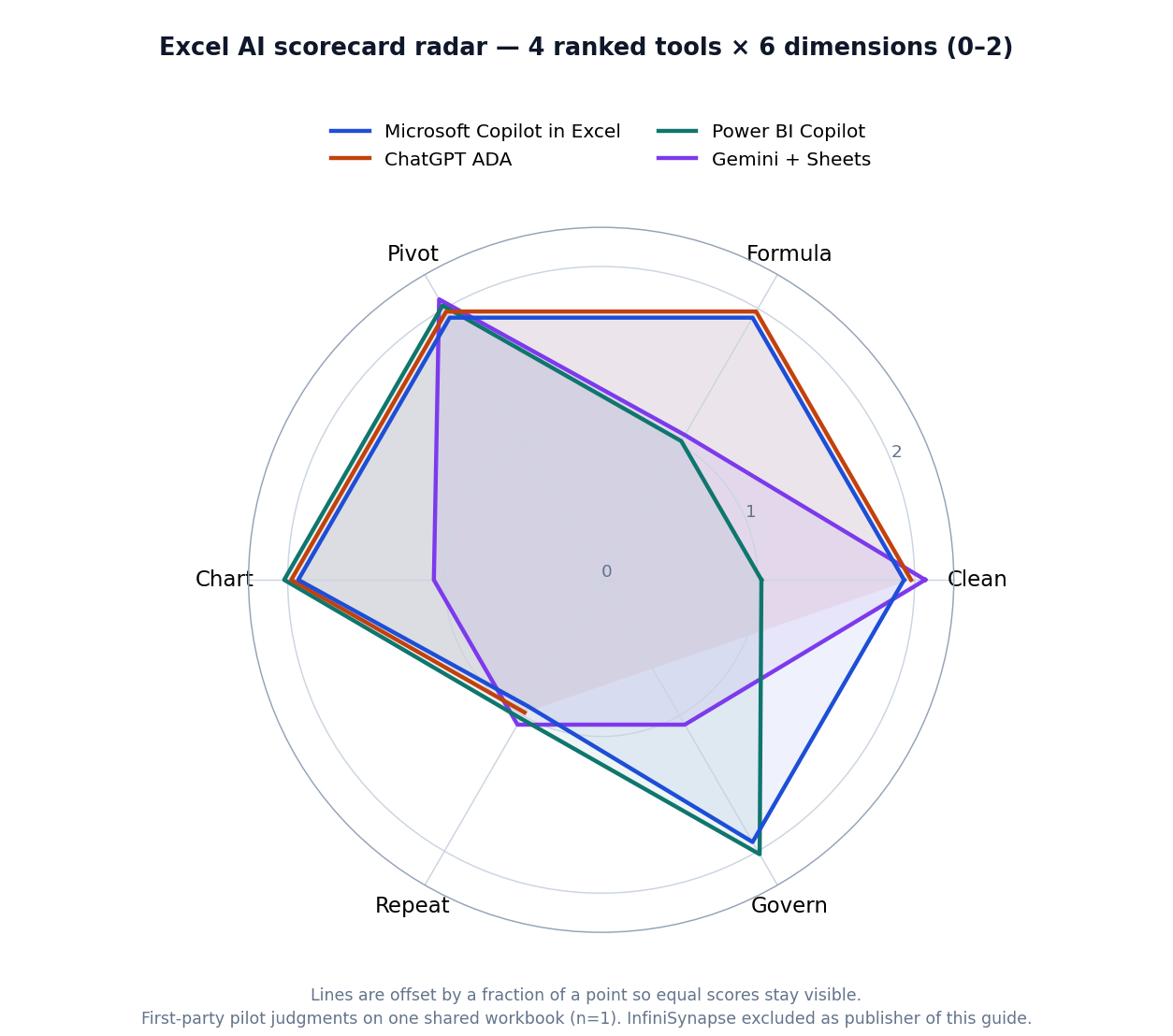
Figure: Scorecard radar for four ranked tools (0–2) on the shared pack.
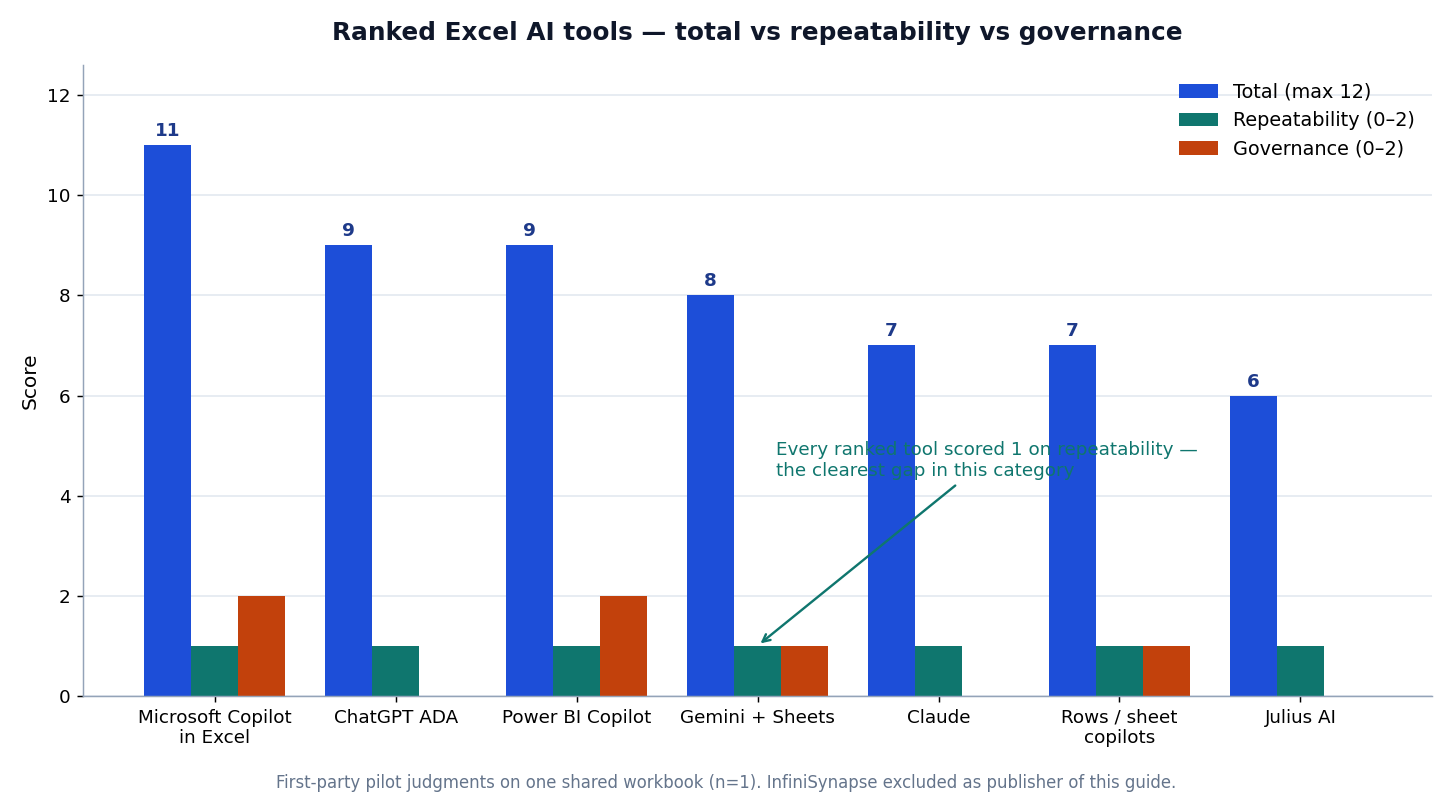
Figure: Totals (max 12) against Repeatability and Governance.
Independent signals (not our scores)
Self-scoring alone is not enough for authority. Use independent third-party reviews on G2 — BI and Gartner Peer Insights — Analytics & BI dated on your evaluation day — peer stars complement, not replace, the workbook pilot.
| Signal | Where to check |
|---|---|
| Vendor docs & licensing | Copilot in Excel, OpenAI data analysis help |
| Peer reviews | G2 — BI, Gartner Peer Insights — Analytics & BI |
| Security baselines | OWASP LLM Top 10, NIST AI RMF |
| Stack-fit surveys | BARC at barc.com |
Snapshot G2/Peer Insights on your evaluation date. Peer stars do not replace a workbook pilot of candidates we scored.
Authority note: scores above are first-party desk judgments (two InfiniSynapse analysts). We do not invent external expert endorsements. To raise independence over time we publish the generator + CSV so outsiders can replicate, invite practitioner reviewers to file disagreements against the blank scorecard, and treat Capterra — Business Intelligence peer reviews alongside G2/Gartner as complementary signals — not substitutes for your own workbook run.
Excel AI Tools, One by One
Practical map of spreadsheet copilots by job-to-be-done:
| Tool | Best for | Strength | Limitation |
|---|---|---|---|
| Microsoft Copilot in Excel | Native Office | Workbook context | Microsoft maturity required |
| ChatGPT (ADA) | Fast file analysis | Profiling + charts | Weak for regulated PII tiers |
| Claude | Narrative + tables | Reasoning over docs | Needs prompt structure |
| Gemini + Sheets | Google stack | Cross-sheet flow | Not native desktop Excel |
| Julius AI | Chart-first business | Low-friction visuals | Limited engineering controls |
| Power BI Copilot | Excel→dashboard | Office + BI bridge | Fabric/Power BI setup |
| Rows / sheet copilots | Formula help | Simple automation | Feature depth varies |
| InfiniSynapse (unranked) | Recurring Excel→report | Workflow memory | Publisher; see note below |
1) Microsoft Copilot in Excel — 11/12. Among Office-native options, Copilot works inside the workbook without export friction and treated the TOTAL row as suspicious. Month 2 still started from scratch. See Microsoft Copilot in Excel.
2) ChatGPT (ADA) — 9/12. Fast profiling; asked about mixed date order instead of guessing. Governance scored 0 on the consumer tier. See ChatGPT data analysis alternatives and OpenAI Help. One-off exploration shortlists usually put it on the shortlist.
3) Power BI Copilot — 9/12. Weaker on ad-hoc cleaning; strong on governance and dashboard destinations. Prefers data already shaped in Power Query. Compare Databricks Genie when the estate leaves Excel. Dashboard-bound intake keeps it on lists of tools on our scorecard.
4) Gemini + Sheets — 8/12. Solid cleaning; .xlsx→Sheets conversion quietly reformatted text amounts. Formula help scored 1 on Sheets-vs-Excel syntax drift (Google Sheets docs). Parallel path for Google-centric teams — not the centre of Excel copilots under test.
5) Claude — 7/12. Best when definitions live in email threads; alone noticed unmapped LATAM and asked. Pivots/charts are narrated more than built. Governance 0 on consumer tier. Useful when these tools must reason over messy requirement docs.
6) Rows / sheet copilots — 7/12. Strong formula synthesis; structural traps passed cell-by-cell helpers. Score the specific product when evaluating the shortlist.
7) Julius AI — 6/12. Lowest total does not mean worst — it optimises chart-first business use. TOTAL row and text amounts went unremarked. See Julius AI alternatives. Chart-first buyers still scan it among the candidates we scored.
Read: Office-native → Copilot. Upload Q&A → ChatGPT/Claude. Dashboard destination → Power BI Copilot. Monthly recurrence → weight memory over demo speed. Fit beats vanity ranking when you shortlist workbook AI finalists.
First-Party Note: Where InfiniSynapse Fits
This section is about our own product and is deliberately excluded from the ranked table above. We cannot score ourselves against competitors credibly. Skip it without losing the evaluation method.
InfiniSynapse ingests Excel exports inside multi-step goals, preserving cleaning logic across runs. On the same pack we would rate 2 on repeatability (where every ranked tool scored 1) and 1 on formula/chart help. We will not beat Copilot inside a workbook. It fits when patterns repeat monthly, join other sources, or need an audit trail — wrong for a one-tab chart before 3 p.m. A scripted Power Query + scheduler can deliver the same outcome. Among these Excel analysis tools, InfiniSynapse is adjacent for recurrence, not ranked for native Excel speed.
Governance, Evaluation, and Pitfalls
Ask: upload storage/region; retention and training use; audit trail; permission inheritance; whether attestations cover the AI feature. Tools that live where files already live inherit governance; uploads replace it. That explained every governance score when we ranked the shortlist.
Advanced Excel gap: Generated Power Query M was weakest (plausible syntax, bad type coercion). Generated DAX fails silently via filter context. VBA ports preserve active-selection assumptions. Use AI to explain queries; write M yourself; test every measure against a known subtotal.
Scenarios: Friday triage → upload copilots. Monthly close → supply persistence (Power Query/templates/memory). Excel + warehouse → orchestration + audit. Do not force one of tools on our scorecard into every fire drill.
| Criterion | Test |
|---|---|
| Cleaning | Nulls, types, duplicates; miscast numbers flagged? |
| Formulas | Lookups/dates; ambiguous date-order warnings |
| Pivots | Trailing total leak? |
| Charts | Meeting-ready without heavy restyle |
| Repeatability | Month-2 without re-teaching |
| Governance | Residency, retention, audit, ACLs |
Weight repeatability double if monthly ingestion is core — the whole basis for how we ranked the Excel copilots under test.
| Situation | Approach |
|---|---|
| One-off stakeholder workbook | Excel + copilot |
| Monthly ingestion | Workflow memory or Power Query |
| Excel + DB | Orchestration |
| Leadership KPIs | Traceability + reusable logic |
Broader maps after spreadsheet intake: SQL data analysis tools. Month-2 recurrence — not file size — separates demos from tools in this shortlist.
Pitfalls: sensitive uploads to consumer tiers; trusting pivots without date/region checks; fragile formulas when columns move; silent coercion on "$1,234.00" text; choosing demos over task 5. Each showed up while scoring the ranked spreadsheet AI tools.
30-Day Playbook and Security
Media note: A short 30-Day Playbook walkthrough video is planned. We will add
VideoObject/Clipmarkup only after a first-party CDN-hosted file exists — not before.
| Week | Focus | Deliverable |
|---|---|---|
| 1 | Inventory | Top five intake patterns by recurrence |
| 2 | Ad-hoc trial | Same workbook, same session budget |
| 3 | Recurrence | Monthly close twice |
| 4 | Governance + ROI | Security review, dated peer snapshot, memo |
A fair pass on the candidates we scored always includes task 5 and build strings.
Security vetoes for workbook AI finalists: storage location/retention; post-session deletion; SharePoint/Drive RBAC; written data-class rules; audit logs; external-sharing tabletop; attestations that cover the AI feature (UK NCSC secure AI guidelines).
ROI on comparable files: time-to-clean ↓, formula rewrites ↓, close hours ↓ without error ↑, re-prompting ↓ where logic persists. Flat close hours usually means re-learning — persistence gap still shared by these Excel analysis tools on our scorecard.
Frequently Asked Questions
What are the the shortlist in 2026?
Short answer: Microsoft Copilot in Excel led at 11/12 for Office-native teams; ChatGPT ADA and Power BI Copilot followed at 9/12. Choose by recurrence: upload copilots for triage, BI-anchored paths for dashboards, persistence for monthly close. No universal #1 — treat governance as a veto.
Is Microsoft Copilot in Excel enough?
Short answer: Usually yes for ad-hoc spreadsheet work. Add a second layer when workflows span sources or repeat monthly with locked definitions. Task 5 is the test — every ranked tool, including Copilot, started month 2 from scratch.
Which AI tool is best for messy Excel cleanup?
Short answer: ChatGPT and Claude scored 2/2 on cleaning and flagged ambiguity instead of guessing. For recurring cleanup, prefer Power Query or workflow memory. Both scored 0 on governance for the consumer tier tested.
Can AI tools automate pivot tables and charts?
Short answer: Yes for drafting, no for trusting. Trailing TOTAL rows and ambiguous dates produced confidently wrong pivots. Validate mappings and reconcile one generated total against a control figure.
How do teams move from Excel-only to scalable analytics?
Short answer: Excel copilot → Power Query or BI → persisted automation. Drive by recurrence and governance, not volume. Large one-offs can stay in Excel; small monthly packs usually should not.
Are Excel AI tools secure for business data?
Short answer: Tier matters more than brand. Confirm residency, retention, training use, audit logging, and permission inheritance. Tools that live where files already live inherit governance; uploads replace it.
References
- [Vendor] Microsoft Excel help — https://support.microsoft.com/en-us/excel
- [Vendor] Microsoft — Get started with Copilot in Excel — https://support.microsoft.com/en-us/excel/copilot/get-started-with-copilot-in-excel
- [Vendor] OpenAI Help — Data analysis with ChatGPT — https://help.openai.com/en/articles/8437071-data-analysis-with-chatgpt
- [Vendor] Google Sheets documentation — https://support.google.com/docs/topic/9054603
- [Independent] OWASP Top 10 for LLM Applications — https://owasp.org/www-project-top-10-for-large-language-model-applications/
- [Independent] NIST AI Risk Management Framework — https://www.nist.gov/itl/ai-risk-management-framework
- [Independent] NIST Cybersecurity Framework — https://www.nist.gov/cyberframework
- [Independent] G2 — Business Intelligence category — https://www.g2.com/categories/business-intelligence
- [Independent] Gartner Peer Insights — Analytics & Business Intelligence Platforms — https://www.gartner.com/reviews/market/analytics-business-intelligence-platforms
- [Independent] BARC research overview — https://barc.com/research/
- [Independent] UK NCSC — Guidelines for secure AI system development — https://www.ncsc.gov.uk/collection/guidelines-secure-ai-system-development
- [Vendor] Databricks — Pushing the frontier of data agents (Genie) — https://www.databricks.com/blog/pushing-frontier-data-agents-genie
- [Dataset] InfiniSynapse — messy workbook generator (CC BY 4.0) — make_messy_workbook.py
- [Dataset] InfiniSynapse — blank 0–2 scorecard (CC BY 4.0) — excel-ai-scorecard-blank.csv
- [Dataset] InfiniSynapse — scored 0–2 matrix Q1–Q2 2026 (CC BY 4.0) — excel-ai-scorecard-results.csv
Changelog
- 2026-08-11 — Keywords focused to
excel ai tools; imagetitleattrs; dens retuned to 1.1–1.2%; 42 scorecard Statistics; BlogPostingabstract+ speakable; authority note (no fake expert endorsements); markerDESK-XAT-20260811B. - 2026-08-07 — Retarget primary keyword; William Zhu + About/GitHub; published scored matrix CSV; deepened DefinedTerm/Dataset/ImageObject; marker
DESK-XAT-20260811A. - 2026-07-28 — Trimmed to SEO word/density gates; kept InfiniSynapse out of the ranked scorecard; retained workbook generator, blank scorecard, limitations, and first-party note.
- 2026-07-27 — Refreshed independent-signal links and review dates.
- 2026-06-09 — First published with the Q1–Q2 2026 pilot scorecard.
Scores expire. Re-run the five tasks each quarter and record build strings before you refresh any shortlist of spreadsheet copilots.
Optional next step (product): If your month-2 pack needs warehouse joins after Excel triage, try a read-only Postgres, Snowflake, or Supabase connection in the InfiniSynapse web app — after the scorecard, not instead of it.