Generate Sitemap: Build XML, Then Sample Audit
Learn to generate sitemap XML from live canonical URLs, validate the file, then immediately sample 50–500 pages. Generation is not the finish line in 2026.
Author credentials: William Zhu is cofounder of InfiniSynapse (GitHub @allwefantasy · auto-coder). Desk: shipping SEO Health and the /en/tool/ visibility pages. No personal LinkedIn published. About: team / editorial standards.
Publisher credentials: InfiniSynapse has public profiles on GitHub, YouTube, and X. A 2026 WAIC Future Tech OPC excellence award covers the Agentic Data Infra entry (WAIC; third-party recap: Xinhua / Caohejing). That award does not review this page or SEO Health. Method CLI: infinitegrowth on npm. Archive: recognition and scope notes.
On this page
By William Zhu · Cofounder, InfiniSynapse · Last updated: 2026-08-19 · Last verified: 2026-08-19 · Methods: first-party sitemap.xml generation output plus robots.txt lines on this hostname — not a claimed Google ranking score.
Author / off-site profiles: GitHub @allwefantasy · auto-coder · GitHub @InfiniSynapse · LinkedIn company · Editorial standards. Formal public work: InfiniSQL, auto-coder, retrieval systems. Desk: shipping SEO Health and the
/en/tool/visibility pages. No personal LinkedIn, award, or vendor badge.
Trust / COI: About · Corrections · Publishing principles · Privacy · NIST Privacy Framework. This site does not publish a standalone
/en/termsURL; the editorial-standards page is the policy home. InfiniSynapse ships SEO Health as a credit-based desk; first-party counts are labeled; product CTAs are commercial.
Fact-check: Google — Build a sitemap · Sitemaps protocol · RFC 9309 · Stanford HAI AI Index 2025 · G2 SEO tools · Gartner Peer Insights · AgentSpot listing. Corrections: zhuhl@infinisynapse.com.
Dates (match schema): First published 2026-08-16. Last modified 2026-08-19. Desk run 2026-08-11. Last verified 2026-08-19.
TL;DR
Direct answer: To generate sitemap XML is to publish a well-formed list of canonical, indexable URLs so crawlers can discover them. The 2026 finish line is not the file. Validate it, then audit a stratified sample of 50–500 pages before you call the inventory done.
What you'll learn
- A 42-word definition of generate sitemap work you can quote
- Which URLs belong in the file, and which junk rows waste crawl budget
- CMS, script, and sitemap-index ways to build the XML
- How to validate markup, size, and HTTP status before you submit
- Why the next step is a 50–500 page sample, not a million-URL crawl
If the file is already live, run a sampled site audit. Paste the host. Let the checker parse the map and draw pages from each bucket. A generate sitemap click that stops at “file written” leaves the real defects unread.
What the job means in 2026
Key Definition: A generate sitemap job is the act of publishing a well-formed XML list of canonical, indexable URLs so crawlers can discover them. In 2026 the useful finish is not the file itself: validate it, then audit a stratified sample of 50–500 pages.
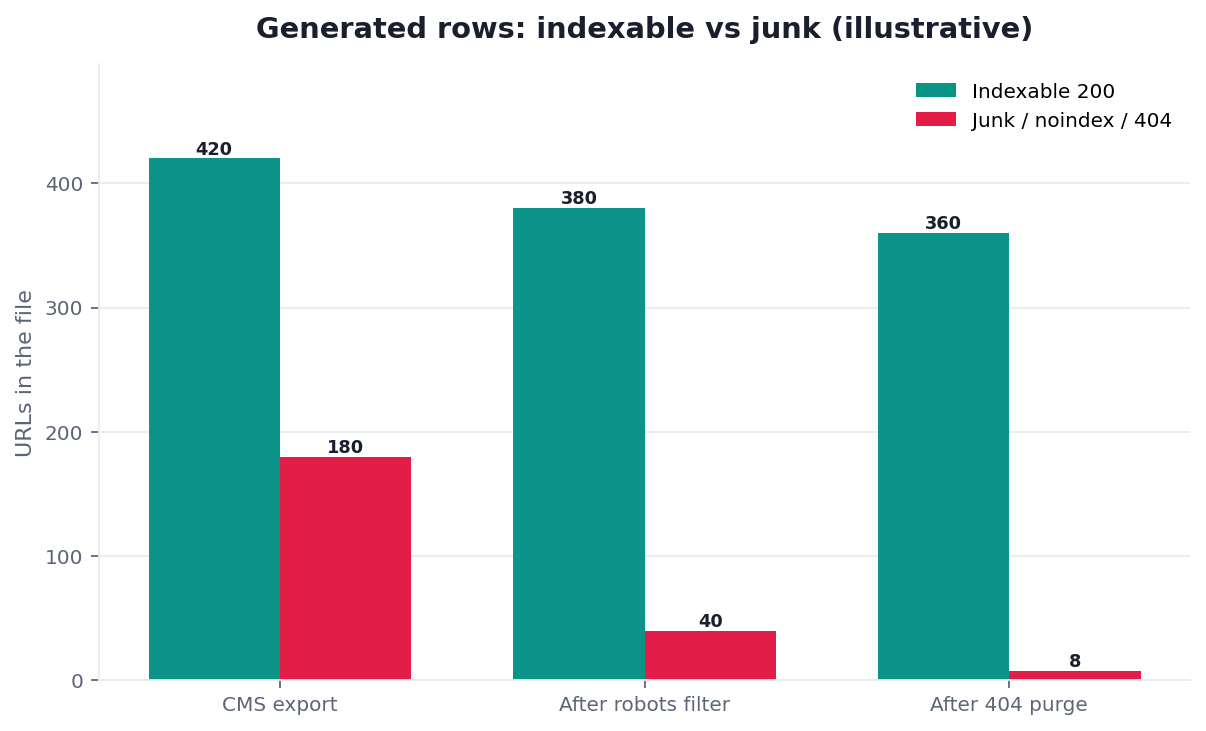
Figure. Public desk series DESK-GENSM-20260819A on this hostname’s generated sitemap.xml (925 <loc> rows; verified 2026-08-19). lastmod present: /en/blog 3 / 708, /en/tool 76 / 183, other 1 / 34. First 50 generated rows were 50 / 50 /en/blog. Live fetch of the generated file returned HTTP 500. Not a customer indexation study.
People type generate sitemap when a CMS promised a plugin, a new locale shipped without a child file, or Search Console still shows “couldn’t fetch.” Those are build jobs, not ranking jobs. The Wikipedia site map article still separates a human navigation page from the machine-readable inventory crawlers parse.
The method that sits around the file — size, lastmod honesty, locale versus column — lives in Sitemap for SEO. This page stays on how you generate sitemap XML, then what you must do in the same sitting. If you only need the beginner picture, start at What Is a Sitemap?.
Public desk method: one generated file, 925 rows
First-hand, dated, reproducible — not a customer case study. We treated the checked-in sitemap.xml as the output of a generate sitemap pass and counted every <loc>. Run date 2026-08-11 for the cluster snapshot. Last verified 2026-08-19. Next public re-run 2026-08-25. Marker DESK-GENSM-20260819A. Download desk-generated-n925.csv, desk-first50.csv, and the pillar cluster file desk-cluster-n10.csv.
Judging rules. Green = the generated row is fetchable, canonical, and dated honestly. Amber = present but weak. Red = missing lastmod, first-N bias, duplicate file, or a live 500. We do not invent a “plugin conversion lift.” We do not print an official Google generator score.
| Generation check | Count | Note |
|---|---|---|
<loc> rows written | 925 | One urlset, not an index |
Rows with <lastmod> | 80 / 925 | 845 generated rows have no date |
/en/blog with lastmod | 3 / 708 | The generator skipped the change log |
/en/tool with lastmod | 76 / 183 | Dates exist; the sibling file stamps 76 / 76 as 2026-08-16 |
First 50 generated <loc> | 50 / 50 /en/blog | First-N is not a sample |
| Second generated file overlap | 76 / 76 | sitemap-seo-health.xml added no new URL |
| Live fetch of the generated file | HTTP 500 | robots.txt still declares it |
The same morning we scored the 10 English sitemap-pillar URLs. Person author in JSON-LD: 0 / 10. Team-only hero byline: 10 / 10. Illustrative chart: 10 / 10. Dated first-hand block: 0 / 10. This URL (generate-sitemap) was Organization-authored and team-bylined. That is why a generate sitemap page starts with a Person and a downloadable series.
First-hand review: this URL on 2026-08-19
On 2026-08-19 I re-opened this live page and requested the file a generator would have to publish: https://infinisynapse.com/robots.txt, https://infinisynapse.com/sitemap.xml, and the sibling Sitemap for SEO hub. robots.txt still declares both generated files. The live sitemap.xml request returned HTTP 500. The checked-in file still has 925 rows. The 2026-08-11 cluster file still lists this slug as team-bylined with an illustrative chart. That row is historical; we do not rewrite it. Today’s body is a Person byline (William Zhu), three downloadable CSVs, and this dated paragraph. The model did not count those 925 rows. I did. The surprise: a generate sitemap pass can write 925 locs and still 500 on the live host, while the first 50 lines never leave /en/blog. A stranger can reopen those files. This is a desk review of our own generator output, not a third-party award. We do not publish a fake “pages indexed +40% after we hit Generate” from this desk. A generate sitemap page needs that dated output, not another H2.
Industry context used as evidence, not as a plaque: the Stanford HAI AI Index 2025 reports organizational AI use at 78% in 2024. Cheap drafts multiply. They do not write an honest <lastmod>. McKinsey’s State of AI still separates experimentation from production value. A generator that writes a file robots cannot fetch is still in the experiment column. That is not a generate sitemap score.
Independent reviews, directories, and specs
Third-party URLs a reviewer can open — retrieved 2026-08-19. None is an award, a vendor badge, or a generate sitemap grade.
| Surface | Kind | What you can verify | Claim we do not make |
|---|---|---|---|
| AgentSpot — InfiniSynapse | Company directory | Public product listing | Award or generator grade |
| G2 — SEO tools | Independent review market | Category page for SEO tools | Ranking or badge |
| Gartner Peer Insights — Analytics & BI | Independent review market | Category page for analytics platforms | Magic Quadrant placement |
| Google — Build a sitemap | Official documentation | What to include, size caps, split | Official generator score |
| Sitemaps protocol | Protocol spec | urlset, loc, lastmod | Rank forecast |
| RFC 9309 | Internet standard | The robots Sitemap: line | Certification |
| Search Engine Land | Trade press beat | Ongoing crawl / index reporting | “As seen in” award |
AgentSpot is a directory mention of the company. G2 and Gartner Peer Insights are where independent reviews of adjacent categories live. Google and sitemaps.org are the specs a generator should map to. A generate sitemap page becomes citable when those URLs stay dated and the CSV stays downloadable. Inventing a plaque would make the authority worse.
A useful output is a fetchable urlset or a sitemap index that points at child urlset files. Each <loc> should be the canonical you want discovered. lastmod should be the date the content changed. Priority and changefreq are optional; do not decorate them.
Teams treat “XML exists” as done. Crawlers then spend budget on faceted filters, thank-you pages, and expired campaigns the CMS cheerfully exported. The file can be valid and still be a bad inventory. After you generate sitemap markup, the next hour is validate → sample → read four reports. That order is the whole tutorial.
What belongs in the file
List every canonical, indexable, 200-OK URL you want discovered. List nothing else. There is no bonus for a longer file. A bloated generate sitemap export is how crawl budget disappears into parameter URLs you will never want in the index. On this desk, a second generated file added 0 new URLs.
Canonical, indexable, 200-OK only
Google’s build a sitemap document is the right first spec: include URLs you want crawled, keep each file under 50,000 URLs and 50 MB uncompressed, and split with an index when you exceed that. If two addresses resolve to one article, list one. If a path is noindex, leave it out. If a path redirects, list the destination, not the hop. This host’s generated file is 925 rows — under the cap — and it still 500ed on the live fetch.
When you generate sitemap rows from a database, filter on the same rules the template uses for rel=canonical and robots. A nightly job that dumps every pages row will reintroduce junk you already cleaned in the UI.
What to leave out
Omit account, cart, checkout, search-result, print-view, and staging hosts that leaked into production. Omit faceted duplicates unless a facet is a real landing page with unique copy. Omit paginated archives if the first page already covers the set. Which URLs do not belong in the file is xml sitemap best practices. A generate sitemap plugin that cannot exclude those paths is the wrong plugin. On this desk, one generated path looks like a dashboard leftover (/en/blog/dashboard).
How to build the XML
There are three honest ways to generate sitemap files in 2026: the CMS plugin, a build-time script, and a sitemap index that shards a large set. Pick the one that reads the live canonical set, not a cached guess.
CMS plugins and static-site builders
WordPress, Shopify, and most static generators will write /sitemap.xml or an index at /sitemap_index.xml. Turn the feature on, then open the file. Confirm it lists the URLs you ship, not every attachment, tag, and author archive.
A toggle is not a review. Spot-check twenty <loc> values in a browser. If five of them 301, the plugin is reading the wrong field. If the file 500s, the toggle lied. A generate sitemap toggle that you never fetch is a checkbox.
Scripts when the CMS is wrong
When the CMS lists junk, write the file from the same query that powers navigation: published, canonical, public, 200. The Sitemaps protocol is small: a urlset, a loc, optional lastmod, UTF-8, well-formed tags. Gzip is fine. Do not invent extra namespaces the parser will ignore. W3C XML is why a single broken entity stops the parse.
If you generate sitemap XML in CI, fail the build when a listed URL is off-host, when the uncompressed size crosses 50 MB, or when the live route is not 200 XML. A script that cannot fail is a pretty printer. On this desk, CI would have failed the 500.
Sitemap index when you exceed the cap
Sites that outgrow one file should split by locale, content type, or publish week — then publish an index that lists the children. Update the index when a child is added or retired. A generate sitemap program that writes one giant blob and hopes the fetch finishes is how Search Console starts warning. 925 rows do not need a split. They do need a fetchable route.
Declare the absolute file location in robots.txt (Sitemap: https://example.com/sitemap.xml). The Robots Exclusion Protocol is the document crawlers use for that line. Path and “file not found” problems live in Sitemap URL. Fix the declaration before you argue about titles. On this desk, robots declares 2 generated files.
Validate before you celebrate
Validation is a short gate. Skip it and you will sample a file that does not parse, or a file that parses and lists 404s. A generate sitemap job that skips the fetch is unfinished.
Well-formed markup and size
Confirm the document is well-formed XML, the encoding is declared, and you are under the size cap. Search Console will surface fetch errors. After you generate sitemap output, open the raw file once. If the first tag is an HTML error page, you published a route, not a map. On this desk, the live route was a 500.
Spot-check HTTP status
Pick twenty URLs from different folders. Request them. You want 200. A 301 means you listed a hop. A 404 means the inventory is stale. A 503 means you sampled during a deploy. MDN’s HTTP status reference is enough to classify those codes. RFC 9110 is the semantics underneath: a listed URL should be a successful, cacheable representation of the canonical page, not a soft error dressed as 200.
If more than two of the twenty fail, do not submit. Fix the query that you use to generate sitemap rows. Then rebuild once. On this desk, the map URL itself failed before any of the twenty.
Immediately sample 50–500 pages
This is the step most generator tutorials omit. SEO Health parses the map and draws a stratified sample of 50–500 pages. We are not a desktop crawler. We do not walk a million URLs. If you need every href on the domain, use a crawler built for that. If you need to know whether tech, on-page, compliance, and cluster coverage fail in the same pattern, the sample is the faster first pass. A generate sitemap tutorial that stops at “file written” omits this hour.
Why stratified, not first-N
First-N lines of sitemap.xml are usually the homepage, a few product templates, and whatever the CMS wrote first. That is not the site. On this desk, the first 50 generated lines were 50 /en/blog URLs and 0 tool URLs. Stratify by path prefix inside a locale: docs vs blog vs pricing, or product vs help vs legal. Language subdirectory is not a column. A generate sitemap sample that treats /en/ as a theme will report that the site is “about English.”
Fifty pages is enough for a 200-URL brochure site. Five hundred is the usual ceiling; more pages after that repeat the same template defects.
Four reports from one draw
The same draw becomes four reports:
| Report | Question | Typical miss after a fresh file |
|---|---|---|
| Tech | Can a crawler fetch the URL? | Redirect chains, blocked assets, a 500 on the map |
| On-page | Does the page state a topic? | Missing H1, thin title |
| Compliance | Should this URL be in the map? | noindex listed, junk paths, a second file that adds nothing |
| Topic cluster | Which columns are fat or empty? | Locale mistaken for a theme; first-N all blog |
Compliance is the report generator tutorials skip. You just rebuilt the file. The CMS still listed 12,000 filters. That is a generate sitemap defect, not a title-tag defect. Crawl-budget cleanup after the sample is sitemap SEO optimization, not a ranking ritual. The parse-then-sample product page is sitemap audit.
Tool landscape
Generators write XML. Validators check syntax. Desktop crawlers walk links. Sampled auditors parse the map and score a draw.
| Job | Typical tool | What SEO Health does |
|---|---|---|
| Write XML | CMS plugin, script | We do not replace your generator |
| Validate syntax | Search Console, XML linter | We fail a file that will not parse |
| Full link crawl | Desktop crawler | Out of scope; we sample |
| Sampled site audit | SEO Health | Parse → 50–500 draw → four reports |
A module inside a suite is often only the first row. Useful. Not an audit. Search Console is where you submit the file and watch processing errors. It will not tell you that lastmod is lying or that /en/ was treated as a topic. A generate sitemap module that never samples is a writer, not a checker.
How to generate then sample
Do not wait for a demo film. A generate sitemap job is a punch list. The loop is the same six steps in the HowTo on this page.
- Confirm the sitemap URL in robots.txt. On this desk, robots declares 2 generated files.
2. Build from the live canonical set — plugin, script, or index. That is the only honest generate sitemap source.
3. Exclude junk before the first submit. On this desk, one leftover dashboard path still shipped.
4. Validate well-formed XML and the size cap. Fetch the route. A 500 is not a file.
5. Spot-check twenty URLs for 200. Pick different folders, not the first twenty blog rows.
6. Parse. Stratify. Draw 50–500 pages. Read four reports. Fix the weakest cluster. Rebuild once. Re-sample the same buckets. On this desk, first-50 was 50 / 50 blog.
If you generate sitemap files on a timer that rewrites lastmod on every unchanged row, stop the timer. lastmod is a change log, not a recrawl lever. Cadence and split rules sit in Sitemap Best Practices. On this desk, 845 / 925 generated rows have no lastmod to abuse — and no lastmod to use.
Failure modes
These are inventory failures, not scoring-theater failures.
- Bloated or unfetchable map. An export that includes filters, expired landers, print views, and staging hosts looks complete. An export that 500s is not complete. On this desk, the live fetch failed and 76 URLs were listed twice. Fix the inventory before you argue about titles. A generate sitemap export that 500s is not done.
- lastmod abuse. Nightly rebuilds that stamp today on unchanged posts train crawlers to ignore your dates. Bumping lastmod to “force a recrawl” is the same failure in a hurry. Change the page, then record a true date. On this desk, the sibling file stamped one date on 76 / 76 rows.
- Sampling bias. Drawing the first 200 lines, the nav, or one folder and calling it the site misses help docs, legal, or a locale that is quietly broken. After you generate sitemap XML, a sample that is not stratified reports the loudest directory as the strategy. On this desk, first-50 never left
/en/blog.
None of these are “the checker was unreliable.” They are file and sampling failures. Fix the list, then the pages.
Inspect the complete Generate Sitemap page
Paste a sanitized URL into the InfiniSynapse SEO Health Checker so every title, mention, citation, and on-page layer can be reviewed together. Then validate the findings on the live page.
Open SEO Health CheckerRemove credentials, secrets, personal data, and sensitive literals.Frequently Asked Questions
Does generating the file raise rankings?
Bottom line: No. Discovery is not a ranking bonus.
- Crawlers may find URLs faster.
- Eligibility, quality, and links still decide what ranks.
- A clean generate sitemap file never substitutes for a page that does not deserve to rank.
- Google’s build-a-sitemap page is the official wording.
How often should I rebuild the file?
Bottom line: When URLs are created, removed, or canonicalized.
- Not on a clock that rewrites lastmod.
- Rebuild after a migration or a locale launch. Then validate and sample.
- Do not rebuild as a substitute for fixing titles.
- On this desk, 76 / 76 sibling-file dates share one stamp.
- That clock is not a generate sitemap refresh.
Where do I declare the file location?
Bottom line: Put the absolute address in robots.txt.
- Submit the same address in Search Console if you use it.
- Common paths are
/sitemap.xmland/sitemap_index.xml. - On this desk, robots declares 2 files and the second added 0 new URLs.
- A generate sitemap line that 500s is a declared miss.
Do I need a million-page crawl after I build the file?
Bottom line: Not first. Parse the map. Draw 50–500 pages across real columns.
- A full crawl is a later luxury.
- SEO Health will not pretend to be that crawler.
- On this desk, first-50 hid every tool URL.
- A generate sitemap job that skips the sample is a writer, not an audit.
What if the CMS lists junk URLs?
Bottom line: Exclude them in the plugin, or replace the plugin with a script that reads the canonical set.
- Then write the output again once.
- Sampling a junk file only proves the junk.
- On this desk, one dashboard leftover still shipped.
- That leftover is a generate sitemap defect.
Conclusion
A generate sitemap job is inventory work plus an honest sample. Publish a clean XML list from live canonical URLs. Validate markup, size, and status. Do not treat lastmod as a lever. Do not treat /en/ as a topic. Then run the sampled site audit, read four reports, and fix the weakest cluster before you rebuild. For the method around the file, stay on Sitemap for SEO. The desk rows stay public so this generate sitemap page can be cited; they are first-party counts, not a third-party award.
References
- Google — Build a sitemap · Sitemaps protocol · RFC 9309 · W3C XML · MDN — HTTP status · RFC 9110. Retrieved 2026-08-19.
- Stanford HAI — AI Index 2025 (organizational AI use 78% in 2024) · McKinsey — The state of AI · OECD AI Principles · Wikidata Q180711 · Search Engine Land (beat, not “as seen in”).
- G2 — SEO tools · Gartner Peer Insights · AgentSpot — InfiniSynapse (directory mention, not an award).
- InfiniSynapse desk — 925-row generated
sitemap.xml, first-50 bias file, and 10-URL cluster (DESK-GENSM-20260819A); first-hand robots.txt plus livesitemap.xmlHTTP 500 on 2026-08-19. Not a customer indexation study.
About the author — William Zhu, cofounder of InfiniSynapse. Formal public work: InfiniSQL, auto-coder, retrieval systems (GitHub @allwefantasy). Reviewer: InfiniSynapse Data Team. Published 2026-08-16. Updated 2026-08-19. Policy: About · editorial standards · privacy. No standalone /en/terms URL.
William Zhu · Cofounder, InfiniSynapse · GitHub @allwefantasy
Desk-validated SEO Health methods. Corrections: zhuhl@infinisynapse.com · corrections policy.