Support Queue Analysis for Staffing (2026)
By William Zhu & the InfiniSynapse Data Team · Published: 2026-08-22 · Last updated: 2026-08-31 · Last verified: 2026-08-31 · Next review: 2026-11-30 · About · Privacy policy · Editorial standards · Corrections
Table of Contents
- TL;DR
- What Support Queue Analysis Means for Staffing
- A Framework for Arrival and Handle Time
- How Teams Compare Queue Reads
- Tool Landscape for Queue Tables
- Implementation Steps You Can Replay
- Accuracy and Experience Record: Illustrative Wait by Hour
- Evidence Boundaries and Independent Validation
- How to Cite This Page
- Selection Scorecard for Queue Packs
- Failure Modes That Mis-Staff a Queue
- Frequently Asked Questions
- Conclusion
TL;DR
We evaluate these patterns at the InfiniSynapse desk on sanitized composites; sample figures on this page are illustrative, not customer uplifts.
Direct answer: Support queue analysis is arrival plus handle-time grain on a dated export—so staffing follows wait by hour and by queue, without blending unlike queues or claiming the system will close tickets.
What you'll learn: a staffing-first definition of support queue analysis; an arrival and handle-time contract; how hour grains differ from weekly blobs; a replayable load path; an illustrative desk composite; a scorecard; and the failure modes that mis-staff a week.
Download evidence: desk log · hour CSV · verification script · source check · reproduction protocol. First-party illustrative evidence only.
The read fails when three queues are averaged into one wait, or when handle time includes pending on a carrier. The fix is a queue key, an hour grain, and a written handle-time sentence. Auto-close is out of scope.
The parent method sits in support analytics. Hour coverage sits on the support ticket analytics for staffing map. This page stays on staffing grains.
What Support Queue Analysis Means for Staffing
Key Definition: Support queue analysis is the audit of arrivals, wait, and handle time by queue and hour on an authorized export, so staffing questions stay inspectable. The unit of work is a coverage window with grain—not a model that pretends to clear the backlog.
Telecom and service bodies publish how wait is measured; the ITU is a public reminder that a service level is a defined clock, not a wallboard color. Support queue analysis needs the same sentence: which queue, which hour, which handle-time rule.
A helpdesk UI is a live filter. The pack is a dated file plus those sentences. If two leads disagree on whether pending pauses handle time, stop. The disagreement is the work.
If the missing object is backlog math rather than hour coverage, continue in ticket analytics. If the next failure is a lagged score, use CSAT analysis.
Treat support queue analysis as a table. Minimum columns: ticket_id, created_at (with timezone), queue, status, first_reply_at or assigned_at, and resolved_at or handle_seconds if the export has it. Hash requester keys. Drop contact fields.
Arrival grain is not inventory
Arrival is created_at bucketed to an hour or interval. Inventory is how many sit open at that hour. Support queue analysis that charts only open count will staff for a pile that arrived last week. Print both: arrivals in the interval, and stock at interval end.
Hour grain needs a timezone. Support queue analysis that buckets UTC for a US phone queue will shift the Monday peak. Bind the zone in a note.
Handle time needs a pause rule
Handle time is agent work, or first-response gap, or resolve minus create—pick one sentence. Support queue analysis that mixes them will look precise and be wrong. Pending on a third party should be written as pause or not-pause.
Research labs publish how evaluation windows bias a claim; Stanford HAI (retrieved 2026-09-04) is a reminder that a metric without a window is not a finding. Support queue analysis should print the handle-time window on the pack.
A Framework for Arrival and Handle Time
Fill this contract before you publish a roster. Support queue analysis without grain will average a chat queue into a phone queue.
| Layer | What you lock | Typical source | Failure if skipped |
|---|---|---|---|
| Identity | ticket_id | Helpdesk export | Duplicate waits |
| Queue | team, channel, skill | Fields or tags | Blended wait |
| Arrival | created_at + timezone | Same export | Shifted peaks |
| Wait | first_reply or first_assign | Same export | Silent SLA |
| Handle | written pause rule | Same export | Pending as work |
| Privacy | fields you will not load | Policy note | PII in prompts |
Support queue analysis is closer to a coverage plan than to a chatbot. You decide what is in the extract. Defense research offices publish program methods with explicit scopes; DARPA (retrieved 2026-09-04) is a public example of stating the problem boundary, not a vendor for tickets.
Classification systems help when queue names drift. WIPO taxonomies are a reminder that a class is a written rule. Support queue analysis should freeze queue names for the window; if “Tier 2” split mid-week, say so.
Config files often carry the queue list. The YAML specification (retrieved 2026-09-04) is a useful reminder that a roster map is data you can version. Bind that map as a note. Support queue analysis should not rediscover queues from free text every Monday.
How Teams Compare Queue Reads
Teams argue tools. They should argue grain. Support queue analysis models differ in what they claim to see.
| Model | Works when | Breaks when |
|---|---|---|
| Weekly volume only | Headcount is the question | Intra-day wait is the question |
| Live wallboard | Today’s floor | Handle time and lag are missing |
| Hour × queue pack | Timezone and pause are written | Filters change every Monday |
| Theme clustering only | Language is the question | Staffing is the question |
Hour grains versus weekly blobs
A weekly blob answers: how many arrived. An hour grain answers: when wait spiked. Support queue analysis for staffing needs the hour grain. Do not average a 9 a.m. chat peak into a 9 p.m. email trough.
A dashboard can show the hour bars. It cannot invent the pause rule. Support queue analysis still owns the sentence.
First-response wait staffs the front. Handle time staffs the work after pickup. Do not blend them into “productivity.” Print both if you have both. If you only have created and resolved, say that handle time is a coarse proxy.
What is a data agent is a fit when you want a read-only analyst on the export. It is not a floor supervisor. Support queue analysis remains a pack a second person can open.
Tool Landscape for Queue Tables
You do not need a native Zendesk connector to start. You need an export you are allowed to use. Support queue analysis on a dated CSV is valid. Do not invent an integration the product does not have.
InfiniSynapse is a professional AI data analyst on sources you authorize. Ask wait by hour. It does not write rosters back to the helpdesk and it does not auto-close tickets.
Structured exports you can authorize
Minimum columns for support queue analysis: ticket_id, created_at, queue, and a first-reply or assign timestamp. Add handle seconds if present. Hash requester IDs. Drop emails and phone numbers.
Freeze the file date and the filter. Support queue analysis that reloads “all open” every Monday will lose resolved rows and cannot compute handle time.
Access paths such as MCP for data analysis matter when the store is already connected under a policy. They do not bypass sanitization.
Definitions bound as notes, not SQL theater
If someone wants SQL, that is optional. Natural language to SQL is a poor first step when the pause rule is still unwritten. Support queue analysis should bind the rule in a knowledge-base note, then ask the staffing question.
A live wallboard is a different product. Support queue analysis is the weekly or daily pack you can replay. Do not treat a screenshot as grain.
Implementation Steps You Can Replay
Start with the queue contract. Support queue analysis that starts from “we are understaffed” will invent a peak to match the story.
Sanitize and load the export
- Drop PII columns you do not need.
- Hash remaining person keys.
- Freeze the file date, timezone, and queue list.
- Load only what you authorized.
Support queue analysis at this step is dull on purpose. If two leads disagree on the queue map, stop. Write the map. Then load.
You can upload the sanitized file at the InfiniSynapse app and ask wait by hour. Keep the agent read-only. Support queue analysis does not patch the helpdesk.
Bind arrival and handle-time sentences
Write arrival as created_at in timezone Z, bucketed to hour. Write handle time as one formula, including pending pause yes or no. Support queue analysis without those sentences will drift when someone switches to calendar hours.
If first-response and resolution use different clocks, print both. Do not average them into one “efficiency” number.
Ask wait by hour
Ask one goal: which queue-hours added the most wait this window, and whether handle time moved on those hours. Support queue analysis quality is the inspectable table, not a heatmap without n. Open the counts. Check that a small overnight queue did not dominate a percentage.
Download Markdown or PDF. Keep the query. Reuse the same goal next week. A chat-only result is not a pack.
Accuracy and Experience Record: Illustrative Wait by Hour
The following numbers are an illustrative desk composite, not a customer result or benchmark. Run ID: SQA-COVERAGE-20260823. Operator: InfiniSynapse Data Team. Six outputs and three held items were inspected.
| Item | Desk composite (illustrative) |
|---|---|
| Window | 7 days, 2026-08-11 to 2026-08-17 |
| Timezone | America/Los_Angeles |
| Arrivals | 5,040 |
| Peak hour | Tue 10:00–11:00, chat queue |
| Median first-response wait | 18 minutes chat; 4.2 hours email |
| Handle time | 12 minutes chat (pending excluded) |
| Aged stock | 310 open over 48 hours at Friday 17:00 |
| Action | Add chat coverage Tue 09:00–12:00; do not close by macro |
Support queue analysis on this pack is useful because arrival hour and wait are both visible. A weekly blob would have hidden the Tuesday chat peak.
A second week should use the same timezone and pause rule. If the peak moves, the pack should say whether arrivals moved or the queue map changed.
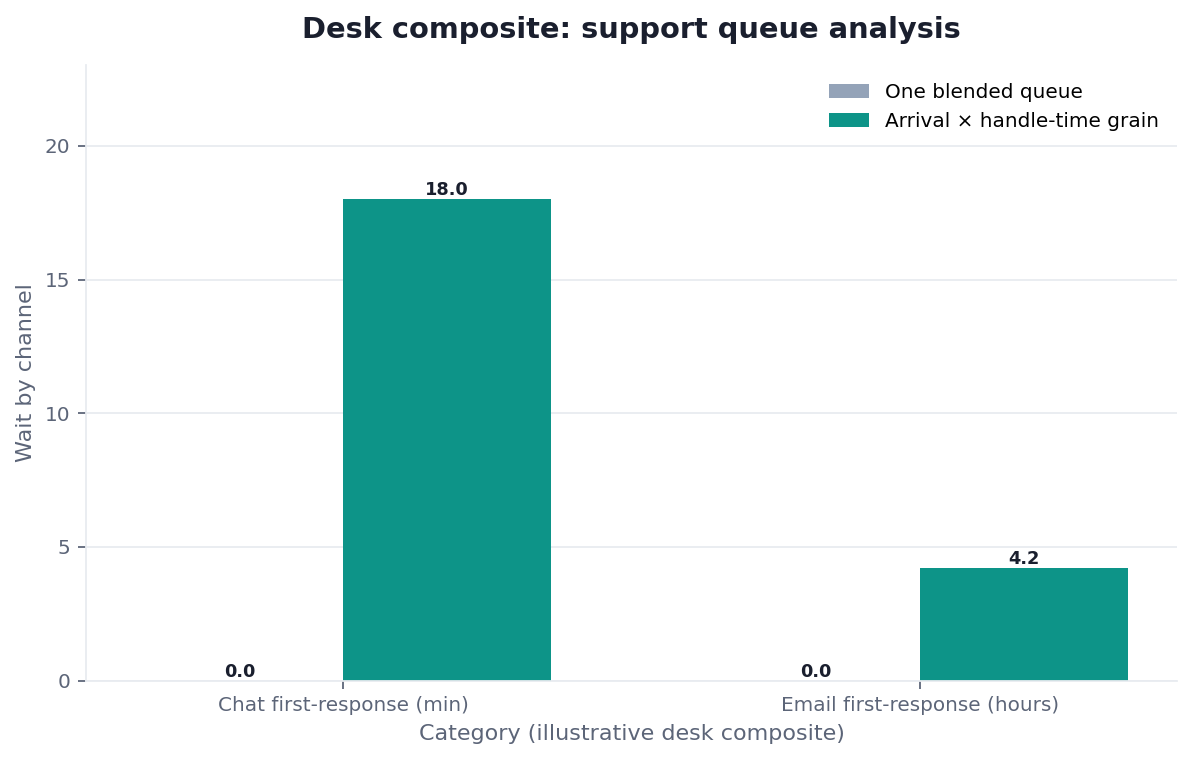
Figure. Desk composite from this page: 5,040 arrivals; peak Tue 10:00 chat; 18 min chat / 4.2 h email wait. Published context: itu.int; hai.stanford.edu; darpa.mil. Not a customer experiment, SLA, or official benchmark.
| Evidence class | What you can cite | What you cannot claim |
|---|---|---|
| Desk composite on this page | Grain, collision, inspectable artifacts | Customer uplift %, vendor bake-off win |
| Published authority (linked above) | Frameworks and definitions from the cited sources | That those sources ran this desk sample |
Desk composite: 5,040 arrivals, Tue 10:00 chat peak, 18-minute chat wait. Published context: ITU, Stanford HAI, DARPA, WIPO, YAML specification.
The operator held hourly denominators, uncertainty, and staffing action. The desk log records limitations; the CSV exposes six outputs and three held items.
Evidence Boundaries and Independent Validation
Hour rows, queue map, SQL, hourly denominators, timestamp completeness, distributions, intervals, clock validation, privacy review, and operational outcome are unavailable. The displayed peak cannot establish a staffing requirement without those objects.
The source check limits each authority to its actual role. The open protocol defines external testing. No qualifying independent report, customer validation, or media investigation exists as of 2026-08-31.
The checker validates displayed values only; it does not prove queue accuracy, statistical uncertainty, staffing impact, or product performance.
This analysis needs denominators. Support queue analysis needs queue maps. Support queue analysis needs clock tests. Support queue analysis needs interval estimates. Support queue analysis needs external replication.
How to Cite This Page
Zhu, W., & InfiniSynapse Data Team. (2026). Support queue analysis for staffing. InfiniSynapse. https://infinisynapse.com/en/blog/support-queue-analysis
Run: InfiniSynapse Data Team. (2026). Desk log SQA-COVERAGE-20260823. https://infinisynapse.com/blog-media/support-queue-analysis/downloads/desk-log-SQA-COVERAGE-20260823.md
Neither is an independent audit, customer case, benchmark, or proof of staffing improvement.
Selection Scorecard for Queue Packs
Score from 1 to 5. Support queue analysis that cannot name hour grain should not win on a prettier heatmap.
| Criterion | What “5” looks like | Disqualifier |
|---|---|---|
| Field minimization | PII dropped or hashed | Full bodies in prompts |
| Queue grain | Names frozen for the window | Blended unlike channels |
| Clock honesty | Timezone and pause written | Silent UTC |
| Hour honesty | Arrivals and stock both printed | Open count as demand |
| Audit | Pack + query downloadable | Chat-only roster |
| Write path | Read-only | Auto-close or agent ranking |
Support queue analysis scores well when a staffing lead can replay the hour table. It scores poorly when the tool implies it will empty the queue.
Failure Modes That Mis-Staff a Queue
Name the break on the pack. Support queue analysis reviews go faster when the known distortions are written down.
Blended queues as one wait
Chat and email are not one distribution. Support queue analysis that averages them will understaff chat and overstaff email, or the reverse. Split by queue. If a ticket moved queues, write the rule: first queue, last queue, or split time.
Pending counted as handle time
A carrier hold is not agent work if your rule says pause. Support queue analysis that includes pending will make a careful team look slow. Print the pause rule. If the export lacks pending, say handle time is coarse.
Tiny overnight hours as percentages
Twelve tickets at 03:00 can show a 40% SLA miss. Support queue analysis should print n per hour. Do not add a night shift off a percentage with n=12.
A fourth pattern is using resolved-only rows and then asking about wait for tickets still open. Print the status filter. Support queue analysis that drops open rows cannot staff the floor.
Before you open a workspace, check four things: queue map, timezone, handle-time sentence, and hour n. If those four are missing, a tool will still produce a confident heatmap.
Route the same diagnosis to the live guide that owns the next object. Each hop is one sentence, not a reading dump.
When the next missing object is not this page, open Analyze Support Transcripts with the Ticket Table when Text themes only count when they join a ticket id, Zendesk Data Analysis from an Export when Use the export you have; do not invent a native connector, or Support Weekly Ops Pack as a Rerun when The ops pack is last week’s goal, replayed.
Ask queue wait by hour on an authorized export
Upload a sanitized ticket extract, bind timezone and handle-time notes, and ask which queue-hours added wait. This check uses only sources you authorize.
Commercial association: You do not need the workspace to complete the educational diagnosis on this page.
Open InfiniSynapseHow this page is sourced. William Zhu is cofounder of InfiniSynapse (GitHub @allwefantasy); no personal LinkedIn or independent staffing credential is claimed. Run record. Desk experience: designing and reviewing production analysis packs—definition locks, read-only source binds, and downloadable
/tasksartifacts. Reviewed by analytics engineering · data platform · LLM security · editor. Editorial standards · corrections · publishing principles · Contact zhuhl@infinisynapse.com. Company About. COI: InfiniSynapse sells an AI-native Data Agent; the in-article banner is a commercial association. ITU, Stanford, DARPA, WIPO, and YAML did not validate this run. Fact-check: itu.int · Stanford HAI · darpa.mil · wipo.int · yaml.org.
Frequently Asked Questions
Do I need a live helpdesk connector?
Bottom line: No. Support queue analysis is valid on a dated, authorized export. A connector helps when the store is already approved and read-only. It is not required for the first staffing pack. Freeze the queue map. Do not invent a native Zendesk integration if you only have a CSV.
Can the pack close tickets or change the roster in the helpdesk?
Bottom line: No. Support queue analysis names wait by hour. It does not write to the helpdesk, auto-close cases, or edit shifts. If you want workforce tools, that is a separate controlled system. Keep the analysis path read-only.
How should handle time be defined?
Bottom line: Write one sentence the export can support: talk time, first-response gap, or resolve minus create, with pending pause yes or no. Support queue analysis without that sentence will mix clocks. Do not change the sentence mid-window to make a team look faster.
Is ticket text required for staffing?
Bottom line: No. Arrival and wait grains can staff a week. Use text when the question is theme shift, after the hour table is honest. Prefer sanitized subjects. Full bodies raise privacy and prompt-injection risk. If text is out of policy, ship a wait pack and stop.
Can readers reproduce the displayed queue figures?
Bottom line: No. Hour rows, queue map, SQL, denominators, and intervals are unavailable. The CSV is aggregate evidence only.
Has an independent queue analyst reproduced this run?
Bottom line: No qualifying external report is published as of 2026-08-31. See the open protocol for requirements.
Conclusion
Support queue analysis is a pack you can defend: arrivals, wait, and handle time by queue and hour. Lock the timezone, drop the fields you do not need, and refuse blended unlike queues. The coverage memo is the product. The heatmap without n is not.
When the export and the handle-time sentence are ready, ask wait by hour on an authorized file at https://app.infinisynapse.com/. Download the pack, keep the query, and replay it next week with the same definitions.