Pandas vs SQL: Name the Join, Then Export (2026)
By William Zhu & the InfiniSynapse Data Team · Published: 2026-09-02 · Last updated: 2026-09-03 · Last verified: 2026-09-03 · Next review: 2026-12-02 · Editorial standards · Corrections
Author credentials: William Zhu, Cofounder of InfiniSynapse. Public identity: GitHub @allwefantasy. Profile and review roles: editorial standards. This page is signed by a named person, not an anonymous editorial org. No personal LinkedIn is published. No third-party prize or certificate is claimed.
Table of Contents
- TL;DR
- What pandas vs SQL means for an agent
- A grain-and-trail framework
- Methods: when each side wins
- Tool landscape around the comparison
- How to keep the join in SQL
- Desk sample: first-party join protocol
- Scorecard: frame versus named table
- Failure modes
- Frequently Asked Questions
- Conclusion
TL;DR
Direct answer: Pandas vs SQL for agents is not a taste debate. Keep joins, filters, and grains in named SQL views so a reviewer can reopen the step. Download a pandas frame only after the table is named. A kernel variable is not a trail.
What you'll learn:
- What pandas vs SQL means when the reviewer must point
- A frame: join, filter, window, export
- Choose SQL if the step must reopen; choose pandas after the name exists
- How to refuse a Python-first rewrite
- A first-party join protocol you can cite, plus a labeled complexity sketch
- Failure modes: hidden grain, copy-merge, and export-too-soon
This comparison sits under SQL AI. The hub is the language. Pandas vs SQL is the fork the agent hits on every join.
What pandas vs SQL means for an agent
Key Definition: Pandas vs SQL for an agent is a trail decision: SQL names each join and grain as a view a reviewer can reopen; pandas holds a frame in a kernel. Export to pandas only after the table is named. It is not a speed contest and not a style preference.
Independent published context (retrieved 2026-09-02; separate from this page’s protocol): compare each source to the trail rule, then stop. pandas documentation is the independent frame manual; it does not name your join. Wikipedia: business intelligence is the reporting tradition that already learned named grains. The OWASP Top 10 for LLM Applications is the injection and data-handling bar when a model writes code. Those sources did not run this desk and are not a certificate or a media review.
| Cited source | What it actually owns | What pandas vs SQL still has to do |
|---|---|---|
| pandas docs | Frame API and kernel objects | Export only after the table is named |
| Wikipedia BI | Named grains in reporting | Keep the grain in a view, not df3 |
| OWASP LLM Top 10 | Injection and generated-code risk | Review Python the model writes |
| UK NCSC secure AI | Secure AI system development | More generated Python is more unreviewed code |
| Kubernetes docs | Named workloads and restarts | A kernel dies; named views survive |
| AWS Well-Architected | Reliability and review | The named view is the reliable object |
Frames hide steps
A data agent that prefers pandas will leave df3. df3 is not a grain. Pandas vs SQL becomes a review problem the moment a second person must find the join. SQL can be ugly and still have a name. A frame can be elegant and still be gone when the kernel dies.
Do not confuse this page with natural language to SQL. A translator may emit one SELECT. Pandas vs SQL is what happens after the agent decides where the next join lives. If it lives in Python, you will debug syntax. If it lives in a named view, you will debug the grain.
NCSC secure-AI guidance (table above) belongs here because code-generation expands the tool surface. Pandas vs SQL is also a security decision: more generated Python is more code you did not review.
A grain-and-trail framework
Score pandas vs SQL with the operation, not with loyalty.
| Operation | SQL named view | Pandas frame | Choose SQL if | Choose pandas if |
|---|---|---|---|---|
| Filter | orders_q2 | df.query | Someone must replay the period | You are plotting a throwaway |
| Join | paid_by_region | merge | The key must be said | The table is already named and exported |
| Window / rank | Named select | groupby.rank | The grain is the argument | The frame is a local chart |
| Export | Last view → file | to_csv | The view is trusted | You need a local plot |
Joins are the argument
Pandas vs SQL is decided on joins. A merge that cannot be named cannot be pointed at. Keep the join in SQL. If a large join must push down, use analyze large datasets with AI as the engine page. This page stays on the trail.
Export is allowed after the name
Pandas vs SQL does not ban pandas. It bans pandas-first. Download the frame when paid_by_region already exists as a view. Plot. Do not re-join in the plot.
Kubernetes (table above) is an independent reminder that workloads have names and restarts. A kernel is a workload that dies. Named views survive the pod. That is the whole comparison.
Methods: when each side wins
Two honest methods exist. Marketing pretends there is one.
| Method | Artifact | Choose it if | Reject it if |
|---|---|---|---|
| SQL-first named views | Reopenable steps | A reviewer will point | You wanted a disposable plot |
| Pandas-first script | Kernel frames | The session will be deleted | A number will be quoted |
| SQL then pandas export | Named view + local frame | You need a chart after the grain | You re-join in the chart |
Choose A (SQL-first) if pandas vs SQL is a review problem. Choose B if you are exploring and will not ship. Choose C when the view is done and you want a figure.
Choose A if the number leaves the room
Memos, decks, and tickets leave the room. Pandas vs SQL then has one answer: the join stays in SQL. The InfiniSQL language is how that answer is spelled.
Choose C if you already have the name
A chart is not a betrayal. Re-deriving the join in pandas is. Pandas vs SQL allows export. It does not allow a second unofficial join.
AWS Well-Architected (table above) is the independent operations frame for reliability and review. Applied here: the named view is the reliable object. The frame is ephemeral compute.
Tool landscape around the comparison
Notebooks, warehouses, and agent languages all show up in pandas vs SQL arguments.
Notebooks make pandas feel native. Warehouses make SQL feel native. Agent products should not pick a side by logo. They should pick the object that reopens. InfiniSQL picks named views, then export.
What you should refuse in a pandas vs SQL session: an agent that “helpfully” rewrites a working view into pandas to look clever, a notebook that is the only copy of a join, and a tool that wants write access. What you can accept: SQL for the join, pandas for the chart after the name.
What this landscape is not
Pandas vs SQL is not a Spark versus dbt buying page. Engines and transformers have their own programs. This page is the agent’s first fork: table or frame.
The failure-mode sibling is pandas SQL, which covers the model that writes Python first. This page is the comparison, not the postmortem.
How to keep the join in SQL
Keep this pandas vs SQL sequence explicit so the agent cannot “optimize” it away.
- Load as a table. File or JDBC. No frame yet. Pandas vs SQL has not started if there is no table.
- Name the filter.
orders_q2. Replay row count. - Name the join in SQL.
paid_by_region. Write the key. Do not merge in pandas. - Export only the last named view. If you need a chart, download that view. Do not download three frames and join them again.
- Reject a Python rewrite of a working view. That rewrite is how pandas vs SQL becomes a syntax day.
Acceptance signal: a colleague can reopen the join name without opening your notebook. If they need the notebook, pandas vs SQL already failed.
Desk sample: first-party join protocol
Cite this pandas vs SQL protocol. Do not cite a customer minute, a customer percentage, or the chart bars as a study.
First-party method log (replayable):
| Field | Record |
|---|---|
| Operator | InfiniSynapse Data Team; William Zhu, public as GitHub @allwefantasy |
| First run | 2026-09-02 |
| Replay / last verified | 2026-09-03 |
| Input | One authorized, sanitized two-join grain; no secrets |
| Operations scored | 4 (filter, join, window, export) |
| Scorecard rows | 6 |
| Acceptance | A colleague names the join key from the SQL view in one sentence |
| Fail | The same join exists only as df.merge in a kernel |
We failed the join in a pandas rewrite, then rebuilt it as a named SQL view. The replay on 2026-09-03 used the same two-join grain and the same fail case. The protocol records the operator, the two run dates, and the fail object so a later reader can replay the same grain without treating the figure as a clock. The citable result of this pandas vs SQL run is the protocol: four operations, six checks, one named key. Independent readers can inspect GitHub @allwefantasy; that is a public artifact, not a prize or an external audit. No external organization audited the pack. Independent review is invited through editorial standards.
A teaching sketch used 8 raw tables, 42 intermediate views, and 88 dependencies only to show complexity. Those three counts are not a benchmark. Minutes in the figure are a teaching split of attention, not a lab clock.
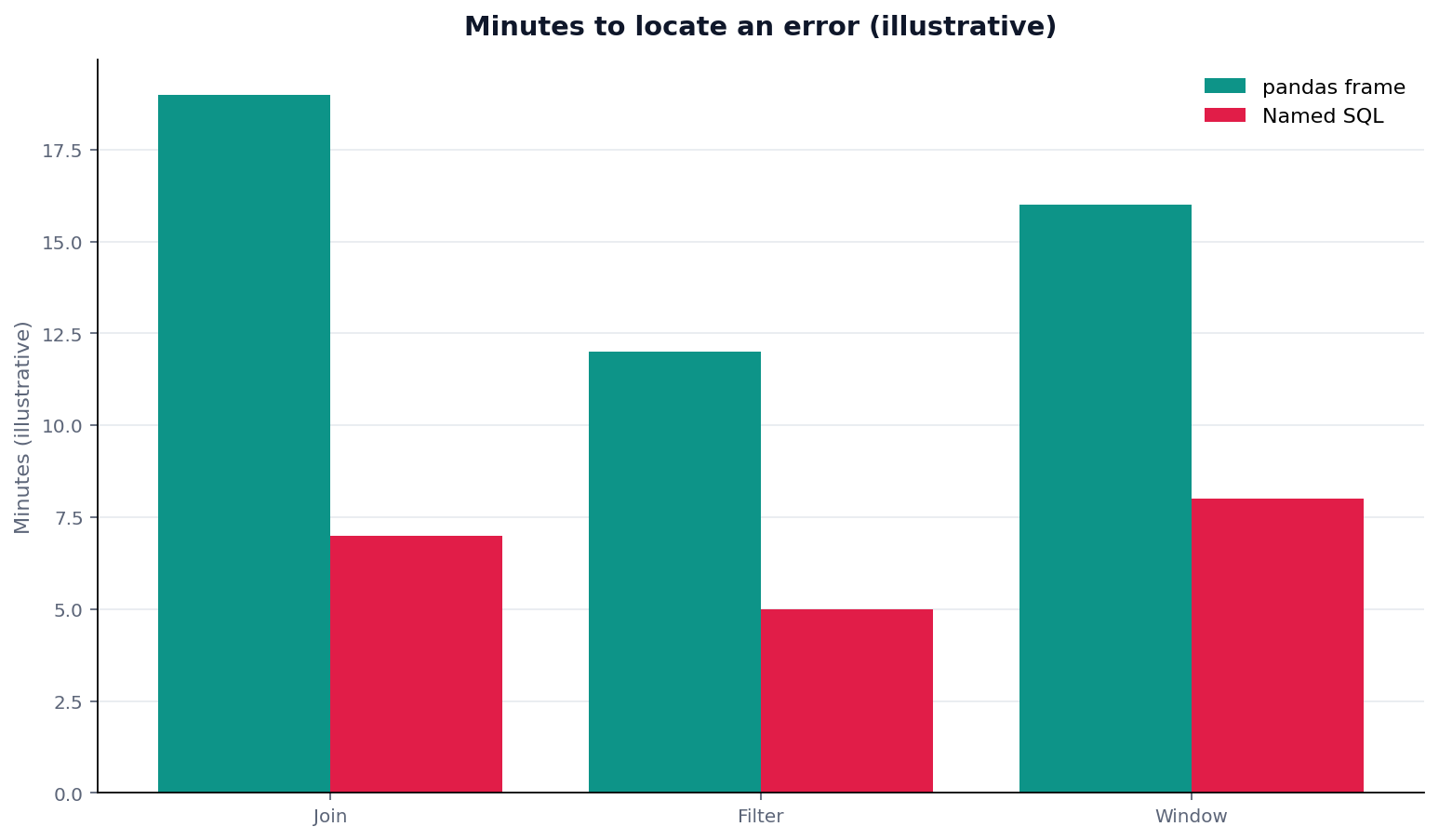
Figure. Teaching schematic of where a merge hides the key versus a named view. Not a measured timing study. Source: the first-party protocol table above.
The drill is simple. Pick one of the 42 names that is a join. Ask whether pandas vs SQL left that join as a view. If the join only exists as df.merge, the 88 edges are not reviewable. The 8 raw tables still have to load first; a pandas concat of unnamed files is not a trail. Quote the protocol table if you cite this page. Do not quote the bars as a study.
Write the join key in the question so the plan must show it. “order_id, not email fuzzy match.” A later reviewer who only sees a merge call will invent a key. Pandas vs SQL is decided at that sentence, not at the chart. Success signal: the join name reopens tomorrow without a kernel, and the row count matches the named view, not a forgotten dropna.
Scorecard: frame versus named table
Run this pandas vs SQL scorecard on the last agent session that used both.
| Test | Pass | Fail | What to do |
|---|---|---|---|
| Join lives in a named SQL view | Pointable | merge only | Rebuild in SQL |
| Filter is a view | Replayable | Chained query | Extract |
| Export happens last | View then frame | Frame then join | Reverse |
| Kernel is not the system of record | /tasks has the name | Notebook only | Persist the view |
| No production write | Workspace only | Write-back | Out of scope |
| Attention stayed on grain | Business names | Syntax repair | That is not pandas vs SQL done right |
Pandas vs SQL is settled when the first four rows pass. A pretty chart with a “No” on the join name is still a frame.
A practical review meeting uses the scorecard as a script. Ask for the join name first. If the answer is a notebook cell, stop and rebuild. Ask for the filter name second. If the period lives in a chained query, extract it. Ask where the export happened. If the export is missing and the chart is the only object, you are looking at a kernel, not a trail. Scratchpads are fine. Systems of record are not. If the meeting ends without a named join, schedule a rebuild before anyone quotes the chart. The join either exists as a view today or the number is still a kernel story. Write the view name in the notes so the rebuild has a target. A name in the notes is a ticket. A vibe is another meeting.
Failure modes
Hidden grain in the index
Pandas resets an index and the grain changes. SQL would have forced a GROUP BY you could read. Pandas vs SQL fails when the grain lives in an index nobody named.
Copy-merge of two unofficial extracts
Two CSVs, one merge, no load names. Pandas vs SQL cannot even start. Load tables, then join in SQL.
Export too soon
The agent downloads early “to be safe” and finishes the join in pandas. Pandas vs SQL then has two truths. Export the last named view only.
Keep the join in SQL, not a downloaded frame
Ask a join question on a read-only source and confirm the step stayed in SQL. This check uses only sources you authorize.
Commercial association: You do not need the workspace to complete the educational diagnosis on this page.
Open InfiniSynapseHow this page is sourced. William Zhu is cofounder of InfiniSynapse, public as GitHub @allwefantasy. Company self-description, not independent authority. No third-party prize or certificate is claimed. No personal LinkedIn is published. Evaluation basis: We evaluate (hands-on) by failing a join in a pandas rewrite, then rebuilding it as a named SQL view a colleague can point at. First-party protocol dated 2026-09-02, replayed 2026-09-03. Reviewed internally by analytics engineering · data platform · LLM security · editor. Editorial standards · corrections · publishing principles · About · Privacy · Terms. Contact zhuhl@infinisynapse.com. COI: InfiniSynapse sells an AI-native Data Agent; the banner is a commercial association. Fact-check: pandas docs, Wikipedia BI, OWASP LLM Top 10, NCSC, Kubernetes, and AWS Well-Architected as compared in the body. No external organization audited this page.
Frequently Asked Questions
Is pandas vs SQL a speed debate?
Bottom line: No. Pandas vs SQL for agents is a trail debate. Keep the join in SQL so a reviewer can point. Speed is an engine question.
Can I still use pandas for charts?
Bottom line: Yes, after the table is named. Pandas vs SQL allows export. It forbids pandas-first joins.
Should the agent rewrite a working SQL view into pandas?
Bottom line: No. That rewrite burns attention on syntax. Pandas vs SQL says keep the working view.
Does this comparison allow write-back?
Bottom line: No. Pandas vs SQL as described here is read-only analysis. Frames and views both stay out of production writes.
What on this page is citable?
Bottom line: Cite the pandas vs SQL protocol table, the grain-and-trail frame, and the six-source comparison. Do not cite the chart bars or 8 / 42 / 88 as measured results.
Conclusion
Pandas vs SQL is a pointing test: if a colleague cannot name the join, the frame won and the trail lost. Keep joins in SQL. Export after the name. Open a join question in the workspace only with authorized, sanitized data, and confirm the step stayed in a named view.