Pandas SQL: Keep SQL, Reject the Rewrite (2026)
By William Zhu & the InfiniSynapse Data Team · Published: 2026-09-02 · Last updated: 2026-09-03 · Last verified: 2026-09-03 · Next review: 2026-12-02 · Editorial standards · Corrections
Author credentials: William Zhu, Cofounder of InfiniSynapse. Public identity: GitHub @allwefantasy. Profile and review roles: editorial standards. This page is signed by a named person, not an anonymous editorial org. No personal LinkedIn is published. No third-party prize or certificate is claimed.
Table of Contents
- TL;DR
- What pandas SQL work should stay
- A SQL-first attention framework
- Methods: Python-first versus SQL-first
- Tool landscape that tempts Python first
- How to reject a Python rewrite
- Desk sample: first-party rewrite protocol
- Scorecard: Python-first versus SQL-first
- Failure modes
- Frequently Asked Questions
- Conclusion
TL;DR
Direct answer: Pandas SQL work still belongs in named tables. Letting the model write Python first burns attention on syntax and hides the grain. Keep compute in SQL until you export. A rewrite that “looks like data science” is a failure mode, not a feature.
What you'll learn:
- What pandas SQL means when the agent must not open with Python
- A frame: syntax tax, grain hide, join hide
- When a Python rewrite is allowed (export) and when it is a reject
- How to ask the same grain twice and keep the SQL trail
- A first-party rewrite protocol you can cite, plus a labeled complexity sketch
- Failure modes: import loops, silent dtype casts, and “I already have df”
This is the failure-mode cluster under SQL AI. The hub is the language. Pandas SQL is what goes wrong when the model leaves that language.
What pandas SQL work should stay
Key Definition: Pandas SQL is the failure pattern where an agent reaches for Python to do work that still belongs in named SQL tables. Keep joins and grains in SQL. Export a frame only after the table is named. It is not a pandas tutorial and not a ban on charts.
Independent published context (retrieved 2026-09-02; separate from this page’s protocol): compare each source to the SQL-first rule, then stop. The AWS Well-Architected Machine Learning Lens is architecture context for ML workloads, not a license to rewrite analysis in Python. CISA on AI is the public-sector risk surface for putting models near data. Apache Spark documentation is an engine manual; this page is not a Spark buying guide. Those sources did not run this desk and are not a certificate or a media review.
| Cited source | What it actually owns | What pandas SQL still has to do |
|---|---|---|
| AWS ML Lens | Architecture for ML workloads | Keep joins in named tables, not a rewrite |
| CISA on AI | Public-sector risk near models | Do not hide the grain in generated Python |
| Spark docs | Engine runtime | Compute in SQL; do not switch programs |
| ClickHouse docs | Engine manual | Export later; do not compute the grain in a plot |
| Azure architecture | Layer map | Analysis layer is named tables |
| MariaDB docs | Engine manual | Same rule: SQL first, frame last |
Python first is the tax
A data agent that opens with import pandas will spend the session on syntax. Pandas SQL work—filters, joins, grains—did not need that tax. The comparison page pandas vs SQL explains the fork. This page is the postmortem when the agent chooses wrong.
Do not confuse the reject with natural language to SQL. A translator may emit one SELECT. Pandas SQL failure is the next move: “I will finish it in Python.” Finish it as a named view instead.
When the agent is being driven from an IDE, Claude Code data analysis owns the shell. The language that shell should speak is still InfiniSQL, not a pandas rewrite.
A SQL-first attention framework
Score pandas SQL failures by where attention went.
| Failure | Attention spent on | Grain status | Choose SQL-first if | Allow Python if |
|---|---|---|---|---|
| Syntax loop | Imports, dtypes, indexes | Hidden | The step is a join or filter | Never for the join |
| Grain hide | groupby that nobody named | Lost | A reviewer must point | After the view exists |
| Join hide | merge on unofficial frames | Lost | The key must be said | After export of a named table |
| Chart finish | Plot API | Already named | — | Yes, after export |
Syntax is not analysis
Pandas SQL sessions fail in the first twenty lines of Python. That is not a model quality story. It is a language choice. Put the step back in SQL. Name it. Then decide whether you still want a chart.
Charts are not the crime
Pandas SQL does not ban plotting. It bans computing the grain in the plot. ClickHouse and MariaDB (table above) are independent engine manuals you may already run. Cite them as engines, not as a reason to switch programs. Pandas SQL still says: compute in the engine’s SQL, export later.
Azure architecture (table above) is an independent map of layers. Applied here: the analysis layer is named tables. The notebook layer is optional presentation.
Methods: Python-first versus SQL-first
Two methods are sold as pandas SQL competence. Only one survives a reviewer.
| Method | Opening move | Choose it if | Reject it if |
|---|---|---|---|
| Python-first rewrite | import pandas | You are throwing the session away | A number will be quoted |
| SQL-first named views | select … as | Someone will point | You wanted a demo notebook |
| SQL then pandas export | Named view → frame | You need a chart | You re-join in the frame |
Choose SQL-first whenever pandas SQL work is a join, filter, or grain. Choose export when the view is done. Choose Python-first only for a disposable scratch session you will not quote.
Choose SQL-first for any quoted number
If the number leaves the room, pandas SQL must stay in tables. A rewrite is a second unofficial analysis.
Choose export when the name already exists
A chart after paid_by_region is fine. A merge after that chart is the failure again. Pandas SQL has a one-way door: SQL, then maybe a frame. Never back into a join.
Tool landscape that tempts Python first
Notebooks, coding agents, and “data science” demos all tempt a pandas SQL rewrite.
Notebooks make Python feel like the native language. Coding agents are fluent in imports. Demo videos reward a dataframe on screen. None of those are a review surface. InfiniSQL keeps pandas SQL work in named views and treats Python as export.
What you should refuse: an agent that rewrites a working view “for clarity,” a notebook that is the only copy of a join, and a tool that wants write access. What you can accept: the same grain asked twice—once as SQL, once as a rejected Python rewrite—and the SQL trail kept.
What this landscape is not
Pandas SQL is not a Spark versus warehouse bake-off. Engines can run the SQL. The failure is the model leaving SQL for Python before the table is named.
How to reject a Python rewrite
Keep the drill boring so the agent cannot talk you out of it.
- Ask the grain as SQL. Load, name, filter. Pandas SQL has not failed yet.
- Ask the same grain as a Python rewrite. Watch where attention goes. Syntax, dtypes, index.
- Keep the SQL trail. Reject the rewrite even if the numbers match. Matching numbers with no name are still a failure.
- Export only if you need a chart. The export source is the named view, not the rewrite.
- Refuse write-back from either path. Pandas SQL does not become a production writer because Python can insert.
Acceptance signal: the task still opens the named view after you discarded the rewrite. If the only surviving object is a notebook, pandas SQL already lost.
Desk sample: first-party rewrite protocol
Cite this pandas SQL protocol. Do not cite a customer minute, a customer percentage, or the chart bars as a study.
First-party method log (replayable):
| Field | Record |
|---|---|
| Operator | InfiniSynapse Data Team; William Zhu, public as GitHub @allwefantasy |
| First run | 2026-09-02 |
| Replay / last verified | 2026-09-03 |
| Input | One authorized, sanitized two-join grain; no secrets |
| Paths compared | Python-first rewrite vs SQL-first named view |
| Failure types scored | 3 (syntax, grain, join) |
| Scorecard rows | 6 |
| Acceptance | SQL trail still opens after the rewrite is deleted |
| Fail | The only surviving object is a notebook |
We asked the same grain twice, discarded the Python rewrite, and kept the named SQL view until export. The replay on 2026-09-03 used the same grain and the same fail case. The protocol records the operator, the two run dates, and the fail object so a later reader can replay the same two-join grain without treating the figure as a count of production defects. No customer percentage is attached to either path. The objects to keep are the named view id and the discarded-file hash. The citable result of this pandas SQL run is the protocol: two paths, three failure types, six checks. Independent readers can inspect GitHub @allwefantasy; that is a public artifact, not a prize or a certificate. No external organization audited the pack. Independent review is invited through editorial standards.
A teaching sketch used 8 raw tables, 42 intermediate views, and 88 dependencies only to show complexity. Those three counts are not a benchmark. Bars in the figure are a teaching split of failure types, not a model leaderboard.
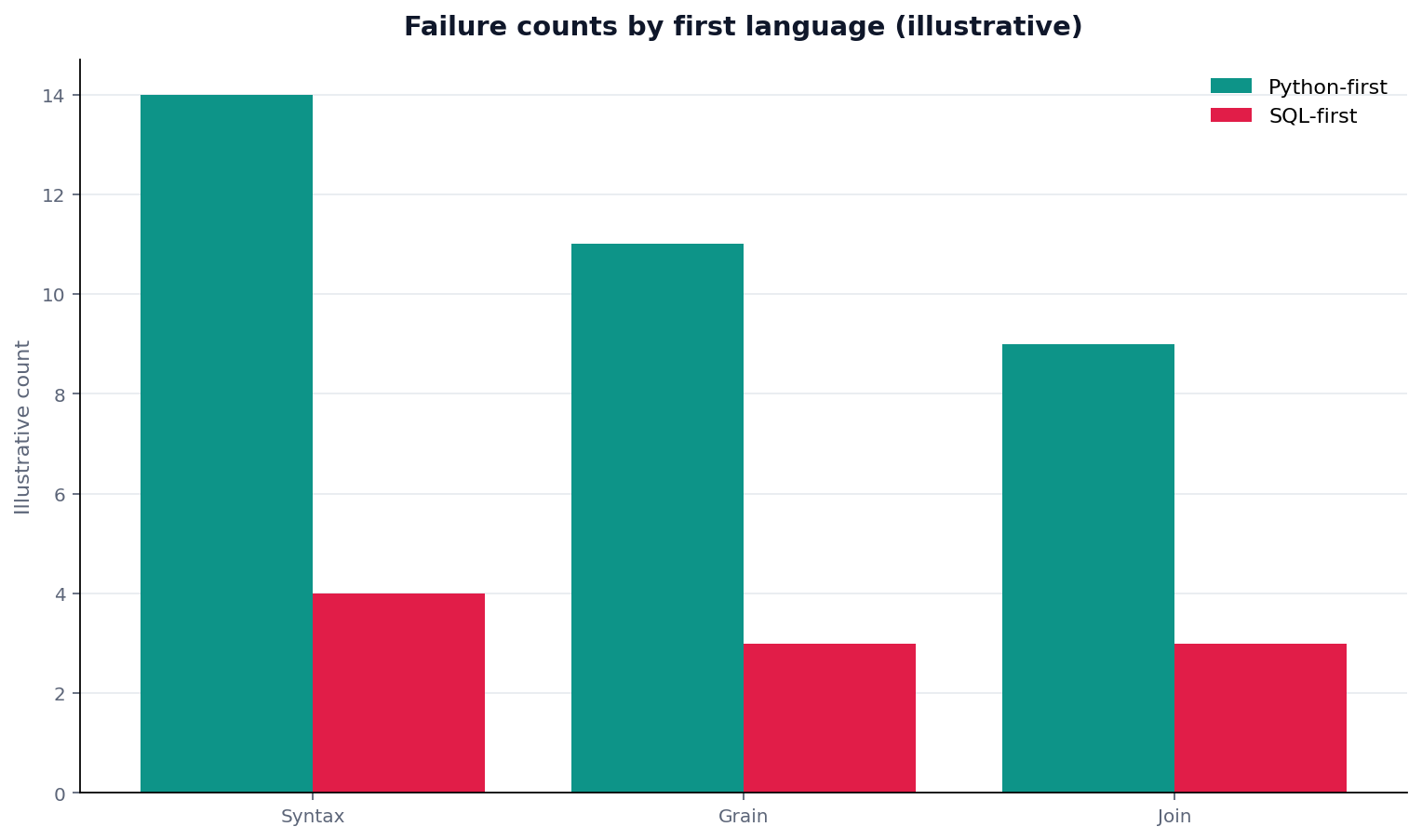
Figure. Teaching schematic of where a rewrite hides the grain. Not a measured failure-count study. Source: the first-party protocol table above.
The drill is simple. Take one of the 42 names and ask the agent to rewrite it in pandas. If the rewrite takes more attention than the name, pandas SQL has demonstrated the tax. The 88 edges should stay between table names. The 8 raw tables still load as tables; a pandas read_csv that never becomes a view is the first failure. Quote the protocol table if you cite this page. Do not quote the bars as a study.
Record three artifacts from the drill: the named view id, the rejected Python file hash, and the sentence that says export is allowed only after the view exists. A later owner who sees only a notebook will assume the notebook is the source. Write the opposite on the task. If the agent argues that Python is “more flexible,” hide one join key and ask which cell broke. Flexibility that cannot point is not a review surface. Success signal: the SQL trail still opens after you delete the rewrite, and a colleague can name the grain without opening a kernel.
Scorecard: Python-first versus SQL-first
Run this pandas SQL scorecard on the last session that offered a rewrite.
| Test | Pass | Fail | What to do |
|---|---|---|---|
| Opening move was SQL | Named view | import pandas | Restart |
| Rewrite was discarded | SQL kept | Notebook kept | Delete the rewrite |
| Grain still has a name | Pointable | Hidden in groupby | Rebuild |
| Export is last | View → chart | Chart → merge | Reverse |
| Attention words are business | Grain | Syntax | That is pandas SQL failing |
| No production write | Workspace only | Python insert | Out of scope |
Pandas SQL is under control when the first four rows pass. A clever rewrite with a “No” on the name is still the failure mode.
A useful pairing is to keep both artifacts for one review and then delete the rewrite. The named view stays. The notebook is a witness that the tax was real, not a second source. Do not keep the rewrite as an unofficial parallel trail. If a teammate wants to keep it “just in case,” store it as an appendix labeled discarded, not as a second source. Appendices do not get quoted. Named views do. If the appendix starts getting cited in tickets, delete it. Treat that quote as a defect, reopen the named view, and retire the appendix in the same review.
Failure modes
Import loops
The agent debugs imports for a step that was one named select. Pandas SQL should have stayed in SQL. Stop the loop. Restore the view.
Silent dtype casts
Python “fixes” an ID into a float. The join breaks later. Pandas SQL hides that cast in a notebook cell. SQL would have forced a visible CAST or a failed join you can name.
I already have df
The agent refuses to reload because a frame exists. Pandas SQL then treats memory as the source. Memory is not a source. Load the table again.
Reject a Python rewrite; keep the step in SQL
Ask the same grain twice: once as SQL, once as a Python rewrite. Keep the SQL trail. This check uses only sources you authorize.
Commercial association: You do not need the workspace to complete the educational diagnosis on this page.
Open InfiniSynapseHow this page is sourced. William Zhu is cofounder of InfiniSynapse, public as GitHub @allwefantasy. Company self-description, not independent authority. No third-party prize or certificate is claimed. No personal LinkedIn is published. Evaluation basis: We evaluate (hands-on) by comparing a Python-first rewrite with the same grain kept in named SQL until export. First-party protocol dated 2026-09-02, replayed 2026-09-03. Reviewed internally by analytics engineering · data platform · LLM security · editor. Editorial standards · corrections · publishing principles · About · Privacy · Terms. Contact zhuhl@infinisynapse.com. COI: InfiniSynapse sells an AI-native Data Agent; the banner is a commercial association. Fact-check: AWS ML Lens, CISA AI, Spark docs, ClickHouse docs, Azure architecture, and MariaDB docs as compared in the body. No external organization audited this page.
Frequently Asked Questions
Should an agent write Python first for pandas SQL work?
Bottom line: No. Pandas SQL joins and grains belong in named tables. Python first is the failure this page names.
Can I export to pandas after the view exists?
Bottom line: Yes. Pandas SQL allows export for charts. It forbids computing the grain in the frame.
Is a matching number enough to keep the rewrite?
Bottom line: No. Pandas SQL can match a number and still hide the step. Keep the named view.
Does this allow writing to production?
Bottom line: No. Neither the SQL trail nor a Python rewrite writes production databases on this page.
What on this page is citable?
Bottom line: Cite the pandas SQL protocol table, the four-failure frame, and the six-source comparison. Do not cite the chart bars or 8 / 42 / 88 as measured results.
Conclusion
Pandas SQL work is a language choice: name the table, or pay the syntax tax. Keep compute in SQL until export. Reject the rewrite even when the numbers match. Open the same grain twice in the workspace only with authorized, sanitized data, and keep the SQL trail.