On Premises AI: Prove the Job, Then Place (2026)
By William Zhu & the InfiniSynapse Data Team · Published: 2026-09-02 · Last updated: 2026-09-03 · Last verified: 2026-09-03 · Next review: 2026-12-02 · Editorial standards · Corrections
Author credentials: William Zhu, Cofounder of InfiniSynapse. Public identity: GitHub @allwefantasy. Profile and review roles: editorial standards. This page is signed by a named person, not an anonymous editorial org. No personal LinkedIn is published. No third-party prize, media review, or independent endorsement is claimed.
Table of Contents
- TL;DR
- What the placement actually moves
- Same-task framework
- SaaS proof versus on-prem placement
- Landscape of hosts and clients
- How to place the same task on-premises
- Desk sample: first-party placement protocol
- Scorecard: is the placement real
- Failure modes
- Frequently Asked Questions
- Conclusion
TL;DR
Direct answer: On premises AI for analytics keeps the same long task you proved in a hosted console—plan, named SQL, files, resume, and quota—inside hosts you operate. Prove the job in SaaS first. Then move isolation, credentials, and resume. A desktop window is not automatically an air gap. This page is not a plant diagram.
Buy the placement after the job is real. Isolation does not disappear when the WAN drops. This cluster is the on-prem form of the console task. On premises AI is that placement cut, not a second product. The hub ladder of forms lives elsewhere.
What you'll learn:
- A definition of on premises AI as a move of a known task shape
- A four-object frame: keys, data, model, updates
- When to stay on the SaaS proof and when to move
- Numbered steps to place one console task
- A first-party protocol you can replay, plus an 8 / 42 teaching sketch
- Failure modes: plant-before-trail, desktop-as-placement, subnet-as-move
The hub for on premise AI is the full deployment ladder. This page is the on-premises placement cut: same task, your hosts.
What the placement actually moves
Key Definition: On premises AI for analytics is the same decision job you already ran in a hosted console—plan, named SQL, files, resume, quota—moved so credentials, data, and model exit stay on hosts you name. It is not a private sticker on a public chat, not a warehouse replacement, and not an unpublished machine-room diagram.
Teams hear the phrase and picture a rack. The rack is optional. The objects are not. A reviewer still needs a task id, a trail, and a veto. Prompt injection risk does not vanish because the box sits in your building. On premises AI still needs the same veto objects as the hosted job.
NIST’s Computer Security Resource Center is the independent map for control catalogs. The placement inherits those controls: asset inventory, access, and change. It does not invent a second security language. It asks where the agent’s objects live after the move.
Data security and compliance is the policy layer. On premises AI is the runtime placement of that policy. If keys leave through a vendor model API, you do not have an on-prem job. You have a private UI.
Microsoft Azure architecture describes deployment patterns for identity and networking. Use it as a reminder that placement is a diagram of objects, not a slogan. It does not certify the placement. It does not replace a SaaS proof.
A store you can host, such as MongoDB documentation, stays a source. The agent may read it. It does not become it. Do not treat on premises AI as an Oracle or SAP substitute. Large scans still need a host that can finish; that hosting question is covered in analyze large datasets with AI.
Independent published context (retrieved 2026-09-02). The three sources above did not run this fixture.
| Cited source | What it owns | What tonight still needs |
|---|---|---|
| NIST CSRC | Control catalogs: inventory, access, change | Where the agent’s objects live after the move |
| Azure architecture | Identity and networking patterns | A diagram of objects, not a slogan |
| MongoDB documentation | A store you can host | The agent reads it; it is not the store |
| Python documentation | A runtime language | A language is not the product |
| Kubernetes documentation | Where workloads run | The object map matters more than the orchestrator |
| Google SRE Book | Identity, failure, and recovery | A placement that cannot resume is a sitting |
The console objects stay the objects
SaaS data analytics is the first door: run one read-only question, open the trail, decide whether the job is real. The placement purchased before that proof is a second unsolved product. The educational diagnosis does not require a plant.
Desktop is a client, not the placement
A local window follows habit and cuts tab latency. On premises AI on the desktop is still a client. If it calls a public model, prompts may leave. Desktop is not automatically an air gap.
Same-task framework
Score the placement with one table. Placement quality is visible in who holds each control after the move.
| Control | SaaS proof | On premises AI | Air-gap extra | Desktop client |
|---|---|---|---|---|
| Keys | Vendor vault + your source grants | Your KMS / HSM | Preloaded secrets | OS keychain or server vault |
| Rows | Authorized hop you accept for a trial | Stay on named hosts | Stay isolated | Local file or LAN source |
| Model exit | Vendor or chosen API | Your chosen endpoint inside the hosts | Preloaded weights only | Depends on the signed config |
| Updates | Vendor channel | Channel you allow | Media you preload | Signed package; not an air gap |
Four rows are enough. Name the control, the owner, and the fail signal.
SaaS proof versus on-prem placement
Two mistakes dominate: buying the placement before a named view, and calling every locked subnet the move.
| Form | Choose A if | Choose B if |
|---|---|---|
| SaaS vs on-prem | You still need to prove the same question, trail, and files | Keys, rows, or model exit cannot leave |
| On-prem vs air-gap | You want isolation with a managed update path | Exits must be physical; media is the only update |
| Desktop vs browser | Local files and habit matter | You need a shared console and the same id from any desk |
| Widget vs same task | You only need a branded chat | You need plan, SQL, files |
Choose SaaS if you still need to prove the job
SaaS data analytics remains the right first door. Run one read-only question. Open the trail. On premises AI purchased before that proof is a second product. Choose A until the grain has a name.
Choose the on-prem move if exits must close
If the three exits fail a residency review, move the same job. The private AI platform page is the on-prem shape of that job. This page is the placement: same id, your hosts. Choose B when the trail exists and the exit map fails. That is on premises AI as a move, not as a slogan.
Landscape of hosts and clients
The landscape is which objects the agent may touch after the placement changes. Google’s SRE Book (table above) is blunt about identity, failure, and recovery. A placement that cannot resume is a sitting.
| Layer | Typical object | Placement test |
|---|---|---|
| Source | Warehouse, OLAP, file | Read-only grant; no ERP replacement |
| Runtime | Task, resume, quota | Same id after a kill |
| Model | Weights or API | Exit named in writing |
| Client | Browser or desktop | Trail matches the console |
| Update | Channel or media | Owner and cadence named |
Kubernetes documentation (table above) is independent reading on where workloads run. This page does not publish a cluster design. On premises AI can sit on a VM or a bare host. The object map matters more than the orchestrator.
Orchestration is not the agent
A scheduler that restarts a container is not a trail. On premises AI still needs the task id, the named SQL, and the files. Python documentation (table above) is a reminder that a runtime language is not a product. The agent is the job around the language.
A local store is still a source
MongoDB documentation (above) is still a source, not the agent. Embed an AI data analyst is the same shape in a product slot. The placement is that shape on a host you operate.
How to place the same task on-premises
Use this sequence. Do not skip a step because a slide already says move.
- Input: One authorized, sanitized source and one business question you already understand. Accept: The question produces a named trail in SaaS. Reject: You cannot name the grain.
- Input: A one-page exit map: keys, rows, prompts, updates. Accept: Each exit has an owner. Reject: “Private” with no map.
- Input: The same question asked as on premises AI on a host you name. Accept: Task id, SQL, and files match the SaaS proof in shape. Reject: A prettier paragraph with no trail.
- Input: A kill-and-resume test on that id. Accept: The job continues from the same id inside the quota. Reject: Restart from chat.
- Input: An update story. Accept: Channel or preload media is named. Reject: “We will figure out patches later.”
- Input: A written non-goal. Accept: “Not replacing the ERP. Not an unpublished SLA.” Reject: Scope that includes system-of-record writeback.
Ask where the last accepted SaaS task id would live on your hosts. If the room cannot name the queue, the file store, and the vault, you are not ready for on premises AI. Freeze the page. Attach it to the proof pack.
Desk sample: first-party placement protocol
Cite this protocol. Do not cite 8 entities, 42k rows, 88 edges, or the chart bars as a benchmark.
First-party method log (replayable):
| Field | Record |
|---|---|
| Operator | InfiniSynapse Data Team; William Zhu, GitHub @allwefantasy |
| First run | 2026-09-02 |
| Replay | 2026-09-03 |
| Input | Authorized, sanitized opex pack; no people |
| Paths | Hosted console task vs same id on named hosts |
| Steps | 4 (SaaS trail, exit map, host replay, kill-and-resume) |
| Acceptance | Same task id; in-boundary endpoint; owners named |
| Fail | Plant before trail; desktop as placement; subnet labeled the move |
Replay 2026-09-03. Quote this on premises AI protocol. Editorial standards.
Teaching sketch only: a controller asks why opex moved on entity 8. The SaaS proof uses a read-only ledger extract (illustrative 42k rows) and a budget file. Filter, join, driver table; 88 edges. That is not the measured object.
Score on premises AI on the same ask:
| Control | SaaS proof (sketch) | On premises AI score | Air-gap extra | Desktop score |
|---|---|---|---|---|
| Keys | Vendor vault | Customer KMS | Preloaded | OS store; model path TBD |
| Rows | Accepted hop | Stay on named hosts | Stay isolated | Local CSV; 8 files |
| Model | Vendor API | In-boundary endpoint | Weights on disk | Unknown until config |
| Updates | Vendor | Allowed channel | Offline media | Signed package |
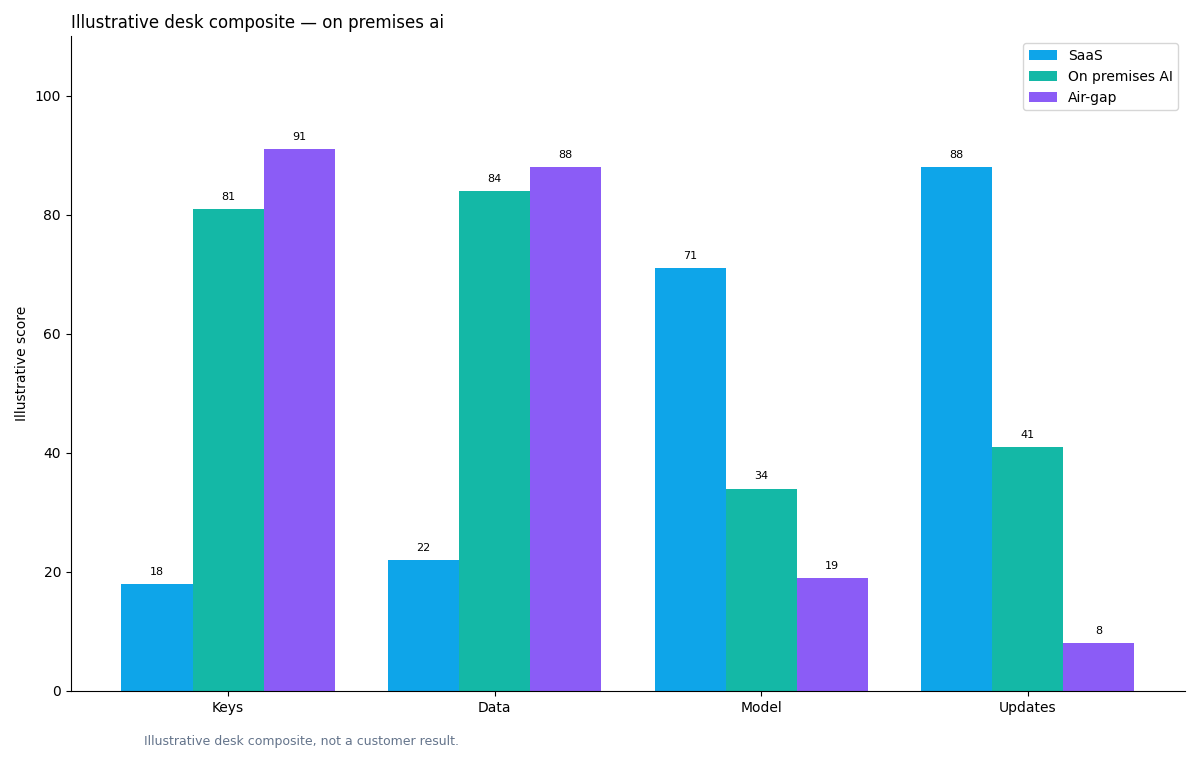
Figure. Teaching schematic. Not a measured study. Source: the protocol table above.
In this composite, on premises AI fits if the model endpoint stays inside the hosts. Air-gap fits only if weights are already on the media list. Desktop does not close the model exit by itself. Quote the protocol, not the bars.
Scorecard: is the placement real
| Signal | Stay on SaaS proof | Move as on premises AI | Move to air-gap | Add desktop |
|---|---|---|---|---|
| Job not yet replayed | Yes | No | No | Optional later |
| Keys cannot leave | No | Yes | Yes | Only if client is not the vault |
| Model API forbidden | No | If you host the model | If weights are preloaded | Same as the runtime it calls |
| Physical exit required | No | No | Yes | No |
| Browser latency / local habit | Maybe | Maybe | Rare | Yes |
| You want an ERP replacement | Out of scope | Out of scope | Out of scope | Out of scope |
Choose A (SaaS) if the trail is still missing. Choose B (on premises AI) if the trail exists and the exit map fails. Choose C (air-gap) only when the update story is media. Choose D (desktop) when the complaint is the tab, not the boundary.
Failure modes
Buying the plant before the trail
Procurement likes a plant. Analysts need a trail. On premises AI that cannot reproduce the SaaS question is a second product. Prove the isomorphic job first. Then move the objects.
Treating desktop as the placement
Local habit is not a control. On premises AI on a laptop can still stream prompts. If the signed config calls a public endpoint, treat it as SaaS with a nicer window. Desktop is not automatically an air gap.
Calling a locked subnet the move
A subnet with a proxy is still a path. On premises AI as a private cloud can be the right buy. It is not an air gap by itself if the task id never moved.
The hub on premise AI holds the full ladder. When you need the same long task on hosts you operate as a product shape, read private AI platform.
SaaS data analytics stays the right first proof when residency has not yet forced a move.
Prove the job in SaaS, then place it on-prem
Run one read-only question in the web app, then map which objects must stay on your hosts. This check uses only sources you authorize.
Commercial association: You do not need the workspace to complete the educational diagnosis on this page.
After you prove the same question on authorized data, Book a Demo if the job must live on hosts you operate.
Open InfiniSynapseHow this page is sourced. William Zhu is cofounder of InfiniSynapse, public as GitHub @allwefantasy. Company self-description, not independent authority. No third-party prize is claimed. No personal LinkedIn is published. Evaluation basis: We evaluate (hands-on) by proving the SaaS trail, then listing which isolation and resume objects move on-prem. Protocol 2026-09-02, replayed 2026-09-03. Reviewed internally by analytics engineering · data platform · LLM security · editor. Editorial standards · corrections · publishing principles · About · Privacy · Terms. Contact zhuhl@infinisynapse.com. COI: InfiniSynapse sells an AI-native Data Agent; the banner is a commercial association. The educational diagnosis does not require it. Fact-check: NIST CSRC · Microsoft Azure architecture · MongoDB documentation · Python documentation · Kubernetes documentation · Google SRE Book. No external organization audited this page. This page is not third-party recognition.
Frequently Asked Questions
Is on premises AI the same as an air-gapped plant?
Bottom line: No. On premises AI is the on-prem placement of a proven console task. Air-gap is the subset where exits are physical and tools, models, and updates are preloaded.
Does a Windows app count as on premises AI isolation?
Bottom line: No. Desktop solves latency and habit. On premises AI isolation is about keys, rows, and model exit, not the window manager.
Should we buy this before trying SaaS?
Bottom line: No. Prove the isomorphic job first. On premises AI is a move of a real trail, not a substitute for seeing named SQL.
Will this replace our ERP or warehouse?
Bottom line: No. Sources stay sources. On premises AI reads authorized tables. It is not an Oracle or SAP replacement and not a warehouse procurement page.
What still exists when we cut the network?
Bottom line: Isolation, credentials, resume, and quota still exist. On premises AI that cannot resume a killed task is a demo, online or off.
What on this page is citable?
Bottom line: Cite the protocol table, the four-object frame, and the six-source comparison. Do not cite the chart bars or the 8 / 42k / 88 sketch as an on premises AI result.
Conclusion
On premises AI is a placement of a job you can already audit: isolation, credentials, resume, and quota inside hosts you name. SaaS proves the job. Desktop is not an air gap. If you later use the workspace, open InfiniSynapse only with authorized, sanitized inputs. For a private-host conversation after that proof, Book a Demo.