AI Dashboard Builder vs a Tile Catalog (2026)
By William Zhu & the InfiniSynapse Data Team · Published: 2026-08-22 · Last updated: 2026-08-23 · Last verified: 2026-08-23 · Next review: 2026-11-23 · Editorial standards · Corrections
AI Dashboard Builder vs a Tile Catalog (2026)
Table of Contents
- TL;DR
- What an AI dashboard builder actually is
- A build-you-can-rerun framework
- How a builder differs from a drawing app
- Tool landscape for builders
- Implementation steps from canvas to rerun
- Desk sample: drawing app versus rerun (illustrative)
- Selection scorecard
- Failure modes that still look built
- Frequently Asked Questions
- Conclusion
TL;DR
We evaluate these patterns at the InfiniSynapse desk on sanitized composites; figures on this page are illustrative, not customer uplifts.
Direct answer: An AI dashboard builder that cannot rerun is a drawing app. Building means you state a meeting goal, the agent queries sources you already authorized, and next week you run the same goal again. If the only verb is “arrange tiles,” you drew. Score an AI dashboard builder by whether Monday’s pack and last Monday’s pack can be compared as files.
What you'll learn:
- Why an AI dashboard builder fails when it cannot rerun
- How a tile catalog and a drawing app fail different reviews
- A five-stage framework from goal sentence to next week’s pack
- A desk-composite sample (illustrative) of a drawing versus a rerun
- Scorecard rows and three failures that still look built
The Stanford HAI AI Index keeps showing adoption without matching evaluation. Teams buy an AI dashboard builder, then redraw the canvas every Sunday. Treat what is a data agent as the missing object when the builder is only a mouse.
What an AI dashboard builder actually is
Key Definition: An AI dashboard builder is a task that produces a downloadable board—charts, tables, and files—from authorized sources for one decision, then lets you rerun that same goal when the window moves. It is not a tile catalog, a drawing app, or a warehouse you must stand up first.
A classical dashboard is a published layout. The builder is a job you can rebuild without a designer. Keep certified finance tiles in BI. Build the Tuesday exception board as a pack you can refresh.
IMF data pages are usable because a series can be pulled again next quarter with the same code. That is the cultural test for an AI dashboard builder: next week’s pull should be the same job, not a new drawing.
If you still need the generator path that starts from one question, open the hub on the AI dashboard generator. The builder does not replace your BI estate. It replaces the weekend of arranging tiles.
A catalog is not a build
A tile catalog rewards last year’s questions. An AI dashboard builder rewards this week’s goal. You do not browse a gallery of “revenue by region” widgets. You say what the meeting must decide. The agent picks figures that serve that decision.
A builder that always emits the same six tiles regardless of the question is a template with extra marketing. Reject it. An AI dashboard builder that cannot change shape when the goal changes is a catalog wearing a chat box.
Evidence you can rebuild
Open the task. Find the chart. Find the SQL or file transform. If an AI dashboard builder cannot do that, it is a drawing. Natural language to SQL may sit inside the task. The SQL is not the deliverable. The pack you can rerun is.
BIS statistics exist so a reader can return to the same table next month. Ask the same of the builder: same job, new window.
Gartner’s Peer Insights for Analytics and BI platforms is the buyer’s peer channel for published BI. Use a different test for an AI dashboard builder: can a skeptic rebuild the figure next week?
A build-you-can-rerun framework
| Stage | Input | Output you keep |
|---|---|---|
| Goal | Meeting decision, window, audience | One sentence you will reuse |
| Sources | Existing DBs or files | Connections, not a new mart |
| Plan | Agent steps | Inspectable task timeline |
| Board | Charts + tables | Workspace preview |
| Rerun | Same goal, new window | Next week’s pack you can diff |
An AI dashboard builder that skips “plan” is a renderer. One that skips “rerun” is a drawing you will remake by hand. A build needs both.
OECD data catalogs exist because a published table still needs a code and a vintage. Your pack needs the same note. A tile without a grain sentence is decoration.
Inputs the agent can rebuild from
Weak: “open the AI dashboard builder.” Strong: “for Thursday’s ops review, show fill rate versus promise date on the replica we already connected, plus the five SKUs driving the miss.” The second sentence names audience, metric, source, and cut. An AI dashboard builder can plan that. The first sentence invites a blank canvas.
Write goals the way you write a meeting invite. If you would not put the sentence on a calendar, do not put it in the builder. How you generate a dashboard from natural language is the next skill.
The semantic layer still matters when you have one; bind those definitions or a knowledge-base memo so an AI dashboard builder does not invent “active.”
How a builder differs from a drawing app
A drawing app lets you place rectangles. An AI dashboard builder lets you rerun a judged job. MCP for data analysis may be how a coding agent triggered the task. The rebuild still happens on the web workspace. The archive should not live only in an IDE buffer.
Do not announce that a builder replaces your BI estate. Certified finance tiles can stay where they are. That split is the whole operational dashboard vs BI argument.
An AI-native dashboard is the object you keep. The builder is how you produce it twice. If the tool only draws, you do not have a builder.
Drawing apps freeze a picture
A picture cannot open SQL. A picture cannot rerun. People still send them because they are fast. If the only way your AI dashboard builder “rebuilds” is to recapture the window, the product failed. Require workspace reruns.
Eurostat’s database is useful because a table can be queried again. That is rebuild. A PNG of last month’s table is a drawing.
Catalogs freeze last year’s layout
BI catalogs are publications. When you use an AI dashboard builder, you are building a job. Keep certified tiles in BI. Do not pretend a dragged tile is the same object as a generated pack you can rerun.
Analyze a database without ETL if the blocker is still “we have to migrate first.” A builder that begins with a warehouse project is a consulting canvas.
Tool landscape for builders
Drawing apps. They arrange tiles. Honest when labeled a canvas. A problem when the sales deck calls the canvas an AI dashboard builder.
BI copilots. They draft tiles inside a semantic model you already paid to build. Good when the question is already in the model. Weak when the question arrived Tuesday.
Agent-generated operational boards. Connect existing sources, state the meeting goal, download the pack, rerun next week. InfiniSynapse’s path: connect → ask for next week’s board → open charts in the task → download. InfiniSQL plans; the workspace stores the files. No prebuilt metric warehouse is required, and nothing is written back to production.
Cross-source is allowed: orders in Postgres, SKU notes in a file, one pack. Our World in Data’s charts are a public analog for “the same figure can be rebuilt from a named series.” Use that test on an AI dashboard builder. Do not claim those public charts ran your desk sample.
Canvases that only draw
If the vendor’s answer to “rebuild” is “drag the tiles again,” walk away. A professional AI data analyst leaves files. NLP2SQL toys and ChatBI paragraphs do not. A builder that stops at a canvas has no archive.
Workspaces that store the job
This is the path the hub describes. The audience is a recurring meeting. The source is already there. The success test is “we reran it Monday and the definitions matched.” Pretty is optional. Traceable is not.
Download the AI dashboard from that workspace, not from a thread. An AI dashboard builder that cannot download is a demo that cannot rerun.
Implementation steps from canvas to rerun
- Connect one authorized source—or two, if the meeting truly needs both.
- Bind a knowledge base if “margin” or “active” is contested. An AI dashboard builder will otherwise pick a fluent definition.
- State the meeting goal, the window, and the decision. Do not ask for “some charts.”
- Let the task run. Open the plan and the queries behind each figure.
- Download the files from the workspace. Attach those files, not a chat screenshot.
- Next cycle, rerun the same goal. Compare artifacts. That is the build.
These steps are educational. The same sequence is what you would click in the web app after you finish the diagnosis here.
Connect and bind before you build
Snowflake, Postgres, MySQL, files, ClickHouse, and the rest of the supported list are eligible if you are allowed to read them. An AI dashboard builder that begins with “first we model a mart” is a consulting project.
Binding is not optional when two teams disagree on a word. A builder that invents “active” will look confident and still fail the follow-up email. Put the approved sentence next to the source. Then build.
Inspect, download, then rerun
The board is not finished when the canvas looks pretty. It is finished when the workspace holds files and each featured number opens a query. Then you rerun. A weekly dashboard refresh that redraws tiles by hand is the habit this pack is meant to retire. Freeze the goal text. If you rewrite the prompt every Sunday, you are commissioning a new drawing, not using an AI dashboard builder.
Desk sample: drawing app versus rerun (illustrative)
Desk composite, not an uplift percentage.
Ops had a published tile catalog: six charts, none of which answered “which SKUs missed promise this week.” The same team used an AI dashboard builder for a Wednesday pack: promise misses from a Postgres replica plus a sanitized SKU note file. One goal produced three charts and a Markdown exception list (illustrative). Finance opened the filter. The following Wednesday the same goal reran. We are not claiming the meeting got 40% shorter. We are claiming the pack and the query lived in the same folder, which a drawing app cannot do.
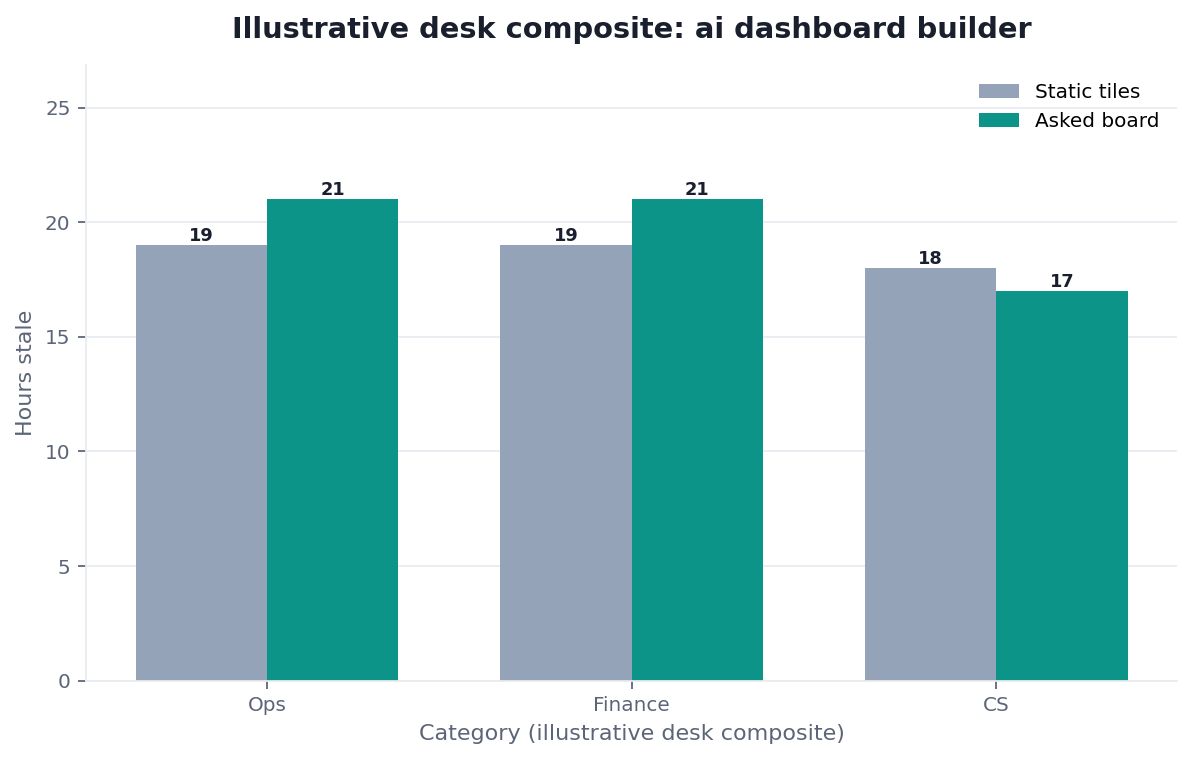
Figure. Illustrative desk composite (category × method). Not a customer experiment, SLA, or official benchmark.
| Evidence class | What you can cite | What you cannot claim |
|---|---|---|
| Desk composite on this page | Grain, collision, inspectable artifacts | Customer uplift %, vendor bake-off win |
| Published authority (linked above) | IMF series, BIS tables, OECD catalogs, Eurostat queries, Our World in Data charts | That those sources ran this desk sample |
Selection scorecard
| Criterion | Weak | Strong |
|---|---|---|
| Trigger | Blank canvas, “pretty please” | Named meeting and decision |
| Trace | Image only | Query behind each figure |
| Sources | Must migrate first | Existing DBs and files |
| Refresh | Manual redraw | Rerun the same goal |
| Pack | Chat bubble | Downloaded artifacts |
| Shape | Same six tiles every week | Figures follow the goal |
If a vendor’s AI dashboard builder cannot download, score it as a demo. If it can download but cannot show SQL, score it as a poster. If it cannot rerun, score it as a drawing app.
Failure modes that still look built
A pretty canvas with no query
The preview impresses the room and dies in the follow-up email. Require the workspace path. If the AI dashboard builder refuses, you bought a renderer. A picture of a chart is not a build, no matter how many times the deck says “AI-native.”
A template that ignores the meeting
People accept the same six tiles because the preview is fast. A builder that ignores the goal is a catalog with a chatbot. Freeze a decision sentence, then reject figures that do not serve it.
A rebuild that is actually a redraw.
Rewriting the prompt every Sunday feels like building. It is drawing again. Freeze the text. Rerun the AI dashboard builder. Change the sentence only when the meeting’s decision changes.
Before you send any board, check that the files are in the workspace, that each featured number opens to a query, and that the sources are ones you authorized. That inspection is the diagnosis.
| Live guide | Open it when |
|---|---|
| AI dashboard generator | you need the question-to-board path |
| AI-native dashboard | the fight is artifact versus tile catalog |
| Generate dashboard from natural language | the prompt is still a shopping list |
| what is a data agent | the missing object is the agent, not the canvas |
| mcp for data analysis | a coding agent triggered the task |
| download AI dashboard | the last inch is getting the files |
Build one board you can rerun next week
Connect one authorized source, type the meeting goal you already use, and download the charts from the task workspace so you can rerun them. This check uses only sources you authorize.
Commercial association: You do not need the workspace to complete the educational diagnosis on this page.
Open InfiniSynapseHow this page is sourced. William Zhu is cofounder of InfiniSynapse (GitHub @allwefantasy); no personal LinkedIn is published. Reviewed by analytics engineering · data platform · LLM security · editor. Editorial standards · corrections · publishing principles · Company Vision. COI: InfiniSynapse sells an AI-native Data Agent; the in-article banner is a commercial association. Fact-check: Stanford HAI AI Index · McKinsey State of AI · Gartner Peer Insights — Analytics & BI · NIST AI Risk Management Framework · OWASP Top 10 for LLM Applications.
Frequently Asked Questions
Is an AI dashboard builder the same as a BI canvas?
Bottom line: No. A BI canvas publishes a layout. An AI dashboard builder produces a task pack you can rerun. Keep certified tiles in BI; build the operational board when the question is this week’s.
Can an AI dashboard builder read two sources?
Bottom line: Yes, if both are connected and authorized. You do not need a warehouse project first. You do need to inspect the joins in the task. An AI dashboard builder that hides the join is not ready for a decision.
What proves the builder can rerun?
Bottom line: Next week’s pack sitting next to this week’s pack, with the same goal sentence and inspectable queries. If the AI dashboard builder only lets you redraw, you have a drawing app.
Does building a board write into Tableau?
Bottom line: No. An AI dashboard builder does not publish into Tableau or Power BI and does not write back to production databases. It creates artifacts in the task workspace you can download.
How do I keep next week’s build consistent?
Bottom line: Reuse the same goal sentence and the same bound definitions. If you rewrite the prompt every Sunday, you are not rerunning an AI dashboard builder; you are commissioning a new drawing.
Conclusion
An AI dashboard builder that cannot rerun is a drawing app. Write the meeting goal, run it on sources you already have, and refuse figures that cannot open a query. When you want to run that check, open InfiniSynapse and build one board you can rerun next week from the same question.