Julius AI Data Analysis Review: Excel, Chat, and When It Stops
Julius AI is a chat tool for spreadsheet data analysis: upload Excel or CSV, ask in plain English, get a chart. Our desk log: 14/18 first-pass charts needed no restyle versus ChatGPT’s 9/18. It fits solo Excel and CSV work. It is not an enterprise AI analyst for live warehouse KPIs. When the file has to stay on a database, use GPT data analyst alternatives. Use the scorecard below to evaluate Julius AI on AI workflows and AI engineer fit before you standardize on it.
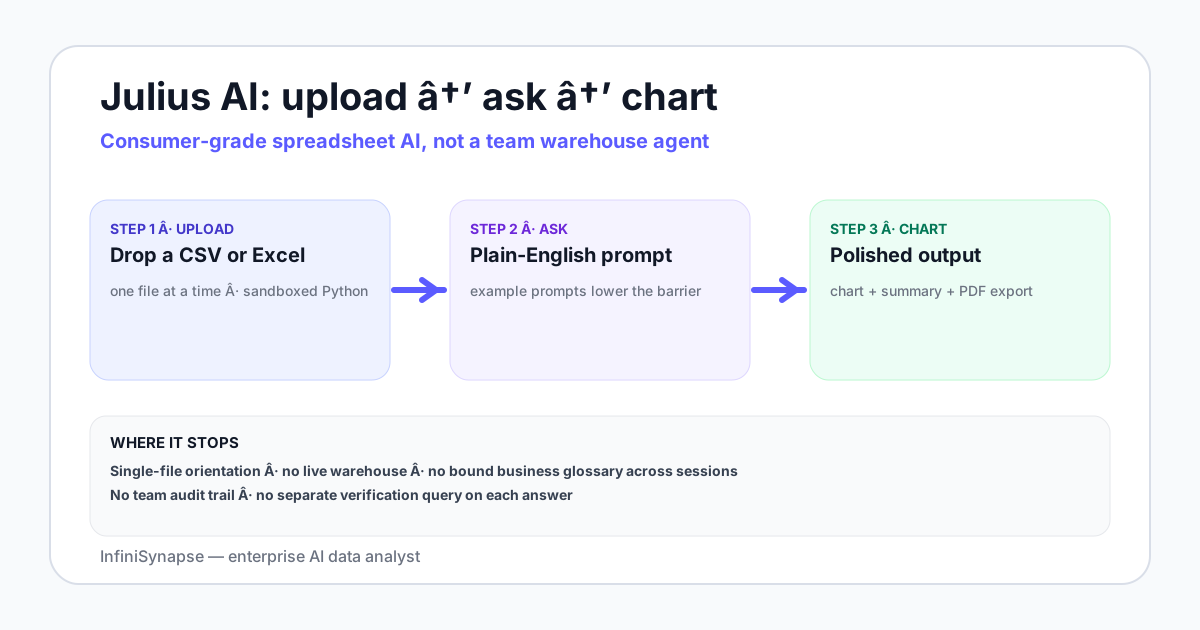
Table of Contents
- TL;DR
- What Julius Is Built For
- Desk Log Findings
- Where Julius AI Works Well in 2026
- Julius AI vs ChatGPT Data Analysis
- Evaluate Julius AI: Enterprise Scorecard
- Julius AI vs Enterprise Data Agents
- Where Julius AI Stops in 2026
- A Practical Selection Rubric
- When and How to Switch from Julius
- FAQ
- Who Wrote This
- Methodology and Review Notes
- Sources and References
- Related Guides
TL;DR
Julius AI data analysis is a consumer-friendly chat surface for spreadsheet work: upload a CSV or Excel file, ask in plain English, get charts and summaries back (Python runs under the hood).
| Signal | Takeaway |
|---|---|
| Best fit | Individual analysts, students, light SMB spreadsheet jobs |
| Strength | Faster activation than ChatGPT for one-off file charts |
| Hard stop | No direct warehouse connection, no shared glossary, no team audit trail |
| Switch trigger | Warehouse + shared definitions + evidence trail become requirements |
Quick picks
| Need | First choice |
|---|---|
| Vendor CSV fire drill / class dataset | Julius AI |
| One tool for analysis + writing + code | ChatGPT |
| Recurring KPIs on Snowflake/Postgres | Warehouse-connected data agent |
Related: Julius AI vs ChatGPT · Julius AI alternatives · AI Excel data analysis tools · ChatGPT data analysis alternatives.
What Julius Is Built For
Julius sits in the “upload a file, chat for insight” category—not the “connect a warehouse, share definitions, audit the SQL” category. That framing is the whole point of evaluating Julius AI data analysis honestly.
In practice the loop looks like this:
- Upload a CSV or Excel workbook.
- Ask a question in plain English (“MoM revenue by region, exclude refunds”).
- Julius runs sandboxed Python, returns a table/chart/summary.
- You iterate with follow-ups until the export is good enough to share.
That loop is excellent for personal exploration with Julius AI data analysis. It is the wrong default once the same number must be reproduced by a teammate next Monday from a live warehouse.
Julius AI for Excel
Julius AI Excel work is the core job: drop an .xlsx or CSV, ask for a chart or a filter, export. Tidy single-sheet files usually finish in two prompts. Multi-sheet workbooks, duplicate keys, and merged header rows need follow-ups. Always spot-check a total against a pivot before you paste the chart into a deck. Broader shortlist: AI Excel data analysis tools.
Julius AI chat for data analysis
Julius AI chat is the interface, not a second product. You type in plain English; sandboxed Python runs behind the reply. You do not write code. That is why students and SMB operators pick it over a notebook. It is also why team KPIs fail: each chat is a new thread with no shared glossary.
Desk Log Findings
Experience (InfiniSynapse Data Team desk, July 2026 — labelled internal log, not an independent survey or commissioned user study). We ran 18 shared tidy-CSV prompts (orders / region / refunds) on Julius and ChatGPT Advanced Data Analysis with the same files and wording.
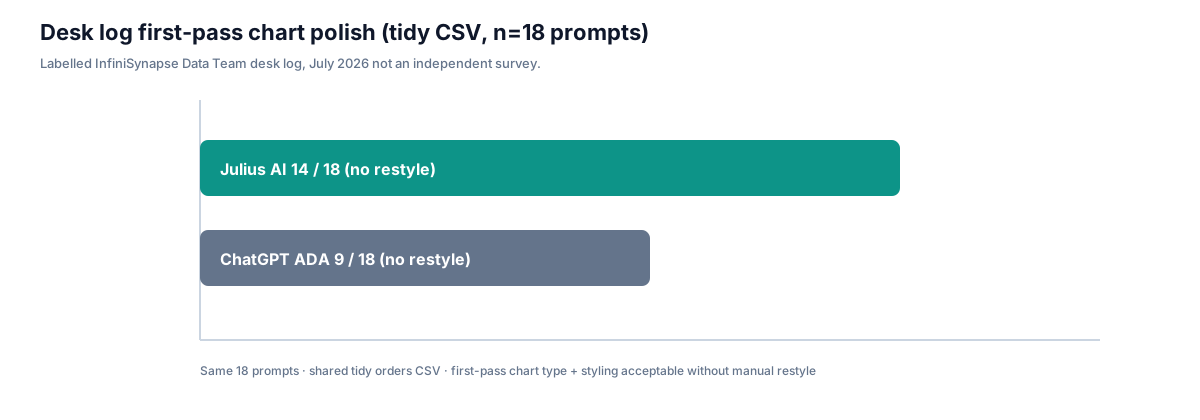
| Measure (desk log) | Julius | ChatGPT ADA |
|---|---|---|
| First-pass chart acceptable without restyle | 14 / 18 | 9 / 18 |
| Median prompts to shareable export (tidy file) | 2 | 3 |
| Live warehouse query without export | 0 / 18 | 0 / 18 |
Separately, in six anonymized switch-candidate briefs where teams already used Julius AI data analysis weekly, four reported re-explaining the same metric definition in ≥3 sessions in a single week—our operational switch signal, not a market-prevalence claim. Third-party category reviews for broader analytics platforms remain useful context on G2 and Gartner Peer Insights; they do not score this file-chat niche the way a hands-on Julius AI data analysis desk log does.
Where Julius AI Works Well in 2026
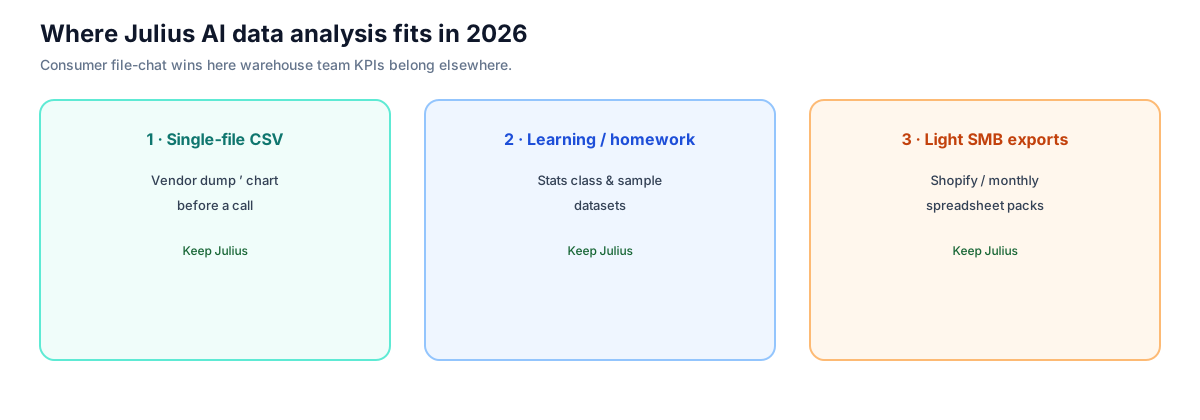
Three patterns where Julius AI data analysis is still the right first tool:
1. Single-file CSV or Excel exploration
A vendor drops a 30MB CSV. You need a chart and a short summary before a call. Julius usually finishes this in two prompts, with cleaner default chart styling than raw ChatGPT matplotlib output—consistent with our 14/18 desk-log polish rate. Broader spreadsheet shortlist: AI Excel data analysis tools.
2. Student and learning workflows
Statistics homework, Kaggle-style sample datasets, “learn pandas without opening a notebook.” The path from upload to first insight stays short.
3. Small-business spreadsheet analysis
A merchant reading monthly Shopify exports without standing up a warehouse. Activation energy—from file picker to first chart—is among the lowest in the category.
The product’s value for Julius AI data analysis is consumer UX over raw analytical depth: example prompts, default charts, polished export, and a friendly chat surface for users who would otherwise stop at the file picker.
Julius AI vs ChatGPT Data Analysis
Both run Python in a sandbox over a single uploaded file. Differences are mostly surface-level, not architectural:
| Dimension | Julius AI | ChatGPT (Advanced Data Analysis) |
|---|---|---|
| Default charts | Polished with less prompting | Often raw matplotlib needing restyle |
| Starting UX | Tutorial-style example prompts | Assumes you know what to ask |
| Export polish | Stronger PDF/slide exports for non-technical readers | Flexible, more DIY |
| Sandbox walls | File size / row count limits | Similar walls |
| Verification | No separate verification query by default | Same default gap |
| Broader session | Spreadsheet-first | Analysis + writing + coding in one thread |
Honest read: Julius AI data analysis is the polished consumer version; ChatGPT is the all-purpose copilot. For team analytics on a warehouse, both stop at the same wall. For a scored head-to-head on shared file tasks, see Julius AI vs ChatGPT.
Evaluate Julius AI: Enterprise Scorecard
Use this four-line scorecard when you evaluate the enterprise AI & analytics company Julius AI on AI analysts, AI workflows, AI engineers, and enterprise AI. Scores are desk judgments from the 2026 file-chat log above—not a commissioned survey.
| Dimension | Desk score | Read |
|---|---|---|
| AI analyst | 3 / 5 | Strong solo file analyst. Weak as a shared team AI analyst with one definition of revenue. |
| AI workflows | 2 / 5 | The upload → chat → chart loop is fast. It is not a reusable team workflow. |
| AI engineer | 2 / 5 | Sandboxed Python is inspectable. It is not an AI engineer platform for pipelines or production SQL. |
| Enterprise AI | 2 / 5 | Self-serve seat. Warehouse access, glossary, and audit trail are the procurement gaps. |
File-chat wins. Warehouse is the wall. If three of four rows need a 4+, do not standardize Julius AI data analysis as your enterprise AI analyst.
Julius AI vs Enterprise Data Agents
| Dimension | Julius AI | Enterprise data agent (e.g. InfiniSynapse) |
|---|---|---|
| Primary audience | Individual / student / light SMB | Data and analytics teams |
| Source model | Single uploaded file | Read-only warehouse / operational DB connections |
| Knowledge base | Per-chat context | Bound to the source; retrieved before SQL |
| Verification | None by default | Plan + SQL + verification + evidence trail |
| Procurement fit | Self-serve seat | Enterprise controls (SOC 2 / NIST AI RMF alignment) |
Categories serve different jobs. A solo founder learning Shopify analytics belongs on Julius AI data analysis. A finance analyst preparing a board number on Snowflake belongs on a connected agent—warehouse-native NL expectations are documented in Snowflake Cortex Analyst. Multi-source connector design should also follow Microsoft's data architecture guidance. Category framing: What Is a Data Agent? · AI data analyst · AI for Data Analysis.
Where Julius AI Stops in 2026
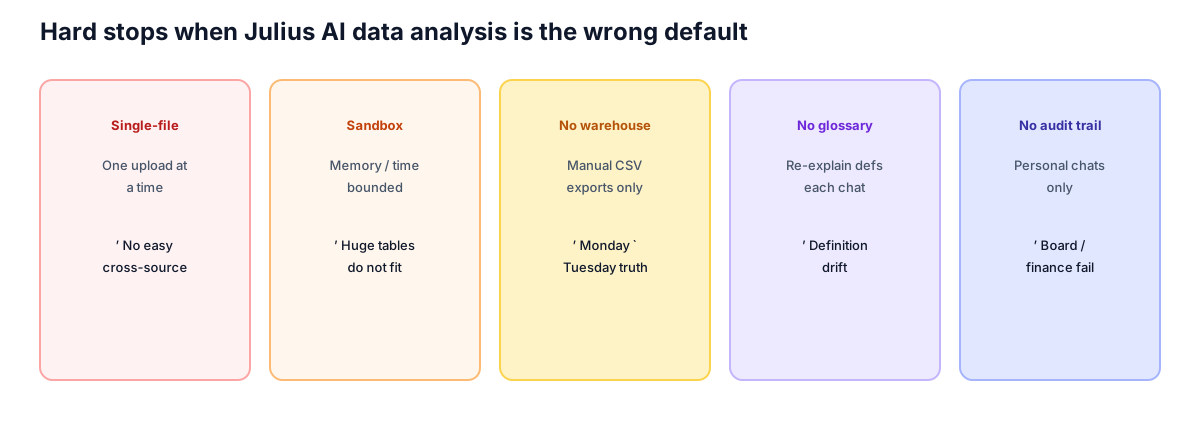
None of these limits are surprising—Julius positions as consumer-friendly. Read them as a fit test before you standardize on Julius AI data analysis for a team.
| Limit | What happens | Implication |
|---|---|---|
| Single-file orientation | One upload at a time; multi-file work is friction | Cross-source questions need another tool |
| Sandboxed Python | Memory and time bounded | Tens of millions of rows do not fit |
| No direct warehouse connection | Every analysis starts from a manual export | Monday’s CSV drifts from Tuesday’s truth |
| No bound knowledge base | Each chat re-explains business definitions | Definition drift across sessions |
| No team audit trail | Chats are individual artifacts | Finance / regulated / board workflows fail review |
If three or more rows describe your week, keep Julius AI data analysis for personal exploration and run a connected-agent pilot for the team path. Production access reviews should align with the NIST AI Risk Management Framework, and LLM-backed file tools should account for prompt-injection risks in the OWASP Top 10 for LLM Applications.
Test the warehouse wall with one KPI
Keep Julius for personal CSV fire drills. For the same KPI on a live warehouse, connect read-only and compare: chat reply vs plan + SQL + verification.
A Practical Selection Rubric
Answer these five questions in ten minutes when you evaluate Julius AI data analysis against a connected agent:
- Is the analysis one file at a time, or does it cross multiple sources?
- Will the same analysis be repeated by you next week—or by teammates today?
- Does someone (auditor, finance, board) ever ask how the number was produced?
- Are business definitions stable enough that re-explaining them every chat is painful?
- Are you billing time on this analysis as part of a job, or exploring for yourself?
| Score pattern | Recommendation |
|---|---|
| ≥3 “single / individual / no-audit” | Julius AI data analysis is fine |
| ≥3 “cross-source / team / audit” | Switch to a warehouse-connected agent |
| Mixed | Keep Julius AI data analysis for personal exploration; pilot an agent for team KPIs |
When and How to Switch from Julius
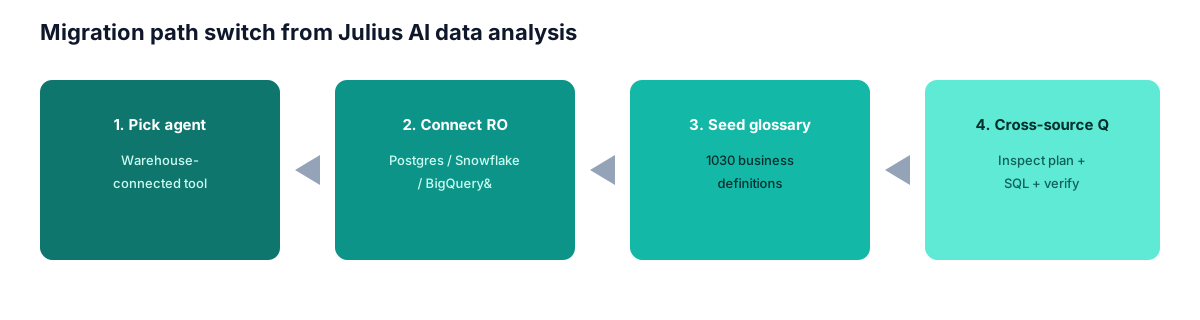
Three signals say it is time:
- You re-explained the same business definitions in more than three Julius sessions in a week.
- The CSV you upload comes from a warehouse you could query directly.
- A teammate asks for the same analysis and you cannot share a reproducible artifact.
Migration path (short):
- Pick a warehouse-connected agent.
- Connect read-only (Postgres, MySQL, Snowflake, BigQuery, Supabase, etc.).
- Seed a small business glossary (10–30 definitions).
- Ask one question that crosses two sources; inspect plan, SQL, and verification together.
The handoff from Julius AI data analysis to a connected agent is a workflow shift, not a full re-learning curve. Adoption benchmarks in the Stanford HAI AI Index track the same move from demo copilots to governed analyst loops. Agent reliability research from Anthropic on effective agents is also useful when you evaluate planner–executor–verifier traces.
Try a warehouse-connected data analyst with a bound knowledge base
Connect a Postgres, MySQL, Snowflake, or Supabase warehouse read-only. Seed a small knowledge base of business definitions. Ask one question that crossed two sources and watch the plan, SQL, and verification step before deciding whether to add an enterprise agent to your stack.
Frequently Asked Questions
What is Julius AI data analysis?
Short answer: a chat interface for spreadsheet work. Upload a CSV or Excel file, ask in plain English, and get charts and summaries from sandboxed Python. It is built for individual, file-first workflows—not for direct warehouse analytics.
Is Julius AI better than ChatGPT for data analysis?
Short answer: Julius often wins one-off spreadsheet charts; ChatGPT wins mixed writing/coding sessions. Neither replaces a warehouse-connected team workflow. See our desk log (14/18 vs 9/18 first-pass polish) and Julius AI vs ChatGPT.
Does Julius AI work with Excel?
Short answer: yes. Upload an .xlsx or CSV, ask in Julius AI chat, and get charts or summaries. Multi-sheet workbooks and messy keys usually need follow-up prompts. Spot-check totals against a pivot before sharing.
What is Julius AI chat for data analysis?
Short answer: a plain-English chat loop over one uploaded file. You do not write Python. Julius runs sandboxed code and returns a table, chart, or summary. It is not a shared team workflow.
Is Julius AI an enterprise AI analyst?
Short answer: no. Treat it as a personal file sandbox. It is not an enterprise AI analyst with shared definitions, live warehouse access, and an audit trail for board or finance work.
How do you evaluate Julius AI on AI workflows and AI engineers?
Short answer: score four lines—AI analyst, AI workflows, AI engineer, enterprise AI. Julius wins solo Excel/chat jobs. It scores poorly when the same KPI must be reproduced by teammates from a live warehouse. See the enterprise scorecard.
Can Julius AI connect to Snowflake or BigQuery?
Short answer: not as a first-class shared team connection. Typical Julius AI data analysis workflows still start from a manual export. If live warehouse access is a requirement, evaluate a connected data agent instead.
Who should use Julius AI in 2026?
Short answer: individuals, students, and small businesses doing single-file exploration. Teams that need shared definitions, recurring KPIs, and audit-ready evidence should treat Julius as a personal sandbox—not the system of record. Regulated rollouts often also map AI management controls to ISO/IEC 42001.
When should I switch away from Julius AI?
Short answer: when warehouse connectivity, a shared glossary, and an evidence trail become procurement or operating requirements—or when teammates cannot reproduce your chats as a stable workflow.
Does this review include InfiniSynapse?
Short answer: yes, as one enterprise data-agent example in the comparison table. Scores and switch signals are written so Julius and ChatGPT can win their fit categories; InfiniSynapse is not scored as the automatic winner.
How accurate is Julius AI data analysis on messy CSVs?
Short answer: tidy CSVs work well; messy keys, duplicate IDs, and multi-sheet Excel often need follow-up prompts. Always spot-check totals against a hand filter or pivot before sharing.
Is Julius AI free for team analytics?
Short answer: pricing and plan limits change—verify on julius.ai. Even on paid seats, treat Julius AI data analysis as a personal/file sandbox unless your org has approved shared warehouse connectors, a glossary, and an audit trail elsewhere.
Who Wrote This
Named author. William Zhu — InfiniSynapse cofounder. Public engineering profile: GitHub @allwefantasy. Org: github.com/InfiniSynapse.
About / contact. Published by the InfiniSynapse Data Team. Public About / Team page: https://infinisynapse.com/en/editorial-standards. Reader feedback, contradictions, and corrections: zhuhl@infinisynapse.com · corrections policy. There is no public comment thread on this static page; email is the feedback channel.
Methodology and Review Notes
Last updated: 2026-09-15 · Next scheduled review: 2026-12-15
This review of Julius AI data analysis draws on Julius AI public product pages and documentation, hands-on testing across multiple file types and question shapes in 2026 (including the 18-prompt tidy-CSV desk log above), comparison runs against ChatGPT Advanced Data Analysis and InfiniSynapse, and field notes from teams that moved from Julius to a warehouse-connected agent. The rubric and switch signals reflect observed practice rather than vendor positioning.
Conflict of interest: InfiniSynapse publishes this guide and sells an enterprise AI data analyst. To reduce bias, the page leads with the topic itself, treats InfiniSynapse as one option among many, and links out for standards and independent references.
Update cadence: Reviewed every 90 days for accuracy and link health.
Source note: Body maintained at https://infinisynapse.com/en/blog/julius-ai-data-analysis. Related comparison pages: Julius AI vs ChatGPT and Julius AI alternatives.
Sources and References
- [Vendor] Julius AI — official product site: julius.ai
- [Vendor] OpenAI — Data analysis with ChatGPT: help.openai.com
- [Independent] G2 — Analytics Platforms: g2.com
- [Independent] Gartner Peer Insights — Analytics and Business Intelligence Platforms: gartner.com
- [Standard] ISO/IEC 42001 AI management systems: iso.org
- [Independent] Yao et al. — ReAct: arxiv.org/abs/2210.03629
- [Vendor] Anthropic — Building Effective Agents: anthropic.com
- [Standard] NIST AI Risk Management Framework: nist.gov
- [Standard] OWASP Top 10 for LLM Applications: owasp.org
- [Independent] Stanford HAI AI Index: hai.stanford.edu/ai-index
- [Independent] BIRD-SQL benchmark: bird-bench.github.io
- [Policy / About] InfiniSynapse — Editorial standards & About: infinisynapse.com/en/editorial-standards
- [Person] William Zhu — public engineering profile: github.com/allwefantasy
Related Guides
- What Is a Data Agent?
- Julius AI vs ChatGPT
- Julius AI alternatives
- InfiniSynapse vs Julius AI
- Best AI tools for data analysis
- ChatGPT data analysis alternatives
Try InfiniSynapse online → · Feedback on this page: email the desk