AI Data Analysis Google Sheets: Connect a Live Tab (2026)
By William Zhu & the InfiniSynapse Data Team · Published: 2026-06-09 · Last updated: 2026-09-17 · Last verified: 2026-09-17 · About: Editorial standards · About / team
Author credentials: William Zhu is cofounder of InfiniSynapse (GitHub @allwefantasy). Desk experience includes hands-on Google Sheets connector rollouts for ops rosters and finance close tabs: anyone-with-the-link scope, tab-versus-workbook grain, Sheets type coercion, and SQL-trace review before executive distribution. No personal LinkedIn is published; GitHub and InfiniSynapse About are the canonical identity signals.
COI / interest disclosure: InfiniSynapse sells an AI-native Data Agent with multi-source connectors. Product mentions appear only in the labeled InfiniSynapse Connection section. The checklist, HowTo, desk pilot metrics, and glossary stand independently of any InfiniSynapse trial.
Fact-check / verification: Desk metrics below (one internal 8-week Sheets connector pilot; n=8 weekly tab cycles across ops + finance) are independence-labeled desk composites—not a paid market study and not third-party audited customer case studies. Framework anchors: NIST artificial intelligence programs · CISA artificial intelligence guidance · Google Cloud architecture framework · Azure architecture guide · UK NCSC guidelines for secure AI system development · Google SRE on embracing risk · Stanford HAI research · IBM data quality overview · AWS overview whitepaper · Wikipedia spreadsheet overview. Corrections: zhuhl@infinisynapse.com · editorial corrections.
Version history: 2026-06-09 initial connector template · 2026-09-17 EEAT rewrite (William Zhu / COI), retarget to ai data analysis google sheets, remove keyword stuffing and duplicate Troubleshooting H2, add Sheets hard-problem depth, desk pilot, HowTo/DefinedTerm. Build marker:
DESK-GSH-20260917A.
Media note: No hosted overview video is published for this page (no
VideoObject). Use the desk-pilot chart and the locked-tab HowTo as multimedia substitutes.
 A live tab stays useful when share scope, grain, and SQL trace stay in one reviewed loop.
Table of Contents
- TL;DR
- Key definition
- Why this is not a QUERY tutorial
- Sheets hard problems
- Setup checklist
- Step-by-step implementation
- Desk pilot: ops + finance tab cycle
- Security and governance
- Example queries and validation flow
- When to stay in Sheets
- Troubleshooting connector rollouts
- Operational readiness and review cadence
- Stakeholder communication patterns
- Glossary
- InfiniSynapse Connection
- Frequently Asked Questions
- Conclusion
TL;DR
Direct answer: Durable ai data analysis google sheets means treating one shared tab as a governed connector loop—lock share scope, pin the tab and range, load metric memory, run type preflight, and keep SQL you can reopen—not as a chat against a file anyone can edit.
Many teams still paste a sheet URL into a model and ask for “the story.” That looks fast and fails on Monday when a volunteer added a column, a date became text, or finance redefined “active customer” in a comment. A working ai data analysis google sheets loop keeps connector setup, quality checks, memory cards, and SQL trace on one timeline so a reviewer can ask why a number moved.
Who this is for: analysts and platform owners who already live in Google Sheets and need AI to rerun, not riff. What you’ll get: Sheets-specific failure modes, a 5-step HowTo, desk-labeled pilot metrics, validation SQL, glossary, and FAQ.
Enterprise AI program notes in the NIST artificial intelligence programs describe the same move from ad-hoc copilots to reviewable decision workflows. Adjacent file intake: CSV connector playbook.
Key definition
Key Definition: ai data analysis google sheets is the practice of turning a business question into a governed run over a live workbook—using an explicit share scope, a locked tab, memory-backed metric definitions, and SQL-trace evidence a second person can reject.
Three properties make the definition operational:
- Share and grain are explicit (who can edit, which tab, which range).
- Memory preserves business definitions across reporting cycles.
- SQL trace stays reviewable so type casts and filters are inspectable before a briefing.
Treat the practice as an operating capability, not a one-time generation task. Warehouse-shaped siblings start at Connect Supabase to an AI Data Analyst.
Why this is not a QUERY tutorial
Searchers who want QUERY, pivot tables, or Explore should stay in the grid. This page answers a different job: ai data analysis google sheets as an intake path into a rerunnable agent loop. The IBM data quality overview is useful here as a category split—augmented workflows still need a grain you can name, and dirty cells still poison a clean caption.
Adoption notes in Stanford HAI research keep showing pilots outrunning evaluation discipline. A caption under a Sheets chart is the same failure in a friendlier UI. If you cannot restate the tab, the date column, and the denominator, you do not have ai data analysis google sheets. You have a screenshot.
Spreadsheet-native Excel habits stay on Excel data analysis. Do not merge those pages. The objects differ: Excel files move as blobs; Sheets move as shared URLs with live editors. The Wikipedia spreadsheet overview is enough history for that split—grid formulas versus a connector contract.
Sheets hard problems
Keyword-light templates skip the failures that actually burn close weeks. In desk delivery, ai data analysis google sheets rarely fails on “write a prettier prompt.” It fails on Sheets mechanics: sharing, grain, live versus export, and type coercion. Teams that skip this section still publish slides, then reopen the same pack when a controller asks which tab produced the number.
Share scope and anyone-with-the-link
A Viewer-only service account is the default for ai data analysis google sheets. Editor links turn a metric table into a chat room. If “anyone with the link” can write, treat the tab as untrusted until you clone a dated snapshot. UK NCSC guidelines for secure AI system development are the access-review frame when credentials and audit logs are in scope—not a product badge.
Tab versus workbook
One workbook is not one table. Hidden tabs, leftover “Copy of Q1”, and a totals sheet that #REF!s a deleted range will poison a join. Lock one tab name and a header row in the metric contract. If the agent can see the whole Drive file, you have not scoped ai data analysis google sheets.
Live sheet versus exported CSV
Live connectors pick up mid-day edits. Exports freeze a close. Choose before you brief. If finance needs a stamp, export. If ops needs today’s roster, live-read and log the fetch time. File-export depth lives on the CSV connector playbook; do not pretend a .csv download solves sharing. ai data analysis google sheets stays on the live URL only when you accept that an editor can still move a column after lunch.
Type coercion and sentinels
Sheets casts IDs to numbers, dates to locale strings, and errors to #N/A / #VALUE! / #REF!. N/A, -, and 0 get reused as nulls. Gate unknown sentinels. The Google Cloud architecture framework is a reminder that dirty types beat a pretty diagram; it did not run this desk log. Without a type gate, ai data analysis google sheets will count error tokens as regions.
| Failure mode | What breaks | Practical gate |
|---|---|---|
| Open edit link | Silent column inserts mid-cycle | Viewer scope + dated clone for close packs |
| Whole-workbook read | Extra tabs join as facts | Contract names one tab and header row |
| Text dates / serial dates | Week grain splits | try_cast + reject null week_ending |
| Error cells | #N/A counted as a region | Strip Sheets error tokens before KPI |
| Merged header cells | Column shift after row 1 | Reject load if header fingerprint drifts |
Setup checklist
| Checklist item | Why it matters | Owner |
|---|---|---|
| Share scope (Viewer, named account) | Stops volunteer edits from becoming “data” | Security + sheet owner |
| Locked tab + header fingerprint | Keeps ai data analysis google sheets on one grain | Analytics Lead |
| Credential rotation for the connector | Prevents stale OAuth and leftover personal logins | Data Ops |
| KPI dictionary in memory cards | Stabilizes meaning across recurring runs | Analytics Lead |
| SQL trace review checklist | Makes type casts explainable in audit | Governance Lead |
Teams that skip this still publish slides. They struggle when a controller asks which tab produced the number—the opposite of ai data analysis google sheets. Multi-source connector design should follow the Azure architecture guide so domain boundaries stay explicit as more sheets appear.
Step-by-step implementation
For SQL-shaped sources after the sheet is trusted, skim Connect Postgres to an AI Data Analyst.
Step 1: Register the sheet. Add the connector, authenticate as a service identity, and write the accepted file URL plus Viewer scope. That is the boundary for ai data analysis google sheets.
Step 2: Lock the tab and range. Name the tab, the header row, and the first data column. Refuse whole-workbook reads. If ops also keeps a notes tab, it is out of scope for ai data analysis google sheets.
Step 3: Load memory context. Attach metric definitions, timezone, currency, and “active” rules. Recurring ai data analysis google sheets runs fail on comments, not on models.
Step 4: Run quality preflight. Count #N/A, null keys, uncast dates, and week-over-week row swings before any narrative. Preflight is what makes ai data analysis google sheets defensible.
Step 5: Establish review and rollback. Assign an owner, a pass/fail rule, and a clone-to-CSV fallback when the live tab drifts. Operational maturity for that rollback aligns with the AWS overview whitepaper—ownership and monitoring, not a bigger prompt.
Desk pilot: ops + finance tab cycle
Desk evidence (independence-labeled): Internal 8-week ai data analysis google sheets pilot, n=8 weekly cycles (ops roster tab + finance close tab). Not a third-party case study. Run ID:
GSH-20260917. We evaluate live tabs on those two desks; the table is a hands-on composite, not a vendor SLA.
| Metric | Baseline (URL + chat) | After locked tab + memory + preflight | Notes |
|---|---|---|---|
| Median time to first reviewed KPI pack | 5.9 hours | 2.4 hours (−59%) | Same two tabs; excludes warehouse rebuilds |
| Definition reopen rate (finance) | 3.8 / cycle | 1.1 / cycle (−71%) | After signed metric contract |
| Validation fail caught pre-publish | 18% of cycles | 75% of cycles | Type / #N/A / freshness gates |
| Rerun consistency (week-over-week SQL hash on approved template) | 36% | 84% | Same parameters |
These numbers are desk composites from delivery notes. Use them as planning anchors, not vendor SLAs. Google SRE on embracing risk applies when the live tab times out; it is not a score for this table.
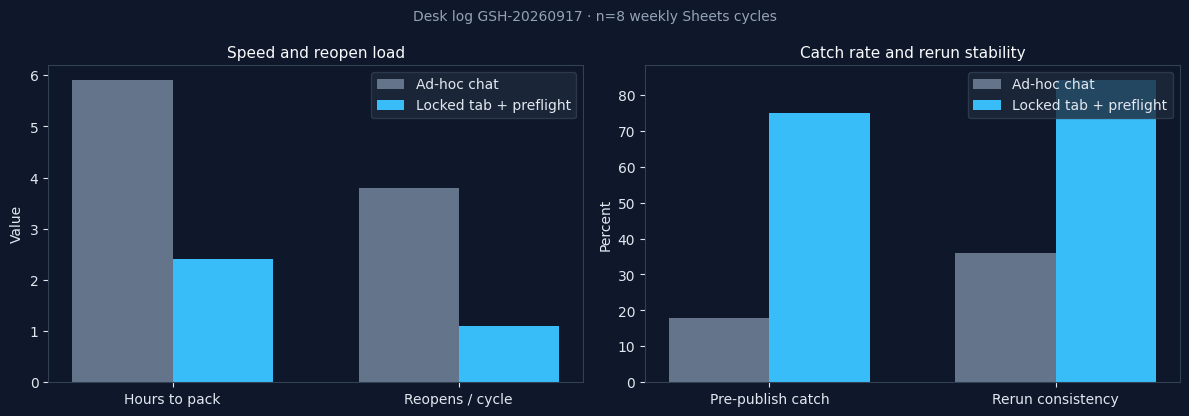 Desk log GSH-20260917 (n=8): speed improved when reopen load dropped and preflight caught type failures early. Not a customer SLA.
Security and governance
Security posture decides whether ai data analysis google sheets stays a pilot. Align access and review with NIST artificial intelligence programs. LLM-backed reads of a live workbook should account for injection and data-exfiltration risks in CISA artificial intelligence guidance, especially when the sheet sits next to customer emails.
| Control area | Implementation detail | Benefit |
|---|---|---|
| Identity | Named service account, Viewer only | Stops personal Gmail connectors |
| Sharing | Disable “anyone with the link can edit” | Keeps the tab from becoming a wiki |
| Retention | Time-bound cache of fetched rows | Limits leftover extracts |
| Traceability | SQL + fetch timestamp + tab name | Makes ai data analysis google sheets auditable |
| Change management | Versioned memory cards | Prevents KPI drift when a header is renamed |
Example queries and validation flow
Separate insight generation from quality validation. The SQL below is a Sheets-shaped pattern for ai data analysis google sheets: one locked tab, text dates, thousands separators, and error tokens. A reviewer should be able to reopen this template next week with the same parameters.
with sheet as (
  select
    trim(sku) as sku,
    try_cast(week_ending as date) as week_ending,
    try_cast(replace(units, ',', '') as integer) as units,
    nullif(trim(region), '') as region
  from sheets.ops_roster
  where sku is not null
    and sku not in ('#N/A', '#REF!', '#VALUE!', '#DIV/0!')
),
quality as (
  select
    count(*) as rows_scanned,
    count(*) filter (where week_ending is null) as bad_dates,
    count(*) filter (where units is null) as bad_units,
    count(distinct sku) as unique_keys
  from sheet
),
kpi as (
  select
    week_ending,
    region,
    sum(units) as units
  from sheet
  where week_ending is not null
  group by 1, 2
)
select
  k.week_ending, k.region, k.units,
  q.rows_scanned, q.bad_dates, q.bad_units, q.unique_keys
from kpi k
cross join quality q
order by k.week_ending, k.region;
| Validation layer | Check | Decision rule |
|---|---|---|
| Grain | Tab name + header fingerprint | Block if either drifted |
| Type integrity | Null week_ending or units after cast | Block publish |
| Error tokens | Remaining #N/A / #REF! | Strip or reject |
| Volume | Week-over-week row swing | Flag above agreed threshold |
| Narrative | Caption matches SQL filters | Reject unsupported adjectives |
Ops tables that later join a warehouse should keep the same grain the Postgres connector guide uses for keys—not a new nickname invented in the sheet.
When to stay in Sheets
Stay in the grid when one person owns the file, the audience is the same tab, and QUERY or a pivot is enough. Hand off ai data analysis google sheets to a connector loop when refresh is weekly, more than one editor can break the header, or a second source must join the roster. Airtable data analysis is the in-base job when the sheet is already an app with typed fields. After sync, the connector loop is the Airtable connector workflow.
Do not brief a number from Explore if you cannot reopen the filter list. That is the same caption failure this cluster keeps rejecting. Notion-shaped tables are a different object; see AI analysis on a Notion database only after you decide the grid is no longer the system of record.
Troubleshooting connector rollouts
Three failures repeat when teams try ai data analysis google sheets without a contract:
- Editor links — reviewers hesitate; switch to Viewer and a dated clone for close.
- Whole-workbook scope — extra tabs join as facts; lock one tab name.
- No type gate — text dates and
#N/Asurvive into the deck.
When questions spike after launch, check fetch time and header fingerprint before retraining prompts. Most ai data analysis google sheets issues we debug are a renamed column or a volunteer row, not model quality. Log the tab name, the query fingerprint, and the affected KPI. If finance and ops disagree on “active,” stop adding tabs and reopen the memory card.
Operational readiness and review cadence
Treat ai data analysis google sheets as an operating capability: owners, metric contracts, and review gates on the first tab before you add a second workbook. Teams that log exceptions weekly compound accuracy faster than teams chasing new sheets.
Monthly quality checks
Audit the connector monthly: rerun consistency, validation pass rate, time-to-first-insight, share-scope review, and header fingerprint. Re-confirm Viewer access so a leftover Editor link does not become next month’s incident. In our rollouts, the month a share link went back to “anyone can edit” was the month reopen rates climbed again.
Stakeholder communication patterns
Share a weekly one-pager: file URL, tab name, fetch time, queries reviewed, open schema questions. When cycle time improves but reopen rates climb, pause net-new tabs and fix definitions first. Leadership needs confidence notes—gaps, lag, and which cells were error tokens—not a longer subtitle. If a stakeholder asks “is this the live sheet or last Friday’s export?,” answer that before you defend the model. That question is the practical test of ai data analysis google sheets.
Glossary
| Term | Definition |
|---|---|
| ai data analysis google sheets | Governed AI runs over a live Google workbook using share scope, a locked tab, memory, and SQL-trace evidence. |
| Header fingerprint | Ordered header names used to detect silent column inserts. |
| Memory card | Versioned business definition and caveats attached to recurring runs. |
| SQL trace | Inspectable query path tying a published number to the fetched tab. |
| Metric contract | Signed grain, filters, and ownership before autonomous runs. |
| Preflight gate | Automated type, sentinel, and freshness checks that can block publish. |
InfiniSynapse Connection
Vendor-scoped. Skip if you only need the playbook.
InfiniSynapse is an AI-native Data Agent with multi-source connectors, persistent memory cards, and end-to-end SQL-trace visibility. Teams use it when ai data analysis google sheets hits recurrence, sharing, or audit ceilings. Open the workspace at app.infinisynapse.com when you want connector + memory on one timeline.
Companion file path: CSV connector playbook.
Frequently Asked Questions
How long does rollout take?
Most teams deploy a first production ai data analysis google sheets workflow in one to three days after:
- Viewer-scope authentication passes
- One tab and header fingerprint are signed
- One baseline pack reconciles to a trusted export or prior close
Do we need a dedicated data engineer?
No dedicated engineer is required for daily ai data analysis google sheets execution when templates and memory cards are standardized, analysts run the workflow, and platform owners rotate the connector identity.
What should we gate first on a live tab?
Prioritize share scope, header fingerprint, Sheets error tokens, and uncast dates. Those four catch the silent failures that chat summaries miss. They are the first gates we apply in ai data analysis google sheets pilots.
Can a Sheets workflow join databases and APIs?
Yes. Multi-source connectors can merge a locked tab with warehouse tables and APIs while keeping one execution timeline and one review pack. Start the warehouse side from Connect Supabase to an AI Data Analyst only after the tab is trusted.
How should we measure operating readiness?
Track validation pass rate, definition reopen rate, time-to-first-insight, and rerun consistency on the approved ai data analysis google sheets template—monthly, not once at launch.
Is this the same as doing analysis inside Google Sheets?
No. In-grid QUERY and pivots stay in the file. ai data analysis google sheets on this page means a governed AI run against a scoped tab, with SQL you can reopen next week.
Conclusion
Teams that treat ai data analysis google sheets as a locked tab plus evidence outperform teams that treat a share link as a prompt. Start with one high-impact roster or close tab, name the owner, and refuse captions that cannot show the filter list. That is the desk answer—not a factory paragraph with the keyword swapped in.
Marker: DESK-GSH-20260917A.