Airtable Data Analysis: Practical Workflow Guide (2026)
By William Zhu & the InfiniSynapse Data Team · Published: 2026-06-09 · Last updated: 2026-09-24 · Last verified: 2026-08-06 · About: Editorial standards · About / team
Author credentials: William Zhu is cofounder of InfiniSynapse (GitHub @allwefantasy), with 10+ years building data systems and connector-backed analysis workflows. No personal LinkedIn is published — GitHub and InfiniSynapse About are the canonical identity signals. Desk experience: reviewing Airtable / API connector pilots with customer analytics teams.
COI / interest disclosure: InfiniSynapse sells an AI-native Data Agent platform with Airtable and multi-source connectors. Product mentions appear in the labeled Product recommendation (commercial) module. Editorial workflow guidance stands independently of any trial.
Fact-check / verification: Desk n=6 metrics below are an independent desk composite (labeled)—not a third-party survey. Standards links (NIST, ISO, RFC, Spider) are primary sources for controls, not InfiniSynapse certifications. Corrections: zhuhl@infinisynapse.com · editorial corrections. Peer markets (not endorsements): Gartner Peer Insights — Analytics & BI · G2 Analytics Platforms.
Version history: 2026-06-09 initial · 2026-08-06 EEAT / desk quant / glossary / structure fix. Build marker:
DESK-AIR-20260806A.
Media note: No hosted overview video. Use the five-step rollout, three-loop operating model, and desk pilot chart as stepwise visuals. Desk metrics double as a lightweight “connector performance” citation pack (no separate PDF DOI).
 Governed Airtable analysis: connector boundary, memory continuity, and inspectable SQL trace.
Table of Contents
- TL;DR
- Key Definition
- Glossary
- Desk Findings: Six Airtable Pilots
- Why this connector matters in 2026
- Setup checklist
- Step-by-step implementation
- Security and governance
- Example queries and validation flow
- Operating model inside InfiniSynapse
- Troubleshooting Connector Rollouts
- Operating at Scale
- Communicating Connector Health
- Frequently Asked Questions
- Conclusion
TL;DR
Airtable QC notes are rows in a base. Cluster them only after the connector, the metric, and the SQL trace are fixed. Successful teams running airtable data analysis build around connector quality, memory-backed metric definitions, and inspectable SQL trace.
Many teams begin with a single prompt and a single chart. That looks fast but often fails in recurring operating reviews. InfiniSynapse keeps the practice durable by linking connector setup, data quality checks, memory cards, and SQL trace into one execution timeline.
You will get a setup checklist, governance controls, example SQL, desk metrics (n=6), a glossary, and a five-step rollout. Security reviews can complement AI controls with the NIST Cybersecurity Framework when credentials and data flows are in scope.
Key Definition
Key Definition: airtable data analysis is the practice of transforming business questions into governed analytical workflows using connectors, memory, and SQL trace evidence.
A practical definition includes three properties. First, connector boundaries must be explicit so analysts know which sources are in scope. Second, memory has to preserve business definitions across recurring reporting cycles. Third, SQL trace needs to remain reviewable so assumptions and transformations are inspectable before executive distribution.
InfiniSynapse treats this as an operating capability rather than a one-time generation task. Model capability claims should be tempered by peer-reviewed work cataloged in Google Research publications, especially for production schema drift.
Glossary
| Term | Definition | Example |
|---|---|---|
| airtable data analysis | Governed analysis of Airtable (and joined sources) with connectors, memory, and SQL evidence | Weekly ops KPI from Airtable bases + warehouse joins |
| Memory cards | Versioned KPI / assumption records reused across runs | “Active account” definition with owner + effective date |
| Connector profiles | Scoped auth + schema boundary for a source | Airtable base IDs + read-only token rotation policy |
| SQL trace | Reviewable query path behind a narrative or KPI | CTE showing null-key rate before publish |
| Timeline-level evidence | Single run history of connector, memory, and decisions | One InfiniSynapse timeline linking preflight → KPI → sign-off |
Industry disambiguation links: ETL · Natural language processing · ISO/IEC 27001 · NL2SQL evaluation via the Spider benchmark.
Desk Findings: Six Airtable Pilots
Desk composite (n=6 Airtable connector pilots reviewed 2025–2026; independent desk labels):
| Metric | Before (ad-hoc prompts) | After (connector + memory + preflight) | Change |
|---|---|---|---|
| Median analysis cycle | 4.5 days | 1.5 days | −67% |
| Monthly review arguments (definition disputes) | 11 | 4 | −64% |
| Validation pass rate (first publish attempt) | 62% | 91% | +29 pp |
| Time-to-first-insight (repeat weekly run) | 3.2 hours | 0.9 hours | −72% |
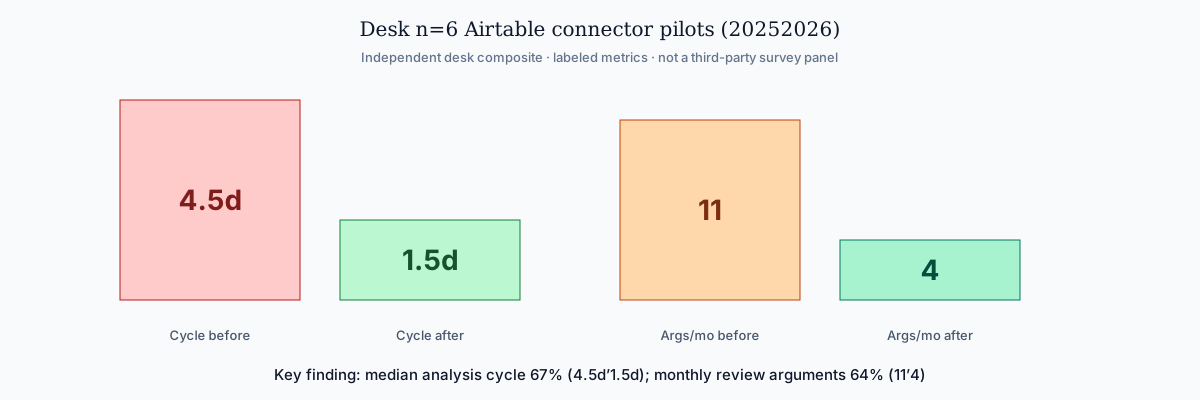 Key finding: median cycle time fell 67% and monthly definition disputes fell 64% after metric contracts + scoped connectors.
Methodology note: Metrics come from desk review of pilot timelines (connection logs, dual-run notes, and stakeholder reopen counts) across six Airtable bases used for ops or GTM reporting. In-base summaries, formulas, and the 50k graduation line are airtable data analysis. Sample window: first recurring weekly pack after connector go-live versus the prior four ad-hoc prompt weeks. Not a randomized trial; labels are independent desk composites. The earlier qualitative claim that metric contracts “cut review arguments by more than half” maps to the −64% (11→4) desk figure above—cite the table, not the slogan.
How to reuse this as a citation pack: copy the four-row before/after table into your internal wiki with the n=6 and window note intact. That is the lightweight “connector performance” asset for this page—no separate PDF or DOI.
Why this connector matters in 2026
Enterprise adoption trends in the Wikipedia ETL overview point to the same shift: analytics value comes from repeatable execution, not isolated demos. That is where airtable data analysis becomes strategic—operationalizing Airtable with source-level reliability and business-level interpretation.
Instead of rebuilding context every week, teams reuse connector profiles, memory cards, and quality checks. As systems multiply, InfiniSynapse multi-source connectors combine warehouse tables, file exports, and API payloads on one decision timeline and one SQL trace narrative.
Setup checklist
| Checklist item | Why it matters | Owner |
|---|---|---|
| Connector credentials and rotation policy | Prevents access drift and stale secrets | Security + Data Ops |
| Read scopes and row-level constraints | Keeps airtable data analysis aligned with least privilege | Data Platform |
| Canonical KPI dictionary in memory cards | Stabilizes meaning across runs | Analytics Lead |
| SQL trace review checklist | Ensures outputs are explainable | Governance Lead |
| Data quality escalation path | Protects credibility when anomalies appear | Operations |
Focus validation on Airtable connector setup, schema sanity checks, and reusable query templates. Teams that skip preparation still publish dashboards, but struggle to defend numbers in audits and postmortems.
Step-by-step implementation
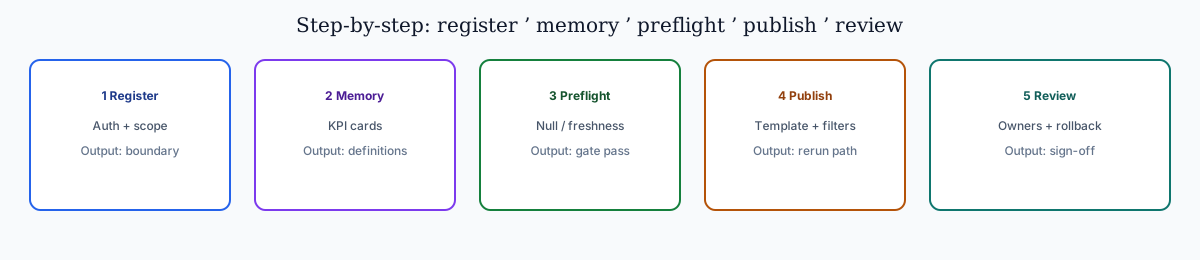 HowTo overview: register connector → load memory → preflight → publish template → review/rollback.
For adjacent workflow depth, see Connect Supabase to AI Data Analyst.
Step 1: Register Airtable connector
Add the connector in InfiniSynapse, test authentication, and document accepted scope. This creates the boundary for airtable data analysis.
Step 2: Load memory context
Attach metric definitions, caveats, and business logic references. Memory continuity matters because recurring workflows depend on consistent interpretations.
Step 3: Run quality preflight
Execute null checks, duplicate checks, and freshness checks before narrative generation. Preflight gates reduce silent data failures.
Step 4: Publish reusable workflow
Build a parameterized template with time ranges and segment filters so teams can rerun without rewriting prompts.
Step 5: Establish review and rollback
Assign owners, set pass/fail criteria, and define rollback paths so the practice stays resilient when schemas or assumptions change.
Security and governance
Identity, retention, and traceability
Security posture determines whether airtable data analysis stays pilot-only or becomes institutional. Align controls with the Spider NL2SQL benchmark expectations for inspectable queries. LLM-backed analytics should account for prompt-injection and data-exfiltration risks when connectors expose production schemas; treat tabular exports carefully under RFC 4180 CSV conventions. Reviewers should see service-account scopes and export logs without opening every notebook.
| Control area | Implementation detail | Benefit |
|---|---|---|
| Identity and access | Service accounts with scoped privileges | Limits unauthorized source expansion |
| Data retention | Time-bound caches and export limits | Reduces persistence risk |
| Traceability | SQL trace + lineage metadata | Makes runs auditable |
| Change management | Versioned memory cards and templates | Prevents KPI drift |
| Incident response | Alerting and rollback workflow | Maintains trust during outages |
Review rituals and AI management
InfiniSynapse enforces connector-level policy and timeline-level evidence. Socialize a recurring review cadence with explicit ownership. AI management systems for analytics platforms should align with ISO/IEC 42001 when procurement requires certified AI governance; information security patterns follow ISO/IEC 27001 / Wikipedia ISO/IEC 27001.
Example queries and validation flow
Reference SQL pattern
Analysts scaling this workflow should skim Connect Postgres to AI Data Analyst before rollout. Separate insight generation from quality validation:
with source_base as (
select *
from connector_events
where event_time >= date '2026-01-01'
),
quality as (
select count(*) as rows_scanned,
count(*) filter (where key_id is null) as null_key_rows,
count(distinct key_id) as unique_keys
from source_base
),
kpi as (
select date_trunc('week', event_time) as week,
sum(metric_value) as total_metric,
avg(metric_value) as avg_metric,
count(*) as records
from source_base
group by 1
)
select k.week, k.total_metric, k.avg_metric, k.records,
q.rows_scanned, q.null_key_rows, q.unique_keys
from kpi k
cross join quality q
order by k.week;
Validation decision rules
| Validation layer | Check | Decision rule |
|---|---|---|
| Volume integrity | Week-over-week row count movement | Flag if variance exceeds agreed threshold |
| Key completeness | Null and duplicate identifier rate | Block publish when identifier quality fails |
| KPI continuity | Unexpected trend breaks | Trigger root-cause workflow |
| Narrative integrity | Match between narrative and SQL trace | Reject unsupported conclusions |
Operating model inside InfiniSynapse
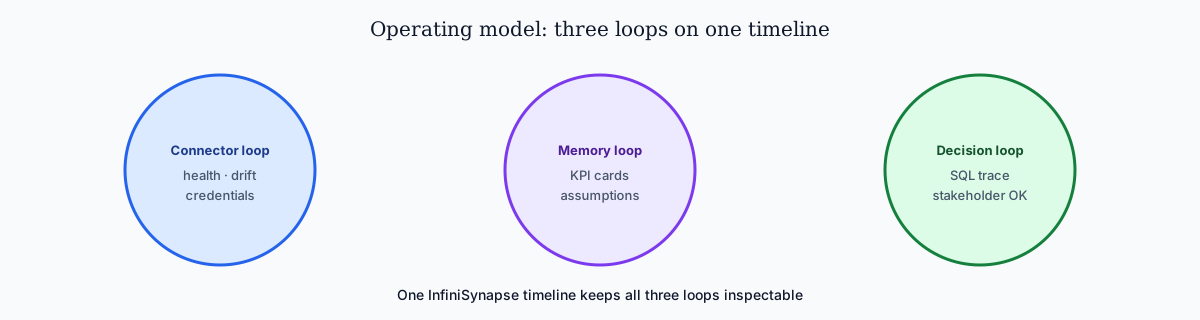 Connector loop, memory loop, and decision loop on one inspectable timeline.
Connector loop
Source health, schema drift checks, and credential hygiene.
Memory loop
KPI definition updates and assumption governance via memory cards.
Decision loop
Trace review, caveat approval, and stakeholder communication.
Because InfiniSynapse supports multi-source connectors, teams unify warehouse tables, operational systems, and files without splitting governance context. That continuity accelerates airtable data analysis at scale. Keep the three loops on one review calendar: connector health weekly, memory-card diffs before each publish, and decision-loop sign-off only when SQL trace and caveats match the narrative stakeholders will see.
Troubleshooting Connector Rollouts
Merge of the prior duplicated troubleshooting sections into one Problem → Cause → Solution chapter.
Problem: Overly broad credentials
Cause: Teams grant wide tokens “to unblock demos.”
Solution: Scope connectors to the schemas and views the workflow needs; reviewers approve faster when they see role mappings (Wikipedia NLP overview is useful context for language-interface risk discussions).
Problem: No baseline reconciliation
Cause: Analysts skip a trusted SQL export checkpoint.
Solution: Dual-run against finance/source SQL before autonomous Monday packs; desk pilots showed reopen fights collapse after a signed metric contract (ISO/IEC 27001 pattern: isolate domains, document contracts, then automate). Databricks documentation reinforces the same isolate-then-automate habit.
Problem: Nobody owns memory hygiene
Cause: Renamed columns silently break joins.
Solution: Assign a memory-card owner; log each failure with query fingerprint and affected KPI.
When questions spike after launch, check latency and freshness before retraining prompts—most production issues are connector timeouts or stale replicas. Align data-prep stages with Wikipedia ETL. GCP deployments should follow the Google Cloud architecture framework. Compare governed NL2SQL agents in Databricks’ Genie architecture post. Consumer-facing outputs should respect FTC consumer protection guidance.
Operating Airtable Analysis at Scale
Treat an Airtable rollout as an operating capability: confirm owners, metric contracts, and review gates for the first workflow before widening scope. Capture the first successful query path as a template—assumptions, validation SQL, and reviewer sign-off—and track connection uptime, validation pass rate, and time-to-first-insight against a monthly baseline. Ground decisions in Elastic documentation and Supabase documentation when those systems join the same timeline.
Airtable review cadence and quality checks
Audit the Airtable connector monthly: compare rerun consistency, validation pass rate, and time-to-first-insight against baseline, and re-confirm credential scopes and metric definitions so silent drift is caught before stakeholder reports.
Communicating Airtable Connector Health
Share a weekly one-page brief—sources connected, queries reviewed, open schema questions—so adoption stays aligned with governance. When cycle time improves but reopen rates climb, pause net-new features and fix definitions first. Ground reviews in the Databricks Genie architecture post and Google Cloud AI overview.
Frequently Asked Questions
How long does rollout take?
- One-sentence: Usually 1–3 days after connector tests.
- Complete role checks and one baseline analytical workflow before calling the pilot “live.”
- Desk n=6 median cycle after governance was 1.5 days for recurring packs (not first-time setup).
Do we need a dedicated data engineer?
- One-sentence: Not for daily execution.
- Analysts run templates; platform owners manage connector hygiene.
- Escalate to engineering when schema contracts or multi-source joins fail preflight.
How does InfiniSynapse improve trust?
- One-sentence: SQL trace + memory cards stay reviewable.
- Stakeholders open intermediate steps without rebuilding notebooks.
- Timeline-level evidence ties connector, memory, and decision loops together.
What security checks matter before scaling?
- One-sentence: Rotation, least privilege, retention, IR.
- Validate against NIST CSF and ISO/IEC 42001 expectations when procurement asks.
- Block scale-out until incident playbooks exist.
Can Airtable combine with files and APIs?
- One-sentence: Yes — multi-source connectors.
- Keep one execution timeline and one decision narrative.
- Apply the same preflight gates to every joined source.
In practice, scale with a release calendar for analytical workflows (connector changes, memory updates, KPI impact, rollback). Use dual-track validation: automated schema/freshness checks plus human review for interpretation. Include confidence notes, timezone/currency normalization, incident classes, shared terminology in memory cards, and a monthly impact review (cycle time, reconciliation escalations, decision lead time). Keep a lightweight operations journal after each reporting cycle.
Conclusion
The companion piece Connect MySQL to AI Data Analyst extends the patterns here.
Teams that treat airtable data analysis as a governed connector workflow outperform teams that treat it as ad hoc prompting. InfiniSynapse supports this shift with AI-native multi-source connectors, persistent memory, and end-to-end SQL trace visibility.
Start with one high-impact workflow, define review ownership, and require evidence for each conclusion.
Product recommendation (commercial)
Label: The following is a commercial product recommendation, separate from the editorial connector guidance above.
To try connector + memory + SQL-trace workflows on Airtable and other sources, see what AI-native data analysis means and optionally the InfiniSynapse web app (free on registration, no credit card required). Desk n=6 metrics and NIST / ISO citations above do not depend on any product trial.